Red-Teaming a Local LLM: A Beginner’s Guide to Evaluating Your Own Deployment with garak, PyRIT, promptfoo and Inspect
The most important thing to do before opening a locally deployed model to a team or to customers is red-teaming: take the attacker’s view and test systematically where your own system breaks. It is not “find a magic prompt that gets through”; it is an engineering process with scope, metrics, records and a fix loop. This beginner’s guide to red-teaming a local LLM explains what to test, which tools to use, how to build an isolated environment, how to design metrics, and the step that is most often skipped: using statistics to judge whether a result can be trusted. One declaration first: this covers evaluating systems you own or have written authorization to test only; it provides no attack text you could use directly and does not teach bypassing other people’s systems. For the background see LLM jailbreak explained and for defense design jailbreak defenses explained; everything related is in the LLM jailbreak and safety hub.
Key points (updated 2026-11-04)
- Open-source tools are enough to start: garak (Apache-2.0, NVIDIA), PyRIT (MIT, Microsoft), promptfoo (MIT), Inspect (MIT, UK AI Security Institute) and HarmBench (MIT, a standardized benchmark).
Authorize first, isolate second, use only public benchmarks: test only your own system, run on a machine without external network, and do not store or spread harmful output.
Measure two metrics together: attack success rate and over-refusal rate; watching only the first gives you a model that refuses everything.
Sample size sets credibility: 3 successes in 200 tests gives a Wilson 95% interval of about 0.5% to 4.3%; zero successes does not mean zero risk, the upper bound is about 1.9%.
Feed results into a find, fix and retest loop, and rerun after every change of model, guardrail or system prompt.
Ground rules first: authorization, scope and isolation
What separates red-teaming from attacking is first the rules, not the technique:
- Test only your own systems or ones with written authorization: doing this against someone else’s service may breach its terms or the law; follow your local laws and platform rules.
- Define scope: write down which model, which version, which entry points (chat, API, retrieval, tool calls) and what you will not test.
- Isolate the environment: use a separate machine or container, cut unneeded external network and keep real business databases and production keys out.
- Use public benchmarks and harmless samples of your own: evaluation data comes from public benchmarks such as HarmBench or from test cases you write that contain no usable harmful detail.
- Treat outputs as sensitive data: the model may produce inappropriate content during testing, so restrict access, set a retention period, do not share it and do not post directly usable successful cases publicly.
- Follow responsible disclosure: if you find a flaw in a third-party model or software, notify the maintainers first and leave time for a fix.
The loop for red-teaming a local LLM
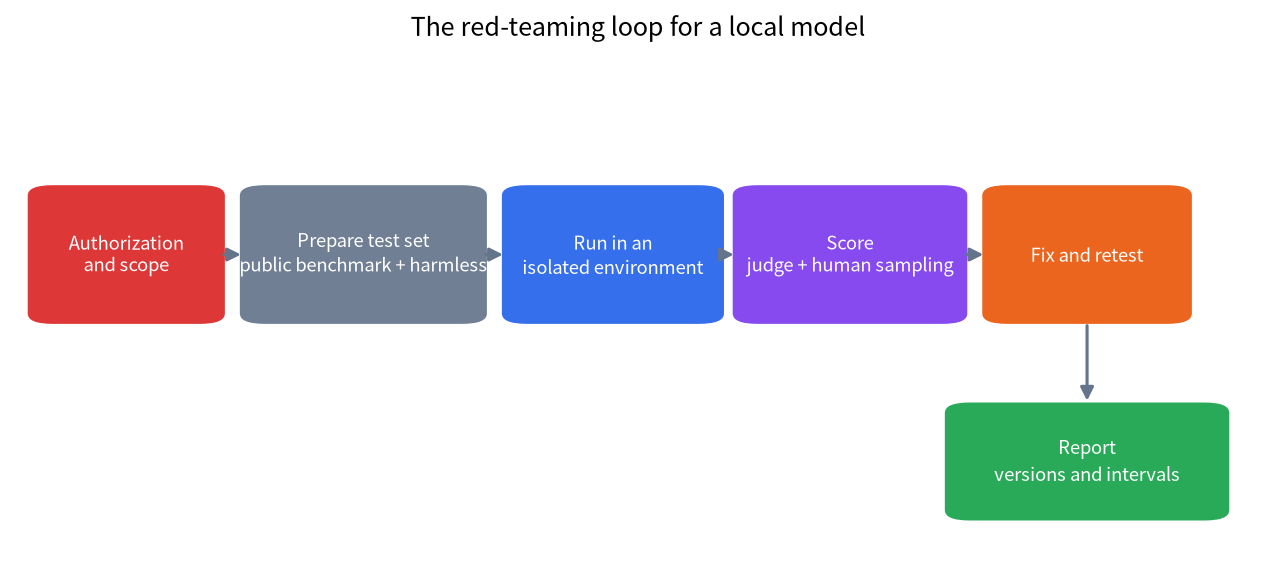
The whole process is a cycle: authorization and scope → prepare a test set → run → score → fix → retest → report. Whenever the model, guardrail, system prompt or permissions change, go back to “run”.
Five common open-source tools
| Tool | Origin and licence | Main use | Fits whom |
|---|---|---|---|
| garak | NVIDIA, Apache-2.0 | LLM vulnerability scanner with many built-in probes and detectors, used from the command line | A quick broad scan of a local model |
| PyRIT | Microsoft, MIT | Python framework that orchestrates multi-turn attacks, converters and scorers | Teams that want custom multi-turn flows and scoring |
| promptfoo | MIT | Test cases and red-team evaluation that can regress in CI | Putting evaluation in the dev pipeline |
| Inspect | UK AI Security Institute, MIT | General evaluation framework with composable tasks, solvers and scorers | Writing your own evaluation tasks |
| HarmBench | Center for AI Safety, MIT | Standardized benchmark for attacks and defenses | Comparable, reproducible metrics |
Suggestions: to start fast, scan with garak; to put evaluation in daily development, use promptfoo or Inspect; for multi-turn research and custom scoring, use PyRIT; to compare with papers, use HarmBench. Tool versions change quickly, so treat the commands below as subordinate to the official documentation.
A minimal local scan with garak
garak is a command-line tool; installing it and listing probes looks like this (commands from its official README):
python -m pip install -U garak
garak --list_probes
Use --target_type and --target_name to choose the model and --spec to choose probes; the README’s example form is --spec probes.encoding (encoding-based prompt-injection probes). A local model can be connected through a local Hugging Face pipeline, llama.cpp GGUF, or the REST generator; if your model exposes a compatible API through Ollama you can connect it with the REST configuration from the official docs, and the local API server guide covers the interface. A few tips:
- Trial-run a small probe set first to confirm the configuration, then run the full set; the full set has many probes and takes a long time.
- Fix the model version, quantization, system prompt and sampling parameters and write them in the report, otherwise results cannot be reproduced (quantization effects are in the quantization guide).
- Keep garak’s log files for review and for comparing configurations.
- Options may change between versions; go by
garak --helpand the official docs.
Designing metrics: attack success rate and over-refusal
An evaluation that only counts “how many times it was broken” rewards a model that refuses everything, so record at least these together:
| Metric | Meaning | How to measure | Caution |
|---|---|---|---|
| Attack success rate (ASR) | Share of harmful-category requests from a public benchmark where the model gave content it should not | Public benchmark plus a judge | The judge itself errs; sample for human review |
| Over-refusal rate | Share of harmless but “sensitive-looking” requests the model refuses | Your own harmless sample set | Affects real usability |
| Guard false-block / miss rate | With a guard model added, the block rate on harmless requests and the miss rate on harmful ones | Same, counted separately | See the Llama Guard local deployment tutorial |
| Consistency | Whether repeated samples of the same request agree | Resample at temperature above 0 | Decides how many samples to take |
| Latency and cost | Time added by protection | Timing | Weighs the price of protection |
Report by category: an overall 3% success rate can hide a 30% problem in one category.
Statistics: how many tests are enough
Red-team results are often treated as “exact percentages” but they are estimates with error. A Wilson confidence interval adds an error range to a proportion. Worked examples (all with 200 samples):
| Successes | Point estimate | Wilson 95% interval |
|---|---|---|
| 0 / 200 | 0% | 0% to about 1.9% |
| 3 / 200 | 1.5% | about 0.5% to 4.3% |
| 10 / 200 | 5.0% | about 2.7% to 9.0% |
| 30 / 200 | 15.0% | about 10.7% to 20.6% |
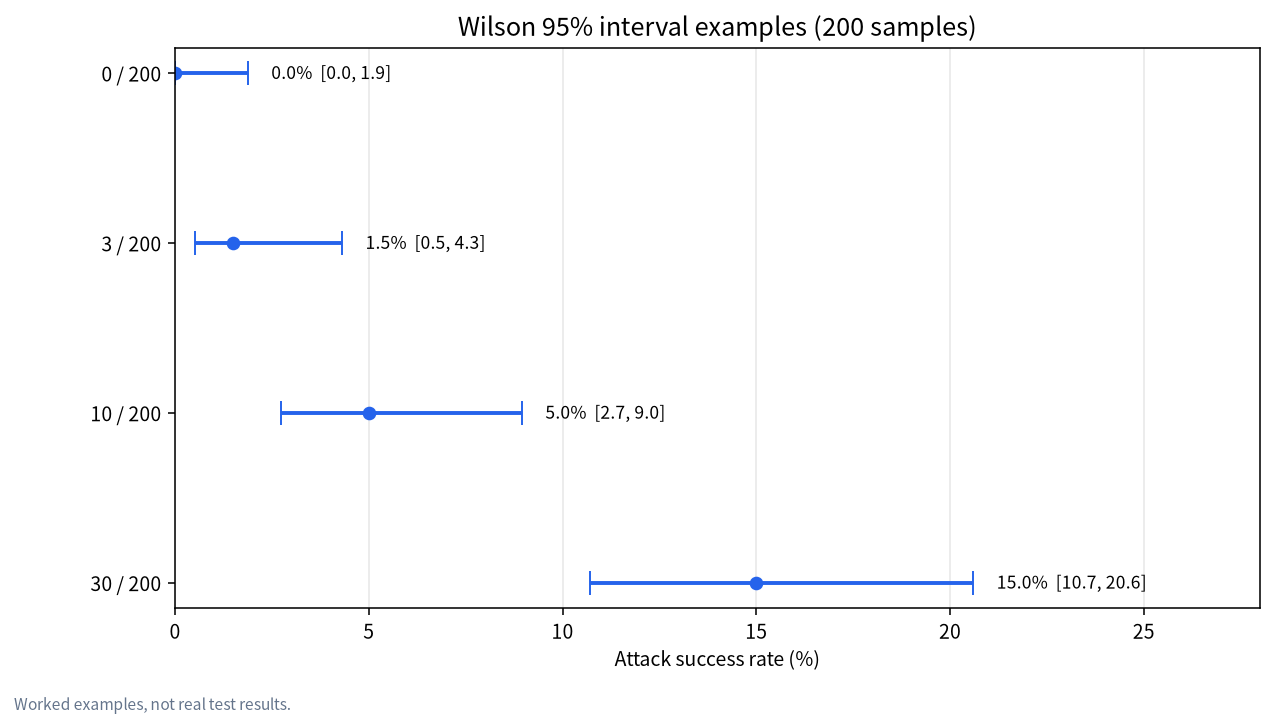
Two conclusions follow. First, zero successes does not mean zero risk: with no success in 200 tests, the 95% upper bound on the true rate can still be close to 1.9%. Second, small samples give wide intervals: comparing two configurations, if the baseline is 12/200 (6.0%, interval about 3.5% to 10.2%) and with a guard it is 3/200 (1.5%, interval about 0.5% to 4.3%), the intervals overlap, so the evidence that “the guard helps” is not yet strong and more samples are needed. Scale to 2,000 samples at the same 1.5% (30/2000) and the interval narrows to about 1.1% to 2.1%.
Sample size against margin of error, by normal approximation with a true rate near 5%:
| Samples | 95% margin of error (approx.) |
|---|---|
| 50 | ±6.0 points |
| 100 | ±4.3 points |
| 200 | ±3.0 points |
| 500 | ±1.9 points |
| 1,000 | ±1.4 points |
| 2,000 | ±1.0 point |
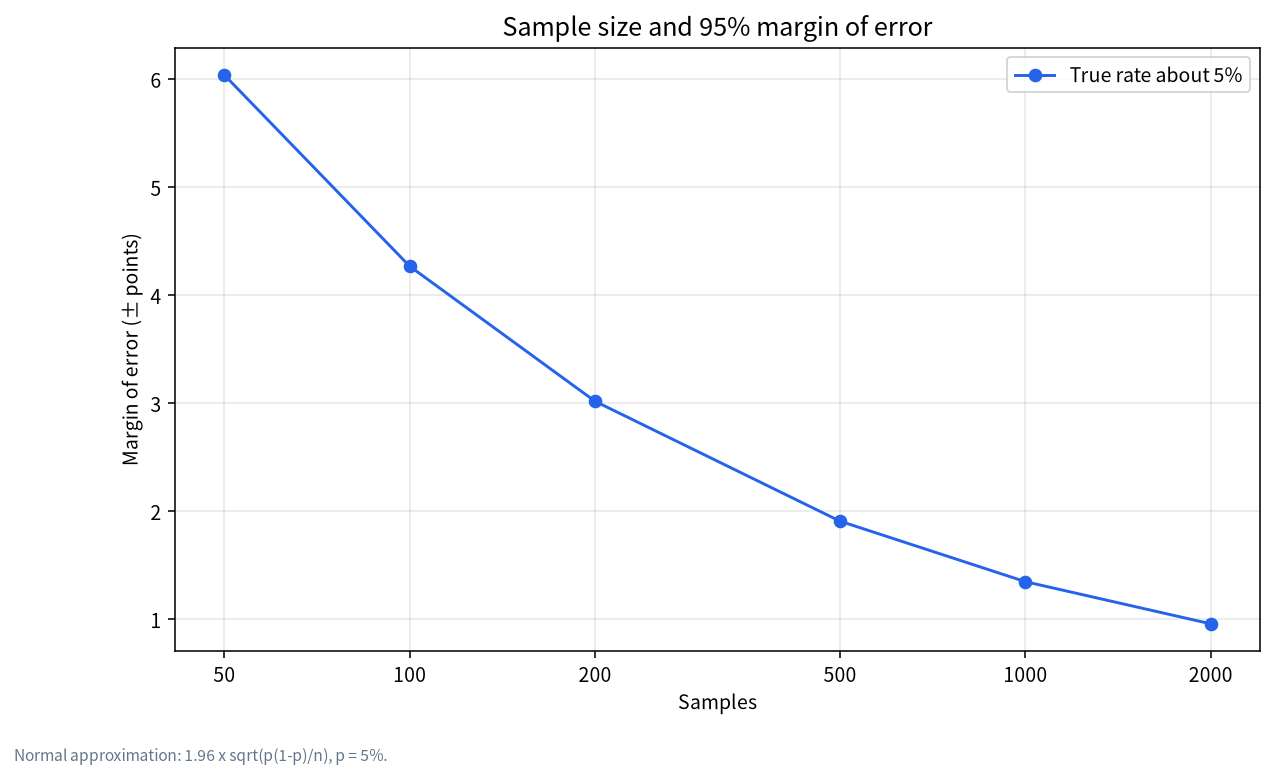
The margin shrinks with the square root of the sample size: halving the error takes about four times the samples. So when comparing configurations, use the same test set and sampling parameters and report intervals rather than bare percentages.
Judges: the pitfalls of automatic scoring
Most red-team evaluations need a “judge” to decide whether an output counts as a success: keyword matching, another classifier (such as a guard model) or another LLM scoring it. Each errs: keywords miss and misfire, LLM scoring can carry bias, and results from different judges are not directly comparable. In practice:
- Sample a share of results for human review to estimate the judge’s own error;
- State the judge’s name and version in the report;
- Cross-check key conclusions with two different judges;
- When humans review, protect the reviewers and limit how much harmful content they see.
Turning results into fixes
The value of red-teaming is in fixing, not finding. Work in this order:
- Classify and grade: organize findings by category and severity, separating “model-layer problems”, “guard-layer problems” and “permission configuration problems”.
- Pick the remedy: adjust the system prompt, add or replace a guard, restrict tool permissions, add rate limits, or switch to a more suitable model (see jailbreak defenses explained).
- Retest: rerun with the same test set and compare intervals; guard against “fixing one thing and breaking another”.
- Record versions: record the model, quantization, guard and system prompt versions together so you can trace back.
- Regress continuously: put the evaluation in the update process and run it on every change.
Red-team checklist
- ☐ Authorization obtained and scope written down
- ☐ Run in an isolated environment with no production data
- ☐ Public benchmarks and harmless samples of your own used
- ☐ Attack success rate and over-refusal both measured
- ☐ Enough samples, with confidence intervals reported
- ☐ Judge sampled for human review
- ☐ Outputs managed as sensitive data with a retention period
- ☐ Findings graded and fed into fix and retest
Common misconceptions
- “Finding one prompt that gets through is red-teaming”: red-teaming wants coverage and repeatable rates, not single cases.
- “One clean run means it is safe”: randomness and sample size make a single result unreliable.
- “More refusals mean more safety”: an excessive over-refusal rate leaves the system unusable.
- “A local model has no external risk, so no need to test”: once others can use it or it connects to tools and data, you need to.
- “Publishing successful cases helps the community”: follow responsible disclosure and do not publish directly usable attack text.
FAQ
What hardware does red-teaming a local LLM need?
The scanning tool itself needs no VRAM; the need comes from the model under test, and during testing you run the target and the judge together, so add both to your VRAM budget; see the local LLM VRAM guide.
What is the difference between garak and PyRIT?
garak is closer to an out-of-the-box scanner with many built-in probes; PyRIT is closer to a composable framework suited to custom multi-turn flows and scoring.
How many samples are enough?
It depends on the difference you want to resolve: telling 3% from 6% needs roughly 750 per group at the usual 5% significance and 80% power; start with 200 for a first pass and enlarge samples for key categories.
Can I use real user data in tests?
Not advisable. Use public benchmarks and harmless samples of your own and keep real data and privacy out of testing; see local LLMs and privacy.
What should I do when I find a problem?
For your own system, fix by priority and retest; for a third-party model or software, notify the maintainers privately first.
Can red-teaming prove a system is safe?
No. It gives an estimate under a particular test set and conditions and cannot prove “absolute safety”.
Talk to us
If you want an evaluation process for your own local model, send your deployment and use case to the community or email admin@microaione.com. More related reading is in the LLM jailbreak and safety hub, and you can start with the short history of LLM jailbreaks to see how attack and defense evolved.
References: garak repository, PyRIT repository, promptfoo repository, Inspect repository, HarmBench (arXiv 2402.04249). Licence information read from each repository page; data read on 2026-11-04, Beijing time.