
What Is a Local LLM? How It Differs from Cloud AI and Who It Is For
Fact-check note: File sizes, licences and official statements were checked on 30 October 2026 against the Ollama library, Hugging Face model pages and the Ollama FAQ. There are no self-run benchmarks here. The cost row in the comparison table describes structure only, not prices; for numbers see Local LLM vs Cloud API.
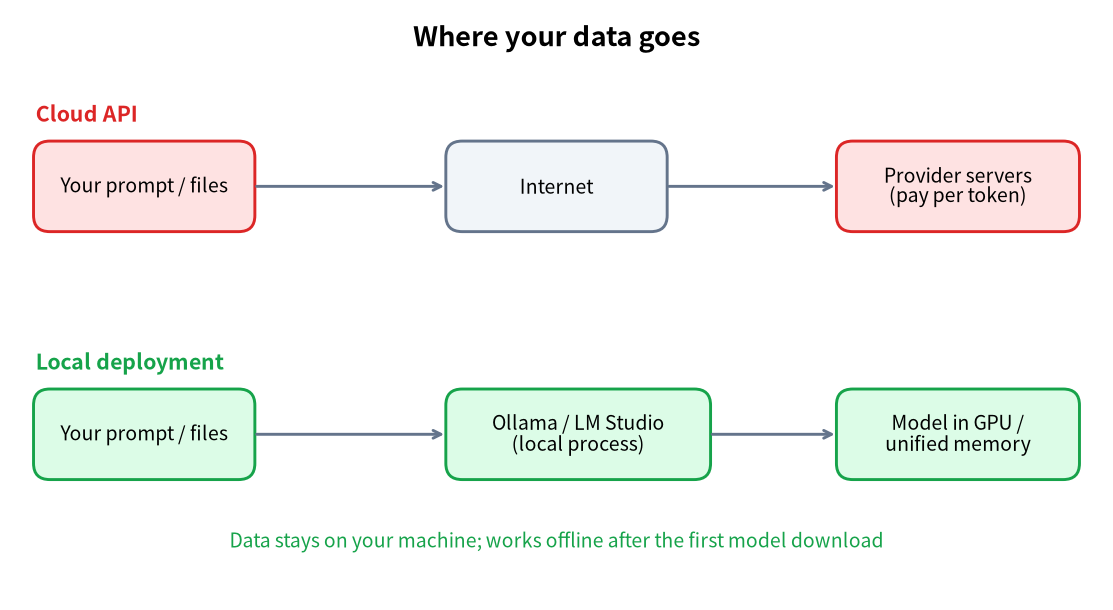
What is a local LLM? In short, it is a large language model you download and run on your own computer. Your prompt is processed by your own GPU or memory, the answer is generated there, and nothing has to be sent to a provider. Open-weight families such as Qwen, Gemma, gpt-oss and DeepSeek can all be used this way.
The idea is simple, but the vocabulary is muddy: “local LLM”, “offline LLM”, “on-device LLM” and “private deployment” are used loosely and sometimes interchangeably. This article defines the terms once, compares local models with cloud AI, spells out what they can and cannot do, says who should bother, and ends with the hardware and the first step.
What Is a Local LLM, Exactly? Local, Offline, On-Device and Self-Hosted Compared
| Term | Core meaning | Typical setting | Must it be offline? |
|---|---|---|---|
| Local LLM | Runs on hardware you control | PC, workstation, home mini-server | No |
| Offline LLM | Needs no network while running | Secure sites, travel, flaky connections | Yes, at run time |
| On-device LLM | Runs on an end-user device | Phone, tablet, laptop, “AI PC” | No |
| Self-hosted / private deployment | Runs in your own server room for many users | Company knowledge base, internal assistant | No |
They overlap. A small model on your laptop is local and on-device; unplug the network cable and you are using it offline. On this site, “local LLM” means a model running on hardware you control.
How a Local LLM Works
A model is one (large) file
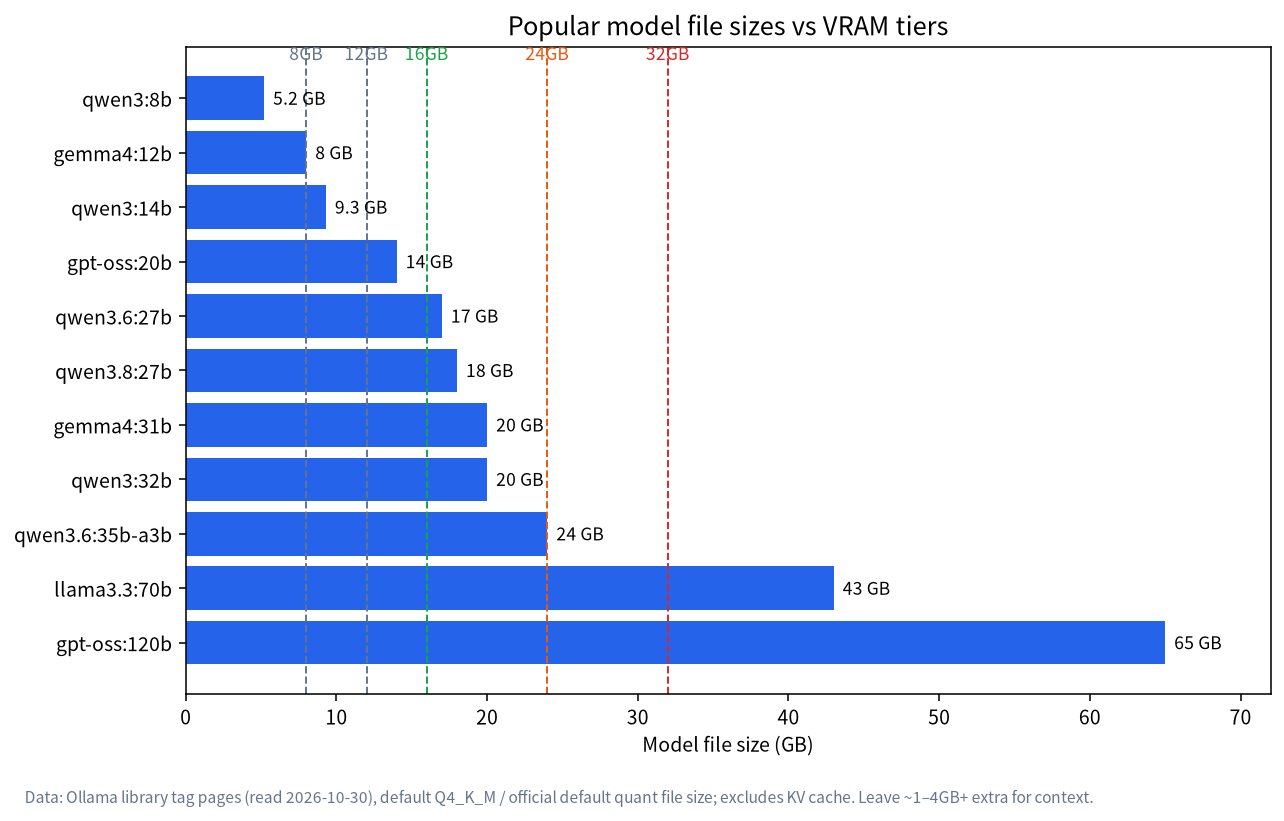
A downloaded model is a set of trained parameters. In the Ollama library (read 2026-10-30), qwen3:8b is about 5.2GB, gpt-oss:20b about 14GB and llama3.3:70b about 43GB. To make such files fit consumer hardware they are usually quantized, meaning stored at lower numeric precision; see LLM Quantization Explained.
An inference engine reads the file and produces answers
The file cannot answer anything by itself. An inference engine loads it into VRAM or RAM and generates the reply token by token. Common choices are Ollama, LM Studio and llama.cpp. They offer a command line, a GUI or a local API (Ollama listens on http://localhost:11434), which other apps can call just as they would a cloud API.
Speed depends on “does it fit” and “how fast can memory move”
A useful mental model: memory capacity decides whether the model fits, and memory bandwidth largely decides how fast it generates. That’s why two 24GB devices can feel very different. For the details read Best GPU for Local LLMs.
A Hypothetical Example: Summarising a Confidential Contract
This is an illustration, not a customer story. Imagine a company lawyer holding a contract that must not leave the building, who wants a quick clause summary.
- They install Ollama on an office PC with a 24GB GPU and download a 27B-class model such as
qwen3.6:27b(about 17GB on disk). - They paste the contract into a local interface and ask for a clause summary and risk flags. The text is processed in that machine’s memory only.
- They treat the output as a first draft and check it against the original, because any model, local or cloud, can be wrong.
Two lessons follow. The value of a local model here is that the data stays put, not that the model is smarter than a cloud one. And whichever model you use, important conclusions still need human review.
Five Common Myths About Local LLMs
| Myth | Reality |
|---|---|
| A local LLM is totally free | Models are usually free, but hardware, power and your time are costs; at very low usage a subscription can be cheaper |
| Local is always slower than cloud | A small model on a good GPU can be very fast; slowness comes from models that don’t fit in VRAM |
| Local is automatically safer | Only “data stays on the device” is stronger; you still have to secure the machine, permissions and model sources |
| A local model is the same model as the website | Local versions are often smaller or quantized, so scale and ability differ |
| You need to know programming | With a GUI such as LM Studio you can download and chat; see LM Studio Tutorial |
Local LLM vs Cloud AI: The Real Differences
| Dimension | Local LLM | Cloud AI (web app / API) |
|---|---|---|
| Where data goes | Stays on your machine (for local models) | Sent to the provider’s servers |
| Capability ceiling | Limited by the open models you can fit; usually below the strongest closed models | Access to the provider’s newest, strongest models |
| Cost structure | One-off hardware plus electricity; amortises with heavy use | Subscription or per-token billing; grows with usage |
| Network | Needed to download; can run offline afterwards | Always required |
| Control | You choose model version, parameters, prompts | Provider may upgrade, throttle or retire models |
| Maintenance | You handle drivers, updates, troubleshooting | Essentially none |
| Speed | Hardware-bound; small models fast, big ones can crawl | Usually fast and consistent |
| Customisation | Plug in your own documents, pin versions, fine-tune | Whatever the provider exposes |
One caveat matters for privacy. Ollama’s FAQ states that when you run models locally, Ollama does not see your prompts or data, whereas with its cloud-hosted models the prompts and responses are processed on its servers. So “I use Ollama” does not automatically mean “my data stayed home”; it depends on whether you chose a local or a cloud model.
What a Local LLM Is Good At, and Where It Falls Short
Good fits
- Sensitive material: contracts, medical notes, proprietary code, finance data you’d rather keep on-device.
- A private knowledge base: point a model at your own documents and search them locally.
- High-volume, repetitive work: translation, summarisation, classification, data cleaning. With steady heavy use, a fixed cost is easier to amortise.
- Offline or poor-connectivity work: travel, factories, secure networks.
- Learning and experiments: seeing how models behave and trying different models and settings.
Set your expectations
- The strongest closed models are usually stronger. On the hardest reasoning, long-document and multimodal tasks, open models you can fit locally generally lag, though the gap varies by task. Test with your own real work.
- You need some hardware and some patience. Drivers, VRAM and context settings can bite; see Ollama Troubleshooting.
- “It runs” is not “it’s pleasant”. If VRAM is short, part of the model spills into system RAM and speed drops sharply.
What “Open” Means for Local Models
Most local models are open-weight: the parameters are public and downloadable, but training data and code may not be. Licences differ, so read them before commercial use. These examples were checked on Hugging Face model pages on 2026-10-30:
| Model family | Licence on Hugging Face | Note |
|---|---|---|
| Qwen3.6 / Qwen3.8 | Apache-2.0 | Permissive; attribution notices still apply |
| Gemma 4 | Apache-2.0 | Check the official page for current terms |
| gpt-oss | Apache-2.0 | Open-weight models from OpenAI |
| DeepSeek-R1 / V4 | MIT | Distilled variants inherit the base model’s licence |
| Llama 3.3 | Llama 3.3 community licence (custom) | Has usage terms and restrictions; read before commercial use |
A Mini Glossary You Will Meet in Every Guide
Local-LLM writing is full of shorthand. These are the terms you will keep running into, with a plain meaning for each:
| Term | Plain meaning |
|---|---|
| Parameters (7B, 32B) | The number of learned weights, in billions. More usually means more capable and more memory |
| Quantization (Q4_K_M, Q8_0) | Storing weights at lower precision to shrink the file and VRAM use |
| Context window | How many tokens the model can keep “in mind” at once; longer needs more memory |
| Token | A chunk of text, roughly a short word or word fragment |
| VRAM | Memory on the graphics card; the key limit for GPU inference |
| Unified memory | Apple Silicon’s shared CPU/GPU memory pool |
| MoE (mixture of experts) | A model that activates only part of its parameters per token; the whole file must still fit in memory |
| GGUF | A common single-file format for quantized models used by llama.cpp and Ollama |
If a guide uses a term you can’t place, check this list first; we explain the memory arithmetic in How Much VRAM Does an LLM Need?.
Who Should Run a Local LLM
| Who | Why it fits | Suggested starting point |
|---|---|---|
| Privacy-minded individuals | Data stays on the device | 8–16GB VRAM, begin with 7B–14B |
| Developers | Local API, pinned versions, easy debugging | 24GB VRAM or a Mac with 32GB+ |
| Small teams | Internal knowledge base, no sensitive data leaving | Try existing machines first, then evaluate a dedicated box |
| Tinkerers | The fun is the point | The gaming GPU you already own |
| Occasional askers | Probably not worth it | Just use a cloud assistant |
If you’re in the last group, no guilt: local and cloud aren’t exclusive. Many people keep routine and sensitive tasks local and send the rare hard problem to the cloud, as discussed in Local LLM vs Cloud API.
Hardware and a First Step
A starting-point guide, combining the Ollama file sizes read on 2026-10-30 with third-party rules of thumb:
| Your device | Roughly what runs | Example |
|---|---|---|
| PC with no discrete GPU | 1B–4B small models | Learn the workflow |
| 8GB VRAM | 7B–8B | qwen3:8b (5.2GB) |
| 16GB VRAM / 16GB Mac | about 14B–20B | gpt-oss:20b (14GB) |
| 24GB VRAM | 27B–32B | qwen3.6:27b (17GB) |
| 48GB+ | 70B | llama3.3:70b (43GB) |
The shortest path is install Ollama, run one command, start chatting. The steps are in the Ollama Install Guide and the sizing logic in How to Run an LLM Locally. To see which models are worth the disk space, read Best Local LLMs.
FAQ
What is a local LLM in one sentence?
A large language model that you download and run on your own device, so prompts and answers are handled on that machine rather than by a provider.
Does a local LLM need internet?
Only to download the software and models. After that it runs without a network. If you turn on web search or use cloud-hosted models, those features do need the network and the content is handled by the corresponding service.
Is a local LLM better than ChatGPT-style cloud AI?
There’s no single winner. Cloud AI is usually stronger on the hardest tasks and needs no upkeep; local models win on privacy, control, offline use and cost at heavy volume. Many people mix both.
Is a local LLM safe, and is my data really private?
If you run a local model and haven’t enabled web or cloud features, prompts are processed on your machine, which the Ollama FAQ confirms. The model file itself comes from the internet though, so download from official or trusted sources.
Can an ordinary laptop run a local LLM?
Small models (1B–4B), yes, with limited speed and quality. For a better experience you want at least 8GB of VRAM or a Mac with 16GB+ unified memory.
Are local LLMs free?
Most open-weight models are free to download, with licences that vary, so check before commercial use. What you pay is hardware, electricity and your time.
Next Steps and Community
If you want to turn “what is a local LLM” into a machine that actually works for you, start by telling us your needs and budget in our community (join the community). Our team in Shenzhen sources, assembles and tests local-LLM machines and can suggest a tiered configuration for your budget. No pressure to buy.
Sources
- Ollama FAQ (data and privacy statements)
- Ollama model library (file sizes, read 2026-10-30)
- Hugging Face: GGUF documentation