
Run an LLM on 8GB VRAM: What Can an 8GB GPU Run? Model Picks
Fact-check note: File sizes come from the Ollama library (read 2026-10-30). Usable VRAM and which models fit follow CanRun’s public estimates, labelled as such. We did not run speed or quality tests on 8GB cards, so there are no self-measured numbers here.
Lots of people have a graphics card with just 8GB of memory and want to know what it can really do. Here is the short version for running an LLM on 8GB VRAM: 8GB comfortably runs 7B–8B models whose files are under about 5–6GB; 12B-class is a stretch; 14B and up spill into system RAM and slow down sharply; 27B and above is out of reach. Below you’ll find picks by use case, settings, and a view on when to upgrade.
LLM on 8GB VRAM: How Much Do You Actually Have?
Eight gigabytes is the nominal figure; the system and display output take a share. CanRun’s guide estimates that an 8GB RTX 4060 offers about 7.4GB usable. Subtract context cache and runtime overhead and the space left for the model file is roughly 5.5–6.5GB.
| Item | Size | Note |
|---|---|---|
| Nominal VRAM | 8GB | Card specification |
| Usable VRAM | about 7.4GB | CanRun’s estimate for the RTX 4060 |
| Context cache + overhead | about 1–2GB (8k context) | Varies by model; see How Much VRAM Does an LLM Need? |
| Room for the model file | about 5.5–6.5GB | Our rough arithmetic |
For example CanRun estimates Llama 3.1 8B (Q4_K_M) at 6.3GB total with 8k context, leaving about 1GB of the 7.4GB usable. Gemma 4 12B needs 7.8GB, which exceeds 7.4GB, so roughly 90% sits on the GPU as a partial offload. Gemma 3 12B at 8.4GB and Qwen3 14B at 10.5GB push more weight into system RAM and run noticeably slower.
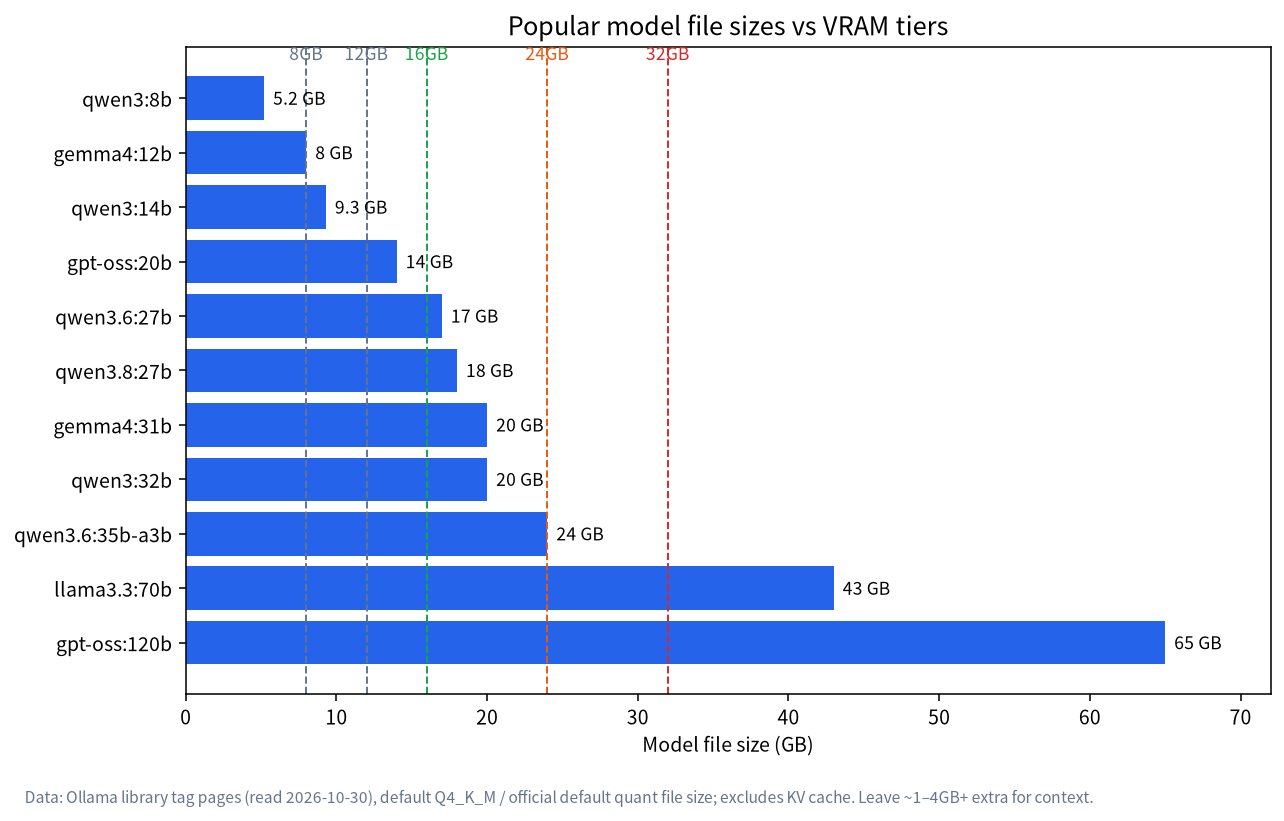
Recommended Models for an 8GB GPU, by Use Case
File sizes below come from Ollama’s pages. “Fit” is our judgement comparing file size with the 5.5–6.5GB budget, not a measurement.
| Use | Suggested tag | File size | Fit | Note |
|---|---|---|---|---|
| Everyday chat | qwen3:8b |
5.2GB | Good | 8B general model |
| Everyday chat | llama3.1:8b |
4.9GB | Good | Context up to 128K (VRAM-limited) |
| Everyday chat | gemma4:e4b |
6.6GB | Tight | Near the ceiling; keep context small |
| Reasoning (maths, logic) | deepseek-r1:8b |
5.2GB | Good | Prints its thinking first, using more context; see Run DeepSeek Locally |
| Coding | qwen2.5-coder:7b (the latest tag) |
4.7GB | Good | The model page was last updated some time ago; compare with newer general models |
| Image understanding | qwen3-vl:8b (the latest tag) |
6.2GB | Tight | Images also use context |
| Image understanding (light) | qwen3-vl:4b |
3.3GB | Roomy | Suits 8GB cards |
| Light and fast | llama3.2:3b (the latest tag) |
2.0GB | Roomy | Quick, limited ability |
| Light and fast | phi4-mini |
2.5GB | Roomy | 128K context ceiling |
| Light and fast | qwen3:4b |
2.5GB | Roomy | A common small-model pick |
| Document retrieval (embeddings) | nomic-embed-text |
274MB | Tiny | For RAG, not a chat model |
Our advice: prefer an 8B-class model around 5GB, which keeps it 100% on the GPU and leaves room for context. For more comparisons see Best Local LLMs.
Stretching: Are 12B and Larger Worth It?
| Model | File | CanRun’s 8k estimate | Situation at 7.4GB usable |
|---|---|---|---|
| Gemma 4 12B (default Q4) | 8.0GB | 7.8GB | About 90% on the GPU, the rest in RAM; CanRun rates it “runs well” |
| Gemma 4 12B (IQ4_XS) | n/a | 7.1GB | Fits fully with almost no margin |
| Gemma 3 12B | 8.2GB | 8.4GB | Partly in RAM; CanRun rates it “runs slowly” |
| Qwen3 14B | 9.3GB | 10.5GB | Partly in RAM; slow |
Stretching costs speed, context room and stability. If you only want to try a bigger model now and then, go ahead; for sustained use, we suggest upgrading the card, covered below.
Settings for 8GB
- Control context. Ollama defaults to 4k for under 24GiB of VRAM, plenty for everyday chat. Raise it to 8k–16k only for long-document tasks, checking
ollama pseach time. - Compress the KV cache. Set
OLLAMA_FLASH_ATTENTION=1andOLLAMA_KV_CACHE_TYPE=q8_0; the official docs say q8_0 uses about half the memory of f16 with very small precision loss. - Limit concurrency. For personal use set
OLLAMA_NUM_PARALLEL=1so it doesn’t reserve cache for several simultaneous requests. - Close VRAM hogs. Browser hardware acceleration, video software and games all take VRAM;
nvidia-smishows who. - Verify with
ollama ps. PROCESSOR should read100% GPU; any CPU share means choose a smaller model.
If an 8GB card isn’t being used at all, see Ollama Troubleshooting: GPU Not Used.
Hands-On: A Complete Run on an 8GB Card
Here is a conservative sequence for your first time on an 8GB card. The commands are standard Ollama usage; installation is covered in the Ollama Install Guide.
# 1. Pull and run an 8B model of about 5GB
ollama run qwen3:8b

# 2. Inside the chat, set context to 8k (the 4k default is fine for chat; raise it for long documents)
/set parameter num_ctx 8192

# 3. In another terminal, check for 100% GPU
ollama ps
If step three shows 100% GPU, both the model and its cache are on the card and you can carry on. If a CPU share appears, drop context back to 4096 first, and if that doesn’t help switch to a smaller model such as qwen3:4b. The principle: confirm a small, stable setup works, then grow it step by step, rather than loading the biggest model and then hunting for why it’s slow.
What Quantization Means on 8GB
The same 8B model varies enormously in size by quantization. Using the rule-of-thumb ratios from our VRAM article (Q4_K_M about 0.6GB per billion parameters, Q8_0 about 1.1GB, FP16 about 2GB):
| 8B model version | Estimated file size | Situation on an 8GB card |
|---|---|---|
| Q4_K_M | about 4.8GB (about 5.2GB actual on Ollama) | Fits; the default choice |
| Q8_0 | about 8.8GB | Doesn’t fit; heavy spill into RAM |
| FP16 | about 16GB | Impossible |
On 8GB, Q4_K_M is essentially the only sensible choice. Lower quantizations such as Q3 save a little space but cost more quality and usually aren’t worth it. For how quantization works and the trade-offs, see LLM Quantization Explained.
Five Typical 8GB Scenarios
| Scenario | Suggestion | Watch out for |
|---|---|---|
| Everyday Q&A, writing polish | qwen3:8b with 4k–8k context |
Don’t open very long context |
| Reading long documents | Have the model summarize in sections rather than stuffing the whole text in | 8GB can’t carry a very long KV cache |
| Coding help | A 7B–8B model with short context | Complex projects will be limited; Ollama recommends at least 64000 tokens for coding tools, which 8GB can’t do, so set expectations |
| Maths and logic | deepseek-r1:8b |
Thinking uses context, so raise num_ctx |
| Image understanding | qwen3-vl:4b |
The 8b at 6.2GB is tight |
Common Misconceptions
| Misconception | Reality |
|---|---|
| “8GB of VRAM holds an 8GB model file” | About 7.4GB is usable and cache needs room too, so keep the file under 5.5–6.5GB |
| “More system RAM makes up for VRAM” | RAM lets the model run, but whatever lands there slows noticeably |
| “Fewer parameters always means more usable” | 3B–4B models suit light tasks; complex reasoning and long text are limited |
| “Force a big model when VRAM is short” | Speed and stability suffer; a model one size smaller is better |
| “All 8GB cards are equally fast” | Same capacity, different bandwidth (224–448GB/s), so speeds differ |
Beyond the 8GB GPU: RAM, Storage and Laptops
VRAM is only half the story. For an 8GB machine to run models smoothly, watch a few other things:
- System RAM: 16GB or more is advisable. When part of a model lands in RAM, or you keep a browser and developer tools open alongside, memory runs short fast.
- Storage: 5GB models are easy to collect in bulk, so keep at least 50GB free and use an SSD for faster loading.
- Laptops: laptop 8GB GPUs usually have lower bandwidth, and sustained load triggers throttling and fan noise; keep it plugged in with clear airflow.
- Drivers: NVIDIA cards need a reasonably recent driver, and Ollama’s docs require driver 550 or newer; an old one leaves the GPU unused. See Ollama Troubleshooting.
Common 8GB Cards Compared
CanRun’s card table lists common 8GB cards and their bandwidth (at equal capacity, higher bandwidth generates faster):
| Card | VRAM | Bandwidth | Note |
|---|---|---|---|
| GeForce RTX 3070 | 8GB | 448GB/s | Older card with high bandwidth |
| GeForce RTX 5060 | 8GB | 448GB/s | |
| GeForce RTX 5060 Ti 8GB | 8GB | 448GB/s | Shares its name with the 16GB version; check the memory when buying |
| GeForce RTX 4060 Ti 8GB | 8GB | 288GB/s | |
| GeForce RTX 4060 | 8GB | 272GB/s | The most common |
| GeForce RTX 4060 Laptop / 4070 Laptop | 8GB | 256GB/s | Laptop versions |
| GeForce RTX 3050 8GB | 8GB | 224GB/s | Lowest bandwidth |
CanRun’s conclusion is that all of these 8GB cards can use the same roughly 7.4GB, so the same models fit on each; what changes is speed.
When to Upgrade, and to What
| If you want | Suggestion | Reference |
|---|---|---|
| Better answer quality on a modest budget | 12GB (such as the RTX 3060 12GB, about 11.4GB usable) | Holds 12B–14B, though 14B leaves under 1GB |
| To use 20B-class models comfortably | 16GB | Holds gpt-oss:20b (14GB) |
| To run 27B–32B | 24GB | See What Can a 24GB GPU Run? |
Specific cards and price ranges are in Best GPU for Local LLMs. Before upgrading, check with the list above whether you really need a bigger model or just better settings.
A Quick Decision Guide
If you are still unsure what to download first, this short flow usually settles it:
- Do you mainly chat, rewrite or translate? Start with
qwen3:8band a 4k context. - Do you need step-by-step reasoning for maths or logic puzzles? Try
deepseek-r1:8band raise the context to 8k. - Do you need to read screenshots or photos? Use
qwen3-vl:4b, and move to the 8b version only ifollama psstill shows 100% GPU. - Is speed your priority on an older laptop? A 3B–4B model such as
llama3.2:3borqwen3:4bwill feel snappier. - Did none of these satisfy you? That is the signal to look at a 12GB or 16GB card rather than fight the limit.
What 8GB Can’t Do
- 27B–32B models: files are 17–20GB, most of it would sit in system RAM.
- Long context (32K and up): the cache alone would exceed VRAM.
- gpt-oss-120b: CanRun rates it “won’t run” on an 8GB card.
- Loading several models at once: exceeds the usable space.
FAQ
What’s the best model for 8GB of VRAM?
On file size and versatility, qwen3:8b (5.2GB) or llama3.1:8b (4.9GB) is a safe start; for reasoning, try deepseek-r1:8b.
Can an RTX 4060 8GB run a 14B model?
It can load, but CanRun estimates Qwen3 14B needs 10.5GB, over the 7.4GB usable, so part of the weights sit in RAM and it runs slowly.
Is a laptop 8GB GPU the same?
The capacity is the same but laptop versions usually have lower bandwidth (the 4060 Laptop is 256GB/s), so they’re a little slower.
Can 8GB VRAM run image-generation models?
This article covers text LLMs and image-understanding models only; image generators have different memory needs that we haven’t checked, so we draw no conclusion.
Why is an 8B model still a bit slow on my 8GB card?
Check whether ollama ps shows 100% GPU, then whether context is too large and whether other software is holding VRAM.
Should I jump straight to a 24GB card?
It depends on budget and needs. For long-term use of 27B–32B models, 24GB is the sweet spot; for everyday chat, 8B-class models are enough.
Next Steps and Community
Not sure which model suits your 8GB card, or which tier is the best-value upgrade? Post your card and use case in the community (join the community). Our Shenzhen team sources, builds and tests local-LLM machines and can help you weigh “upgrade the card” against “replace the whole machine”. Talk first; no obligation to buy.