
Running an LLM on 24GB VRAM: What Can an RTX 3090 / 4090 Run?
Fact-check note: Ollama file sizes were read on 2026-10-30. The memory-needs and “does it fit” data come from CanRun’s public estimates (Q4_K_M, f16 KV cache, labelled per item). We did not benchmark speed or memory on a 24GB card ourselves. Third-party estimates can differ from a real
ollama ps; trust the measurement.
If you own an RTX 3090 or RTX 4090, or you’re thinking of buying a 24GB card, this article answers the key question for running an LLM on 24GB VRAM: which models actually fit? The short answer: 24GB is the sweet spot for individuals. 27B–32B dense models and 30B-class MoE models all fit entirely on the card; 70B does not; and long context is where you have to budget carefully.
LLM on 24GB VRAM: How Much Is Really Usable?
CanRun estimates that an RTX 3090 and RTX 4090 can each use about 23.4GB of the nominal 24GB. Add weights, KV cache and buffer, compare against the usable figure, and you have the margin. The table below is CanRun’s estimate at 8k context, Q4_K_M and an f16 KV cache:
| Model | Weights | KV cache (8k) | Total | Margin vs 23.4GB | Verdict |
|---|---|---|---|---|---|
| Qwen3.6 27B | 16.1GB | 0.5GB | 17.2GB | about 6.2GB | Roomy |
| Qwen3.8 27B | 16.5GB | 0.5GB | 17.6GB | about 5.8GB | Roomy |
| Gemma 4 26B-A4B (MoE) | 16.9GB | 0.2GB | 17.7GB | about 5.7GB | Roomy |
| Gemma 4 31B | 18.3GB | 0.7GB | 19.5GB | about 3.9GB | Comfortable |
| Qwen3 30B-A3B (2507, MoE) | 18.4GB | 0.8GB | 19.8GB | about 3.6GB | Comfortable |
| Qwen3.6 35B-A3B (MoE) | 21.1GB | 0.2GB | 21.8GB | about 1.6GB | Tight |
| Qwen3 32B | 19.3GB | 2.1GB | 22.0GB | about 1.4GB | Very tight |
| Llama 3.3 70B | 41.9GB | 2.7GB | 45.2GB | about −21.8GB | Doesn’t fit |
Note that the “margin” is our own subtraction of CanRun’s total from 23.4GB. File sizes on Ollama’s pages differ somewhat from CanRun’s weight estimates (for example the q4_K_M variant of qwen3.6:35b-a3b is listed at 24GB on Ollama, 23GB for the default tag, while CanRun puts the weights at 21.1GB, noting that llama.cpp keeps the input embedding table in system memory), so check ollama ps after loading for the final answer.
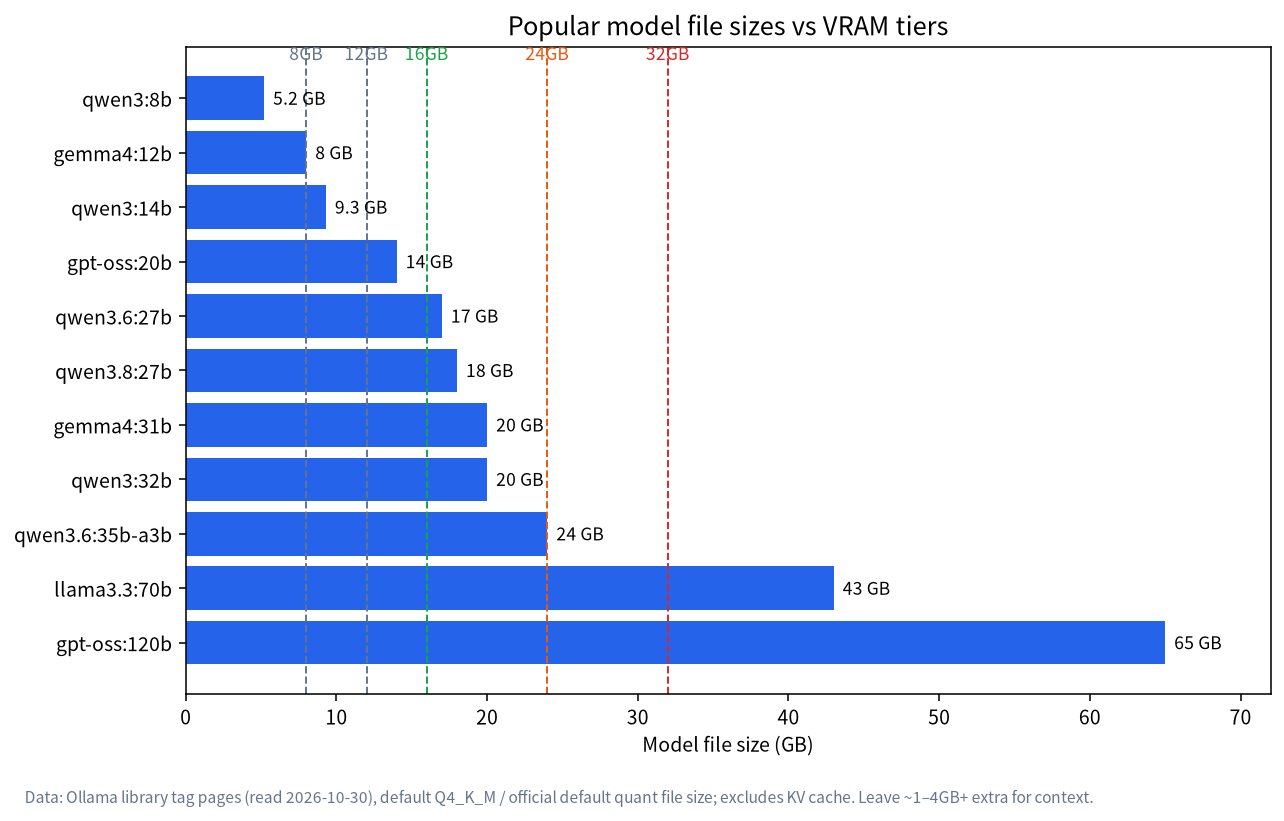
Recommended Models for a 24GB Card
| Use | Suggested tag | Ollama file size | Note |
|---|---|---|---|
| General workhorse (dense) | qwen3.6:27b |
18GB (default tag; the q4_K_M variant is 17GB) |
Widest margin; allows longer context |
| General workhorse (dense) | qwen3.8:27b-q4_K_M |
18GB | Same class, newer |
| General workhorse (dense) | gemma4:31b |
19GB (default tag; the it-q4_K_M variant is 20GB) |
A 31B dense model |
| Speed first (MoE) | qwen3:30b-a3b |
19GB | Activates about 3B parameters per token, so it generates quickly |
| Speed first (MoE) | gemma4:26b-a4b |
16GB (default tag; the it-q4_K_M variant is 18GB) |
About 4B active parameters |
| Coding | qwen3-coder:30b |
19GB | A 30B-class MoE coding model; the page lists 256K context |
| Reasoning | deepseek-r1:32b |
20GB | Thinking uses context; see Run DeepSeek Locally |
| Dense 32B | qwen3:32b |
20GB | CanRun estimates 22.0GB at 8k, so only comfortable with short context |
For finer comparisons see Best Local LLMs, and for the Qwen family’s sizes see Run Qwen Locally.
Long Context: The Real Bottleneck at 24GB
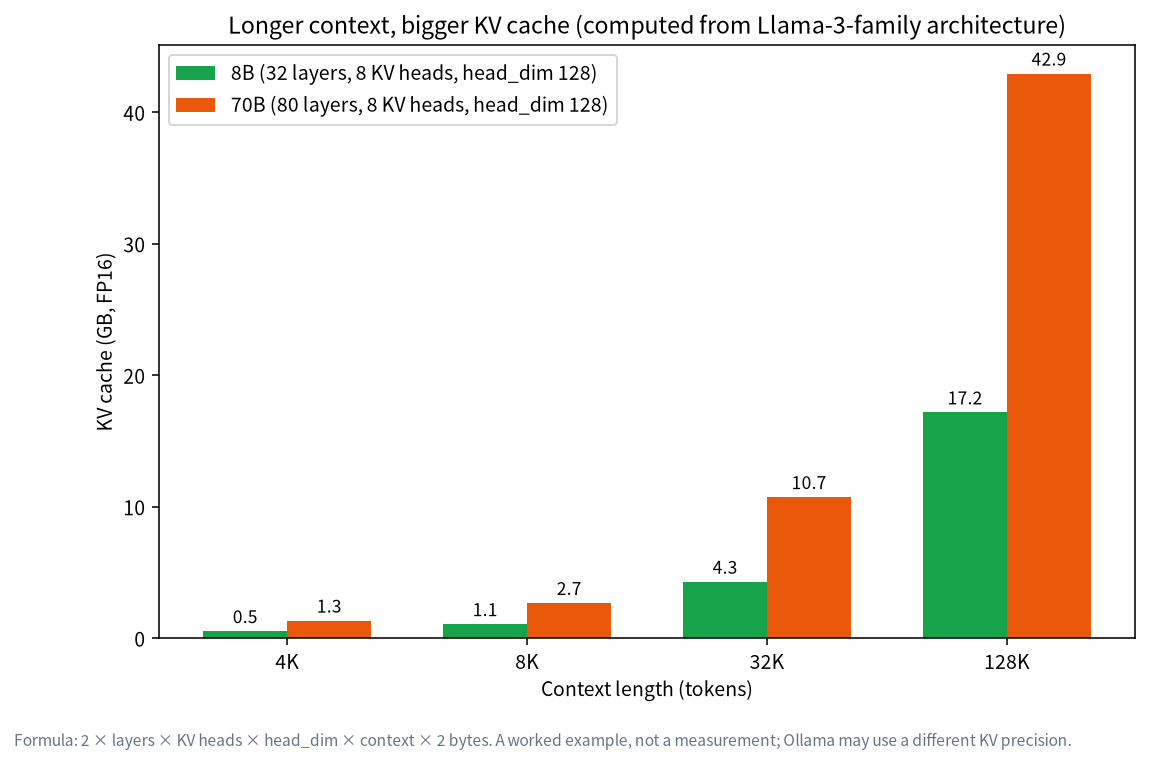
CanRun estimates that at 32k context with an f16 KV cache, Gemma 4 31B needs 21.8GB, Qwen3.6 27B needs 19.0GB and Qwen3.6 35B-A3B needs 22.6GB (very little margin). Ollama’s documentation says the default context for 24–48GiB of VRAM is 32k, so a 24GB card may inflate its cache by default, which matches the KV-cache behaviour in How Much VRAM Does an LLM Need?.
If you need more context there are three levers: choose a smaller model (27B rather than 32B); quantize the KV cache to q8_0 (OLLAMA_FLASH_ATTENTION=1 plus OLLAMA_KV_CACHE_TYPE=q8_0, which the docs say uses about half the memory of f16); or simply shorten the context with OLLAMA_CONTEXT_LENGTH.
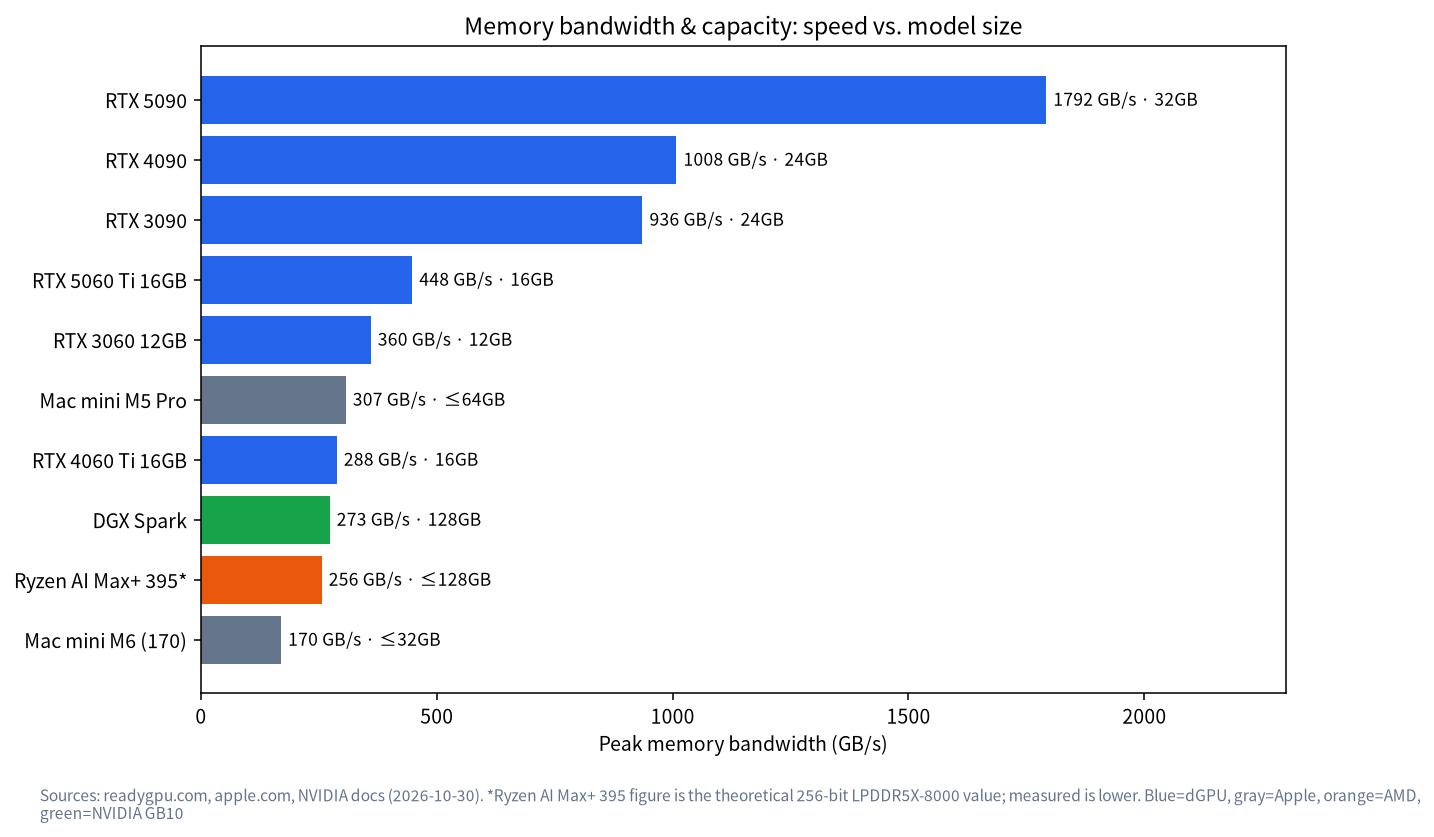
RTX 3090, RTX 4090 and Peers Compared
| Card | VRAM | Bandwidth | Power / PSU guidance | Price snapshot (2026-10-30, US asking, readygpu.com) |
|---|---|---|---|---|
| RTX 3090 | 24GB | 936GB/s | 750W PSU recommended | New about $1,698, used from about $1,599 |
| RTX 3090 Ti | 24GB | 1008GB/s (CanRun) | n/a | No reliable quote yet; ask us |
| RTX 4090 | 24GB | 1008GB/s | 450W, 850W PSU recommended | New about $2,073, used from about $3,300 |
| Radeon RX 7900 XTX | 24GB | 960GB/s (CanRun) | n/a | No reliable quote yet; ask us |
Prices are dated US asking-price snapshots that swing a lot, and used asking prices are sometimes above new ones. Reference price (estimated from Oct 2026 median market prices; the actual quote prevails): used RTX 3090 about 7,550 RMB and RTX 4090 about 26,465 RMB (medians across Xianyu, Taobao and market reports; the Xianyu listing median for a used 3090 is about 9,350 RMB, while community-reported deals mostly fall between 5,500 and 8,000 RMB). CanRun’s estimates say these 24GB cards can all use the same 23.4GB and fit the same models, with speed set by bandwidth and similar factors. For example it rates Qwen3 32B and DeepSeek R1 Distill Qwen 32B as “runs well” on the RTX 3090 but “runs great” on the RTX 4090, because both models have a thinking mode that faces stricter speed thresholds which only the faster 4090 clears. That is a third-party estimate; we haven’t measured it.
The trade-off is simple: if it merely has to fit, the 3090’s capacity is enough and its price is usually friendlier; look to the 4090 when generation speed matters. The AMD RX 7900 XTX has the same capacity, but check your software’s ROCm or Vulkan support first; see Ollama Troubleshooting. For whole-system budgets see Local LLM PC Build Guide, and for every VRAM tier see Best GPU for Local LLMs.
Quantization Trade-offs on a 24GB Card
The same model comes in several quantization levels, and 24GB’s sweet spot is Q4_K_M. File sizes below come from Ollama’s tag pages (2026-10-30):
| Model | Q4_K_M | Q8_0 | BF16/FP16 | Verdict on a 24GB card |
|---|---|---|---|---|
qwen3.6:27b |
17GB | 30GB | 56GB | Only Q4_K_M fits |
qwen3.8:27b |
18GB | 30GB | 56GB | Only Q4_K_M fits |
qwen3:32b |
20GB | 35GB | 66GB | Only Q4_K_M, with a thin margin |
qwen3:30b-a3b |
19GB | 33GB | 61GB | Only Q4_K_M fits |
In other words, chasing “higher precision” on 24GB is mostly a dead end: Q8_0 needs 30GB or more, which is 32GB-card territory. To see why Q4_K_M is the default choice, read LLM Quantization and Q4_K_M.
Choosing a Model by Scenario
| Scenario | Suggestion | Why |
|---|---|---|
| Everyday Q&A, writing, translation | 27B dense, 4k–8k context | Largest margin, balanced quality and stability |
| Long documents and document Q&A | 27B with a q8_0 KV cache, 16k–32k context |
The cache is the main cost, and quantizing it frees room |
| Coding and tool use | A 30B-class MoE coding model | Generates fast, good for iteration; agent tools usually suggest at least 64000 tokens of context, which needs a smaller model or a quantized cache |
| Maths and logic reasoning | deepseek-r1:32b, short context |
Thinking consumes lots of context, so don’t set it too long |
| Fastest responses | MoE qwen3:30b-a3b |
Only about 3B parameters active per token |
A Complete First Run on 24GB
Here is the shortest path to load and verify a 27B model on a 24GB card; for installation see Install Ollama:
ollama pull qwen3.6:27b
ollama run qwen3.6:27b "Introduce yourself in three sentences"
ollama ps
nvidia-smi
The first command downloads the model (roughly 18GB, minutes to tens of minutes depending on your connection), the second checks that it answers, the third shows whether the PROCESSOR column reads 100% GPU, and the fourth shows VRAM use. If VRAM sits near the 24GB edge, drop context to 8k or enable a q8_0 KV cache. If PROCESSOR shows a CPU share, the model has spilled into RAM; pick a smaller one.
Power, Electricity and the Case
24GB-class cards are usually the biggest power draw in a system. NVIDIA lists the RTX 4090 at 450W with an 850W PSU recommended, and 750W for the 3090. Estimate running cost as power in kilowatts × hours per day × price per kWh. For example (purely hypothetical), 0.4kW average load for 4 hours a day at 0.6 yuan per kWh is about 0.96 yuan a day, roughly 29 yuan a month. Your load and tariff will differ, so substitute your own numbers. As for the case, flagship cards are large and need airflow and power connectors, so measure the space before buying.
24GB Versus Neighbouring Tiers: Worth the Upgrade?
| Tier | CanRun usable VRAM estimate | Typical models that run comfortably | What 24GB adds |
|---|---|---|---|
| 8GB | about 7.4GB | 8B class | 27B–32B models and longer context |
| 12GB | about 11.4GB | 12B–14B class | 27B class and 30B MoE fully on the card |
| 16GB | depends on the card | 14B–20B class | Generous margin for 27B class |
| 24GB | about 23.4GB | 27B–32B, 30B MoE | n/a |
| 32GB (RTX 5090) | about 31.4GB | Same, plus longer context and Q8_0 27B | Longer context, higher precision |
If you are on 8GB or 12GB and models always feel one step out of reach, moving to 24GB is usually the best-value jump. If you are already at 24GB, going higher costs a great deal, so first tune context, KV cache and model choice. The 8GB tier is covered in LLM on 8GB VRAM.
Three Reminders Before You Buy
- Settle the use case first. If you only do everyday Q&A, a 16GB-class card with a 14B model may be enough; don’t force 24GB for a “maybe later”.
- Check prices live. The prices here are US asking-price snapshots; China-channel prices, warranty and condition vary widely, so verify on the day you buy.
- Budget the whole machine. PSU, case, RAM and cooling push the total well above the card’s price; see Local LLM PC Build Guide for the full list.
What 24GB Can’t Run
- 70B-class dense models:
llama3.3:70bis a 43GB file and CanRun’s total is 45.2GB; it doesn’t fit, and CanRun rates it “won’t run” on the RTX 4090 because partial offload is too slow. - gpt-oss-120b: likewise rated unable to run on a 24GB card.
- Several large models resident at once: each takes a dozen-plus gigabytes, so 24GB holds one.
- The headroom a 32GB card offers: CanRun notes the RTX 5090 (about 31.4GB usable) can run Qwen3 32B at 32k context (28.7GB) and hold 27B models at Q8_0 (about 28.4GB), which a 24GB card cannot.
If 70B is a must, see the 48GB+ options in Best GPU for Local LLMs, or consider a large unified-memory machine.
Tips for Using a 24GB Card
- Prefer 27B over 32B. The margin is far wider and context can be longer.
- Make a MoE model the workhorse.
qwen3:30b-a3bis a 19GB file that fits in VRAM and generates faster than a dense model of the same size. - Quantize the KV cache.
q8_0is the officially suggested compromise. - Verify with
ollama ps. Confirm100% GPUafter loading. - Control concurrency.
OLLAMA_NUM_PARALLELreserves cache per parallel request; for personal use set it to 1. - Mind cooling and power. NVIDIA recommends an 850W PSU for the 4090, and flagship cards are big; measure the case.
FAQ
What’s the best model for 24GB of VRAM?
On margin and capability, a 27B-class dense model such as qwen3.6:27b (18GB for Ollama’s default tag) is a safe workhorse; choose qwen3:30b-a3b when you want speed. More comparisons are in Best Local LLMs.
Can 24GB run a 70B model?
Not comfortably. A 70B Q4 file is 43GB, which a 24GB card can’t hold, so most of it would sit in RAM and run very slowly.
3090 or 4090?
Same capacity. The 4090 has higher bandwidth and power draw, and the price gap depends on the market; if you just need it to fit, the 3090 is often enough.
Can 24GB run two models at once?
Two small ones, yes; two large ones, no. OLLAMA_MAX_LOADED_MODELS controls how many load together, but mind the total VRAM.
Is a used 3090 safe?
There is risk, so inspect it; see the used-card routine in Best GPU for Local LLMs.
Is a 24GB Mac the same as a 24GB GPU?
No. A Mac’s GPU can use about 70% of unified memory, so a 24GB Mac offers about 16.8GB; see Running LLMs on a Mac.
Next Steps and Community
A 24GB setup is an excellent personal workhorse tier, but whether to pick a 3090 or 4090 and how to build around it depends on your budget and use. Share your needs in the community (join the community). Our Shenzhen team sources, builds and tests local-LLM machines and can propose a configuration for your budget. Talk first; no obligation to buy.