Rent a GPU or Buy One for LLMs: Break-Even Hours and Years, Worked Out
“Rent a GPU or buy one for LLMs?” is the question nobody running models can avoid. A used RTX 3090 costs about 7,550 CNY and an RTX 4090 about 26,465 CNY, while renting a 3090 in the cloud costs a fraction of a dollar an hour. How many hours a day do you have to use it before buying beats renting? This article takes the hourly prices on RunPod’s public pricing page plus our 2026-10-30 Chinese GPU price snapshot, works out break-even hours and years, and explains what the calculation leaves out and when renting is the better fit.
How we checked this: Cloud prices come from RunPod’s pricing page (marked updated 2026-10-28). It is one provider only; prices on Chinese hourly compute platforms differ, and we could not obtain figures we can verify, so we draw no conclusion about them. We assume 7.0 CNY per USD, 0.8 CNY per kWh, and card power of 350 W for the 3090, 450 W for the 4090 and 575 W for the 5090. We did not test the rental experience (latency, queueing, interruptions).
Key points (updated 2026-11-04)
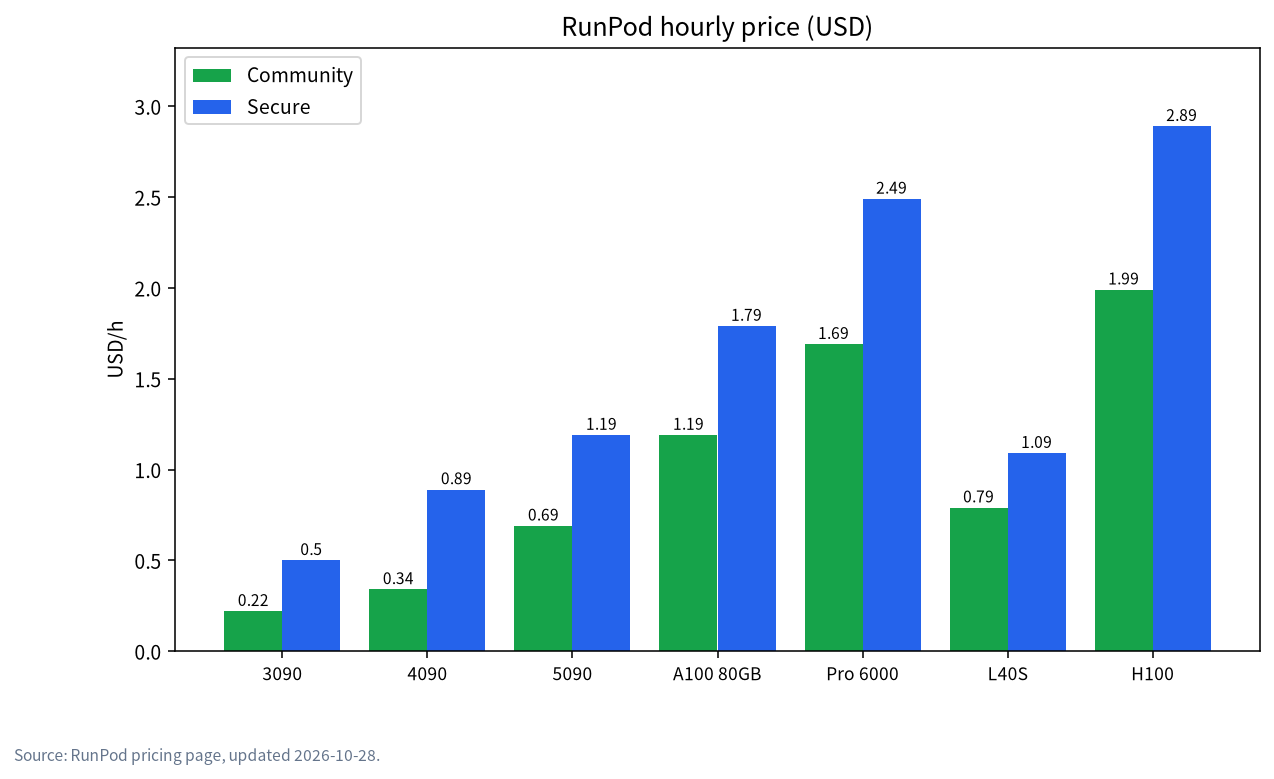
- RunPod hourly prices (community / secure, USD): RTX 3090 0.22 / 0.50, RTX 4090 0.34 / 0.89, RTX 5090 0.69 / 1.19, A100 PCIe 80GB 1.19 / 1.79, RTX Pro 6000 96GB 1.69 / 2.49, L40S 0.79 / 1.09, H100 PCIe 1.99 / 2.89.
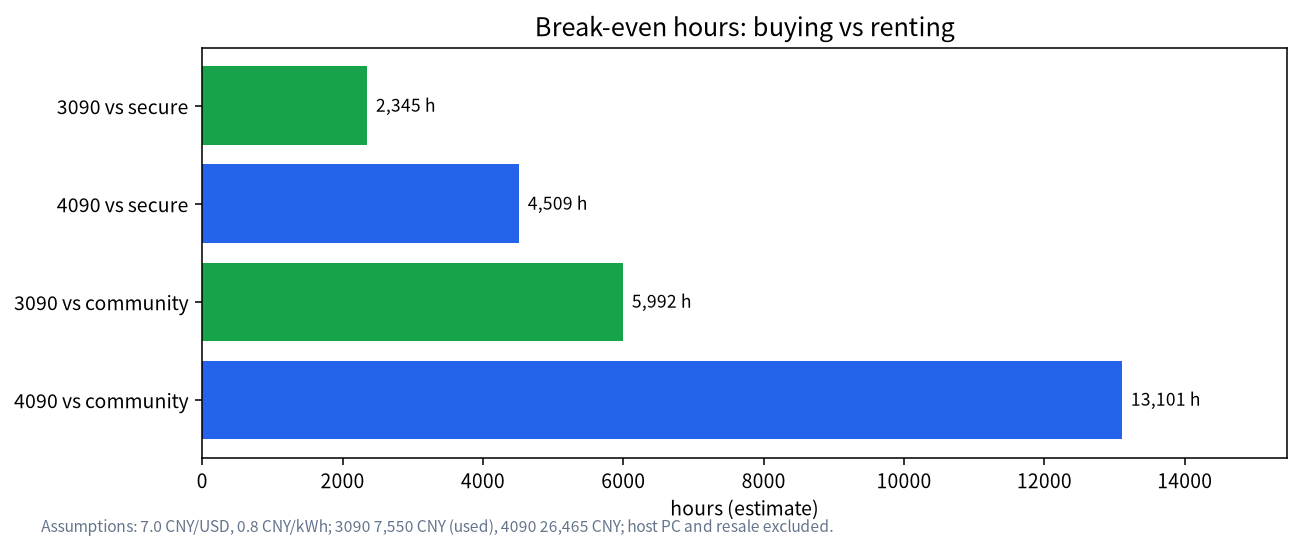
Break-even hours (rental price minus electricity): 3090 about 5,992 h (community) or about 2,345 h (secure); 4090 about 13,101 h (community) or about 4,509 h (secure).
In years, a 3090 against community cloud: about 8.2 years at 2 hours a day, 4.1 at 4 hours, 2.1 at 8 hours; against secure cloud only about 3.2, 1.6 and 0.8 years.
- Bottom line: if you use a GPU one or two hours a day, or only for the occasional big job, renting wins; if you use it 4+ hours a day for over a year, a used 3090-class card wins, once you also weigh privacy, the host PC and resale value.
Rent a GPU or buy one for LLMs: first, what an hour costs
RunPod splits compute into “community cloud” and “secure cloud” tiers, and the same card is priced very differently (page marked updated 2026-10-28, USD per hour):
| GPU | Community | Secure | In CNY per hour (community / secure, at 7.0) |
|---|---|---|---|
| RTX 3090 | 0.22 | 0.50 | 1.54 / 3.50 |
| RTX 4090 | 0.34 | 0.89 | 2.38 / 6.23 |
| RTX 5090 | 0.69 | 1.19 | 4.83 / 8.33 |
| A100 PCIe 80GB | 1.19 | 1.79 | 8.33 / 12.53 |
| RTX Pro 6000 96GB | 1.69 | 2.49 | 11.83 / 17.43 |
| L40S | 0.79 | 1.09 | 5.53 / 7.63 |
| H100 PCIe | 1.99 | 2.89 | 13.93 / 20.23 |
Storage is billed too if you keep models and data: the page lists about 0.10 USD per GB per month for container disk and about 0.07 USD per GB per month for network volumes under 1 TB. A 100 GB network volume is about 7 USD a month (about 49 CNY).
Local card prices and electricity
Our Chinese price snapshot from 2026-10-30 (details in cheap GPUs for LLMs): a used RTX 3090 about 7,550 CNY, an RTX 4090 about 26,465 CNY, a used RTX 3060 12GB about 2,050 CNY and an RTX 5060 Ti 16GB about 5,599 CNY. Prices move, and used cards carry condition and warranty risk; see the used GPU buying guide.
Electricity at 0.8 CNY per kWh, per hour at full load: the 3090 costs 0.35 kW x 0.8 = 0.28 CNY; the 4090 costs 0.45 kW x 0.8 = 0.36 CNY. This covers the card only, not the rest of the PC.
How to compute break-even hours
Break-even hours = card price / (rental price per hour – local electricity per hour).
Example: used 3090 against community cloud. Rental 0.22 USD x 7.0 = 1.54 CNY per hour, minus 0.28 CNY of electricity, leaves 1.26 CNY saved per hour; 7,550 / 1.26 is about 5,992 hours.
Example: used 3090 against secure cloud. 0.50 x 7.0 = 3.50 CNY, minus 0.28, saves 3.22 CNY per hour; 7,550 / 3.22 is about 2,345 hours.
Example: 4090 against community cloud. 0.34 x 7.0 = 2.38 CNY, minus 0.36 of electricity, saves 2.02 CNY per hour; 26,465 / 2.02 is about 13,101 hours.
Example: 4090 against secure cloud. 0.89 x 7.0 = 6.23 CNY, minus 0.36, saves 5.87 CNY per hour; 26,465 / 5.87 is about 4,509 hours.
In years: how many hours a day
Assuming 365 days a year, break-even years = break-even hours / (hours per day x 365):
| Option | 2 h a day | 4 h a day | 8 h a day |
|---|---|---|---|
| 3090 vs community cloud | about 8.2 years | about 4.1 years | about 2.1 years |
| 3090 vs secure cloud | about 3.2 years | about 1.6 years | about 0.8 years |
| 4090 vs community cloud | about 17.9 years | about 9.0 years | about 4.5 years |
| 4090 vs secure cloud | about 6.2 years | about 3.1 years | about 1.5 years |
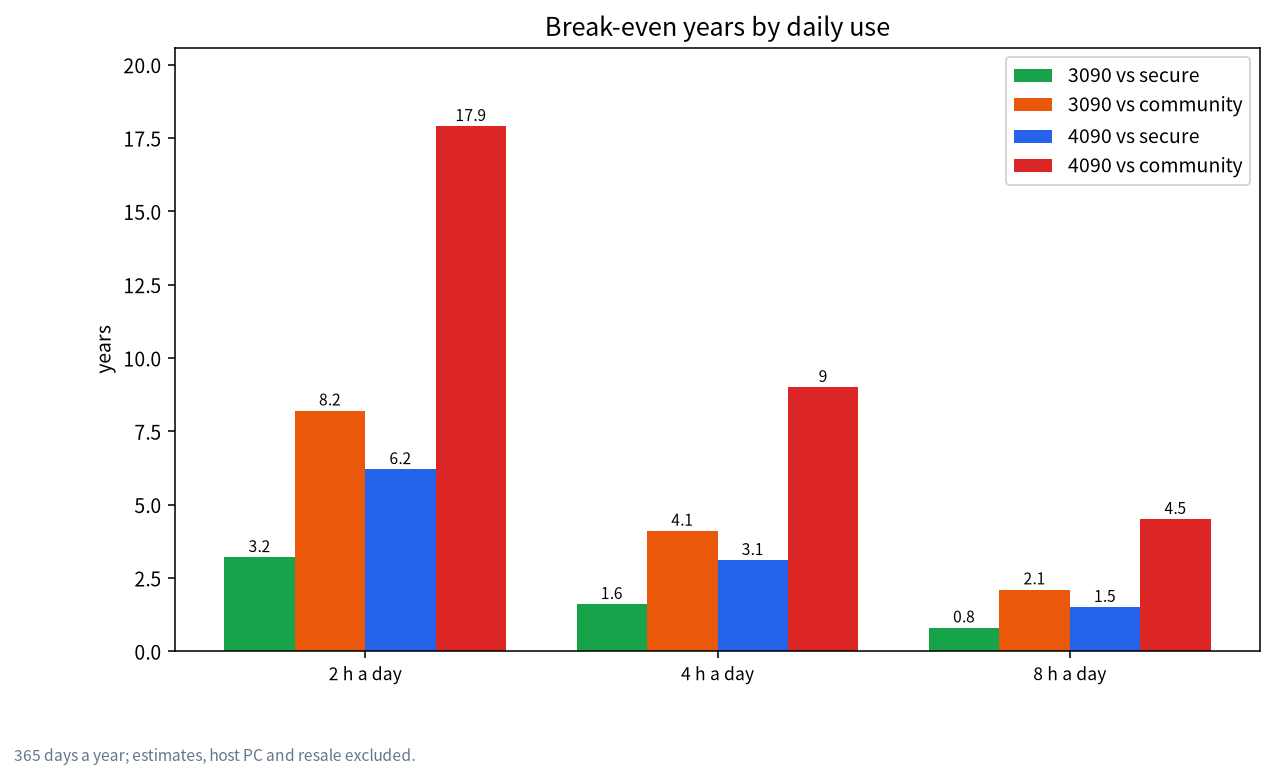
A few judgements follow from the table. If the comparison is the cheap community tier, a 4090 can hardly pay for itself through saved rent; a used 3090 under heavy use of 8 hours a day pays back in roughly two years; against secure cloud the payback is much faster.
What does 100 hours a month cost to rent?
If you only run jobs occasionally, say 100 hours a month on a 4090: about 34 USD (about 238 CNY) on community cloud or about 89 USD (about 623 CNY) on secure cloud. Add a 100 GB network volume at about 49 CNY a month. A 26,465 CNY 4090 would take many years to pay back at that usage, so renting is clearly cheaper.
When renting fits better
- Occasional big jobs. Fine-tuning or a batch run that finishes in tens of hours; rent, then release, and tie up no capital. For fine-tuning memory needs see local LoRA fine-tuning VRAM.
- Trying big models before deciding what to buy. Spend a few hours in the cloud on a 70b-class model, then decide how much VRAM you really need.
- Needing more VRAM than a home card offers. An 80 GB A100 is 1.19 USD an hour (about 8.33 CNY) on community cloud; the DeepSeek 671b weights are about 404 GB, so the weights alone need at least six 80 GB cards (404 / 80 is about 5.05, rounded up). That is an estimate, and whether that many cards are available to rent is not guaranteed.
- Tight budget and low frequency. Keep the money and buy when the price is right; see GPU price timing.
When buying fits better
- Steady use of 4+ hours a day for over a year. From the examples above, at 4 to 8 hours a day a used 3090 pays back in about 2.1 to 4.1 years against community cloud and about 0.8 to 1.6 years against secure cloud.
- Privacy requirements. Running locally keeps data on your machine, which renting can hardly replace; see local LLM privacy.
- Stability and low latency. No queues and no risk of interruption.
- The card has other uses. Gaming, editing and rendering spread the cost.
Hybrid strategy: local for daily use, cloud for the occasional big job
Many people do not need to choose one. A common combination is a used 24 GB 3090 at home for everyday 8b to 32b models, and a temporary cloud rental when you need a bigger model or a one-off fine-tune.
Example: you own a 24 GB card and want 20 hours a month on a 70b-class model. A 70b at Q4 is about 43 GB (see the size table in DeepSeek local install), which does not fit in 24 GB and needs at least 48 GB of VRAM. Renting an 80 GB A100 PCIe at 1.19 USD an hour on community cloud, or 8.33 CNY, costs about 167 CNY for 20 hours; add the 49 CNY a month for a 100 GB network volume and the total is about 216 CNY a month. Buying a 48 GB-plus card for those 20 hours would cost far more for very low utilisation, so this “occasional big model” need suits renting.
Decision cheat sheet
| How you use it | Better fit | One-line reason |
|---|---|---|
| A few dozen hours a month | Rent | Cumulative rent stays far below a card’s price |
| 4+ hours a day, long term | Buy (used 3090 etc.) | Pays back in one to several years and you keep privacy and stability |
| Occasionally need more than 24 GB | Local plus temporary rental | Cheap daily use, occasional expansion |
| Sensitive data | Buy | Data stays local |
| Not sure what to buy | Rent for a few hours first | Validate VRAM needs in the cloud before ordering |
| One-off fine-tune or batch job | Rent | Release when done; no capital tied up |
One last reminder: break-even years assume you really use the card every day. Many people use a new card far less than planned, so instead of guessing, log your real usage hours for a month and plug those into the formula.
What this calculation leaves out
- The rest of the PC. We counted only the card; if you do not yet own a computer, add motherboard, CPU, memory, PSU and case. For builds see 24 GB budget GPU build.
- Resale value. Selling the card in a few years recovers some money, which lowers the real cost of buying, but it is hard to predict, so we left it out.
- Idle power and cooling. We counted full load only, with no standby, room or cooling cost.
- Hidden rental costs. Upload and download time, storage fees, reclaimed instances and queueing; real experience may differ, community cloud differs from secure cloud in stability, and we did not test either.
- Exchange rate and price swings. Prices move and so does the exchange rate.
- Chinese platforms. Rental platforms in China price and operate differently; this article compares RunPod only and reaches no conclusion about them.
- Privacy risk. Putting data on someone else’s machine is a risk you must assess yourself.
Common mistakes
- Thinking a fraction of a dollar an hour means renting is always cheaper. True at low usage, but at high usage the total passes the price of a card quickly.
- Treating the card price as the total cost. The host PC, electricity and resale value all matter.
- Comparing against community cloud while expecting secure-cloud reliability. The tiers differ by more than 2x in price and also in stability; match them properly.
- Forgetting storage fees. A network volume that keeps big models is billed continuously.
- Forgetting privacy. When you process sensitive material, cloud rental may defeat the reason you wanted a local model.
What we checked and what we did not
Cloud prices come from the numbers on RunPod’s public pricing page, and Chinese card prices from our 2026-10-30 snapshot. Break-even times are estimates derived from formulas, and the exchange rate, electricity price and power draw are assumptions. We did not measure rental latency, queueing or interruptions, and did not verify prices on Chinese compute platforms.
FAQ
Is it cheaper to rent a GPU or buy one for LLMs?
It depends on intensity. For one or two hours a day, or occasional jobs, renting is cheaper; for 4+ hours a day sustained over a year, a used 3090-class card is cheaper.
How long does a used 3090 take to pay for itself?
Against RunPod community cloud, about 2.1 years at 8 hours a day and 4.1 years at 4 hours; against secure cloud, about 0.8 years at 8 hours a day. These are estimates that exclude the host PC and resale value.
Why does the 4090 take so long to pay back?
Because it costs a lot (about 26,465 CNY) while rental is cheap: community cloud is only 0.34 USD an hour, so saved rent barely recovers the price.
Is my data safe on a rented GPU?
Your data sits on someone else’s machine, so you must assess the provider and your compliance needs; for privacy-sensitive work, local is easier to control.
Could Chinese platforms be cheaper?
We could not obtain prices we can verify for Chinese platforms, so this article draws no conclusion; compare them yourself.
Should I rent or buy for fine-tuning?
Occasional fine-tuning suits renting, releasing the instance afterwards; consider buying only if you fine-tune often.
Want to run the numbers for your own case?
Visit the community or email admin@microaione.com with your daily hours and budget. Our Shenzhen team can plug them into the formula and will mark the estimated parts.
References: RunPod pricing, Cheap GPUs for LLMs (price snapshot 2026-10-30), Ollama library: deepseek-r1 (671b about 404 GB).