Used GPU for Local LLMs: How to Pick and Test an RTX 3090 or 4060 Ti 16GB
For local LLMs, VRAM is the scarcest resource, and for the same capacity a used card is usually far cheaper than a new one. That is why so many people look at a used GPU for local LLMs: a 24GB RTX 3090 for a few thousand yuan, or a 16GB RTX 4060 Ti. The saving is real, and so is the risk: mining wear, refurbished boards, swapped cores and fake VRAM sizes have all burned buyers. This guide shows how to work out value, how to inspect a card and how to test it. To decide how much VRAM you need, start with how much VRAM is enough, and for whole-PC pairings see our PC build configurations.
Verification note: Prices come from our 2026-10-30 reference price table. For China they are mainly used-listing medians from sources such as VRAMGlass’s Xianyu listing statistics and posts on SMZDM, and single-source rows are flagged. They are reference points, not quotes and not sale prices. The inspection tools and methods come from common third-party buying guides, which we did not reproduce item by item on our own hardware; treat them as an experience checklist, not a standard. Prices move fast, so check again before you pay.
Key takeaways (Updated 2026-10-30)
- Per GB of VRAM the used 3060 12GB (about 171 yuan) and 3090 24GB (about 315 yuan) are cheapest, against about 1103 for the 4090.
Listings far below the going rate are usually problems; check model and bus width in GPU-Z, then run VRAM and burn-in tests.
If you must replace the power supply, the used 3090’s price advantage shrinks, so cost the PSU and case together.
Used GPU for Local LLMs: Why 24GB and 16GB Cards
For local LLMs, whether a model fits in VRAM matters more than how fast the card is. The basic mapping is in our 24GB VRAM guide and 8GB VRAM guide. Four cards come up most often on the used market:
| Card | VRAM | Used reference price (CNY, median) | CNY per GB of VRAM | Best for |
|---|---|---|---|---|
| RTX 3060 12GB | 12GB | 2050 | about 171 | The cheapest start, 7B–14B quantized models |
| RTX 4060 Ti 16GB | 16GB | 4200 | about 263 | You want 16GB at lower power; discontinued, so mostly used |
| RTX 3090 24GB | 24GB | 7550 | about 315 | The cheapest way to 24GB, runs 30B-class quantized models |
| RTX 4090 24GB | 24GB | 26465 | about 1103 | Faster, but more than three times the 3090’s price |
These are median reference prices from 2026-10-30. The 3060 and 4060 Ti 16GB rows each rest on a single source and do not represent your local market.
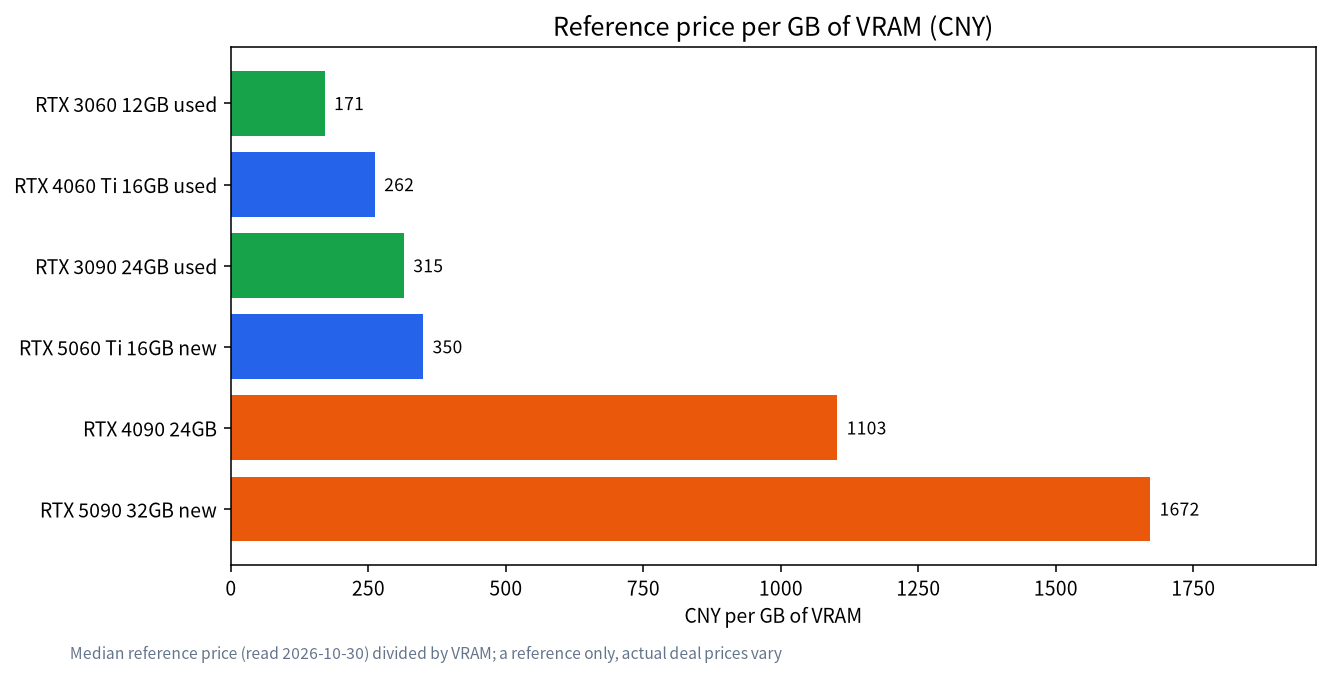
The takeaway is plain. If your goal is “the most VRAM for the least money”, a used 3090 24GB costs far less per GB than a 4090 or 5090, and the 3060 12GB is the cheapest entry point. The trade-offs are no manufacturer warranty, and higher power draw and heat.
Look at the Price First, Then the Risk
Used-card pricing has one rule: listings far below the going rate are usually problems. When we built our reference prices, 3090 listings under 4000 yuan were mostly mining cards or cards with hidden faults. The sources we read in October 2026 disagree quite a bit on the 3090: a Xianyu listing median of about 9350 yuan (range 7900–10876), an older snapshot near 8350 yuan, and a range of 5500–8000 yuan for completed deals on SMZDM. We take a median of about 7550 yuan as a reference, not as the price you should pay.
Remember that a listing price is not a sale price. The same card can differ by thousands of yuan by city, condition and warranty.
Common Traps
| Risk | What you see | How to avoid it |
|---|---|---|
| Mining wear | Worn fans, hot VRAM, yellowed PCB | Ask for a video inspection; run VRAM temperature and burn-in tests |
| Refurbished or swapped core | Label does not match the real core | Check core, VRAM and bus width in GPU-Z |
| Fake VRAM size or bad chips | Size is right but errors or artifacts appear after a while | Run a VRAM test such as memtest_vulkan |
| Modified card | Blower conversions, VRAM-modified non-reference boards | Read the cooling, power and seller notes carefully and ask for a warranty |
| Empty box or swap | You receive a different card, or no card | Inspect in person, use a platform with buyer protection, and film the unboxing |
This table is our synthesis of common inspection guides and used-3090 reviews. Each row maps to a check you can perform yourself.
The Inspection Checklist, Step by Step
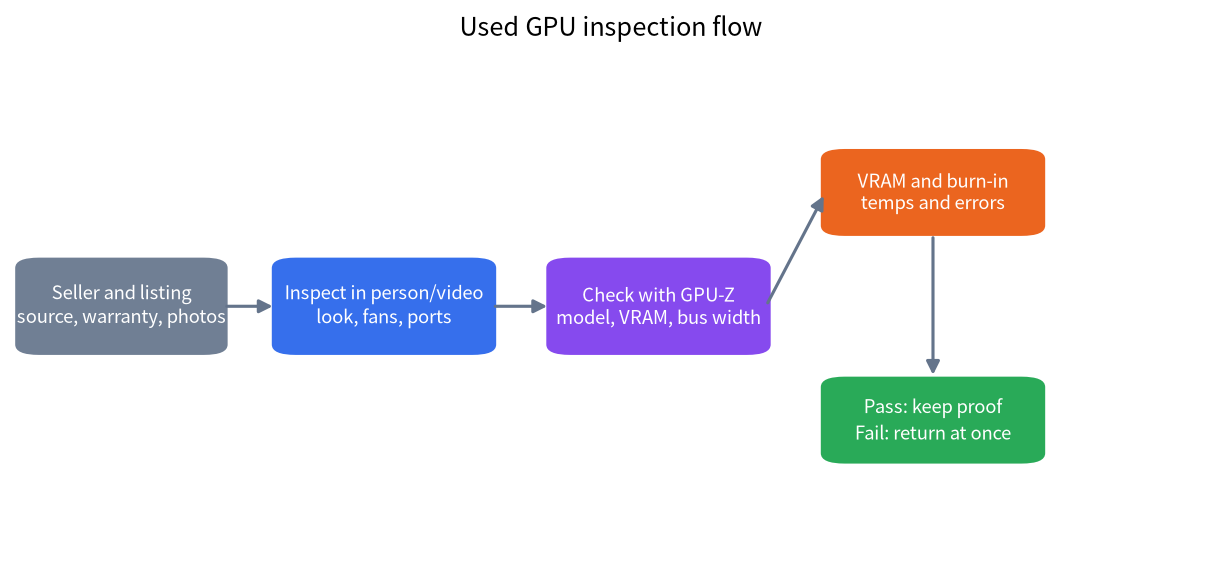
- Judge the seller and listing. Prefer sellers with a warranty, real photos and a track record. Skip listings that only use stock images.
- Inspect the exterior. Look for oxidised contacts, screws that have been turned, smooth fan rotation and unusual noise. On a 3090, memory sits on both sides of the PCB, so watch the backplate temperature too.
- Check with GPU-Z. According to third-party guides, a 3090 should show a GA102 core, 24576 MB of GDDR6X, a 384-bit bus and 10496 shaders. If the model, memory or bus width does not match, return it.
- Test the VRAM. Run a tool such as memtest_vulkan for a while and require zero errors.
- Burn it in. Run something like FurMark for 30 to 60 minutes and watch temperatures, fan behaviour and driver crashes. A reference from third-party guides is to keep the memory junction temperature below roughly 100 degrees Celsius.
- Confirm warranty and returns. Get the return window in writing and keep the chat log, tracking number and inspection video.
About mining cards: third-party guides commonly say a mining card is not automatically a bad card, and depends on how it was used and maintained. Still, unless the discount is clear, there is little reason to take the risk.
After You Buy: Run a Real Model Right Away
Inspection only catches part of the problems; sustained inference is the real test. On day one, do three things:
- Install the driver and use
nvidia-smito confirm the memory size and temperature readings. - Load a model with Ollama or llama.cpp that fills most of the VRAM, and generate continuously for dozens of minutes while watching for errors, artifacts or the card dropping off the bus. Our VRAM calculator guide explains how to size it.
- Record idle and full-load temperatures. If they run high, check case airflow first and consider fresh thermal material, but do not break warranty seals yourself.
For power headroom, case airflow and the rest of the machine, see our PC build configurations.
Questions to Ask the Seller Before You Pay
A good used listing comes with a seller willing to answer specific questions. Ask directly:
- Where did the card come from, and is there an invoice or purchase record, and is it still under warranty?
- Was it ever used for mining or run at full load for long periods, and for how long?
- Has the cooler been removed, or the paste or thermal pads replaced? If so, when and by whom?
- Can you send a video filmed today, including a GPU-Z screenshot and the burn-in run?
- How many days do I have to return it after delivery, and who pays for shipping?
A seller who dodges these questions, or who refuses a video inspection, is already giving you a signal. Save the answers; if there is a dispute later, they are your evidence.
Power Supply, Case and Power Draw: Do Not Buy a Card You Cannot Fit
Big-VRAM used cards are often high-power cards too. According to NVIDIA’s official specifications, the RTX 3090 has a total board power of about 350W with a recommended power supply of 750W, while the RTX 4060 Ti 16GB and RTX 3060 12GB draw much less, around 160W and 170W respectively. So before buying a 3090, settle three things:
- Power supply wattage and connectors: besides total wattage, check that you have enough power connectors, and budget for a new unit if needed. In our reference table an 850W power supply has a median price of about 1070 yuan.
- Case space: non-reference 3090s are often very long and thick, so measure your case for card length and thickness.
- Cooling and airflow: memory temperatures climb at full load, so the case needs good intake and exhaust.
Add all that up and the real cost of a used 3090 is more than the card. If your case and power supply both need replacing, the total can be higher than you expected, and it is worth comparing the newer RTX 5060 Ti 16GB, or looking at the complete builds in our PC build configurations.
Run the Numbers: Used 3090 Plus a New Power Supply
Here is a worked example using our reference table (all median reference prices from 2026-10-30, for illustration only). A used 3090 is about 7550 yuan, and an 850W power supply is about 1070 yuan, for a total of about 8620 yuan, or roughly 359 yuan per GB of VRAM. A new RTX 5060 Ti 16GB is about 5599 yuan, or roughly 350 yuan per GB. In other words, if you must replace the power supply as well, the 3090’s price-per-GB advantage almost disappears, and what remains is its 24GB on a single card, which lets you run larger models. If your power supply and case are already adequate, the 3090’s advantage stays clear. Which one to pick depends on how large a model you want to run, and whether you can live without a warranty.
When Not to Buy Used
- You need a warranty and dependable delivery, for example a machine in an office shared by a team. A new card or a complete system fits better.
- Your case or power supply cannot take a large card such as a 3090. Check the wattage and connectors first.
- You do not have the time or patience to inspect, or no trustworthy source.
- Your budget allows new: the RTX 5060 Ti 16GB has a median reference price of about 5599 yuan in China, and we compare it in a separate article.
FAQ: Buying Used GPUs for Local LLMs
Is a used 3090 still worth buying?
If you want 24GB of VRAM at a lower price, a used 3090 is still among the best values. Inspect carefully, stay away from listings far below the going rate, and accept that there is no manufacturer warranty.
Can I buy a former mining card?
Third-party guides say a mining card is not automatically broken and depends on care and test results. But mining cards often carry fan wear and ageing VRAM risk, so avoid them unless the discount is clear and you can test the card.
How do I confirm the VRAM is really 24GB?
Check capacity, type and bus width in GPU-Z, then test the memory with a tool such as memtest_vulkan. If the capacity is right but errors appear, return the card all the same.
Is a used 4060 Ti 16GB worth it?
It is discontinued, with a used reference price of about 4200 yuan and much lower power draw than a 3090. It makes sense if your case and power supply are limited and you want 16GB, but the price per GB is higher than a 3090.
How long do I have to return a faulty card?
It depends on the platform and what the seller agreed. Ask for the return window before buying and keep the chat log and inspection video.
Does a used card run models slower?
Speed depends on the card model, memory bandwidth and model size, not on age. If the memory or cooling is faulty, though, you will see throttling, errors and crashes.
Want Someone to Check a Listing?
If you are unsure whether a used card is safe, or would like a setup we have inspected and tested, join the community or email admin@microaione.com with the seller’s description and screenshots. For the basics, read how to run an LLM locally.
References and further reading: NVIDIA: GeForce RTX 3090 specifications, TechPowerUp: GPU-Z.