Local LoRA Fine-Tuning VRAM: How Much GPU Memory You Need for QLoRA and LoRA
Running a model needs far less memory than teaching it something new, and that gap surprises almost everyone who tries fine-tuning at home. This guide to local LoRA fine-tuning VRAM gives you the published minimums for QLoRA and LoRA from 3B to 70B, explains what pushes real usage above those minimums, and lists the levers that rescue a run that has just crashed with an out-of-memory error. It also covers Mac and Windows routes and what to do with the adapter afterwards. If you have not yet decided whether fine-tuning is the right tool, start with the local RAG guide, because retrieval solves many problems that people try to fix by training.
Verification note: the VRAM minimums come from the Unsloth documentation, which states that they are the absolute minimum and that some models need more. The 65B-on-48GB claim comes from the QLoRA paper abstract. The MLX defaults come from the mlx-lm LoRA document. We did not run training jobs for this article, so any margin we suggest is our own rule of thumb, labelled as such, and the worked examples are hypothetical.
Key takeaways (Updated 2026-10-30)
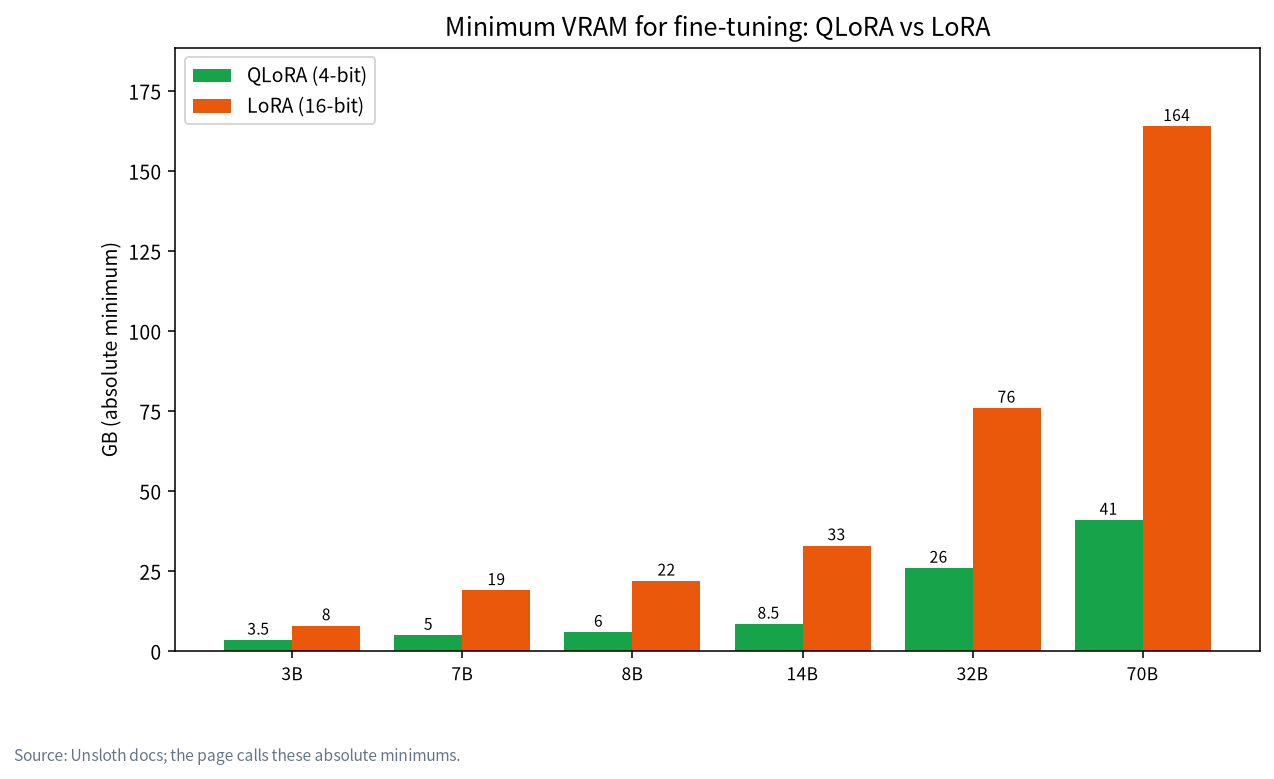
- Per the Unsloth docs, QLoRA (4-bit) minimums are 5GB for 7B, 8.5GB for 14B, 26GB for 32B and 41GB for 70B, while 16-bit LoRA needs 19GB, 33GB, 76GB and 164GB for the same sizes.
These are floors, not budgets. Batch size, example length and the model itself push real usage higher, so leave headroom.
When training runs out of memory, lower the batch size first, then shorten examples, then use QLoRA, then gradient checkpointing.
Should You Fine-Tune at All?
Fine-tuning changes how a model behaves: its tone, its output format, its habits on a narrow task. It is a poor way to add facts, because facts you train in are hard to update and hard to check. If your goal is a model that answers from your documents, retrieval is usually the better first step, and our RAG guide shows how. If your goal is a different style, a strict output format or a specialist behaviour that prompting cannot hold, fine-tuning makes sense.
A short test helps. Write a good prompt with a few examples inside it and run it on the model you already have. If that works most of the time, you may not need training. If it fails in a consistent way, you have found a job for LoRA. A local run also keeps your training data on your own machine, which matters when the examples are private, as discussed in our privacy guide.
LoRA and QLoRA in Plain Terms
Full fine-tuning updates every weight of the model, so it needs memory for the weights, their gradients and the optimiser state. LoRA, introduced in a 2021 paper, freezes the original weights and trains small low-rank adapter matrices added alongside them. Only the adapters need gradients and optimiser state, which cuts memory sharply, and the result is a small adapter file rather than a new copy of the model.
QLoRA goes one step further. Its authors describe backpropagating gradients through a frozen, 4-bit quantised pretrained model into the LoRA adapters, and their abstract says this reduces memory enough to fine-tune a 65B-parameter model on a single 48GB GPU. In practice, QLoRA means the base model is loaded in 4-bit form, much like the quantised files described in our quantisation guide, while the adapters are trained at higher precision. The trade-off is some extra compute and, depending on the setup, a small quality cost, so it is the default choice for consumer cards.
Local LoRA Fine-Tuning VRAM by Model Size
The Unsloth documentation publishes a table of minimum VRAM sorted by model size and method, and it is the clearest public reference we found. It notes that QLoRA uses 4-bit and LoRA uses 16-bit, and that the numbers are the absolute minimum because some models need more.
| Parameters | QLoRA (4-bit) minimum | LoRA (16-bit) minimum |
|---|---|---|
| 3B | 3.5GB | 8GB |
| 7B | 5GB | 19GB |
| 8B | 6GB | 22GB |
| 14B | 8.5GB | 33GB |
| 27B | 22GB | 64GB |
| 32B | 26GB | 76GB |
| 70B | 41GB | 164GB |
Two patterns stand out. First, 16-bit LoRA grows quickly: a 14B model needs about 33GB, which is beyond every single consumer card except the 32GB RTX 5090, and even that is too small once you add headroom. Second, QLoRA brings 14B within reach of a 12GB card on paper and 32B within reach of a 32GB card. Compare that with inference, where a 14B Q4_K_M model needs about 8.6GB of weights alone, as we show in the VRAM guide.
What Fits on Your Card
Using the minimums above, here is how the common card sizes line up. The right-hand column is our own rule of thumb, not a published number: we suggest picking a model whose QLoRA minimum is at most about 70 to 75 percent of your VRAM, so that longer examples and a batch size above one still fit.
| Your VRAM | Largest QLoRA minimum that fits | Comfortable choice (our rule of thumb) |
|---|---|---|
| 8GB | 7B at 5GB, 8B at 6GB | 3B to 7B, short examples |
| 12GB | 14B at 8.5GB | 8B, or 14B with care |
| 16GB | 14B at 8.5GB | 14B |
| 24GB | 27B at 22GB | 14B comfortably, 27B only just |
| 32GB | 32B at 26GB | 14B to 27B, 32B tight |
| 48GB | 70B at 41GB | 32B comfortably, 70B tight |
For 24GB cards in particular, the Unsloth table puts 27B at 22GB, which leaves almost nothing spare, while 32B at 26GB does not fit at all. Our 24GB guide and 12GB and 16GB guide cover what else those cards are good for. If you are choosing a model size for fine-tuning, the model size chooser walks through the same idea for inference, and the principle carries over: start smaller than you think.
Why Real Usage Is Higher Than the Table
The Unsloth page is explicit that the figures are floors. Several things push real usage up.
Batch size. Unsloth names too high a batch size as a common cause of running out of memory and suggests trying 1, 2 or 3. Each extra example processed at once adds activation memory.
Example length. Longer training examples need more memory, because activations grow with sequence length. The mlx-lm document says the same: longer examples require more memory, and if it makes sense for your data, splitting them helps.
Adapter size and the model itself. A higher adapter rank adds trainable parameters, and different architectures use different amounts. That is why the documentation warns that some models need more than the table shows.
Everything else on the card. Your desktop, a browser and any other process using the GPU take memory from the same pool. Close them before a long run.
The Memory Levers, in the Order We Would Pull Them
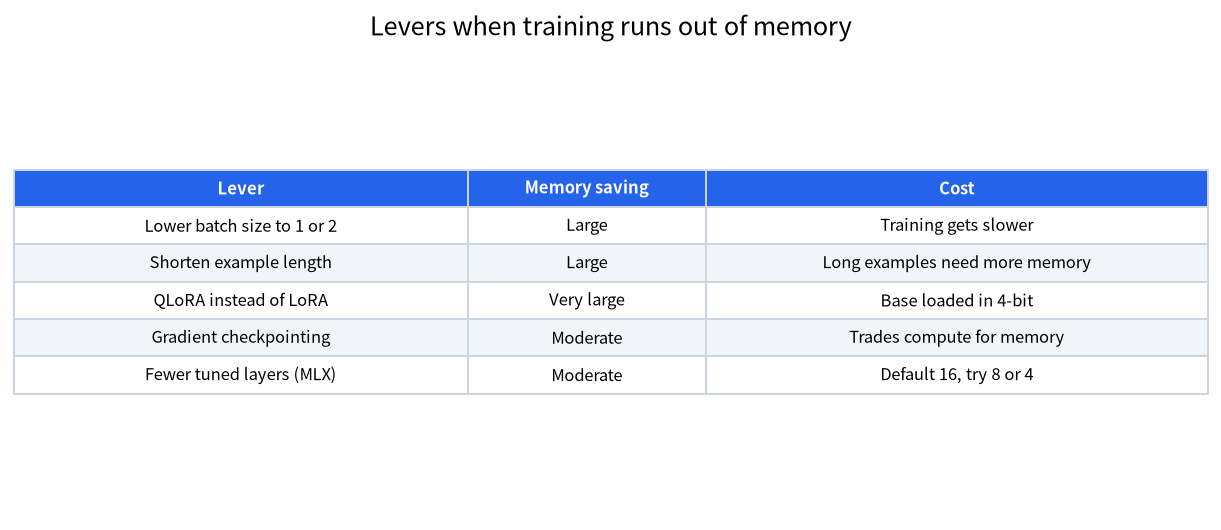
When a run crashes with an out-of-memory error, change one thing at a time and rerun briefly before changing the next.
- Lower the batch size to 1 or 2. This is the cheapest fix, and it only slows training a little. If you want a larger effective batch, accumulate gradients over several steps instead.
- Shorten the examples. Trim long examples or split them, if that is sensible for your data.
- Use QLoRA instead of LoRA. Loading the base in 4-bit is the biggest single saving, as the table shows.
- Turn on gradient checkpointing. It trades extra compute for lower memory and helps most with long sequences.
- Choose a smaller base model. If nothing else works, a smaller model that fits is better than a large one that never finishes.
For inference-side out-of-memory errors, our out-of-memory troubleshooting guide covers a different set of causes.
The Mac Route With MLX
On Apple silicon, the mlx-lm package includes LoRA fine-tuning. Its document shows a command of the form mlx_lm.lora --model <path_to_model> --train --data <path_to_data> --iters 600. It states that if the model path points to a quantised model, training uses QLoRA, and otherwise regular LoRA. Supported fine-tuning types are lora (the default), dora and full.
The same document has a Memory Issues section that matches the levers above. It suggests QLoRA, a smaller --batch-size (the default is 4), fewer layers with --num-layers (the default is 16, so try 8 or 4), shorter examples and the --grad-checkpoint flag. Data goes in train.jsonl, with an optional valid.jsonl that reports validation loss, and adapters are saved in adapters/ by default. The mlx_lm.fuse command merges an adapter into the model and saves a fused model.
On a Mac, the limit is unified memory shared with everything else, so the practical advice from our Mac guide applies: leave room for the system and close other heavy apps. We make no claim about how MLX speed compares with a GPU, because we have not measured it.
The Windows and Linux Route
Unsloth’s requirements page lists Windows, macOS, Linux and WSL, and CPU-only options. On Windows, many people prefer WSL 2 because it behaves like Linux while using the GPU, and we cover the setup in the WSL 2 and Docker guide. Whichever route you use, check the current requirements page for your GPU generation before you start, since driver and library support changes from release to release.
Using the Adapter After Training
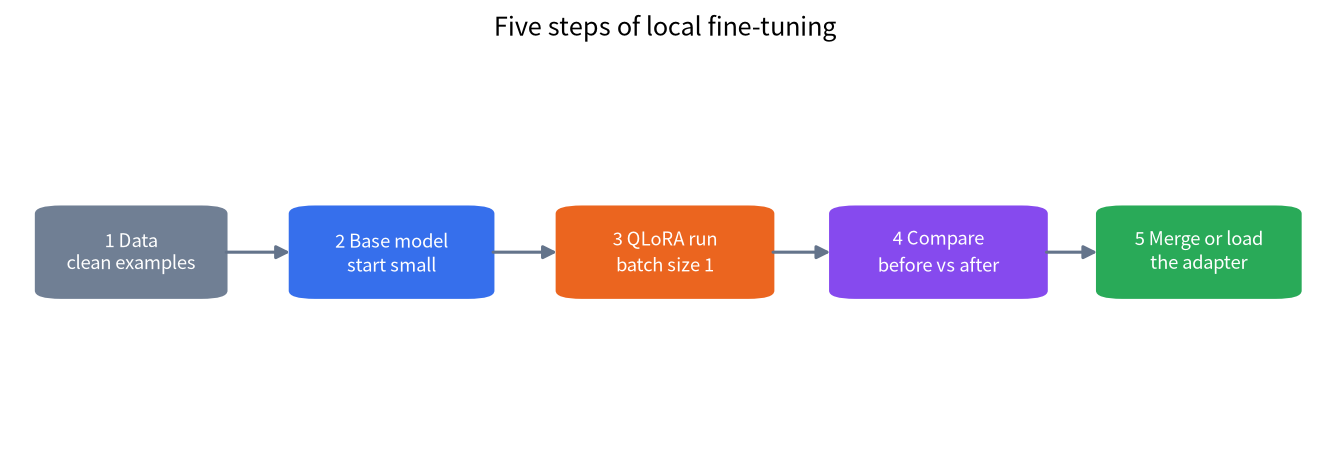
Training produces an adapter, and you have two ways to use it. You can merge it into the base model, which gives you a single model file, as mlx_lm.fuse does on a Mac. Or you can load the adapter next to the base at run time. llama.cpp’s server supports this with --lora FNAME, which loads a LoRA adapter in GGUF form, and the README notes that requests using different LoRA configurations are not batched together, which can reduce performance. The llama.cpp repository includes a convert_lora_to_gguf.py script for converting adapters, and our GGUF guide explains the format. Check your serving tool’s documentation for how it expects adapters, because support differs.
A Hypothetical Planning Example
This is an illustration of the method, not a record of a real run. Suppose you have a 16GB card and want a model that answers support tickets in a fixed format. The table gives a QLoRA minimum of 8.5GB for a 14B model, about 53 percent of 16GB, which is inside our rule of thumb. You would start with a batch size of 1, examples trimmed to the length you really need, and a short run to see whether loss falls and memory holds. Then you would compare the tuned model with the original on a set of examples you did not train on. If memory is tight, you would drop to an 8B base instead of pushing the 14B.
The comparison step is the one people skip. Always keep a few examples out of training, run the same prompts before and after, and judge the answers yourself. A falling training loss tells you the model is learning your examples, not that it is better at the real job.
Common Mistakes
- Reading the table as a budget. The figures are floors. Plan for headroom.
- Starting with 16-bit LoRA. It needs several times the memory of QLoRA at the same size.
- Training on long examples without noticing. Length drives memory, so check it.
- Skipping the held-out test. Without it you cannot tell improvement from memorisation.
- Fine-tuning to add facts. Retrieval is usually better for changing knowledge.
- Leaving other GPU apps open. They share the same VRAM.
FAQ: Local LoRA Fine-Tuning VRAM
How much VRAM do I need to fine-tune a 7B model?
The Unsloth docs give a minimum of 5GB for QLoRA and 19GB for 16-bit LoRA. Real usage depends on batch size and example length.
Can I fine-tune a 70B model at home?
QLoRA lists a 41GB minimum for 70B, so it needs a 48GB-class setup and is tight there. 16-bit LoRA lists 164GB.
What is the difference between LoRA and QLoRA?
LoRA trains small adapters on top of frozen weights. QLoRA does the same with the frozen base loaded in 4-bit, which cuts memory sharply.
Is a 24GB card enough?
For QLoRA it covers up to about 27B at the stated 22GB minimum, with little room to spare. A 14B model is more comfortable.
Can I fine-tune on a Mac?
Yes, mlx-lm includes LoRA and QLoRA training. Speed and memory depend on your machine, and we have not benchmarked it.
Do I need fine-tuning for a document chatbot?
Usually not. Retrieval from your documents is the more common and easier route, as in our RAG guide.
Talk With Us
Tell us your card and your task in the community and we will help you size a run, or email admin@microaione.com.
References: Unsloth requirements, QLoRA paper, LoRA paper, mlx-lm LoRA document, llama.cpp server README.