Cheap GPU for LLM: Choosing by VRAM Tier and Cost per GB of VRAM and per GB/s (2026-10 Price Snapshot)
Which cheap GPU for LLM work should you actually buy? The graphics-card market in October 2026 looks nothing like two years ago: 16GB cards are getting more expensive, even re-released RTX 3060 12GB cards are no longer cheap, and a “budget GPU for local models” mostly exists as luck on the used market. So this guide does not force cards into price brackets. It uses a more stable lens: choose by VRAM tier (12GB, 16GB, 24GB) and compute what each GB of VRAM and each GB/s of bandwidth costs. All prices are labeled as our 2026-10-30 snapshot and will change, but the method and the ranking logic will not. For used-card risk see our used GPU buying guide, for timing see GPU price timing, and for why bandwidth matters see why LLMs need GPUs, not CPUs.
Key points (updated 2026-11-04)
- By cost per GB of VRAM the used RTX 3060 12GB (about 2050 CNY) is cheapest at about 171 CNY/GB; the used RTX 3090 24GB (about 7550 CNY) is about 315 CNY/GB, the most realistic cheap 24GB option.
By cost per GB/s of bandwidth the used 3060 is about 5.7 CNY and the 3090 about 8.1; a new 5060 Ti 16GB is about 12.5 and a 4090 about 26.
Two cheap cards do not double speed: with layer splitting GPUs take turns, so the ceiling stays near one card’s bandwidth. In our example dual 3060s reach about 18 tokens/s versus about 48 for one 3090.
Prices rose fast in 2026-10 and several come from a single source, so re-check before ordering; in our snapshot, 3090 listings below about 4000 CNY were flagged as mining-card or hidden-fault risks.
We did not measure these cards; all speeds are theoretical ceilings computed from formulas.
Cheap GPU for LLM: first decide what “cheap” is measured in
Total price alone misleads. Two numbers matter for LLMs: VRAM capacity decides how large a model fits, and memory bandwidth sets the generation-speed ceiling (decode speed ≈ bandwidth ÷ model bytes, derived in the companion article). So a more useful meaning of cheap is:
price per GB of VRAM = price ÷ capacity; price per GB/s = price ÷ bandwidth.
We used our 2026-10-30 price snapshot (medians of quotes from several channels; used prices are median listings on a second-hand marketplace) together with official NVIDIA specifications:
| Card | Price (CNY) | VRAM | Bandwidth (GB/s) | CNY per GB VRAM | CNY per GB/s | Official power (W) |
|---|---|---|---|---|---|---|
| RTX 3060 12GB (used) | about 2050 | 12GB | 360 | about 171 | about 5.7 | 170 |
| RTX 3060 12GB (new) | about 3475 | 12GB | 360 | about 290 | about 9.7 | 170 |
| RTX 4060 Ti 16GB (used) | about 4200 | 16GB | 288 | about 263 | about 14.6 | 165 |
| RTX 5060 Ti 16GB (new) | about 5599 | 16GB | 448 | about 350 | about 12.5 | 180 |
| RTX 3090 24GB (used) | about 7550 | 24GB | 936.2 | about 315 | about 8.1 | 350 |
| RTX 4090 24GB | about 26465 | 24GB | 1008 | about 1103 | about 26.3 | 450 |
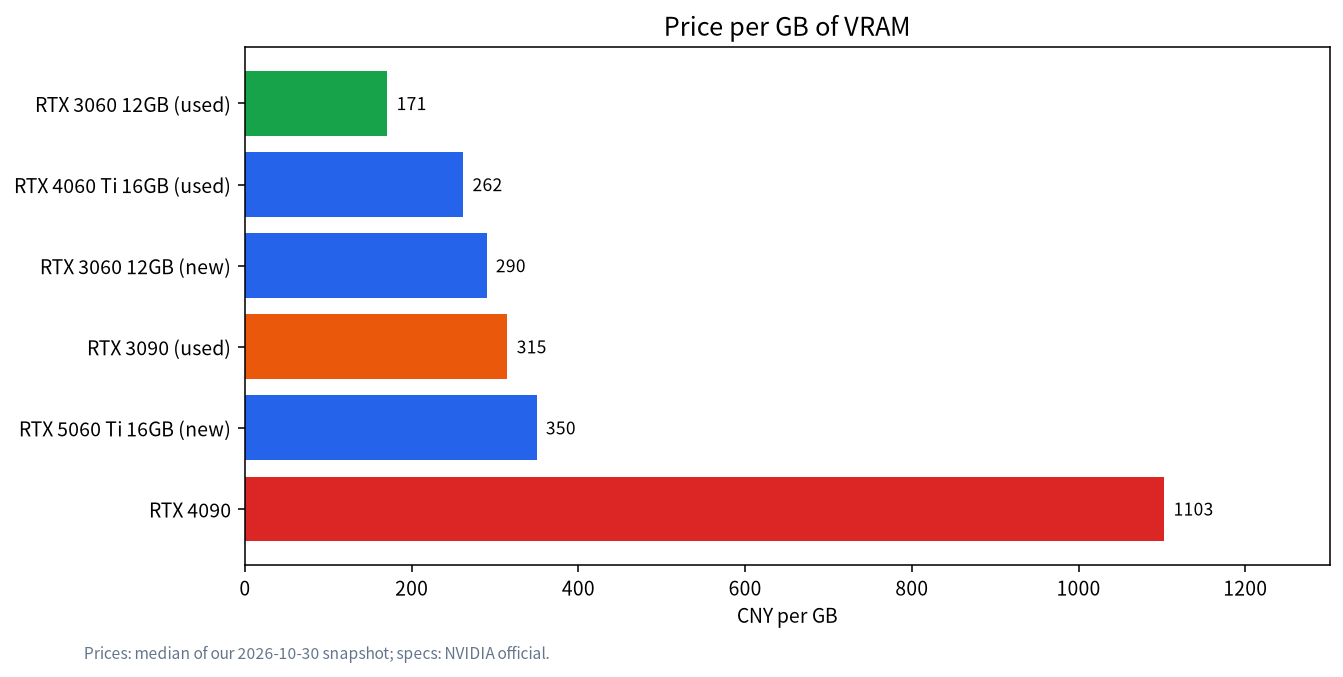
About the prices: new 3060 12GB quotes range from 2950 to 4000 (re-released “new” cards have reached about 4000), 5060 Ti 16GB quotes range from 5200 to over 7000, and used 3090 listings run from 6000 to 9350. The table uses the medians in our snapshot file; single-source items (used 3060 and 4060 Ti) deserve less trust. Power figures are NVIDIA’s official board power.
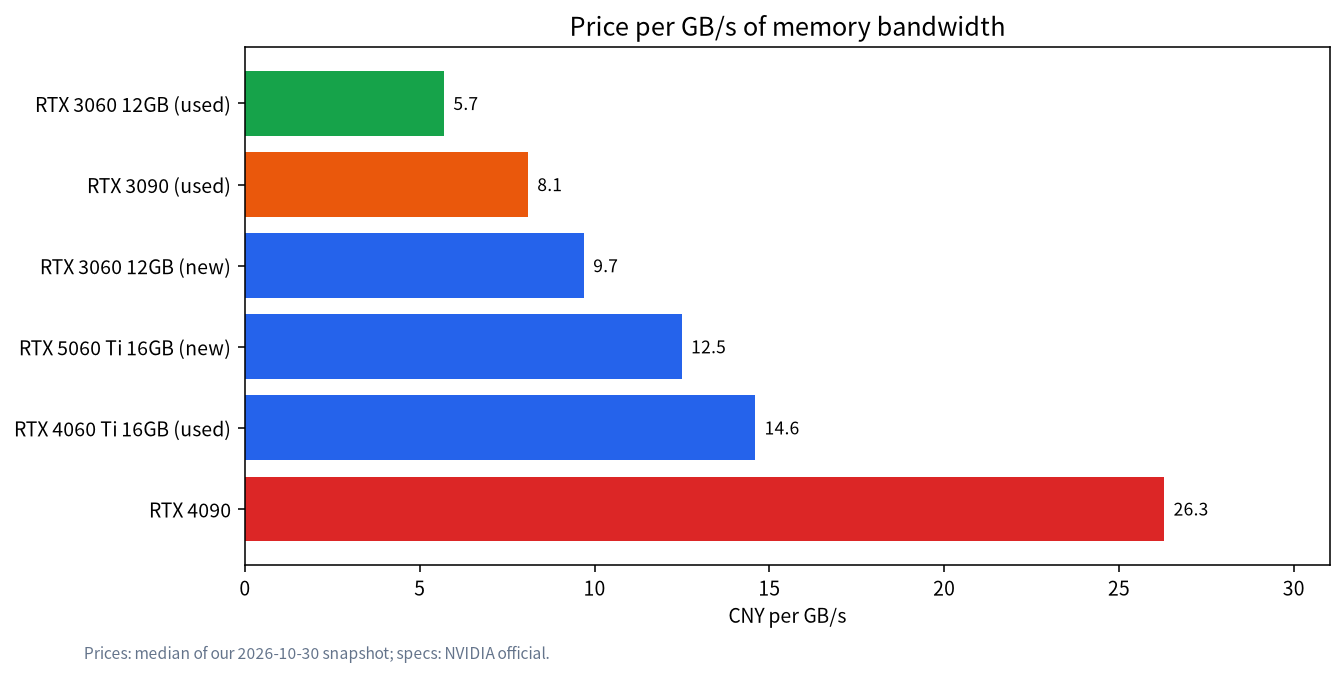
What the two charts say. First, the used 3060 12GB is cheapest per GB of VRAM and per GB/s, at the cost of a 12GB ceiling and an older core. Second, the used 3090 is the value king of the 24GB tier: it has about 2.6 times the 3060’s bandwidth for only about 2.4 CNY more per GB/s, but it draws 350W and needs a 750W-plus power supply and real cooling (see rig power and cooling). Third, the 4060 Ti 16GB has only 288 GB/s, less than the 3060 12GB, so its value is the 16GB capacity, not speed. Fourth, the 4090 costs about 26 CNY per GB/s, three to five times the cheap options; it is a buy for top speed, not for being cheap.
What each VRAM tier can hold: fit first, speed second
VRAM must hold weights, KV cache (which grows with context) and runtime overhead. Weight size ≈ parameters × bits per weight ÷ 8. The llama.cpp quantization docs list about 4.89 bits per weight for Q4_K_M, 5.70 for Q5_K_M, 8.50 for Q8_0 and 6.56 for Q6_K. Our formula results for common combinations:
| Model and quantization | Weights (GB) | Minimum VRAM tier | Notes |
|---|---|---|---|
| 8B Q8_0 | 8.5 | 12GB | Near-unquantized quality with room for KV cache |
| 14B Q4_K_M | 8.6 | 12GB | The workhorse of the 12GB tier |
| 14B Q6_K | 11.5 | 16GB | Does not fit comfortably in 12GB |
| 24B Q4_K_M | 14.7 | 16GB (tight) or 24GB | Only about 1GB left on 16GB; long context will overflow |
| 32B Q4_K_M | 19.6 | 24GB | The sweet spot of the 24GB tier |
| 70B Q4_K_M | 43.1 | Does not fit one card | Needs offload to RAM on 24GB, and speed drops sharply |
A rule of thumb is to reserve at least 1.5 to 2GB for KV cache and overhead, more for long context (see context length and KV cache). So a 14B Q4 is comfortable on 12GB, while a 24B Q4 on 16GB is a stretch. For full calculations use the VRAM calculator guide; for the 8GB tier read 8GB VRAM local LLMs and for the 24GB tier 24GB VRAM local LLMs.
Three realistic cheap routes
Route 1: a used 3060 12GB (about 2000 CNY). A good entry card that handles 8B to 14B at Q4 or Q8. The risk is that second-hand cards may be mining or refurbished units with short warranties. Board power is 170W, which is easy on the power supply and case.
Route 2: a used 3090 24GB (about 6000 to 9000 CNY). 24GB holds a 32B Q4_K_M and bandwidth is high, so it is the realistic best of the not-cheap-but-best-value options. Our snapshot explicitly notes that 3090 listings below about 4000 CNY are mostly mining cards or hidden-fault cards, so do not chase the lowest price. It is big, hot and risky second-hand, so follow the inspection steps in the used GPU buying guide.
Route 3: a new 5060 Ti 16GB (about 5600 CNY, volatile). 448 GB/s is better than the 4060 Ti, it has a warranty and draws 180W. But 2026-10 already saw shortages and rises (quotes above 7000 in our snapshot), so re-check prices; our analysis is in RTX 5060 Ti 16GB for LLMs. For whole-PC budget thinking see the budget entry build.
Can two cheap cards be combined: dual 3060 vs one 3090
“Two 3060 12GB for 24GB” sounds like a bargain: about 4100 CNY (2 × 2050) versus 7550. The capacity does fit a 32B Q4_K_M, but speed needs working out. By default llama.cpp splits the model across GPUs by layer, so each token passes through the cards one after another and their memory bandwidth does not add; roughly, each card reads its own share in turn. The speed ceiling therefore stays near one card’s bandwidth:
- Dual 3060 on 32B Q4_K_M (about 19.6GB): ceiling ≈ 360 ÷ 19.6 ≈ 18.4 tokens/s
- One 3090 on the same model: ceiling ≈ 936.2 ÷ 19.6 ≈ 47.8 tokens/s
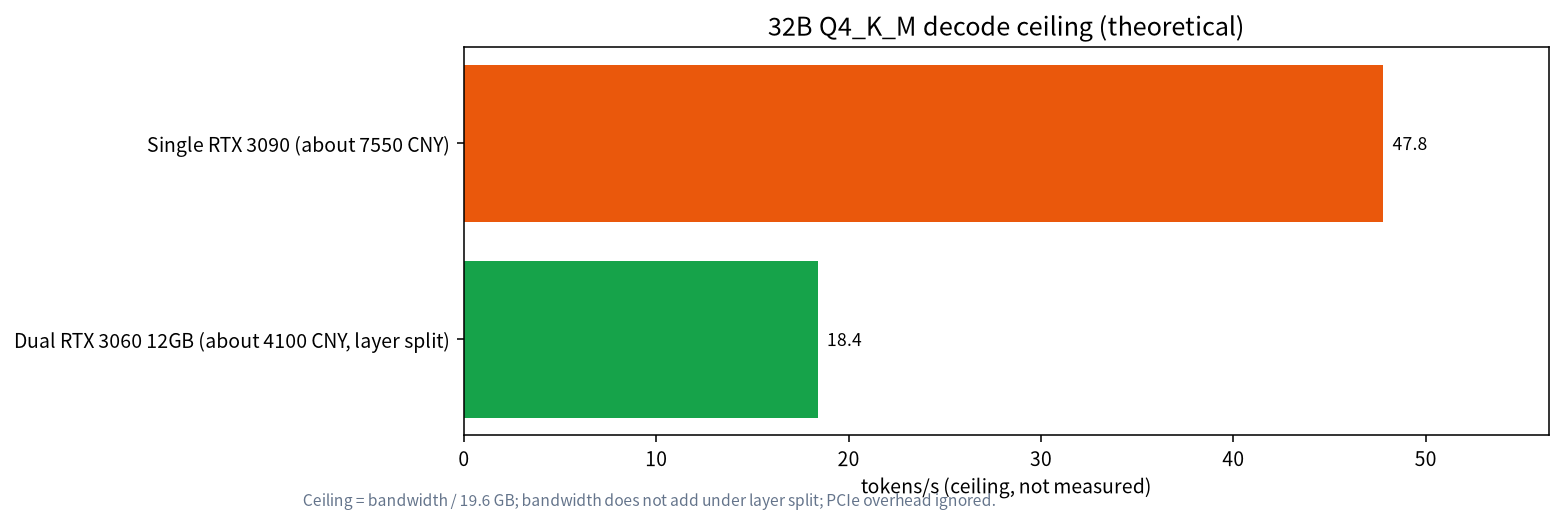
So saving about 3400 CNY buys only about 38% of the speed ceiling, and it uses a second PCIe slot with more power and case pressure (2 × 170W). If you care about fitting more than speed, dual 3060 is a workable route; otherwise a single 3090 makes more sense. These are formula-based ceilings, not measurements, and PCIe communication overhead lowers them further.
Are old data-center cards like the P40 a bargain
The Tesla P40 is often called “cheap 24GB.” NVIDIA’s documents describe a Pascal data-center card with 24GB of GDDR5, 346 GB/s bandwidth and 250W power, passively cooled, needing server airflow or a home-made fan solution, and with no display output. More important is software lifetime: CUDA Toolkit 13.0 removed offline compilation and library support for Maxwell, Pascal and Volta (CUDA 12.x still works, and the R580 driver branch supports those older architectures until about mid-2028). Newer software will optimize less and less for such cards. Our advice: consider it only if you are willing to handle cooling, power and software versions, and accept speed far below newer cards at a similar price. It is not for a first build. We could not get reliable domestic prices for these cards, so we give no price comparison.
Other brands (specs only, no price comparison)
| Card | VRAM | Bandwidth (GB/s) | Watch out for |
|---|---|---|---|
| Intel Arc B580 | 12GB | 456 | Backend maturity varies by tool; check yourself |
| AMD RX 9060 XT 16GB | 16GB | 320 (AMD “up to”) | Some partner cards quote slightly higher; check ROCm/Vulkan support, see AMD GPUs for local LLMs |
| AMD RX 7600 XT 16GB | 16GB | 288 | Same bandwidth as the 4060 Ti 16GB |
These cards have attractive memory specs, but we have no reliable price snapshot or compatibility tests for them, so we draw no “cheap” conclusion. Confirm that the software you plan to use (Ollama, llama.cpp, LM Studio) supports the card’s backend before you buy.
Checklist before buying
- Decide the model and quantization first, add 2GB of headroom to the weights, and pick the VRAM tier.
- Within a VRAM tier, compare bandwidth, not just capacity.
- Used cards: ask for a video check, run a 30-minute stress test, watch memory temperature and refuse mysteriously cheap “3090s.”
- Check your power supply: a 3090 is 350W per card, so 750W or more is advised, and a dual-card build needs enough 8-pin connectors.
- Check prices: 2026-10 was volatile, so compare at least three sources and revisit price timing.
How we checked this, and what we did not do
Prices come from our snapshot file compiled on 2026-10-30, using medians of quotes from several channels (second-hand listings, retailer prices and market reports); some items have a single source, such as VRAMGlass’s 3090 page. Specifications come from NVIDIA and AMD official pages; P40 and CUDA 13 facts come from NVIDIA’s datasheet and technical blog. The per-GB prices and speed ceilings are our own calculations. We did not buy or benchmark these cards, nor did we verify real dual-GPU split speeds.
FAQ
What is the best value GPU for local LLMs?
The best value GPU for local LLMs is often the one with the lowest cost per GB of VRAM, including used-market options. Within a budget, extra VRAM usually beats a small compute bump. Check PSU, cooling, and drivers—see the budget list above.
What is the cheapest GPU for running LLMs?
In our 2026-10-30 price snapshot, the cheapest per GB of VRAM is the used RTX 3060 12GB at about 171 CNY/GB. If you need 24GB, a used 3090 at about 315 CNY/GB is the most realistic choice, with second-hand risk.
3060 12GB or 4060 Ti 16GB?
The 3060 12GB has 360 GB/s against 288 GB/s for the 4060 Ti 16GB, so on small models the 3060 has the higher ceiling. For bigger models (14B Q6, 24B Q4) you need the 16GB.
Do two 3060s act as a 24GB card?
They can hold a model of about 24GB, but with layer splitting the speed ceiling stays near one card’s bandwidth; in our example 32B Q4_K_M reaches about 18 tokens/s, around 38% of a single 3090.
Is a used 3090 worth it?
With a budget above 6000 CNY and the ability to inspect the card, it has the lowest cost per GB of VRAM in the 24GB tier. Our snapshot warns that listings below about 4000 CNY are mostly mining or hidden-fault cards.
Can a P40 24GB run LLMs?
It can hold large models, but it is a passively cooled older data-center architecture, CUDA 13 no longer compiles for Pascal, and newer software will optimize for it less, so it is not for beginners.
I have a small budget. What first?
Try an 8B model on the hardware you already have, then decide. If you buy, consider a used 3060 for the 12GB tier and look at 16GB or a 3090 once you need bigger models.
Want a build matched to your budget?
Join the community or email admin@microaione.com with your budget, target models, case and power supply, and we will lay out a plan with the method in this article.
References: NVIDIA GeForce RTX 30 series (3060 and 3090 specifications), NVIDIA Tesla P40 product brief, NVIDIA: GPU architecture support for CUDA developers, AMD RX 9060 XT specifications, llama.cpp quantization docs. Price snapshot read on 2026-10-30, article checked 2026-11-04.
Further reading: Rent a GPU or buy one: break-even math