GPU Price Timing for Local LLM: Should You Buy Now or Wait?
Every few weeks someone asks whether now is a good time to buy a graphics card for local models, and the honest answer is that nobody can predict next month’s price. What you can do is measure what you are paying for, see how noisy the quotes are, and decide using rules that do not depend on a forecast. This guide to GPU price timing for local LLM use gives you those rules: price per gigabyte of VRAM, the spread between quotes, a four-question checklist, and the situations where waiting really costs more than it saves. All prices are reference prices read on 2026-10-30, not offers, and they will have moved by the time you read this.
Verification note: Prices come from our reference sheet of public quotes (Chinese market medians, with a few US listings), read between 2026-10-09 and 2026-10-30 and rounded. Several rows rest on one or two sources, the RTX PRO 6000 on a single low-confidence source. Per-GB figures are our own division, labelled derived. We do not forecast prices and nothing here is a transaction record.
Key takeaways (Updated 2026-10-30)
- Compare cards by price per GB of VRAM: from our reference medians, a used RTX 3060 12GB is about CNY 171 per GB, a used RTX 3090 about 315, an RTX 4090 about 1,103 and an RTX 5090 about 1,672 (derived).
Quotes for one card vary widely: public reports put the RTX 5060 Ti 16GB between about CNY 5,200 and 7,000 within three weeks, so compare several channels before ordering.
Wait only if you can name what you are waiting for and the cost of waiting is low; otherwise buy the smallest card that fits the models you actually use.
Why Timing Is Hard in 2026
Graphics card prices for AI use move with things you cannot see: memory supply, production decisions, demand from other buyers and import conditions. In the reports we read in October 2026, one financial-news article attributed swings in RTX 5090 quotes to rumours about production being halted and to GDDR7 supply, and another report described the 16GB RTX 5060 Ti as out of stock in places, with prices reported to have roughly doubled from an earlier low. We cannot confirm the causes, and NVIDIA has not, to our knowledge, said anything that settles the rumours, so treat them as context rather than facts. The practical lesson is that single-day prices are noisy, and a number from a forum post last month may be useless today.
Because forecasting is unreliable, our advice is to convert the decision into things you can check: what you need, what fits, and how large the gap is between channels.
Measure Price Per GB of VRAM
For local models, VRAM is the scarce resource, and speed comes second: a card that cannot hold your model is not a bargain at any price. Dividing the price by VRAM gives a quick measure of how much capacity you buy per yuan, as long as you keep the limits in mind: it ignores bandwidth, power draw, warranty and software support.
| Card | Reference price (CNY) | VRAM | Price per GB (derived) | Notes |
|---|---|---|---|---|
| RTX 3060 12GB, used | 2,050 | 12GB | about 171 | Listing median, single source |
| RTX 4060 Ti 16GB, used | 4,200 | 16GB | about 263 | Discontinued, single source |
| RTX 3060 12GB, new | 3,475 | 12GB | about 290 | Two quotes, 2,950 and 4,000 |
| RTX 3090 24GB, used | 7,550 | 24GB | about 315 | Quotes from 6,000 to 9,350 |
| RTX 5060 Ti 16GB, new | 5,599 | 16GB | about 350 | Seven quotes, shortage reported |
| RTX 4090 24GB | 26,465 | 24GB | about 1,103 | Mixed new and used |
| RTX 5090 32GB, new | 53,500 | 32GB | about 1,672 | Six quotes |
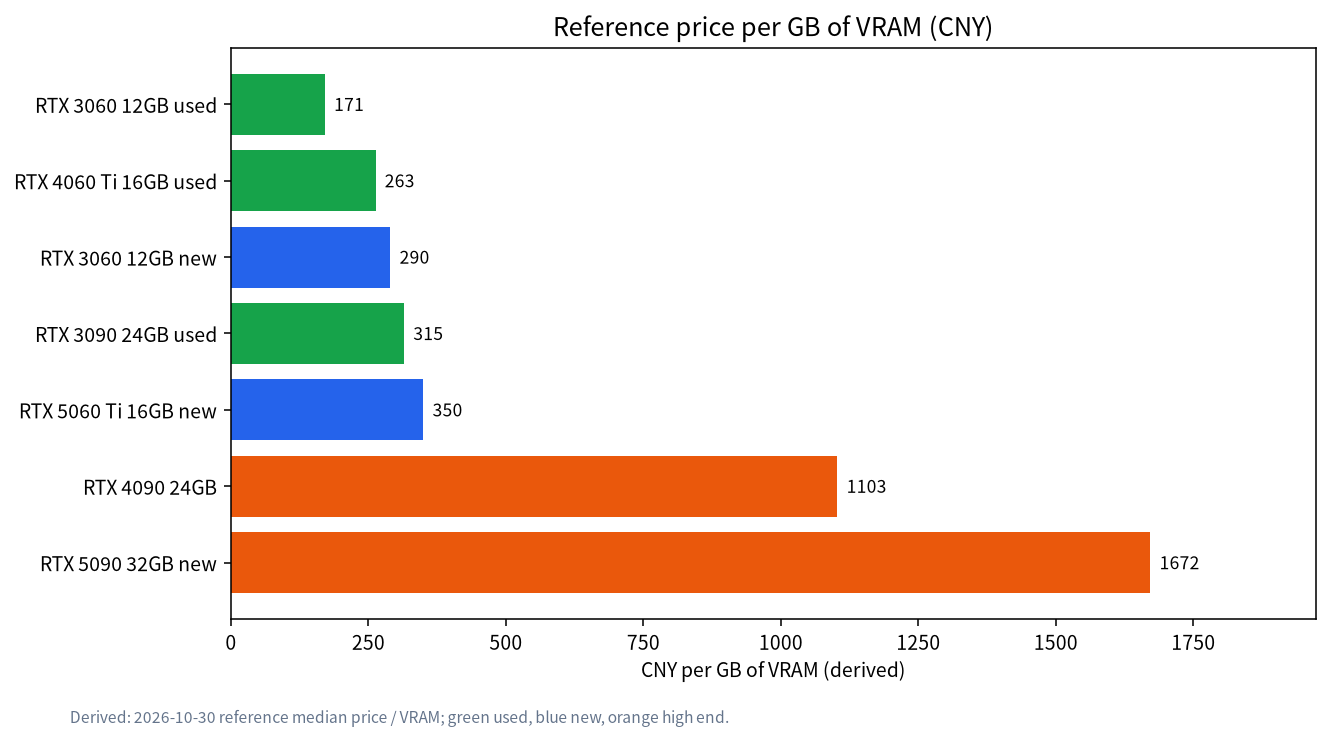
Read the table as a map, not a ranking. The used RTX 3090 offers the cheapest 24GB in our data, which is why our 24GB budget build uses it, but a used card carries risk, as explained in the used GPU buying guide. The RTX 5060 Ti 16GB is the cheapest new 16GB card here, covered in our 5060 Ti guide. The RTX 4090 and RTX 5090 cost much more per GB, and you pay for bandwidth and capacity together; our flagship comparison shows when that is worth it.
Look at the Spread Before You Look at the Average
The second number to check is how far apart the quotes are. If the same card sells for 30 percent more on one channel, the average tells you little, and the decision is really about where to buy and what condition to accept.
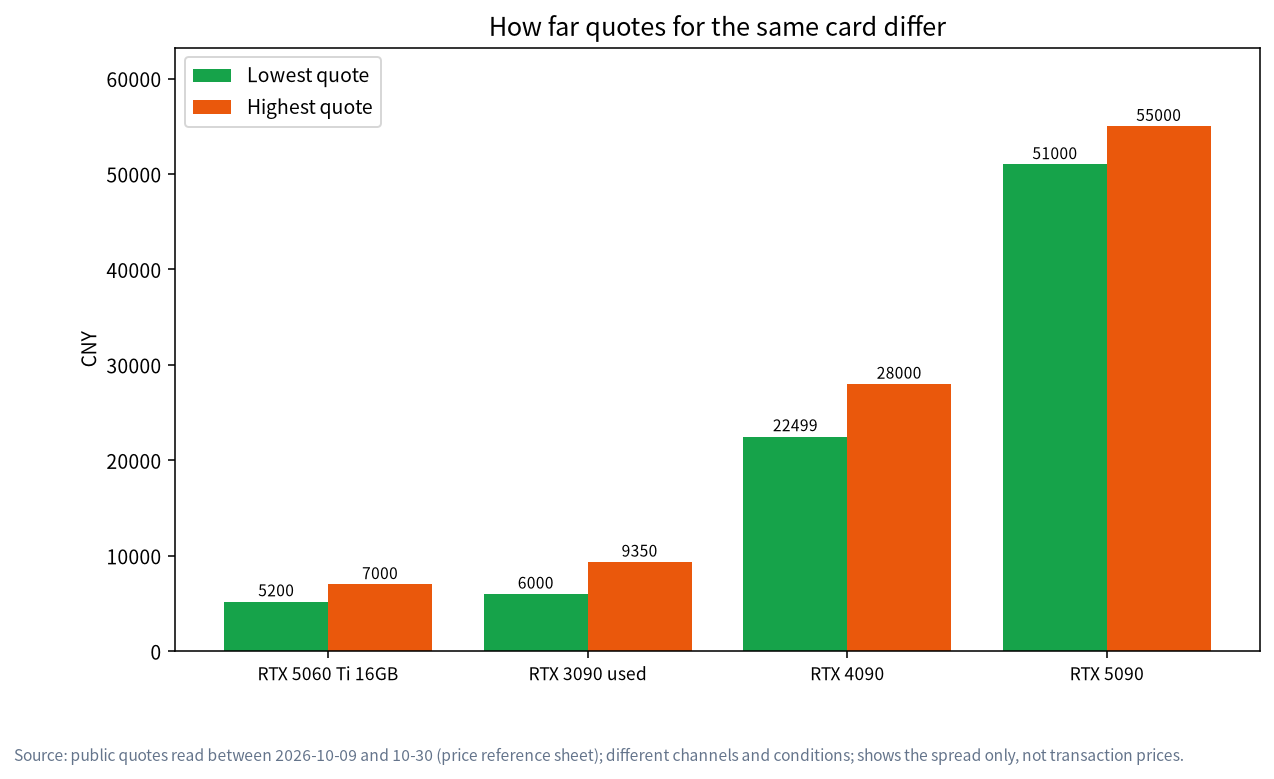
In the quotes we read, the 5060 Ti 16GB ranged from about CNY 5,200 to 7,000, the used 3090 from about 6,000 to 9,350, the 4090 from about 22,499 to 28,000 (new, used and modified cards mixed), and the 5090 from about 51,000 to 55,000. Those gaps come from different channels, different conditions and different dates. Some differences are explained: lower prices for a used card often reflect mining use or hidden faults, and “new” turbo-cooler 4090s may be modified cards, which is why our price sheet carries warnings. Others are only noise.
A useful habit is to check three channels on the same day and write down price, condition, warranty and date. If one quote is far below the rest, ask why before you celebrate.
US and China Markets Differ
If you can buy in more than one market, remember that the ratio between cards is not the same everywhere. The lowest new US listings we saw, shown below next to the Chinese reference medians, give a feel for the difference. Currency conversion, taxes, import duty and warranty terms matter more than the sticker price, and we do not recommend buying across borders to save a few percent. We show these only to remind you that a “good price” in one place can be ordinary in another.
| Card | China reference median (CNY) | Lowest US listing (USD) | Note |
|---|---|---|---|
| RTX 5060 Ti 16GB, new | 5,599 | 618 | Seven Chinese quotes, one US listing |
| RTX 3090 24GB, used | 7,550 | 1,599 | Used market, condition varies |
| RTX 4090 24GB | 26,465 | 2,073 | Chinese quotes mix new and used |
| RTX 5090 32GB, new | 53,500 | 5,654 | Used listing seen at 6,450 in the US |
Do not divide one column by the other and call the result an exchange rate; the numbers describe different channels on different dates. The point is only that cards sit at different positions relative to each other in different markets.
The Card Is Not the Whole Bill
A price-per-GB comparison favours big cards that need big power supplies, so add the parts that come with the card. From the same reference sheet, a 650W power supply is about CNY 350, an 850W about 1,070 and a 1000W about 1,199. Our reference 5090 requires a 1000W system power supply according to NVIDIA’s specification, while the 3090 and 4090 call for 750W and 850W. If your current supply is too small, add its price to the card before comparing. The same goes for case size, cooling and, for used cards, the cost of a repaste or a fan replacement. A cheaper card that forces a new supply and case can end up costing more than a dearer card that fits what you have.
Likewise, think about what the card will run. The model you actually use decides whether you need 12GB, 16GB, 24GB or more, and paying for headroom you never use is a quiet waste. Our model size chooser works backwards from your use case to a memory target, which is a far better anchor than a price chart.
A Simple Worksheet
Write down five numbers before you shop: the VRAM your models need, the maximum price you will pay, the power supply you already have, the cost of any extra parts, and the date by which you need the card. Then collect three quotes per candidate card with condition and warranty. Cross out anything that does not fit the VRAM or the supply. Of what remains, pick the lowest price you trust, not the lowest price you saw. If the answer is above your maximum, the decision is to buy a smaller card or wait, and now you know exactly what you are waiting for.
Four Questions Before You Buy
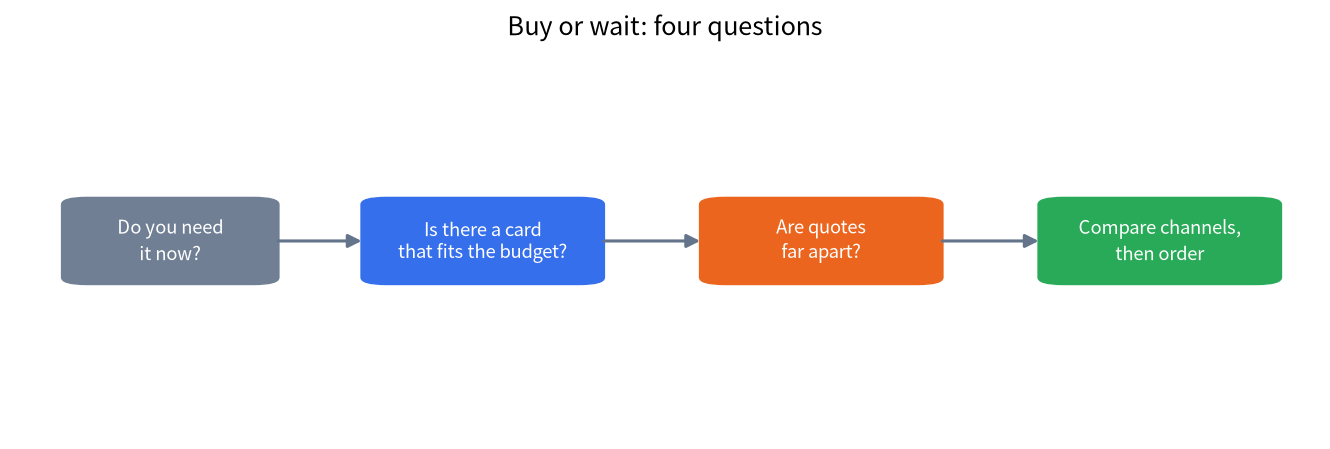
- Do you need it now? If your current setup runs the models you use, waiting costs nothing. If you cannot work without it, the price of waiting is your time.
- Is there a card that fits your budget and your models? Check the size with our VRAM guide and the model size chooser. Buying more VRAM than you need is the most expensive timing mistake.
- Are the quotes far apart? If yes, spend a day comparing channels; if no, you will not gain much by waiting for a better deal.
- Can you accept the risk? Used cards carry wear risk, and new cards in short supply can carry mark-ups. Decide your limit in advance.
When all four answers favour buying, buy. The common failure is waiting for a perfect price while paying for cloud services in the meantime, which may cost more than the difference you hoped to save.
When Waiting Is Reasonable
Waiting makes sense in a few cases. If your current hardware works and you are only curious about an upgrade, there is no cost to delay. If a specific product you want has been announced with a date, you may reasonably want to see its price and reviews first, but only if you can say what you will do if the price is higher than expected. If you are considering a whole system rather than a card, such as the machines in our all-in-one buying guide or mini PC guide, prices change more slowly, but compare per-GB memory cost the same way.
Waiting is a poor choice when the shortage is already visible, when you have a deadline, or when a smaller purchase would solve your actual problem. For many people, a 16GB card is enough, as covered in our 12GB and 16GB guide.
Practical Ways to Reduce Price Risk
You can lower the cost of a wrong guess without predicting anything. Buy from sellers with return policies and keep the receipt, so a bad purchase can be reversed. For used cards, ask for a short test video and run a stress test within the return window. Avoid paying a large deposit to unknown sellers. Keep the power supply and case in mind, since a card that needs a new PSU adds cost, as shown in our PC build configurations. Finally, set a price alert for the one model you actually want, and decide a maximum price before you look, so that a scary headline cannot push you into a rushed purchase.
Common Mistakes
- Judging a card by its price alone. VRAM per yuan is the better first filter.
- Trusting one quote. Compare at least three channels on the same day.
- Buying more VRAM than your models need. It is the costliest mistake.
- Waiting for a rumour. Rumours rarely include a date or a price.
- Ignoring the PSU and case. A big card can add hundreds of yuan of extra parts.
- Mixing new and used prices. They are different products with different risks.
FAQ: GPU Price Timing for Local LLM
Should I wait for new GPUs before buying?
Only if you can name the card, the date and what you will do if the price disappoints. Otherwise buy what fits your models today.
Are used GPUs worth it for local LLM?
Often, because VRAM per yuan is better. The risks are wear and hidden faults, so read our used GPU guide and keep a return option.
Why do quotes for the same card differ so much?
Channels, condition, warranty, taxes and dates differ, and some listings are modified or hidden-fault cards.
Is price per GB of VRAM the right metric?
It is a good first filter, but it ignores bandwidth, power, warranty and software support, so use it with the other checks.
Will prices fall next month?
We cannot know. Our figures are reference prices read on 2026-10-30, and you should recheck on the day you buy.
Is cloud cheaper than buying while I wait?
It can be for light use, see our local versus cloud comparison, but heavy daily use usually favours owning, if you buy a card that fits your models.
Talk With Us
Comparing quotes for a build? Share your list in the community or email admin@microaione.com.
References: NVIDIA GeForce RTX 5060 family, NVIDIA GeForce RTX 5090, NVIDIA GeForce RTX 3090 family.