
How to Install Ollama on Windows, Mac and Linux: From Download to Your First Model
Fact-check note: System requirements, install commands and folder paths were checked on 30 October 2026 against Ollama’s official documentation and the ollama.com download page (latest GitHub release at the time: v0.40.13, published 2026-10-28). We did not reinstall on every OS for this article and did not benchmark speed. Ollama updates often, so screens and defaults may differ slightly; the official docs win.
Ollama is one of the most popular ways to run language models on your own machine: install it, type one command, and it downloads and runs a model while also exposing a local API for other software. This guide shows how to install Ollama on Windows, macOS and Linux, then covers verification, moving the model folder, tuning context length and the first things to check when something misbehaves.
Not sure what hardware or model size to aim for yet? Read How to Run an LLM Locally first.
Check the System Requirements Before You Install Ollama
| OS | Official requirement | GPU notes |
|---|---|---|
| Windows | Windows 10 22H2 or newer (Home or Pro); the installer itself needs about 4GB | NVIDIA driver 551.61 or newer; AMD needs a ROCm v7-capable driver stack or a Vulkan-capable driver |
| macOS | macOS Sonoma (14) or newer | Apple M-series chips get GPU acceleration; Intel Macs are CPU-only |
| Linux | One-line script and manual packages provided | NVIDIA driver 550+; AMD needs ROCm v7 |
Models take extra disk space, from a few GB to tens of GB (Ollama library, read 2026-10-30: qwen3:8b about 5.2GB, gpt-oss:20b about 14GB, llama3.3:70b about 43GB). Make room first. To check whether your GPU is supported, see the official hardware page: NVIDIA cards need compute capability 5.0 or higher.
Install Ollama on Windows
Option 1: the graphical installer (recommended)
- Open ollama.com/download, pick Windows and download
OllamaSetup.exe. - Run it. The docs say no administrator rights are needed and it installs to your user directory by default; to change the location run
OllamaSetup.exe /DIR="d:\some\location"from a command line. - Afterwards Ollama runs in the background with an icon in the system tray. The
ollamacommand works in cmd, PowerShell and other terminals. - The local API address is
http://localhost:11434.
Option 2: one PowerShell command
The download page also offers:
irm https://ollama.com/install.ps1 | iex
Make it a habit to open the script URL and read it before piping anything from the internet into a shell. Run it at your own risk.
Windows notes
- If progress bars render as boxes in the terminal, that’s an old terminal font issue; switch fonts.
- Logs live in
%LOCALAPPDATA%\Ollama.app.logandserver.logare there; checkserver.logfirst when troubleshooting.
Install Ollama on macOS
- On the download page choose macOS and download
Ollama.dmg. - Open the dmg and drag Ollama into Applications (the recommended route).
- On first launch, if the
ollamacommand isn’t on your path, the app asks permission to create a link in/usr/local/bin. Accept. - Open Terminal and
ollamais available.
Models and config go to ~/.ollama by default; logs are in ~/.ollama/logs. For choosing a Mac and planning memory, see Running LLMs on a Mac.
Install Ollama on Linux
The one-line script
curl -fsSL https://ollama.com/install.sh | sh
This is the standard method in the official docs. Again, read the script in a browser before you run it.
Manual install
For people who want control over paths:
curl -fsSL https://ollama.com/download/ollama-linux-amd64.tar.zst | sudo tar x -C /usr
ollama serve
In another terminal, ollama -v printing a version number means the server is up. For AMD GPUs also download ollama-linux-amd64-rocm.tar.zst and extract it to the same place; on ARM64 use ollama-linux-arm64.tar.zst.
Run it as a service
The docs recommend adding Ollama as a startup service for manual installs: create an ollama user and group, write /etc/systemd/system/ollama.service (contents are in the official Linux doc), then:
sudo systemctl daemon-reload
sudo systemctl enable ollama
sudo systemctl start ollama
sudo systemctl status ollama
NVIDIA and AMD drivers
NVIDIA users should run nvidia-smi; if it prints card details the driver is healthy. AMD users need ROCm v7.
Verify the Install and Run Your First Model
These steps are the same on all three systems. First the version:
ollama -v
Then the example model from the official quickstart:
ollama run gemma4:e2b
The docs note this download is about 7.2GB and recommend 8GB of available VRAM or unified memory; if VRAM is short Ollama uses system RAM but answers slow down. On weaker hardware pick a smaller model. On first run Ollama may walk you through setup and offer to sign in for cloud models; for local-only use just choose local models. Type /bye to leave the chat.
To confirm the model is on your GPU, open another terminal and run:
ollama ps
100% GPU in the PROCESSOR column means fully on the GPU, 100% CPU means fully in system RAM, and a mix means partial offload, which hurts speed.
Test the API
The official example:
curl http://localhost:11434/api/chat -H "Content-Type: application/json" -d '{"model": "gemma4:e2b", "messages": [{"role": "user", "content": "Say hello in one sentence."}], "stream": false}'
If it returns text, the local server works. To add a browser interface, see Open WebUI + Ollama.
Which first model should you pick?
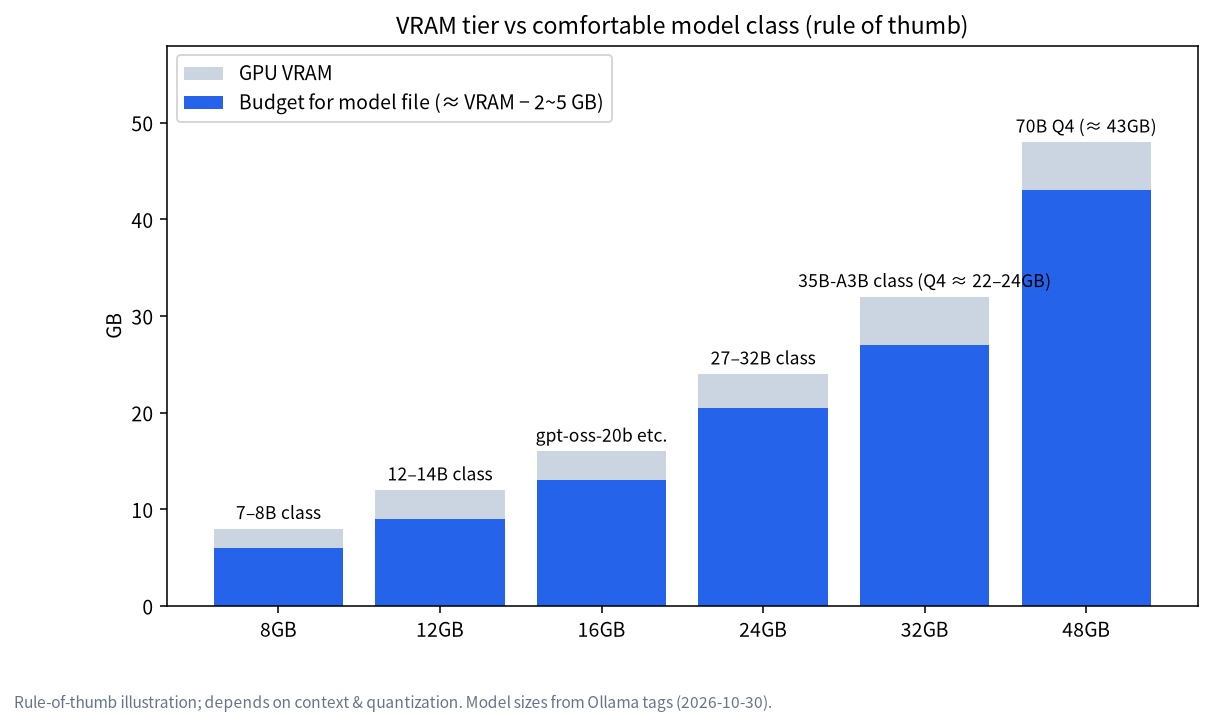
| Available VRAM / memory | Try first | File size (Ollama, 2026-10-30) |
|---|---|---|
| No GPU / under 4GB | qwen3:1.7b or gemma4:e2b |
1.4GB / 4.6GB (q4_K_M tag) |
| 8GB | qwen3:8b |
5.2GB |
| 12GB | qwen3:14b |
9.3GB |
| 16GB | gpt-oss:20b |
14GB |
| 24GB | qwen3.6:27b or qwen3:32b |
17GB / 20GB |
Essential Ollama Commands
| Command | What it does |
|---|---|
ollama run <model> |
Download (if needed) and run a model |
ollama pull <model> |
Download only |
ollama ls |
List downloaded models |
ollama ps |
Show running models and where they loaded |
ollama stop <model> |
Stop and unload a model |
ollama rm <model> |
Delete a model |
ollama serve |
Start the server manually |
By default a model stays in memory for five minutes after its last use. To free it immediately, use ollama stop.
Change Where Ollama Stores Models
Default paths from the official FAQ:
| OS | Default model path |
|---|---|
| macOS | ~/.ollama/models |
| Linux | /usr/share/ollama/.ollama/models |
| Windows | C:\Users\%username%\.ollama\models |
If your C: drive is tight, set the OLLAMA_MODELS environment variable to another folder:
- Windows: quit Ollama from the tray, create
OLLAMA_MODELSin “Edit environment variables for your account”, save, then start Ollama from the Start menu. Existing models don’t move on their own, so copy them. - macOS:
launchctl setenv OLLAMA_MODELS "/your/dir", then restart the Ollama app. - Linux: run
sudo systemctl edit ollama.service, addEnvironment="OLLAMA_MODELS=/your/dir"under[Service], thensystemctl daemon-reloadand restart. The docs stress that with the standard install theollamauser must have read/write access to that directory;sudo chown -R ollama:ollama /your/dirdoes it.
Other Settings Worth Knowing
Slow downloads and proxies
The FAQ says Ollama pulls models over the internet and can use a proxy through the HTTPS_PROXY variable, with the proxy certificate installed as a system certificate. It specifically warns not to set HTTP_PROXY, because model pulls use HTTPS only and setting it can break the connection between the client and the local server.
Let other devices on your network connect
Ollama listens on 127.0.0.1:11434 by default. Set OLLAMA_HOST, for example to 0.0.0.0:11434, to allow LAN access. That exposes the API to everyone on the network, so set up a firewall first and never expose it directly to the public internet.
Context length
This differs from older tutorials. Per the official docs, the default context length now depends on VRAM: 4k under 24GiB, 32k for 24–48GiB, 256k at 48GiB or more. Web search, agents and coding tools should be set to at least 64000 tokens. Use the OLLAMA_CONTEXT_LENGTH environment variable, /set parameter num_ctx 8192 inside a chat, or the slider in the Ollama app settings. More context costs more memory.
Ollama Environment Variables Cheat Sheet
After installation most behaviour tweaks are environment variables. This table is compiled from the official FAQ and hardware docs (read 2026-10-30). How you set a variable differs by OS; use the Windows, macOS and Linux methods from the model-folder section above.
| Variable | What it does | Notes |
|---|---|---|
OLLAMA_HOST |
Listen address | Default 127.0.0.1:11434; 0.0.0.0 exposes it to your LAN |
OLLAMA_MODELS |
Model storage folder | On Linux the ollama user needs read/write access |
OLLAMA_CONTEXT_LENGTH |
Default context length | Default depends on VRAM, see above |
OLLAMA_KEEP_ALIVE |
How long models stay loaded | Default five minutes; the API’s keep_alive parameter overrides it |
OLLAMA_MAX_LOADED_MODELS |
Models loaded at once | Watch VRAM when several are online |
OLLAMA_NUM_PARALLEL |
Parallel requests | More parallelism uses more memory |
OLLAMA_FLASH_ATTENTION |
Force Flash Attention on/off | Auto-enabled where supported; reduces memory at long context |
OLLAMA_KV_CACHE_TYPE |
KV cache quantization | Default f16; needs Flash Attention |
OLLAMA_NO_CLOUD |
Disable cloud features | Set to 1 to stay strictly local |
CUDA_VISIBLE_DEVICES |
Choose which NVIDIA GPUs to use | Comma-separated list |
HTTPS_PROXY |
Proxy for model downloads | Do not set HTTP_PROXY |
Note the old value before you change anything, change one variable at a time, and verify with ollama ps and a quick chat so any problem is easy to trace.
Your First Week With Ollama: A Practical Checklist
Plenty of people stop at “it chats”. This minimal checklist moves you from “works” to “dependable”:
- Settle on one main model. Use one that fits your VRAM for a week before comparing others. Don’t download a dozen; the disk fills up fast.
- Note your context needs. Default is fine for chat. For long documents, agents or coding, raise it deliberately and watch how the size reported by
ollama pschanges. - Make
ollama psa habit. It’s the quickest way to see whether the model is really on the GPU. - Decide about LAN access. If you don’t need it, keep the default localhost-only listener; it is safer.
- Leave room in the model folder. Point
OLLAMA_MODELSat a large drive and prune withollama lsandollama rm. - Add a GUI last. Once the command line is solid, add Open WebUI or LM Studio. When something breaks, you’ll know which layer to blame.
Updating and Uninstalling
- Update: Windows and macOS download updates automatically; click “Restart to update” in the tray or menu-bar icon. On Linux, re-run the install script.
- Uninstall: on Windows use Apps & features (if you changed
OLLAMA_MODELS, the models are not deleted with it). Linux and macOS steps are in the official docs.
Troubleshooting After You Install Ollama
The GPU isn’t used and it’s slow
Check in this order:
- Run
ollama psand read the PROCESSOR column. - On NVIDIA, run
nvidia-smiand confirm the driver meets the requirement. - Read the logs:
%LOCALAPPDATA%\Ollama\server.logon Windows,~/.ollama/logs/server.logon macOS,journalctl -e -u ollamaon Linux. - On Linux laptops that drop to CPU after suspend/resume, the docs describe a driver workaround:
sudo rmmod nvidia_uvm && sudo modprobe nvidia_uvm.
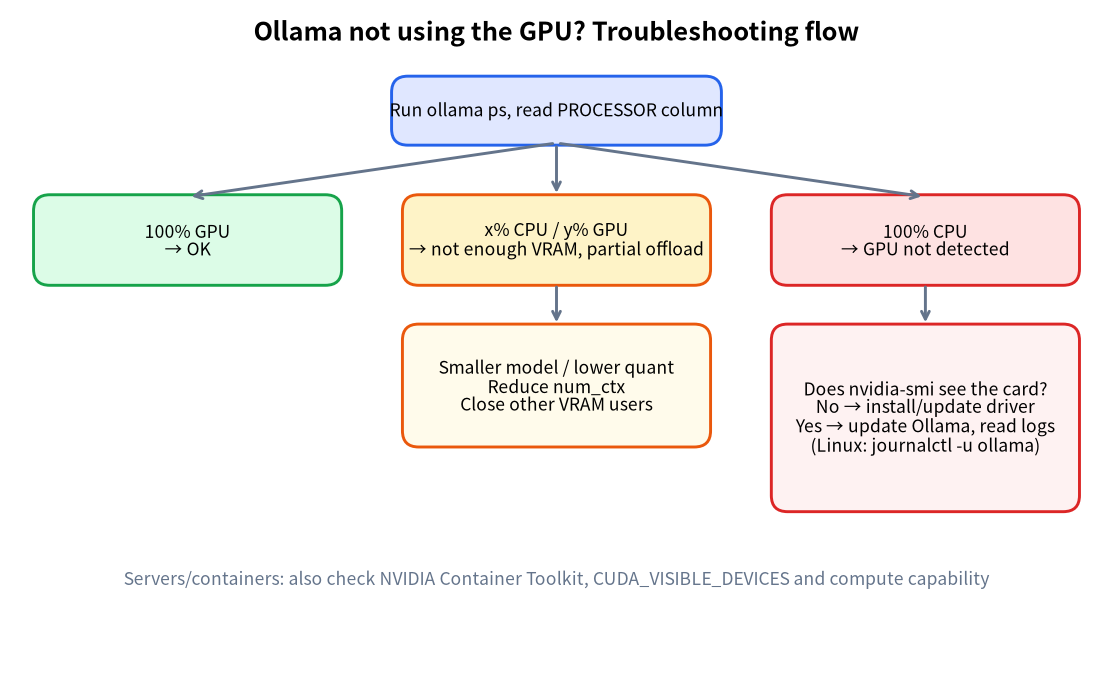
For a fuller checklist see Ollama Troubleshooting: GPU Not Used.
The model doesn’t fit in VRAM
Move down one model size or reduce context length. Best GPU for Local LLMs explains how to size it.
FAQ
Does installing Ollama need internet access?
Installing and downloading models does. After that, local use doesn’t need a network; cloud models and web search do. For fully local use you can disable cloud features per the docs (OLLAMA_NO_CLOUD=1).
Ollama or LM Studio?
Ollama leans towards the command line and an API that other programs can call; LM Studio gives you a graphical app. Both work; see the LM Studio Tutorial.
Is my GPU supported by Ollama?
NVIDIA needs compute capability 5.0+. For AMD, Intel and others, read the official hardware page and verify before you buy.
Does Ollama send my chats to the internet?
The FAQ says that when you run models locally, Ollama does not see your prompts or data; with cloud-hosted models, prompts and responses are processed on its servers.
What next after installing?
Try DeepSeek with Run DeepSeek Locally, or put a web interface in front of Ollama.
What is Ollama’s default context length?
It is no longer a fixed 4096. It depends on VRAM: 4k below 24GiB, 32k for 24–48GiB and 256k from 48GiB, as described under “Context length” above.
Next Steps and Community
If you’re stuck on GPU detection, drivers or downloads after you install Ollama, bring your ollama ps output and logs to our community (join the community). If you’d rather skip the setup entirely, our Shenzhen team can discuss a ready-built machine around your budget: we source, assemble and test, and there’s no obligation.