Dual GPU LLM Build: Two Used RTX 3090s for 48GB, Parts, Power, Cooling and Limits
A single 24GB card runs 32B models comfortably but cannot hold a 70B model. The popular answer in the local-LLM community is to buy two used RTX 3090s and get 48GB of VRAM for much less than a workstation card. This guide covers the dual GPU LLM build in practical terms: what really fits in 48GB, what the motherboard, power supply and case must provide, how llama.cpp and Ollama use two cards, the cost derived from our reference prices, and the cases where one card is the better choice. If you have not yet settled on a single 24GB card, start with our 24GB build and the used-GPU buying guide.
Verification note: llama.cpp split-mode options come from its server documentation; the Ollama multi-GPU behavior comes from its FAQ; the 3090 size, three-slot design, NVLink support and the 750W single-card power-supply recommendation come from NVIDIA’s RTX 3090 page; all checked on 2026-10-30. Prices are median reference prices from our 2026-10-30 survey, not quotes, and the dual-card total is a derived estimate. We did not build or benchmark a dual-3090 machine for this article, so we publish no speed numbers.
Key takeaways (Updated 2026-10-30)
- Two 24GB cards give 48GB, enough for a 70B Q4_K_M file (43.1GB) with a modest context, but not for long contexts without cache quantization.
Splitting layers across cards adds capacity, not speed: one token still passes through the layers in sequence.
A pair roughly adds the price of a second used 3090 plus a better board, power supply and cooling; our derived reference total is about 22,000 yuan before board, case and cooling upgrades.
What 48GB Buys You
The main reason to add a second card is capacity. The llama.cpp documentation lists the Llama 3.1 70B Q4_K_M file at 43.1GB. That does not fit on one 24GB card at all, but it fits across two, leaving about 5GB for the context cache and buffers. Using the KV cache formula from our context-length guide, Llama 3.1 70B needs about 2.5GiB at 8K context in f16, so a 70B Q4_K_M model at 8K fits in roughly 45.6GB before runtime overhead. At 32K the f16 cache grows to 10GiB, which does not fit; with a q8_0 cache it is about 5GiB and the total is about 48.1GB, which is right at the limit and in practice too tight.
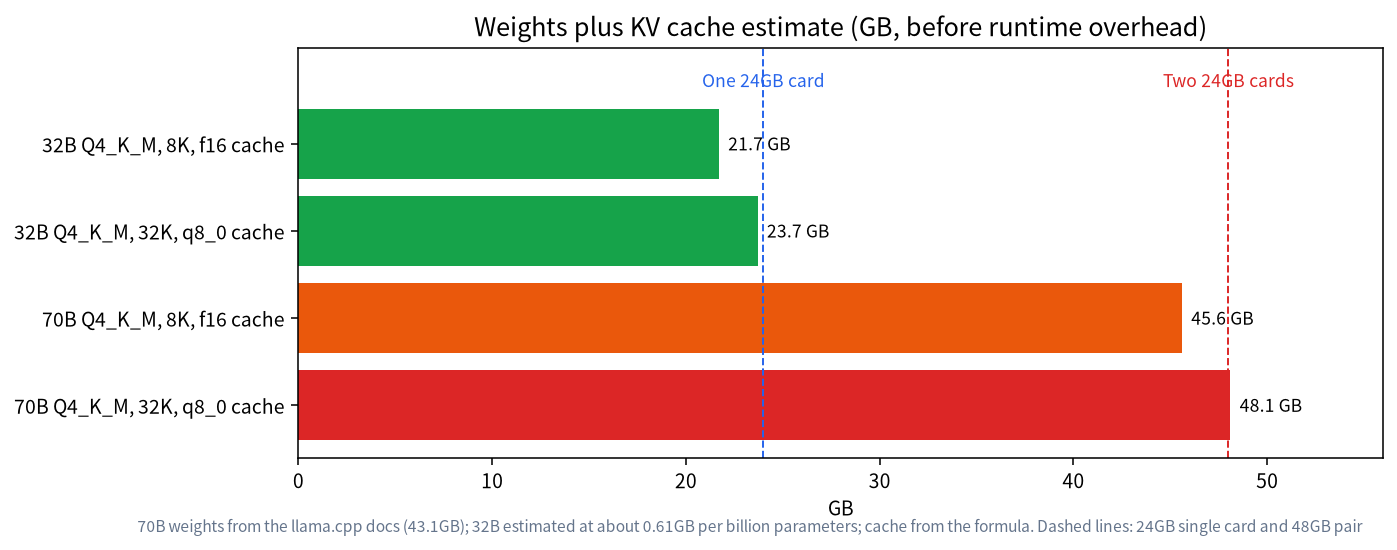
| Model | Weights (Q4_K_M) | Cache and context | Total (estimate) | Fits 24GB | Fits 2 × 24GB |
|---|---|---|---|---|---|
| 32B | about 19.7GB | 2GiB at 8K, f16 | about 21.7GB | Yes, tight | Yes |
| 32B | about 19.7GB | 4GiB at 32K, q8_0 | about 23.7GB | No in practice | Yes |
| 70B | 43.1GB | 2.5GiB at 8K, f16 | about 45.6GB | No | Yes, tight |
| 70B | 43.1GB | 5GiB at 32K, q8_0 | about 48.1GB | No | No in practice |
These are estimates before the runtime’s own buffers and before any desktop use of the first card. Plan a margin of one to two gigabytes per card.
Parts That Matter
Motherboard and PCIe
Most consumer boards have one full-speed x16 slot and the others wired at lower speeds, so check the manual for how lanes are shared when two slots are used; many boards offer x8 and x8, and some drop the second slot to x4 or to chipset lanes. For layer splitting the traffic between cards is modest, and the Ollama FAQ notes that keeping a model on one GPU reduces data moved over the PCI bus, which hints at the cost of splitting. A board whose second slot has fewer lanes will work but may load models more slowly. The more important constraint is physical: a 3090 Founders Edition is three slots thick and 313mm long per NVIDIA, so two of them need slot spacing and a case with room. The cheap B760M board in our single-card reference build is unlikely to suit two such cards; budget for a larger board.
Power Supply
NVIDIA lists 750W as the required power supply for a single 3090 system. A pair needs far more headroom. Reference-design 3090 cards are rated around 350W each, so two cards, a CPU and the rest can approach 1000W at peak. A quality 1000W unit is a minimum and 1200W gives comfortable margin; you can also limit each card’s power with nvidia-smi -pl which lowers heat and noise; test how much speed you give up on your own workload. Our reference table lists a 1000W unit at about 1,199 yuan.
Cooling and Case
Two three-slot cards side by side trap heat. Choose a case with strong front airflow, leave a gap between cards if the board allows it, and monitor temperatures with nvidia-smi. Used cards may have aging thermal paste or pads, so check temperatures right after you buy. NVIDIA lists a maximum GPU temperature of 92 degrees Celsius for the 3090; aim to stay well below that under sustained load.
NVLink: Not Required
The RTX 3090 supports NVLink, and NVIDIA sells a bridge for 30-series cards. For LLM inference with layer splitting it is not required; the cards work over PCIe, and many community builds run without a bridge. NVLink matters more for training and for some tensor-parallel setups. If a seller offers a bridge cheaply it is a bonus, but do not pay a premium for it for chat and coding use.
How Software Uses Two Cards
llama.cpp
The llama.cpp server documentation describes the split mode option: none uses one GPU, layer (the default) splits layers and KV across GPUs in a pipeline, row splits weights by rows, and tensor is described as experimental. The --tensor-split option sets the proportion per card, for example 1,1 for two equal cards or 3,1 for uneven ones, and --main-gpu selects a main card. For most users the default layer mode with an equal split is right.
Ollama
Ollama’s FAQ explains that if a model fits entirely on one GPU it is loaded there, which usually gives the best performance, and if not it is spread across all available GPUs. That means a pair is only used for models that do not fit on one card, which is exactly the 70B case. You do not need to configure the split manually.
What About Speed
Layer splitting runs the layers in sequence, so for a single conversation the second card adds memory, not speed. Memory bandwidth is the limit for generation, as explained in the VRAM guide; each token still reads all weights, and a 70B model reads far more than a 32B one, so expect a 70B model on two cards to be slower per token than a 32B model on one. We publish no measured numbers here; test on your own machine. Two cards can help throughput when serving several users at once if each model fits on one card, since each card can serve its own request.
Derived Cost
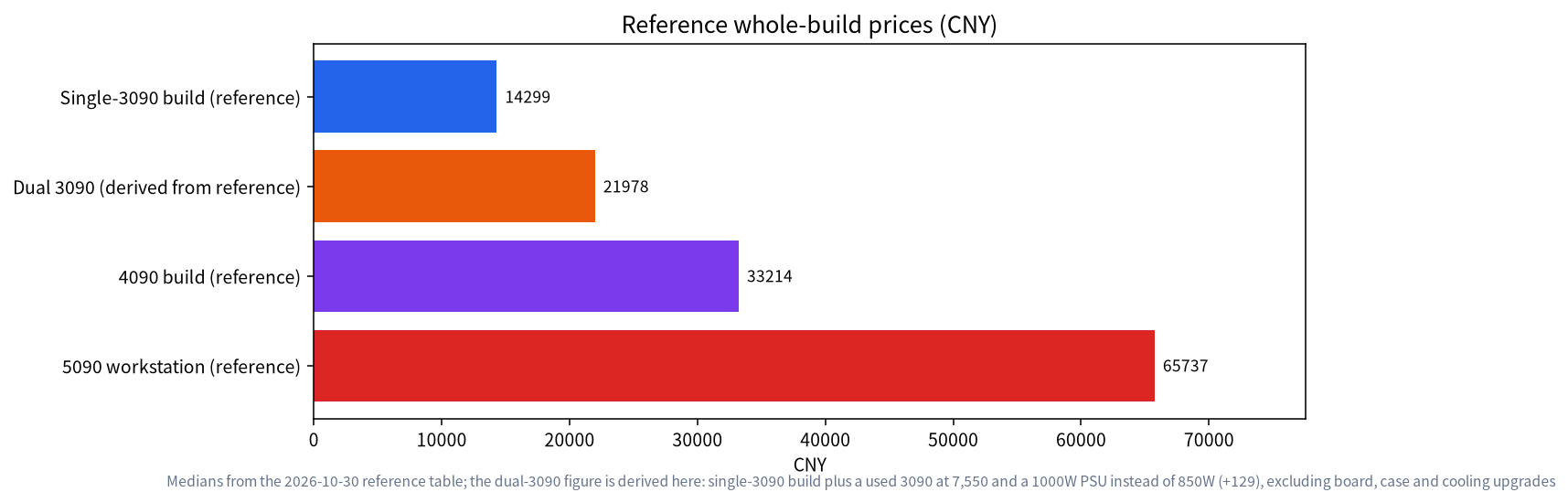
From the reference builds, the single-3090 advanced configuration is 14,299 yuan, including a used 3090 at 7,550 and an 850W power supply at 1,070. Adding a second used 3090 at 7,550 and replacing the power supply with a 1000W unit at 1,199 (an extra 129) gives about 21,978 yuan. That excludes a board with suitable slot spacing, a larger case and extra cooling, which can add substantially, and prices of used cards vary by condition and seller. By comparison, the 4090 reference build is 33,214 yuan and the 5090 workstation is 65,737 yuan. The pair gives more total memory than either, but only the memory, and the bandwidth per card stays at the 3090’s 936 GB/s.
| Option | Memory | Reference price | Strength | Weakness |
|---|---|---|---|---|
| One used 3090 | 24GB | 14,299 yuan whole build | Simple, cheap | No 70B |
| Two used 3090s | 48GB | about 21,978 yuan (derived, before upgrades) | 70B Q4 at modest context | Power, heat, size, used risk |
| One 4090 | 24GB | 33,214 yuan whole build | Faster per card | Same 24GB |
| One 5090 workstation | 32GB | 65,737 yuan whole build | Newest, fastest single card | Cost, still under 48GB |
When One Card Is Better
- You only run models up to 32B: a second card adds cost and noise for nothing.
- You value quiet and low power: one card is easier.
- You are unsure about used hardware: two used cards double the risk.
- You want the best speed per model: a single faster card beats two slower ones when the model fits.
Buying and Setup Checklist
- Confirm the case can hold two three-slot cards, and measure clearance.
- Pick a board whose second slot has enough lanes and spacing.
- Choose a 1000W to 1200W quality power supply with enough power connectors.
- Test each used card separately before installing both.
- Install current drivers and confirm both cards with
nvidia-smi. - Load a 70B model with a small context first, then raise it while watching memory.
Who Should Build It
A pair of used cards suits a specific kind of user: someone who wants to run 70B-class models locally for privacy or cost reasons, is comfortable with used hardware, has a case and a desk that can take a large noisy machine, and does not need the fastest possible speed. Hobbyists who experiment with many models, small teams that want a shared model server, and people who use long documents with a large model are typical examples. If your work is mostly chat and coding with models up to 32B, one 24GB card is simpler and cheaper, and you can revisit a second card later if your needs grow. Many builders start with one card on a board and power supply that can take a second, which spreads the cost and lets you decide after you have seen how you actually use the machine.
Planning for Noise, Heat and Electricity
Two high-power cards produce real heat and fan noise under sustained load, and a pair of used cards may have fans that are less quiet than new ones. Place the machine where noise does not matter, or choose a case with large slow fans and consider limiting card power. Check the electricity use too: a machine drawing several hundred watts for hours each day adds to your bill, and a circuit shared with other appliances should have headroom. Idle power matters if the machine stays on as a server; check how much each card draws at idle on your own unit and decide whether to power it down when not in use. None of this is a reason to avoid the build, but it is part of the real cost that a parts list does not show.
Common Mistakes
- Counting 48GB as one pool without margin: each card needs room for buffers.
- Ignoring the power supply: an undersized unit causes crashes under load.
- Putting cards too close: heat throttling reduces speed and shortens life.
- Expecting double speed: the pair adds memory, not generation speed.
- Skipping the test of used cards: test each one alone before the pair.
FAQ: Dual GPU LLM Build
Can two 24GB cards run a 70B model?
Yes at Q4_K_M, whose file is about 43.1GB according to the llama.cpp documentation, with a modest context. Long contexts need cache quantization and still leave little margin.
Do I need NVLink?
No for inference with layer splitting. The cards communicate over PCIe. NVLink is more useful for training.
Does a second GPU double the speed?
No. Layer splitting adds memory. A single conversation still passes through the layers in order.
What power supply do I need?
NVIDIA lists 750W for one 3090 system. For two, plan on 1000W as a minimum and 1200W for headroom, and consider limiting power with nvidia-smi -pl.
Does Ollama use both cards automatically?
According to its FAQ, a model that fits on one GPU is loaded there, and a model that does not fit is spread across all available GPUs.
Can I mix different GPUs?
llama.cpp allows uneven splits through --tensor-split, but mixed cards are limited by the smaller one and by driver support; test before relying on it.
Share Your Build
If you have built a dual-card machine, we would like to hear what worked. Post in the community or email admin@microaione.com.
References: NVIDIA GeForce RTX 3090 family, llama.cpp server documentation, Ollama FAQ, llama.cpp quantize README.