LLM Context Length VRAM: How the KV Cache Works, Formulas, Worked Examples and Fixes
You download a model whose file is 5GB, you have a 12GB card, and everything works, until you raise the context length and the model suddenly slows to a crawl or crashes with an out-of-memory error. The missing piece is the KV cache. This guide explains how LLM context length VRAM use works: what the KV cache is, the formula to compute it, worked examples for models from 7B to 70B, how cache quantization saves memory, what Ollama’s defaults are, and how to fix problems. You will be able to estimate memory before you download anything. If you want the weight side of the story first, read the VRAM calculator guide.
Verification note: the model parameters (layers, attention heads, key-value heads, hidden size) come from the public config.json files of Qwen2.5 and Llama 3.1 models on Hugging Face, and the sizes are computed by us with the formula shown, in GiB, for an f16 cache. The statements on Ollama’s default context by VRAM size, on OLLAMA_CONTEXT_LENGTH, OLLAMA_KV_CACHE_TYPE and flash attention come from Ollama’s documentation, checked on 2026-10-30. We did not measure real memory use, and runtimes add overhead on top of these figures.
Key takeaways (Updated 2026-10-30)
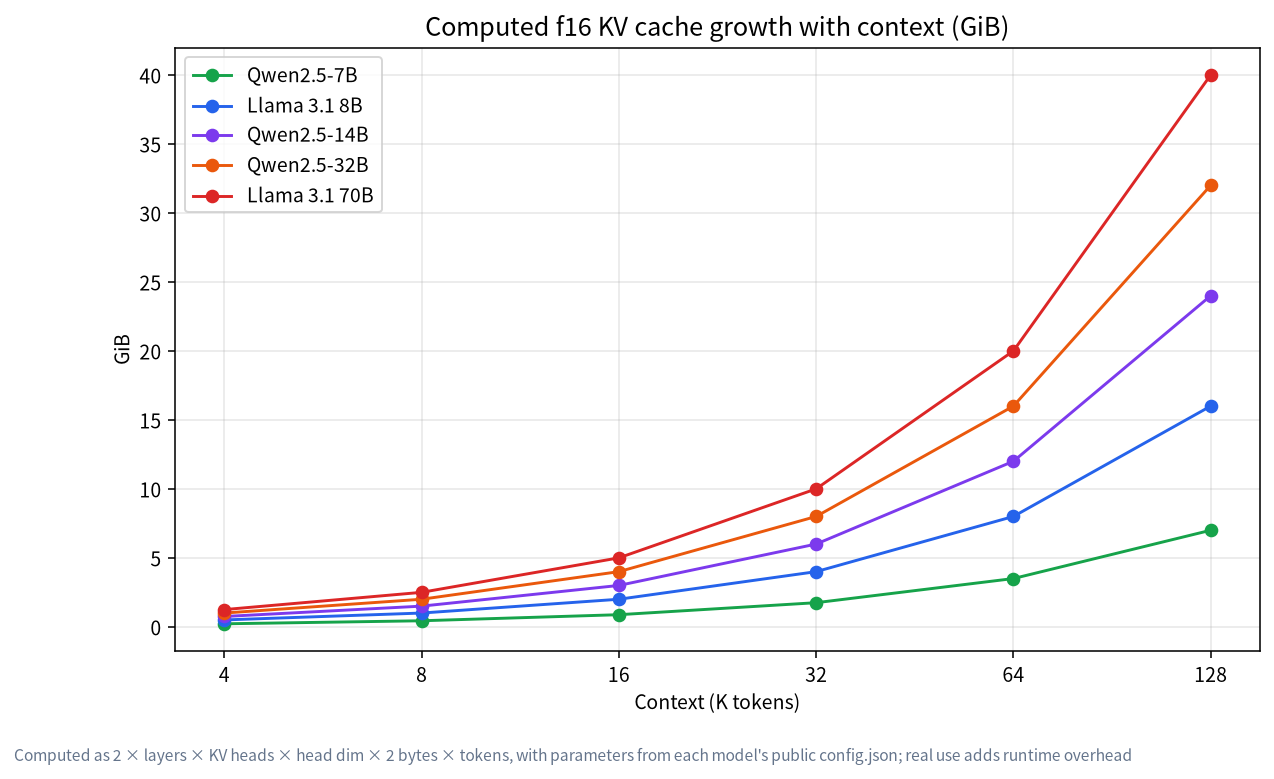
- The KV cache grows linearly with context: for Llama 3.1 8B in f16 it is 128KiB per token, which is 4GiB at 32K and 16GiB at 128K.
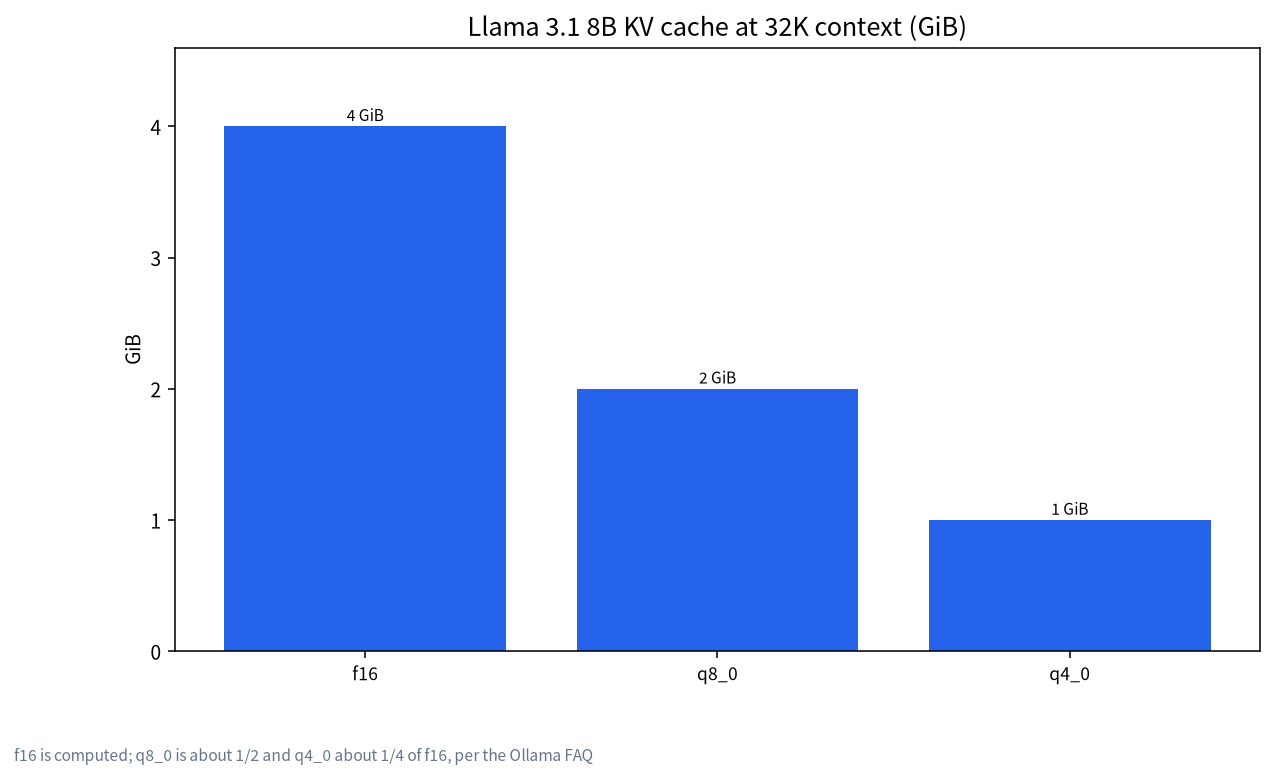
Weights are fixed, but the cache is a choice: a smaller context or a quantized cache (q8_0 about half, q4_0 about a quarter) can be the difference between fitting and spilling to the CPU.
Ollama’s default context depends on VRAM: 4K below 24GiB, 32K from 24GiB to 48GiB, and 256K from 48GiB; set it deliberately for coding and agent work.
What the KV Cache Is
A transformer model generating text must look back at every earlier token. To avoid recomputing the same keys and values for those tokens at every step, it stores them in a cache, the KV cache. The cache holds, for each layer and each earlier token, one key vector and one value vector for each key-value head. The longer the conversation or document, the more tokens the cache holds, so its size grows in direct proportion to the context length. Unlike the weights, which are a fixed file, the cache is allocated for the context you ask for, and it normally lives in the same fast memory as the weights.
The Formula
For a model with L layers, H_kv key-value heads and head dimension D, using f16 (2 bytes) numbers:
KV bytes per token = 2 (key and value) × L × H_kv × D × 2 bytes
Multiply by the number of tokens in your context to get the cache size. The head dimension is usually the hidden size divided by the number of attention heads. Modern models use grouped-query attention, in which H_kv is much smaller than the number of attention heads; that is why the cache is smaller than older models of the same size would need.
| Model | Layers | KV heads | Head dim | KV per token (f16) | 8K | 32K | 128K |
|---|---|---|---|---|---|---|---|
| Qwen2.5-7B | 28 | 4 | 128 | 56KiB | 0.44GiB | 1.75GiB | 7GiB |
| Llama 3.1 8B | 32 | 8 | 128 | 128KiB | 1GiB | 4GiB | 16GiB |
| Qwen2.5-14B | 48 | 8 | 128 | 192KiB | 1.5GiB | 6GiB | 24GiB |
| Qwen2.5-32B | 64 | 8 | 128 | 256KiB | 2GiB | 8GiB | 32GiB |
| Llama 3.1 70B | 80 | 8 | 128 | 320KiB | 2.5GiB | 10GiB | 40GiB |
The Qwen2.5 models in this table were published with a 32K native context, so their 128K column is shown only to illustrate the formula; check each model’s documented limit. Llama 3.1 models list 131,072 positions.
LLM Context Length VRAM Worked Example: Will It Fit?
Take Llama 3.1 8B with a Q4_K_M file of about 4.9GB, which the llama.cpp documentation lists, and a 32K context. The f16 cache is 4GiB, so the weights and cache together are about 8.9GB before the runtime’s own buffers and the display. That fits on a 12GB card with a little room. At 128K the cache alone is 16GiB, so the total exceeds 20GB and the same model no longer fits a 16GB card without cache quantization or a shorter context.
Now take a 32B model. Using about 0.61GB per billion parameters for Q4_K_M, the file is near 19.7GB, and the Qwen2.5-32B cache at 8K is 2GiB, giving roughly 21.7GB. That is tight but possible on a 24GB card; at 32K the cache is 8GiB and the total is about 27.7GB, which no longer fits. These sums explain the common experience that a model that loads fine at 4K context fails at 32K. For hardware choices, see the 24GB guide and the 12GB and 16GB guide.
Shrinking the Cache: Quantization and Flash Attention
Ollama’s documentation says the K/V cache can be quantized to reduce memory when Flash Attention is enabled. The environment variable OLLAMA_KV_CACHE_TYPE sets it globally for all models. The default is f16. Type q8_0 uses about half the memory with a very small loss in precision and is recommended if you do not use f16, and q4_0 uses about a quarter with a small to medium loss that may be more noticeable at higher context sizes. The documentation also notes that models with a high GQA count, such as Qwen2, may see a larger impact from cache quantization.
| Cache type | Memory vs f16 | Quality note | When to use |
|---|---|---|---|
| f16 | 1x | Highest precision | You have room |
| q8_0 | about 1/2 | Very small loss | The first thing to try when tight |
| q4_0 | about 1/4 | Small to medium loss, more visible at long context | Last resort for very long context |
Ollama Defaults and Settings
Ollama’s context length page says the default depends on your VRAM: below 24GiB the default is 4K, from 24GiB to 48GiB it is 32K, and at 48GiB or more it is 256K. It also notes that tasks requiring large context, such as web search, agents and coding tools, should be set to at least 64,000 tokens. You can change the default with the OLLAMA_CONTEXT_LENGTH environment variable, with /set parameter num_ctx inside ollama run, or with the num_ctx parameter in the API. The FAQ also warns that parallel requests multiply memory: required memory scales with the number of parallel requests times the context length, so a 2K context with 4 parallel requests becomes an 8K context in memory.
Diagnosing a Spill to the CPU
When the weights plus cache exceed VRAM, part of the model runs on the CPU, and speed drops sharply. Run ollama ps and read the processor column: a model entirely on the GPU shows 100% GPU, while a split shows percentages. If you see a split after raising the context, reduce the context, quantize the cache, choose a smaller model or a smaller quantization, or reduce parallel requests. Our guide on Ollama and the GPU lists more checks, and the coding assistant guide shows why coding tools are heavy users of context.
How Much Context Do You Actually Need
Many tasks need far less than the maximum a model advertises. A casual chat rarely exceeds a few thousand tokens. Summarizing a long document needs the document plus the answer, perhaps 8K to 32K for a long article. Retrieval systems send only the retrieved passages, so 8K is often enough, as described in our knowledge-base guides. Agents and coding assistants that read many files need more, but they can often work with chunks. Choose the smallest context that fits your task and raise it only when needed. A longer context also slows prompt processing, because more tokens must be processed before the first word appears.
A Short Planning Recipe
- Find the model’s file size and its layers, KV heads and head dimension.
- Choose the context length you really need.
- Compute the f16 cache with the formula, then halve it if you will use q8_0.
- Add the file size, the cache and about one to two gigabytes for buffers and the desktop.
- Compare with your VRAM; if it is over, reduce context first, then try a cache type, then a smaller model.
- Verify with
ollama psafter loading.
Why the Cache Matters More Than People Expect
When people compare models they quote parameter counts and file sizes, so it is natural to think memory use is decided at download time. In reality the memory you need is the weights plus a cache whose size you choose every time you load the model. That choice is the lever you control. Two people with the same 16GB card and the same model can have very different experiences, one at 4K context with everything on the GPU and fast, the other at 64K with part of the model on the CPU and slow. Neither is wrong; they asked the machine for different things. The practical lesson is to treat context length as a budget. Decide how much memory the weights take, subtract that and a safety margin from your VRAM, and the remainder is what you can spend on context. Spending it wisely, with a cache type that suits your quality needs, is what lets a modest card handle surprisingly long documents.
Common Mistakes
- Counting only the file size: the cache is extra and can be several gigabytes.
- Raising context to the model’s maximum: a 128K setting can need tens of gigabytes.
- Forgetting parallel requests: they multiply the context memory.
- Quantizing the cache without checking quality: test on your own prompts, especially at long context.
- Ignoring defaults: tools differ, and some use larger contexts than others.
- Mixing GB and GiB: file sizes are often in GB and cache sums here are in GiB; leave a margin.
Multi-Model and Multi-User Notes
If you run several models at once or serve several users, remember that every loaded model and every parallel request has its own cache. Ollama’s FAQ describes a maximum number of loaded models and a parallel request setting, and it states that required memory scales with the number of parallel requests multiplied by the context length. For a shared server, plan memory for the worst case rather than the average, or limit parallelism. It is better for a request to queue for a few seconds than for the whole server to spill to the CPU and become slow for everyone.
FAQ: LLM Context Length and VRAM
What is the KV cache?
A store of the key and value vectors of every earlier token, kept so the model does not recompute them for every new token. Its size grows linearly with context length.
How do I calculate KV cache size?
Multiply 2 × layers × KV heads × head dimension × bytes per number × number of tokens. For f16, bytes per number is 2.
How much VRAM does 32K context need?
It depends on the model. In f16 it is about 1.75GiB for Qwen2.5-7B, 4GiB for Llama 3.1 8B, 8GiB for Qwen2.5-32B and 10GiB for Llama 3.1 70B, on top of the weights.
Does a quantized KV cache hurt quality?
Ollama’s documentation says q8_0 usually has no noticeable impact and q4_0 has a small to medium loss that may be more noticeable at higher context sizes. Test on your own work.
What is Ollama’s default context?
According to its documentation, 4K below 24GiB of VRAM, 32K from 24GiB to 48GiB, and 256K from 48GiB, changeable with OLLAMA_CONTEXT_LENGTH.
Why does my model slow down when I raise the context?
The cache grows and may push part of the model to the CPU. Check ollama ps, then reduce context, quantize the cache or use a smaller model.
Share Your Numbers
If your measured memory differs from these estimates, we would like to know. Post your model, context and GPU in the community or email admin@microaione.com.
References: Ollama context length, Ollama FAQ (KV cache type, parallel requests), Qwen2.5-32B-Instruct config, llama.cpp quantize README.