Mini PC for Large LLMs: Ryzen AI Max+ 395, DGX Spark and Mac with 128GB of Unified Memory
A discrete graphics card tops out at 24GB or 32GB of VRAM, so to run a 70B or 120B model you need several cards or an expensive workstation card. In 2026 there is another route: a mini PC for large LLMs. These machines put the CPU and GPU on one big pool of unified memory, so 128GB can be used directly by the graphics side, and a box the size of a book can hold a quantized model of around 100B parameters. It is not a cure-all, though: fitting is not the same as running fast. This article explains memory, bandwidth, reference prices and trade-offs for three families of device: Ryzen AI Max+ 395, DGX Spark and Mac. If unified memory is new to you, start with running local LLMs on a Mac, and for VRAM basics see how much VRAM is enough.
Verification note: Specifications come from official NVIDIA and AMD pages and AMD’s ROCm technical blog (read 2026-10-30). Prices come from our reference price table and are median reference prices from 2026-10-30, not quotes. Speed figures come from third-party articles that we did not reproduce on our own machines, and are used only to show orders of magnitude. How much unified memory the GPU can actually use depends on BIOS, operating system and software, so check your own device.
Key takeaways (Updated 2026-10-30)
- 128GB of unified memory fits a quantized 70B model (about 43GB), but at about 256 GB/s a dense 70B tops out near 6 tokens per second.
Sparse (MoE) large models suit these machines best.
128GB-tier reference prices: Ryzen AI Max+ 395 about 24566 yuan, DGX Spark about 42500, Mac Studio M5 Max about 41749.
Mini PC for Large LLMs: Capacity Is Plentiful, Bandwidth Is Not
Start with the principle, because it makes every later choice easier. To generate each token, a model has to read its weights (or the active part of them) from memory, so generation speed is capped at roughly memory bandwidth divided by the data read per token. A discrete card has very high memory bandwidth, while unified-memory machines have far less.
Take the Ryzen AI Max+ 395. It uses 256-bit LPDDR5X-8000 memory, up to 128GB, with a theoretical bandwidth of about 256 GB/s. AMD says that through its variable graphics memory feature up to 96GB can be given to the graphics side, and that 4-bit models of up to about 128 billion parameters can run. In one community test we read, the measured usable GPU memory bandwidth was about 215 GB/s.
Use that bandwidth to estimate. A 70B dense model at Q4_K_M is about 43GB (from the Llama 3.1 70B figures in the official llama.cpp quantize docs). Every token needs those 43GB read, so the theoretical ceiling is about 256 ÷ 43, or roughly 6 tokens per second. That matches the order of magnitude of about 6 tok/s in third-party write-ups. Sparse mixture-of-experts (MoE) models activate only a small part of their parameters per token, so they are much faster: third-party tests put gpt-oss-120b generation at roughly 35 to 55 tokens per second, depending on whether the Vulkan or ROCm backend is used, and Qwen3-30B-A3B at about 78 tokens per second on Vulkan. These numbers come from third-party articles and show scale only; your own speed will vary with software version and settings.
The takeaway: big unified-memory machines suit sparse (MoE) large models best, and suit 70B dense models poorly. We cover MoE in a later article.
Three Families Compared
| Aspect | Ryzen AI Max+ 395 mini PC | NVIDIA DGX Spark | Mac Studio / Mac mini (M5 series) |
|---|---|---|---|
| Memory | Up to 128GB unified, up to 96GB assignable to graphics | 64GB or 128GB unified | 24GB to 128GB depending on model |
| Official positioning | AI PC / mini workstation | Desktop AI development, up to 1 petaFLOP at FP4, inference on models up to 200 billion parameters per NVIDIA | General-purpose computer, supported by both MLX and llama.cpp |
| Reference price (CNY, median) | about 24566 (128GB) | about 42500 (128GB) | about 41749 (Mac Studio M5 Max 128GB), about 24249 (Mac mini M5 Pro 64GB) |
| OS and ecosystem | Windows or Linux, Vulkan/ROCm | NVIDIA Linux, CUDA ecosystem | macOS, Metal and MLX |
| Best for | The lowest price for 128GB of capacity | CUDA development, fine-tuning, parity with server environments | Quiet, stable, low-fuss use |
Reference prices come from our 2026-10-30 table, each built from one to four quotes, and differ by channel and configuration. The US store price of the DGX Spark has gone out of stock and been raised twice, so check live prices.
What Each GB of Memory Costs
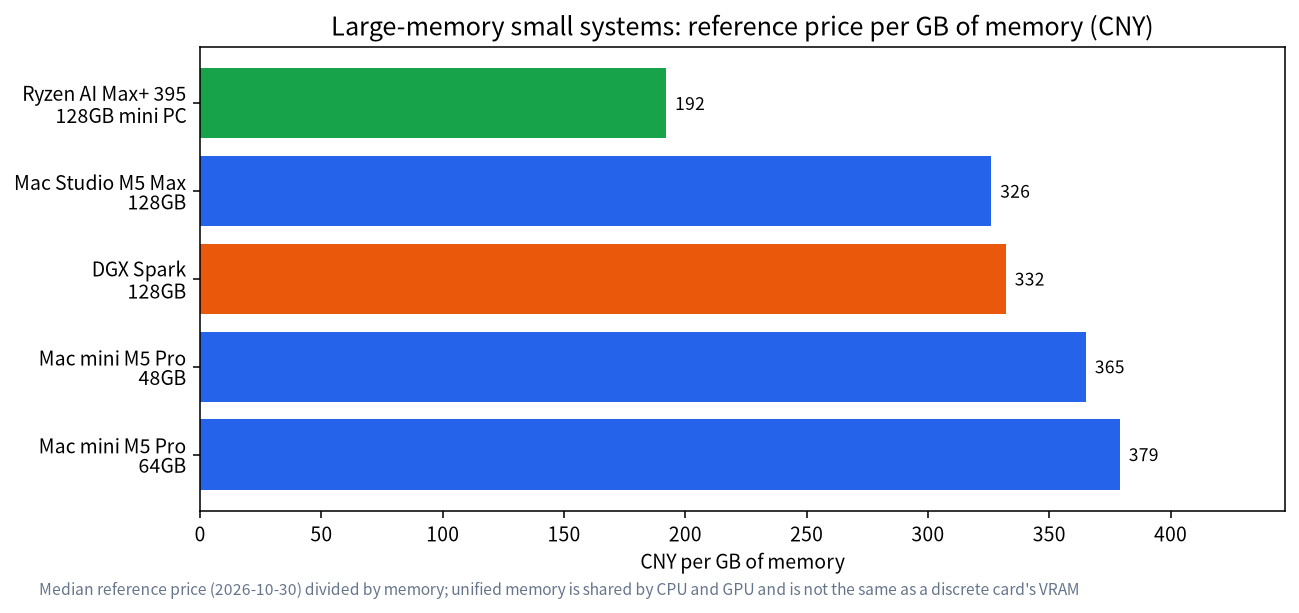
At reference prices, the 128GB Ryzen AI Max+ 395 mini PC works out to about 192 yuan per GB, against about 332 for the DGX Spark, about 326 for the Mac Studio M5 Max 128GB and about 379 for the Mac mini M5 Pro 64GB. The chart shows the Ryzen mini PC has the lowest price per GB of capacity, at the cost of a software ecosystem that needs more tinkering, and its bandwidth is not better than the other two. Note that “per GB” for unified memory and “per GB” for a discrete card’s VRAM are not the same thing, because bandwidth differs enormously, so do not compare them directly. For per-GB card pricing see our guide to used GPUs for local LLMs.
How to Choose: Start From Model Size
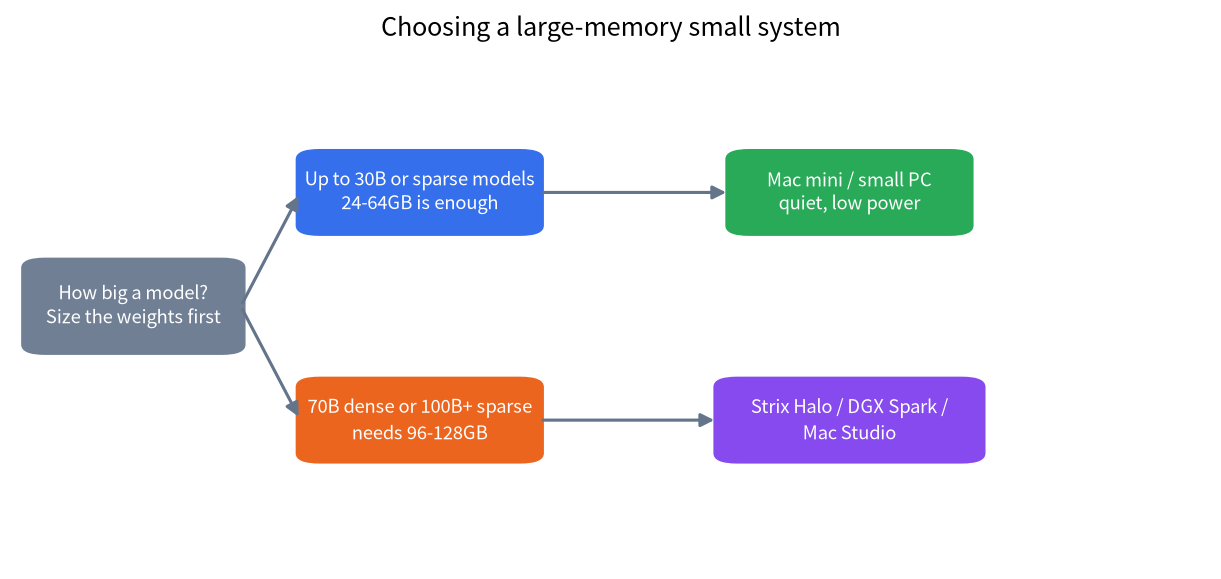
- Size the model first. Use the VRAM calculator guide to estimate weights plus context. A 30B-class model at 4 bits needs only a few tens of GB, so 24–64GB is enough.
- Only 70B dense or 100B+ sparse models need 96–128GB.
- Set speed expectations. Large dense models on unified memory give a few tokens a second, which suits offline batch work or conversation where real time does not matter. Sparse models feel far better.
- Match your habits. If you want Windows or gaming, pick Ryzen. If you want CUDA and fine-tuning, pick DGX Spark. If you want quiet and low fuss, pick a Mac.
Which Models Fit: Checking Against Official Numbers
The table below uses the Q4_K_M file sizes for the Llama 3.1 family from the official llama.cpp quantize docs (the original 16-bit weights are 32.1GB, 280.9GB and 1625.1GB), and compares two memory tiers. It counts weights only. It does not include the KV cache for context or the memory the operating system itself uses, so real headroom is smaller than the table suggests.
| Model | Approx. Q4_K_M size | 64GB unified memory | 128GB unified memory | Note |
|---|---|---|---|---|
| Llama 3.1 8B | 4.9GB | Fits easily | Fits easily | Speed mostly depends on bandwidth, usually smooth |
| Llama 3.1 70B | 43.1GB | Fits, but little headroom | Fits with ample headroom | Dense model, clearly limited by bandwidth |
| Llama 3.1 405B | 249.1GB | Does not fit | Does not fit | Needs multiple machines or server-class hardware |
The table helps you judge quickly whether something will fit. The 64GB tier suits a single quantized model from 30B to 70B, and the 128GB tier suits a 70B model with a long context, or two models loaded at once. For a giant such as 405B, a mini PC is the wrong tool. Q4_K_M is only a common compromise; see our guide to Q4_K_M quantization for the trade-offs, and our best local LLM guide for choosing the model itself.
Practical Points in Daily Use
- BIOS and memory split: Ryzen mini PCs need the share of memory given to graphics set in the BIOS or driver. AMD’s documentation says up to 96GB can be dedicated, but follow your vendor’s BIOS.
- Software backend: third-party tests generally find Vulkan faster for short-context generation, and ROCm better for long-context prefill and stability. Versions change fast, so try both.
- Long context: unified memory is large, but the KV cache still takes memory, and longer context means slower speed. See context length and KV cache.
- Cooling and noise: fans in a small case can be loud under full load, so think about where it sits.
- Support and firmware: drivers and firmware on a new platform change often, so look at the vendor’s update history before you buy.
A Short Worked Example
Say you want to run a roughly 120B sparse model locally for a small office and also keep a 30B model loaded for quick questions. The weights of the large model at 4 bits come to a few tens of GB, the smaller model needs a few more, and you want headroom for the KV cache at a long context. A 128GB machine covers that with room to spare, while a 64GB machine would be tight. If instead you only ever run a 14B model, a 64GB mini PC is already more than you need, and a 16GB graphics card in a normal desktop would be cheaper and faster. Writing the model list down before shopping is the cheapest way to avoid paying for memory you will never use.
A Checklist Before You Buy
- List the models you want to run, look up their 4-bit file sizes, and add the cache needed for your context length.
- Check whether the memory is soldered and whether it can be upgraded; on these machines it usually cannot be expanded later.
- Confirm the maximum memory that can be assigned to graphics, and whether it has to be set manually in the BIOS.
- Look up how well the software you plan to use (Ollama, llama.cpp, LM Studio) supports the platform, and any known issues.
- Confirm the warranty, the firmware update channel and the cooling design, especially if the machine will run at full load for long periods.
When Not to Buy One
- Your main model is a 70B dense model and you want more than ten tokens a second. A multi-card 24GB setup fits better; see the 24GB VRAM guide.
- Your budget is limited and you only want 8B to 14B models. A 12GB or 16GB card is cheaper; for whole-PC options see our PC build configurations.
- You are a team that needs heavy concurrent serving. Look at server hardware, not a mini PC.
FAQ: Mini PCs and Unified Memory
Is 128GB of unified memory the same as 128GB of VRAM?
No. Unified memory is shared by CPU and GPU, and how much the GPU may use is limited by BIOS and OS; AMD says up to 96GB can be dedicated, for example. Its bandwidth is also far below a high-end discrete card.
Can a mini PC run a 70B model?
It fits: a 70B model at Q4 is about 43GB. But at about 256 GB/s a dense 70B has a theoretical ceiling of roughly 6 tokens per second, so it is better suited to sparse models.
Ryzen AI Max+ 395 or DGX Spark?
For the lowest price per unit of capacity and a Windows or Linux desktop, pick Ryzen. For the CUDA ecosystem, fine-tuning, or parity with server environments, pick DGX Spark. In reference prices that is about 24566 yuan against about 42500 yuan.
Is a mini PC good as a home AI server?
Yes. It has low power draw, a small footprint and manageable noise, and Ollama or llama.cpp can expose an API from it. Installation is covered in the Ollama install guide.
How much slower is unified memory than a discrete GPU?
It varies a lot, but unified-memory bandwidth is typically an order of magnitude below a high-end card, so the same model generates much slower. Dividing bandwidth by model size gives a rough estimate.
Will prices keep rising?
Memory prices rose noticeably in 2026, and the DGX Spark’s US list price in our table was raised twice. We do not forecast prices; decide by need and check again before you pay.
Need Help Choosing?
If you want to know whether your model will fit a particular mini PC, or want us to help with selection and delivery, join the community or email admin@microaione.com with your model size and budget. For the basics, read how to run an LLM locally.
References and further reading: NVIDIA: DGX Spark, AMD: Ryzen AI Max+ 395, llama.cpp: quantize docs.