Local LLM Installation Service: How Remote Setup Works, What to Ask, and How to Stay Safe
Plenty of people buy a graphics card or a small PC and then get stuck on drivers, environment variables, model downloads and interface settings, so they look for help. A local LLM installation service usually means someone sets up the runtime on your machine, remotely or on site, makes it work and hands it over. This is a generic guide: what such a service normally includes, what the remote workflow looks like, what to watch when you let someone operate your computer, how to accept the result, and when doing it yourself is the better option. We do not recommend or review any specific provider, and we give no service prices because we have no verifiable market quotes. If you would rather try it yourself first, read the local LLM deployment guide.
Verification note: the statements that Ollama listens only on the local machine at port 11434 by default, that OLLAMA_HOST changes the bind address, and that OLLAMA_NO_CLOUD=1 disables cloud features come from the official Ollama FAQ. The workflow, checklists and decision rules are our own general advice, not an industry standard. There are no prices and no customer cases in this article.
Key takeaways (Updated 2026-10-30)
- A good service writes down its scope before it starts, runs an acceptance test at the end, and removes all remote access when it finishes.
The biggest risk in remote help is access: use a temporary account, share nothing unnecessary, stay present, and delete the access afterward.
If you only need Ollama and one model, following a tutorial is usually faster; multi-machine, permission and company cases are where outside help pays off.
When You Actually Need a Local LLM Installation Service
Start with the need. The comparison below helps you choose between doing it yourself and getting help.
| Situation | Suggestion | Why |
|---|---|---|
| One computer, Ollama and one model | Do it yourself | Few steps and good tutorials, see the Ollama install guide |
| GPU not detected or speed is oddly slow | Self-diagnose first | Mostly driver or VRAM problems, see Ollama not using the GPU |
| Several machines, several users, permissions | Get help or a team | Gateways, authentication and audit are involved, see enterprise private LLM deployment |
| Bought an all-in-one and do not know how to use it | Ask after-sales first | Agree on after-sales when you buy, see the all-in-one buying guide |
| No time and no wish to learn | Get help | Time has value, but mind security |
The Five Steps of a Remote Installation Service
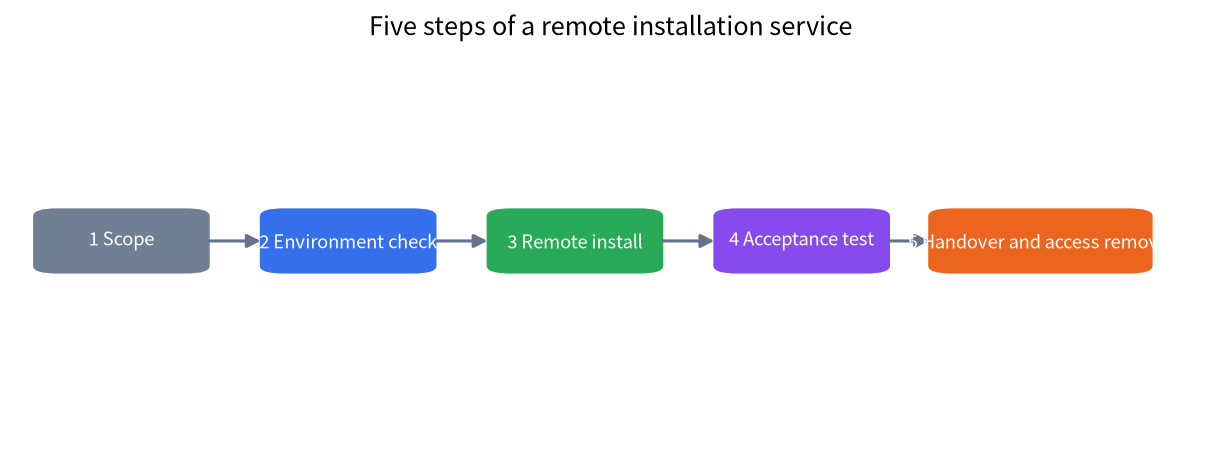
A professional service normally follows the order below, and you can use it to judge whether the other side is competent.
- Scoping: learn your hardware, operating system, purpose and budget, and agree which models to install and what result to expect.
- Environment check: confirm the GPU model, VRAM, drivers and system version, and decide what can run; see the VRAM guide.
- Remote install: install software, download models and configure the interface while you watch.
- Acceptance test: test with agreed prompts and confirm that the model runs on the GPU with acceptable speed and stability.
- Handover and access removal: you receive written notes and the remote access and temporary accounts are removed.
The scope can be captured in a single table; the more specific the deliverables, the better.
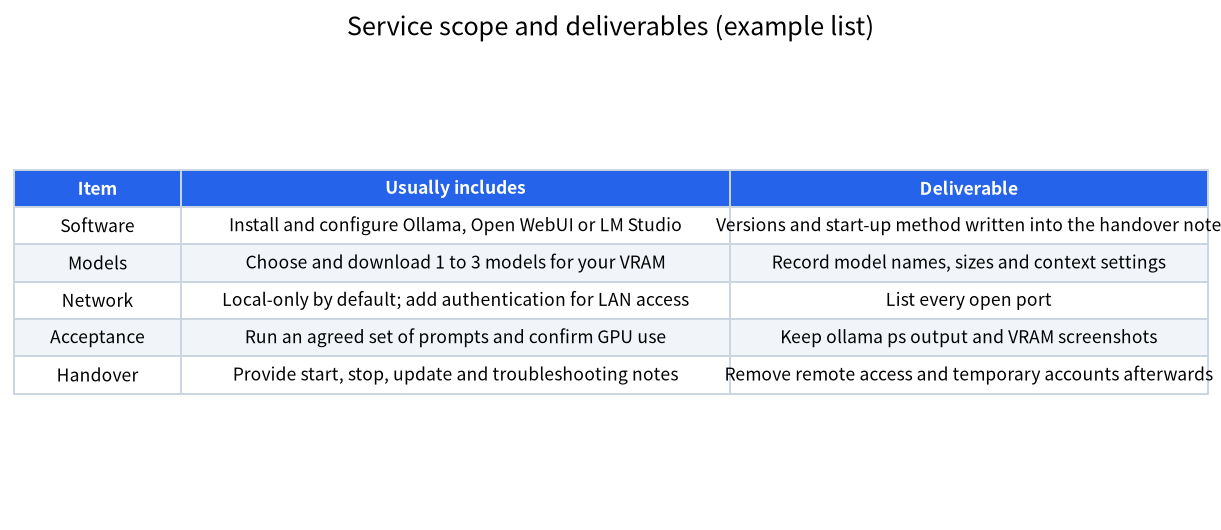
How to Write the Scope and Deliverables
| Item | What to state clearly | Typical disagreement |
|---|---|---|
| Software | Which programs and which versions | Only one is installed while you expected the full set |
| Models | Which models and how large | Downloads are big and need your network and disk |
| Network access | Local only, or reachable on the LAN | A port is opened for convenience without authentication |
| Acceptance criteria | Which prompts and what speed count as a pass | No standard, dispute afterward |
| After-sales | Who responds, how fast, and whether it is paid | “Lifetime support” is not written down |
| Data | Whether the provider will touch your files | A private document is opened by accident during the session |
The last row is critical. During remote help, screen access can let the other person see anything on your desktop. Close or move private files first, use a temporary system account created only for the installation, and stay present throughout.
Safety Points for Remote Installation
Letting someone operate your computer carries more risk than people expect. Useful protections include:
- Use a temporary account: create a system account only for the installation with just enough rights, and delete it afterward.
- Stay present: do not allow work while you are not watching.
- Open only necessary ports: Ollama listens only on the local machine at port 11434 by default, which is a safe default. For LAN use, go through an authenticated reverse proxy and confirm that nothing is exposed to the public internet. The official documentation explains that OLLAMA_HOST changes the bind address, but decide who may connect before you change it.
- Disable cloud features you do not want: if you want fully local operation, set OLLAMA_NO_CLOUD=1 as described in the official documentation.
- Revoke at the end: delete the remote tool’s authorization, the temporary account and any port rules you no longer need, and change any password typed during the session.
- Do not hand over unnecessary credentials: installing a model never needs your bank, email or company accounts.
Acceptance Checklist
Before handover, go through the checks below with the provider and keep the results.
| Check | How | Pass standard |
|---|---|---|
| Model answers normally | Ask 3 to 5 agreed prompts | Normal answers, no errors |
| Runs on the GPU | Look at the processor column of ollama ps | Mostly GPU |
| Still works after reboot | Restart and start again | The service recovers automatically or manually |
| Network scope matches the agreement | Check the bind address and firewall | Nothing exposed to the internet by accident |
| Documentation is complete | Read the handover notes | Start, stop, update and troubleshooting steps exist |
| Access was revoked | Check the remote tool and accounts | Temporary account deleted |
A Simple Test for Doing It Yourself
If you are willing to spend a few hours, doing it yourself is usually better value, and you will understand the system better, which makes later problems easier to handle. Give yourself a simple test: if you can install Ollama and run one model within an hour by following a tutorial, most personal needs do not require a service. If you are stuck for more than half a day on drivers, permissions or networking, consider help, and ideally describe your situation in the community first, because a small hint sometimes solves it.
What a Provider Should Never Ask For
Some requests are red flags regardless of how friendly the provider seems. A model installation does not need your online banking, your email password, your company VPN credentials or your cloud account keys. It does not need permanent administrator access that stays in place after the job, and it does not need you to disable your security software permanently. If a step truly requires a temporary change, such as allowing a driver to install, ask why, note when it will be reversed, and check afterward that it was. It is also reasonable to ask the provider to explain each major step in plain language as they go. A competent installer can do this easily, because the work is a short list of well-known actions: install a driver, install a runtime, download a model, test, and clean up. Someone who cannot explain what they are doing, or who gets impatient when you ask, is a reason to pause the session.
Three Typical Scenarios
A single gaming PC. You have an NVIDIA card with 12GB or 16GB of VRAM and want a local chat assistant. A provider checks the driver version, installs Ollama, pulls a model that fits your VRAM, and installs a web interface if you want one. The acceptance test is two or three prompts and a look at ollama ps. This job is small, which is also why many people do it alone.
A small office with one shared machine. Several colleagues should reach the model from their own computers. Here the network step matters most: the service must decide how people connect, put authentication in front, and make sure the port is not open to the internet. This is the point where outside help starts to be more valuable, and where a written scope prevents surprises.
A pre-built all-in-one machine. The hardware arrives configured, and the remaining job is to connect your documents and users. Ask the seller what is already installed, what is customizable, and how updates are delivered, before paying for extra services.
Questions to Ask Before You Contact a Provider
- Can the scope and deliverables be written down?
- How will remote access work, and can it use a temporary account?
- What is the acceptance standard and who confirms it?
- How are problems handled and how quickly?
- Does the price include later updates, and are there extra fees?
- Will they touch my data, and how is it protected?
- Can I run and update the system myself afterward?
Common Traps
- Unclear scope: a verbal promise that “everything will be installed”, but only one program is.
- No acceptance: the installer leaves and later you find the CPU has been doing all the work.
- Backdoors left behind: remote tools and accounts are not cleaned up.
- Public ports: the inference port is exposed to the internet for convenience.
- A black box: after the provider leaves you cannot update or debug, which is why you require handover notes.
- Ignoring hardware limits: a service cannot create VRAM, and model choice is still bounded by your hardware.
How to Think About Price
We have no verifiable market quotes, so we do not give any price range. A good approach is to get written quotes from two or three providers, ask each to list what is included, and compare not just price but scope, acceptance, after-sales and security measures. Be careful with unusually cheap quotes, because what gets cut is often acceptance and support. Also remember that a service fee is separate from the hardware budget; see the GPU guide for hardware.
After Handover: Keep the System Healthy
A service ends, but the machine keeps running. Ask for the exact commands to start, stop and update the software, and write down which models are installed and where they are stored. Check for updates on a schedule you can keep, for example once a month, and always read the release notes before upgrading because defaults sometimes change. Keep a copy of the configuration, and if you added a web interface, remember that its accounts and passwords are your responsibility now. If you ever need to move the models to a different disk, the environment variable that controls the model directory is documented in the official Ollama documentation. A system you understand is a system you can fix, and that is the real goal of any installation service.
FAQ: Local LLM Installation Service
What does a local LLM installation service usually include?
Usually an environment check, software installation, model download, interface configuration, an acceptance test and handover notes. The exact scope must be written down before it starts.
Is remote installation safe?
It can be reasonably safe depending on how it is done: a temporary account, you present throughout, only necessary ports open, and access revoked afterward. If the other side asks for credentials unrelated to the installation, refuse.
Can I install it myself?
For most personal cases, yes. If you can run Ollama within an hour by following a tutorial, you do not need a service. Consider help for complex cases.
How much does a service cost?
We have no verifiable market quotes, so we give no price. Ask providers for written quotes and compare scope and after-sales.
How do I confirm the model runs on the GPU?
After running a model, execute ollama ps and check whether the processor column shows mostly GPU. You can also check VRAM use in the task manager or with nvidia-smi.
What should I do after the service finishes?
Keep the handover notes, change any passwords used during the session, confirm remote access is revoked, and learn the basics of starting, stopping and updating.
Want to Try It Yourself First?
If you hit a problem, describe your GPU, system and error in the community or email admin@microaione.com. Many problems can be located in a few lines, and you may not need a paid service at all.
References and further reading: Ollama official FAQ (network exposure, environment variables, cloud features), OWASP Top 10 for LLM Applications.