What Is GGUF? Getting Started with llama.cpp: Download, Run and Quantize
Almost everyone new to local LLMs runs into the .gguf extension sooner or later: Hugging Face is full of repositories called “something-GGUF”, and Ollama and LM Studio both read it under the hood. So what is GGUF? In short, it is the single-file model format used by the llama.cpp project, which packs the weights, the tokenizer and the metadata into one file you can download and run directly. This article covers three things: what is actually inside a GGUF, how to install and run llama.cpp, and how much file size changes between quantization levels. By the end you will know how to read the row of Q4, Q5 and Q8 files in a model repository. If quantization is new to you, read it alongside our guide to Q4_K_M quantization.
Verification note: the definition of GGUF and the commands come from the official llama.cpp docs site (llama.app) and Hugging Face’s documentation. File sizes and bits per weight come from the official quantize README in the llama.cpp repository (all read 2026-10-30). The README’s speed numbers do not say which hardware they were measured on, so we quote sizes only, not speeds. The project moves fast, so check flags against the version you installed.
Key takeaways (Updated 2026-10-30)
- GGUF is the single-file model format used by llama.cpp, holding weights and metadata together.
Q4_K_M is the common compromise: about 4.58 GiB for Llama 3.1 8B against about 14.96 GiB at F16.
Most people download a ready-made GGUF and use llama-cli to chat or llama-server for an API.
What Is GGUF: One File That Holds a Whole Model
According to the llama.cpp introduction, llama.cpp runs models stored in the GGUF format, a single file that bundles everything needed to run: model weights, tokenizer and metadata. Thousands of ready-to-use GGUF models sit on Hugging Face.
Compared with the scattered formats common elsewhere, a single file has practical advantages:
- Easy to move: copy one file to another computer and it works, which suits offline and intranet setups.
- Self-describing: layer count, context length, vocabulary and more live in the file header, so the runtime does not hunt for extra config files.
- Made for quantization: one model can be published as several quantized versions, each its own GGUF file, so you download the one that fits your VRAM.
| Aspect | GGUF | Original safetensors weights |
|---|---|---|
| File shape | One .gguf file with tokenizer and metadata |
Several shards plus config and tokenizer files |
| Main use | Local inference in llama.cpp, Ollama, LM Studio | Training, fine-tuning, inference with Transformers |
| Often quantized | Common; one repo, many quantizations | Usually BF16/FP16 at full precision |
| Runs locally as is | Yes | Most local tools need a conversion first |
How GGUF Relates to llama.cpp, Ollama and LM Studio
People often treat these as competitors, but they sit at different layers. llama.cpp is the inference engine that reads GGUF and does the maths. Ollama and LM Studio build download management, model libraries, chat interfaces and APIs on top. For Ollama setup see our Ollama install guide, and for a graphical option see the LM Studio tutorial.
Using llama.cpp directly gives you more transparency, more tunable parameters and faster access to new features, at the cost of a few more commands. A dedicated comparison article later in this series helps you choose between the three.
llama.cpp Tutorial, Part One: Installing
Hugging Face’s documentation gives two common routes:
# macOS / Linux
brew install llama.cpp
# Windows
winget install llama.cpp
Or build from source. To let an NVIDIA card do the work you enable CUDA at build time:
git clone https://github.com/ggerganov/llama.cpp
cd llama.cpp
cmake -B build -DGGML_CUDA=ON    # drop the option if you have no NVIDIA GPU
cmake --build build --config Release
AMD ROCm, Intel SYCL and other back ends use different build options, so see the project’s build guide. Prebuilt binaries and Docker images are also available if you would rather not compile.
First Run: Download a Model with -hf
Hugging Face’s docs explain that if you give a repository name and a quantization tag, llama.cpp downloads the model and caches it, with the cache location set by the LLAMA_CACHE environment variable:
llama-cli -hf bartowski/Llama-3.2-3B-Instruct-GGUF:Q8_0
If you already have a .gguf file, point at it with -m:
llama-cli -m ./my-model.gguf
One thing to know: the newer official docs site (llama.app) unifies the commands as llama cli and llama serve, and says llama.cpp adjusts unset options to fit your device memory by default, so out-of-memory errors at startup are rare. Many existing tutorials still use the older llama-cli and llama-server spelling. Both spellings point at the same functionality, so which one you type depends on your installed version; run --help to confirm.
Turn the Model into an API with llama-server
To let other programs call your local model, start the server. The official docs say it offers an OpenAI-compatible API (chat completions, completions, embeddings and more), a built-in web chat interface, and parallel decoding with continuous batching:
llama-server -hf bartowski/Llama-3.2-3B-Instruct-GGUF:Q8_0
# then call it through the OpenAI-compatible endpoint
curl http://localhost:8080/v1/chat/completions \
  -H "Content-Type: application/json" \
  -d '{"messages":[{"role":"user","content":"Hello"}]}'
The example port in Hugging Face’s docs is 8080, while the newer llama.app docs say the default is 127.0.0.1:9931. Go by your version: the startup log prints the real address. Some commonly used options from the official docs:
| Option | What it does |
|---|---|
-c, --ctx-size N |
Context size in tokens; 0 uses the model’s maximum |
-ngl, --gpu-layers N |
Layers to offload to the GPU: auto, all or a number |
-np, --parallel N |
Number of slots for concurrent requests |
--host, --port |
Bind address and port; local only by default |
--api-key KEY |
Require a key to access the API |
If you want other computers on your LAN to reach it, set --host to 0.0.0.0, and always pair that with --api-key and a firewall rule. Never put an unprotected endpoint straight on the public internet.
GGUF Quantization: How Much Smaller Does It Get?
Quantization stores weights in fewer bits, which shrinks the file and lowers the VRAM requirement, at the possible cost of some quality. The official quantize README lists bits per weight and file size for Llama-3.1-8B:
| Quantization | Bits per weight | File size (GiB) |
|---|---|---|
| IQ2_M | 2.93 | 2.74 |
| Q2_K | 3.16 | 2.95 |
| Q3_K_M | 4.00 | 3.74 |
| Q4_K_S | 4.67 | 4.36 |
| Q4_K_M | 4.89 | 4.58 |
| Q5_K_M | 5.70 | 5.33 |
| Q6_K | 6.56 | 6.14 |
| Q8_0 | 8.50 | 7.95 |
| F16 | 16.00 | 14.96 |
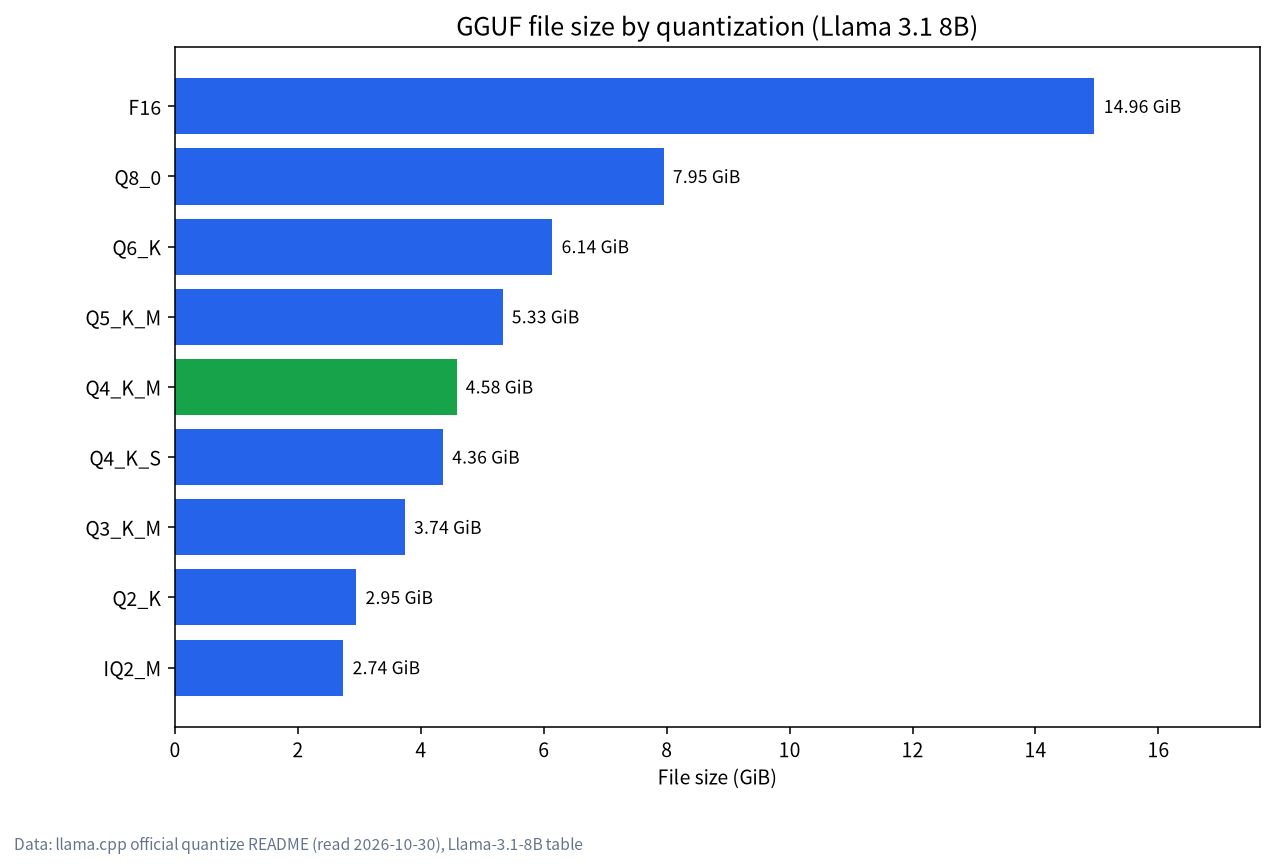
Q4_K_M uses about 4.9 bits per weight, which makes it less than a third of the F16 size. That is why it is the common default: much smaller, with quality that is usually good enough. Hugging Face’s docs also say Q4_K_M is the default when you name no quantization. The way to choose is to look at your VRAM and take the highest quantization that still fits. The arithmetic is in our VRAM calculator guide. We have not run our own quality evaluations across quantizations, so read the model publisher’s notes and test on your own tasks.
Converting and Quantizing Yourself: When You Need It
Most people never convert anything and simply download a GGUF someone else made. But if you start from original weights on Hugging Face, the README’s flow has two steps: convert to a high-precision GGUF such as bf16 with convert_hf_to_gguf.py, then compress with llama-quantize:
python convert_hf_to_gguf.py --outfile model-bf16.gguf --outtype bf16 <model-directory>
./build/bin/llama-quantize model-bf16.gguf model-Q4_K_M.gguf Q4_K_M
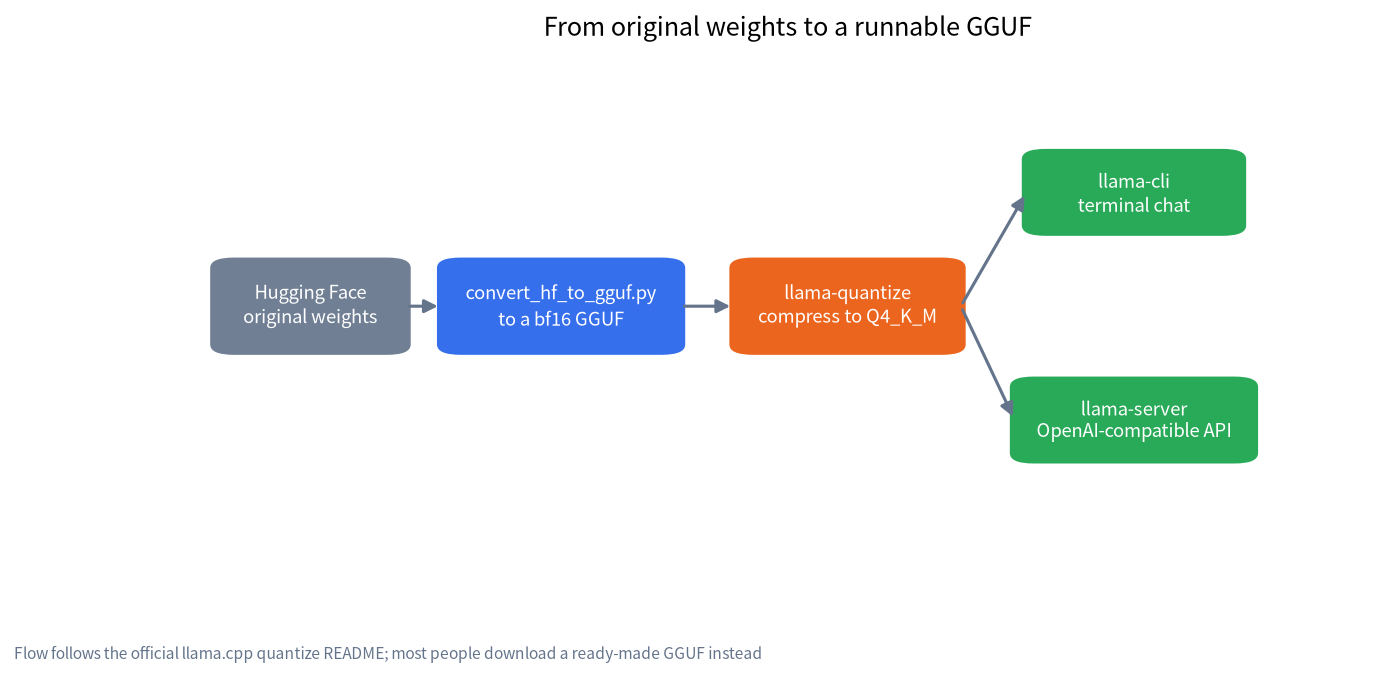
The README adds two warnings. First, conversion and quantization need enough disk space for the intermediate files. Second, for vision and other multimodal models the multimodal projector is usually kept in a high-quality format such as bf16 or q8, because a smaller quantization barely helps speed or memory and only risks quality.
How to Pick a Trustworthy GGUF Repository
Many GGUF repositories are uploaded by third parties, and quality varies. Before you download:
- Check the publisher: prefer the model author’s official repository, or a long-running quantizer with a good reputation.
- Read the model card: confirm the base model, licence, quantization method and template notes.
- Check the file size: compare it with your VRAM and leave room for the context cache, using the tier table in our best local LLM guide.
- Check for shards: large models may be split into several files, and you need all of them.
- If downloads are slow: see our slow Ollama download guide for the ModelScope and Hugging Face routes.
A practical tip before you start: keep a small notes file with the exact command line, the repository name, the quantization tag and the llama.cpp version that worked for you. Local LLM setups drift over time as projects release new builds, and a short record lets you reproduce a working setup on a second machine, or roll back when an update breaks something.
Common Runtime Problems and What to Do
| Symptom | Usual cause | What to do |
|---|---|---|
| “unknown model architecture” | llama.cpp is too old to support this new model | Upgrade to a newer build, or pick a supported model |
| Slow load and low speed | The model does not fit in VRAM and some layers run on the CPU | Use a lower quantization or shorter context, and tune -ngl |
| File not found or shard missing | A large model is split into several files and only some were downloaded | Put all shards in one folder and start from the first shard |
| Garbled or repeating output | Chat template mismatch, or the quantization is too low | Check the template on the model card; try a higher quantization |
| LAN access refused | The server listens on localhost by default | Set --host, and set --api-key and a firewall rule too |
The two most common causes are an old build and a model that does not fit. The first is solved by upgrading. The second follows the same logic as our guide on Ollama not using the GPU: first check how many layers actually landed in VRAM, then decide whether to pick a smaller model, a lower quantization or a shorter context. We did not reproduce every row of this table ourselves; it organises common situations, and the exact error text depends on your version.
FAQ: GGUF and llama.cpp
What does GGUF stand for?
It is the model file format used by llama.cpp. The official description emphasises “a single file containing weights, tokenizer and metadata”. We skip the history of the name because it does not affect how you use it.
Can I use a GGUF file in Ollama?
Yes. Ollama is built on llama.cpp and can pull GGUF straight from Hugging Face with ollama run hf.co/username/repository:quantization. You can also download a file and import it with a Modelfile.
Should I choose Q4_K_M or Q8_0?
Look at your VRAM. If Q8_0 fits and you want higher precision, take it; if memory is tight, take Q4_K_M. By the official table an 8B model is about 4.6GiB at Q4_K_M and about 8GiB at Q8_0, nearly double.
Do I have to compile llama.cpp myself?
No. You can install it with brew or winget, and prebuilt packages and Docker images exist. You only compile when you want a specific hardware back end such as CUDA or the very latest features.
Is a GGUF model safe to download?
A GGUF is a data file rather than an executable. Still, treat any third-party download with care: check the source, verify hashes and the model card, and use trusted channels. Confirm the licence allows your use.
Should I use llama.cpp or Ollama?
Choose Ollama if you want convenience, a model library and one interface. Choose llama.cpp if you want finer control and quicker access to new features. Both read the same kind of GGUF files, so they do not conflict.
Keep Going
If you want to deploy a GGUF on a specific machine, or you are unsure which quantization suits your GPU, join the community or email admin@microaione.com with your GPU model and memory size. For the whole beginner route, revisit how to run an LLM locally.
References and further reading: llama.cpp official docs, Hugging Face: GGUF with llama.cpp, llama.cpp quantize README.