gpt-oss Local Deployment Guide: Run gpt-oss-20b and gpt-oss-120b with Ollama and llama.cpp
gpt-oss is OpenAI’s open-weight reasoning model family, available in 20b and 120b sizes under the permissive Apache 2.0 license, so it can be used personally and commercially. It is especially well suited to running locally because it ships in the MXFP4 format, making it much smaller than an ordinary model of the same parameter count. This gpt-oss local deployment guide covers two routes: Ollama, the easiest, and llama.cpp, the more flexible. It explains how much memory each size really needs, how to keep some expert layers on the CPU when VRAM is short, and how to set the reasoning effort. For installing Ollama, see the Ollama install guide; for the GGUF format, see GGUF and llama.cpp for beginners.
Verification note: Model sizes and features come from Ollama’s gpt-oss page (read on 2026-10-30). The memory table, command-line flags, and hardware speed data come from the official llama.cpp guide to running gpt-oss (GitHub discussion #15396). The speed figures there come from early builds around August 2025 and are indicative only; they are not our measurements. We did not run our own speed tests.
Key takeaways (Updated 2026-10-30)
- Ollama lists gpt-oss:20b at about 14GB and gpt-oss:120b at about 65GB, both with a 128K context; the stated targets are a system with 16GB of memory for the 20b and a single 80GB GPU for the 120b.
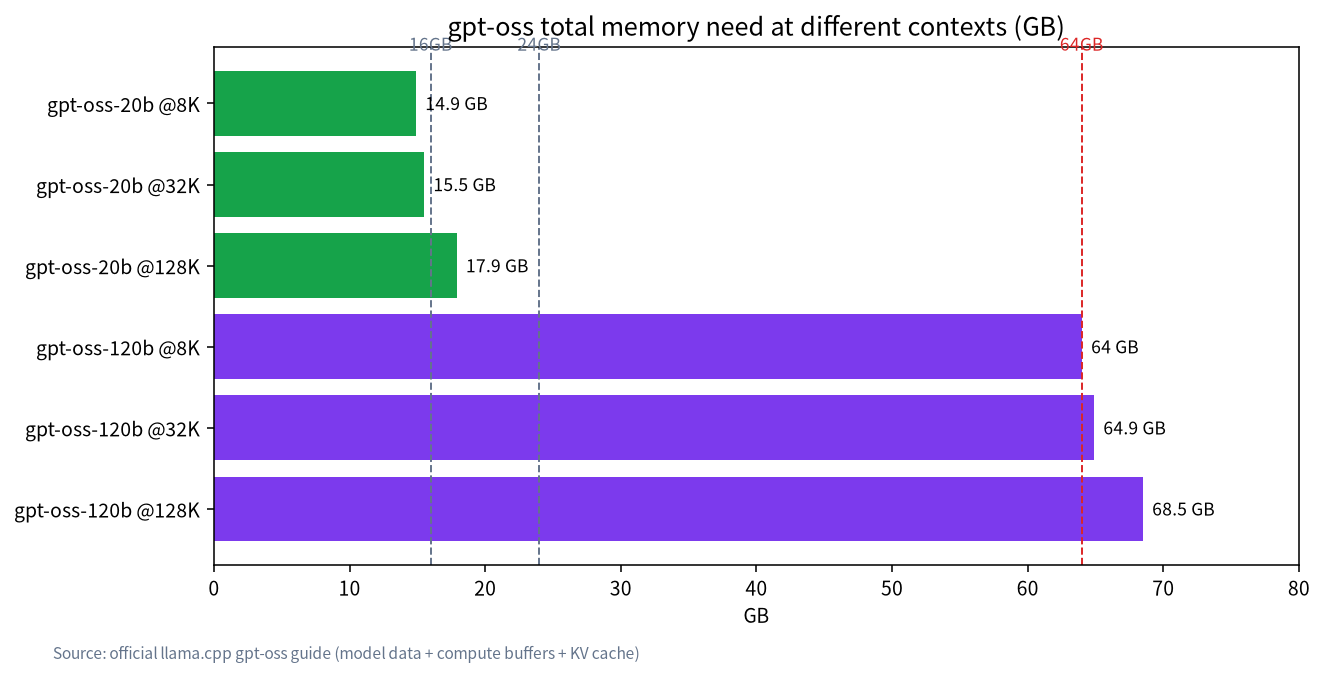
The official llama.cpp guide estimates total memory for the 20b at about 14.9GB at 8K context and 17.9GB at 128K, and for the 120b at about 64.0GB to 68.5GB.
When VRAM is not enough,
--n-cpu-moekeeps some MoE layers on the CPU with acceptable performance; do not forget--jinja.
gpt-oss Local Deployment: Specifications and Memory First
| Item | gpt-oss-20b | gpt-oss-120b |
|---|---|---|
| Ollama tag and size | gpt-oss:20b, about 14GB | gpt-oss:120b, about 65GB |
| Context | 128K | 128K |
| Quantization | MoE weights in MXFP4 (about 4.25 bits per parameter) | Same |
| Stated target | A system with 16GB of memory | A single 80GB GPU |
| llama.cpp guide: total need at 8K context | about 14.9GB | about 64.0GB |
| At 32K context | about 15.5GB | about 64.9GB |
| At 128K context | about 17.9GB | about 68.5GB |
The totals include model data, compute buffers, and the KV cache. Notice that gpt-oss’s context cache grows slowly: going from 8K to 128K adds only about 3GB for the 20b. That is a property of this architecture and should not be assumed for other models. The 20b is tight on 16GB of VRAM and comfortable on 24GB; see 24GB VRAM for local LLMs. The 120b needs 64GB or more of memory, such as a large-memory mini PC or a Mac; see large-memory mini PCs for local LLMs and running local LLMs on a Mac.
Route One: Run It with Ollama
- Upgrade to the latest Ollama first.
- Run
ollama run gpt-oss:20borollama run gpt-oss:120b; the first run downloads the model. - Use
ollama psto confirm the processor split.
According to the Ollama page, gpt-oss natively supports function calling, web browsing (Ollama offers an optional built-in web search), Python tool calls, and structured outputs, and you can see its full chain of thought. Reasoning effort can be set to low, medium, or high depending on your latency needs: low for simple questions, high for hard ones. Ollama supports MXFP4 natively without extra quantization or conversion, so do not go looking for another quantized version.
Route Two: llama-server from llama.cpp
The llama.cpp team provides pre-converted GGUF files: ggml-org/gpt-oss-20b-GGUF and ggml-org/gpt-oss-120b-GGUF. The launch command in the official guide is:
llama-server -hf ggml-org/gpt-oss-20b-GGUF --ctx-size 0 --jinja -ub 2048 -b 2048
It downloads the model automatically and serves a web chat interface and an OpenAI-compatible API on localhost. The important flags are:
| Flag | Purpose |
|---|---|
-hf |
Hugging Face model ID, downloaded automatically |
--ctx-size (-c) |
Context length; more context needs more memory. Both models max out at 128K, and 0 uses the model default |
-ub, -b |
Batch sizes; larger sizes enlarge compute buffers and can help speed in some cases |
-fa |
Enable Flash Attention on backends that support it |
--n-cpu-moe N |
Keep N MoE layers on the CPU, for hardware that cannot fit the model fully on the GPU |
--jinja |
Use the Jinja chat template embedded in the GGUF; required |
The official guide stresses that you do not have to fit the whole model in VRAM to get good performance: offloading just the attention tensors and the KV cache to the GPU and keeping the rest in CPU memory can still give decent speed. That matters if you have 12GB to 16GB of VRAM: tune how many layers stay on the CPU with --n-cpu-moe and find the best value by experiment.
Hardware Reference
| Hardware | Suggestion | Notes |
|---|---|---|
| 8GB of VRAM or memory | Not recommended | The guide says Macs with 8GB of memory cannot run gpt-oss |
| Mac with 16GB of memory | 20b with some layers on the CPU | The guide’s example uses --n-cpu-moe 12 -c 32768 --no-mmap |
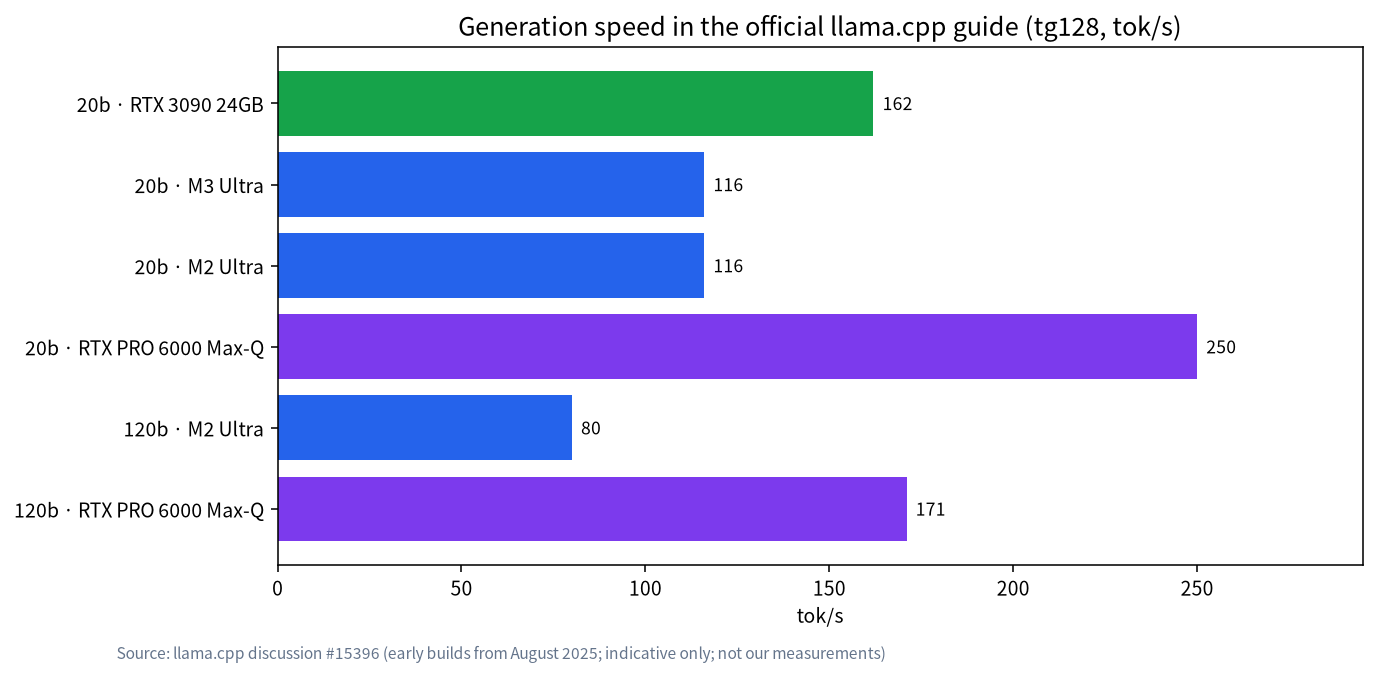
| 24GB of VRAM | 20b fully on the GPU | In the guide an RTX 3090 reaches about 162 tok/s tg128 (early build) |
| 64GB or more VRAM or memory | 120b | Total need starts around 64GB |
| Apple silicon | Stay under about 70% of total memory | Recommendation from the guide |
All the data in Figure 2 comes from the official guide and reflects early builds around August 2025, so it shows orders of magnitude, not today’s speed: the 20b reaches over a hundred tokens per second on high-end GPUs and Macs, and the 120b reaches tens up to nearly two hundred on large-memory Macs and workstation GPUs. Measure your own machine with llama-bench.
Error and Speed Troubleshooting Table
| Symptom | Likely cause | Fix |
|---|---|---|
| Raw markers in the output, or analysis with no final text | Missing --jinja, or an unsuitable reasoning-format flag |
Add --jinja and use a recent llama.cpp |
| Load failure or out of memory | Context too large, or too little VRAM | Lower --ctx-size and use --n-cpu-moe to keep some layers on the CPU |
| Slower than expected | Some layers on the CPU, or batch sizes poorly tuned | Adjust --n-cpu-moe, -ub, and -b, and make sure -fa is on |
| Wanting to quantize again | Not advised | Use the native MXFP4 version rather than re-quantizing |
| Ollama cannot find the model | Ollama is too old | Upgrade Ollama |
Context Length and Memory Trade-offs
The table shows that gpt-oss’s context cache grows slowly, so if your memory is just enough you can open the context to around 32K without the cache swallowing VRAM the way it does with other models. The compute buffer, however, is a fixed cost of about 2.7GB that you must reserve at any context length. On a 16GB machine the 20b’s 14.9GB total leaves almost no margin, so once the system takes its share you should use --n-cpu-moe to move some layers to the CPU, or move to a 24GB machine.
In practice, start with a small context such as -c 8192, confirm usage with nvidia-smi or a system monitor, then raise it step by step. Change one parameter at a time so you know where each change in speed or memory comes from, and write down every command and result. You will quickly find the configuration that suits your machine.
Measure Your Own Machine with llama-bench
The speed numbers in the official guide come from the authors’ machines and early builds, so do not apply them to your hardware. The llama-bench tool bundled with llama.cpp measures prompt-processing speed (pp) and generation speed (tg) on your own machine. Keep the same model file and batch settings, change one variable, and test again to compare settings. Save the results with the commands so you can compare again after a software or hardware upgrade.
A Practical First-Hour Plan
If you have never run a model of this kind, follow a simple order in your first hour. Start with Ollama and the 20b so you can confirm that your drivers and memory are healthy and that ollama ps shows the model on the GPU. Ask three or four questions of different kinds, and try each reasoning level once so you can feel the difference in latency and depth. Only after that, if you want finer control, switch to llama-server and repeat the same questions with the same context length, then compare speed and memory use side by side. This sequence keeps problems easy to isolate: if the first step works and the second does not, the cause is almost always a flag or a template, not your hardware.
When you eventually try the 120b, repeat the same ladder: smallest context first, then confirm the split between GPU and CPU, and only then widen the context. Treat the numbers in this guide as a map of what is possible, not as a promise of what your own machine will deliver.
Common Mistakes
- Thinking the 120b needs an 80GB GPU: a single 80GB card is the official ideal. With CPU memory and
--n-cpu-moe, configurations with 64GB or more of memory can run it too, with speed depending on bandwidth. - Assuming context always costs enormous memory: gpt-oss’s cache grows slowly, but that is specific to its architecture.
- Re-quantizing an MXFP4 model: the official advice is to use the native version.
- Using old software: new models demand recent versions; use the latest Ollama and llama.cpp.
- Treating early speed data as today’s speed: the numbers come from early builds and are indicative only.
Choosing Between the 20b and the 120b
If your machine has 16GB to 24GB of VRAM, choose the 20b. It is small and fast and suits everyday Q&A, writing help, and code completion, and with tool calling it can handle simple agent tasks. If you have 64GB or more of unified memory, or a large-memory host, and your problems are harder, try the 120b. Its reasoning is stronger, but generation speed and resource use are both heavier. Either way, run a comparison on your own tasks before spending more on hardware.
For most individuals the 20b is already a good starting point. The 120b is more of a workstation, large-memory host, or small-team service choice. To judge your budget, see VRAM and local LLMs: how to choose a GPU and how to calculate LLM VRAM requirements.
Habits After Deployment
Treat reasoning effort as a dial you can adjust at any time: use low for everyday questions to save time and compute, and switch to high for hard math, code, and multi-step problems. Because the model outputs a full chain of thought, decide whether to hide it in settings where users will see the output. If you plan to connect it to other applications, the OpenAI-compatible endpoint of llama-server is convenient, but expose it only on a trusted network.
FAQ: gpt-oss Local Deployment
How much VRAM does gpt-oss 20b need?
The Ollama page lists about 14GB, and the llama.cpp guide estimates about 14.9GB total at 8K context. The stated target is a system with 16GB of memory, and 24GB of VRAM is more comfortable.
Does the gpt-oss 120b need an 80GB GPU?
It is stated to fit on a single 80GB GPU. When VRAM is short, some MoE layers can stay in CPU memory, and total memory needs start around 64GB.
Why do I need --jinja?
It makes llama.cpp use the chat template embedded in the GGUF. The official guide requires it; without it, the output format may be wrong.
Can gpt-oss be used commercially?
The Ollama page says it uses the Apache 2.0 license, with no copyleft restrictions, suitable for experimentation, customization, and commercial deployment. Read the full license text yourself before commercial use.
Ollama or llama.cpp?
Choose Ollama for the easiest route, and llama.cpp when you want finer control such as --n-cpu-moe.
How do I set the reasoning effort?
The model supports low, medium, and high; choose by task complexity and latency needs.
Need Help Deploying?
If you want to run gpt-oss on your own machine but are unsure which size to pick, tell us your hardware in our community, or email admin@microaione.com. For a wider comparison of models, see best local LLMs in 2026.
References and further reading: Ollama: gpt-oss model page, llama.cpp: official guide to running gpt-oss, Hugging Face: ggml-org/gpt-oss-20b-GGUF.