MiniMax H3 Locally: Is It the Best Open Video Model? Hardware, License and Cost
Among open-weights video generation models, MiniMax H3 is currently the strongest on the Artificial Analysis text-to-video board: the 768p version scores an Elo of 1161, while the only other open-weights models listed, LTX-2.5 Fast and Pro, score 947 and 944. But “best open” carries two conditions that need reading carefully. The license has territorial limits, with the United States, European Union, United Kingdom and South Korea treated as territories that need a separate license; and the hardware demand is high, so the official documentation does not describe a minimum configuration that a single consumer card handles comfortably. This article compares H3 with closed models such as Seedance 2.5, tabulates the official memory and timing data, works out self-hosting against API cost, and gives a reproducible test method.
Verification note: Leaderboard data was read from Artificial Analysis on 2026-11-01. Hardware, timing, VRAM and license information comes from MiniMax’s official “Run and self-host MiniMax H3” documentation (last reviewed by MiniMax on 2026-08-26); the SGLang and vLLM-Omni benchmarks in it were measured by the upstream projects, not by MiniMax, and the document says so. We have not run H3 on our own machines, so there are no self-measured timings or quality scores here.
Key takeaways (Updated 2026-11-01)
- Artificial Analysis text-to-video board: MiniMax H3 (768p) scores 1161 at $4.80 per minute, the strongest open-weights model; Seedance 2.5 scores 1157 at $34.12 per minute.
License: as of the revision MiniMax reviewed on 2026-08-26, the US, EU, UK and South Korea are excluded territories needing a separate license; the open release omits the Context-IR and 2K regeneration components.
Hardware: the official two-RTX-5090 layerwise-offload recipe takes about 559.67 seconds end to end for a 5-second clip; the ComfyUI path publishes no minimum VRAM.
The Short Answer: Is It the Best Open Video Model?
On third-party boards, yes. On the Artificial Analysis text-to-video board (v2.1), MiniMax H3 (768p) scores 1161 with a rank range of 2 to 6, is labelled open weights and dates from July 2026. The other open-weights entries are LTX-2.5 Fast (947) and LTX-2.5 Pro (944), more than 200 points behind. For reference, closed Seedance 2.5 scores 1157 and MiniMax’s own higher-spec H3 Max scores 1149 (not labelled open weights on the board).
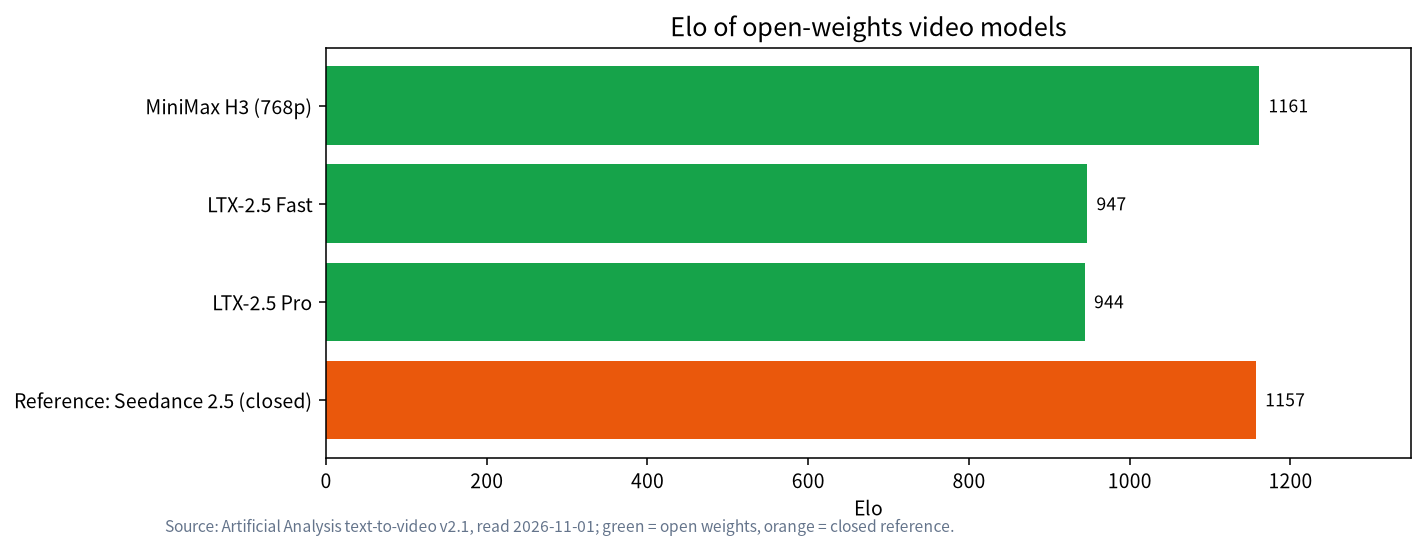
Two qualifications apply. First, “open weights” is not “open source license”: H3 uses the MiniMax H3 Community License, whose territorial limits come next. Second, the open release is H3-Base only (the FL2VA and Ref2VA checkpoints). H3-Context-IR and H3-Regenerate-2K are not included, so a self-hosted service cannot reproduce the full context-understanding plus 2K-regeneration workflow of the MiniMax platform; which configuration the board’s Elo reflects is something to confirm against the official notes.
The License: Check Your Territory First
A warning box at the top of the official page states that H3 is governed by the MiniMax H3 Community License Agreement; as of the revision reviewed on 2026-08-26, the United States, European Union, United Kingdom and South Korea are Excluded Territories and require a separate license. The agreement also covers commercial use, distribution, attribution, hosted-service safeguards and an acceptable use policy, can be revised, and MiniMax tells readers to review the current text before downloading, deploying or offering a hosted service.
For you this means: if you are in those regions, or your service serves users there, “open weights” does not mean “free to use as you like”. We are not lawyers and have not read every clause, so have counsel read the full agreement before you commit. That is also why this article says “open weights” rather than “open source”.
Hardware Data From the Official Documentation
The documentation gives two local paths: a visual ComfyUI workflow, and a served API using SGLang or vLLM-Omni. ComfyUI needs version 0.30.0 or later and ships text-to-video, image-to-video and reference-to-video templates that use pruned and quantized files from Comfy-Org (including INT8 and NVFP4 components). MiniMax warns that these are different artifacts from the official mixed BF16/FP32 checkpoint, so quality, memory and reproducibility can differ and you should not mix benchmark claims between paths; the ComfyUI guide also publishes no minimum GPU memory or performance, so you must validate on your own hardware.
The SGLang path includes measured data. The workload is 1344 x 768, 124 frames at 24 fps, 50 steps, a 5-second text-to-video-with-audio clip.
| Configuration | Time | Peak VRAM per GPU | Note |
|---|---|---|---|
| 8 x B300, BF16, FL2VA | 19.04 s | 83,578 MB | Upstream benchmark |
| 8 x B300, FP8, FL2VA | 18.03 s | 51,926 MB | FP8 is online quantization, approximate |
| 4 x H200, Ulysses 4 | 75.10 s mean | about 94,288 MB | Upstream benchmark |
| 4 x H200, TP 2 + Ulysses 2 | about 78–86 s | about 63,490 MB | Lower VRAM, slightly slower |
| 4 x H100, TP 2 + Ulysses 2 | 13.25 s | 66.04 GB | The upstream table does not state the request shape; compare only within it |
| 2 x RTX 5090 32GB, TP 2 + layerwise offload | 559.67 s | about 26.3 GiB | Lossless, end to end, including 33.61 s decode |
| 1 x RTX 4090 24GB, layerwise offload + INT8 | depends on host RAM and bandwidth | about 18GB | Online INT8, approximate, time not published |
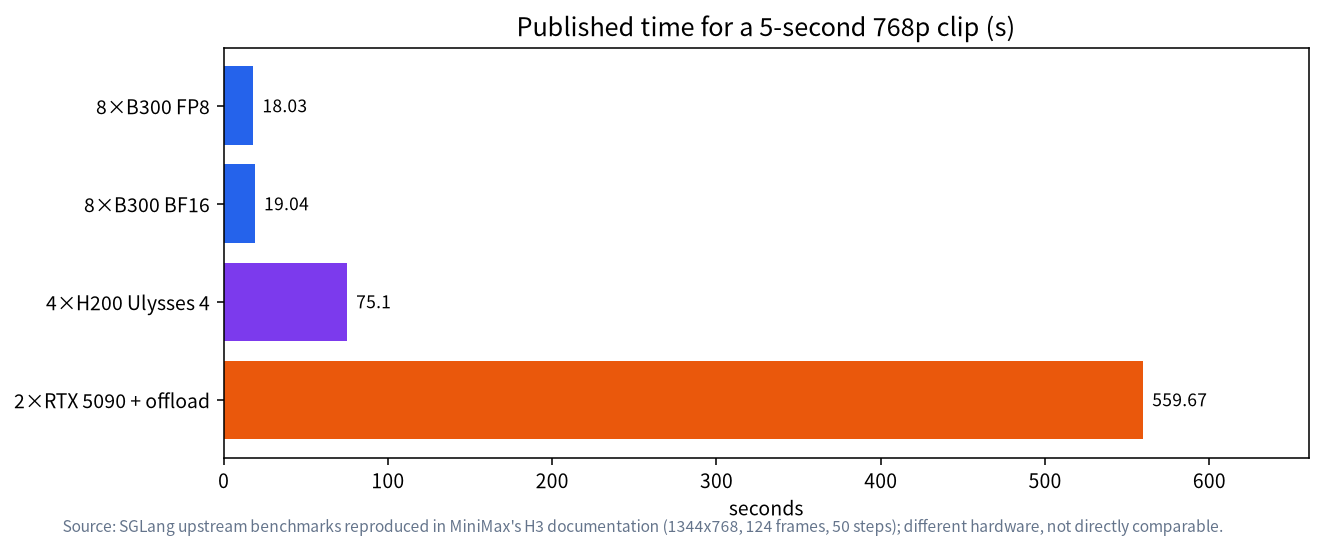
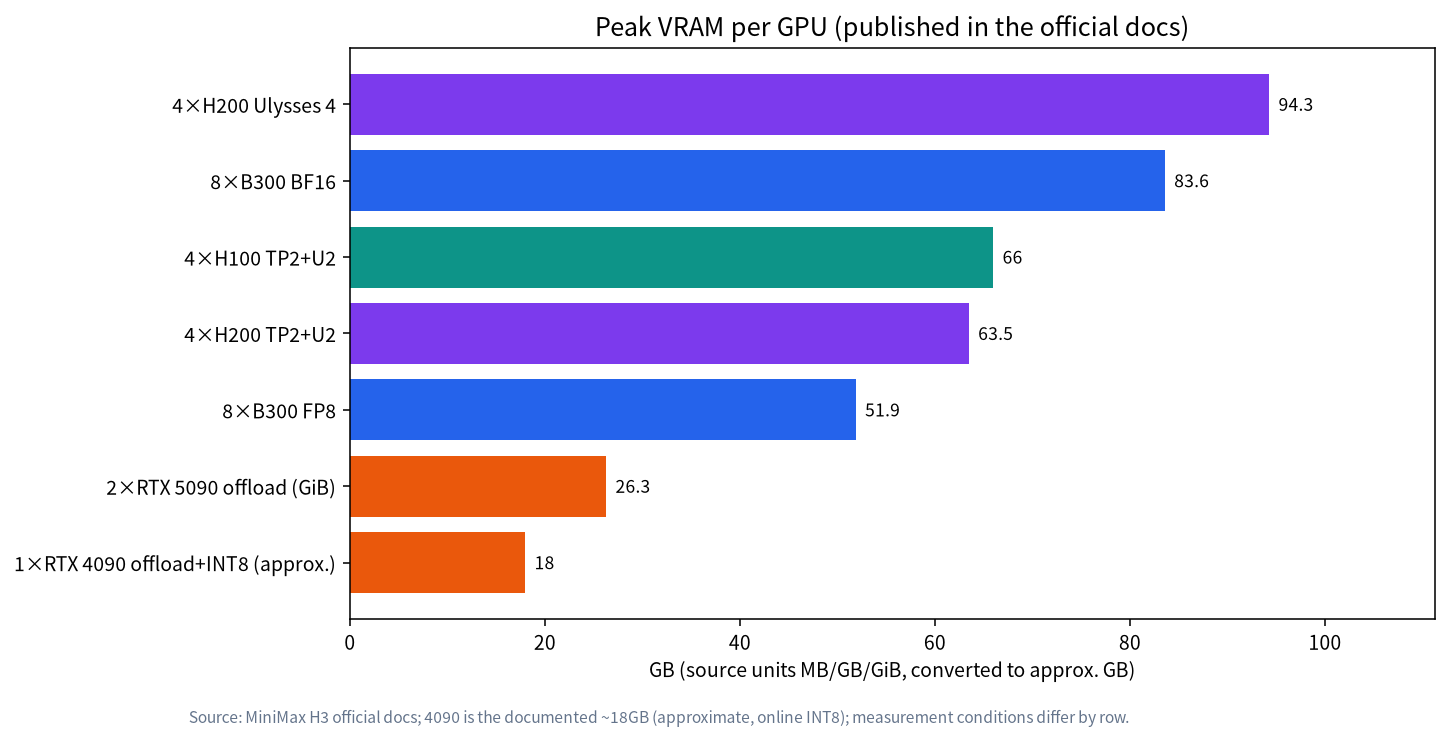
Read the table with three cautions. First, the documentation says the 8 x B200 topology is a reference configuration, not a minimum-hardware claim, and the model card demonstrates a four-GPU command without publishing peak VRAM, host RAM or full disk requirements. Second, these numbers are SGLang upstream benchmarks, not hardware MiniMax verified, and were measured on upstream builds rather than the exact pinned commit. Third, the consumer-GPU path depends on offloading, so speed is tied to host memory and bandwidth; the community vLLM-Omni recipe requires at least 200 GiB of available system RAM for two-GPU offload (384 GiB recommended) and about 135 GiB of disk per checkpoint partition. In short, consumer cards can run it, but not easily.
Cost: Is Self-Hosting Worth It?
Here is arithmetic on the published data (derived, not measured). Two RTX 5090s on the lossless offload recipe need 559.67 seconds for a 5-second clip, about 112 seconds of compute per second of video. Running flat out for 24 hours gives roughly 154 clips of 5 seconds (86,400 / 559.67), about 771 seconds of video. At the board’s price for H3 (768p, about $4.80 per minute or $0.08 per second), that volume would cost about $61.70 through an API. This ignores your cards, the rest of the machine, electricity and system memory, and ignores failed attempts. It makes one point: self-hosting can beat the API only when you generate a lot every day, and for light use it almost certainly does not pay.
Compare closed Seedance 2.5: a 5-second clip costs about $2.85 at 1080p on the board’s pricing, against about $0.40 on H3’s API price. So if you only want H3-grade quality cheaply, H3’s hosted service is already far cheaper than the closed option, and the reasons to self-host should be data retention, custom LoRAs or offline operation. The documentation also describes an upstream LoRA fine-tuning recipe for H3-Base using miles-diffusion: the reference hardware is a single node of 8 H200s, taking about 66 minutes for 3 epochs from a cold cache, and it is experimental.
Side by Side With the Alternatives
This table puts H3 into the choice a local reader actually faces. “Not verified” means we did not read a reliable primary source, so we do not state it.
| Item | MiniMax H3 (768p) | LTX-2.5 Pro / Fast | Seedance 2.5 |
|---|---|---|---|
| Artificial Analysis Elo | 1161 | 944 / 947 | 1157 |
| Downloadable weights | Yes (H3-Base) | Labelled open weights on the board | No |
| Board price per minute | $4.80 | Not verified in this article | $34.12 |
| License limits | Community license; US, EU, UK, South Korea need a separate license | Not verified here, check it yourself | Official channel not sold in the US, Canada, UK, Australia, New Zealand (third-party summary) |
| Local hardware bar | High; ComfyUI minimum VRAM not published | Not verified here | Not applicable |
| Who it suits | People with high-end GPUs or a workstation who must retain data | Those wanting a lighter option must assess the quality gap themselves | People willing to pay for reference-asset capability |
The conclusion: H3 is currently the only option that is both downloadable and close to closed-model level, but the bar is not low; if you lack suitable hardware, the sensible path is to validate your subject matter on a hosted service first and decide on a build afterwards. LTX-2.5 trails H3 by more than 200 Elo points, which means a much lower chance of being picked in a blind test; whether you accept that gap depends on your use.
A Checklist Before You Decide
Before spending money on a card, run through five questions. First, are you or your audience in an excluded territory? If so, sort out licensing first. Second, how many seconds of video do you need each day? Only a steady daily volume of hundreds of seconds or more can bring self-hosting near API prices. Third, must your data stay local? That is the hardest reason to self-host. Fourth, how much system memory do you have? Offload recipes tend to hit the memory ceiling before the VRAM ceiling. Fifth, can you accept the quality gap between ComfyUI’s quantized files and the official BF16 checkpoint? If three or more answers are “no”, keep using a hosted service.
If You Do Not Have the VRAM
The official paths give no firm guarantee for a single 24GB card. The RTX 4090 24GB recipe uses layerwise offload and online INT8 with a peak of about 18GB, but latency depends on host memory and bandwidth and no time is published. Three sensible options: try the ComfyUI quantized templates at small sizes before spending on hardware; validate your subject matter on a hosted service; or consider a workstation-class card, covered in RTX PRO 6000 workstation and our RTX 5090, 4090 and 3090 comparison. To understand how RAM and VRAM complement each other, read RAM, VRAM and CPU offload and ComfyUI hardware requirements.
Test It Yourself: A Reproducible Method
We have not run H3. Here is a method you can follow to decide whether going local is worthwhile.
- Check the license and your territory first, and save the date of the agreement version you read.
- Use the ComfyUI text-to-video template, recording the ComfyUI version, the template revision and every model-file revision; do not silently swap checkpoints.
- Fix the canvas: use the native 1344 x 768 16:9 canvas and avoid the 1.0 megapixel step (the documentation says it resolves to 1376 x 768, above H3-Base’s pixel-area limit).
- Fix duration and frame rate: 24 fps; duration snaps to a 17k+5 frame grid, so record the actual frame count.
- Use at least three seeds per prompt and record time, peak VRAM, host RAM and any crashes.
- Compare against a hosted service: generate the same prompt on H3’s hosted service or on Seedance 2.5 and run a blind pick.
- Log speed modes separately: the 8-step Turbo LoRA is faster but the documentation says it can reduce motion and audio quality; record the LoRA name, strength, steps and seed.
Shot: a warm living room at night, three cats play tiny brass instruments, movement synchronized to the music.
Duration 5 seconds, 16:9, 1344x768, 24 fps, stereo audio.
Dialogue: none. Sound: warm room reverb.
Common Mistakes
- Treating “open weights” as “unrestricted”. The US, EU, UK and South Korea need a separate license; read the agreement.
- Validating the official BF16 baseline with ComfyUI’s quantized files. MiniMax states they are not the same numerical baseline.
- Looking at VRAM only. Offload recipes lean hard on system RAM and bandwidth.
- Picking the 1.0 megapixel step. It resolves to 1376 x 768, above H3-Base’s pixel-area limit.
- Treating upstream benchmarks as an official guarantee. The documentation says they are upstream configurations, not MiniMax-verified hardware.
- Running FSDP inference without checking output. An upstream issue cited in the documentation reports it can silently produce corrupted video and audio.
Related Reading
- Seedance 2.5 vs Wan 3.0 and MiniMax H3
- ComfyUI hardware requirements
- RTX PRO 6000 workstation
- RTX 5090, 4090 and 3090 compared
- RAM, VRAM and CPU offload
FAQ: MiniMax H3
Is MiniMax H3 the best open video generation model?
On the Artificial Analysis text-to-video board it is the strongest open-weights model at Elo 1161, with the other open-weights entries at 947 and 944. Its license has territorial limits, so “open weights” is the more accurate label.
Can MiniMax H3 run on an RTX 4090 or 5090?
The official documentation’s upstream data: two RTX 5090s with layerwise offload take about 559.67 seconds end to end for a 5-second clip; one RTX 4090 24GB with offload and INT8 peaks around 18GB, with no time published. Both lean on large system RAM.
Can I use MiniMax H3 in the US or EU?
Under the license version MiniMax reviewed on 2026-08-26, the US, EU, UK and South Korea are excluded territories needing a separate license. Check the current agreement.
How much does the MiniMax H3 API cost?
Artificial Analysis lists $4.80 per minute for the 768p version and $9.60 for H3 Max, which works out to about $0.40 for a 5-second clip.
Is self-hosting cheaper than the API?
Only with heavy continuous generation. By our estimate, two RTX 5090s running flat out for 24 hours produce about $61.70 worth of video at API prices, before hardware and electricity.
How does the open release differ from H3 on the MiniMax platform?
The open release is H3-Base and omits the Context-IR and 2K regeneration components, so the full platform workflow cannot be reproduced.
Talk With Us
Evaluating a local video generation setup? Join the community or email admin@microaione.com.
References: MiniMax: run and self-host H3, Artificial Analysis text-to-video leaderboard, CellCog: Seedance 2.5 pricing summary (third party).