Does Qwen Need Jailbreaking for Local Deployment? Work Out Which Kind of Refusal You Have First
Once Qwen is running locally under Ollama or llama.cpp, many people ask the same thing: does Qwen need jailbreaking for local deployment (the Chinese community says “po jia”, 破甲)? Behind that question sit three different ones: why is the model refusing me, did I deploy it wrongly or does it really not want to answer, and if my need is legitimate, what should I do? The conclusion first: for the overwhelming majority of legitimate local uses, the answer is no. What you should do is check the chat template, quantization, context and system prompt, and only then decide whether to change the model or add guardrails. One note on our policy: we do not provide jailbreak prompts or steps to bypass safety limits. We cover diagnosis, lawful fixes and risks. If you first want the difference between jailbreak, “po jia” and uncensored builds, read LLM jailbreak explained.
Key points (updated 2026-11-04)
- With Qwen running locally, the only limits are the alignment training in the weights and the system prompt you set. There is no input/output filter layer of the kind hosted products often have.
Many things that look like refusals are really a wrong chat template, over-aggressive quantization, truncated context or a bad thinking-mode setting. Check those first; no jailbreak is needed.
Real over-refusal (a harmless task declined) has lawful remedies: a better-suited model size, clearer task context, or the system prompt of your own product.
Community “uncensored” builds carry quality loss and supply-chain risk, and they remove a protection layer without judging legality for you.
To see how much your model really refuses, run a small 50-prompt evaluation; the method is below.
The short answer: does Qwen need jailbreaking for local deployment?
Three cases:
| Your situation | Do you need a jailbreak? | Better approach |
|---|---|---|
| The answer is short, off-topic or cuts off, like a refusal but with no refusal wording | No | Check chat template, quantization, context length, sampling parameters |
| The model treats a harmless task as dangerous, e.g. security awareness, general medical facts, ordinary fiction plot | No | Give task context, try another size, adjust your own product’s system prompt, and measure |
| The request itself involves illegal or harmful content | You should not | This is what a model should refuse; we do not provide workarounds |
In other words, “do I need to jailbreak it?” is often aimed at the wrong target. The real question is: which layer caused this refusal?
Where the limits come from in a local deployment
Recall the five layers from the previous article: pretraining data, instruction tuning, alignment training, system prompt, and input/output filters. When you deploy Qwen locally you get the first three (baked into the weights), you decide the fourth, and the fifth does not exist unless you add it. Two consequences follow.
First, a local Qwen is not “free of all limits”. It is still an alignment-trained chat model and will decline clearly harmful requests, and it may be conservative on some topics. We have not systematically tested Qwen’s refusal boundaries, so we give no percentages; you can measure it on your own tasks with the method below.
Second, a local Qwen has no outer filter like hosted products, so you decide whether to add guardrails such as Llama Guard and Qwen3Guard. If you serve the model to other people this step matters even more.
Diagnose first: is it really a refusal?
This is the order we suggest.
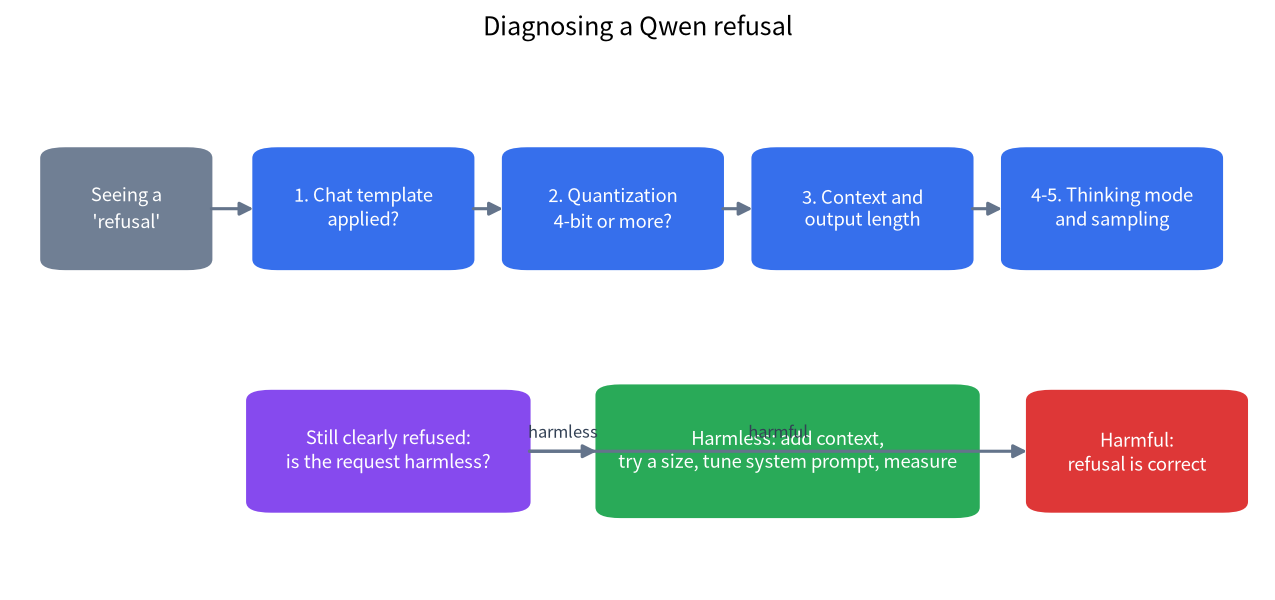
1. Chat template. When you assemble prompts by hand in llama.cpp or some front ends without the model’s own chat template, the model can behave strangely: off-topic answers, repeated special tokens, early stops. Models pulled through Ollama normally ship with a template, so this rarely bites; when you convert GGUF yourself, check that the template was written in. Installation steps are in our Ollama install guide.
2. Quantization. Very low bit widths make a model dumber: off-topic or looping output. Q4_K_M is usually the size/quality compromise; see the Q4_K_M explainer. If you used 2- or 3-bit just to fit VRAM, go back to 4-bit before drawing conclusions.
3. Context and output length. If the context is too small the prompt gets truncated and the model may never see your task; if max output tokens is too small, answers stop halfway.
4. Thinking mode. Recent Qwen releases often have a thinking-mode switch: on, the model writes a long reasoning trace first; off, it answers directly. The switch differs between versions, so follow the model card; set wrongly, the output can be swallowed by reasoning text.
5. Sampling parameters. Temperature too high or too low, or a bad repetition penalty, can also make output seem “off”. Start from the model card’s recommended settings.
Only after these five checks does it count as over-refusal: the model explicitly declines a harmless request in clear wording.
Real over-refusal: lawful fixes
Give context. Alignment training makes a model sensitive to requests that look dangerous. Stating the real purpose (for example “I am writing a handout on spotting phishing emails for corporate security training”) usually gets a more useful answer than a one-line instruction. This is not circumvention; it gives the model the information it needs to judge. If the request truly crosses a safety line the model will still refuse, which is correct behavior.
Try another model size. Different sizes and generations of Qwen may differ in refusal tendency. We listed the sizes in the Qwen local deployment guide; the chart below puts the quantized sizes we read in one place so you can try a few within your VRAM.
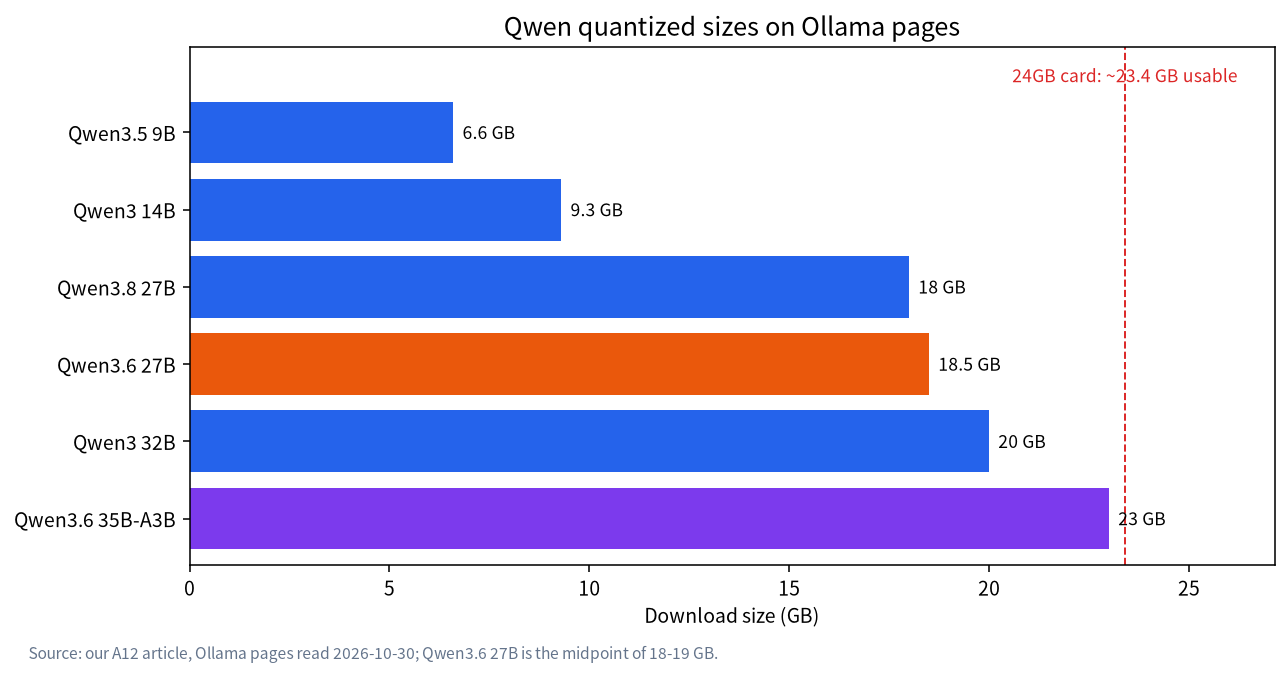
These sizes come from Ollama pages we read on 2026-10-30. They are quantized file sizes; real usage adds context cache. For how to estimate it, see how to choose a model size.
Adjust the system prompt of your own product. If you deploy Qwen for your own lawful product, define a clear role and scope in the system prompt (for example “you are an internal cybersecurity training assistant”). That is ordinary product design, not a jailbreak, and it helps the model understand the task.
Add guardrails on top rather than removing the model’s own. If your worry is that the model is “not open enough”, the steadier path is to keep the built-in alignment and let an external classifier moderate by your own policy, so the rules are controllable and logged.
Five approaches compared
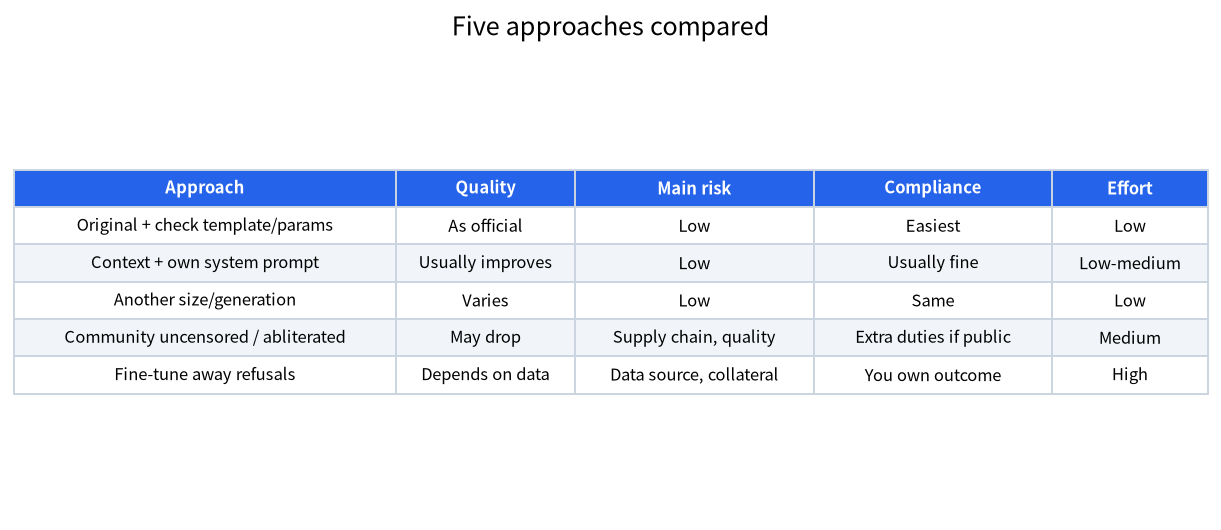
| Approach | Answer quality | Main risk | Compliance | Effort |
|---|---|---|---|---|
| Original Instruct model, after checking template and parameters | As official | Low | Easiest | Low |
| Give context and adjust your own product’s system prompt | Usually improves | Low | Depends on use, usually fine | Low to medium |
| Switch model size or generation | Depends on model | Low | Same | Low |
| Community “uncensored” or abliterated build | May drop; test it | Supply chain, quality, hallucination | Serving it publicly adds duties | Medium; you must vet the source |
| Fine-tune away refusals yourself | Depends on data and method | Data source, collateral damage | Same, and you own the outcome | High |
The last two rows are the “edit the weights” route. We explained the mechanism in the refusal-direction ablation explainer: the technique works in research, but it does not make a model smarter and it does not judge compliance for you.
A 50-prompt evaluation: put a number on your over-refusal
Rather than going by feel, measure it:
- Write 50 harmless prompts your business will genuinely encounter, covering the types you fear get wrongly refused.
- Run each configuration with the same parameters: original, with added context, and with another model size.
- Judge by hand whether each one was refused and count the refusals.
- Compare rates. If the original refuses 12, the rate is 12 ÷ 50 = 24%; if adjusting the system prompt drops it to 4, that is 8%.
Note that 50 is a small sample; a gap of a few points between two runs may be noise. For a stricter comparison use 200-plus prompts and report a confidence interval as in our local model red-teaming primer. Also, this evaluation only measures wrongful refusal of harmless tasks; it must not be used to probe how to coax a model into harmful output.
What to record before you ask for help
A refusal that cannot be reproduced cannot be diagnosed. Whenever you suspect over-refusal, write down five things: the exact model tag and quantization, the runtime and its version, the full chat template or system prompt in use, the sampling parameters, and the first 200 characters of the response. With those five facts, most “refusals” turn out to be a configuration problem within minutes, and the genuine ones can be compared across model sizes on equal terms. Keep the harmless test prompts in a plain text file so you can rerun them after every change; a regression you cannot rerun is a regression you will argue about instead of fix.
Risk reminders: do not download “po jia” builds casually
- Supply chain: pickle weights can run code on load, as Hugging Face explains. Prefer safetensors or GGUF, and check the publisher and hashes.
- Quality: editing weights can cost capability; test before shipping.
- Compliance: in mainland China, serving a model to the public falls under rules such as the Interim Measures for Generative AI Services; Article 4 forbids generating content the law prohibits. This is general information, not legal advice.
- Privacy: the point of local deployment is that data stays on your machine, as covered in local LLMs and privacy. Do not hand your data to an unknown hosted “cracking service” just to get a more open model.
For Qwen’s licensing and newest releases, rely on the QwenLM GitHub and model cards. In the official README we saw Qwen3.8 listed under Apache 2.0; check other releases one by one.
FAQ
How do people ask about lifting Qwen local “restriction mode”?
Questions like “how to lift Qwen local restriction mode” often mix alignment training, bad chat templates, and real safety filters. For legitimate use, debug templates, quantization, and system prompts first. This site does not provide jailbreak prompts or bypass steps—see the decision flow above.
Does Qwen need jailbreaking for local deployment?
For nearly all legitimate uses, no. Check chat template, quantization, context and thinking-mode settings first. If it really is over-refusal of a harmless task, give context, try another model size, or adjust your own product’s system prompt.
Why does my local Qwen sometimes not answer?
Possible causes are a wrong template, too-low quantization, truncated context, an output length cap, or the model judging the request risky. Check each in turn before deciding it was a refusal.
Is there a ready-made uncensored Qwen?
Community members do publish edited builds, but quality and provenance vary, you must vet them and own the risk. We do not link to downloads or recommend specific ones.
I want Qwen to be more “open”. What is a sound approach?
Keep the built-in alignment, set a clear role in your own lawful product, and use an external moderation model for your own policy. It is controllable and easy to log.
Does a local Qwen need safety guardrails?
If only you use it, not necessarily. If you serve others or connect it to business systems, add input and output moderation; see our local guardrail tutorial.
How do I tell whether my Qwen over-refuses?
Run a 50-prompt or larger evaluation, record the refusal rate on harmless tasks and compare configurations. With a small sample, differences may just be noise.
Talk to us
If you hit refusals or odd output while deploying Qwen, send the model size, quantization and run command (no secrets) to the community or email admin@microaione.com, and we will help work out which layer is responsible. To read the topic systematically, see our LLM jailbreak and safety hub.
References: QwenLM GitHub, Ollama Qwen3 page, Hugging Face pickle security note, Interim Measures for Generative AI Services. Data read between 2026-10-30 and 2026-11-04, Beijing time.