LLM GPU Calculator: Estimate VRAM for Any Model Size, Quantization and Context (Free Online Tool)
Before buying a card or downloading a model, the question is always the same: how much VRAM does this model need? Memory use splits into three parts: weights, KV cache and runtime overhead. The LLM GPU calculator below adds exactly those three. Choose a model preset (or type the parameter count and KV cache per token yourself), pick a quantization and a context length, and it shows an estimated total plus whether 8 GB to 80 GB cards can hold it. Below the tool you will find the formula, cheat-sheet tables and worked examples, so you can also do it in your head.
How we checked this: The calculator is an estimator, not a measurement. Weights are parameters times bytes per parameter (FP16 about 2.0, Q8_0 about 1.1, Q4_K_M about 0.6); the KV cache is derived from a model’s layers, KV heads and head dimension; overhead is a 1 to 2 GB rule of thumb; usable VRAM is 0.92 to 0.95 of nominal. We did not test these combinations on hardware, and software, versions and drivers will differ. Mixture-of-experts models, multimodal models and multi-GPU splits are outside this simple formula.
Key points (updated 2026-11-04)
- Formula: total VRAM is roughly weights (parameters x bytes per parameter) + KV cache (bytes per token x context length) + overhead (about 1 to 2 GB); divide by the usable fraction (about 0.92 to 0.95) to get a suggested nominal VRAM.
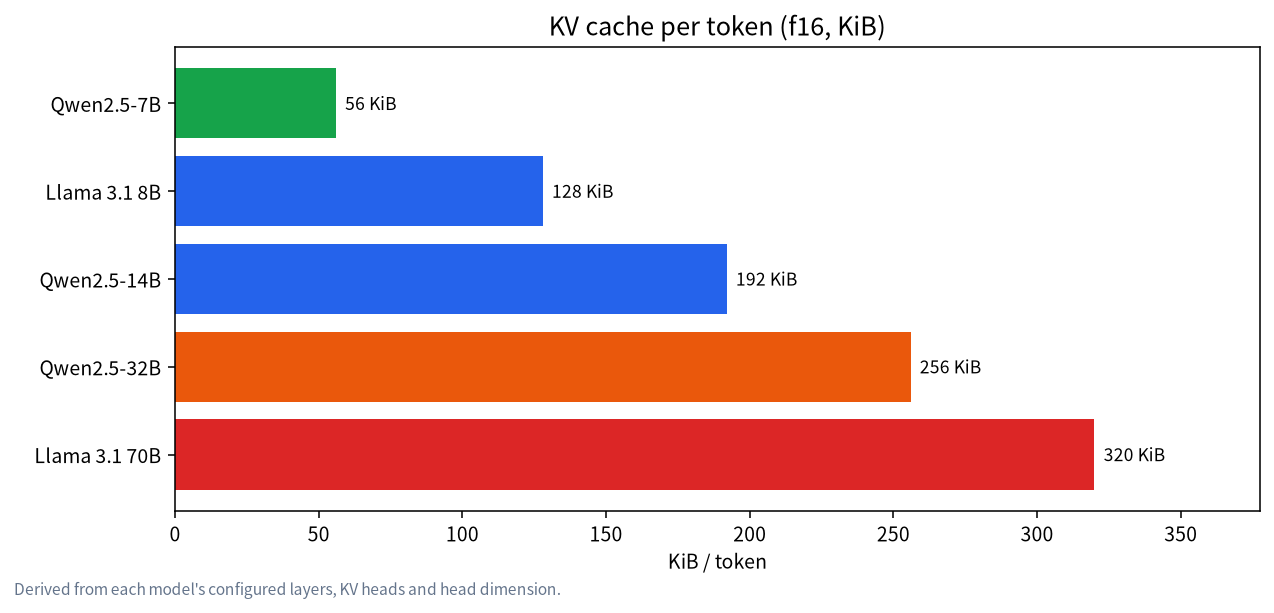
KV cache per token (f16): Qwen2.5-7B about 56 KiB, Llama 3.1 8B about 128 KiB, Qwen2.5-14B about 192 KiB, Qwen2.5-32B about 256 KiB, Llama 3.1 70B about 320 KiB.
Examples: Llama 3.1 8B at Q4_K_M with 8K context totals about 7.3 GB, suggesting about 7.8 GB nominal, tight on an 8 GB card; a 32B at Q4_K_M with 8K totals about 22.7 GB, tight on a 24 GB card.
- Ollama’s documentation says its default context depends on VRAM: 4k under 24 GiB, 32k for 24 to 48 GiB, 256k at 48 GiB or more.
The LLM GPU calculator: estimate VRAM online
Choose a model preset below, or choose “Custom” and type the parameter count and KV cache per token. All calculation runs in your browser and nothing is uploaded.
VRAM estimator (runs in this page, nothing is uploaded; results are estimates)
How to read the result: "Total needed" is weights plus KV cache plus overhead; "Suggested nominal VRAM" is that total divided by the usable fraction. For each VRAM tier, a total up to 85% of usable VRAM is "comfortable", up to 100% is "tight", and above that "does not fit". When it is tight, a longer context can push you over.
Where the formula comes from
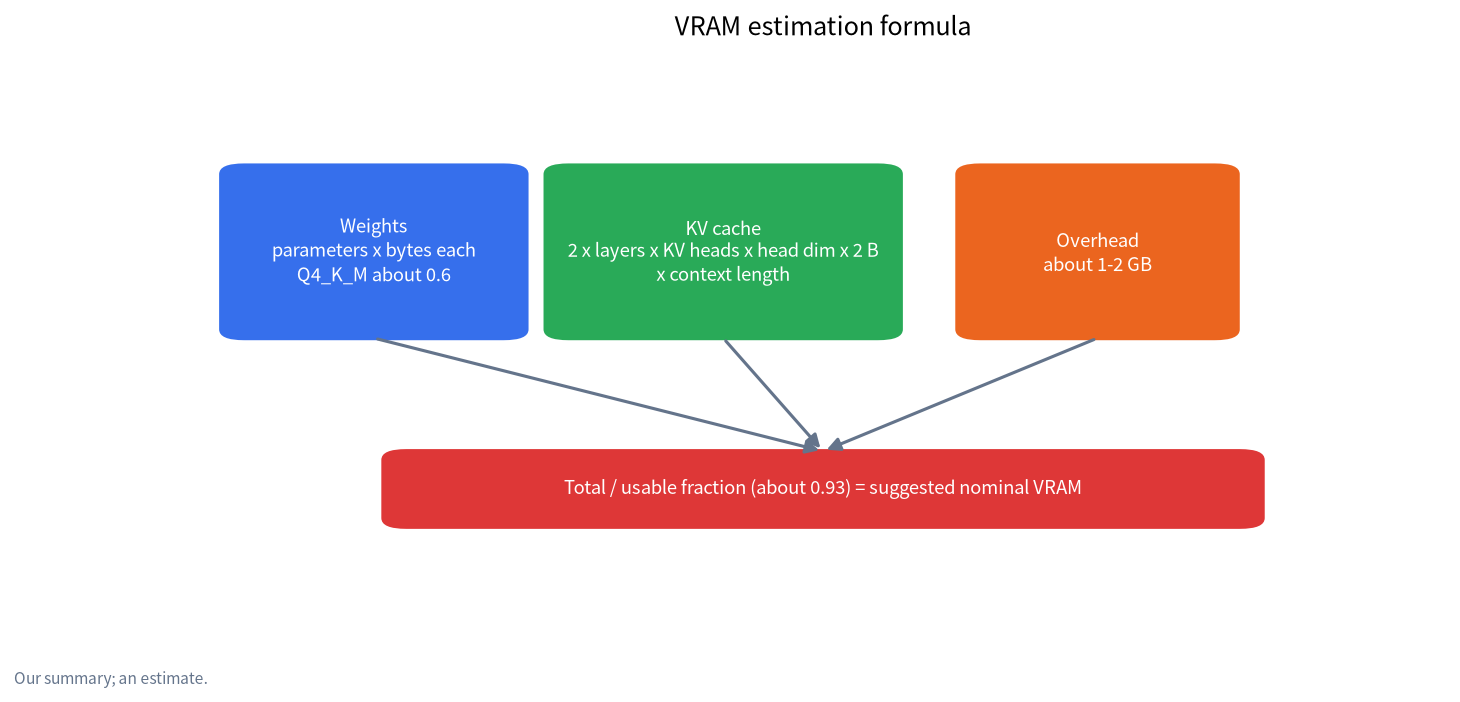
1. Weights = parameters (billions) x bytes per parameter. FP16 is 2 bytes per parameter, Q8_0 about 1.1 and Q4_K_M about 0.6 (other articles on this site use 0.61 GB per billion; the difference is small). For what quantization means see Q4_K_M quantization.
2. KV cache = bytes per token x context length. Bytes per token = 2 x layers x KV heads x head dimension x bytes per element (2 for f16). The leading 2 is one copy for keys and one for values.
3. Runtime overhead: the inference framework, the CUDA context and scratch buffers. We use 1 to 2 GB as a rule of thumb, and the calculator defaults to 1.5 GB.
4. Usable fraction: not all of a card's nominal capacity is usable, since the system and display output take a share. We use 0.93 as the default (a rule-of-thumb range of 0.92 to 0.95).
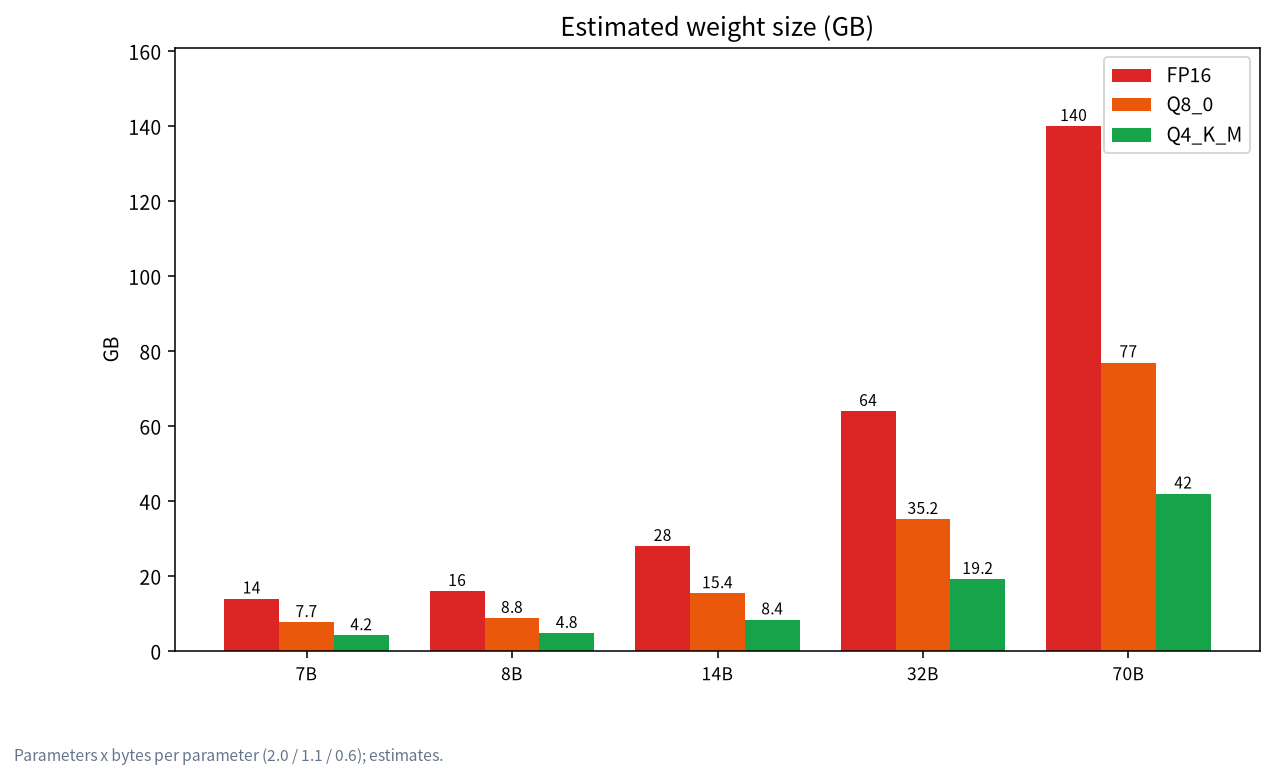
Cheat sheet 1: weight size
| Model | FP16 (about 2.0) | Q8_0 (about 1.1) | Q4_K_M (about 0.6) |
|---|---|---|---|
| 7B | about 14.0 GB | about 7.7 GB | about 4.2 GB |
| 8B | about 16.0 GB | about 8.8 GB | about 4.8 GB |
| 14B | about 28.0 GB | about 15.4 GB | about 8.4 GB |
| 32B | about 64.0 GB | about 35.2 GB | about 19.2 GB |
| 70B | about 140.0 GB | about 77.0 GB | about 42.0 GB |
The table uses round parameter counts (7, 8, 14, 32, 70). Real models differ slightly, so these numbers will not exactly match the file sizes listed on Ollama.
Cheat sheet 2: KV cache size (f16)
KV cache per token depends on the model's structure. This table is our derivation from layers, KV heads and head dimension (f16), multiplied by context length:
| Model | Per token | 4K context | 8K | 32K | 128K |
|---|---|---|---|---|---|
| Qwen2.5-7B | 56 KiB | about 0.22 GB | about 0.44 GB | about 1.75 GB | about 7.0 GB |
| Llama 3.1 8B | 128 KiB | about 0.5 GB | about 1.0 GB | about 4.0 GB | about 16.0 GB |
| Qwen2.5-14B | 192 KiB | about 0.75 GB | about 1.5 GB | about 6.0 GB | about 24.0 GB |
| Qwen2.5-32B | 256 KiB | about 1.0 GB | about 2.0 GB | about 8.0 GB | about 32.0 GB |
| Llama 3.1 70B | 320 KiB | about 1.25 GB | about 2.5 GB | about 10.0 GB | about 40.0 GB |
KV cache precision can also be lowered: q8_0 uses about half the memory of f16 and q4_0 about a quarter. Ollama's FAQ says q8_0 has a very small precision loss that usually has no noticeable impact, while q4_0 has a small-to-medium loss that may be more noticeable at higher context sizes, and that models with a high GQA count (such as Qwen2) may be affected more. Those are the official statements; we did not measure quality loss ourselves. For more on how context relates to VRAM see context length and KV cache VRAM.
Worked examples (1.5 GB overhead, 0.93 usable fraction)
| Scenario | Weights | KV cache | Total | Suggested nominal VRAM |
|---|---|---|---|---|
| 8B, Q4_K_M, 8K context | 4.8 GB | 1.0 GB | about 7.3 GB | about 7.8 GB |
| 14B, Q4_K_M, 8K | 8.4 GB | 1.5 GB | about 11.4 GB | about 12.3 GB |
| 32B, Q4_K_M, 8K | 19.2 GB | 2.0 GB | about 22.7 GB | about 24.4 GB |
| 32B, Q4_K_M, 32K, f16 | 19.2 GB | 8.0 GB | about 28.7 GB | about 30.9 GB |
| 32B, Q4_K_M, 32K, q8_0 KV | 19.2 GB | 4.0 GB | about 24.7 GB | about 26.6 GB |
| 70B, Q4_K_M, 8K | 42.0 GB | 2.5 GB | about 46.0 GB | about 49.5 GB |
| 8B, Q8_0, 8K | 8.8 GB | 1.0 GB | about 11.3 GB | about 12.2 GB |
| 8B, FP16, 8K | 16.0 GB | 1.0 GB | about 18.5 GB | about 19.9 GB |
| 8B, Q4_K_M, 128K | 4.8 GB | 16.0 GB | about 22.3 GB | about 24.0 GB |
A few useful conclusions from the table:
- An 8 GB card running an 8B at Q4_K_M with 8K context is only just enough; a longer context pushes it over.
- A 32B on a 24 GB card is already tight at 8K context; to get 32K you would need to drop the KV cache to q8_0 and accept the trade-off.
- At 128K context the KV cache can exceed the weights: the 8B weights are only 4.8 GB, but the 128K KV cache needs 16 GB.
- A 70B needs nearly 50 GB even at Q4, which a single 24 GB card cannot hold; you need several cards or more VRAM, see dual-GPU builds.
Why Ollama's default context changes with VRAM
According to Ollama's documentation, the default context length depends on VRAM: 4k under 24 GiB, 32k from 24 to 48 GiB and 256k at 48 GiB or more. That means the same model on a bigger card gets a bigger KV cache allocated by default and so uses more VRAM. If memory use jumps after a hardware upgrade, this is the likely reason, not a fault. You can set the context length yourself to control it; see fixing out-of-memory.
Putting the result to work in Ollama
After estimating, you still need the setting to take effect. In Ollama, per the official documentation:
- Context length: set the default with the
OLLAMA_CONTEXT_LENGTHenvironment variable or the slider in the app's settings; inollama runuse/set parameter num_ctx, and in the API passnum_ctx. A larger context needs more VRAM, so estimate first. - KV cache precision: set
OLLAMA_KV_CACHE_TYPEtof16,q8_0orq4_0. The docs say quantizing the KV cache needs Flash Attention (OLLAMA_FLASH_ATTENTION=1), and the option is global, shared by all models. - Concurrent requests: the docs say parallel requests for one model enlarge the context by the number of parallel requests, and required memory scales with
OLLAMA_NUM_PARALLELtimesOLLAMA_CONTEXT_LENGTH. When several people share a model, multiply the calculator's KV cache by the concurrency; for shared setups see a shared local LLM for small teams. - Check real usage:
ollama psshows the model's actual size and whether the PROCESSOR column reads 100% GPU or part of it sits on the CPU. If part is on the CPU, VRAM was not enough and speed will drop; shorten the context or use a smaller model.
Example: fitting a 32B on a 24 GB card. By the calculator a 32B at Q4_K_M with 8K context needs about 22.7 GB, while a 24 GB card offers about 22.3 GB usable, so it does not fit. There are three options: cut context to 4K (KV about 1.0 GB, total about 21.7 GB, tight but workable); switch the KV cache to q8_0, which at 8K is about 1.0 GB and also totals about 21.7 GB; or move to a 14B or a Q3-level quantization. Note that we did not test any of these combinations; they follow from the formula.
What this calculator leaves out
- Mixture-of-experts (MoE) models: all expert weights must sit in VRAM or memory, so enter the total parameters, not the active parameters. The KV cache depends on the attention design, so look up the specific model.
- Multimodal models: the image encoder takes extra VRAM.
- Batching and concurrency: each session has its own KV cache, so multiply it by the concurrency.
- Partial offload to RAM: letting some layers live in system memory lowers VRAM needs but slows generation noticeably.
- Multi-GPU splits: there is communication and duplication overhead, so it is not a simple sum; see dual-GPU builds.
- Unified-memory devices such as Apple Silicon: the usable fraction and system use differ from a discrete GPU; see running local LLMs on a Mac.
- Software differences: llama.cpp, Ollama and vLLM differ in overhead and cache strategy.
Common mistakes
- Counting only the weights. Many people use file size as the VRAM need, ignoring KV cache and overhead, and badly underestimate at long context.
- Using active parameters as the VRAM need. MoE models need memory for the total parameters.
- Ignoring the usable fraction. A 24 GB card offers about 22 to 22.8 GB.
- Assuming quantization has no quality cost. Q4 loses some quality, and we make no quantified claim about it.
- Treating the result as a guarantee. It is an estimate; leave headroom. The "tight" tier on this page's tool exists to remind you of that.
What we checked and what we did not
KV cache per token comes from each model's configured layers, KV heads and head dimension, derived by formula (Llama 3.1 8B: 2 x 32 x 8 x 128 x 2 bytes = 128 KiB). Ollama's default contexts come from its official documentation; the bytes per parameter are rules of thumb. We did not measure these combinations on GPUs and did not test the real use of different software. If your real usage differs a lot from the calculation, trust the real number, and feel free to tell us.
FAQ
How do I estimate LLM VRAM needs?
Total VRAM is roughly weights plus KV cache plus runtime overhead: weights = parameters x bytes per parameter, KV cache = bytes per token x context length, and overhead about 1 to 2 GB.
How large a model can an 8 GB card run?
At Q4_K_M, an 8B model with 8K context totals about 7.3 GB, which is tight on 8 GB; larger models need a shorter context or partial offload to system memory.
Can a 24 GB card run a 32B?
A 32B at Q4_K_M with 8K context totals about 22.7 GB against about 22.3 GB usable on a 24 GB card, so it is tight or does not fit; longer context needs a lower-precision KV cache and a trade-off.
Why does VRAM grow so fast with a longer context?
Because the KV cache is proportional to context length. Llama 3.1 8B uses about 128 KiB per token, so a 128K context is about 16 GB, more than the 4.8 GB of Q4 weights.
What parameter count do I enter for an MoE model?
Enter the total parameters, since all experts' weights must be in VRAM or memory; active parameters only affect speed.
How accurate is the result?
It is an estimate; software, drivers and context strategy differ. Leave headroom and trust the runtime numbers for real usage.
Want us to run the numbers?
Visit the community or email admin@microaione.com with your model, quantization, context length and GPU. Our Shenzhen team can check them and will mark which parts are estimates. For more VRAM reference tables see the VRAM quick-reference.
References: Ollama: context length docs, Ollama FAQ (KV cache types), Qwen2.5-7B model page (config), Qwen2.5-32B model page (config), Llama 3.1 8B model page, llama.cpp quantize docs.