
Best Local LLM in 2026: Pick by VRAM and Task, Not by Leaderboard
Timeliness note: models change monthly, and this is a snapshot from 2026-10-30. File sizes and context windows come from Ollama library pages; VRAM estimates come from the third-party CanRun estimate table. Neither is our own measurement. We quote no leaderboard scores and have run no benchmarks of our own, so the advice below is about what fits and what each family is designed for. Always read the model card and licence before downloading.
“What’s the best open model?” is the question our community hears most. There is no best model in the abstract, only the best one for your VRAM and your work. So this guide to the best local LLM takes a different route: start from your memory, then your task, and only then pick a name. Once you’ve chosen, set up the tooling with our Ollama install guide. If the basics are new to you, read what is a local LLM first.
Three Questions Before You Pick
- How much usable VRAM (or unified memory) do you have? That caps model size; see our VRAM calculator guide.
- What will you do with it? Chat, writing, coding, long documents, images and multi-step reasoning favour different model types.
- How much context do you need? Longer context means a bigger KV cache, so the same model needs more memory.
Best Local LLM by VRAM Tier
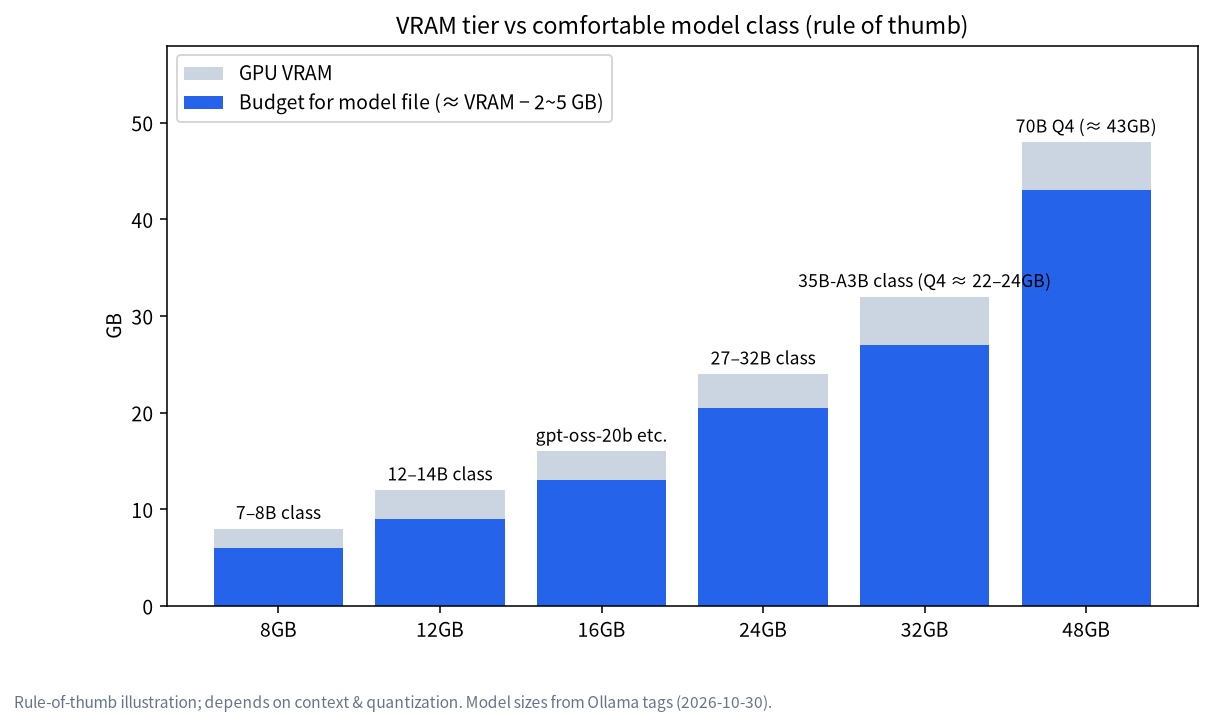
The table below uses CanRun’s estimates (Q4_K_M quantization, 8K context, f16 KV cache, weights plus cache). These are third-party figures and real use varies with the runtime and settings. The same source notes that usable VRAM is below the label: about 7.4GB on an 8GB card, 11.4GB on 12GB, 23.4GB on 24GB, and 31.4GB on a 32GB RTX 5090.
| VRAM tier (usable, approx.) | Candidate models | CanRun total | Notes |
|---|---|---|---|
| 8GB (about 7.4GB) | Llama 3.1 8B | 6.3GB | Fits at 8K context with little headroom |
| 8GB | Gemma 4 12B | 7.8GB | Slightly over usable VRAM; partial offload slows it down |
| 12GB (about 11.4GB) | Gemma 3 12B | 8.4GB | Comfortable, room for longer context |
| 12GB | Qwen3 14B | 10.5GB | Near the limit; keep context modest |
| 16GB (about 15.4GB by the same pattern, our inference) | gpt-oss-20b | 12.3GB | Too big for a 12GB card, comfortable at 16GB |
| 24GB (about 23.4GB) | Qwen3.6 27B | 17.2GB | Leaves about 6GB for longer context |
| 24GB | Gemma 4 26B-A4B | 17.7GB | Mixture-of-experts: big total, small active set |
| 24GB | Gemma 4 31B | 19.5GB | Larger than the 27B class, tighter headroom |
| 24GB | Qwen3 30B-A3B | 19.8GB | Mixture-of-experts |
| 24GB | Qwen3.6 35B-A3B | 21.8GB | Near the ceiling; short context only |
| 24GB | Qwen3 32B | 22.0GB | Nearly full; be frugal with context |
| 64GB+ unified memory or multi-GPU | Llama 3.3 70B | 45.2GB | Won’t fit one 24GB or 32GB card |
| 96GB+ unified memory or multi-GPU | gpt-oss-120b | 63.6GB | Estimated total already exceeds 64GB, so you need more headroom |
Note that the “about 15.4GB” figure for 16GB cards is our extrapolation from the 8GB, 12GB and 24GB figures, not a CanRun number. Treat it as an estimate.
Best Local LLM by Task: Starting from Official Descriptions
The task grouping below follows Ollama’s library pages and official model cards. We did not run comparative evaluations, so we describe fit, not scores.
| Task | Families to try first | Why | Watch out for |
|---|---|---|---|
| Everyday chat and writing | Qwen3.6, Gemma 4, Llama 3.1 8B (small VRAM) | Sizes spanning 8GB to 24GB and beyond | Start with the biggest tier that fits |
| Coding and agents | Qwen3-Coder (30b, about 19GB on Ollama), gpt-oss | Qwen3-Coder targets coding; gpt-oss is described for reasoning and agentic work | Agents and coding tools want at least 64,000 tokens of context, so leave VRAM free |
| Multi-step reasoning | gpt-oss, DeepSeek-R1 distills, thinking modes in Qwen | Official descriptions stress reasoning | Long thinking traces cost time; set expectations |
| Images and screenshots | Gemma 4, Qwen3.5/3.6/3.8, Qwen3-VL | Ollama marks these families as accepting image input | Images use memory too, and may need a recent Ollama version |
| Small VRAM or low-end machines | Llama 3.1 8B, Qwen3 4B/8B, Gemma 4 e2b/e4b | Files from about 2.5GB to 9.5GB | Limited ability; don’t expect complex tasks |
| Big-memory Mac or workstation | Llama 3.3 70B, gpt-oss-120b, Qwen3.5 122b | Large scale | Won’t fit one card; see running an LLM on Mac |
Key Points on the Main Families
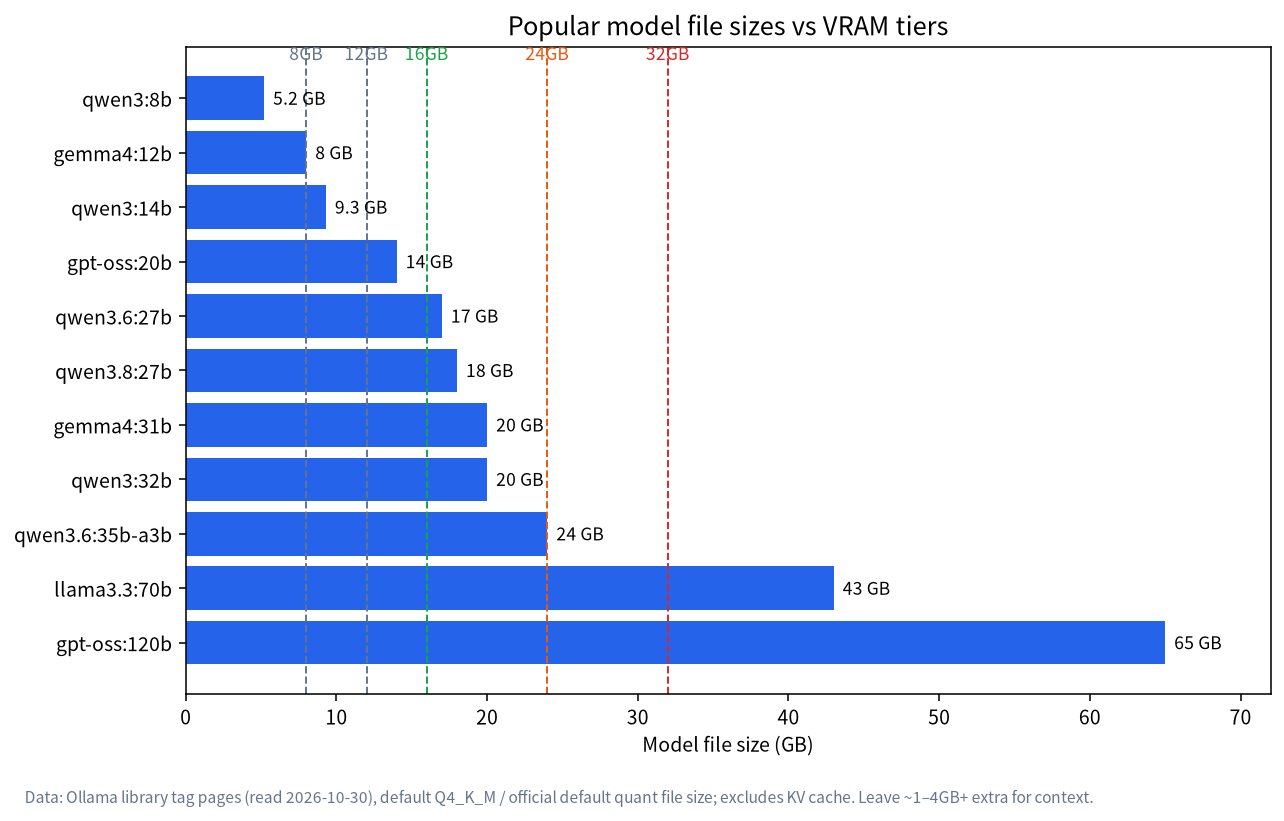
File sizes below come from Ollama library pages read on 2026-10-30 for default or main tags. They cover the file only, not the context cache.
The Qwen family
| Series | Main sizes and file sizes | Context | Input |
|---|---|---|---|
| Qwen3 | 0.6b 523MB, 8b 5.2GB, 14b 9.3GB, 30b 19GB, 32b 20GB | mostly 40K, some 256K | Text |
| Qwen3.5 | 4b about 3.3GB, 9b 6.6–7.6GB, 27b 17–20GB, 35b 22GB | 256K | Text and image |
| Qwen3.6 | 27b 18–19GB, 35b 23GB | 256K | Text and image |
| Qwen3.8 | 27b 18GB | 256K | Text and image |
Qwen3, Qwen3.6 and Qwen3.8 are marked Apache-2.0 on their model cards (we specifically re-checked the Hugging Face page for Qwen3.6-27B); we did not separately verify Qwen3.5’s licence. Qwen3.8 thinks by default and lets you turn that off per request. Deployment steps are in our guide to running Qwen locally.
The Gemma 4 family
Ollama’s gemma4 tags include e2b (4.6–7.5GB), e4b (6.6–9.5GB, also the default), 12b (7.7–8.0GB), 26b (16–19GB) and 31b (19–20GB). All accept text and image input; the e-series has a 128K context window and 12b and above 256K. The information we read is that Gemma 4 uses an Apache-2.0 licence, but treat the model card as authoritative.
The gpt-oss family
gpt-oss comes in 20b (14GB) and 120b (65GB), with a 128K context window and text-only input; the page lists tool use and thinking. The official page describes a permissive Apache 2.0 licence. The 20b model is an interesting pick for the 16GB tier.
DeepSeek and Llama
DeepSeek-R1’s weights are MIT-licensed. What Ollama offers from 1.5b to 70b are distilled models, and only 671b is the full-size original, as we explain in running DeepSeek locally: don’t mistake a small distill for the real thing. Llama 3.3 70B uses the Llama 3.3 Community License, not the more familiar Apache or MIT, so read the terms before commercial use; on Ollama it is also about a 43GB file and needs a lot of memory.
Quantization Changes the “Does It Fit” Answer
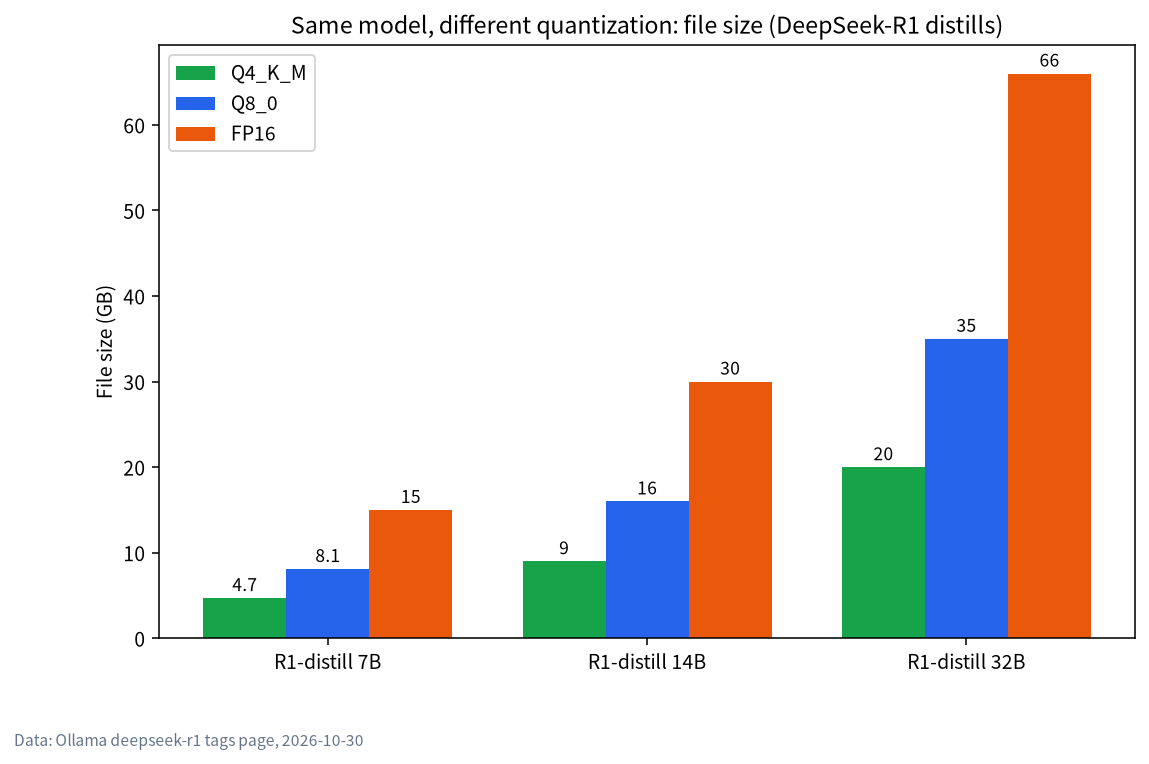
One model’s size varies enormously by quant level. On Ollama, qwen3.6:27b is about 17GB at Q4_K_M, about 30GB at Q8_0 and about 56GB at BF16. A 24GB card fits the Q4_K_M but not the Q8_0. Q4_K_M is the default starting point for most people; how to read the name and choose a level is covered in our quantization guide.
Licence Cheat Sheet
| Family | Licence (check the model card) | Note |
|---|---|---|
| Qwen3, Qwen3.6, Qwen3.8 | Apache-2.0 | Qwen3.5 not separately verified |
| Gemma 4 | Apache-2.0 (the information we read) | Treat the model card as authoritative |
| gpt-oss | Apache 2.0 | Stated on the Ollama page |
| DeepSeek-R1 | MIT | Distills also carry their base model’s licence; the Ollama page explains |
| Llama 3.3 | Llama 3.3 Community License | Not Apache/MIT; read the terms for commercial use |
Licensing is the easiest thing to overlook when you build a product, so read the original model card instead of relying on our table.
The Three Most Common Selection Mistakes
Mistake one: bigger is always better. A model that doesn’t fit in VRAM runs partly on the CPU and slows to a crawl, so a smaller model that fits entirely is often the better experience. Mistake two: looking only at the file size. The file is just the weights; runtime needs the context cache and overhead on top, so a 20GB file on a 24GB card is not comfortable. Mistake three: treating mixture-of-experts models as small. Names with A3B or A4B activate only part of their parameters per token, but all the weights still have to sit in memory, so size by total parameters, not active ones.
A Quick Way to Shortlist in Five Minutes
If you only have a few minutes, do this. Write down your usable memory from the tier table. Subtract roughly 20 to 25 percent for headroom, because the context cache and runtime overhead are not in the file size. Search the Ollama library for families that list a tag below that number, and pick two candidates of different families rather than two sizes of one family. Pull both, run ollama ps to confirm they sit on the GPU, and ask each the same three questions from your real work. Within an evening you will have a better answer than any leaderboard could give you.
How to Run a Fair Comparison Yourself
We don’t publish scores because your tasks are the real test. Try this instead:
- Collect 10 real tasks: questions you actually ask, a document to summarise, a function to fix.
- Give every candidate the same prompts and the same context length.
- Record three things: was the answer usable, how long until the first token, and the generation speed.
- Use
ollama psto confirm each model sits fully on the GPU, so the CPU doesn’t muddy the result. - Keep the results in a table and rerun the same 10 tasks when a new version arrives.
Keeping Up Without Drowning in News
Models arrive so fast that chasing every new name is pointless. A calmer rhythm: each month, pick at most one new candidate in your VRAM tier, run your 10 tasks, and delete it if it isn’t better. Watch the update dates on Ollama library pages and the notes on model cards rather than a single screenshot on social media. If your VRAM can’t hold the new model’s smallest size, upgrading hardware beats wrestling with quantization; see our GPU guide and PC build configurations.
FAQ
What is the best local LLM right now?
There is no best model without hardware. At 8GB, try something around 8B; at 24GB, try families such as Qwen3.6 27B and Gemma 4 26B or 31B. The right one depends on your task and context length.
Which model for 8GB of VRAM?
An 8GB card offers about 7.4GB usable, and Llama 3.1 8B (about 6.3GB by CanRun’s estimate) is a steady choice. Details are in LLM on 8GB VRAM.
Which model for 24GB of VRAM?
Q4_K_M models between 27B and 35B are the sweet spot, with estimated totals from 17GB to 22GB. See LLM on 24GB VRAM for the trade-offs.
Which model is best for Chinese?
It varies by task and we have no evaluation data of our own. Use the 10-task method above with your own Chinese tasks to compare Qwen, Gemma 4 and others.
Can I use open models commercially?
It depends on the licence. Apache-2.0 and MIT in the table above are generally friendly to commercial use, but Llama 3.3 uses a community licence with a use policy. Treat the model card as authoritative and consult a lawyer if needed.
A new model just came out. Should I switch immediately?
No. Compare it on your own tasks and switch only if it’s better. New versions often change size too, so check your VRAM first.
Next Steps and Community
Post your GPU model or memory size and your main use (writing, coding, images and so on) in our community (join the community) and we’ll help narrow your shortlist. We source, assemble and test local-LLM machines in Shenzhen, so if you’d like to work backwards from these models to a whole-system spec, come and talk. Start with a conversation about your needs; there is no obligation to buy.