LLM Quantization Explained: What Q4_K_M Means and How to Choose a GGUF Quant
Fact-check note: The size and speed figures come from the table in llama.cpp’s official quantize documentation (Llama-3.1-8B as the example; the excerpt doesn’t state the test hardware, so use the speeds for trend only). Ollama file sizes were read from official pages on 2026-10-30. We did not run quality evaluations ourselves and won’t give unsourced numbers like “Q4 loses X points”.
If you’ve downloaded a local model you’ve seen suffixes like Q4_K_M, Q8_0 and Q5_K_S without knowing what they mean or which to pick. This article is about LLM quantization: what it is, why almost every local setup uses it, how to read the name Q4_K_M, how the levels differ in size and speed, and which one your GPU should take. Pair it with How Much VRAM Does an LLM Need? if you want the VRAM maths too.
What LLM Quantization Is: Storing Weights in Fewer Bits
A model’s weights start as high-precision floating-point numbers, commonly 16-bit. Quantization compresses them into fewer bits, such as 8 or 4. The llama.cpp documentation says it shrinks the model and can speed up inference, at the price of possibly introducing some accuracy loss, usually measured with perplexity and KL divergence, and that a good importance matrix (imatrix) can minimize it.
For local use the point is plain: VRAM is limited, and quantization lets a bigger model fit. Take Llama 3.1 in llama.cpp’s documentation:
| Model | Original size | Quantized (Q4_K_M) | Shrink factor |
|---|---|---|---|
| 8B | 32.1GB | 4.9GB | about 6.6x |
| 70B | 280.9GB | 43.1GB | about 6.5x |
| 405B | 1,625.1GB | 249.1GB | about 6.5x |
(The original size is an F32-class unquantized file, so the factor against FP16 is smaller; the shrink factor is our own division of the documentation’s numbers.)
Reading LLM Quantization Names: What Q4_K_M Says
A quant name is several pieces joined together. The community’s usual reading is:
| Piece | Meaning | Example |
|---|---|---|
| Number after Q | Roughly how many bits per weight | Q4 is about 4 bits, Q8 about 8 |
| K | Uses k-quants (a block-wise mixed scheme) | Q4_K is finer than the older Q4_0 |
| S / M / L | Small, Medium or Large within the level | Q4_K_S is smaller, Q4_K_M sits in the middle |
| IQ prefix | i-quants, better suited to very low bit counts | IQ4_XS, IQ3_M |
_0 |
An older, simpler scheme | Q8_0, Q4_0 |
So Q4_K_M means “about 4 bits, k-quant, medium”. “About 4” is an average: in llama.cpp’s documentation the Q4_K_M of Llama-3.1-8B measures 4.89 bits per weight, not exactly 4, because different layers mix different precisions.
Quant Levels Compared: Size and Speed
This table comes from llama.cpp’s official quantize documentation for Llama-3.1-8B. Size is in GiB and speed is text generation in tokens per second (the excerpt doesn’t state the test hardware, so read the trend only):
| Quant level | Bits per weight | File size (GiB) | Generation speed (t/s) | Size vs F16 |
|---|---|---|---|---|
| F16 (unquantized) | 16.00 | 14.96 | 29.17 | 100% |
| Q8_0 | 8.50 | 7.95 | 50.93 | about 53% |
| Q6_K | 6.56 | 6.14 | 58.67 | about 41% |
| Q5_K_M | 5.70 | 5.33 | 67.23 | about 36% |
| Q4_K_M | 4.89 | 4.58 | 71.93 | about 31% |
| IQ4_XS | 4.46 | 4.17 | 77.51 | about 28% |
| Q3_K_M | 4.00 | 3.74 | 71.68 | about 25% |
| Q2_K | 3.16 | 2.95 | 79.85 | about 20% |
| IQ2_M | 2.93 | 2.74 | 74.44 | about 18% |
| IQ1_S | 2.00 | 1.87 | 79.73 | about 13% |
Two patterns show up. File size is roughly proportional to bit count, and generation speed generally rises as the file shrinks (generation is mostly memory-bandwidth-bound, so less data to read is faster), though the lowest levels are not always the fastest. Note that the table holds no quality data: fewer bits mean more loss, but how much depends on the model and task, and we won’t invent numbers.
You can also compute size yourself: weight size is about parameters × bits per weight ÷ 8. Llama-3.1-8B has roughly 8.03 billion parameters and Q4_K_M is about 4.89 bits, so 8.03 billion × 4.89 ÷ 8 is about 4.91 billion bytes, or 4.58 GiB, matching the table.
Why Most People Choose Q4_K_M
Three reasons: it cuts size to about a third while quality still suffices for most uses; it is the level Ollama defaults to; and Hugging Face’s documentation says that when running a GGUF through Ollama it picks Q4_K_M if the repository has it, and otherwise chooses a sensible level. It is the ecosystem’s default, so you’ll find the most guides and answers for it.
“Sufficient” is not “best”, though. If your VRAM has room, consider Q5_K_M or Q6_K for more precision; only when VRAM is short do you step down to Q3, Q2 or the IQ family. The next section covers the trade-offs.
Choosing an LLM Quantization Level by VRAM
| Your situation | Suggested level | Reason |
|---|---|---|
| Q4_K_M just fits and you need long context | Q4_K_M, then quantize the KV cache | Save space for context |
| Q4_K_M fits with 2GB or more to spare | Q5_K_M or Q6_K | Trade space for precision |
| Q8_0 fits (small models) | Q8_0 | Closest to unquantized precision |
| Q4_K_M doesn’t quite fit | Try a smaller model first, then IQ4_XS or Q3_K_M | Change the model before squeezing hard |
| You need extreme compression | Q2_K or IQ2 family | Quality drops noticeably; only if nothing else fits |
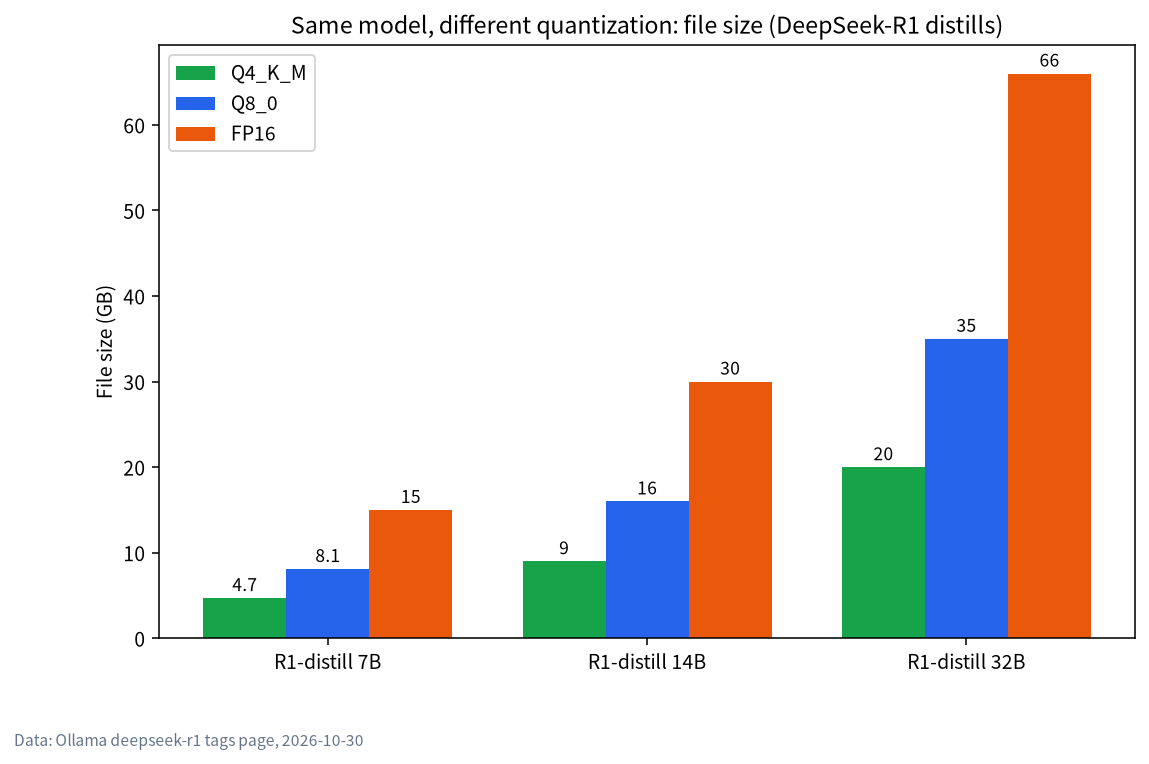
Real examples from Ollama’s pages (2026-10-30):
| Model | Q4_K_M | Q8_0 | BF16/FP16 |
|---|---|---|---|
qwen3.6:27b |
17GB | 30GB | 56GB |
qwen3:32b |
20GB | 35GB | 66GB |
qwen3:30b-a3b |
19GB | 33GB | 61GB |
On a 24GB card only the Q4_K_M versions of these fit, while Q8_0 needs a 32GB-or-larger card; the full analysis is in LLM on 24GB VRAM. An 8GB card starts with smaller models instead; see LLM on 8GB VRAM.
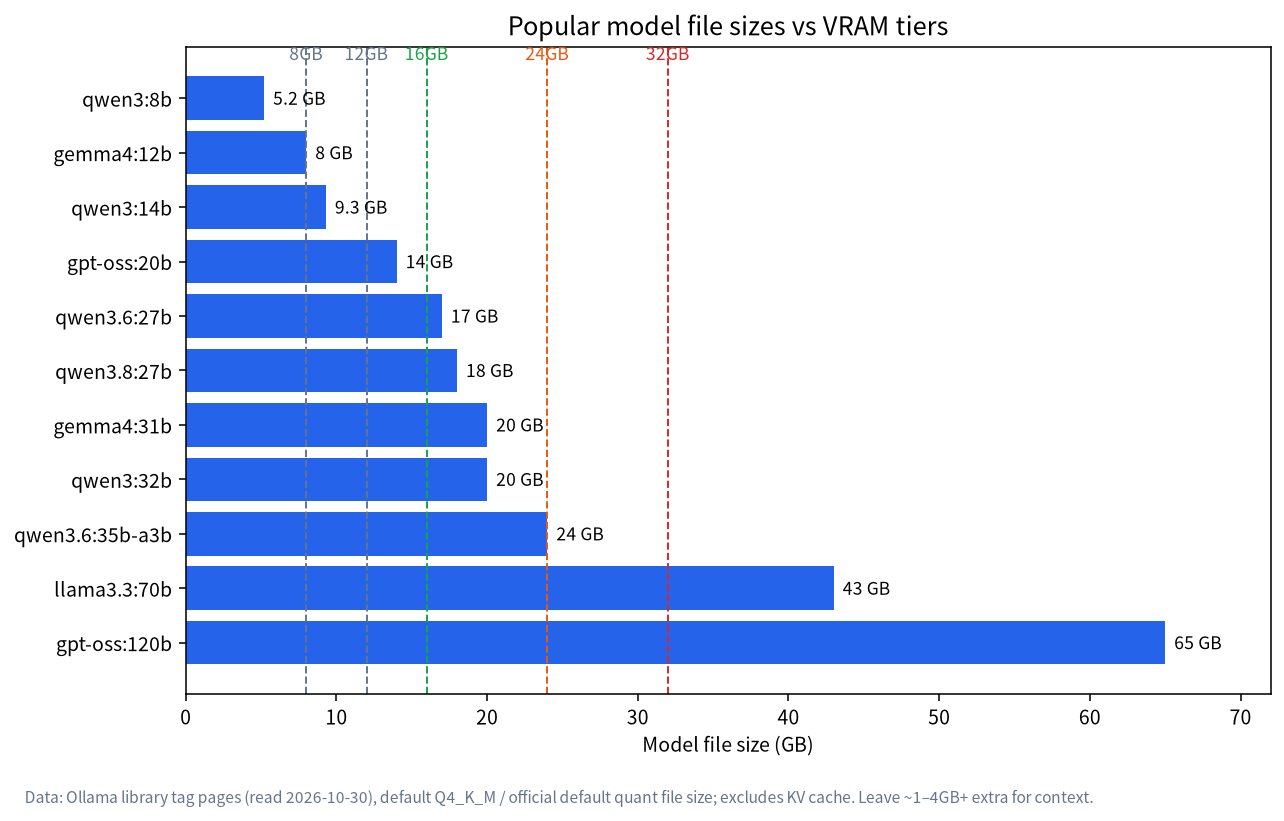
A Worked Example: Spending a 24GB Budget
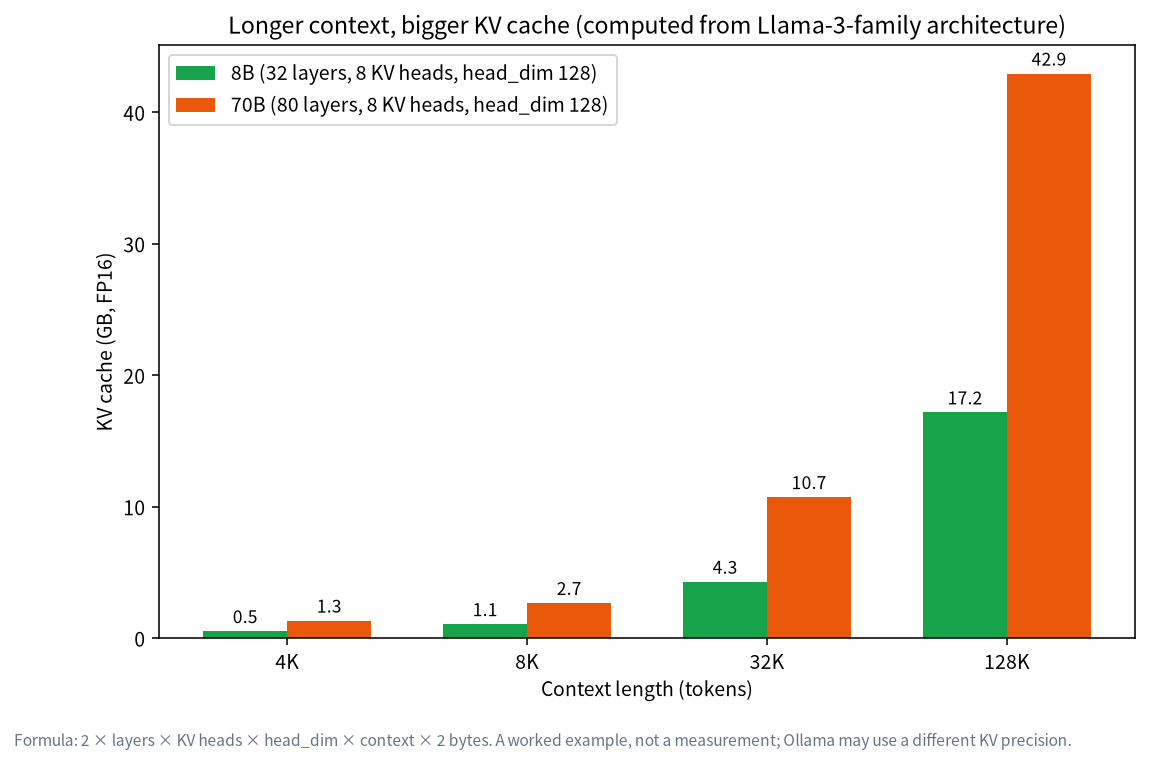
Take a 24GB card, which CanRun estimates offers about 23.4GB usable. Qwen3.6 27B at Q4_K_M is a 17GB file on Ollama, and CanRun’s 8k-context total is about 17.2GB (16.1GB weights plus 0.5GB KV cache), leaving about 6GB. You have choices for that leftover room. You can stretch context: CanRun’s estimate at 32k with an f16 cache is about 19.0GB, still on the card. You can try a higher quant, but Q8_0 is a 30GB file and simply doesn’t fit. Or you can keep Q4_K_M and quantize the KV cache to q8_0 to leave even more space. For most people on this card the first and third options beat chasing a higher weight quant, which shows why quantization is a budgeting exercise rather than a single “best” setting.
Beyond Weights: Quantizing the KV Cache
Besides weights, context creates a KV cache that can eat a great deal of VRAM at long context. Ollama’s official FAQ says that with Flash Attention on (OLLAMA_FLASH_ATTENTION=1) you can quantize the cache with OLLAMA_KV_CACHE_TYPE:
| Type | Memory | Precision impact (per the docs) |
|---|---|---|
f16 |
Baseline (default) | Highest precision |
q8_0 |
About 1/2 of f16 | Very small loss, usually no noticeable impact (the recommended compromise) |
q4_0 |
About 1/4 of f16 | Small-to-medium loss, may be more noticeable at larger context sizes |
The docs add that this is a global setting applied to all models, and that models with a high GQA count (such as Qwen2) may see a larger precision impact, so you may need to experiment.
Getting the Quant Level You Want
In Ollama’s official library the default tag is Ollama’s chosen default quantization; for a specific level, look for tags with suffixes like q4_K_M and q8_0 on the tags page.
If a model only has GGUF files on Hugging Face, Ollama can run them directly:
ollama run hf.co/username/repository
ollama run hf.co/username/repository:Q8_0
The first uses the default quant (Q4_K_M if present); the second names a level after the colon, case-insensitively, and you can also use the full file name as the tag. For LM Studio, see LM Studio Tutorial; its official docs advise choosing a 4-bit or higher quant.
To quantize a model yourself, llama.cpp provides the llama-quantize tool: first convert the original model to GGUF (preferably from a 16-bit or 32-bit file), then run:
./llama-quantize input-model-bf16.gguf output-model-Q4_K_M.gguf Q4_K_M
The documentation specifically warns that requantizing an already quantized model (--allow-requantize) can severely reduce quality, so start from a high-precision file; and the vision components (mmproj) of multimodal models are usually kept at bf16 or q8, because a smaller quant barely helps speed or memory but could hurt quality.
Verify It Yourself: Is This Quant Good Enough?
Since no single quality number suits everyone, the most reliable way is to compare on your own tasks. A simple method:
- Prepare 10 questions you really ask, covering writing, code, language understanding and maths.
- Run the same set on Q4_K_M and on a higher level (for example Q6_K or Q8_0) with a low, fixed temperature.
- Compare accuracy, format-following and how often it makes things up, and write it down.
- If you can’t feel a difference, use the smaller file and spend the saved VRAM on context.
- If the difference is clear on the tasks you care about most, use the larger level or switch to a smaller model.
It needs no special benchmarking tools and is closer to your own needs than anyone else’s scores. Keep the notes, because when a new model version appears you can rerun the same ten questions in minutes.
Common Misconceptions
| Misconception | Reality |
|---|---|
| Fewer bits is always faster | Speed generally rises as the file shrinks, but not every low-bit level is faster; compare Q3_K_M with Q4_K_M in the table |
| Quantization only makes quality worse, with no remedy | A good imatrix reduces loss, and the IQ family is tuned for low bit counts |
| Q8_0 is always better than Q4_K_M | Q8_0 is closer to the original, but about twice the size; it’s pointless if it doesn’t fit |
| Only weights can be quantized | The KV cache can be quantized too, and the two can be combined |
| All models behave the same after quantization | The effect varies by model and task; test it |
FAQ
What’s the difference between Q4_K_M and Q4_K_S?
Both are roughly 4-bit k-quants; S is the smaller version and M the medium one. For Llama-3.1-8B, Q4_K_S is 4.36GiB and Q4_K_M is 4.58GiB, so M is slightly larger and usually a little more precise.
How much dumber does quantization make a model?
There’s no universal answer; it depends on the model, task and level. The official documentation only says it “may introduce some accuracy loss” and suggests measuring with perplexity or KL divergence. We won’t invent numbers.
Which quant for an 8GB GPU?
Choose a smaller model (7B–9B) at Q4_K_M rather than forcing a large model into a lower quant; see LLM on 8GB VRAM.
Are Q5 and Q6 worth it?
If you have spare VRAM, yes. If VRAM is tight, saving the space for context is usually more valuable.
Should I download several quant levels of the same model?
Only while you’re comparing. Each file is several to dozens of gigabytes, so once you’ve decided, delete the others to free disk space.
What is GGUF?
GGUF is the model file format used in the llama.cpp ecosystem. Hugging Face hosts lots of community GGUF quants, and Ollama and LM Studio can both use them directly.
Does KV cache quantization hurt answer quality?
The docs say q8_0 has a very small loss and q4_0 may be more noticeable at larger context sizes; measure on your own model and task.
Next Steps and Community
A good quant choice lets the same card run a model one tier larger. Post your GPU and the model you want in the community (join the community) and work it out together. Our Shenzhen team sources, builds and tests local-LLM machines and can help judge which configuration fits; talk first, no obligation to buy.