Local LLM PC Build: Four Tiers From 12GB to 32GB VRAM
Fact-check note: GPU prices are a US asking-price snapshot read from readygpu.com on 2026-10-30. They swing a lot and are for orientation only. China-market prices for the other parts are estimated from October 2026 median quotes in the “Reference System Prices” section below. The advice rests on public sources and VRAM maths, not on our own benchmark runs.
Many people want to build a computer for running AI models but don’t know where to start: how big a GPU, how much RAM, will the PSU cope? This guide lays out a way to plan a local LLM PC build: choose a VRAM tier from the models you want to run, then build the CPU, RAM, PSU, storage and case around that card. It includes four tier configurations, a price snapshot and a pitfalls checklist. If you want to understand GPUs first, start with Best GPU for Local LLMs.
The Core Idea of a Local LLM PC Build: VRAM First
VRAM is the hard gate: it decides whether a model fits on the card at all. The CPU and RAM influence load time and what happens when the model doesn’t fit, but not whether it fits. So the build order is:
- Decide the model size you want (see How Much VRAM Does an LLM Need?).
- Pick the GPU tier that holds it.
- Build the PSU, CPU, RAM, storage, case and cooling around that card.
PromptQuorum’s hardware guide advises that with a dedicated GPU the CPU and RAM are secondary: an 8-core or better CPU, at least 16GB of RAM, and an NVMe SSD of 500GB or more. CanRun’s test conditions assume 32GB of system RAM, and for a machine with a 24GB-class card we suggest at least 32GB.
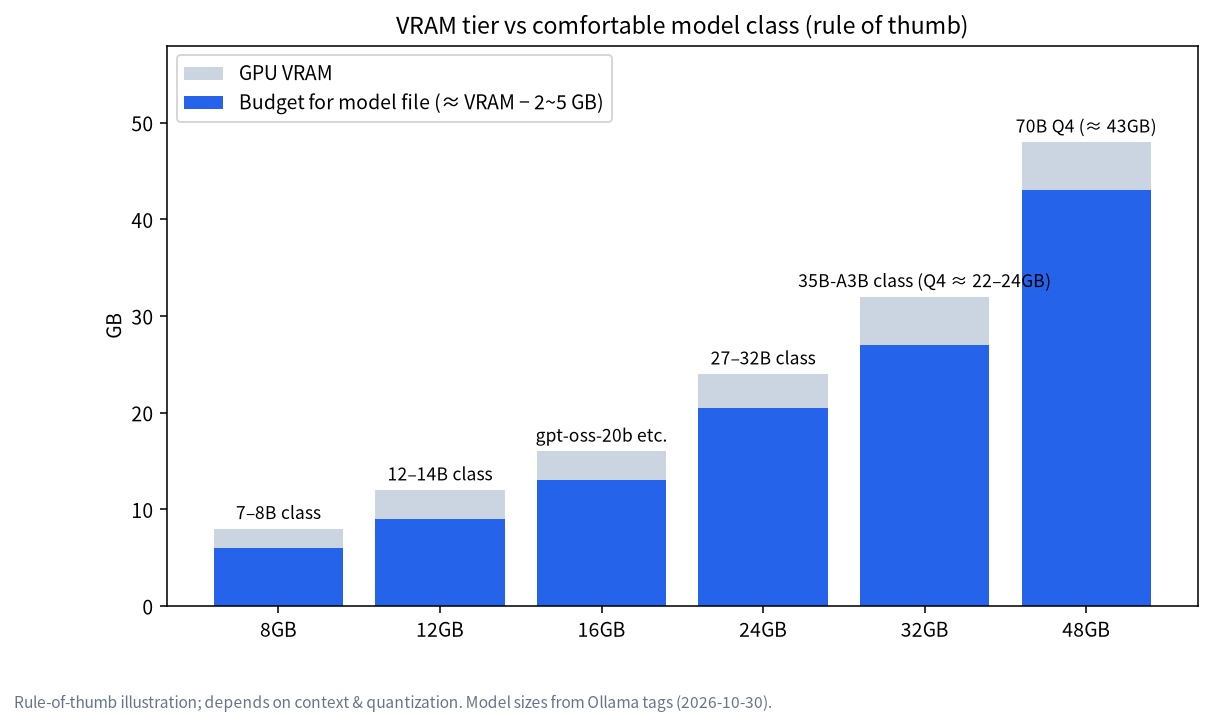
Four Build Tiers at a Glance
| Tier | VRAM | Representative GPU | Runs comfortably | RAM advice | PSU advice | Reference system price (estimate) |
|---|---|---|---|---|---|---|
| Entry | 12GB | RTX 3060 12GB | 8B–14B models | 16GB minimum, 32GB better | Follow the card’s official guidance | about 7,900 RMB |
| Mainstream | 16GB | RTX 5060 Ti 16GB | 14B–20B models | 32GB | About 600W (official for the 5060 Ti) | about 10,900 RMB |
| Advanced | 24GB | RTX 3090 / RTX 4090 | 27B–32B and 30B MoE | 32GB or more | 750W–850W | about 14,300 RMB (used 3090) / 33,200 RMB (4090) |
| Flagship | 32GB | RTX 5090 | Same, plus longer context and Q8_0 27B | 64GB steadier | About 1000W | about 65,700 RMB |
“Runs comfortably” follows CanRun’s 8k-context estimates: Qwen3 14B needs about 10.5GB, which a 12GB card (about 11.4GB usable) holds; Qwen3.6 27B at about 17.2GB and Gemma 4 31B at about 19.5GB fit a 24GB card (about 23.4GB usable). The smaller 8GB tier is covered in LLM on 8GB VRAM.
Reference System Prices: Estimated From October 2026 Median Quotes
Reference price (estimated from Oct 2026 median market prices; the actual quote prevails): the table below adds up the median of public quotes for each part from mid-to-late October 2026 (JD, Taobao, ZOL, SMZDM, Guangzhou parts-market reports, and aggregators of Xianyu listing medians). It excludes monitor, peripherals, OS licence and shipping. It is an estimate, not a quote from us. Source, date and confidence for each part are recorded in our price reference sheet; contact us if you want it.
| Tier | Main parts (median price, RMB) | Total (RMB, approx.) |
|---|---|---|
| Entry 12GB | RTX 3060 12GB new 3,475; i5-12600KF 900; H610M board 499; DDR4 32GB (2×16GB) 1,150; 1TB SSD 1,025; 650W PSU 350; cooler and case 500 | 7,900 |
| Mainstream 16GB | RTX 5060 Ti 16GB 5,599; i5-14600KF 1,300; B760M board 929; DDR4 32GB 1,150; 1TB SSD 1,025; 650W PSU 350; cooler and case 500 | 10,900 |
| Advanced 24GB (used 3090) | RTX 3090 used 7,550; i5-14600KF 1,300; B760M 929; DDR4 32GB 1,150; 2TB SSD 1,800; 850W PSU 1,070; cooler and case 500 | 14,300 |
| Advanced 24GB (RTX 4090) | RTX 4090 26,465; other parts as above | 33,200 |
| Flagship 32GB (RTX 5090) | RTX 5090 new 53,500; R7 9700X 1,339; B650M board 1,499; DDR5 64GB (2×32GB) 5,900; 2TB SSD 1,800; 1000W PSU 1,199; cooler and case 500 | 65,700 |
Three things to keep in mind. First, GPU and memory prices are rising fast: a 27 October market report said mainstream cards rose another 8%–10% in two days, so real prices may be higher than the table. Second, used RTX 3090 quotes are spread wide: the Xianyu listing median is about 9,350 RMB, while community reports of actual deals mostly fall between 5,500 and 8,000 RMB; the table uses the median across those views, and any used card must be inspected. Third, the same RTX 3060 12GB moved from about 2,950 to about 4,000 RMB across late-October quotes, and we took the median of the two. Contact us to confirm a specific configuration and price.
GPU Price Snapshot (2026-10-30, US Asking Prices)
| GPU | VRAM | Bandwidth | New (best listing) | Used (from) | Power / PSU guidance |
|---|---|---|---|---|---|
| RTX 3060 12GB | 12GB | 360GB/s | about $370 | about $300 | Per official guidance |
| RTX 5060 Ti 16GB | 16GB | 448GB/s | about $618 | about $725 | 180W, 600W PSU suggested |
| RTX 4060 Ti 16GB | 16GB | 288GB/s | about $780 | about $650 | Per official guidance |
| RTX 5070 Ti | 16GB | 896GB/s | about $1,460 | about $1,330 | Per official guidance |
| RTX 3090 | 24GB | 936GB/s | about $1,698 | about $1,599 | 750W PSU suggested |
| RTX 4090 | 24GB | 1008GB/s | about $2,073 | about $3,300 | 450W, 850W PSU suggested |
| RTX 5090 | 32GB | 1792GB/s | about $5,654 | about $6,450 | 575W, 1000W PSU suggested |
Three cautions. First, these are US asking-price snapshots and say nothing about China-market channels, so see the “Reference System Prices” section above for China-market estimates. Second, PromptQuorum (updated 2026-10-17) reports that memory shortages are still pushing prices up, so expect volatility. Third, used asking prices are sometimes above new ones; inspect any used card carefully, using the routine in Best GPU for Local LLMs.
Entry Tier: Planning a 12GB Build
The 12GB RTX 3060 is one of the best-value entry cards. CanRun estimates about 11.4GB usable, and Qwen3 14B needs about 10.5GB: it just fits, with little margin, so keep context to 4k–8k. This tier suits everyday Q&A, writing polish, learning and experiments, and small-scale document Q&A.
Suggested parts: an 8-core or better CPU; 16GB of RAM at least, 32GB if you keep a browser and developer tools open; an NVMe SSD of 500GB or more; and a PSU following the card’s official guidance from a reputable brand. Most of the budget at this tier goes to the platform around the card. At October 2026 median prices an entry system comes to about 7,900 RMB, of which the GPU is about 44%; see the reference table above, and the actual quote prevails.
Mainstream Tier: Planning a 16GB Build
Sixteen gigabytes is a popular sweet spot. The RTX 5060 Ti 16GB sits at about $618 new in our snapshot and draws only 180W, so a roughly 600W PSU is enough. Sixteen gigabytes holds 14B–20B models and leaves wider room for context.
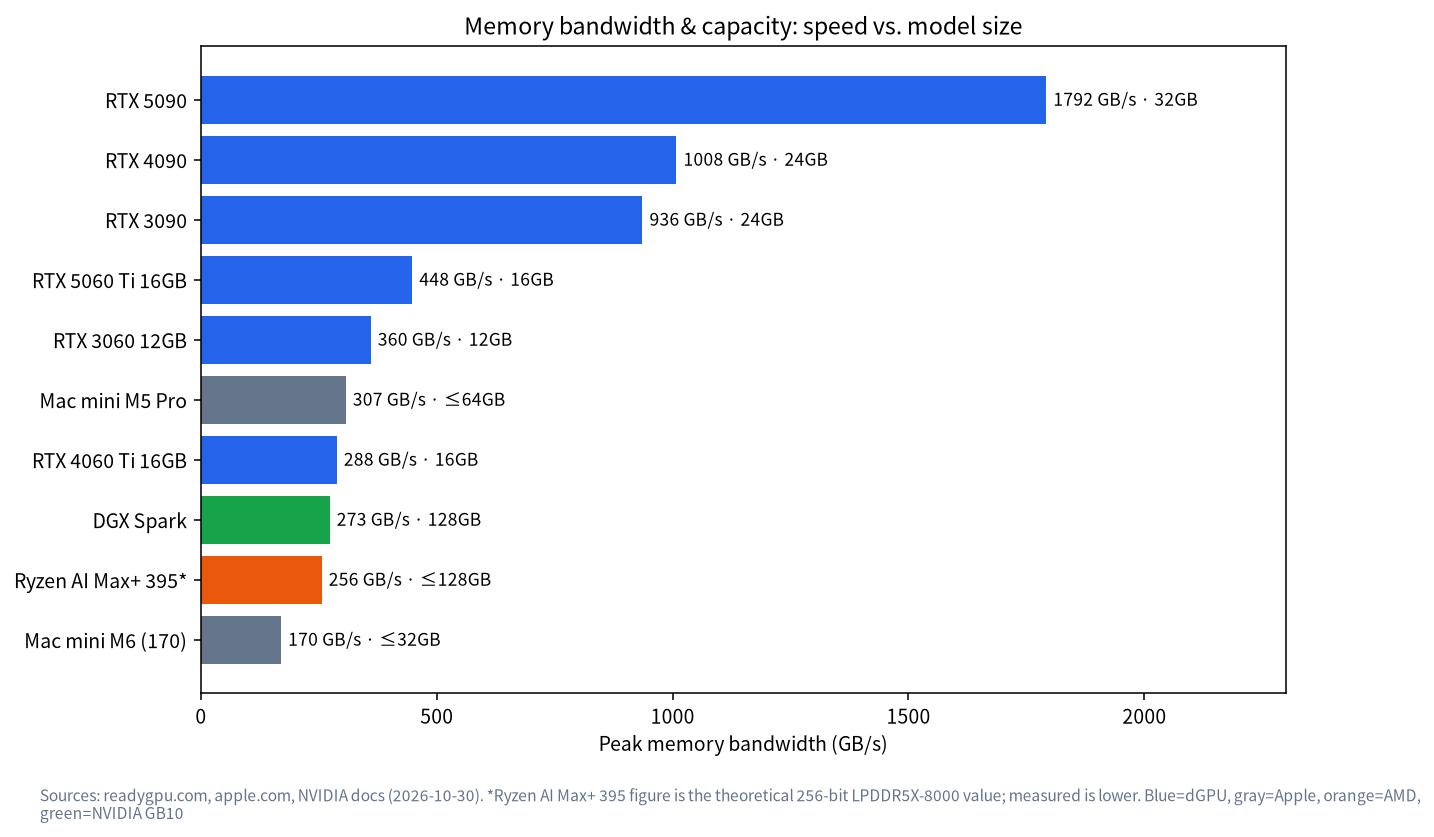
Mind the bandwidth, though: the RTX 5060 Ti’s 448GB/s against the RTX 4060 Ti 16GB’s 288GB/s is a big gap, so two cards with the same capacity may generate at quite different speeds (higher bandwidth is usually faster, but we haven’t measured it). Aim for 32GB of RAM.
Advanced Tier: Planning a 24GB Build
Twenty-four gigabytes is the personal workhorse tier: 27B–32B dense models and 30B-class MoE models fit entirely on the card, with the model list in LLM on 24GB VRAM. The build focus here is the PSU, case and cooling: NVIDIA lists the RTX 4090 at 450W with an 850W PSU suggested, and a 750W PSU for the 3090. The case must hold a large card and move air freely.
Choosing a 3090 or 4090 comes down to budget and how much you value generation speed. Capacity is the same, bandwidth is higher on the 4090, and prices are in the snapshot above.
Flagship Tier: Planning a 32GB Build
The RTX 5090 has 32GB, 1792GB/s of bandwidth, a 575W rating and a suggested 1000W PSU. What 32GB buys is mostly longer context and higher precision: CanRun estimates Qwen3 32B at 32k context needs 28.7GB and a 27B model at Q8_0 about 28.4GB, neither of which fits a 24GB card.
Even 32GB won’t hold Llama 3.3 70B at Q4_K_M (CanRun estimates 45.2GB). If 70B-class models are your goal, consider multiple cards, a large unified-memory machine, or an appliance route; see Local LLM Appliance Buying Guide. Flagship prices are very high, and PromptQuorum notes street prices far above the official guide price, so check the live price on the day.
Choosing the Other Parts
| Part | Suggestion | Basis and notes |
|---|---|---|
| CPU | A mainstream desktop CPU with 8 cores or more | PromptQuorum’s advice; with a GPU the CPU isn’t the bottleneck |
| RAM | 16GB minimum; 32GB for 24GB-class cards; 64GB for heavy multitasking | Only used when part of a model spills out of VRAM |
| Storage | 500GB NVMe at least; 1TB–2TB if you swap models often | A 4-bit 7B–8B model is about 4–5GB; a 30B-class one is about 19GB |
| PSU | Follow the card’s official wattage, choose a certified brand | 750W for the 3090, 850W for the 4090, 1000W for the 5090 |
| Case and cooling | Fit the card length, front-to-back airflow | Sustained load triggers throttling |
| Motherboard | At least one full-speed PCIe x16 slot | Check slot spacing and power if you may add a second card later |
PromptQuorum’s storage planning reference: 500GB holds the OS and one or two small models, 1TB holds three to five models, and 2TB holds ten or more. For inference only, storage speed mainly affects load time.
How to Think About the Budget
There is no universal split, but one rule holds up: the GPU is usually the single largest line item, and skimping on the PSU, case or cooling to afford a bigger card tends to backfire. Write your budget down in this order: GPU, PSU, RAM, storage, CPU and motherboard, then case and cooling. Add a small reserve for cables, thermal paste and a spare fan. If a quote or a plan leaves out any of these, ask why before paying.
Assembly and Bring-Up Steps
- Confirm the model and VRAM. Use CanRun or the method in this site’s VRAM guide.
- Measure the case. Card length, thickness and power-connector position.
- Assemble in order. CPU and RAM on the motherboard, then the cooler, storage, motherboard into the case, PSU and finally the GPU. Seat the GPU power connectors fully.
- Install the OS and drivers. NVIDIA cards need a recent driver; Ollama’s docs require driver 550 or newer.
- Install Ollama and verify. See Install Ollama, then confirm
100% GPUinollama ps. - Stress test. Run for at least 30 minutes and watch temperature, noise and stability.
Build Pitfalls Checklist
- Judging the PSU by wattage alone. Transient draw on high-power cards can exceed the label, so don’t economize on the PSU.
- Loose power cables. GPU connectors must seat fully; a loose one can drop the card or even burn it.
- A case that doesn’t fit. Flagship cards are huge, so measure before buying.
- A bad used card. Mining cards, refurbished cards and falsified VRAM exist; inspect and prefer sellers with a warranty.
- Forgetting the driver version. An old driver leaves the GPU unused; see Ollama Troubleshooting.
- Ignoring noise and heat. In a home that stays on, noise is a cost too.
Build It, Buy a Prebuilt, or Get a Mac?
| Option | Pros | Cons | Best for |
|---|---|---|---|
| Self-built desktop | Upgradable, good value, full CUDA ecosystem | Hands-on work and pitfalls | People who enjoy tinkering |
| Branded or vendor prebuilt | Convenient, with after-sales | Specs and pricing are opaque; shop around | People who want to just use it |
| Mac (unified memory) | Low power, quiet, large memory holds big models | Memory isn’t upgradable; GPU can use about 70% | Quiet and low-power seekers; see Running LLMs on a Mac |
| Appliance (multi-GPU or big memory) | Delivered as a set, aimed at teams and private deployment | Expensive; verify spec and service | Companies and teams; see Local LLM Appliance Buying Guide |
If your usage is light, run the numbers first: a cloud API can be cheaper for light users, as discussed in Local LLM vs API.
FAQ
What’s the minimum hardware to run a local LLM?
A GPU with 8GB of VRAM, or an Apple silicon Mac with 16GB of unified memory, runs 7B–8B models. For comfortable use of 14B and up, aim for 12GB–16GB of VRAM.
How much RAM do I need?
With a dedicated GPU, start at 16GB, and 32GB for 24GB-class cards. RAM doesn’t directly set the model size that fits, but when VRAM runs out the model spills into RAM and speed drops sharply.
Can I use an AMD or Intel GPU?
You can try, but check software support first; NVIDIA’s CUDA ecosystem is the most complete. For AMD, see Ollama Troubleshooting.
How much does a 24GB machine cost?
Reference price (estimated from Oct 2026 median market prices; the actual quote prevails): a used RTX 3090 on a 14600KF platform with 32GB RAM, a 2TB SSD and an 850W PSU comes to about 14,300 RMB; with an RTX 4090 instead, about 33,200 RMB. GPU prices are swinging hard, so see the “Reference System Prices” section above.
Can two GPUs combine their VRAM?
Some software can split a model across several cards, but that adds motherboard, PSU, cooling and configuration complexity, and we have no measured data, so beginners should start with one card.
How do I confirm the GPU is really in use?
After loading a model, run ollama ps and check the PROCESSOR column reads 100% GPU.
Next Steps and Community
The hard part of a build is rarely “what to buy”; it’s “how to put it together without stepping on a mine”. Post your budget and use case in the community (join the community) and talk it through with others. Our Shenzhen team sources, builds and tests local-LLM machines and can propose a configuration for your budget, whether prebuilt or self-build. Talk first; no obligation to buy.