24GB VRAM PC Build: A Used RTX 3090 Machine at About 14299 Yuan, and How It Compares With an RTX 4090
With 12GB of VRAM you can run 14B-class models, but the real dividing line for useful local LLMs is 24GB: a 32B-class 4-bit model fits entirely in VRAM, with room left for context. This article lays out a 24GB VRAM PC build: a used RTX 3090 machine at a reference price of about 14299 yuan, against about 33214 yuan for the same configuration with an RTX 4090. We list the full parts, explain what the machine can run, what to watch for in power and cooling, and when it is worth paying nearly twenty thousand yuan more for the 4090. If your budget is tighter, start with our entry-level build, and for what 24GB can hold, read the 24GB VRAM guide.
Verification note: Prices come from our 2026-10-30 reference price table. They are medians, most parts have a single source, and the used 3090 and the 4090 have four sources each; they are not quotes. Used-card prices vary a lot, so see our inspection article. Model sizes are orders of magnitude for common quantized files, so go by the model card. We did not benchmark this build and give no speed figures. OpenAI’s memory requirements for gpt-oss are taken from its official announcement.
Key takeaways (Updated 2026-10-30)
- A used-3090 build is about 14299 yuan and a 4090 build about 33214 yuan; both have 24GB of VRAM, and the gap is about 18915 yuan.
24GB suits 30B to 32B models at 4-bit; dense 70B models still do not fit.
The 3090 draws about 350W and NVIDIA recommends a 750W supply; we specify 850W. Budget the power supply, case length and inspection together.
24GB VRAM PC Build: The Parts List
| Part | Used-3090 build | Reference price (CNY) | Note |
|---|---|---|---|
| GPU | RTX 3090 24GB (used) | 7550 | The cheapest entry to 24GB; needs inspection |
| CPU | i5-14600KF boxed | 1300 | Plenty of cores for tokenizing, retrieval and other side tasks |
| Motherboard | B760M (DDR4) | 929 | Better expansion than the entry-level H610M |
| Memory | DDR4 32GB (2 x 16GB) | 1150 | A starting capacity; add more if needed |
| Storage | 2TB SSD | 1800 | A 24GB machine downloads more and larger models |
| Power supply | 850W | 1070 | Official guidance is 750W; we leave headroom |
| CPU cooler | Air cooler | 250 | Case airflow matters more than the cooler |
| Case | Mid-tower | 250 | Must fit the 3090’s length and thickness |
| Total | 14299 | Excludes monitor, peripherals, OS licence, shipping and assembly/testing fees |
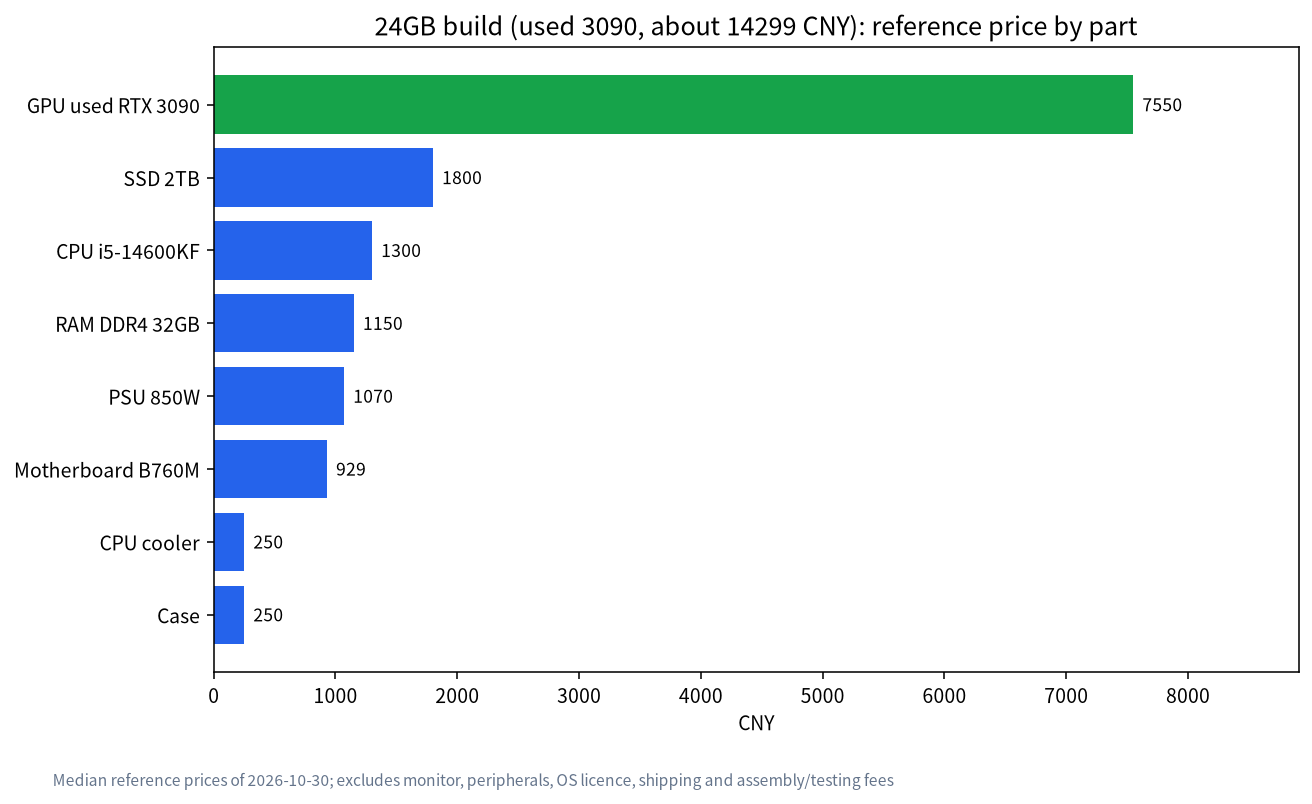
The GPU is about 53% of the total. Compared with the entry build, the extra money goes to three places: the card goes from 12GB to 24GB, the power supply from 650W to 850W, and storage from 1TB to 2TB.
The Same 24GB: What Separates the 3090 From the 4090
| Aspect | Used RTX 3090 | RTX 4090 |
|---|---|---|
| VRAM | 24GB | 24GB |
| GPU reference price (CNY, median) | 7550 (used) | 26465 |
| Whole-PC reference price (CNY) | about 14299 | about 33214 |
| Warranty | Usually none from the manufacturer | New cards have one (used ones do not) |
| Speed | Adequate | Generally faster, but we did not measure |
| Risks | Mining wear, refurbishment, fake VRAM size | Modified cards, empty-shell cards |
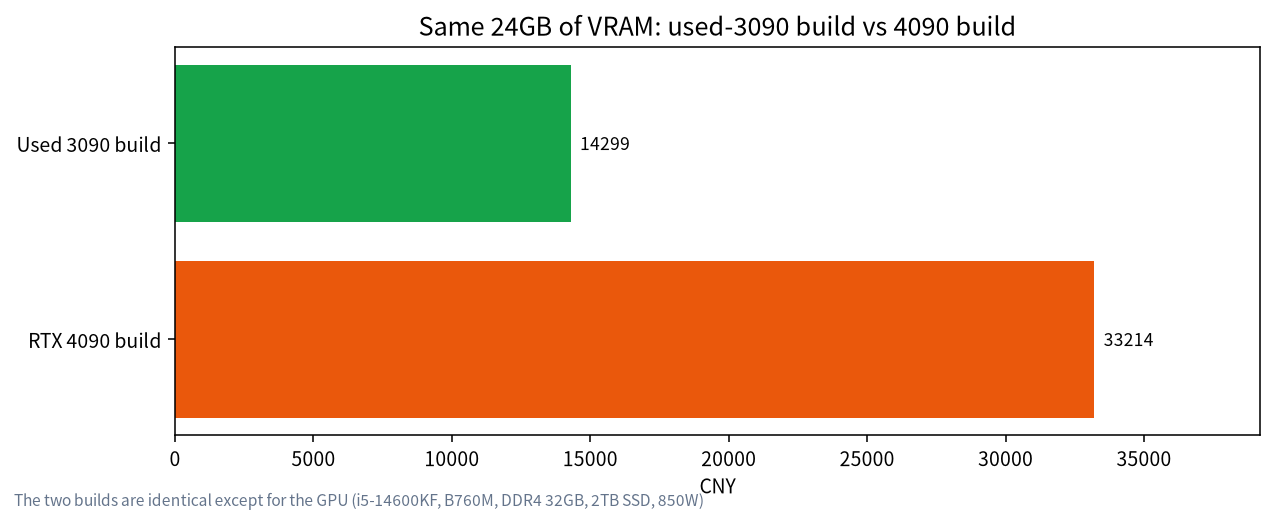
The VRAM is the same, so the two cards can hold the same models. The extra 18915 yuan for the 4090 buys more compute and a newer architecture, not more model capacity. If your goal is simply to fit a 32B model in VRAM, a used 3090 is far better value. If you need image generation, fine-tuning or high concurrency speed, the 4090 starts to make sense. The used 4090 market also has modified and empty-shell cards, which our guide to used GPUs for local LLMs covers.
Why 24GB Is a Dividing Line
Work it out from the official llama.cpp quantize docs: Llama 3.1 70B at Q4_K_M is about 43.1GB, or roughly 0.62GB per billion parameters. By that ratio a dense 32B model at 4-bit is about 19.7GB, which with context cache and runtime overhead approaches the 24GB ceiling, while a 14B model needs only about 8.7GB, which a 12GB card can hold. This is a rough extrapolation, since model architectures differ and the model card has the true file size, but it shows why 24GB is the line for 30B-class models. Below it you either lower the quantization or push layers into system memory and lose speed. Above it you gain longer context and higher-precision quantization.
What 24GB Can Run
The usable part of 24GB is about 22GB once the driver and system take their share, and you still need room for the context cache. A rough guide:
| Model size | Approx. size at 4-bit | Fits in 24GB? | Note |
|---|---|---|---|
| 7B–14B | about 5–9GB | Very comfortable | Allows higher quantization or very long context |
| 20B class, such as gpt-oss-20b | low teens of GB | Fits | OpenAI says gpt-oss-20b runs with about 16GB of memory |
| 30B–32B | about 18–20GB | Fits, with limited context | The main use for 24GB; do not open the context too wide |
| 70B dense | about 43GB | Does not fit | Needs two 24GB cards or a large-memory machine |
| gpt-oss-120b | OpenAI cites a single 80GB-class GPU | Does not fit | Not for 24GB |
Sizes are orders of magnitude estimated from common model cards and the llama.cpp quantization docs; the 43.1GB for Llama 3.1 70B at Q4_K_M comes from the official quantize docs. Model sizes vary widely, so go by the real file and check context use with our VRAM calculator guide. For quantization choices see Q4_K_M quantization, and for choosing models see the best local LLM guide.
How Much Context to Leave Room For
Many people find that a model loads fine, but raising the context sends VRAM straight to its limit. The reason is that the context cache (the KV cache) grows linearly with length. With a 32B model taking about 19.7GB, a 24GB card has only a few GB left to cover system use and the cache, so the context will likely top out between a few thousand and perhaps ten-odd thousand tokens. The method is in the VRAM calculator guide. If you often need very long context, choose a smaller model or a bigger-VRAM plan instead of forcing it.
Power, Case and Cooling: Where 24GB Builds Go Wrong
- Power supply: the 3090 draws about 350W and NVIDIA recommends 750W. We specify 850W to leave headroom for the CPU and transient peaks, and the supply needs enough power connectors.
- Case length and thickness: non-reference 3090s are often very long and thick, so check the case’s supported card length and thickness before buying.
- Airflow: memory temperature is the 3090’s weak point. The case needs at least a front-to-back airflow path, and you should check memory temperature under load once built.
- Memory: 32GB is the starting point; if you will run a knowledge base or several services at once, go straight to 64GB.
When the 4090 Is Worth It (and When It Is Not)
If your use includes image generation, larger batches of concurrent requests, or long daily sessions, a card with much more compute can save a lot of waiting, and the extra money may be justified. A new 4090 also has better warranty and support, which for a machine delivered to a team often matters more than the few thousand yuan saved. On the other hand, if you are the only user and mostly chat and write with local models, a used 3090 with careful inspection is the more practical choice. Whichever you pick, first confirm with the 24GB VRAM guide that the models you want really fall within 24GB.
One more point on timing: used-card prices and new-card prices in 2026 have moved noticeably within a single month, as our own reference table shows. If you are not in a hurry, check three or four sources over a week, write down the lowest credible price for each part, and only then commit. A build assembled from parts bought over a few weeks costs less than one assembled in an afternoon, provided you inspect each part as it arrives and keep every receipt and every chat log for the whole period.
Trade-Offs to Settle Before You Buy
- Can you live without a warranty? A used 3090 usually has none, so you inspect and test it yourself.
- Is there budget headroom? The power supply and case may both need replacing, and that has to go into the total.
- Would a new 16GB card do? The RTX 5060 Ti 16GB is about 5599 yuan and the mainstream whole build about 10853 yuan, which may be enough if you mainly run 14B to 24B models.
- Will you add a second card later? The 3090 is a common dual-card choice, which needs board and power-supply support; see our later dual-GPU article.
A Practical Test of Whether You Need 24GB
Ask yourself three questions. First, how big is the model file you use most, and once you add the context cache you need, does it exceed 14GB? Second, do you often hit “the model does not fit, so I lower the quantization”? Third, are you willing to pay about 3400 yuan more (at reference prices the 24GB build costs about 3446 yuan more than the mainstream 16GB build)? If all three answers are yes, the 24GB build is worth it. If not, the 16GB mainstream build may be better value.
After the Build: Verification Steps
- Use
nvidia-smito confirm 24GB of VRAM and note idle temperature. - Load a 32B-class 4-bit model with the context set to the length you will really use, and confirm every layer sits in VRAM.
- Generate continuously for at least half an hour, watching memory temperature, fans and any driver drop.
- For a used card, finish all of the above inside the return window and keep records.
FAQ: 24GB Builds
Can about 14000 yuan buy a machine with 24GB of VRAM?
At 2026-10-30 reference prices, a used-3090 build is about 14299 yuan (excluding monitor and peripherals). It is a median reference, and real prices vary by region and condition.
Why does the 4090 cost so much more with the same VRAM?
The 4090 has newer architecture and much more compute. If you only care whether a model fits in VRAM, both can hold the same models.
Can 24GB run a 70B model?
A 4-bit 70B is about 43GB, so a single 24GB card cannot hold it. You need two 24GB cards or a large-memory machine.
What if a used 3090 has no warranty?
Inspect and burn-in test it carefully, keep the chat log and inspection video, and confirm the platform’s return terms. If your budget allows, buy new.
Must the power supply be 850W?
NVIDIA recommends 750W, and 850W is our choice for headroom. It depends on your CPU and other parts, so calculate for your real configuration.
What if I want two cards later?
You need a board with two suitable PCIe slots, enough power and case space; see our later article on dual-GPU builds.
Need Help Putting One Together?
If you want us to select, inspect and test a machine for you, join the community or email admin@microaione.com with your budget and the models you want to run. For the basics, read how to run an LLM locally, and for the ladder of configurations see our PC build configurations.
References and further reading: NVIDIA: GeForce RTX 3090 specifications, OpenAI: gpt-oss repository, llama.cpp: quantize docs.