Entry-Level PC Build for Local LLMs: A Roughly 8000 Yuan RTX 3060 12GB Machine
If you want a computer dedicated to local LLMs and do not want to spend five figures on day one, the most realistic starting point for an entry-level PC build for local LLMs is a graphics card with 12GB of VRAM. Using median market prices from late October 2026, a machine built around an RTX 3060 12GB and an i5-12600KF costs about 7899 yuan, excluding a monitor, peripherals and an operating-system licence. This guide gives the full parts list, the reasoning behind each part, what the machine can actually run, and how to upgrade later. To decide how much VRAM you need, read how much VRAM is enough, and for the wider ladder of configurations see our PC build configurations.
Verification note: Prices come from our 2026-10-30 reference price table. They are medians, most parts have a single source and the 3060 new card has two, and they are not quotes. GPU prices are volatile: within the same week we saw new RTX 3060 12GB cards quoted at about 2950 yuan and about 4000 yuan in China. What runs depends on quantization and context, so go by the model card for exact file sizes. We did not benchmark this exact build, so we give no speed numbers.
Key takeaways (Updated 2026-10-30)
- The reference build is about 7899 yuan, of which the RTX 3060 12GB is about 3475 yuan, or 44%.
12GB of VRAM suits 7B to 14B models at 4-bit; for 24GB, see the advanced builds.
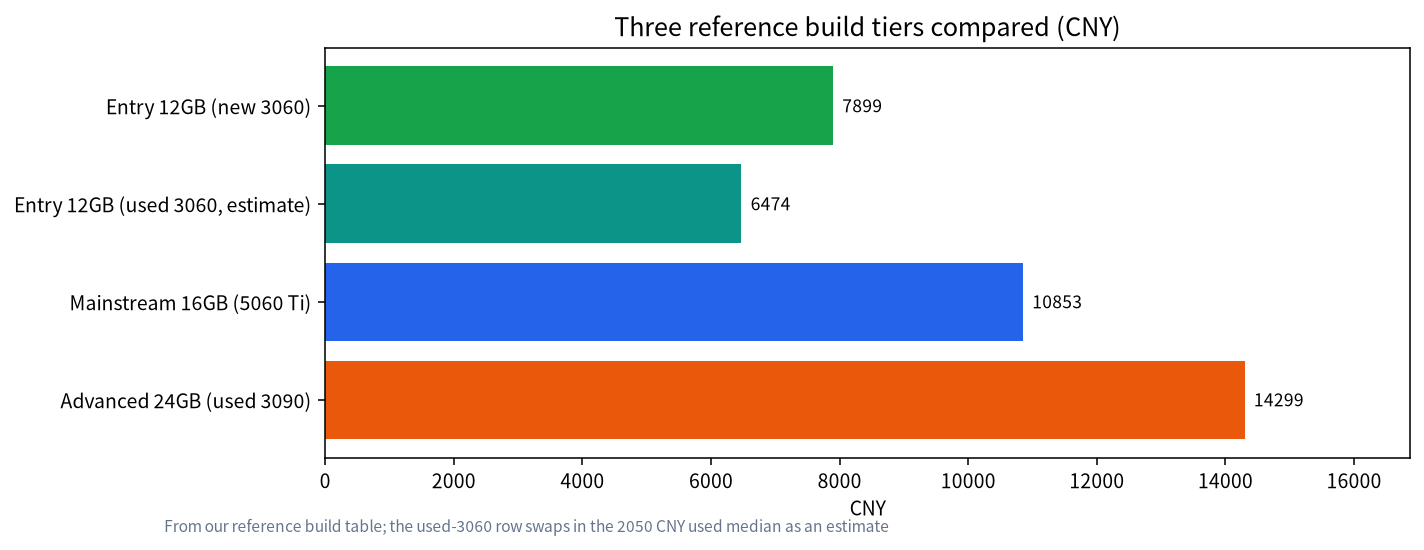
Save money by buying the GPU used (the total drops to about 6474 yuan, an estimate), and do not skimp on the power supply or memory.
Entry-Level PC Build for Local LLMs: Pick the VRAM First
The first bottleneck in local LLMs is VRAM: when a model does not fit, speed falls off a cliff. So the build order is the opposite of an ordinary gaming PC: decide the graphics card first, then spend as little as possible on everything else. 12GB is a sensible floor for an entry build. An 8GB card can run 7B to 8B models, but context and multitasking get tight; see the 8GB VRAM guide. With 12GB you can comfortably hold a 14B-class 4-bit model and still leave some room for context.
The Reference Parts List
| Part | Model | Reference price (CNY) | Why |
|---|---|---|---|
| GPU | RTX 3060 12GB (new) | 3475 | One of the few entry cards with 12GB; new-card prices have been volatile lately |
| CPU | i5-12600KF boxed | 900 | Inference runs mainly on the GPU, so an adequate CPU will do; the KF has no integrated graphics, so a discrete card is required |
| Motherboard | H610M (DDR4) | 499 | The lowest-cost board that works, with limited expansion |
| Memory | DDR4 32GB (2 x 16GB) | 1150 | 32GB is the starting line; too little memory slows model loading and unloading |
| Storage | 1TB SSD | 1025 | Model files are big; a single 14B model is several GB |
| Power supply | 650W | 350 | The 3060 draws little, but leave headroom for upgrades |
| CPU cooler | Air cooler | 250 | Air cooling is enough on an entry platform |
| Case | Mid-tower | 250 | Make sure airflow is good; avoid tiny cases |
| Total | 7899 | Excludes monitor, peripherals, OS licence, shipping and assembly/testing fees |
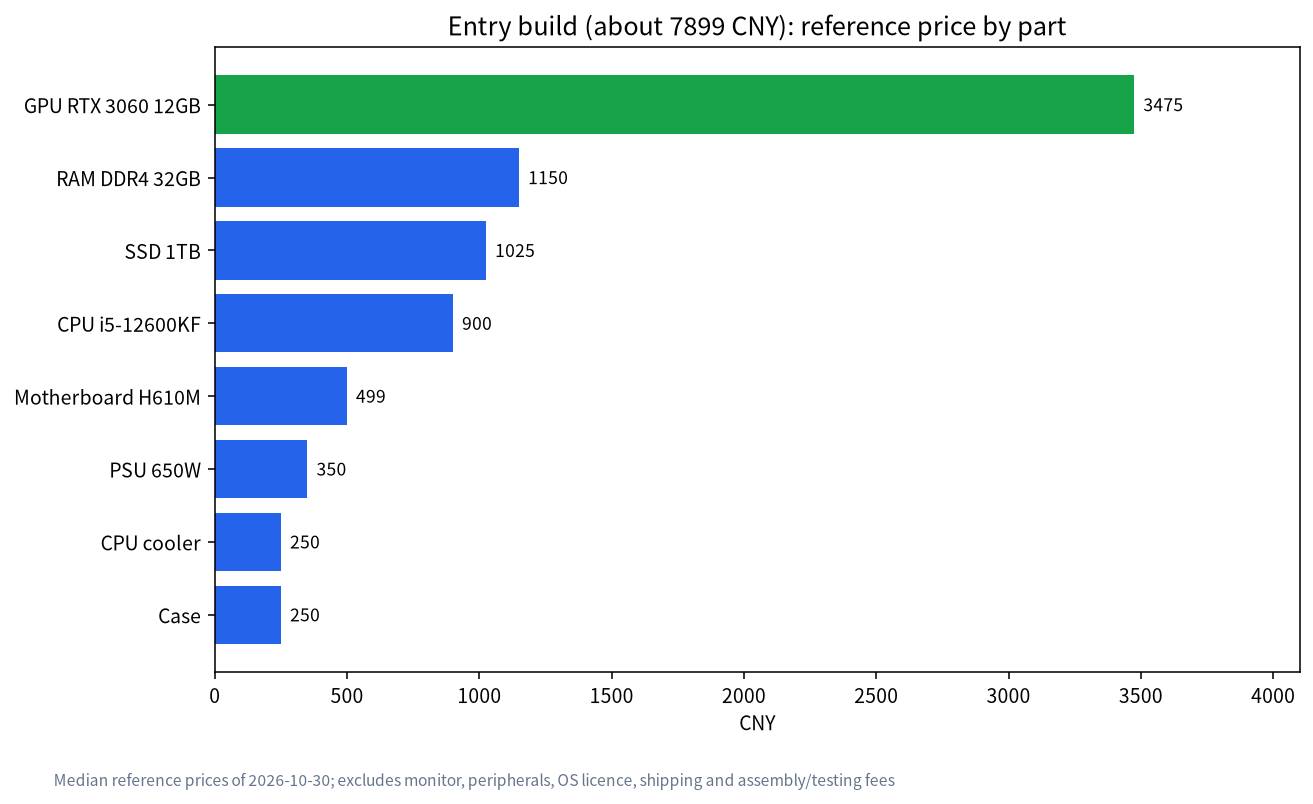
The chart shows the GPU takes 44% of the total price, and memory plus storage together come to about 2175 yuan, the second biggest block. That explains why the room for savings is mostly in the GPU: a used 3060 12GB (median reference price about 2050 yuan) brings the whole machine down to about 6474 yuan. That figure is an estimate. The risks of used cards and how to inspect them are covered in our guide to used GPUs for local LLMs.
What This Machine Can Run
The usable part of 12GB is smaller once the system and driver take their share, and you need a few more GB for the context cache. The rough guide:
| Model size | Approx. size at 4-bit | Fits in 12GB? | Note |
|---|---|---|---|
| 7B–8B | about 5GB | Very comfortable | Allows long context, or a higher quantization such as Q6 or Q8 |
| 12B–14B | about 8–9GB | Fits | The workhorse size for this tier; keep context modest |
| 20B–32B | about 12–20GB | Does not fit, or needs offload to RAM | Speed drops sharply; upgrade to 16GB or 24GB |
| 70B | about 43GB | Not suitable | Needs a large-memory machine or several cards; see our 24GB build article |
The sizes are orders of magnitude that we estimate from common model cards and the llama.cpp quantization docs (Llama 3.1 8B at Q4_K_M is about 4.58 GiB, and 70B about 43.1GB). To size a specific model, use the method in our VRAM calculator guide, and for quantization trade-offs see Q4_K_M quantization. For choosing a model, read the best local LLM guide.
Why These Choices
- The CPU does not have to be strong. Inference mostly happens on the GPU, and a 12th-generation i5 is plenty. Money saved on the CPU is better spent on the card.
- Memory should be at least 32GB. When VRAM runs short, some layers go to system memory, and even if you avoid that, loading big models alongside a browser and a vector store takes memory.
- Leave SSD room. Model files are large. Start with at least 1TB and add another drive later.
- Do not skimp on the power supply. 650W is enough for a 3060, but if you later move to a card like the 3090 you will need a bigger unit. In our table an 850W power supply is about 1070 yuan.
- Know the board’s limits. The H610M is an entry board with few slots and ports. If you plan to go straight to a 24GB card, look at the next tier up.
The Most Common Build Mistakes
- Looking only at GPU compute, not VRAM. Gaming rankings are by frame rate, while local LLMs care first about VRAM capacity. A newer card with 8GB can be worse for LLMs than an older one with 12GB.
- A strong CPU with a small GPU. Inference mostly runs on the GPU, so CPU money spent on the card shows more effect.
- One memory stick instead of two. Single-channel memory lowers bandwidth, so use two 16GB sticks for dual channel rather than one 32GB stick.
- Ignoring power connectors. When you move to a bigger card, check that the power supply has enough connectors, not just enough wattage.
- Trusting a single new-card price. New-card prices have swung widely lately, so compare at least two or three channels and confirm the card is genuinely new and has a warranty.
Your First Day With the Machine
- Install the GPU driver and confirm with
nvidia-smithat 12GB of VRAM is detected. - Install Ollama, following our Ollama install guide, and pull a 7B and a 14B model to compare the experience.
- Watch VRAM use and temperature, and confirm the model runs entirely in VRAM rather than being split onto the CPU.
- Set the context to the length you really need and check that VRAM is still sufficient.
Buying Order and a Budget Rule of Thumb
If your budget arrives in stages, buy in this order: first the graphics card, inspected (a new card needs warranty confirmation; a used card needs an on-the-spot test), then the power supply and motherboard, and finally memory and storage. The benefit is that if the card turns out faulty, you have not yet sunk money into other parts. In the first week after the build, run models for several hours at a stretch so you find problems while the warranty and return window are still open.
A simple rule can tell you whether the budget is balanced: subtract about 2500 yuan from the total for the basics (case, power supply, cooler, storage and board), and split the rest roughly 60% to the GPU and 40% to CPU and memory. For 7899 yuan, that leaves about 5400 yuan, and the 3475-yuan card is about 64% of it, which matches. This is only a rule of thumb, not a standard, so adjust it to the quotes in your city.
The most useful habit is to write down, before you buy anything, the three models you expect to use most and the context length you need for them. Then check each against the table above. If all three fit in 12GB with room to spare, this build is the right size. If one of them does not, it is cheaper to change the plan now than to replace the card in three months, and the upgrade table below shows where each step leads.
Upgrade Paths
| What you want | How to upgrade | Reference cost | Watch out for |
|---|---|---|---|
| Run 24B–32B models | Swap to a 16GB card such as the RTX 5060 Ti 16GB | Card about 5599 yuan | The mainstream whole build is about 10853 yuan |
| 24GB of VRAM | Move to a used 3090, plus an 850W power supply and a DDR4 B760 board | The advanced whole build is about 14299 yuan | Needs inspection; see our used-GPU article |
| Longer context and more concurrency | Add memory and a larger SSD | Depends on capacity | Mind the number of board slots |
| Several services at once | Keep a single card and use a stronger CPU | Depends on the choice | Inference itself is not CPU-hungry |
What Not to Skimp On, and What You Can
Do not skimp on power supply quality, memory capacity (32GB to start) and case airflow. Failures here cause crashes, and it can be hard to tell whether the model or the hardware is to blame.
You can skimp on RGB lighting, case looks, the CPU tier and the monitor (use what you have).
When Not to Choose This Build
- You want models above 30B. 12GB will struggle, so go straight to a 16GB or 24GB build.
- You need dependable team use. Look at complete systems and enterprise options rather than a hobby build.
- You mainly want a quiet, low-power machine. A Mac or a mini PC suits better; see mini PCs for large LLMs.
FAQ: Entry-Level Local LLM Builds
Can 8000 yuan buy a computer that runs local LLMs?
At 2026-10-30 reference prices, an RTX 3060 12GB with an i5-12600KF comes to about 7899 yuan (excluding monitor and peripherals). Prices move quickly, so go by real quotes.
RTX 3060 12GB or a 4060 8GB: which is better for LLMs?
For local LLMs, VRAM capacity matters more than compute. The 3060’s 12GB holds larger models, so it is usually the better pick over a newer 8GB card.
Can 12GB of VRAM run a 32B model?
A 4-bit 32B model needs well over 18GB, so it does not fit in 12GB. Part of it must be offloaded to system memory, and speed drops sharply. Upgrade to 16GB or 24GB.
Is 16GB of system RAM enough?
It works, but we do not recommend it. Running a model, a browser and a knowledge base together gets tight, and 32GB is safer.
Is a used 3060 worth it?
The median reference price is about 2050 yuan, roughly 1400 yuan below a new card. There is no manufacturer warranty, so you need to inspect it; see our used-GPU article.
Can I upgrade to a 24GB card later?
Yes, but check power supply wattage, case space and the motherboard, and expect to replace the power supply with an 850W-class unit.
Need Help Putting One Together?
If you want a setup we have chosen, assembled and tested for you, join the community or email admin@microaione.com with your budget and the models you want to run. For the basics, read how to run an LLM locally.
References and further reading: NVIDIA: GeForce RTX 3060 family, Ollama documentation, llama.cpp: quantize docs.