What Is an AI PC NPU? What It Does, What TOPS Mean, and Whether It Helps Local LLMs
Laptops and mini PCs are now sold as “AI PCs” with an NPU, and the box often shows a big number in TOPS. If you want to run a language model locally, you may wonder whether that number matters and whether you should pay extra for it. This guide answers what is an AI PC NPU in plain terms: what the chip is, what TOPS measures, what Microsoft requires for a Copilot+ PC, how an NPU differs from a GPU for large language models, where software support stands today, and how to decide. If you are choosing a laptop, read it together with our laptop guide.
Verification note: Microsoft’s Copilot+ PC requirement (an NPU capable of 40+ TOPS) and its description of NPUs come from Microsoft Learn; the Ryzen AI Max+ 395 figures (NPU up to 50 TOPS, overall up to 126 TOPS, up to 128GB of 256-bit LPDDR5x-8000) come from AMD’s product page; NPU language-model support in OpenVINO comes from Intel’s OpenVINO documentation; Ollama’s accelerator list comes from its GPU page. All were checked on 2026-10-30. We did not benchmark any NPU, so we give no speeds.
Key takeaways (Updated 2026-10-30)
- An NPU is a low-power chip block designed for AI math; Microsoft requires 40+ TOPS for Copilot+ PCs, but TOPS is a peak figure that does not tell you how fast a language model generates text.
For most local LLM tools, the GPU and its memory bandwidth still decide speed; Ollama’s documentation lists CUDA, ROCm, Metal and Vulkan acceleration, not NPUs.
Treat an NPU as a bonus for battery-friendly background AI features, and buy for RAM and GPU first if local LLMs are the goal.
The Short Answer
An NPU, or neural processing unit, is a dedicated block inside a processor built to run the math of neural networks efficiently, using less power than a CPU or GPU for the same kind of work. Microsoft describes it as a specialized chip for AI-intensive processes such as real-time translation and image generation. An “AI PC” is simply a computer with such a unit, and a Copilot+ PC is the Windows version with a stricter requirement. For local language models the picture is more nuanced, because the main bottleneck is memory bandwidth, and today most tools run on the GPU or CPU.
CPU, GPU and NPU: Three Different Jobs
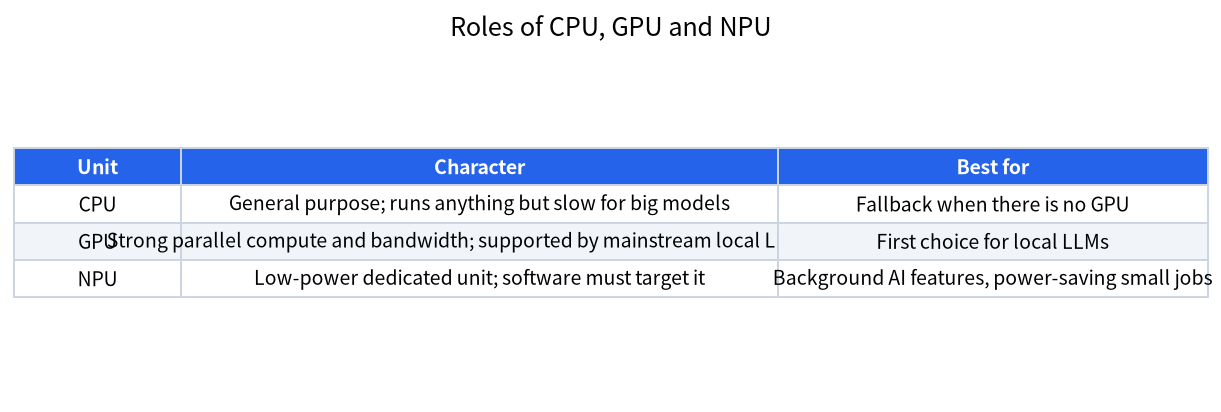
| Unit | Strength | Weakness | Typical role for local LLMs |
|---|---|---|---|
| CPU | Runs everything, always present | Slow for large models | Fallback and offload |
| GPU | Massive parallel compute and high memory bandwidth | Power-hungry, memory limited on small cards | Main engine in Ollama, llama.cpp and LM Studio |
| NPU | Very efficient for supported workloads | Needs software written for it; smaller tool support | Background AI features and some optimized models |
A CPU is the general-purpose worker. A GPU is a massively parallel processor with its own fast memory or fast shared memory, which is why it dominates local LLM work, as explained in the VRAM guide. An NPU is more specialized still: it is designed for the repeated matrix operations in neural networks and aims at efficiency, so tasks can run for a long time without draining the battery.
What TOPS Means, and What It Does Not
TOPS stands for trillions of operations per second. It is a peak throughput number, normally quoted for integer math at low precision. Microsoft says Copilot+ PCs have an NPU able to perform more than 40 TOPS, and that many new Windows AI features require an NPU with 40+ TOPS. The number is useful for a threshold such as “does this PC qualify for Copilot+ features”. It is not a speed rating for a language model, for three reasons. First, peak figures assume ideal conditions. Second, language-model generation spends most of its time reading the weights from memory for every token, so memory bandwidth matters more than compute. Third, different vendors may count operations differently, and an “overall TOPS” figure can add together the CPU, GPU and NPU.
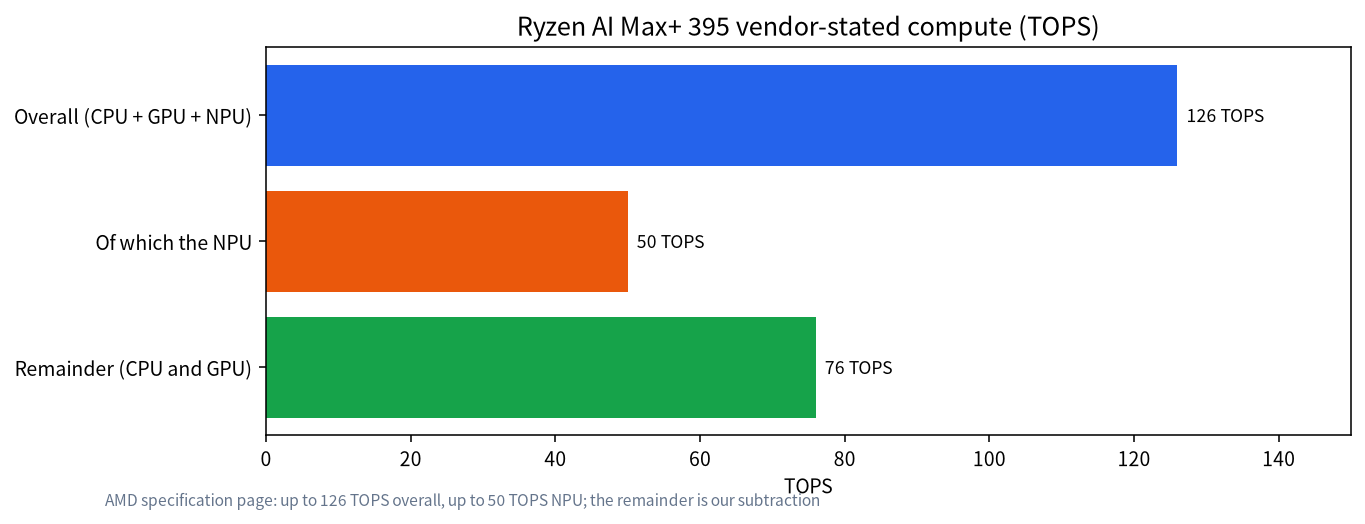
AMD’s product page for the Ryzen AI Max+ 395 is a good example. It lists up to 50 TOPS for the NPU and up to 126 TOPS overall, which means a large share of the total comes from the CPU and GPU, not the NPU. It also lists up to 128GB of memory, 256-bit LPDDR5x-8000 and a Radeon 8060S integrated GPU with 40 graphics cores. The chip’s value for local LLMs comes largely from the large memory pool the GPU can use, as discussed in our large-memory mini PC guide, not from the NPU alone.
Why Bandwidth Beats TOPS for Text Generation
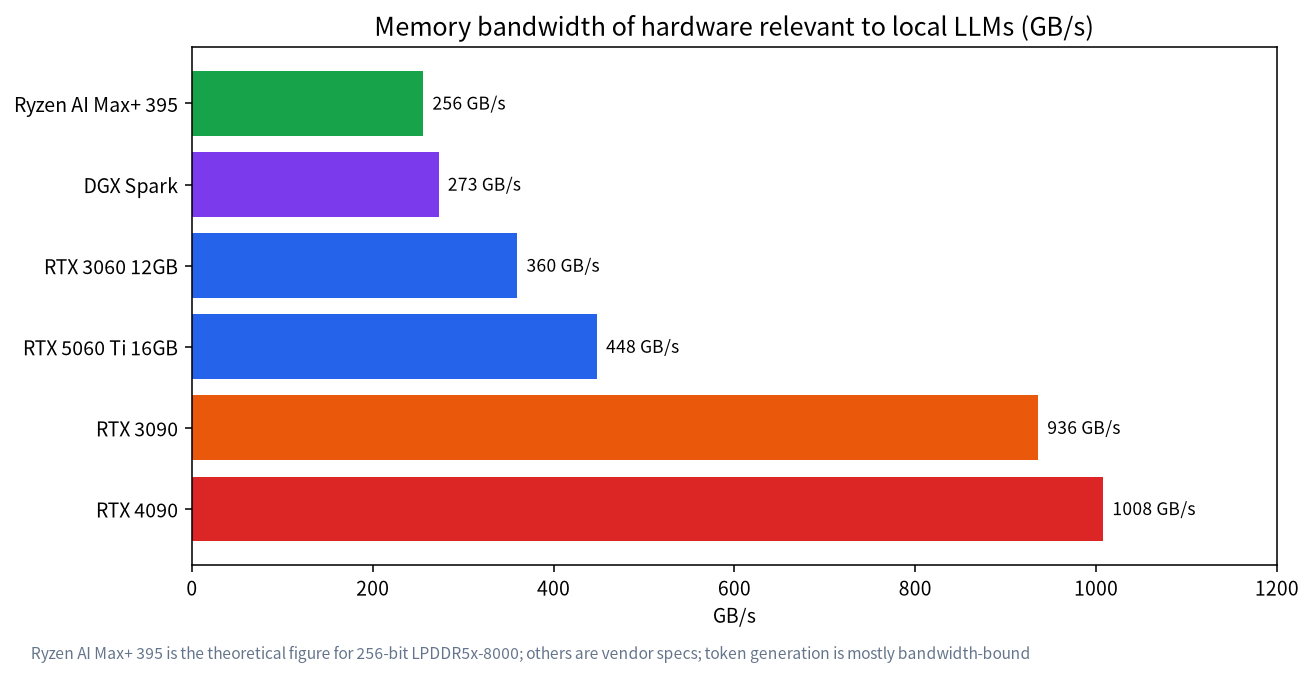
When a model generates a token it must read essentially all of its active weights once. The speed is therefore limited by how fast memory can deliver data. Memory bandwidth for a 256-bit LPDDR5x-8000 interface works out to about 256 GB/s, and NVIDIA lists 273 GB/s for the DGX Spark, while a GeForce RTX 3090 offers 936 GB/s and an RTX 4090 1008 GB/s. An NPU inside a laptop chip generally shares the system memory with the CPU and GPU, so adding an NPU does not add bandwidth. This is why a modest laptop with a 40-TOPS NPU is not suddenly good at running a 14B model: the model still has to stream through memory.
Where Software Support Stands
Support for NPUs in local-LLM tools is real but narrower than for GPUs. Microsoft’s guidance says the NPU needs software specifically written to use it, and recommends Windows ML for running AI tasks on the NPU; Windows ML picks an execution provider such as QNN for Qualcomm or OpenVINO for Intel and falls back to the GPU or CPU if needed. Microsoft also notes that many NPUs support only lower-bit integer math, so models must be converted or quantized to run on them. Intel’s OpenVINO GenAI documents running language models on the NPU, with with support documented for Intel Core Ultra Series 2 NPUs and beyond, and notes that compiling a language model for the NPU happens on the fly and can take substantial time unless you use caching. By contrast, Ollama’s GPU documentation describes acceleration through CUDA, ROCm, Metal and Vulkan and does not describe NPU support. So if you plan to use Ollama, LM Studio or llama.cpp with standard GGUF models, expect the GPU or CPU to do the work.
| Question | Practical answer today |
|---|---|
| Will Ollama use my NPU? | Its documentation describes GPU backends, not NPUs |
| Can an NPU run an LLM at all? | Yes, with NPU-specific toolchains such as OpenVINO GenAI on supported Intel chips |
| Do I need to convert models? | Often yes; NPUs usually need lower-bit integer models in a supported format |
| Is it faster than a GPU? | Not generally for large models; the advantage is power efficiency |
What an NPU Is Good For Today
The strongest case for an NPU is the set of always-on features Windows and applications provide, such as live captions, translation, background blur and local image tools, which are designed to run on it for better battery life. For developers, an NPU can run small optimized models efficiently, which suits on-device assistants and apps that must not drain the battery. For a person who wants to chat with a 14B or 32B model, the practical hardware is still a GPU with enough memory or a unified-memory machine, as covered in our laptop guide and the VRAM calculator guide.
A Realistic Way to Think About an NPU
It helps to compare the NPU with something familiar, such as the video decoder in your computer. You rarely think about the decoder, yet it lets you watch hours of video with little power because a dedicated block does the work far more efficiently than the CPU could. An NPU aims to do the same for AI tasks that run constantly in the background. A language model that you chat with is different: you want it to be as fast as possible for a few minutes at a time, you want a large model, and you are happy to plug in the laptop. That favors the processor with the most bandwidth and memory, which is the GPU. As NPU software matures this balance may shift, and vendors are clearly working on it, so it is reasonable to value an NPU as a hedge on the future. It is not reasonable, today, to expect a laptop NPU to match the speed of a desktop graphics card or to rescue a machine that has too little memory.
If you are curious, check whether your own computer has an NPU by opening Windows Task Manager and looking for an NPU entry on the Performance tab, which Microsoft says is available on devices with NPUs. Watching it while you use a Windows AI feature shows you whether the feature really runs on the NPU, and watching it while you run Ollama will show whether the NPU is used at all.
Should You Pay Extra for One?
- If you want Copilot+ features or long battery life: an NPU PC makes sense, and you should check the exact requirement list at purchase.
- If your goal is local LLMs: spend first on memory capacity and GPU; the NPU is a bonus.
- If you are a developer targeting NPUs: buy the chip family your toolchain supports, such as Intel for OpenVINO.
- If you already have a good GPU: you do not need an NPU for local LLMs.
Prices vary by model, and for a reference point, our October 2026 survey found a Ryzen AI Max+ 395 mini PC with 128GB of memory at a median near 24,566 yuan; that price reflects the memory pool and the GPU more than the NPU.
Common Mistakes
- Comparing TOPS across vendors: definitions and precision differ; compare memory and software support instead.
- Assuming the NPU speeds up Ollama: check the tool’s documentation first.
- Ignoring RAM: an AI PC with little memory still cannot hold a large model.
- Believing marketing numbers as speeds: TOPS are peak numbers, not tokens per second.
- Ignoring driver and software versions: NPU support depends on drivers and runtime versions.
A Buying Checklist
- Decide whether your goal is Windows AI features, battery life or local LLMs.
- For local LLMs, list the model sizes you want and the memory they need.
- Check the memory capacity and bandwidth of the machine, not only the TOPS.
- Check whether the tools you want support the NPU, and which chip family they need.
- Look at the cooling and power limits of the specific laptop model.
- Keep your expectations modest and test with your own workload when possible.
FAQ: What Is an AI PC NPU?
What does NPU stand for?
Neural processing unit, a dedicated block in a processor designed for the math of neural networks.
What is a Copilot+ PC?
A Windows 11 PC with an NPU that can perform more than 40 TOPS, according to Microsoft, enabling a set of on-device AI features.
Does an NPU make local LLMs faster?
Not by itself. Text generation is mostly limited by memory bandwidth, and mainstream tools such as Ollama document GPU acceleration, not NPU acceleration.
Can I run a local LLM on an NPU?
Yes with NPU-specific toolchains. Intel’s OpenVINO GenAI documents running language models on the NPU for supported Intel chips, though compilation can take time.
Is a higher TOPS number always better?
No. It is a peak number that may count different units and precisions. Memory, software and cooling matter as much.
Should I buy an AI PC for local LLMs?
Buy for memory and GPU first. An NPU is a useful extra, but it does not replace enough RAM or a capable GPU.
Tell Us What You Found
If you have tried running models on an NPU, we would like to know your chip, tool and results. Share them in the community or email admin@microaione.com.
References: Microsoft Learn: Develop AI applications for Copilot+ PCs, AMD Ryzen AI Max+ 395 specifications, OpenVINO GenAI on NPU, Ollama GPU support.