Offline LLM Models in Practice: Best Local AI Apps for Chat, Writing, Translation and Documents
Once the model file is downloaded, what you deal with every day is the app: which interface to chat in, how to let it read your documents, and whether translation and writing need different tools. This article surveys the common apps for offline LLM models, explains how to choose by task (chat, writing, translation, document assistant, local agent), gives checkable facts such as licence and maintenance status, and works through a long-document memory estimate. For which steps touch the network and how to go fully offline, see does a local LLM need the internet; this piece is about the apps. We did not install and benchmark each one; the comparison rests on official repositories, websites and documentation read on 2026-11-04.
Key points (updated 2026-11-04)
- Separate three layers: model file, runner (Ollama, llama.cpp and so on), and interface plus knowledge base (Jan, AnythingLLM, Open WebUI and so on). Most apps bundle several layers.
Licences differ: Ollama, AnythingLLM and GPT4All are MIT on GitHub, Jan is Apache-2.0, Open WebUI’s licence has a branding-preservation clause, and LM Studio is not open source. Companies should read the originals.
GPT4All’s last GitHub release was February 2025 (v3.10.0); check maintenance status before choosing.
Translation does not need a large LLM: Firefox’s page translation downloads models and runs them on your device, and Argos Translate is an MIT-licensed offline translation library.
Long-document assistants are the memory hogs: an 8B model with 32K context is about 9.2 GB by formula (Llama 3.1 8B FP16 KV-cache arithmetic, runtime overhead excluded).
Offline LLM models run in three layers: decide which one you need
Many people searching for “local AI software” are comparing things from different layers. Separating them makes the choice clear:
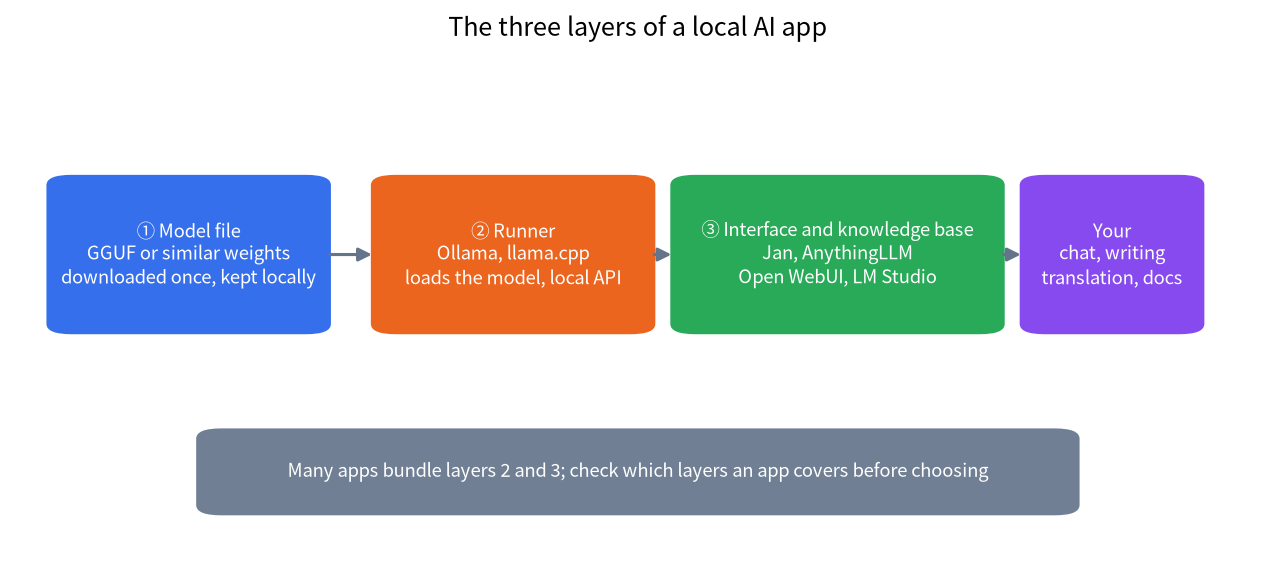
- Model file: for example GGUF weights, downloaded once and kept on your disk.
- Runner: loads the model and does inference, usually with a local API. Ollama and llama.cpp belong here.
- Interface and knowledge base: chat window, document library, prompt templates, multi-user management. Jan, AnythingLLM and Open WebUI lean toward this layer; some bring their own runner and some connect to another one.
For installing a runner see the Ollama install guide; for a ready-made graphical interface see the LM Studio tutorial.
Comparison of mainstream local AI apps
| App | Main role | Licence (GitHub or official statement) | Worth noting |
|---|---|---|---|
| Ollama | Runner plus local API, with desktop installers | MIT | Its README says you can access models locally or in the cloud; cloud models send data off your machine, so use only local models for offline work |
| Jan | Open-source graphical chat client | Apache-2.0 | Describes itself as an open-source ChatGPT replacement and ships installers for several systems |
| LM Studio | Graphical interface, model search and download | Not open source | When we read its home page, the headline product was Bionic, an agent for open models, built on MLX and llama.cpp according to the page; read the official terms for commercial use |
| AnythingLLM | Document workspace, agents, multi-user deployment | MIT | Its site says the desktop app runs on macOS, Windows and Linux and can be self-hosted with Docker |
| Open WebUI | Web interface, often paired with Ollama | Custom licence with branding clause | The LICENSE text forbids removing or replacing Open WebUI branding in most deployments, with exceptions such as no more than 50 end users in 30 days; read it in full before deploying |
| GPT4All | Lightweight desktop chat app | MIT | Last GitHub release February 2025 and last repository push May 2025; judge the maintenance risk yourself |
| llama.cpp | Low-level inference engine and command-line tools | MIT | For advanced users; many graphical apps use it underneath |
The “worth noting” column is not a rating. We did not measure speed, stability or interface quality, so we give no “best” ranking; start from the task you want to solve.
Choose by task: chat, writing, translation and documents
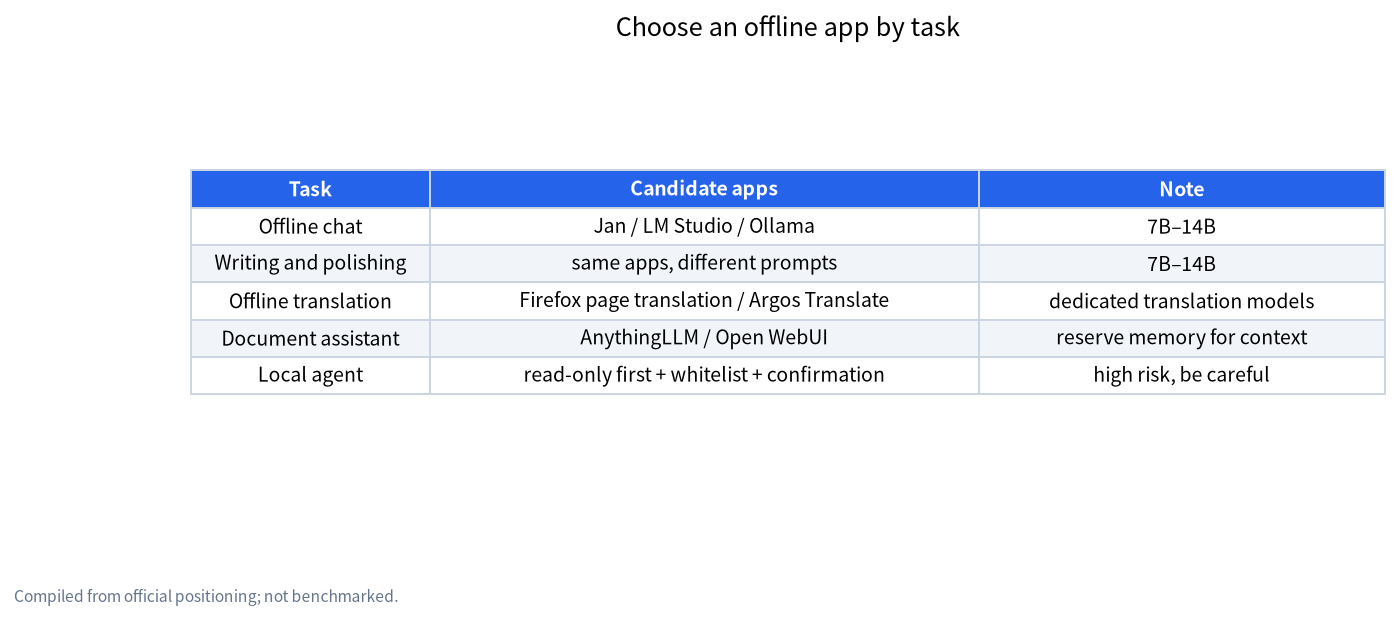
Offline chat and writing. Any graphical client plus a 7B to 14B model handles everyday Q&A, rewriting and polishing. For model size see how to choose a model size. Writing tasks usually need little context, so a machine with 8 GB to 16 GB of RAM can start, depending on the model and quantization. If the answers feel too weak, the usual fix is a larger or better-quantized model rather than a different app, because the interface does not change how smart the model is. Keep two or three models on disk for different jobs, such as a small fast one for rewriting and a larger one for harder questions.
Offline translation. General LLMs can translate, but dedicated local translators use fewer resources. Firefox’s page translation downloads models and runs them on your device, works offline after the download and, per its official page, supports more than 50 languages. Argos Translate is an MIT-licensed open-source offline translation library built on OpenNMT, usable as a Python library, command line or GUI; languages are installed as model packages, and when no direct pair exists it pivots through an intermediate language at some cost in quality. LibreTranslate is an API and web app built on Argos Translate. For long documents or heavy terminology, polish with an LLM afterwards and proofread by hand.
Document assistants. To let a model read your PDFs, notes and contracts you need retrieval plus generation. AnythingLLM puts the document library, vector store and chat in one app and says documents do not leave your device; Open WebUI provides a web interface on top of Ollama; for more elaborate knowledge bases see local RAG knowledge bases and the AnythingLLM tutorial. Caution: if malicious instructions are hidden in a document, the model can be steered; the defense checklist is in prompt injection vs jailbreak.
Local AI agents. An agent is a model plus tools: it can search, read and write files, and run commands. More capability means more risk: broad permissions combined with untrusted content raise the cost of a mistake. Start read-only, whitelist tools and require human confirmation for dangerous actions. We did not evaluate any agent product here and do not recommend connecting a high-privilege agent to important data.
Three questions to pick an app
| Question | If yes | If no |
|---|---|---|
| Is it just you, and you want the simplest interface? | Pick a graphical client such as Jan or LM Studio | Consider a multi-user deployment of Open WebUI or AnythingLLM |
| Should the model read your documents? | Pick an app with a knowledge base and reserve memory for context | For plain chat and writing, any client plus a 7B–14B model will do |
| Will a company or team rely on it long term? | Read the licence and maintenance status first, and see enterprise deployment options if needed | Personal experiments can be looser, but still check that updates are active |
Common misconceptions
- “A graphical app is the model”: the interface is only a shell; what decides quality is the model and quantization you download.
- “An offline app never touches the network”: many apps have update checks, model search, cloud models and web search that you must switch off in settings; see the offline deployment article.
- “Open source means free for any commercial use”: licence terms differ, for example Open WebUI’s branding clause, so read the original before deploying.
- “Newer apps are better”: product positioning changes, for example LM Studio’s home page now headlines an agent product; choose by your task and the official documentation.
How much memory a long-document assistant needs: a worked example
What document assistants most often overlook is memory used by context. Besides the weights, every token leaves a KV cache in VRAM or RAM. Take the Llama 3.1 8B structure (32 layers, 8 KV heads, 128 dimensions per head, FP16 cache):
- KV cache per token = 2 (K and V) × 32 layers × 8 heads × 128 dims × 2 bytes = 131,072 bytes, about 128 KiB.
- 8K context (8,192 tokens) is about 1.07 GB; 32K (32,768) about 4.29 GB; 128K (131,072) about 17.2 GB.
- Add the 8B Q4_K_M weights of about 4.9 GB: roughly 6.0 GB at 8K, 9.2 GB at 32K and 22.1 GB at 128K.
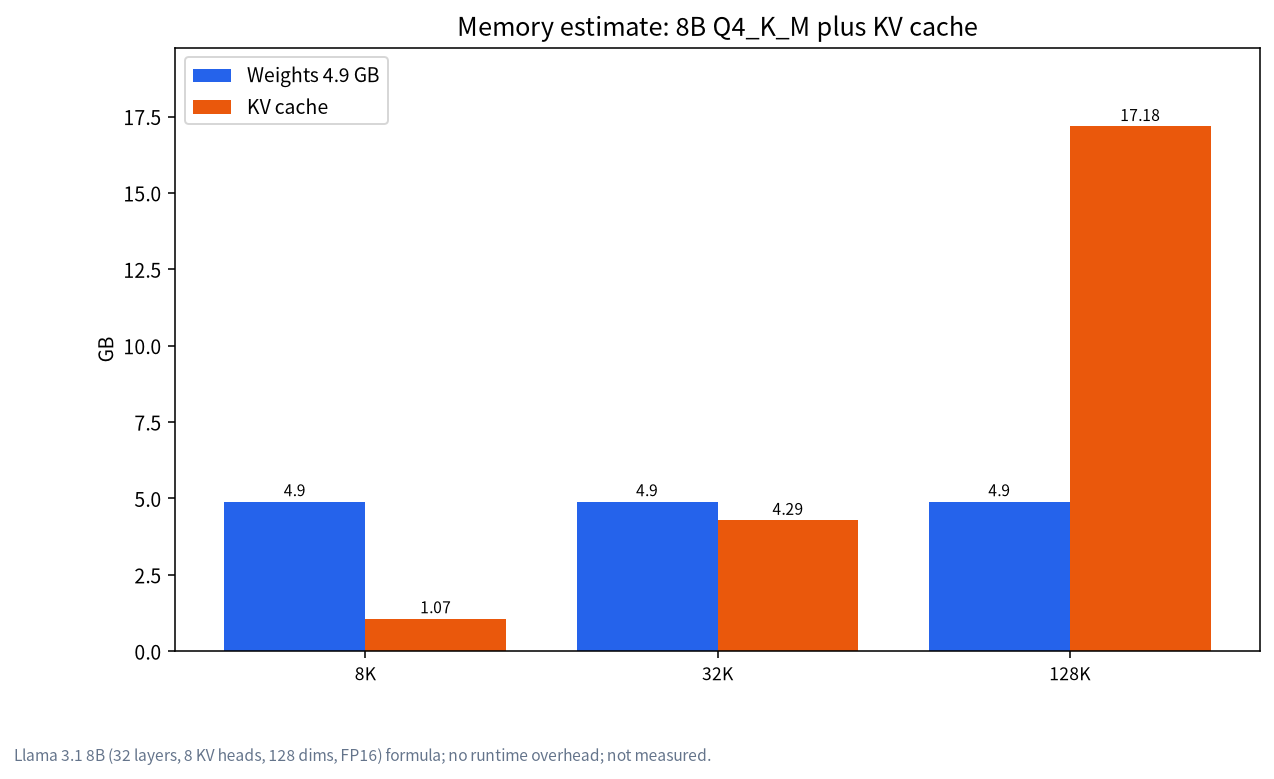
This is a formula estimate, excluding other runtime overhead, and not a measurement; some apps may also default to a quantized KV cache. For a finer calculation use the method in context length and KV cache VRAM. The conclusion: having an 8B model read a document of tens of thousands of words needs clearly more memory than plain chat, so leave room for context or chunk and retrieve instead of stuffing the whole document in.
How to confirm an app really works offline
- While online, download every model you need, then disconnect and test chat, document Q&A and translation.
- In settings turn off auto-update, telemetry, web search, cloud models and plug-in stores (names differ by app).
- Keep the model and knowledge-base folders on the local disk and configure no external API keys.
- For extra safety, restrict outbound connections with a firewall; the specific environment variables and switches are in does a local LLM need the internet.
- For an overall privacy assessment see local LLM privacy.
How we checked this, and what we did not do
Licences and release dates come from each project’s GitHub repository (read 2026-11-04): Ollama, AnythingLLM, GPT4All and llama.cpp are MIT, Jan’s LICENSE is Apache-2.0, and Open WebUI’s LICENSE is custom. LM Studio information comes from its home page. The translation part comes from Firefox’s official page and the Argos Translate README. The KV-cache example uses Llama 3.1 8B’s published structure parameters and the same weight-size conversion as our earlier articles. We did not install or benchmark these apps or test their offline behaviour, so every “suited for” statement is a summary of official positioning, not an evaluation result.
FAQ
Where do I download offline LLMs, and what should I watch for?
Download offline LLMs from model hubs or mirrors, then copy them to the air-gapped machine. Verify checksums, disk space, and licenses. App picks for offline chat, translation, and document help are listed above.
Which app is best for offline LLM models?
There is no single answer. For a simple graphical interface start with Jan or LM Studio; for document Q&A look at AnythingLLM or Open WebUI; for developers and scripting, Ollama and llama.cpp fit better.
Is a local AI agent safe?
It depends on permissions and input. Agents call tools and can be steered by untrusted text, so use read-only access, a whitelist and human confirmation, and read the defense checklist.
Does offline translation require a large model?
No. Dedicated tools such as Firefox’s page translation and Argos Translate use fewer resources and work offline; for long documents or heavy terminology, polish with an LLM afterwards.
Are these apps free?
Most are released under open-source licences on GitHub and cost nothing for personal use, but terms differ, so companies should read the originals; LM Studio is not open source and commercial use follows its official terms.
Why does a document assistant use so much memory?
The model keeps a KV cache for every token it reads. For Llama 3.1 8B a 32K context needs about 4.3 GB of cache, and with the weights the estimate is about 9.2 GB.
What should I look at first when choosing an app?
The task first, then licence and maintenance status, then whether you can switch off networked features. The offline deployment article covers the network steps in more detail.
Want help choosing an offline setup?
Join the community or email admin@microaione.com with your hardware, main tasks (chat, writing, translation, documents) and whether several people will use it.
References: Ollama on GitHub, Jan on GitHub, AnythingLLM, LM Studio, Open WebUI LICENSE, GPT4All on GitHub, Firefox page translation, Argos Translate. Read on 2026-11-04.