How Large a Model Can a 4090 Run? The 24GB Ceiling for 8B, 32B, 70B and MoE, Worked Out
“How large a model can a 4090 run” sounds simple, but the answer depends on three things: quantization precision, context length, and whether you are willing to put part of the model in system RAM. Roughly, an RTX 4090 (24GB) without leaning on RAM holds about a 32B dense model at Q4, about 20B at Q8, and about 10B at BF16; with RAM offload it can limp through a 70B or a larger MoE model, but speed drops sharply. This article works those conclusions out step by step and lists size, speed ceiling and best use for each tier. We have not benchmarked each model on a 4090, so speeds are theoretical ceilings derived from bandwidth; sizes come from Ollama pages and our earlier calculations.
Key points (updated 2026-11-04)
- The 4090 has 24GB of GDDR6X on a 384-bit bus, 1008 GB/s of bandwidth and 450W full load; about 23.4GB is usable in practice.
After reserving about 2.4GB for cache and runtime, the weight budget is about 21GB: about 10B parameters at BF16, 20B at Q8_0, 34B at Q4_K_M.
A 32B model at Q4 is about 22GB at 8K context and about 24GB at 16K, the single-card limit.
A 70B at Q4 is about 43GB and does not fit; with part in RAM the speed ceiling is only about 4 tokens/s. MoE models (such as 122B-A10B and gpt-oss-120b) keep experts in RAM and run far better, but need 64GB to 96GB or more of RAM.
Two 4090s (48GB total) can just hold a 70B Q4 at 8K context; also consider a 5090 32GB or a 96GB workstation card.
How large a model can a 4090 run: start with one formula
Weight size ≈ parameters × bytes per parameter. Q4_K_M is about 0.61 GB per billion parameters, Q8_0 about 1.0625 bytes per parameter and BF16 2 bytes (derivation in the Q4_K_M explainer).
Of the 4090’s 24GB, about 23.4GB is usable in practice; subtract cache and runtime overhead (we use about 2.4GB, matching 8K to 16K of context) and the weight budget is about 21GB:
| Precision | Bytes per parameter | Largest parameter count in 21GB | Arithmetic |
|---|---|---|---|
| BF16 | 2 | about 10.5B | 21 ÷ 2 |
| Q8_0 | 1.0625 | about 19.8B | 21 ÷ 1.0625 |
| Q4_K_M | 0.61 | about 34.4B | 21 ÷ 0.61 |
| About 2.3-bit (IQ2-class) | about 0.29 | about 72B | 21 ÷ 0.29, noticeable quality loss |
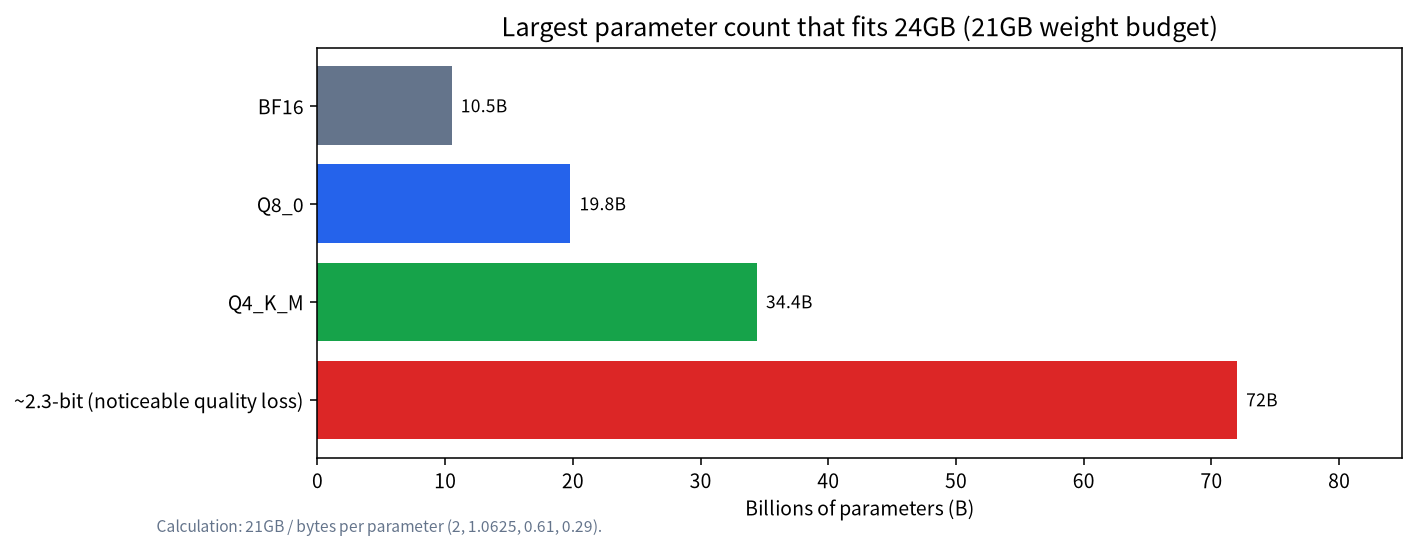
The last row needs a caveat: squeezing a 70B to about 2.3 bits gives roughly 20GB of weights, which in theory fits 24GB, but 2-bit-class quantization costs a lot of quality, we have not tested it, and we would not offer it as the answer to “can a 4090 run 70B”. The safer statement is: the practical single-card ceiling of a 4090 is a dense model of about 32B at Q4.
Fit matrix: common models one by one
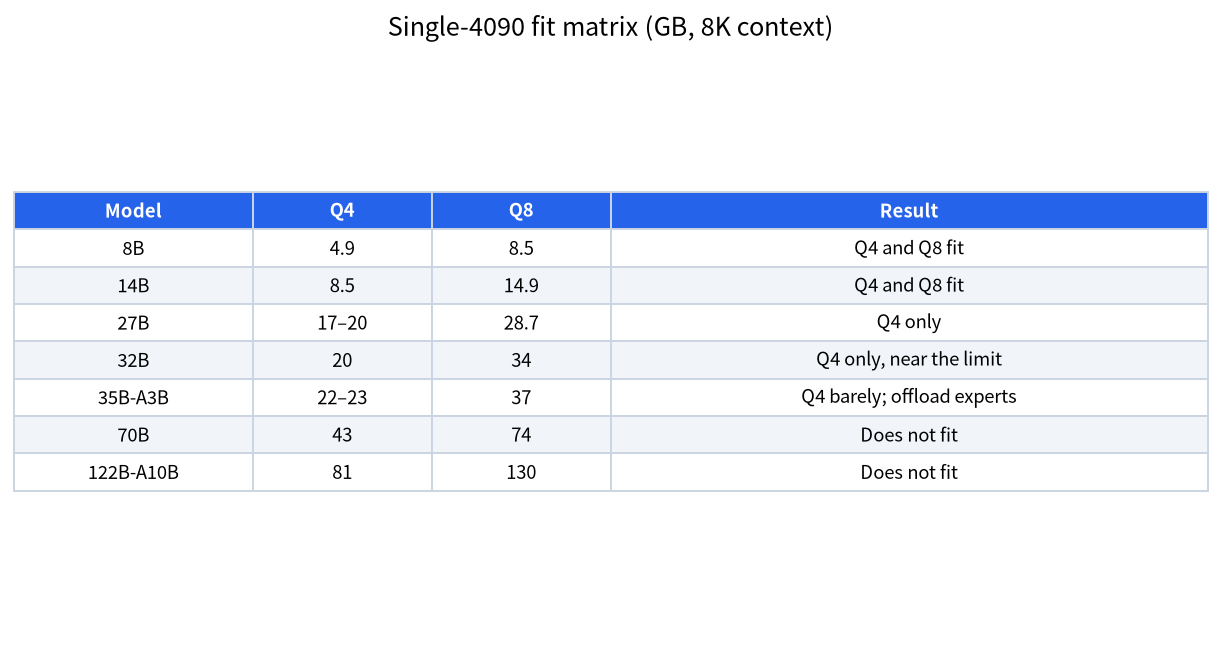
The table gives Q4 and Q8 weight sizes (estimated from the bytes per parameter above; 27B and 32B use the real values on Ollama pages) and whether each fits a single 4090.
| Model | Q4 size | Q8 size | Single 4090 (8K context) |
|---|---|---|---|
| 8B | about 4.9GB | about 8.5GB | Q4 and Q8 easy; BF16 (about 16GB) fits too |
| 14B | about 8.5GB | about 14.9GB | Q4 and Q8 both fine |
| 27B | 17 to 20GB | about 28.7GB | Q4 only |
| 32B | about 20GB | about 34GB | Q4 only; about 22GB at 8K, near the limit |
| 35B-A3B (MoE) | about 22 to 23GB | about 37GB | Q4 barely; offload some experts |
| 70B | about 43GB | about 74GB | Does not fit; needs RAM offload or two cards |
| 122B-A10B (MoE) | about 81GB | about 130GB | Does not fit; needs a lot of RAM |
We gave real 32B figures for a 24GB card in DeepSeek R1 distill sizes explained: about 22GB at 8K and 24GB at 16K. More hands-on advice for 24GB cards is in what a 24GB card can run.
Context length lowers the ceiling further
Weights fitting does not mean it is usable. The KV cache grows with context. For a classic 32B dense model the KV cache per token is often a few hundred KiB, so 16K of context is several GiB, which is why a 32B at Q4 grows from about 22GB at 8K to about 24GB at 16K. Newer hybrid linear-attention models (such as Qwen3.6) have far smaller caches: in Qwen local deployment hardware requirements we computed only about 64KiB per token for the 27B. So two models both called “27B to 32B” can have very different real ceilings depending on architecture. The general method is in the VRAM calculator guide.
A worked example that matches the numbers: why 32B tops out at 8K to 16K
Take a classic 32B dense model (a Qwen2.5-32B-class configuration: 64 layers, 8 KV heads, head dimension 128, as we infer from public configs; check your own model card). KV cache per token is 64 × 2 × 8 × 128 × 2 bytes = 262,144 bytes = 256KiB. At 8K context that is 256KiB × 8,192 = 2GiB, at 16K 4GiB, at 32K 8GiB. With about 20GB of weights the totals are about 22GB at 8K, 24GB at 16K and 28GB at 32K, which matches the “22GB at 8K, 24GB at 16K” cited above and shows that a 32B on a 4090 needs a compressed cache or another model for 32K-plus context. Cache quantization (for example q8_0) roughly halves the cache at a small quality cost.
Beyond 24GB: RAM offload and speed ceilings
Each generated token reads the active weights once, so the speed ceiling is bandwidth divided by the bytes read per token. The 4090’s VRAM bandwidth is 1008 GB/s, while dual-channel DDR5-5600 has a theoretical bandwidth of about 89.6GB/s (5600 × 8 bytes × 2), more than ten times less.
| Scenario | Weights read per token | Read from | Theoretical speed ceiling |
|---|---|---|---|
| 32B Q4, all in VRAM | about 20GB | VRAM | 1008 ÷ 20 ≈ 50 tokens/s |
| 70B Q4, 23GB in VRAM and 20GB in RAM | about 43GB | 23GB VRAM + 20GB RAM | per-token time 23/1008 + 20/89.6 ≈ 0.246 s, about 4 tokens/s |
| gpt-oss-120b (about 117B parameters, about 5.1B active, MXFP4 about 62GB), experts in RAM | about 2.7GB | RAM | 89.6 ÷ 2.7 ≈ 33 tokens/s |
| 122B-A10B Q4 (about 81GB), experts in RAM | about 6.1GB | RAM | 89.6 ÷ 6.1 ≈ 15 tokens/s |
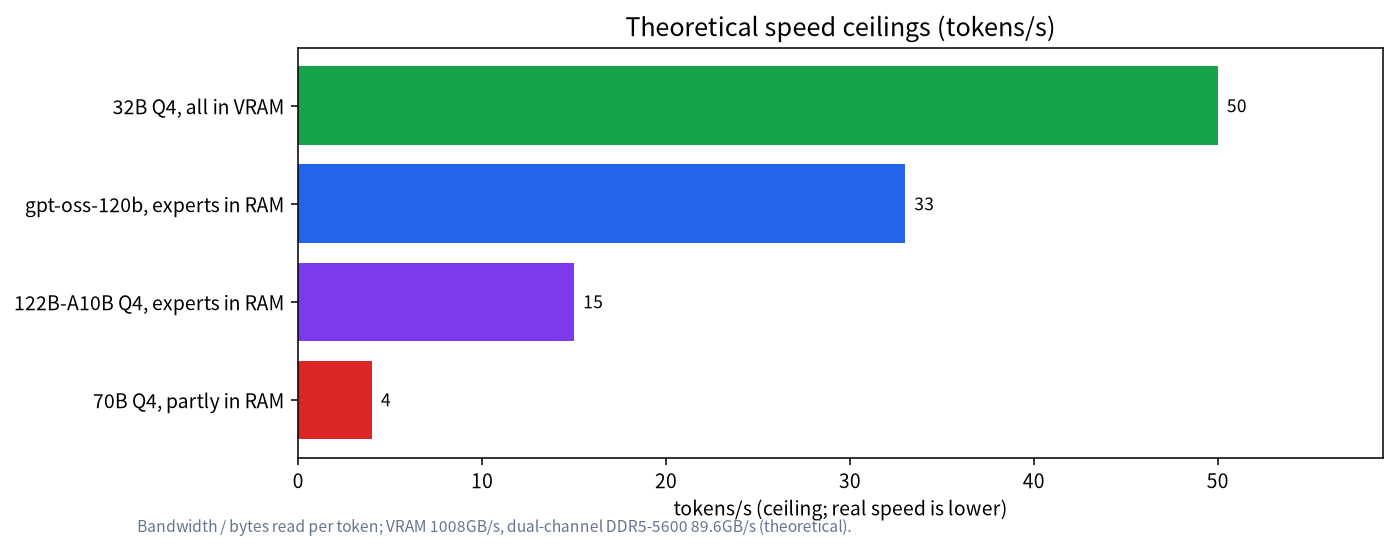
Worked example (70B): 43GB of weights, 23GB in VRAM and 20GB in RAM. Reading the VRAM part takes 23 ÷ 1008 ≈ 0.0228 s, the RAM part 20 ÷ 89.6 ≈ 0.223 s, about 0.246 s in total, or about 4 tokens/s. That is the arithmetic behind “a 70B runs, but slowly”: nearly all the time goes to the RAM part.
MoE models fare much better because each token reads only the active experts. We estimate gpt-oss-120b at about 62GB (117B parameters at roughly 4.25 bits for MXFP4, our calculation) with about 5.1B active, so each token reads about 2.7GB and the theoretical ceiling is about 33 tokens/s; this is why such models on a “24GB card plus lots of RAM” setup are more usable than a 70B dense model. The principle is in local MoE deployment and the trade-offs in RAM versus VRAM.
Mind RAM capacity: offload means VRAM plus RAM must hold the whole model. A 122B-A10B at Q4 is about 81GB; 23GB of VRAM plus 64GB of RAM is 87GB, almost no margin, so we suggest at least 96GB of RAM. gpt-oss-120b at about 62GB is feasible with 64GB of RAM but tight.
How to check the ceiling on your own 4090
- Watch VRAM with
nvidia-smi: note the static use after loading, then raise context to 4K, 8K and 16K in steps and record the growth; the slope should be near the per-token cache computed above. - Use the runtime log to confirm how many layers are in VRAM and how many in RAM: llama.cpp prints the offloaded layer count at start-up and Ollama’s status command shows the processor split. Any layer on the CPU makes speed fall sharply, as the formula predicts.
- For speed, fix the prompt and the generation length, record generation tokens/s and compare with the bandwidth ceiling; reaching about sixty to eighty percent is reasonable, and under thirty percent usually means layers on the CPU or a bad setting.
- Check stability as well: watch temperature and throttling under sustained load; the 4090 draws 450W, so airflow and PSU headroom (we suggest 850W) must be in place.
How much does quantization cost in quality?
Q8_0 is generally regarded as nearly indistinguishable from BF16, Q4_K_M remains usable in most evaluations, losses become noticeable below Q3, and 2-bit-class quants must be tested model by model. Our advice: where it fits, prefer “a bigger model at Q4” over “a smaller model at Q8”, because the capability gain from scale usually exceeds the gap between Q8 and Q4; but that rule of thumb does not hold for every task, so compare on your own. See the Q4_K_M explainer.
Beyond VRAM: RAM, PCIe and cooling
When offloading, system RAM frequency and channel count directly set speed: with the same 64GB, dual-channel DDR5-5600 has a theoretical 89.6GB/s while single-channel has half of that, halving the speed ceiling too, so populate both slots and enable the rated frequency. PCIe bandwidth matters little for whole-layer offload, because offloaded layers stay in RAM and are computed by the CPU; it matters a lot for approaches that copy weights into VRAM for every token, which you should avoid. On cooling, the 4090’s power during sustained inference may be lower than in gaming (depending on the load; measure it yourself), but keep airflow in place and cap power for stability if needed.
Two 4090s: the 48GB world
Two 4090s give 48GB (about 46.8GB usable). A 70B Q4 is about 43GB of weights, and with an 8K cache about 45.5GB, which just fits, but it means a second 4090 (about ¥26,000), a 1,200W-class power supply, enough PCIe lanes and cooling. The pitfalls and trade-offs of multi-GPU are in the dual-GPU local LLM build. On a limited budget more practical directions are:
- One RTX 5090 32GB: a weight budget of about 29GB, holding about 47B at Q4; about ¥53,500 (reference price).
- A 96GB workstation card: 70B at Q8 or larger; see the RTX PRO 6000 workstation.
- Two used 3090 24GB cards: the same capacity as two 4090s at a much lower price, but more power and noise; see RTX 5090, 4090 and 3090 compared.
Fine-tuning and training: the 4090’s ceiling is lower
Inference needs weights and cache; fine-tuning also needs gradients and optimizer state. By Unsloth’s published minimum-VRAM figures, QLoRA (4-bit) fine-tuning needs about 8.5GB for 14B, about 22GB for 27B, about 26GB for 32B (does not fit one 4090) and about 41GB for 70B. So the practical QLoRA ceiling on a 4090 is about 27B. See local LoRA fine-tuning VRAM.
Choosing by task
| Task | Recommendation | Why |
|---|---|---|
| Everyday Q&A and writing | 27B to 32B at Q4 | Best balance of quality and speed |
| Long-document analysis | A 27B hybrid-attention model (small cache) | Cache is the bottleneck |
| Coding assistant | 14B to 32B, mind the quantization | Balances speed and quality |
| Largest open model possible | MoE plus lots of RAM | Speed stays usable |
| A 70B dense model | Two 24GB cards or a 96GB card | One card is too slow |
For more on choosing, see how to choose a model size.
FAQ
How large a model can a 4090 run?
The practical single-card ceiling is about a 32B dense model at Q4, about 20B at Q8, about 10B at BF16; with RAM it can run larger MoE models, at lower speed.
Can a 4090 run a 70B?
A 70B at Q4 is about 43GB and does not fit one card. With part in RAM it runs, but the theoretical speed is only about 4 tokens/s; two 4090s or a 96GB card suit it better.
Can a 4090 run a 32B?
Yes: Q4 is about 20GB, about 22GB at 8K context and about 24GB at 16K, already near the limit, and longer context is tighter.
How much faster is a 4090 than a 3090 for LLMs?
Both have 24GB, so the models they can run are the same; bandwidth is 1008 versus 936 GB/s, so the speed ceiling differs by about 8%. The real differences are price and power; see our comparison.
Is more RAM always better?
For offload, RAM capacity decides whether the model fits and RAM bandwidth decides speed; enough capacity is enough, and do not expect a huge RAM pool to make a 70B fast.
How large a model can a 4090 fine-tune?
The practical QLoRA ceiling is about 27B (about 22GB); a 32B needs about 26GB and does not fit one card.
Talk to us
If you want us to run the numbers for your RAM, context needs and budget, leave a note in the community or email admin@microaione.com.
References: NVIDIA GeForce RTX 4090 specifications, Unsloth fine-tuning VRAM requirements, Ollama model library, OpenAI’s gpt-oss announcement. Data read between 2026-10-30 and 2026-11-04, Beijing time.