External GPU for LLM: Can an eGPU Run LLMs on a Laptop? Thunderbolt vs OCuLink in Practice
Laptops have little VRAM, so many people think of a graphics-card dock to run bigger models. Can an external GPU for LLM use work? Yes, and for LLM inference an eGPU loses much less than it does in games, provided the whole model fits in the external card’s VRAM. This article explains why: what the cable bandwidth really is, how long loading takes, when the cable becomes the bottleneck, and what Mac users and budget buyers should consider instead. Every speed and time here is converted from specifications and formulas; we have not tested any dock. For the laptop itself see laptops for local LLMs, and for used-card risks the used GPU buying guide.
Key points (updated 2026-11-04)
- Decode speed is set by the bandwidth of the memory that holds the weights. With the whole model in the external GPU’s VRAM, almost nothing crosses the cable per token, so speed is close to the same card in a desktop.
The cable mainly affects model loading: the specification requires at least 32 Gbps (about 4 GB/s) of PCIe data on Thunderbolt 4 and at least 16 Gbps (about 2 GB/s) on Thunderbolt 3; OCuLink is PCIe 4.0 x4, about 7.9 GB/s in theory.
Theoretical load time for a 32B Q4_K_M (about 19.6 GB): about 9.8 s on Thunderbolt 3, 4.9 s on Thunderbolt 4 and 2.5 s on OCuLink; real loads are often limited by the SSD.
If the model does not fit in VRAM, the eGPU helps much less; consider a card with more memory instead.
Apple-silicon Macs are not officially supported for eGPU graphics; a 2026 report says a third-party driver enables AI compute on them under demanding conditions, which we did not verify.
External GPU for LLM: it depends on what crosses the cable
With an eGPU the data path is laptop → cable (Thunderbolt or OCuLink) → the card in the dock. To judge whether that is a bottleneck, ask: how much data crosses the cable for each generated token?
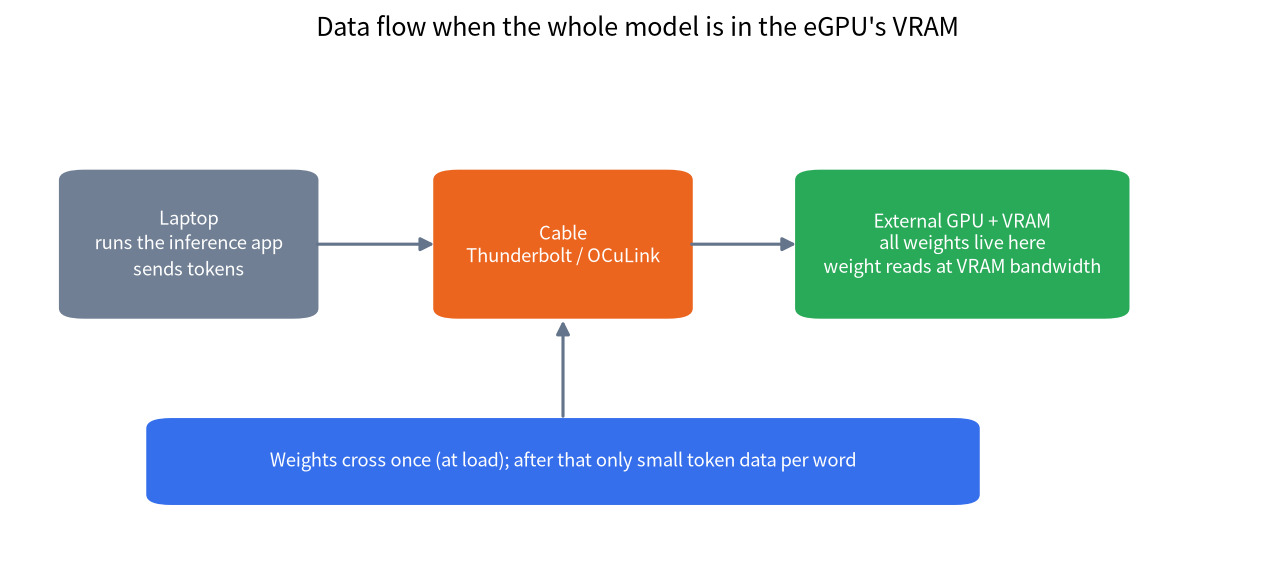
If all the weights already sit in the external card’s VRAM, each token’s weight reads happen between the GPU and its own memory (936.2 GB/s on an RTX 3090, 360 GB/s on an RTX 3060 12GB), and the cable carries very little, essentially the input and output tokens. That differs from gaming, where textures and frame data flow continuously, which is why eGPUs hurt games more. The heavy lifting of LLM inference stays inside the card, which is the root reason eGPUs are friendly to LLMs. The speed ceiling formula is in why LLMs need GPUs, not CPUs: ceiling ≈ VRAM bandwidth ÷ model size.
Example: an 8B Q4_K_M model (about 4.9 GB) in an external RTX 3060 12GB has a theoretical ceiling near 360 ÷ 4.9 ≈ 73.5 tokens/s; the same laptop using only dual-channel DDR5 memory (89.6 GB/s) has a ceiling near 18.3 tokens/s. The difference comes from memory bandwidth, not the cable. These are formula results, not our measurements.
Link bandwidth: Thunderbolt 3, Thunderbolt 4 and OCuLink
| Connection | Specified bandwidth | Converted (GB/s) | Notes |
|---|---|---|---|
| Thunderbolt 3 | 40 Gbps link; minimum PCIe data rate 16 Gbps | about 2 (minimum) | Systems use two or four PCIe lanes, so real throughput can be higher |
| Thunderbolt 4 | 40 Gbps link; minimum PCIe data rate 32 Gbps | about 4 (minimum) | Intel’s Thunderbolt 4 specification raises the PCIe minimum |
| OCuLink (PCIe 4.0 x4) | 16 GT/s × 4 lanes, about 64 Gbps in theory | about 7.9 | PCI-SIG specification; no Thunderbolt-style power or hot plug, and the machine needs the port |
| Desktop PCIe 4.0 x16 | 16 GT/s × 16 lanes | about 31.5 | For comparison |
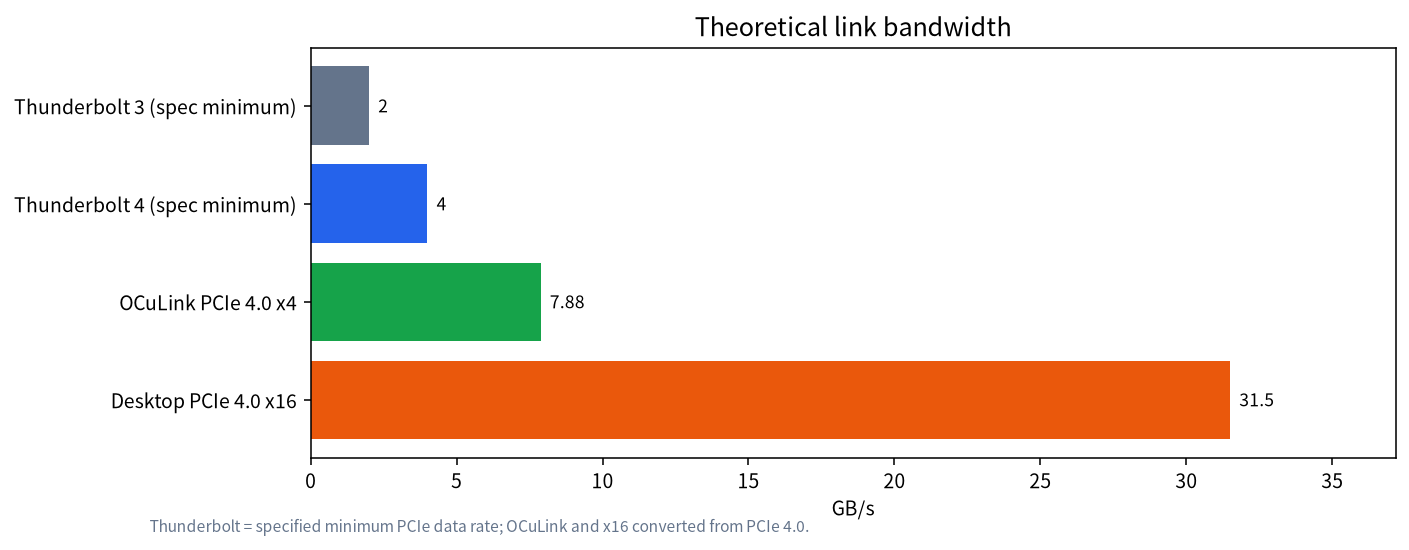
Note that the Thunderbolt numbers are specified minimums, not ceilings, and we did not measure real throughput on any machine. Another difference: Thunderbolt is one cable and easy to plug in, and some docks also charge the laptop; OCuLink has higher bandwidth but is mostly found on mini PCs and a few laptops, needs separate power and is usually connected with the machine off (this varies by product, so follow the manual).
How long loading takes: theoretical times
Loading is where the cable is actually visible. Formula: load seconds ≈ model file size ÷ link bandwidth. Using a 32B Q4_K_M of about 19.6 GB (computed from the llama.cpp quantization documentation’s bits per weight):
| Connection | Bandwidth (GB/s) | Theoretical load time |
|---|---|---|
| Thunderbolt 3 (minimum) | 2 | about 9.8 s |
| Thunderbolt 4 (minimum) | 4 | about 4.9 s |
| OCuLink PCIe 4.0 x4 | 7.88 | about 2.5 s |
| Desktop PCIe 4.0 x16 | 31.5 | about 0.6 s |
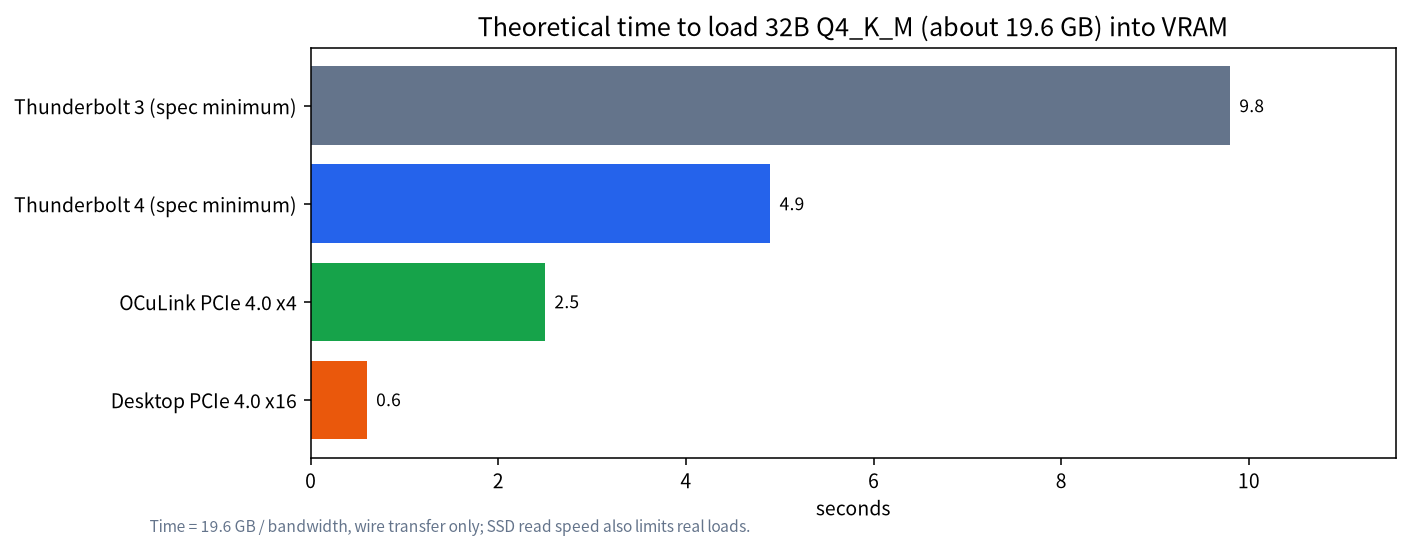
The numbers are short because we only counted the transfer on the wire. A real load also reads the disk: if your SSD really delivers 3 GB/s (an example assumption), 19.6 GB cannot load in less than 6.5 s however fast the link. For most users loading a model once over Thunderbolt 4 takes somewhere from ten seconds to half a minute, felt only when you switch models and not at all while chatting.
When an eGPU is a poor deal
| Situation | Why it is poor | Better approach |
|---|---|---|
| The model does not fit in the external card’s VRAM | Layers that spill into laptop RAM run on the CPU and are slowed by memory bandwidth, cancelling the eGPU advantage (see RAM vs VRAM offload) | Buy a card with more VRAM or choose a smaller model |
| Budget covers only a dock plus an entry card | Dock enclosure and power supply cost extra and the total often approaches a small PC | Compare large-memory mini PCs |
| The laptop has no Thunderbolt 4, USB4 or OCuLink port | No fast port, no eGPU | Check the port before buying |
| You want several cards for a large model | Multi-card traffic over a cable becomes the bottleneck | Use PCIe slots on a desktop board |
| You move around a lot | Dock and card are bulky and need external power | Use the remote approach below |
A dock’s power supply must cover the card’s board power plus headroom, for example 350 W for an RTX 3090. We could not get reliable dock prices, so we make no price comparison; before buying, check that the dock fits your card’s size, power connectors and cooling.
Checks before buying and acceptance tests after
Before buying, confirm five things. First, whether the laptop has Thunderbolt 4, USB4 or OCuLink, and how many PCIe lanes that port really gives you. Second, whether the dock fits your card (length, thickness, power connectors). Third, that the dock’s power supply covers the card’s board power plus roughly 100 W of headroom. Fourth, that drivers exist for the card on your operating system, since Windows and Linux differ, so read the product’s compatibility list. Fifth, whether the model fits entirely in that card’s VRAM; run it through the VRAM calculator guide.
After it arrives, run three acceptance steps. Step one: use nvidia-smi to confirm the card is recognized and check the current PCIe link width and speed in the PCIe section of nvidia-smi -q, making sure it has not dropped to a lower tier than expected. Step two: load the same model, record the load time and compare it with the theoretical times in this article; if the gap is large, check the SSD and cable first. Step three: generate an answer and compare the speed with the ceiling from “bandwidth ÷ model size”; reaching roughly half to 70% of the ceiling is a reasonable result, and a clearly lower figure means checking whether part of the model spilled into RAM or the driver is wrong. The “half to 70%” is our rule-of-thumb target, not an official metric, and we have not verified it on an eGPU.
More practical alternatives
- A desktop or old PC as a model server: keep the GPU in the desktop and call it from the laptop over your LAN. No cable, usable from anywhere in the house; see turning a local model into an API server.
- A large-memory mini PC or unified-memory machine: large models care about capacity and bandwidth, and unified-memory machines are one route; see large-memory mini PCs.
- A laptop with a discrete GPU: fixed VRAM, but stable and portable; see laptops for local LLMs.
- A used GPU in a desktop: for the same money a card in a desktop beats a card in a dock; see the used GPU buying guide.
Can a Mac use an eGPU for LLMs
Apple’s eGPU support page says eGPUs need an Intel-based Mac with Thunderbolt 3; Apple-silicon Macs use their built-in GPU and do not support eGPU graphics acceleration. In April 2026 AppleInsider reported that Apple signed a third-party driver from Tiny Corp, so AMD RDNA3-or-newer and NVIDIA Ampere-or-newer cards in a USB4 or Thunderbolt dock can do AI compute on Apple-silicon Macs, but external display output is not accelerated, NVIDIA cards need Docker Desktop and the steps are involved. We have not verified this ourselves and do not know whether mainstream tools such as Ollama or LM Studio support it. Mac users are usually better off choosing a machine with more unified memory; see running local LLMs on a Mac.
How we checked this, and what we did not do
The minimum PCIe data rates of Thunderbolt 3 and 4 come from Thunderbolt’s official material; OCuLink is PCI-SIG’s PCIe 4.0 specification with bandwidth converted from 16 GT/s and 128b/130b encoding; GPU bandwidth comes from NVIDIA specifications; file sizes use the llama.cpp quantization documentation’s bits per weight (about 4.89 for Q4_K_M); the Mac part comes from Apple’s support page and AppleInsider’s report. We did not buy a dock or measure any Thunderbolt or OCuLink device, so every speed and load time is theoretical.
FAQ
Can an external GPU run LLMs?
Yes. With the whole model in the external card’s VRAM, generation speed is set mainly by that card’s memory bandwidth, and the cable mainly affects loading. If the model does not fit in VRAM, results drop noticeably.
Is Thunderbolt 4 a bottleneck?
For a model that fits in VRAM, little data crosses the cable during inference, so it usually is not. It mainly affects load speed; a 19.6 GB model needs about 5 seconds in theory.
Is OCuLink better than Thunderbolt?
OCuLink has higher bandwidth (about 7.9 GB/s for PCIe 4.0 x4) and loads faster, but it usually needs a machine with an OCuLink port and separate power, and it is less convenient than Thunderbolt.
Can the laptop’s integrated GPU and the eGPU work together?
Inference software normally picks one device to run the model; splitting layers between a GPU and memory is dragged down by the slower part, so it is not a reason to buy a dock.
Can a Mac use an eGPU for LLMs?
Apple does not officially support eGPU graphics acceleration on Apple-silicon Macs. A 2026 report mentions a third-party driver for AI compute with demanding conditions, which we did not verify.
Is an eGPU the best value on a tight budget?
Not necessarily. Dock and power supply are extra costs, and a used card in a desktop or mini PC is often better value. Decide the model size first, then choose hardware.
Want us to check your laptop setup?
Join the community or email admin@microaione.com with your laptop model, ports (Thunderbolt 4, USB4, OCuLink) and the model you want, and we will tell you whether an eGPU is worth it.
References: Thunderbolt 4 overview, PCI-SIG OCuLink specification, Apple Support: using an external graphics processor with your Mac, AppleInsider on eGPU drivers for Apple-silicon Macs, llama.cpp quantization docs. Read on 2026-11-04.