Storage for Local LLMs: How Big Are Model Files and Do You Need NVMe?
When buying a PC or installing models, most people stare at the graphics card until a “not enough disk space” message appears halfway through a download. Storage for local LLMs depends on how many models you keep and how big each one is: an 8B quantized model is about 5 GB, a 70B is 43 GB, and the full DeepSeek-R1 (671b) is roughly 404 GB. This article uses the real file sizes listed on Ollama to estimate whether 512 GB or 1 TB is enough, how much a hard disk, a SATA SSD and an NVMe drive differ when loading a model, and when NVMe is not worth the extra money.
How we checked this: File sizes come from the Ollama deepseek-r1 library page. Drive speeds use Samsung’s published peak figures for the 990 PRO (about 7,450 MB/s sequential read) and 870 EVO (about 560 MB/s), with 150 MB/s assumed for a hard disk. Load time is “file size divided by sequential read speed”, a theoretical floor, and download time is “file size divided by bandwidth”, also theoretical. We did not measure any load or download; real times will be longer.
Key points (updated 2026-11-04)
- File sizes (as listed on Ollama): 8b about 5.2 GB, 14b 9.0 GB, 32b 20 GB, 70b 43 GB, 671b 404 GB.
Keeping 8b + 14b + 32b + 70b together is about 77.2 GB, or about 100 GB with 30% spare. If you only try a few models, 512 GB is usually enough; if you swap models often, choose 1 TB.
Theoretical load time for 70b (43 GB): about 5.8 s on a 990 PRO, 76.8 s on an 870 EVO, 287 s on a hard disk (assumed 150 MB/s). Loading happens once per model load, not during the chat.
- Downloading is usually slower than reading from disk: 70b needs about 57 minutes at 100 Mbps in theory, so for most people the first bottleneck is the network, not the drive.
Storage for local LLMs: start with how big the files are
File size is set by parameter count and quantization precision. Ollama mostly serves roughly 4-bit quantized builds. These are the deepseek-r1 sizes it lists, which work as a reference for similar models:
| Model | File size (Ollama listing) | Typical use |
|---|---|---|
| deepseek-r1:1.5b | about 1.1 GB | Trying it out, low-end hardware |
| deepseek-r1:7b | about 4.7 GB | Entry-level GPUs |
| deepseek-r1:8b | about 5.2 GB | Entry-level GPUs |
| deepseek-r1:14b | about 9.0 GB | 12 GB VRAM |
| deepseek-r1:32b | about 20 GB | 24 GB VRAM |
| deepseek-r1:70b | about 43 GB | Large VRAM or large memory |
| deepseek-r1:671b | about 404 GB | Server-class hardware |
Why quantization shrinks a model this much is explained in Q4_K_M quantization; the file format is covered in the GGUF and llama.cpp primer. As a rule of thumb, Q4 is about 0.61 GB per billion parameters (an estimate that varies a little by model).
How much space to reserve: count by model set
Counting only the model you use today is not enough, because you will probably try several, and the system, software and temporary files also need room. Here are estimates for common sets:
| Scenario | Model set | Files total | With 30% spare |
|---|---|---|---|
| Trying one entry model | 8b | 5.2 GB | about 6.8 GB |
| Entry plus a mid-size | 8b + 14b | 14.2 GB | about 18.5 GB |
| 24 GB GPU owner | 8b + 14b + 32b | 34.2 GB | about 44.5 GB |
| Comparing every size often | 8b + 14b + 32b + 70b | 77.2 GB | about 100 GB |
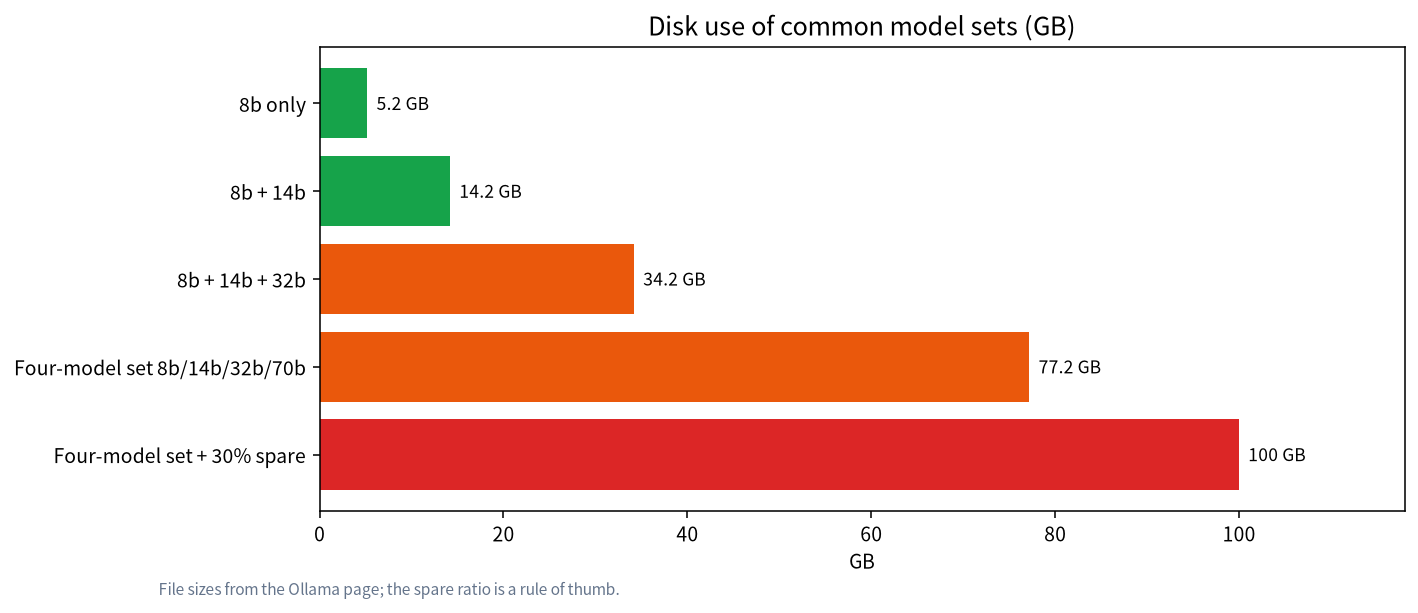
Note that this covers model files only. Most people also have Windows itself, games, software and other tools’ caches. So:
- A 512 GB system drive is usually fine if you keep two or three models (under about 50 GB in total), but tight if it also holds games and lots of files.
- 1 TB holds four or five medium to large models plus everyday use, and is the capacity we recommend, especially if you plan to swap models often.
- 2 TB or more only makes sense if you keep several 70b-class or larger models, or fine-tune and save multiple checkpoints.
What drive speed affects: a theoretical load-time estimate
Drive speed matters only at the moment the model file is read into memory or VRAM. Theoretical load time is file size divided by sequential read speed. The comparison below uses Samsung’s published peak figures for the 990 PRO and 870 EVO, and our assumption of 150 MB/s for a hard disk:
| Model | 990 PRO NVMe (7,450 MB/s) | 870 EVO SATA (560 MB/s) | Hard disk (assumed 150 MB/s) |
|---|---|---|---|
| 8b (5.2 GB) | about 0.7 s | about 9.3 s | about 34.7 s |
| 14b (9.0 GB) | about 1.2 s | about 16.1 s | about 60 s |
| 32b (20 GB) | about 2.7 s | about 35.7 s | about 133 s |
| 70b (43 GB) | about 5.8 s | about 76.8 s | about 287 s |
| 671b (404 GB) | about 54 s | about 721 s | about 2,693 s |
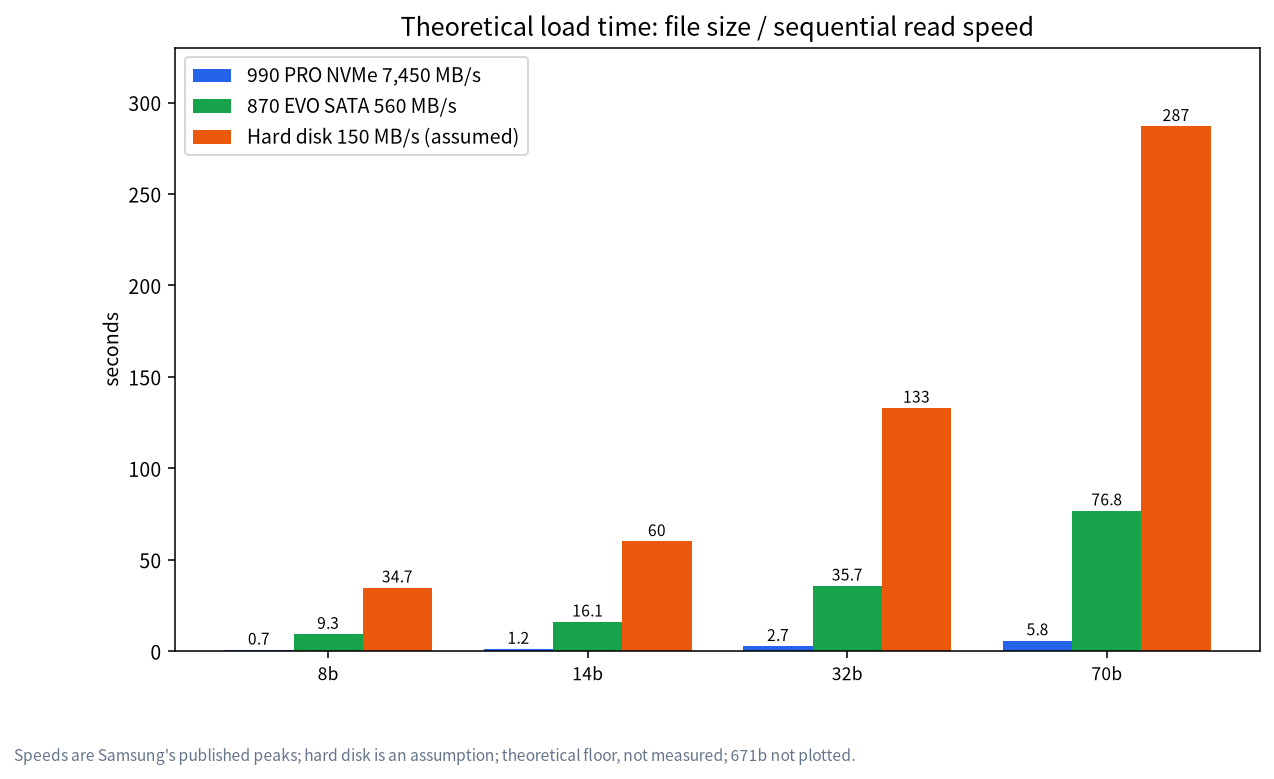
Worked example: reading the 32b (20 GB) from a SATA SSD takes about 20 / 0.56 = 35.7 s in theory; from NVMe about 2.7 s, which saves roughly 33 s each time you load the model. If you load a model a few times a day, that hardly matters; if you keep switching between several models, the NVMe advantage becomes obvious. To stress it again: this is a theoretical floor. Real loading also goes through the filesystem, memory copies and the upload to VRAM, so it takes longer, and we did not measure it.
Downloading is slower than reading: the network is the first bottleneck
Download time is file size x 8 divided by bandwidth. Estimates at 100 Mbps and 500 Mbps:
| Model | 100 Mbps | 500 Mbps |
|---|---|---|
| 8b (5.2 GB) | about 6.9 min | about 1.4 min |
| 14b (9.0 GB) | about 12 min | about 2.4 min |
| 32b (20 GB) | about 26.7 min | about 5.3 min |
| 70b (43 GB) | about 57.3 min | about 11.5 min |
| 671b (404 GB) | about 538.7 min (about 9 hours) | about 107.7 min |
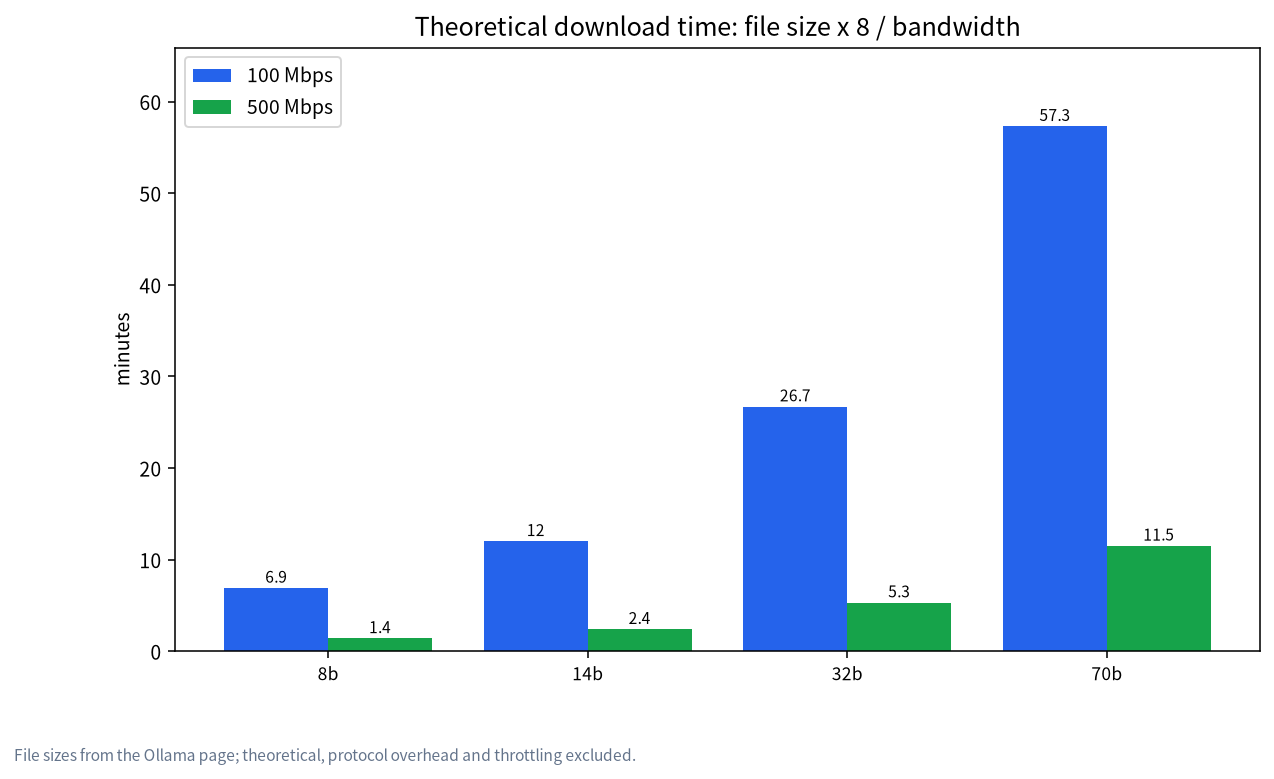
These are theoretical values with no allowance for protocol overhead, server throttling or network jitter. Downloading a 70b takes nearly an hour while reading it from NVMe takes seconds, so downloading fewer times saves more time than buying a faster drive. Keeping the models you have already downloaded and not reinstalling the system casually is worth more than a drive upgrade. For slow-download fixes see Ollama slow downloads and model paths.
Do you actually need NVMe?
| Your situation | Suggestion | Reason |
|---|---|---|
| One or two models, rarely switching | SATA SSD or plain NVMe both fine | Loading happens only at load time; tens of seconds hardly matter |
| Switching between many models often | NVMe first | The saving per switch adds up |
| Models on a hard disk | Not recommended | Loading a 70b takes nearly 5 minutes in theory |
| Fine-tuning or saving checkpoints | NVMe, larger capacity | Heavy writes need both space and speed |
| Laptop with a single M.2 slot | Prioritise capacity in that slot | Speed does not help when space runs out |
One point to remember: NVMe does not make generation faster. Once the model is in VRAM, generation speed is set by VRAM bandwidth and compute, not by the drive. If the model does not fit and part of it sits in system memory, speed is bounded by memory bandwidth, again not by the drive. For what does set generation speed, see the VRAM buying guide.
Platform-specific notes
- Windows PCs: the Ollama installer itself needs about 4 GB, and models are stored by default in the
.ollamafolder under your user directory. If the system drive is tight, setOLLAMA_MODELSto point at another drive. - Macs: unified memory and SSD are usually soldered and cannot be upgraded later, so estimate capacity before buying; see running local LLMs on a Mac. An external SSD can hold models, but speed depends on the interface.
- Mini PCs and laptops: M.2 slots are limited, so check for a free slot before buying; for configuration ideas see large-memory mini PCs and local LLM PC configurations.
What else besides model files takes space
Many people count only the models and miss these:
- The runtime: the Ollama installer needs about 4 GB; with Docker, images and volumes add more, so clean unused images from time to time.
- Knowledge bases and vector data: if you build a local knowledge base (see local RAG), your documents, chunked text and vector index all need room in proportion to how much material you have, so size it from your actual documents.
- Fine-tuning and checkpoints: every saved checkpoint is another file, and keeping several fills a disk quickly; only these scenarios need much larger capacity.
- Duplicate copies: Ollama, LM Studio and similar tools each have their own default model folder, so the same model may be stored twice.
Three budget examples
Example 1: a beginner just trying things. You plan to download an 8b and a 14b, 14.2 GB in total, or about 18.5 GB with 30% spare. Even a 256 GB drive holds that, though leave room for the system and software; SATA or NVMe makes no practical difference here.
Example 2: a 24 GB GPU owner. You use the 14b daily, occasionally switch to the 32b for comparison and keep an 8b as a backup: 34.2 GB, about 44.5 GB with spare. A 1 TB drive is plenty, and the extra space goes to games and files.
Example 3: an enthusiast who often compares sizes. Four models total 77.2 GB, about 100 GB with spare, and adding models beyond DeepSeek easily passes 200 GB. We suggest a dedicated 1 TB or 2 TB NVMe as the model drive, so it does not crowd the system drive and switching takes seconds.
How to move models to another drive
On Windows, set the OLLAMA_MODELS environment variable to a new folder and restart Ollama; newly downloaded models then go to the new location, while already downloaded ones need their folder contents moved over. For path settings and slow-download fixes see Ollama slow downloads and model paths. Close Ollama before moving files so they are not locked.
Common mistakes and hidden costs
- Watching the GPU and ignoring the drive. Model files can eat over 100 GB easily, and a 256 GB system drive fills up fast.
- Thinking NVMe speeds up answers. It only shortens loading and does not change generation speed.
- Ignoring download bandwidth. Download time is often tens to hundreds of times the disk read time.
- Keeping main models on a hard disk. Fine for archives, poor for models you load often.
- Leaving no headroom. When free space runs very low, system and application temp files suffer too; keep about 30% spare.
- Duplicated downloads. Several tools each storing the same model wastes disk; one shared model folder saves space.
What we checked and what we did not
File sizes come from the Ollama listing, drive speeds from Samsung’s documents for the 990 PRO and 870 EVO, and the hard disk speed is our assumption; every time is a theoretical “size divided by speed” value. We did not measure load or download times and did not test the effect of filesystems or antivirus software on reads. Your real times depend on your system and network.
FAQ
How much disk do I need for storage for local LLMs?
For one or two entry models, under 10 GB is enough; keeping 8b, 14b, 32b and 70b together is about 77.2 GB, or about 100 GB with 30% spare. We suggest 1 TB for everyday use.
Is a 512 GB drive enough for local LLMs?
Usually yes if you keep two or three models (under about 50 GB in total) and have few games and files; choose 1 TB if you swap models often.
Do I need NVMe for local LLMs?
Not strictly. NVMe shortens model load time: a 32b takes about 36 s to load from a SATA SSD in theory against about 3 s on NVMe. Generation speed does not depend on the drive.
Can I keep models on a hard disk?
You can, but loading is slow. At an assumed 150 MB/s, a 70b takes about 287 s to load in theory, which is poor for models you switch between.
How much disk does the full DeepSeek 671b need?
Ollama lists about 404 GB; with headroom plan for over 1 TB, and you also need server-class VRAM or memory to run it.
Can models live on an external drive?
Yes, by pointing a setting such as OLLAMA_MODELS at the folder, but load speed depends on the external drive’s interface and speed.
Planning a PC on a budget?
Visit the community or email admin@microaione.com with how many models you plan to keep and your budget. Our Shenzhen team can sketch memory, VRAM and storage recommendations and will mark which parts are estimates.
References: Ollama library: deepseek-r1, Samsung 990 PRO brochure, Samsung 870 EVO brochure, Ollama: Windows docs.