PC Configuration for AI LLM Training: What GPU, RAM and Storage Each Level Needs, from QLoRA Fine-Tuning to Pretraining
Search for a PC configuration for AI LLM training and you will see both “an 8GB card is enough” and “you need hundreds of GPUs”. Both are right, because “training” is really three jobs of very different scale: pretraining (from scratch), full fine-tuning (updating every weight) and LoRA / QLoRA fine-tuning (training small adapters only). This article works out the memory and compute each needs, gives five reference builds and what they can do, covers RAM, storage, power and cooling, and finishes with a worked example of how many hours one fine-tune takes. The conclusion up front: a personal PC suits QLoRA and LoRA fine-tuning, not pretraining; full fine-tuning is realistic only for 1B to 3B models. For fine-tuning VRAM details see local fine-tuning VRAM needs, and for whole builds see local LLM PC build configurations.
Key points (updated 2026-11-04)
- Full fine-tuning with mixed-precision Adam is roughly 16 bytes per parameter: about 16GB for 1B and 112GB for 7B before activations; a personal PC can hardly do anything above 7B.
QLoRA is the workhorse for individuals: by Unsloth’s documented floors, about 5GB for 7B, 8.5GB for 14B, 26GB for 32B and 41GB for 70B; 16-bit LoRA needs 19GB, 33GB, 76GB and 164GB.
Pretraining by the 6ND rule: a 1B model on 20 billion tokens takes about 14 days on one card at an assumed sustained 100 TFLOPS, a 7B about 681 days; not realistic for individuals.
Priorities for a training PC: VRAM > RAM and disk capacity > GPU compute > CPU. Buy VRAM that fits the model first, then think about speed.
Prices are 2026-10-30 reference prices; GPU prices have moved fast recently, so re-check before ordering.
PC configuration for AI LLM training: three kinds of “training”
| Type | What it does | Memory scale | Compute scale | Feasible on a personal PC? |
|---|---|---|---|---|
| Pretraining | Start from random weights, train on huge text corpora | Tens of GB to several TB (with optimizer) | Very high (about 10^20 FLOPs for a 1B model) | Only toy models of a few million to a billion parameters |
| Full fine-tuning | Update all weights of an existing model | About 16 bytes per parameter | Proportional to tokens, fairly high | 1B to 3B yes; 7B and up needs multiple GPUs or rental |
| LoRA | Freeze weights, train low-rank adapters | 16-bit model weights plus a little training state | Medium | 3B to 14B within 24GB |
| QLoRA | Load the base in 4-bit, then train LoRA | About a quarter to a half of 16-bit LoRA | Medium, slight dequantization overhead | Best for individuals, from 8GB |
The LoRA paper introduced freezing weights with low-rank adapters and the QLoRA paper went further by quantizing the base to 4-bit. If you only want the model to learn a format or tone, try good prompting and retrieval first (see local RAG knowledge base); most of the time no training is needed.
How full fine-tuning memory is calculated
For mixed-precision training with the Adam optimizer, each parameter needs roughly: 2 bytes for the 16-bit weight, 2 bytes for the 16-bit gradient, 4 bytes for the 32-bit master weight and 4 bytes each for Adam’s first and second moments, about 16 bytes in all (the classic accounting in the ZeRO paper). So:
| Model | 16 bytes per parameter | Where it fits |
|---|---|---|
| 1B | 16GB | One 16GB card, barely; activations need checkpointing |
| 3B | 48GB | 48GB-class pro card or multiple cards |
| 7B | 112GB | Multi-GPU or 128GB unified memory |
| 14B | 224GB | Multi-GPU server |
| 32B | 512GB | Multi-node |
| 70B | 1,120GB | Data center |
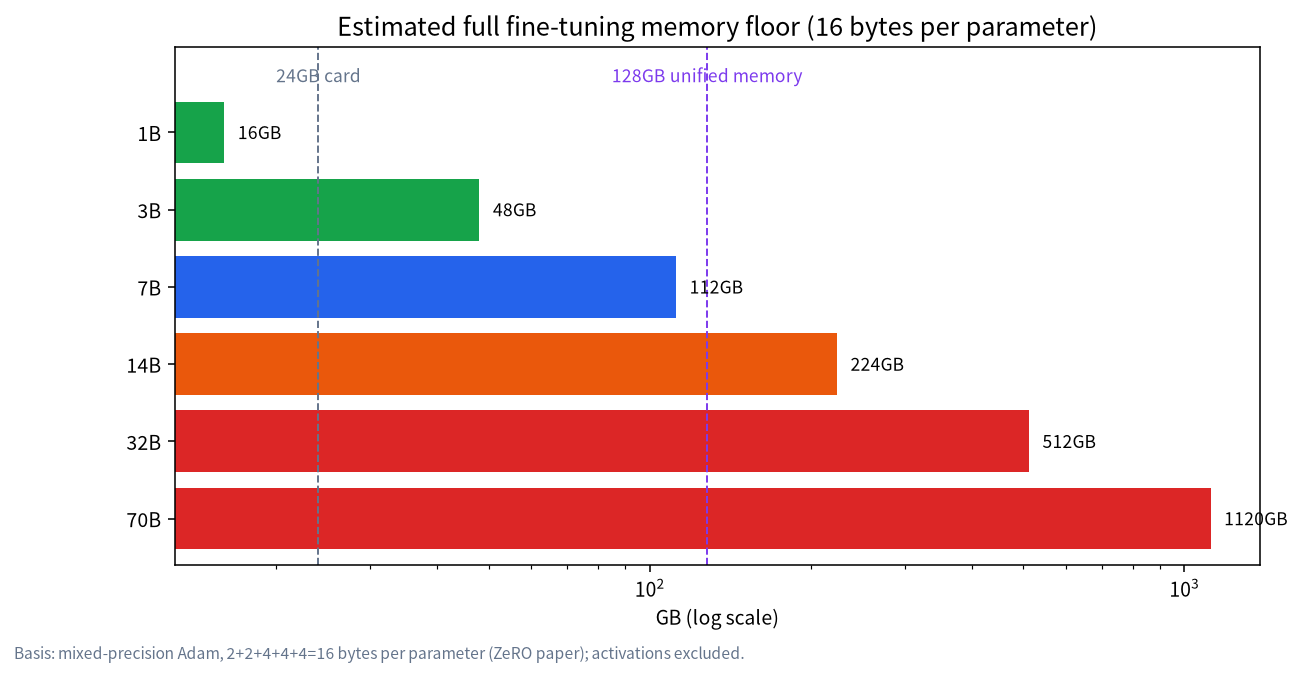
That excludes activations: larger batches and longer sequences use more, and gradient checkpointing trades compute for VRAM. Checkpoint files are big too: a 7B checkpoint with optimizer state is about 112GB, so keeping five takes 560GB of disk, while a LoRA adapter is typically tens to hundreds of MB. That is why individuals almost always choose LoRA or QLoRA.
VRAM floors for QLoRA and LoRA
Unsloth’s documented minimums are the clearest public reference (the docs say these are floors and some models need more):
| Parameters | QLoRA (4-bit) floor | LoRA (16-bit) floor |
|---|---|---|
| 3B | 3.5GB | 8GB |
| 7B | 5GB | 19GB |
| 8B | 6GB | 22GB |
| 14B | 8.5GB | 33GB |
| 27B | 22GB | 64GB |
| 32B | 26GB | 76GB |
| 70B | 41GB | 164GB |
They are floors, not budgets: batch size and sample length push usage up, so leave 20% to 30% headroom (our rule of thumb, adjust for your task). Sources and detail are in the Unsloth requirements page and our fine-tuning VRAM article.
Five builds and what they can train
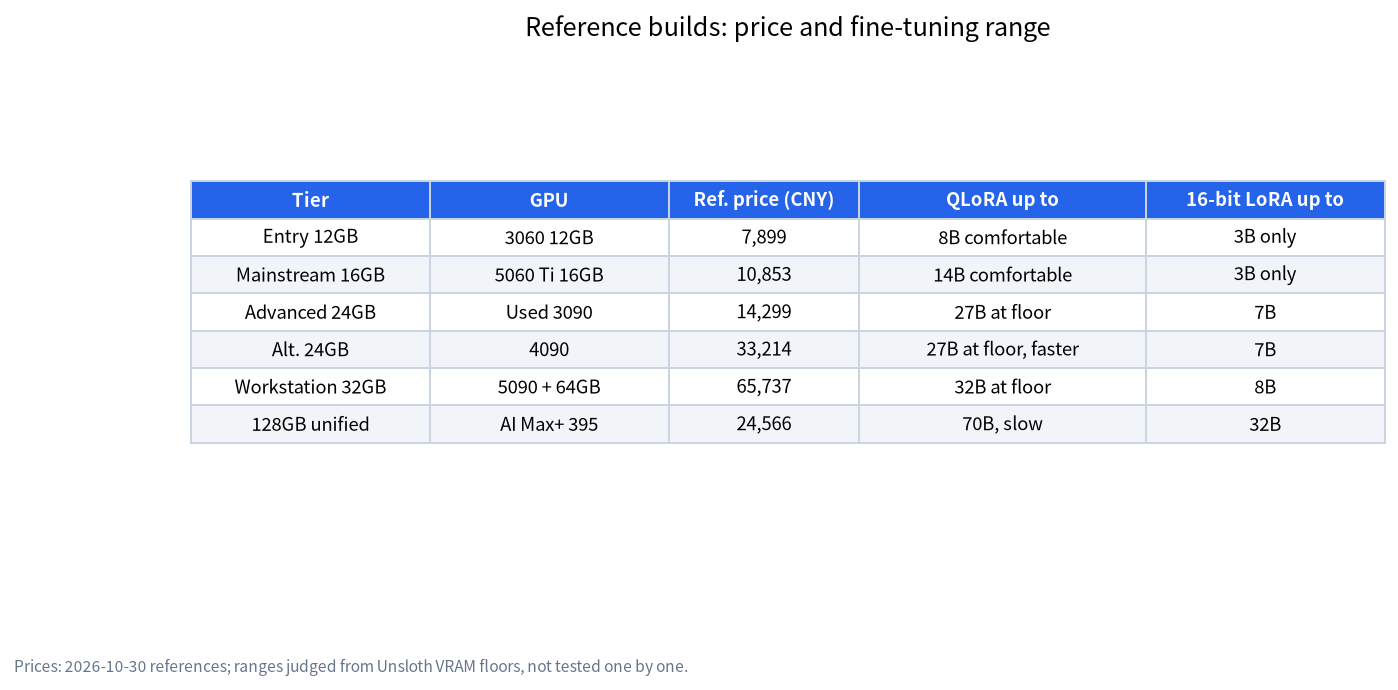
These five tiers come from our 2026-10-30 reference builds. Prices exclude monitor, peripherals, OS licence, shipping and assembly or testing fees, and are references only; get real quotes. What each can train is judged from the VRAM floors above; we did not test each one.
| Tier | Core parts | Reference price | QLoRA up to | 16-bit LoRA up to |
|---|---|---|---|---|
| Entry 12GB | RTX 3060 12GB + 32GB RAM | about ¥7,899 | 8B comfortably, 14B if you keep sequences short | 3B only (7B needs 19GB) |
| Mainstream 16GB | RTX 5060 Ti 16GB + 32GB RAM | about ¥10,853 | 14B comfortably | 3B only (7B needs 19GB) |
| Advanced 24GB | Used RTX 3090 + 32GB RAM | about ¥14,299 | 27B at the floor, 14B comfortably | 7B yes, 8B at the floor |
| Advanced alternative 24GB | RTX 4090 + 32GB RAM | about ¥33,214 | Same, faster | Same |
| Workstation 32GB | RTX 5090 + 64GB DDR5 | about ¥65,737 | 32B at the floor | 8B yes, 14B no (needs 33GB) |
| 128GB unified memory | Ryzen AI Max+ 395 mini PC | about ¥24,566 | 70B (41GB) yes, but slow | 32B (76GB) yes, 70B no |
Some readings. First, at the same money, VRAM capacity is worth more than compute: a used 3090 has the same 24GB as a 4090 at under a third of the reference price; in training, capacity decides “can it be done” and speed only “how long it takes” (see the used GPU buying guide for the risks and 5090, 4090 and 3090 compared). Second, large unified-memory machines can hold bigger models but have lower memory bandwidth, so training is slow; they suit occasional training rather than frequent iteration (see large-memory mini PCs). Third, for the professional route with 48GB or more on one card see the RTX PRO 6000 workstation. Fourth, two cards add up VRAM but consumer cards communicate over PCIe, which costs training efficiency, and the 4090 has no NVLink; see the dual-GPU build.
Compute: how many hours is one fine-tune
VRAM decides whether it fits; compute decides how long it takes. Total training compute is commonly estimated as 6ND (N parameters, D training tokens; the approximation comes from scaling-law research). LoRA does not compute gradients for all weights, so its real cost is lower and 6ND serves as an upper bound.
Worked example: an 8B model, 5,000 samples averaging 1,000 tokens each, 3 epochs:
- Training tokens D = 5,000 × 1,000 × 3 = 15 million
- Compute ≈ 6 × 8×10^9 × 1.5×10^7 = 7.2×10^17 FLOPs
- Assume 30 TFLOPS effective (our conservative assumption for sustained consumer-card training; real figures depend on card, batch and framework): 7.2×10^17 ÷ 3×10^13 = 24,000 seconds, about 6.7 hours
So an 8B QLoRA fine-tune fits in an evening to a day; ten times the data takes roughly ten times as long. QLoRA’s dequantization adds overhead, so go by measurements.
Why pretraining does not suit a personal PC
The token count for pretraining is commonly estimated at about 20 tokens per parameter (a conclusion of the Chinchilla paper, only a compute-optimal reference). Using 6ND and an assumed sustained 100 TFLOPS (already optimistic for one flagship consumer card):
| Model | Tokens (20× parameters) | Compute | Time (one card, 100 TFLOPS) |
|---|---|---|---|
| 1B | 20 billion | 1.2×10^20 | about 13.9 days |
| 3B | 60 billion | 1.08×10^21 | about 125 days |
| 7B | 140 billion | 5.88×10^21 | about 681 days |
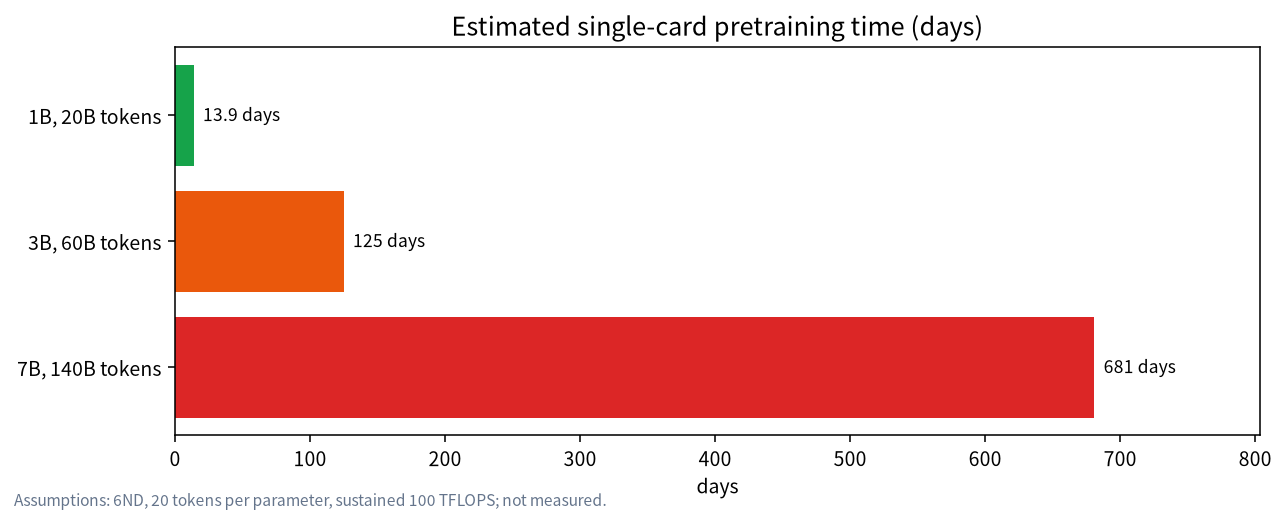
And that ignores memory: pretraining a 7B needs at least 112GB of training state plus activations, which no single card holds, so you need parallelism across cards and communication bandwidth becomes the bottleneck. The realistic path for individuals and small teams who want “their own model” is to pick a good base and do domain fine-tuning with QLoRA rather than train from scratch.
RAM, storage, power and cooling
- RAM: at least comparable to VRAM, 32GB to start and 64GB steadier when loading large models and processing data (our rule of thumb); too little RAM stalls training at the loading stage.
- Storage: NVMe SSD, 1TB to start and 2TB more comfortable. Do the sum: a few base models (an 8B in 16-bit is about 16GB, a 32B about 64GB), datasets and several checkpoints quickly reach hundreds of GB; with full fine-tuning, one checkpoint with optimizer state is 16 bytes per parameter.
- CPU: not the bottleneck; it handles data loading and tokenization. A mid-range 6 to 8 cores is enough, so do not overspend here.
- Power supply: training is a long full load, unlike chat’s intermittent load. For a 24GB-class single card start at 850W, for a 5090-class card start at 1000W, and keep headroom (see power and cooling for LLM rigs).
- Cooling: good case airflow, and watch memory temperature; for long runs, lowering the power limit often costs little speed while cutting temperature noticeably (a common practice, effect varies by card).
- OS: training frameworks are easiest on Linux; Windows users can use WSL2, see WSL2 and Docker deployment. Macs can do LoRA with MLX but the ecosystem differs from CUDA.
Three buying principles
- Pick the target model first, then the VRAM: to fine-tune 14B look at 16GB and up; for 27B to 32B look at 24GB to 32GB; do not buy the card first and hunt for a use.
- Prefer NVIDIA and big VRAM: most training tools support CUDA best; at the same price pick the model with more VRAM.
- Renting is an option: for an occasional large run, renting a cloud GPU is often cheaper than a build; self-hosting pays off with frequent, long-term or sensitive-data use (for privacy see local LLMs and privacy). We give no cloud prices here because they change constantly; check current quotes yourself.
How to confirm a configuration is enough
- Run a small task of a few dozen samples with your target model and real sample length;
- Watch peak VRAM (nvidia-smi or the training log) and treat it as your true floor;
- Raise batch size step by step to find the largest value that does not run out of memory;
- Record time per hundred steps, extrapolate total time and compare with the formulas above;
- On out-of-memory, work in this order: lower batch size, shorten samples, switch to QLoRA, enable gradient checkpointing (see fixing out-of-memory errors).
Common misconceptions
- “If VRAM fits the weights I can train”: activations and long sequences push usage far above the weights themselves.
- “Several small cards equal one big card”: pooling VRAM needs a parallelism framework and communication costs efficiency.
- “Longer training is better”: too many epochs overfit; 1 to 3 epochs is usually enough for small datasets.
- “Fine-tuning teaches new knowledge”: it is better at changing style and format; new facts suit retrieval.
FAQ
What hardware do you need to train an LLM?
What hardware you need to train an LLM depends on full pretraining, full fine-tuning, or parameter-efficient methods like QLoRA—the last can start on consumer GPUs; the first usually needs multi-GPU VRAM. Separate the training goal before you buy parts.
Can a personal PC train a large language model?
It can do LoRA or QLoRA fine-tuning but not pretraining. Full fine-tuning suits only small 1B to 3B models.
What is the minimum VRAM for LLM training?
By Unsloth’s docs, QLoRA on a 3B model needs about 3.5GB at minimum and 7B about 5GB; leave headroom in practice, and 12GB is a more comfortable start.
How different are the 4090 and 3090 for training?
Both have 24GB, which decides what you can train; the 4090 has more compute and trains faster but costs far more. We have not run a same-conditions comparison, so check measurements.
How much RAM do I need?
At least comparable to VRAM, 32GB to start; 64GB is steadier for large datasets and large models.
Are training and inference requirements the same?
No. Training also reserves VRAM for gradients, optimizer state and activations, so the same model usually needs several times more to train than to run.
Is renting a cloud GPU or buying cheaper?
Renting wins for occasional training, and building pays off only with frequent, long-term use; work it out with quotes from the day.
Talk to us
Tell us the model you want to fine-tune, the data size and your budget and we will estimate VRAM and time. Leave a note in the community or email admin@microaione.com. More related reading is in our fine-tuning VRAM article.
References: LoRA (arXiv 2106.09685), QLoRA (arXiv 2305.14314), ZeRO (arXiv 1910.02054), Chinchilla (arXiv 2203.15556), Unsloth requirements page. Build prices come from our 2026-10-30 reference builds. Data read on 2026-11-04, Beijing time.