Hugging Face Mirrors in China: Downloads and Common Failures
If you run models locally from mainland China, a Hugging Face mirror is usually the first thing you go looking for. The model card lives on Hugging Face, but the 40 GB of weights stall at 30%, the connection resets, or the site does not load at all. This guide explains what a mirror actually is, how to point the official tools at one with HF_ENDPOINT, when ModelScope is the better source, how to debug a mirror that “doesn’t work”, and the checks you should run before loading any downloaded file. The same advice applies to anyone on a slow or filtered network, not only in China.
Verification note: Most mirrors are run by third parties or community volunteers. Addresses, uptime, and coverage change without notice, and we do not vouch for any of them. Commands reflect common
huggingface_hubandmodelscopeusage as of November 2026; the official docs win if they differ.Key points (updated 2026-11-05)
- A mirror is a reverse proxy plus a cache. It changes where bytes come from, not what they are.
The cleanest setup: set
HF_ENDPOINTto the mirror, then use the official CLI.Gated models still require accepting the license on the official site and using your token; many mirrors do not proxy auth.
ModelScope is the other stable path inside China, and many Chinese models launch there first.
Always check file sizes, SHA256 hashes, and the LICENSE before you load anything.
What a Hugging Face mirror is and why people need one
The Hugging Face Hub is the largest open-weight model download site in the world. Models, datasets, and Spaces all live there, and most local tools assume you can reach it. From mainland China, direct connections tend to fail in one of three ways: the web pages load but downloads crawl, large files reset partway through, or DNS does not resolve at all.
A mirror solves this by running a server on a better-connected network that speaks the same API as the Hub. Your request goes to the mirror, the mirror fetches from the official Hub (or serves a cached copy), and returns the same bytes. That has two consequences people often miss. First, a mirror does not grant you access you would not otherwise have; a gated Llama or Gemma repo still needs you to click “agree” on the official page. Second, file integrity depends on the operator, so you should verify downloads yourself rather than trust the mirror.
When people search for a “Chinese Hugging Face mirror”, they usually mean this kind of proxy with a Chinese help page, not a translated version of the models.
| Method | Speed from China | Gated models | Integrity risk | Best for |
|---|---|---|---|---|
| huggingface.co direct | Unreliable | Yes (token) | Low | Users with good international links |
| Community mirror + HF_ENDPOINT | Usually fast | Depends on mirror | Medium, verify | Most individual users |
| ModelScope | Fast and stable | Platform’s own flow | Low | Chinese models, companies |
| Ollama / LM Studio catalogs | Network dependent | Only pre-packaged models | Low | Beginners who avoid the terminal |
Hugging Face mirror download: choosing between three paths
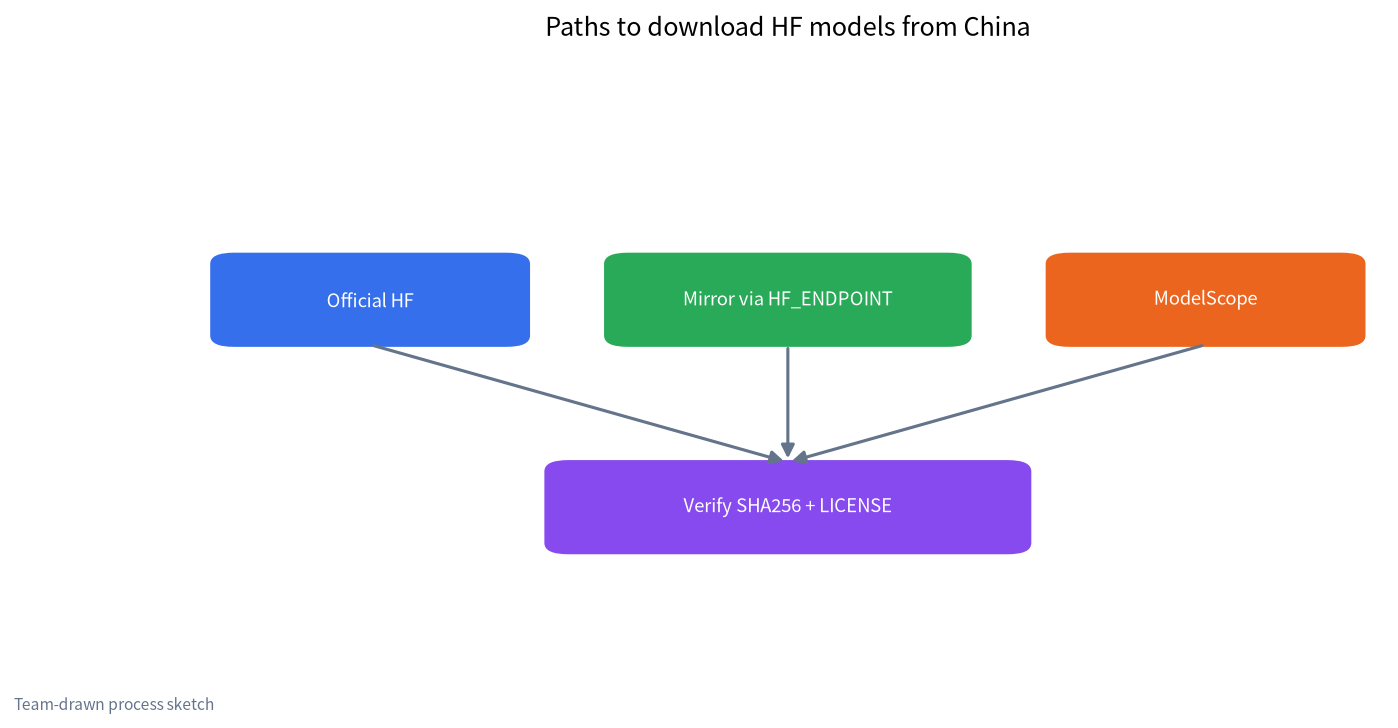
Path 1: official CLI pointed at a mirror. Install huggingface_hub, then change the endpoint with an environment variable before running anything. On Linux or macOS: export HF_ENDPOINT=https://hf-mirror.com. In Windows PowerShell: $env:HF_ENDPOINT="https://hf-mirror.com". Then download as usual: hf download Qwen/Qwen3-8B --local-dir ./qwen3-8b (older versions use huggingface-cli download). The variable must be set before the Python process starts. If you set it after huggingface_hub has been imported, the library has already read the default URL and your change does nothing. This is the single most common beginner mistake.
Path 2: ModelScope. Run pip install modelscope, then modelscope download --model Qwen/Qwen3-8B --local_dir ./qwen3-8b. Qwen, DeepSeek, GLM, Kimi, and many other Chinese model families are usually published there at the same time as on Hugging Face, and the transfer speed inside China is consistently good. The trade-off is coverage: some Western models never appear, and some repos lag behind the Hub by a version.
Path 3: pre-packaged catalogs. If you only want to chat with a model, Ollama or LM Studio can pull quantized GGUF builds and handle sharding and verification for you. If those downloads are slow too, our guide to slow Ollama downloads and model paths covers the fixes.
Setting up a Hugging Face mirror correctly
A few details decide whether you finish in ten minutes or spend the evening retrying.
- Download only the files you need. Many repos hold the FP16 original, several quantizations, and ONNX exports side by side. Use a filter such as
--include "*Q4_K_M*.gguf"to fetch the one file you will actually run. This alone can save tens of gigabytes. - Let resume do its job. Current CLI versions resume interrupted downloads. Rerun the same command; do not delete the partial folder or rename shard files by hand.
- Move the cache. Set
HF_HOMEto a data drive with room to spare. On Windows the default cache sits under your user profile on the system drive and fills it quickly. - Accelerate big files carefully. Installing
hf_transferand settingHF_HUB_ENABLE_HF_TRANSFER=1can be much faster on a stable, wide connection. On a flaky link it fails more often, so turn it off if you see repeated errors. - Protect your token. Gated repos need
hf auth loginor anHF_TOKENvariable. Never paste your token into an unknown mirror’s web form or a “one-click downloader” from a forum.
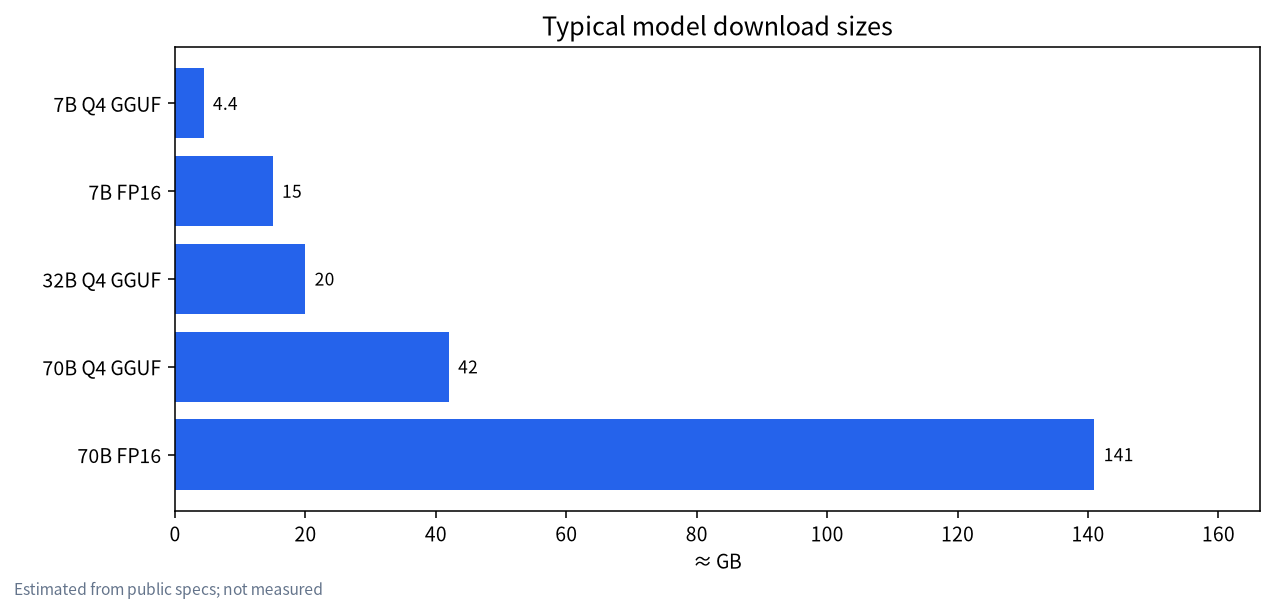
It helps to know sizes in advance. A 7B model in Q4 GGUF is about 4–5 GB; the FP16 original is about 15 GB. A 70B model in Q4 is a little over 40 GB, and FP16 is over 140 GB. Check free disk space first, and see our guide to choosing an SSD for local LLMs. To pick a size that your machine can actually run, try the model size chooser or the VRAM calculator before you start a 40 GB transfer.
Why a Hugging Face mirror is not working: a debugging order
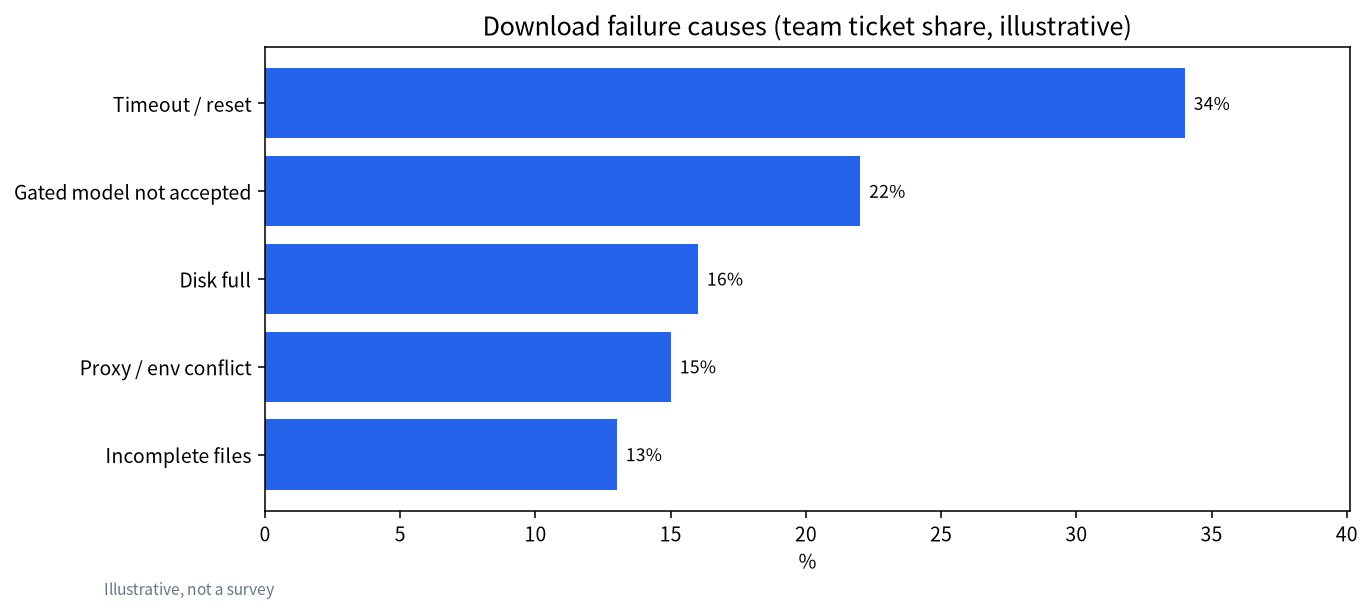
“The mirror doesn’t work” is rarely one problem. Work through the symptoms in this order:
| Symptom | Most likely cause | Fix |
|---|---|---|
| Mirror homepage won’t load | Maintenance or address change | Use ModelScope or retry later |
| CLI still contacts huggingface.co | HF_ENDPOINT set too late or misspelled | Open a new terminal, echo the variable, then run |
| 401 or 403 errors | Gated model not accepted, or not logged in | Accept on the official page and configure a token |
| Fails at 99% | Connection reset or disk full | Free space, rerun the same command to resume |
| safetensors error on load | Incomplete shard | Compare sizes and hashes with the repo file list |
| Slower with a proxy on | Proxy and mirror both active | Pick one; clear HTTP_PROXY and retry |
Two more causes are easy to overlook. Corporate and campus networks often throttle or block large downloads; switching to a home connection or to ModelScope frequently fixes things instantly. And if you download inside Docker, the environment variable has to be passed into the container, not just set on the host.
Open-source LLM download sites compared
Beyond the Hub and ModelScope there are a few other places people get weights. Our article on open-source LLMs and where to download them covers the model families; here is the download angle only.
| Site | Main content | Tool | Notes |
|---|---|---|---|
| Hugging Face Hub | Nearly every open-weight model | hf CLI, git with Xet | Widest catalog; needs a mirror in China |
| ModelScope | Mostly Chinese models, some Western | modelscope CLI | Stable in China; some repos need ID verification |
| Ollama Library | Pre-packaged GGUF | ollama pull | Inference only |
| GitHub Releases | A few small models and tools | Browser / wget | Few large files |
| Cloud-drive “bundles” | Unknown origin | Drive client | High risk; avoid |
That last row deserves emphasis. Bundles shared on cloud drives as “no VPN needed” or “cracked” models are a known way to ship crypto miners or tampered weights. We cover this in ChatGLM one-click pack caveats and our fact-check of leaked and cracked model claims. If an official repo exists, use it.
Checks to run after the download finishes
Getting files onto disk is half the job. Spend two minutes on these before loading:
- Compare the file list and sizes with the repo’s Files tab, especially numbered shards like
model-0000X-of-0000N.safetensors. - Check SHA256. The Hub shows hashes for LFS files. Use
sha256sumon Linux orcertutil -hashfile FILE SHA256on Windows. - Read the LICENSE. Open weights are not automatically free for any commercial use; Llama, Qwen, and Kimi licenses differ in important ways.
- Prefer safetensors. Avoid loading
.binpickle files from sources you do not trust, because pickle can carry executable code. - Go offline. Once verified, set
HF_HUB_OFFLINE=1so programs read only the local cache. This also makes the model usable in fully offline setups.
After that, follow the local LLM deployment guide to choose a runtime. Windows beginners can start with installing a local LLM without the command line.
Advice for teams and internal networks
If several people in a company or lab need the same models, do not have each of them pull from a mirror. Designate one machine with outbound access to download and verify, then publish the files to shared storage or a self-hosted model registry. Other machines run with HF_HUB_OFFLINE=1. This saves bandwidth and gives you a record of each model’s source, revision, and hash, which matters when an auditor asks where a model came from. For projects that touch customer data, add model provenance to your enterprise content safety checklist so nobody quietly introduces unvetted weights.
A simple log is enough to start: repo ID, commit hash or revision, file names, SHA256 values, license, download date, and who approved it. Pin the revision in your scripts (--revision) so a silent upstream update does not change what you serve in production. When you do want to upgrade, download the new revision side by side, rerun your own evaluation prompts, and only then switch the pointer. Keeping the previous version for a week makes rollback a one-line change instead of another 40 GB download.
FAQ
Is a Hugging Face mirror safe to use?
A mirror only relays and caches files, and a reputable one returns the same bytes as the official Hub. You cannot vouch for the operator, though, so verify sizes and SHA256 hashes after downloading. That reduces the risk to a very low level.
I set HF_ENDPOINT, so why does it still hit huggingface.co?
The variable was almost certainly set too late. Set it before starting Python or the CLI, in the same terminal session. In Jupyter, write it to os.environ before importing huggingface_hub.
Can I download gated models through a mirror?
It depends on whether the mirror forwards authentication. Usually you must accept the license on the official page and then use your own token. Never hand your token to an untrusted third-party page.
Mirror or ModelScope, which is better?
For Chinese model families, ModelScope is usually faster and stays in sync. For Western models or niche repos, a mirror offers wider coverage. Whichever you use, the official hash is the source of truth.
Do I have to restart a download that broke halfway?
No. Rerun the same command and it resumes. Do not delete the partial directory or rename shard files.
Is there a web version of a Chinese Hugging Face mirror?
Some mirrors provide a Chinese help page where you can browse model cards. For large files, the CLI is still more reliable than clicking download links in a browser.
Stuck on a download?
Post your error output in the community or email admin@microaione.com. Our Shenzhen team can help tell whether it is the network, the token, or the disk.
Sources: Hugging Face Hub download guide, huggingface_hub environment variables, ModelScope, our open-source LLM download guide, free local AI guide.