
How to Run DeepSeek Locally: Distilled vs Full Model, Picked by VRAM
Fact-check note: Version mappings, file sizes and commands were checked on 30 October 2026 against the Ollama library, DeepSeek’s GitHub README and the Hugging Face model cards. We did not benchmark any variant ourselves; every benchmark number below is DeepSeek’s own and is labelled as such. DeepSeek ships quickly, so check the official pages for anything newer.
When people say they run DeepSeek locally, they’re usually not running the full model from the website. They run a distilled smaller model with a similar name but a very different size and ability. This article explains the difference, covers whether the newer 2026 V4 series can run at home, and tells you which version to download for your VRAM.
The Short Answer
- On an ordinary PC or a single consumer GPU you are running an R1 distill, anywhere from 1.5B to 70B parameters.
- The full DeepSeek-R1 has 671 billion parameters. Ollama’s
deepseek-r1:671bis a 404GB file, which is unrealistic for personal machines. - The newer DeepSeek-V4 (Flash with 284B parameters, Pro with 1.6T) is also a giant mixture-of-experts model. Its Hugging Face repositories total about 160GB (Flash) and about 865GB (Pro), which is server or very-large-memory territory. Ollama’s
deepseek-v4-flashpage is marked retired (2026-09-25), so there is currently no one-lineollama runroute at home. - To get started quickly: around 8GB of VRAM, pick
deepseek-r1:8b; with 24GB, pickdeepseek-r1:32b. - Haven’t installed Ollama yet? See the Ollama Install Guide.
Before You Run DeepSeek Locally: Distilled vs Full Models
The full model: a 671B mixture of experts
According to DeepSeek’s GitHub README, DeepSeek-R1 has 671B total parameters with 37B activated per token, a 128K context length, and is trained on DeepSeek-V3-Base. In a mixture-of-experts (MoE) design only part of the network is used for each token, but every parameter must still be loaded into memory. Memory needs follow total parameters, not activated ones.
Distilled models: small models taught with R1 data
The README describes the distills as open-source Qwen and Llama models fine-tuned on reasoning data generated by DeepSeek-R1. They are not shrunken R1s; they’re Qwen or Llama models that were taught to reason. DeepSeek open-sourced six sizes: 1.5B, 7B, 8B, 14B, 32B and 70B.
How tags map on Ollama
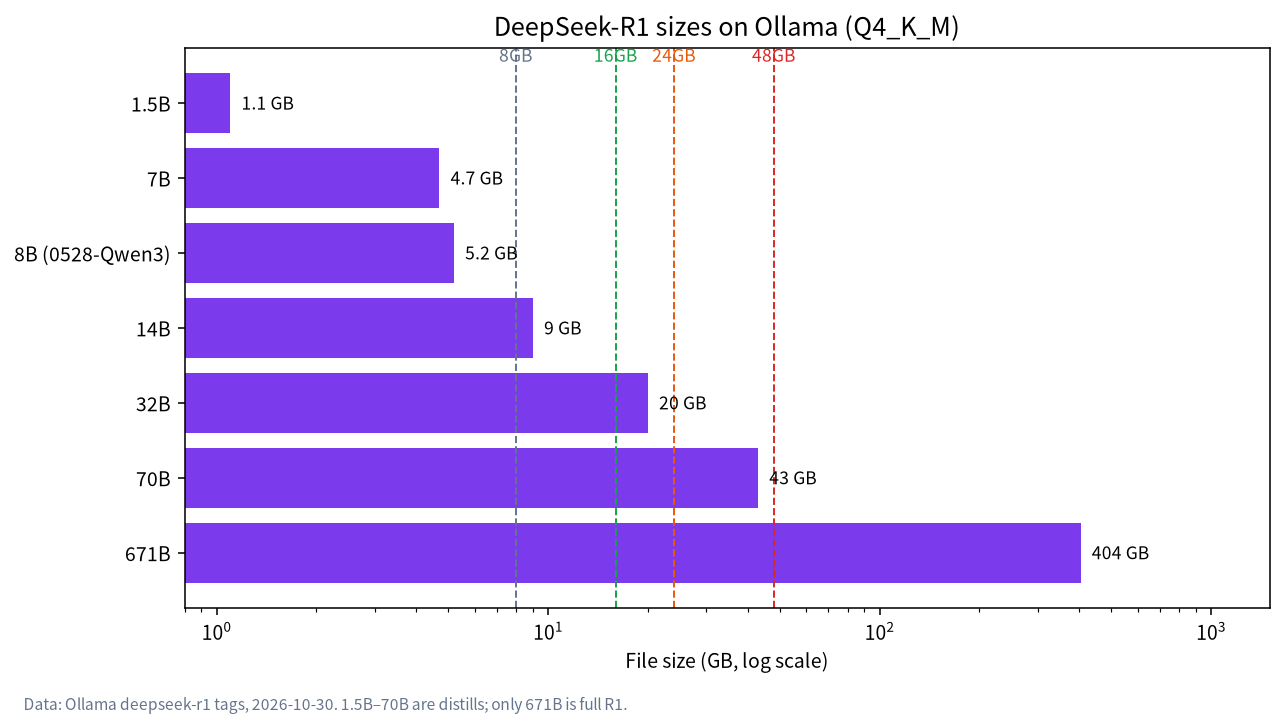
Ollama’s deepseek-r1 tags differ from the GitHub list in one important way:
| Ollama tag | Underlying model | Base | File size (Q4_K_M) |
|---|---|---|---|
deepseek-r1:1.5b |
DeepSeek-R1-Distill-Qwen-1.5B | Qwen2.5 | 1.1GB |
deepseek-r1:7b |
DeepSeek-R1-Distill-Qwen-7B | Qwen2.5 | 4.7GB |
deepseek-r1:8b (default) |
DeepSeek-R1-0528-Qwen3-8B | Qwen3 | 5.2GB |
deepseek-r1:14b |
DeepSeek-R1-Distill-Qwen-14B | Qwen2.5 | 9.0GB |
deepseek-r1:32b |
DeepSeek-R1-Distill-Qwen-32B | Qwen2.5 | 20GB |
deepseek-r1:70b |
DeepSeek-R1-Distill-Llama-70B | Llama 3.3 | 43GB |
deepseek-r1:671b |
DeepSeek-R1 (full) | DeepSeek-V3-Base | 404GB |
Ollama’s page says the 8b tag has been updated to the R1-0528 model distilled into Qwen3-8B, not the Llama-8B listed on GitHub. Running ollama run deepseek-r1 with no tag fetches that 8b. If you downloaded an older copy, ollama pull deepseek-r1 updates it. Sizes are from Ollama’s pages on 2026-10-30 and are download sizes, not total runtime memory.
Can You Run DeepSeek-V4 Locally?
DeepSeek released the V4 series in 2026. From the Hugging Face model cards (MIT licence):
| Model | Total params | Active params | Context | Precision | HF repo size (2026-10-30) |
|---|---|---|---|---|---|
| DeepSeek-R1 (671B) | 671B | 37B | 128K | FP8 | For comparison: 404GB on Ollama at Q4_K_M |
| DeepSeek-V4-Flash | 284B | 13B | 1M | FP4 + FP8 mixed | about 160GB |
| DeepSeek-V4-Pro | 1.6T | 49B | 1M | FP4 + FP8 mixed | about 865GB |
How to read this:
- V4 is MoE too, so fewer active parameters make each token faster to compute but do not shrink the weights you must hold in memory. At roughly 160GB, Flash is far beyond any consumer GPU; think 128GB+ of unified memory plus further quantization, or a multi-GPU server. We don’t suggest it as a target for a personal PC.
- The model card says V4 supports a one-million-token context. For local deployment it recommends
temperature = 1.0, top_p = 1.0, and for the Think Max reasoning mode a context window of at least 384K tokens. Long context eats memory too, so plan headroom. - As of 2026-10-30 the Ollama page for
deepseek-v4-flashsays it was retired on 25 September 2026 and no models have been pushed, so this article gives no Ollama command for it. For current run instructions see the DeepSeek-V4-Flash model card on Hugging Face. - For most individuals the realistic choice remains an R1 distill or a similar-class Qwen, Gemma or gpt-oss model; see Best Local LLMs and Run Qwen Locally.
DeepSeek VRAM Requirements: Which Version for Your GPU
These tiers combine Ollama file sizes with two third-party hardware guides (PromptQuorum, CanRun). They’re guidance, not guarantees:
| Usable VRAM / unified memory | Suggested version | Notes |
|---|---|---|
| Under 4GB or no GPU | 1.5B | Proves the workflow; limited reasoning |
| 8GB | 7B or 8B | The usual starter; 8B is about 5.2GB, leaving room for context |
| 12GB | 8B, or 14B if you keep context small | 14B is 9.0GB; headroom is thin once context is added |
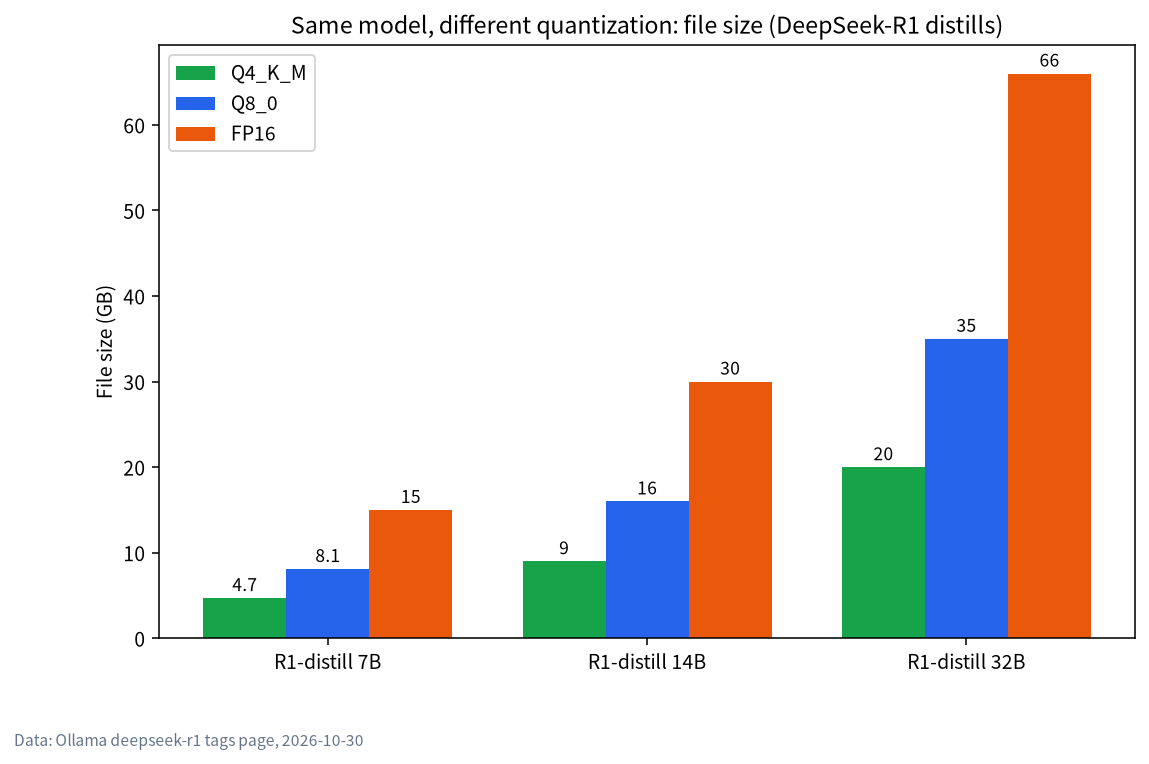
| 16GB | 14B | Comfortable at the standard tag; PromptQuorum estimates 14B at Q8_0 near 15GB, though Ollama lists 16GB, so it’s tight |
| 24GB | 32B | PromptQuorum puts 32B Q4_K_M near 19GB (Ollama lists 20GB), suited to a 24GB card |
| 48GB+ | 70B | 43GB file; a single 24GB card can’t hold it. Multi-GPU, big-memory Mac or pro card |
| Server with hundreds of GB | 671B | Not recommended for individuals |
Mac users should count unified memory; 16GB is a comfortable starting point, and Running LLMs on a Mac goes deeper. If your VRAM sits between tiers, choose the smaller model with generous context rather than forcing the bigger one. For specific cards see Best GPU for Local LLMs.
Four Steps to Run a DeepSeek Distill
Step 1: install Ollama
Follow the Ollama Install Guide and confirm with ollama -v.
Step 2: run the version you chose
ollama run deepseek-r1:8b
Swap 8b for any tag in the table, for example ollama run deepseek-r1:14b. The first run downloads the model and then opens a chat; type /bye to leave.
Step 3: check where it’s running
In a second terminal run ollama ps. 100% GPU is ideal. Any CPU share means part of the model landed in system RAM and speed will drop noticeably; step down a size or lower the context. See Ollama Troubleshooting: GPU Not Used.
Step 4: adjust context
Per the official Ollama docs, the default context length depends on VRAM: 4k under 24GiB, 32k for 24–48GiB and 256k from 48GiB. A reasoning model burns many tokens “thinking”, so 4k is often too small. Inside a chat, type:
/set parameter num_ctx 16384
or set the OLLAMA_CONTEXT_LENGTH environment variable when starting the server. More context uses more VRAM, so check your headroom first; agent and coding use cases should go to at least 64000 tokens.
Why Reasoning Models Feel Slow and Eat Context
R1 models are reasoning models: before the final answer they emit a long chain of “thinking”. That has two practical consequences for local use:
- The same question generates more tokens, so it feels slower than a plain chat model and uses more context. Thinking text occupies the KV cache, which shows up in long conversations.
- The default 4k context is often too small. Ollama defaults to 4k when VRAM is under 24GiB, and a hard maths or coding problem can get cut off. Raise it to 8k–16k as shown above, after checking that your VRAM can hold it.
If your task is rewriting, translation or simple Q&A, you don’t need a reasoning chain; a same-size general model is usually faster and lighter. Reserve reasoning models for maths, code and logic work.
DeepSeek Distills vs Same-Class Alternatives
Before committing to DeepSeek, compare it with other open models in the same VRAM class. This table sticks to facts you can verify on the Ollama pages (2026-10-30) and contains no quality or speed verdicts from us:
| VRAM tier | Model tag | File size | Context listed on Ollama | Licence (Hugging Face) |
|---|---|---|---|---|
| 8GB | deepseek-r1:8b |
5.2GB | 128K | MIT (distills inherit base licence) |
| 8GB | qwen3:8b |
5.2GB | 40K | Apache-2.0 (Qwen3 family) |
| 12–16GB | deepseek-r1:14b |
9.0GB | 128K | MIT (Qwen2.5 base) |
| 16GB | gpt-oss:20b |
14GB | 128K | Apache-2.0 |
| 24GB | deepseek-r1:32b |
20GB | 128K | MIT (Qwen2.5 base) |
| 24GB | qwen3.6:27b |
17GB | 256K | Apache-2.0 |
| 24GB | gemma4:31b |
20GB | 256K | Apache-2.0 |
The context column is each model’s supported maximum, not Ollama’s default; what you can actually use depends on VRAM. Each family has strengths, and Best Local LLMs walks through choosing by use case.
Usage Tips from DeepSeek
The DeepSeek GitHub README lists settings for the R1 family that are worth following locally:
- Set temperature between 0.5 and 0.7, with 0.6 recommended, to avoid endless repetition or incoherent output.
- Avoid a system prompt; put all instructions in the user prompt.
- For maths problems, add a directive such as “Please reason step by step, and put your final answer within \boxed{}”.
- When evaluating, run several tests and average the results.
In Ollama these parameters can be set per chat with /set parameter or baked into a Modelfile.
How Strong Are the Distills? DeepSeek’s Own Numbers
DeepSeek’s GitHub publishes distill results. Three benchmarks below, each a pass@1 score with a 32,768-token generation limit and temperature 0.6:
| Model | AIME 2024 | MATH-500 | LiveCodeBench |
|---|---|---|---|
| DeepSeek-R1-Distill-Qwen-7B | 55.5 | 92.8 | 37.6 |
| DeepSeek-R1-Distill-Qwen-14B | 69.7 | 93.9 | 53.1 |
| DeepSeek-R1-Distill-Qwen-32B | 72.6 | 94.3 | 57.2 |
| DeepSeek-R1-Distill-Llama-70B | 70.0 | 94.5 | 57.5 |
Three caveats. These are DeepSeek’s published figures, not ours. The tests focus on maths, code and reasoning and don’t capture everyday chat or writing quality. And Ollama’s current 8b is the newer Qwen3-based model, which isn’t in this table. Within these three benchmarks, the jump from 7B to 14B is clear, 14B to 32B is smaller, and 32B and 70B land close together. For most individuals, 14B or 32B is the better value range.
Licensing and Commercial Use
According to the README, the model weights are MIT-licensed and the R1 series allows commercial use, modification and derivative works; the V4 model card also lists MIT. Distills, however, inherit their base model’s licence: the Qwen-based ones come from Qwen2.5 (Apache 2.0) and the Llama-based ones follow the relevant Llama licence. Read the originals before commercial use.
FAQ
Is a locally run DeepSeek as strong as the website?
No. DeepSeek decides which model sits behind its website and updates it over time, while a normal PC runs a smaller distilled model of different scale and ability. The value of the distills is privacy, offline use and control, not matching the hosted experience.
Which DeepSeek version fits 8GB of VRAM?
deepseek-r1:7b or deepseek-r1:8b. See What Can an 8GB GPU Run? for more options on that class of card.
Can a 24GB GPU run the 70B model?
Not well. The 70B file is 43GB, so most of it would sit in system RAM and generation would crawl. A 24GB card suits the 32B; see What Can a 24GB GPU Run?.
Can DeepSeek-V4 run through Ollama?
As of 2026-10-30 Ollama’s V4-Flash page is retired with no pushed models, and V4’s weights (about 160GB for Flash) are far beyond consumer hardware, so it isn’t a sensible personal-PC target.
Can I run DeepSeek without a GPU?
Yes. Ollama uses system RAM when VRAM is short, but it’s much slower. Start with 1.5B or 7B.
Downloads are slow. What can I do?
The Ollama FAQ suggests setting HTTPS_PROXY when needed and avoiding HTTP_PROXY.
Next Steps and Community
Which DeepSeek size to choose, and whether 32B is worth the upgrade, usually depends on your exact GPU and budget. Bring your specs to our community and we’ll look together (join the community). If you’d rather not assemble anything yourself, our Shenzhen team sources, builds and tests local-LLM machines and can work backwards from the models you want to run. Start with a conversation; there’s no obligation to buy.