
How Much VRAM Does an LLM Need? Parameters, Quantization and Context
Fact-check note: The formulas and the KV-cache example are computed from architecture parameters (assumptions stated). Model file sizes come from the Ollama library (read 2026-10-30), and third-party estimates come from CanRun and PromptQuorum’s public guides, each labelled. We did not measure every model’s memory use ourselves; trust
ollama psfor the final word.
Before downloading tens of gigabytes of weights, most people ask the same thing: how much VRAM does an LLM need, and will my card cope? You can estimate it with a simple three-part formula: weights + KV cache + runtime overhead. This article explains each part, then gives quick-reference tables and worked examples so you can do the sums before you download.
How Much VRAM Does an LLM Need? The Three Parts
While a model runs, GPU memory holds three things:
- Weights: the model file itself, almost all of which must sit in VRAM. Its size depends on parameter count and quantization.
- KV cache: the keys and values for every token in the context. It grows linearly with context length.
- Runtime overhead: working buffers. Usually small, but not zero; CanRun’s guide calls it the “compute buffer”.
One more thing to remember: a card’s nominal VRAM is not all usable. CanRun’s guide notes that an 8GB RTX 4060 offers about 7.4GB of usable VRAM, with the system and display taking the rest.
Part One: Calculating Weights
Weight size is roughly “parameters × bytes per parameter”, and quantization sets the bytes per parameter:
- FP16: 2 bytes per parameter, about 2GB per billion parameters.
- Q8_0: about 1.1GB per billion.
- Q4_K_M: about 0.6GB per billion (PromptQuorum’s rule of thumb).
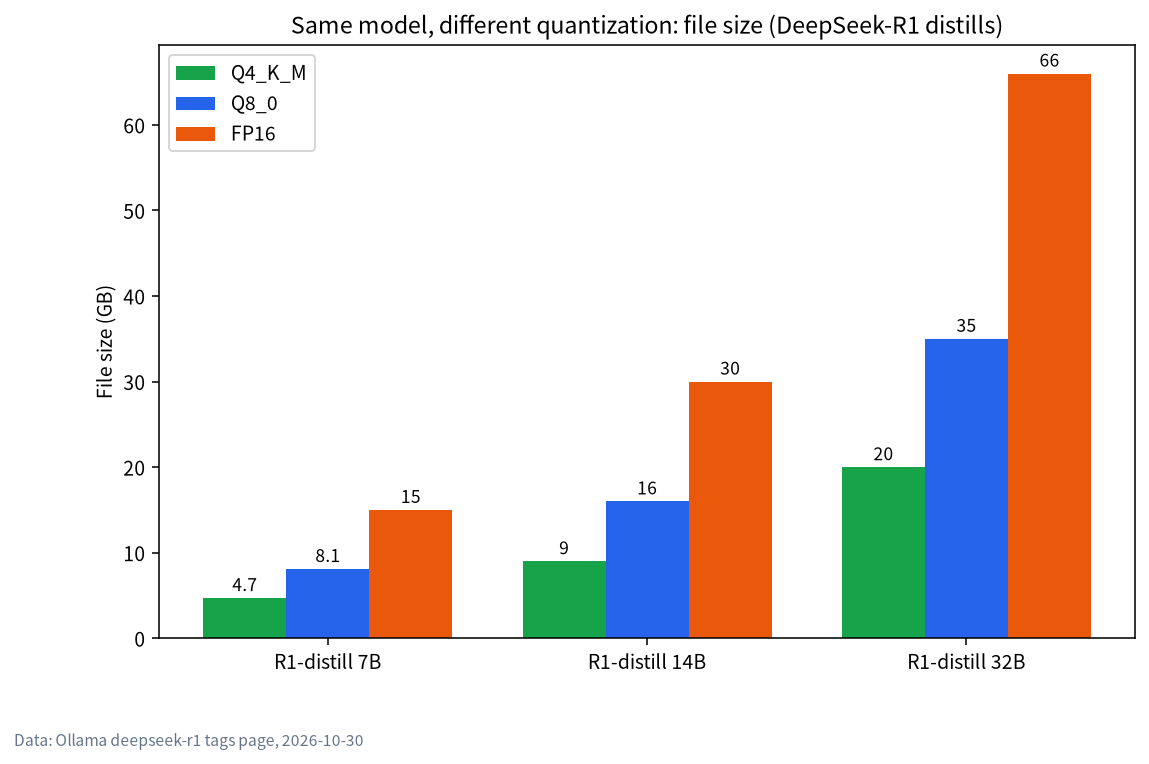
Applying those ratios gives the quick table below, compared with actual Ollama file sizes (real files differ a little by architecture and vocabulary):
| Parameters | Q4_K_M estimate | Q8_0 estimate | FP16 estimate | Actual Ollama file (for comparison) |
|---|---|---|---|---|
| 8B | about 4.8GB | about 8.8GB | about 16GB | qwen3:8b at Q4 is 5.2GB |
| 14B | about 8.4GB | about 15.4GB | about 28GB | qwen3:14b at Q4 is 9.3GB; deepseek-r1:14b is 9.0GB (Q8 16GB, FP16 30GB) |
| 32B | about 19GB | about 35GB | about 64GB | qwen3:32b at Q4 is 20GB; deepseek-r1:32b is 20GB (Q8 35GB, FP16 66GB) |
| 70B | about 42GB | about 77GB | about 140GB | llama3.3:70b Q4_K_M is 43GB; deepseek-r1:70b at Q8 is 75GB |
The estimates land close to the real files. For the trade-offs between Q4_K_M, Q8 and the rest, see LLM Quantization Explained.
MoE models: fewer active parameters does not mean less VRAM
A mixture-of-experts model such as qwen3:30b-a3b activates only about 3B parameters per token, which makes it fast, but the entire file must fit in memory: on Ollama it’s 19GB, not the 2GB a 3B model would be. MoE models are fast but memory-hungry. DeepSeek’s 671B MoE is the same story; see Run DeepSeek Locally.
Part Two: Calculating the KV Cache
KV cache size is proportional to context length. For a standard Transformer, the per-token cost is roughly:
2 × layers × KV heads × head dimension × bytes per value
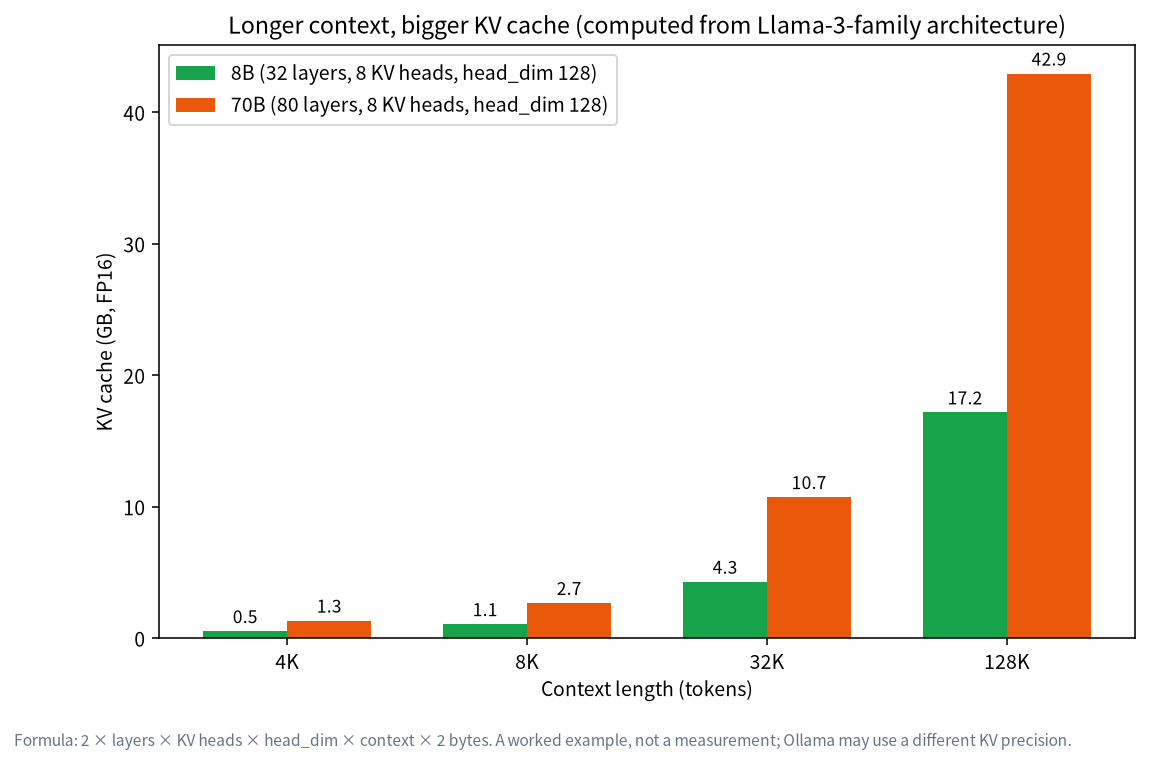
Take Llama-3-family architectures as the example (8B: 32 layers, 8 KV heads, head dimension 128; 70B: 80 layers, 8 KV heads, head dimension 128). At FP16 that is about 128KB per token for the 8B and 320KB for the 70B. The result:
| Context length | KV cache, 8B | KV cache, 70B |
|---|---|---|
| 4K tokens | about 0.5GB | about 1.3GB |
| 8K tokens | about 1.1GB | about 2.7GB |
| 32K tokens | about 4.3GB | about 10.7GB |
| 128K tokens | about 17.2GB | about 42.9GB |
This is a formula example, not a measurement. Architectures differ a lot: some newer models use hybrid attention and similar designs that shrink the KV cache considerably (see the CanRun figures in the next section). The trend is universal though: longer context, bigger cache, and long context is the hidden VRAM hog.
Two ways to shrink the KV cache
Per Ollama’s official FAQ, the OLLAMA_KV_CACHE_TYPE environment variable quantizes the K/V cache (it requires OLLAMA_FLASH_ATTENTION=1):
f16(default): highest precision, largest footprint.q8_0: about half the memory of f16 with very small precision loss; Ollama’s docs say it usually has no noticeable effect on quality.q4_0: about a quarter of f16 with small-to-medium loss that may be more noticeable at large context.
The other lever is simply not to open the context wider than you need. Ollama’s default depends on VRAM: 4k under 24GiB, 32k for 24–48GiB, and 256k from 48GiB; for agents and coding tools it recommends at least 64000 tokens.
Part Three: Overhead and a Cross-Check
CanRun’s guide gives weights, KV cache and buffer for several models at 8k context, Q4_K_M and an f16 KV cache. They show the proportions between the three parts:
| Model | Weights | KV cache (8k) | Total (incl. buffer) | Source |
|---|---|---|---|---|
| Llama 3.1 8B | n/a | n/a | 6.3GB | CanRun estimate |
| Qwen3 14B | n/a | n/a | 10.5GB | CanRun estimate |
| Qwen3.6 27B | 16.1GB | 0.5GB | 17.2GB | CanRun estimate |
| Gemma 4 31B | 18.3GB | 0.7GB | 19.5GB | CanRun estimate |
| Qwen3 30B-A3B (2507) | 18.4GB | 0.8GB | 19.8GB | CanRun estimate |
| Qwen3.6 35B-A3B | 21.1GB | 0.2GB | 21.8GB | CanRun estimate |
For these newer models, weights are still the bulk of the footprint and the 8k KV cache is only a few hundred megabytes, but it grows quickly once context is stretched. These are third-party estimates; we did not verify each one.
In Practice: Three Steps to Check Your GPU
Step 1: find usable VRAM
Multiply nominal VRAM by about 0.92–0.95 as a rough usable figure (CanRun’s numbers: about 7.4GB on an 8GB RTX 4060 and 11.4GB on a 12GB RTX 3060, ratios of roughly 0.93 and 0.95). On a Mac only part of unified memory is available to the GPU, roughly 70% by our estimate; see Running LLMs on a Mac.
Step 2: add headroom to the file size
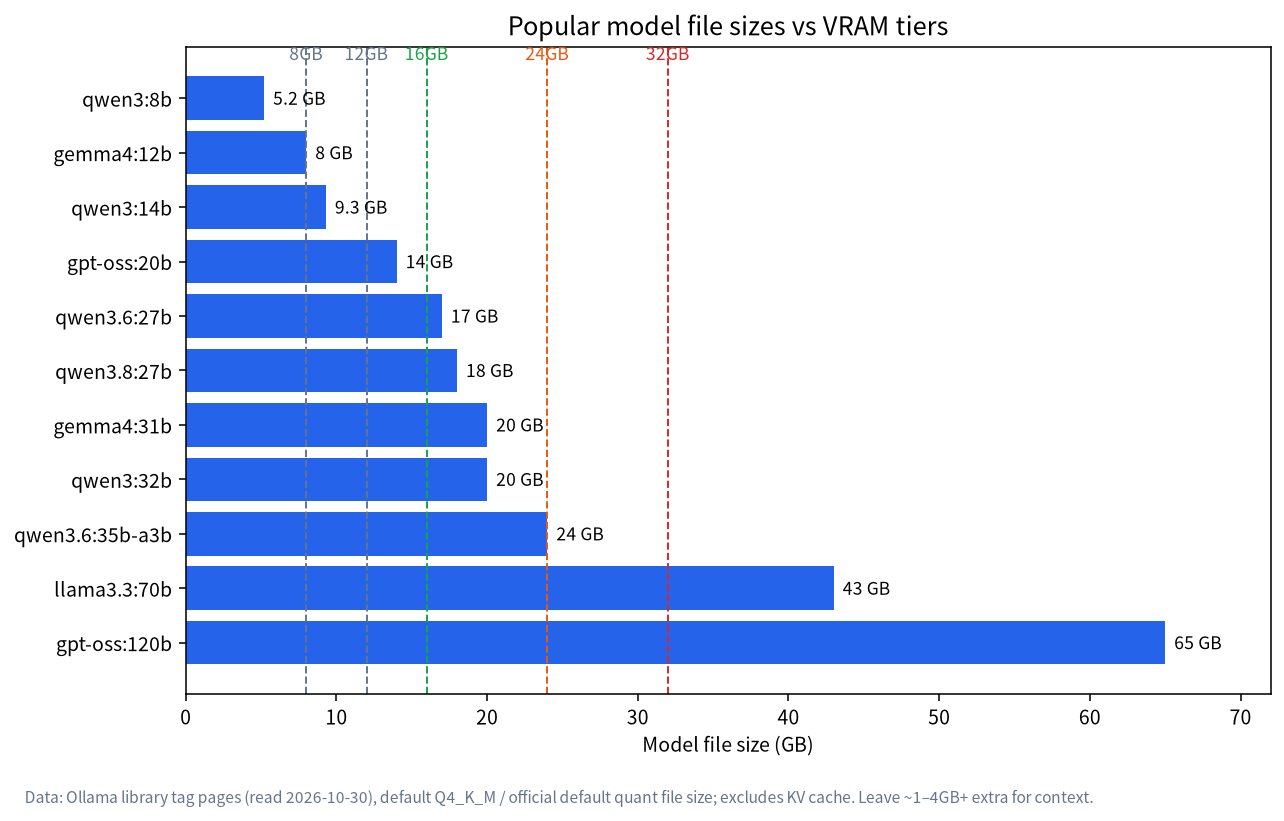
Take the model file size and add 1–4GB for context and buffers. Say you want qwen3:14b (9.3GB) on a 12GB card: CanRun estimates 10.5GB at 8k context against about 11.4GB usable, which leaves under 1GB. That is “it runs, but it’s tight”.
Step 3: verify with ollama ps
After loading the model, run ollama ps. 100% GPU in the PROCESSOR column means it all fits on the card; any CPU share means spill-over and a clear speed drop. For fixes see Ollama Troubleshooting: GPU Not Used.
Three Worked Examples
All three are hypothetical scenarios that use the quick-reference numbers above to show the arithmetic; none is a measured result.
Example one: a 12GB card (such as an RTX 3060 12GB) wants qwen3:14b. Usable VRAM is about 11.4GB, and CanRun estimates 10.5GB in total at 8k context, leaving under 1GB. Verdict: it runs, but keep context at or below 8k. For 32k you’d need KV-cache quantization or an 8B-class model.
Example two: a 24GB card wants qwen3:32b. The file is 20GB and usable VRAM is about 22–22.8GB, leaving roughly 2–2.8GB: enough for 8k context, tight for long context. Options are the smaller qwen3.6:27b (17GB) or quantizing the KV cache to q8_0 to buy more context.
Example three: a 16GB card wants gpt-oss:20b. The file is 14GB and usable VRAM is about 14.7–15.2GB, so on paper under 1GB remains, which is very tight. CanRun’s guide nevertheless lists it as fitting a 16GB card, so load it, confirm with ollama ps, and keep context around 8k.
The lesson: “fits” is not binary; the size of the margin decides how much context you can open and how stable things are. When money is tight, a model one size smaller with room to spare beats one loaded to the very edge.
Quick Reference by VRAM Tier
| Usable VRAM | Model class | Example (file size) | Notes |
|---|---|---|---|
| 8GB card (about 7.4GB usable) | 7B–8B | qwen3:8b (5.2GB) |
See What Can an 8GB GPU Run? |
| 12GB card | 12B–14B | qwen3:14b (9.3GB) |
About 1GB spare; keep context modest |
| 16GB card | about 20B | gpt-oss:20b (14GB) |
The comfortable tier for 20B-class |
| 24GB card | 27B–32B | qwen3.6:27b (17GB), qwen3:32b (20GB) |
See What Can a 24GB GPU Run? |
| 32GB card | 35B-class, high-precision 27B | qwen3.6:35b-a3b (24GB) |
Generous headroom |
| 48GB+ | 70B | llama3.3:70b (43GB) |
One 24GB card can’t hold it; multi-GPU or large-memory machines |
When It Doesn’t Fit: Five Options
- Pick a smaller model. Usually better than forcing it.
- Use a lower quantization. Moving from Q8 to Q4_K_M roughly halves the size or more, at some quality cost.
- Shorten the context with
/set parameter num_ctxorOLLAMA_CONTEXT_LENGTH. - Quantize the KV cache with
OLLAMA_KV_CACHE_TYPE=q8_0(needs Flash Attention). - Accept partial CPU offload. It runs, but slowly; fine for occasional use.
Glossary
| Term | Meaning | Effect on VRAM |
|---|---|---|
| Parameters (B) | How many billions of weights the model has | The base number for weight size |
| Quantization | Storing weights in fewer bits, such as Q4 or Q8 | Fewer bits, smaller weights, slightly lower quality |
| Context length (ctx) | How many tokens the model can see at once | Longer context, bigger KV cache |
| KV cache | The memory region that holds context keys and values | Grows linearly with context |
| Parallelism (NUM_PARALLEL) | Requests handled at once | Each concurrent request has its own cache, so VRAM needs rise |
| Offload | Placing layers that don’t fit in system RAM | It runs, but slower |
Common Misconceptions
| Misconception | Reality |
|---|---|
| “Only 3B active parameters, so an 8GB card can run 30B-A3B” | MoE needs the whole file in memory; qwen3:30b-a3b is 19GB |
| “8GB nominal means 8GB usable” | The system takes some; about 7.4GB usable (CanRun’s figure for the 4060) |
| “File size equals VRAM use” | Add KV cache and buffers, typically 1–4GB or more |
| “More context is always better” | Long context eats VRAM and slows generation |
| “FP16 is far better than Q4” | For most everyday tasks the gap is limited; see LLM Quantization Explained |
FAQ
How much VRAM does a 70B model need?
About 43GB at Q4_K_M (llama3.3:70b), plus context cache. A single 24GB card can’t hold it; you need multiple cards, a pro card or a large unified-memory machine.
Can 8GB of VRAM run a 14B model?
The file is around 9GB (qwen3:14b is 9.3GB), which already exceeds an 8GB card’s usable VRAM, so part spills to system RAM and speed drops sharply. Stick to 7B–8B on 8GB.
How much VRAM does context length use?
It depends on architecture. For a Llama-3-family 8B at FP16, the KV cache is about 0.13GB per 1K tokens, reaching more than 17GB at 128K. Models differ widely, so measure with ollama ps.
Can system RAM make up for missing VRAM?
Yes. Ollama automatically puts layers that don’t fit in system RAM, but generation gets much slower.
How does this work on a Mac?
Macs use unified memory, and the GPU can use roughly 70% of it (sources vary between two-thirds and three-quarters). Verify with ollama ps.
Is there a ready-made calculator?
Third-party tools such as CanRun exist and are a useful reference, but still verify with ollama ps.
Next Steps and Community
If your card sits between two tiers and you can’t pick a model, post the model and your use case in the community (join the community) and we’ll work it out together. Our Shenzhen team sources, builds and tests local-LLM machines and can work backwards from the models you want to run. Talk first; no obligation to buy. Mention your card, your operating system and the context length you need, so that replies can be specific rather than generic.