
Ollama Download Slow? Change the Model Path and Speed It Up (2026)
Plenty of people stall at the first real step: you run ollama run on a model, the progress bar crawls, or it freezes at 90%. Ollama download slow problems usually come down to one of four causes: a proxy or accelerator in the way, ordinary network wobble, a very large file, or a system drive that has run out of space. This guide lists the causes in the order you should check them, then covers two related jobs: moving the model folder to another disk, and pulling GGUF models from ModelScope or Hugging Face when the default route is poor. If Ollama is not installed yet, start with our Ollama install guide.
Verification note: default model locations,
OLLAMA_MODELSandHTTPS_PROXYcome from Ollama’s official docs (the FAQ and Windows pages on docs.ollama.com, read 2026-10-30). Thehf.cosyntax comes from Hugging Face’s documentation. The ModelScope syntax comes from ModelScope’s docs and developer-community write-ups. We did not run speed tests on any network, so there are no “X times faster” numbers here. The download-time chart is a calculation from file size and bandwidth.Key takeaways (Updated 2026-10-30)
- First decide whether the network or the source is slow: check whether
ollama pullis capped at a fixed speed, then change network or proxy.Use HTTPS_PROXY only, never HTTP_PROXY, and move the model folder with OLLAMA_MODELS.
You can also pull GGUF repos straight from Hugging Face or ModelScope.
Ollama Download Slow: Work Out Which Kind of Problem You Have
Look at the symptom before you change anything. This table maps common symptoms to likely causes:
| Symptom | Most likely cause | First thing to try |
|---|---|---|
| Slow from the very start, never speeds up | Traffic goes through a proxy or accelerator on a long route | Turn the proxy off and pull again |
| Fine at first, then gets slower | Network fluctuation or congestion | Ctrl+C, then run the same pull again |
max retries exceeded or certificate errors |
Proxy certificate or setting problem | Check HTTPS_PROXY and system certificates |
| “No space left” halfway | The default drive (often C:) is full | Point OLLAMA_MODELS at a bigger disk |
| The model is not in the official library | It is not published on Ollama | Use a GGUF from Hugging Face or ModelScope |
It helps to have a sense of scale. Ollama library pages list qwen3:8b at about 5.2GB, qwen3:14b at about 9.3GB, qwen3:32b at about 20GB and llama3.3:70b at about 43GB. These files do not compress, so bandwidth sets a hard floor on the time.
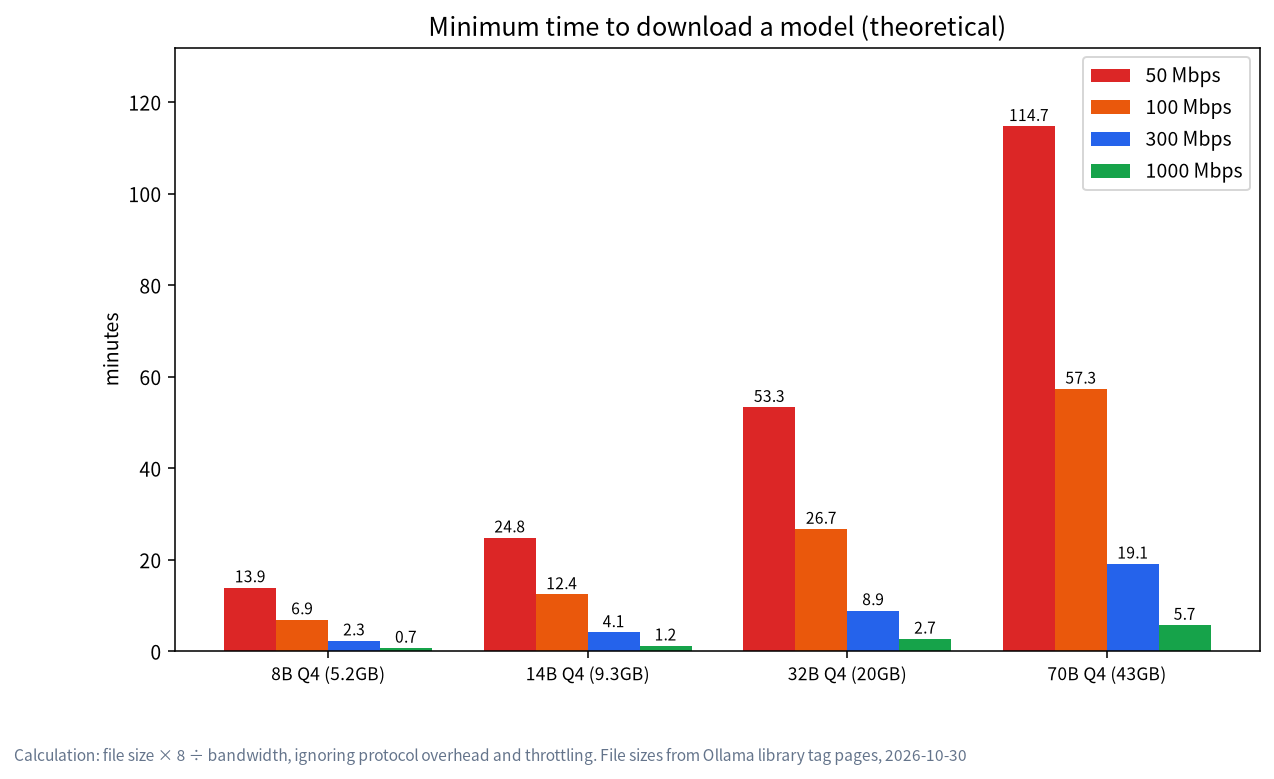
The chart makes the point: even on a steady 100 Mbps line, a 43GB 70B model takes close to an hour, and at 50 Mbps about two hours. Slow is not always broken, so estimate the floor first. Which quantization you pick changes the file size directly, as explained in our quantization guide.
Step One: Proxies and Accelerators, the Most Common Culprit
Many network problems are caused by tools we installed ourselves. Ollama’s FAQ is explicit about proxies:
- Ollama pulls models from the internet; if you need a proxy, use
HTTPS_PROXYto send outbound requests through it, and install the proxy’s certificate as a system certificate. - Do not set
HTTP_PROXY. Model pulls use HTTPS only, and settingHTTP_PROXYcan interrupt client connections to the server. - In Docker, pass
-e HTTPS_PROXY=https://proxy.example.comwhen starting the container, or configure the Docker daemon’s proxy.
In practice:
- If you run a global VPN or a game accelerator, switch it off temporarily and pull again. Community members point out that Ollama’s official downloads sit on Cloudflare’s CDN and are normally quick, and that a transfer which cannot fill your line is often being routed through a detour. That is community experience, not an official guarantee.
- If you must use a proxy, set
HTTPS_PROXYin the environment where the Ollama service runs, not just in the terminal you opened. Ollama runs as a background service, and it cannot see variables you set in a terminal. - On corporate networks, certificate errors are the usual story. Add the proxy’s root certificate to the system trust store and restart Ollama.
Step Two: Resume by Interrupting and Pulling Again
When a download stalls, do not delete the part you already have. The widely shared community advice is to press Ctrl+C and run the same ollama pull again: it continues from the existing part, and the speed often recovers. We list this as worth trying rather than as an official promise, because we have not checked every version. If your version behaves differently, trust what you see.
# After interrupting, just run the same command again
ollama pull qwen3:8b
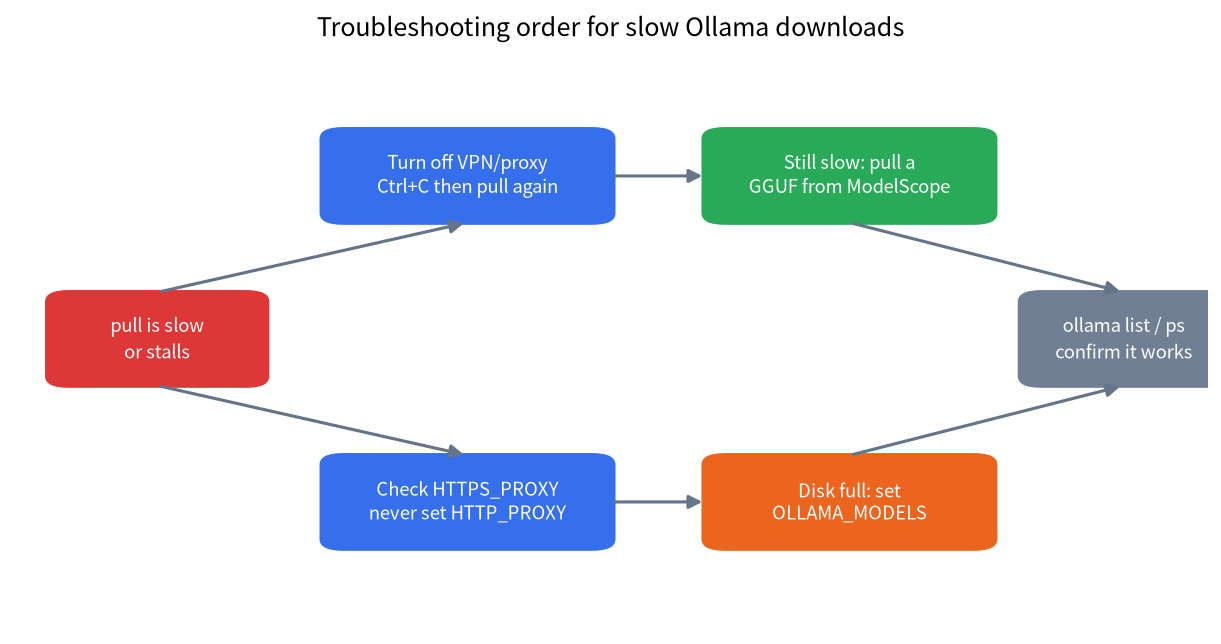
Once the download finishes, run ollama list to confirm the files exist and ollama run to try a prompt. If the model downloads fine but runs on the CPU, go to our guide on Ollama not using the GPU.
Where Models Live: Default Paths on Three Systems
To change the path you need to know where it is now. The FAQ gives these defaults:
| System | Default model directory |
|---|---|
| macOS | ~/.ollama/models |
| Linux (standard install) | /usr/share/ollama/.ollama/models |
| Windows | C:\Users\%username%\.ollama\models |
Windows users should pay special attention: this folder sits under your user profile on the C: drive, and a handful of big models can take tens of gigabytes. The Windows docs also say binaries live in %LOCALAPPDATA%\Programs\Ollama and models and configuration in %HOMEPATH%\.ollama. If C: is tight, change the path before you download your first large model.
Change the Ollama Model Path with OLLAMA_MODELS
The official method is to set the OLLAMA_MODELS environment variable to the folder you want. Steps by platform:
Windows
- Quit Ollama from the system tray.
- Open Settings (Windows 11) or Control Panel (Windows 10), search for “environment variables”, and choose “Edit environment variables for your account”.
- Create a user variable named
OLLAMA_MODELSwith a value such asD:\ollama\models, then confirm. - Start Ollama again from the Start menu, or open a new terminal.
The docs add one useful detail: if you changed OLLAMA_MODELS, the uninstaller does not remove your downloaded models. If you uninstall and want the space back, delete that folder yourself.
macOS
If you use the desktop app, the FAQ’s approach is to set the variable with launchctl setenv OLLAMA_MODELS /Volumes/Data/ollama/models and then restart the app. If you launch ollama serve by hand, prefix the command with the variable.
Linux (systemd)
With the standard installer, Ollama runs as the ollama user, so the new folder must be readable and writable by that user; the docs suggest chown-ing the directory to ollama. Then add the variable through a systemd override:
sudo mkdir -p /data/ollama/models
sudo chown -R ollama:ollama /data/ollama/models
sudo systemctl edit ollama.service
# In the editor that opens, add:
# [Service]
# Environment="OLLAMA_MODELS=/data/ollama/models"
sudo systemctl daemon-reload
sudo systemctl restart ollama
What About Models You Already Downloaded?
After you change the path, Ollama looks in the new folder, and models in the old one will not appear on their own. You have two options: pull again, or quit Ollama and copy the old folder’s blobs and manifests subfolders into the new one, then restart. We suggest testing with one small model first and checking that ollama list shows it before moving the big files.
Still Slow: Pull a GGUF from ModelScope or Hugging Face
When the official route is genuinely unstable, or the model you want is not in the Ollama library, change the source. Ollama can pull GGUF models directly from Hugging Face; the syntax in Hugging Face’s docs is:
ollama run hf.co/{username}/{repository}
# choose a quantization:
ollama run hf.co/{username}/{repository}:Q8_0
The docs say Q4_K_M is used by default when you do not name a quantization, and quantization names are case-insensitive.
Another source popular with users in China is ModelScope. It has integrated with Ollama, and community write-ups give this usage:
ollama run modelscope.cn/{username}/{repository}
ollama run modelscope.cn/{username}/{repository}:Q4_K_M
A few cautions before you use it:
- Developer tutorials state that this needs Ollama 0.3.12 or newer, and 0.4.0 or newer for vision models. Check with
ollama --version. - The repository must contain a GGUF file. A safetensors-only repository fails with a “GGUF file does not exist” style error.
- Repositories on ModelScope are uploaded by third parties. Read the model card and licence, and check the file size.
- Names differ from the official library, so use the exact name you pulled when you write application config.
| Source | Command prefix | Best for | Watch out for |
|---|---|---|---|
| Ollama official library | Just the model name | Mainstream models, least effort | Route quality depends on your network |
| Hugging Face | hf.co/ |
Models the library lacks | Access can be unstable in some regions |
| ModelScope | modelscope.cn/ |
China networks, GGUF models | Ollama 0.3.12+ and a GGUF in the repo |
| Manual GGUF download, then import | ollama create + Modelfile |
Fully offline or intranet machines | More steps; you write the Modelfile |
If you prefer a graphical app, see how downloads work in our LM Studio tutorial, which fetches model files from Hugging Face directly.
Disk Hygiene: A Download Is Not the Finish Line
After moving the path, build the habit of managing models or the space fills up again:
- Run
ollama listto see what you have and how big it is; remove what you do not use withollama rm <name>. - Different quantizations of one model are separate files. After you have compared them, keep one.
- To estimate disk and VRAM before pulling, use the VRAM-tier table in our best local LLM guide.
- If the model folder is on an external drive, mind its read speed. Loading a model is a long sequential read, and a slow drive makes every start slow.
- Avoid non-ASCII characters and spaces in the path so odd tools do not trip over it.
An Eight-Step Checklist
- Estimate the theoretical download time to see whether anything is really wrong.
- Turn off proxies and accelerators temporarily, then pull again.
- Set
HTTPS_PROXYin the service environment, and never setHTTP_PROXY. - After an interruption, Ctrl+C and run the same pull again.
- If space is short, point
OLLAMA_MODELSat a large disk. - On Linux, give the
ollamauser permission on the folder, then restart the service. - If the source is still slow, use a GGUF from ModelScope or Hugging Face.
- When done, verify with
ollama listandollama run.
FAQ: Common Questions
Is a slow Ollama download something I just have to wait out?
Not necessarily. Rule out proxies and accelerators first, then try interrupting and pulling again. If both are fine, the file is probably just large for your bandwidth, and the formula in this article will confirm the expected time.
If a download breaks halfway, is the finished part wasted?
Community experience says no: running the same pull again continues from the existing part. We have not verified every version, so if yours behaves differently, trust what you see and tell us the version number.
After I change the Ollama model path, do my old models still work?
They do not show up automatically. Either download them again, or quit Ollama and copy the old folder’s blobs and manifests into the new one. Verify with ollama list.
I set OLLAMA_MODELS on Windows but nothing changed. Why?
The most common reason is that Ollama was not restarted after the variable was saved. Quit it from the tray, start it from the Start menu, or open a new terminal. Then download a small model and check whether files appear in the new folder.
Are ModelScope models the same as the ones in the Ollama library?
Not necessarily. GGUF repositories on ModelScope are uploaded by the community or organisations, and the quantization and chat template can differ. Read the model card and licence before pulling, and check the licence especially before commercial use.
Can I use Ollama fully offline?
Once the model is downloaded, inference runs on your machine. To deploy to a machine with no internet access, download the GGUF on a connected machine and import it on the target machine.
Need a Hand?
If your network is unusual, or you want to roll Ollama out across an office network, join the community or email admin@microaione.com with your operating system, Ollama version and the error message, and we will take a look. For the full beginner route, read how to run an LLM locally.
References and further reading: Ollama FAQ, Ollama Windows docs, Hugging Face: use Ollama with GGUF models, ModelScope: load ModelScope models in Ollama.