RTX PRO 6000 Workstation Build for Local LLMs: Is 96GB of VRAM Worth the Price?
Most local AI advice stops at 24GB or 32GB of video memory. The NVIDIA RTX PRO 6000 Blackwell Workstation Edition sits far above that line with 96GB on a single card, which changes what you can do without splitting a model across devices. It also costs several times as much as a gaming flagship. This guide to the RTX PRO 6000 workstation build explains what the card is, what 96GB lets you run, what a complete machine costs at our reference prices, how its speed compares with the alternatives on paper, and when one of the cheaper routes is the smarter purchase. If you are still choosing between consumer cards, read our RTX 5090, 4090 and 3090 comparison first.
Verification note: Card specifications come from NVIDIA’s RTX PRO 6000 Blackwell Workstation Edition page, read on 2026-10-30. Prices come from our reference files of the same date. The PRO 6000 price comes from a single market source and has low confidence, and our whole-machine figure for it is an estimate, not a quote. Speeds are derived from memory bandwidth, not measured, and we did not test the card.
Key takeaways (Updated 2026-10-30)
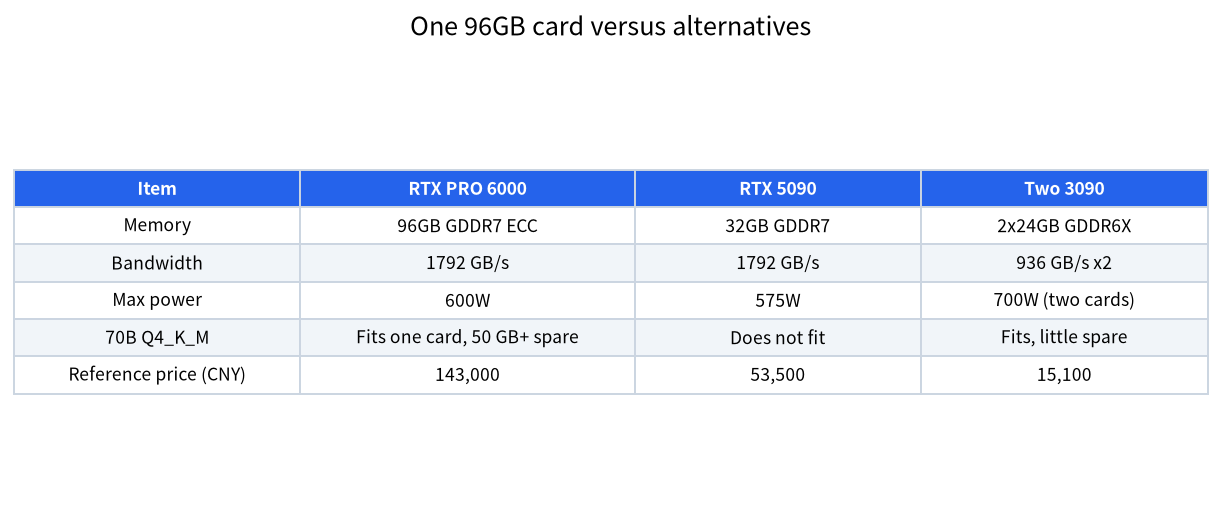
- NVIDIA lists 96GB of GDDR7 with ECC, 1792 GB/s of bandwidth and a 600W maximum power draw in a dual-slot card.
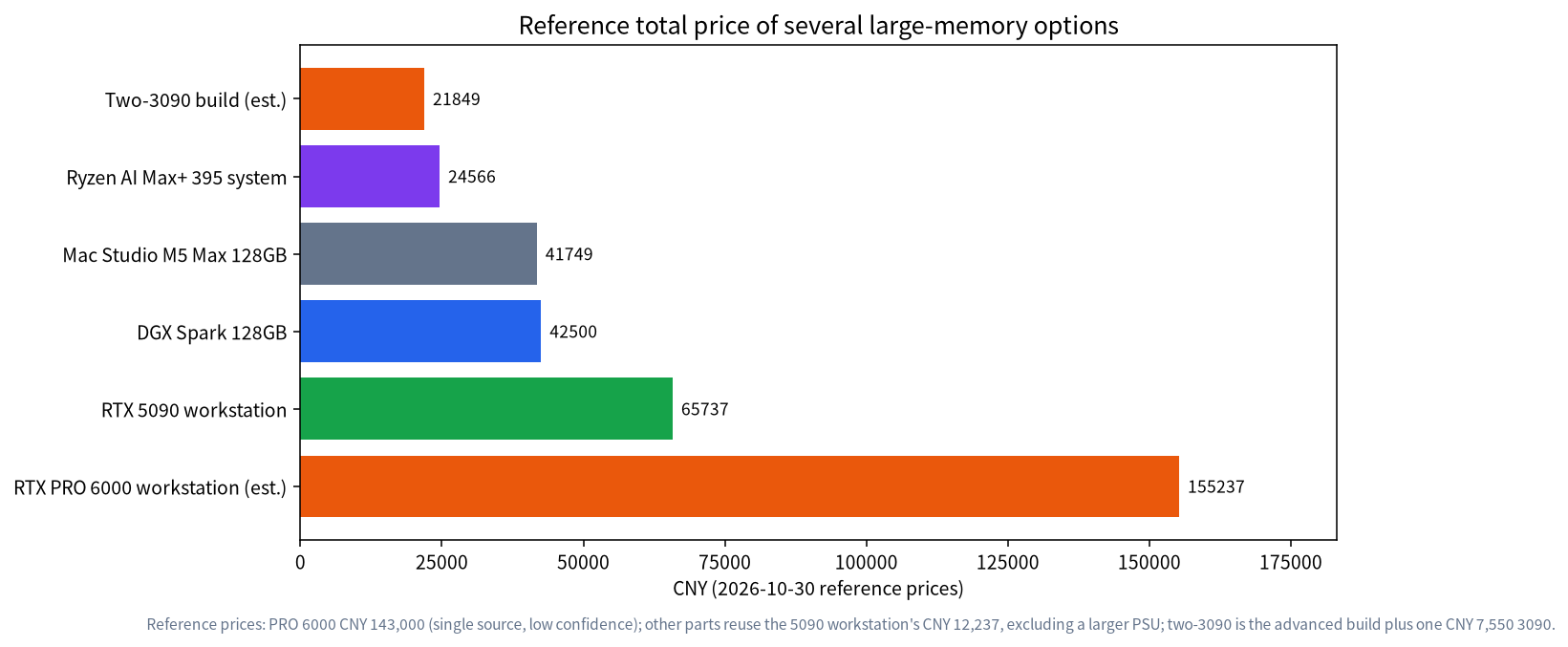
At the reference price of about 143,000 yuan, a complete machine is roughly 155,000 yuan, more than twice a 5090 workstation and about seven times a two-3090 build.
It is the simplest way to run a 70B model plus a long context on one card; for many users, two used 3090 cards or a large-memory mini PC give the same capacity for far less money, with lower speed.
What the RTX PRO 6000 Workstation Edition Is
The card belongs to NVIDIA’s professional line. According to the NVIDIA page, it carries 96GB of GDDR7 memory with error-correcting code, memory bandwidth of 1792 GB/s, a maximum power consumption of 600W and a dual-slot form factor of 5.4 inches by 12.0 inches. The bandwidth equals that of the RTX 5090, which means that for a model that fits in both, the generation speed ceiling is about the same. The difference is capacity: three times the memory of the 5090. A Max-Q variant also exists; NVIDIA’s page mentions that Multi-Instance GPU lets the Max-Q card be split into up to four isolated instances, and our price file lists a Max-Q price of 119,000 yuan from the same single source.
It is not an ordinary gaming card. It is sold through workstation channels and partners, supports ECC memory for reliability, and its price reflects both the memory and the market. If you want a card that works in a normal desktop, check the case, the power supply and the cooling before ordering, as our power and cooling guide explains.
What 96GB Lets You Run
Memory capacity is the main reason to buy it. At roughly 0.61 GB per billion parameters for Q4_K_M, a 70B model takes about 43.1GB. That leaves more than 50GB for the cache and the runtime, and Llama 3.1 70B uses about 320 KiB of cache per token in f16, so a 32K context costs about 10 GiB. The model fits with a long context and even room for a second smaller model, such as an embedding model for retrieval.
A Q8_0 file uses about 8.5 bits per weight, so a 70B model needs roughly 74GB, which also fits, with about 20GB left. That means you can choose higher quality quantisation without offloading to system memory. A MoE model such as gpt-oss-120b, which Ollama lists at 65GB, fits entirely in VRAM with space for context. In our MoE guide, such models run quickly because only a few billion parameters are active per token. On a 32GB card, none of these configurations fits without offloading. See the offloading guide for what that costs in speed.
Derived Speed Ceilings
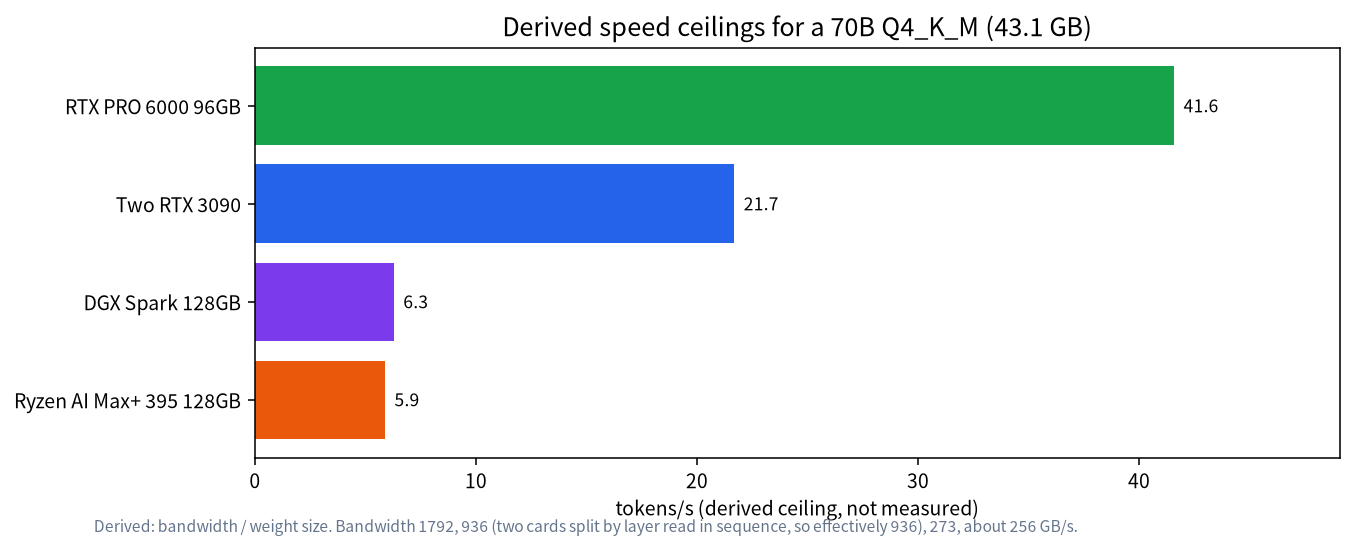
Speed on one card follows the same rule as always: bandwidth divided by the bytes read per token. For a 70B Q4_K_M model of 43.1GB, the PRO 6000’s 1792 GB/s gives a ceiling of about 41.6 tokens per second. Two RTX 3090 cards split by layer read the weights one after another, so the effective ceiling is about that of one card, 936 divided by 43.1, which is about 21.7. NVIDIA’s DGX Spark at 273 GB/s gives about 6.3, and a Ryzen AI Max+ 395 mini PC at about 256 GB/s gives about 5.9. These are derived upper bounds and not measurements, but the ratios explain why people pay for a big, fast card: roughly twice the speed of two 3090s, and about seven times the speed of the large-memory mini PCs, for the same 70B model.
What the Whole Machine Costs
| Option | Memory | Reference total (CNY) | Notes |
|---|---|---|---|
| Two-3090 build (estimate) | 48GB | 21,849 | Advanced build plus a second 7,550 yuan used card; larger PSU may be needed |
| Ryzen AI Max+ 395 mini PC | 128GB unified | 24,566 | Slow bandwidth, quiet and compact |
| Mac Studio M5 Max 128GB | 128GB unified | 41,749 | Official price, our reference file |
| DGX Spark | 128GB unified | 42,500 | 273 GB/s bandwidth |
| RTX 5090 workstation | 32GB | 65,737 | From our reference builds |
| RTX PRO 6000 workstation (estimate) | 96GB | about 155,237 | 143,000 for the card plus the 5090 build’s other parts, 12,237 |
The PRO 6000 total is 143,000 yuan for the card plus the 12,237 yuan that the other parts of our 5090 workstation cost, and it does not include a larger power supply if one is needed, or a server-grade chassis. Treat it as a floor. Our reference file lists the enterprise all-in-one machines for 70B models at 319,800 yuan, so a self-built PRO 6000 system is cheaper than that, but it comes with no vendor support and no installation service.
When It Makes Sense
| Situation | PRO 6000 a good fit? | Cheaper alternative |
|---|---|---|
| Need 70B with a long context and fast replies for several people | Yes | Two 3090 cards, slower |
| Team runs one large model all day, power and noise matter | Yes, single card | Multi-GPU adds heat and complexity |
| Personal use, occasional 70B | No | Large-memory mini PC |
| Mostly 8B to 32B models | No | One 24GB or 32GB card |
| Training or fine-tuning big models locally | Possibly | Rent cloud GPUs for short jobs |
| Need vendor support and warranty | Check the channel | Enterprise appliance |
Choosing the Rest of the Machine
The card does most of the work, so the rest of the machine can be ordinary but must be solid. Pick a power supply with generous headroom above the 600W card, since NVIDIA gives a maximum card power but your CPU, drives and fans add to it. Check the NVIDIA datasheet and your PSU’s connectors before ordering. Choose a case with real front-to-back airflow and room for a 12 inch card, and a motherboard with a full-length PCIe slot that the card does not block. System RAM matters less than VRAM when the model sits on the card, but 64GB gives space for the operating system and tools. Use a fast NVMe drive, as 70B model files are large and load times matter. Our PC configuration guide lists reference builds for other tiers.
For a team, serve the card through an inference engine that handles several users at once; the small team guide covers that, and so does our enterprise deployment guide if you need an approval process, logging and support.
Capacity Arithmetic for a Team
The strongest argument for 96GB is concurrency. Every active conversation needs its own KV cache, and for Llama 3.1 70B that is about 320 KiB per token in f16. If eight people each hold an 8K-token conversation, the cache needs 8 x 8,192 x 320 KiB, which is about 20 GiB. A 70B Q4_K_M model at 43.1GB plus 20 GiB of cache is about 64GB, well inside 96GB with room for spikes. On a 48GB two-card setup the same load needs about 64GB and does not fit, so you would cut the context or the number of users. This is a derived estimate, and the real figure depends on the engine, which may reserve memory differently, but it shows why capacity matters more than raw speed for a shared server. Our vLLM guide explains how engines manage this memory.
Speed is shared too. With 41.6 tokens per second as a single-stream ceiling, several users generating at once split the bandwidth, although batching makes the total throughput higher than any single stream. If your team’s questions are short and bursty, one card is plenty; if people run long jobs all day, plan for the queue.
Operating a Workstation Card
A card of this price deserves monitoring. Watch temperature, power and memory usage with the NVIDIA driver tools, and set alerts for sustained high temperatures. Keep the driver and the inference engine up to date, but test upgrades on a copy of your setup first, because a new driver can change behaviour. ECC memory helps detect and correct some memory errors, which is useful for a server that runs for months, but it does not replace backups of your data and configuration. Keep the machine in a room with controlled temperature and dust, and clean the filters regularly. Finally, write down the exact versions of the driver, engine and model files that work, so you can rebuild the setup after a failure.
Test Before You Commit
Before spending 143,000 yuan, confirm that you need 96GB. Run your real workload on a rented or borrowed large-memory machine for a few days, or on a cheaper setup with offloading, and record the model size, context length and number of users that you actually use. If the numbers never exceed 48GB, two used 3090 cards or a smaller card will serve you. If you regularly need 70B with long contexts for several people, the PRO 6000 simplifies everything. Our all-in-one buying guide is a good comparison point for the vendor-supported route. Also write down the cost of waiting: if a cheaper machine answers a little slower but saves a hundred thousand yuan, the extra seconds may be a bargain for your team.
Common Mistakes
- Treating the single price as a market quote. Our figure comes from one source; get live quotes from several sellers.
- Underestimating power and airflow. A 600W card needs a strong supply and a case that moves air.
- Buying 96GB for models that fit in 24GB. Capacity you never use is money wasted.
- Ignoring warranty and channel. Buy from an authorised partner and keep the invoice.
- Expecting a speed jump over the 5090. Bandwidth is identical; the gain is capacity.
FAQ: RTX PRO 6000 Workstation Build
How much VRAM does the RTX PRO 6000 have?
NVIDIA lists 96GB of GDDR7 with ECC on the Workstation Edition.
Is it faster than an RTX 5090 for LLMs?
For models that fit in both, the generation ceiling is similar because both list 1792 GB/s. The PRO 6000 wins when the model does not fit in 32GB.
Can it run a 70B model at Q8?
A Q8_0 70B model is roughly 74GB by our arithmetic, so it fits in 96GB with room for a moderate context.
Is it cheaper to use two 3090 cards?
Yes, by a large margin at reference prices, but you get 48GB, about half the speed on a 70B model on paper, and more heat and complexity.
Does it need a special power supply?
NVIDIA lists a 600W maximum card power. Choose a supply with generous headroom and check the datasheet for connector requirements.
Should I buy the Max-Q version?
It exists and can be split into isolated instances, according to NVIDIA. Compare its price, power and performance for your workload before deciding.
Talk With Us
Planning a large-memory machine for a team? Join the community or email admin@microaione.com.
References: NVIDIA RTX PRO 6000 Blackwell Workstation Edition, NVIDIA RTX PRO 6000 Blackwell series, Ollama gpt-oss library page.