LLM Rig Power and Cooling: PSU Sizing, Power Limits and Airflow for a Local AI PC
A local language model server is the kind of computer people underbuild on the boring parts. The graphics card gets all the attention, while the power supply and the airflow decide whether the machine runs for months or shuts down in the middle of a long job. This guide to LLM rig power and cooling explains how to size a PSU from official figures, how to use power limits to cut heat and noise, what airflow a big GPU needs, and what to check for a dual-GPU box. It complements our PC build configurations, which choose the parts, with the practical side of keeping them running.
Verification note: GPU board power, required system power and maximum temperatures come from NVIDIA’s product pages for the RTX 5060 Ti, RTX 3090, RTX 4090 and RTX 5090, and the power-limit option comes from NVIDIA’s nvidia-smi documentation; all were read on 2026-10-30. The peak-draw figures are our own derived estimates with an assumed 250W for the rest of the system, not measurements. Reference PSU prices are from our own table. We did not measure noise or temperatures for this article.
Key takeaways (Updated 2026-10-30)
- Start from NVIDIA’s required system power for your card: 600W for the RTX 5060 Ti 16GB, 750W for the RTX 3090, 850W for the RTX 4090 and 1000W for the RTX 5090, then add headroom for the CPU and for a second GPU.
Power limits via nvidia-smi are a cheap way to reduce heat and noise; they need root and must stay within the range the card reports.
A big GPU needs fresh air from the front and a clear exhaust path; a crowded case or two cards stacked together is the usual cause of thermal slowdowns.
Why Power Matters More for Local LLMs
A game loads a graphics card unevenly; a language model server can hold it near its limit for minutes at a time while generating long answers or running a batch. Memory-bound inference does not always reach the maximum board power, but fine-tuning, image generation and heavy concurrent use do. Power supplies are also rated for continuous output, and a unit that is too small can switch off under load, which looks like a random crash and can corrupt files. The cost of a better supply is small compared with the cost of the GPU it protects.
Sizing the PSU From Official Numbers
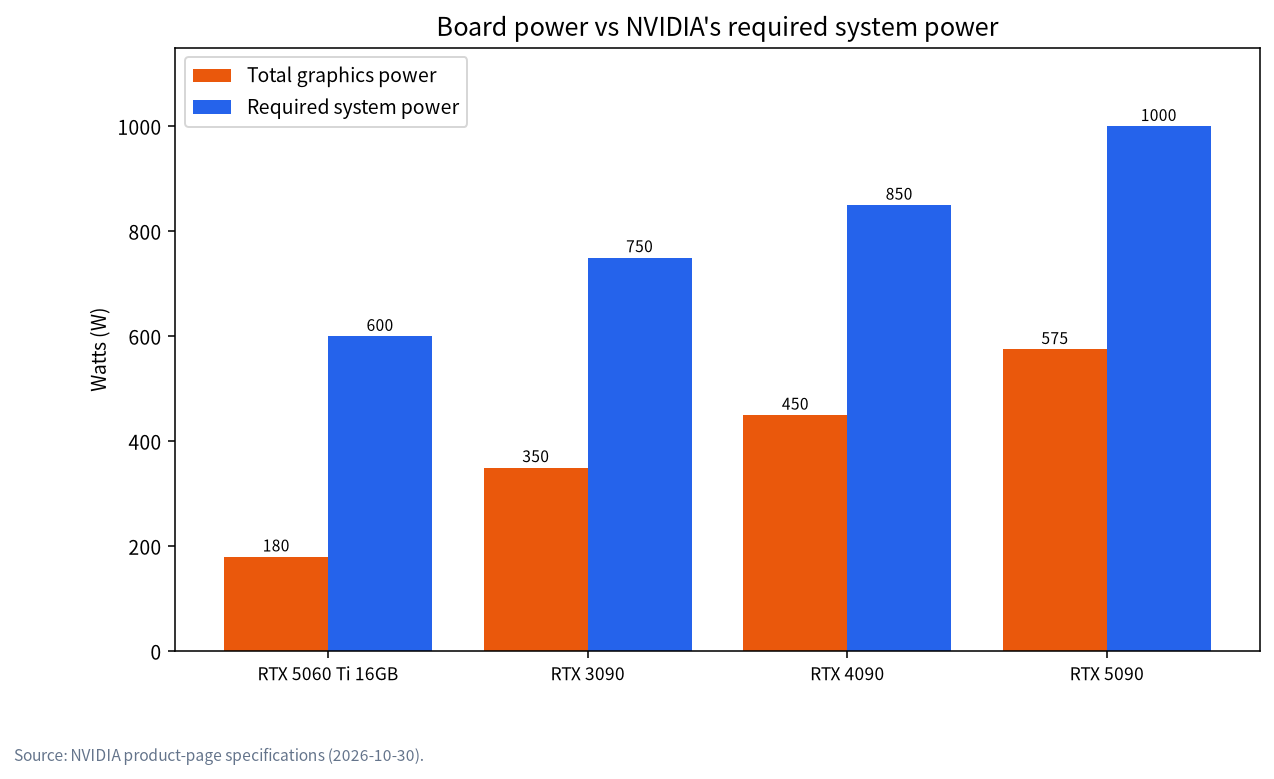
Use the manufacturer’s figures. NVIDIA’s product pages list the total graphics power and the required system power for each card. The chart shows that the RTX 5060 Ti 16GB is rated at 180W with a 600W system requirement, the RTX 3090 at 350W with 750W, the RTX 4090 at 450W with 850W, and the RTX 5090 at 575W with 1000W. The required system power already assumes a typical PC around the card, so treat it as the floor.
| Card | Total graphics power | NVIDIA required system power | Reference PSU price for that class (CNY) |
|---|---|---|---|
| RTX 5060 Ti 16GB | 180W | 600W | 650W class about 350 |
| RTX 3090 | 350W | 750W | 850W class about 1070 |
| RTX 4090 | 450W | 850W | 850W class about 1070 |
| RTX 5090 | 575W | 1000W | 1000W class about 1199 |
The prices are median reference prices from our table on 2026-10-30, for comparison only. The 850W unit is the most useful middle option for a single high-end card, which is why we use it in several reference builds.
For a custom estimate, add the graphics power of every card, then 250W as an allowance for the CPU, board, drives and fans, and divide by about 0.8 to keep the supply near 80 percent of its rating at peak. This is a common rule of thumb, not a standard, and it gives the derived figures below.
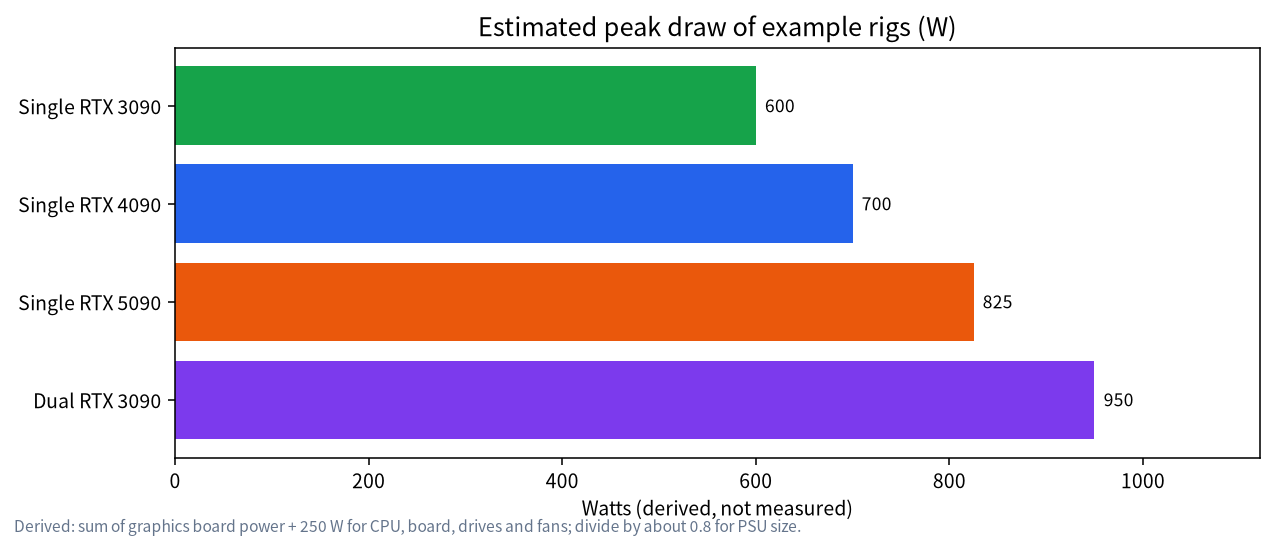
A single RTX 4090 gives 450 plus 250 equals 700W, and divided by 0.8 that suggests roughly 875W, so an 850W to 1000W supply fits. Two RTX 3090 cards give 700 plus 250 equals 950W, which on the same rule suggests a 1200W supply or a plan to apply power limits. Always check the actual connectors as well: high-end cards use a 12-volt high-power cable or several 8-pin cables through an adapter, and the supply must have enough cables of the right type.
Power Limits: Less Heat for Little Speed Loss
NVIDIA’s nvidia-smi tool can set a maximum power limit with the power-limit option. According to its documentation the value must lie between the minimum and maximum power limit that the card reports, and the command requires administrator rights. Lowering the limit reduces heat, fan noise and the load on your supply. The effect on speed depends on the workload and the card, and we have not measured it, so test your own: run a typical generation before and after and compare tokens per second and temperatures. For inference that is limited by memory bandwidth, many people find modest limits cost little speed; for compute-heavy work they cost more. Limits usually reset at reboot, so a server needs a startup script or service to apply them.
Cooling: Airflow Beats Fan Count
Heat has to leave the case. The simplest layout is intake fans at the front, exhaust at the rear and top, and enough free space around the card. NVIDIA lists a maximum GPU temperature of 90C for the RTX 4090 and RTX 5090, 93C for the RTX 3090 and 87C for the 5060 Ti. Staying well below those numbers keeps the card from slowing itself down. Watch temperatures during a long job, not at idle, and check both the GPU core and, on cards that report it, the memory temperature.
Three-slot cards need room. NVIDIA’s pages note three unused expansion slots and room for the cooler, which means a small case can be the weak point. Mesh front panels, unobstructed fans and cable management that does not block the airflow often matter more than adding extra fans. Dust filters need cleaning every few months, especially in a machine that runs all day.
Dual GPU and Open-Air Rigs
Two large cards stacked next to each other heat each other. The upper card breathes warm air from the lower one, so the spacing between them matters. Options include a board with wider spacing, a case designed for it, a blower-style card that exhausts out of the back, or power limits on both cards. Our dual GPU build guide covers the layout in detail. Open-air mining-style frames give the best cooling for several cards but expose the hardware to dust and are hard to keep quiet, so they suit a garage more than a living room.
Noise, Electricity and Location
A machine that is on all day should be quiet enough for its room. Large, slow fans are quieter than small, fast ones, and a power limit lowers the fan speed the card needs. Idle power matters for electricity cost: NVIDIA lists 19W idle for the RTX 4090, but the whole PC idles higher, so measure the wall power with a plug-in meter and multiply by your local tariff. Place the machine where it can draw cool air, not inside a closed cabinet. If you plan a shared home server, our home AI server guide covers UPS, remote access and monitoring.
Monitoring During a Long Run
You cannot tune what you do not measure. The nvidia-smi tool can print the current power draw, temperature, fan speed and clock speeds, and it can refresh every second, so leave it running in a second terminal during a long generation or a batch job. Look for three things. First, whether the power draw sits at the limit for long periods, which means the card is working at full capacity. Second, whether the temperature climbs steadily and then plateaus, which is healthy, or keeps rising toward the maximum, which means the airflow is insufficient. Third, whether the clocks drop while the temperature or power is high; NVIDIA’s documentation describes slowdown reasons, including software power caps and thermal slowdowns, so a falling clock under load is a sign that heat or power is limiting performance.
Log the numbers to a file for a full hour of realistic use before you trust a new build. A machine that is stable for ten minutes can still fail after an hour when the case, the supply and the room have all warmed up. If you plan unattended jobs, also test what happens after a power cut: a small UPS lets the machine shut down cleanly, and a cleanly shut down server is much less likely to need repair of its model files and databases afterwards.
Choosing the Case and Supply for the Next Upgrade
Buy for the card you may want in a year, not only the one you have today. A case that fits a large three-slot card and a supply with a 1000W rating cost little more than smaller ones, and they save you from rebuilding the machine when you upgrade. Modular cables keep the inside tidy, which helps airflow. Prefer supplies from known manufacturers with a long warranty and a published efficiency rating, and avoid buying an unbranded unit to save a few tens of yuan, since the supply is the part that can damage everything else when it fails.
A Pre-Flight Checklist
| Check | What to look for | Why |
|---|---|---|
| PSU rating | At least NVIDIA’s required system power; more for two GPUs | Prevents shutdowns under load |
| Connectors | Correct type and count; fully seated | Avoids overheating cables |
| Airflow path | Front intake, rear and top exhaust, clean filters | Keeps the GPU from throttling |
| Power limit | Set within the range the card reports | Reduces heat and noise |
| Monitoring | Temperature and power logged during a long run | Finds problems before a crash |
| Used parts | Fans, thermal pads and cables inspected | See our used GPU guide |
Common Mistakes
- Buying the PSU last. Choose it with the GPU, not from what is left in the budget.
- Reusing an old supply. Aged units lose capacity and may lack the right connectors.
- Stacking two cards without spacing. The upper card overheats and slows.
- Bending a power cable tightly or leaving it half-seated. Follow the card maker’s installation instructions.
- Forgetting the power limit resets. Apply it at boot if you rely on it.
FAQ: LLM Rig Power and Cooling
What PSU do I need for an RTX 3090 or 4090?
NVIDIA lists 750W for the RTX 3090 and 850W for the RTX 4090 as required system power. Choose a quality unit with the right connectors, and more if you add a second GPU.
Is it safe to power-limit a GPU?
Yes, within the range the card reports through nvidia-smi. Test your workload and watch temperatures; it needs administrator rights.
How hot is too hot for a GPU?
NVIDIA lists maximum GPU temperatures of 87C to 92C for these cards. Aim to stay comfortably below that during long runs.
Do I need liquid cooling?
Usually not. Good airflow and sensible spacing are enough for most single-GPU builds.
How much electricity does a local LLM server use?
It depends on the hardware and how often it works. Measure idle and load power at the wall and multiply by your tariff.
Can I run two GPUs on an 850W supply?
Possibly with strong power limits on smaller cards, but two high-end cards generally need a larger supply. Do the arithmetic with the official figures.
Talk With Us
Planning a build and unsure about power or cooling? Join the community or email admin@microaione.com.
References: NVIDIA RTX 5090 specifications, NVIDIA RTX 4090 specifications, NVIDIA RTX 3090 specifications, nvidia-smi documentation.