Run DeepSeek V4.1 Flash on 12GB VRAM: SSD Streaming Throughput Estimate and Vendor Measurements
“12GB VRAM plus 64GB RAM runs a 763B model locally” is the claim people keep forwarding. Our conclusion up front: you can run DeepSeek V4.1 Flash on 12GB VRAM, and people have done it, but “run” means single-digit tokens per second, with most of several hundred gigabytes of weights sitting on an SSD, and a long reasoning answer can take minutes to tens of minutes. This article lays the working out: the model’s structure, where the experts live, how much data each token needs from disk, how far different drives can take you, and how that compares with the numbers the Strata runtime publishes itself. The question came out of our fact-check of the GSQ-RCO variant; for the 1.5 TB BF16 build, see the OBLITERATUS local deployment guide.
Key takeaways (Updated 2026-11-01)
- The model has 384 routed experts per layer, 6 used per token, over 40 layers. The 2.00 bpw backbone is about 138 GB; with the 111 GB Engram table the disk need is about 257 GB (including an 8 GB drafter). Neither VRAM nor RAM holds that, so the SSD fills the gap.
Strata’s own test: RTX 5070 12GB + 64GB RAM + a 3.6 GB/s NVMe drive gives about 4.7 tokens/s (README table: 4-6) and reads a 4K prompt at about 121 tokens/s. That test used the unedited ISTA-DASLab set, not the edited variant.
Our estimate: each token needs about 2 GB of expert data; at a 60% cache hit rate a 3.6 GB/s drive tops out near 4.4 tokens/s, matching the measurement; a SATA drive manages about 0.6 tokens/s. This is a ceiling and every assumption is listed.
“Runs” is not “runs in full”: it is a 2-bit quantization (KL 0.170 and perplexity +15.5% against the original), small GPUs default to 5 of 6 experts, and there is no parallel-request support.
For comfortable speed you need much more memory (128 GB unified memory: about 11-21 tokens/s) or more VRAM plus 250 GB of RAM.
What Does “Run DeepSeek V4.1 Flash on 12GB VRAM” Actually Mean?
Start by breaking “runs” into parts. Each row comes from Strata’s documentation or follows directly from it:
| Item | Reality on 12GB + 64GB + 3.6GB/s NVMe | Basis |
|---|---|---|
| Generation speed | about 4.7 tokens/s (README table 4-6) | Strata self-reported |
| Prompt reading | about 121 tokens/s at 4K, 231 at 8K | Strata self-reported |
| Wait for a 4,000-token prompt | about 35 seconds | 4,000 / 121, derived |
| One 2,000-token reasoning pass | about 7 minutes | 2,000 / 4.7, derived |
| One 5,000-token long reasoning pass | about 18 minutes | 5,000 / 4.7, derived |
| Parallel requests | not supported | Strata docs: several requests at once is not in this version |
| Load time | a few minutes per start (docs say 1-3 minutes per load) | Strata docs |
| Disk space | 239 / 257 / 274 GB | 1.75 / 2.00 / 2.25 bpw sets with Engram and drafter |
| Under about 40 GB of RAM | untested and slow | Strata docs |
So “runs” roughly means: it loads, it answers, and it handles offline single-user tasks, but it does not suit fast interaction, shared use or long reasoning. With thinking on, the edited variant may also draft longer plans for requests the original refuses, stretching the wait further.
Why a 250 GB Model Can Sit Behind a 12 GB Card
DeepSeek-V4.1-Flash is a mixture-of-experts model: 40 layers, 384 routed experts in each, and 6 used per token, so each step needs only about 1.6% (6/384) of the experts. There are 15,360 routed experts; Strata’s documentation gives about 18.8 MB each in the source MXFP4 format, 288.8 GB in total. The attention and other dense weights are about 16.8 GB, and there is an Engram n-gram table from which each token reads only a few rows. It takes neither VRAM nor RAM, but on a slow drive it slows every token.
| Part | Size (2.00 bpw set) | Where it lives | Note |
|---|---|---|---|
| Dense weights (attention etc.) | 16.8 GB (BF16) in the 508 GB Q8 set; the 2-bit sets’ figure is not stated | VRAM | The 12GB card works in Strata’s measurements; the Q8 single-card headroom note does not apply to 12GB cards |
| 15,360 routed experts | backbone total 138 GB, experts are most of it | hot ones in VRAM, the rest in RAM, overflow on SSD | the cache adapts to use |
| Engram table | 111 GB (IQ4_NL) | SSD, read on demand | keep it on NVMe |
| DSpark drafter | 8 GB | disk, used at run time | speculative decoding |
How Strata Places It: Three Tiers
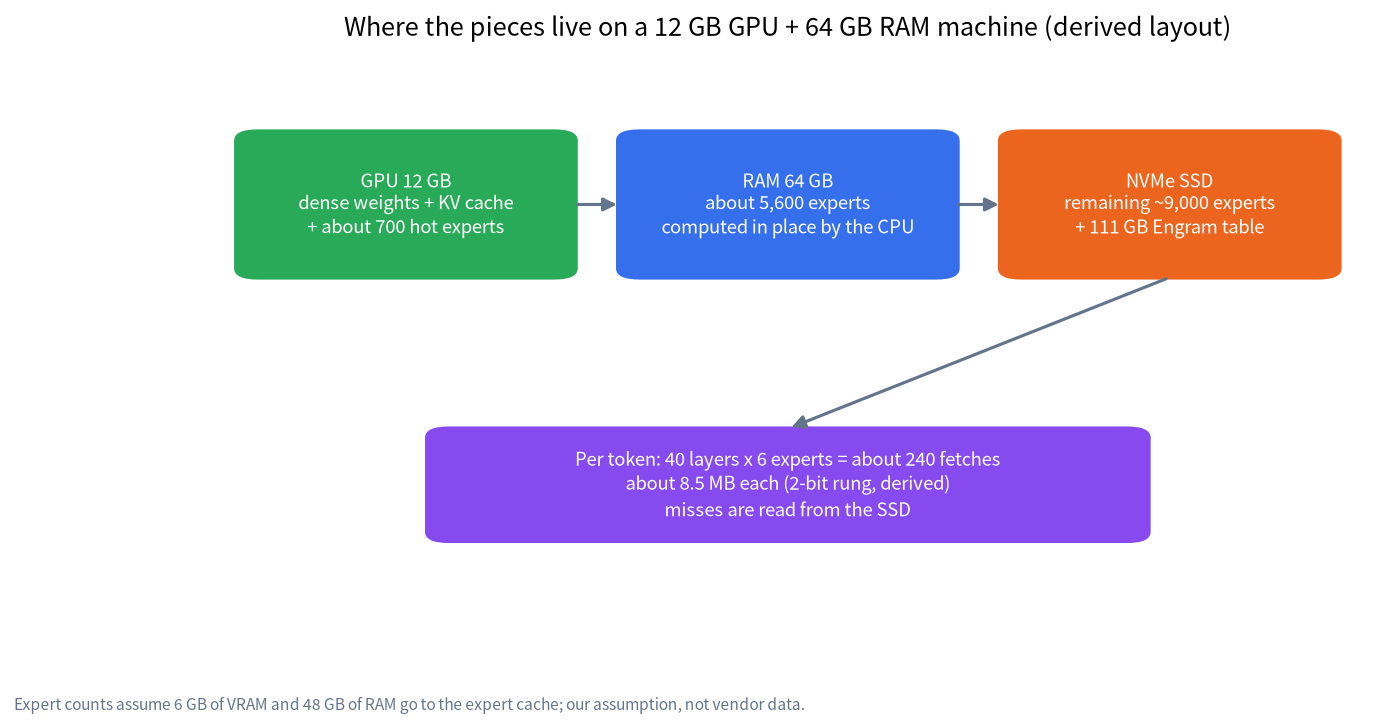
Strata treats VRAM as the hottest tier: dense weights, the KV cache and an expert cache holding the most frequently selected experts. RAM is the second tier: experts not on the GPU are computed in place by the CPU rather than moved to the card. Whatever does not fit in RAM is, in the documentation’s words, “read from the SSD while the model answers”, which is its way of saying “it runs, slowly”. Strata also ships a hot-expert profile that decides which experts to place first. The figure above is our derivation for 12 GB + 64 GB: if 6 GB of VRAM and 48 GB of RAM go to experts, that caches about 700 + 5,600 = 6,300 experts, around 41% of 15,360. Those two allowances are our assumptions, not vendor numbers.
How Much Data Each Token Needs: The Throughput Estimate
Here are our assumptions, one by one, so you can change them for your own machine:
- Each expert is about 8.5 MB at the 2.00 bpw set. Derivation: the source MXFP4 format is 4.25 bits, so 18.8 MB x 2.00 / 4.25 is about 8.8 MB; the alternative is (138.24 GB minus about 8 GB of dense weights) / 15,360, about 8.5 MB. They agree closely, so we use 8.5 MB.
- Each token uses 40 layers x 6 experts = 240 fetches, about 2.04 GB (the default “Faster” mode uses 5 experts, about 1.70 GB).
- The cache hit rate is unknown. With uniform routing it roughly equals the cached fraction, 42%; with a skew toward hot experts it is higher, so we use 60% and 75% as scenarios.
- Misses are read at sustained SSD bandwidth. We exclude CPU compute, random-read loss and any DSpark speculative-decoding gain, so the result is a ceiling.
- Engram reads are a few rows per token and are ignored.
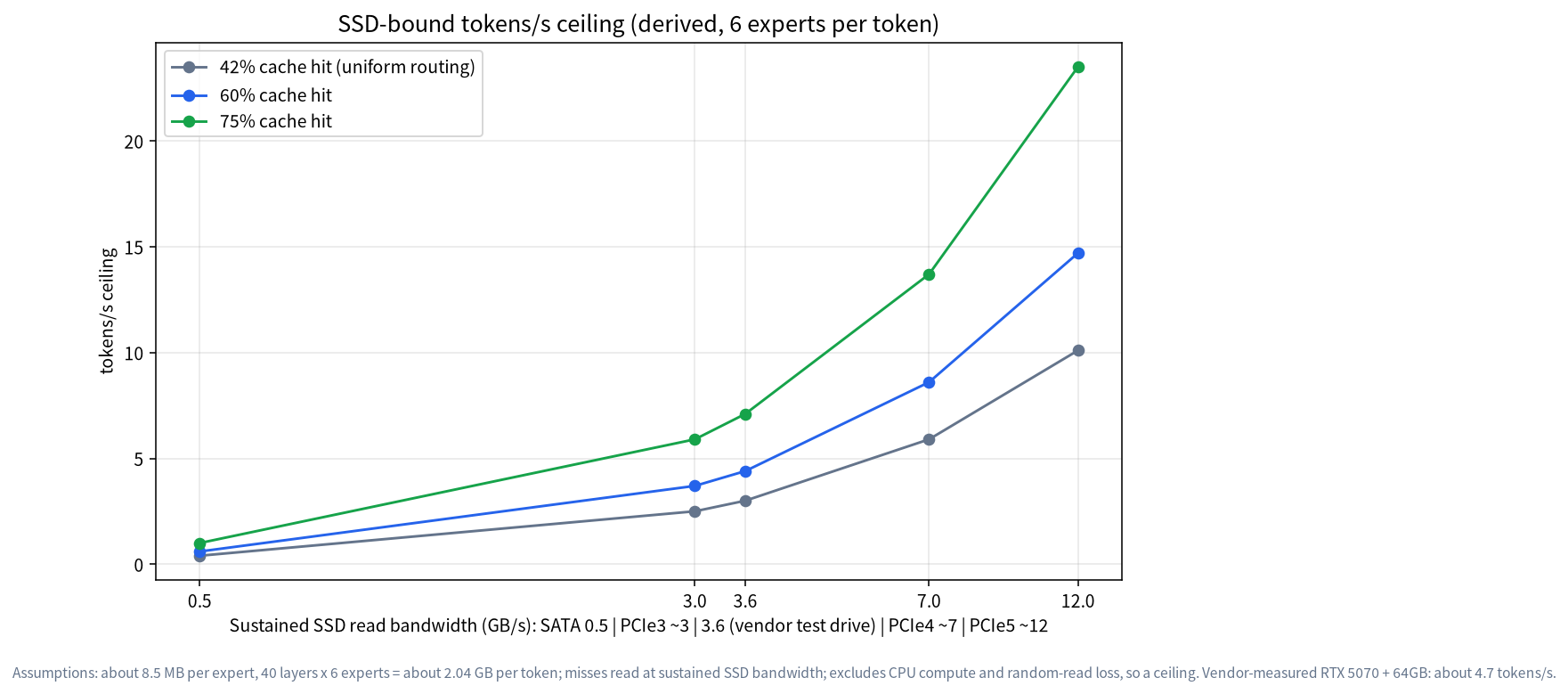
| Cache hit rate | SATA 0.5 GB/s | NVMe 3.6 GB/s (vendor drive) | PCIe 4.0 about 7 GB/s | PCIe 5.0 about 12 GB/s |
|---|---|---|---|---|
| 42% (uniform routing) | about 0.4 tokens/s | about 3.0 | about 5.9 | about 10.1 |
| 60% | about 0.6 | about 4.4 | about 8.6 | about 14.7 |
| 75% | about 1.0 | about 7.1 | about 13.7 | about 23.5 |
| 60%, 5 experts (Faster mode) | about 0.7 | about 5.3 | about 10.3 | about 17.6 |
Reading the table: on the same 3.6 GB/s drive our estimate at 60% hits is 4.4 tokens/s against the vendor’s measured 4.7 (README table 4-6), which says the order of magnitude is right and suggests the real hit rate is somewhere near sixty percent. But that is back-fitting an assumption to a measurement, so it is not independent validation. Drive bandwidth is the key variable: on a SATA drive the ceiling falls below 1 token/s, and a PCIe 5.0 drive could in theory double or triple the ceiling, but CPU compute and memory bandwidth would then become the limit, and we did not model them. The bandwidth classes are typical sequential-read figures for each interface, not benchmarks of specific products.
Vendor Measurements: What to Trust and What to Question
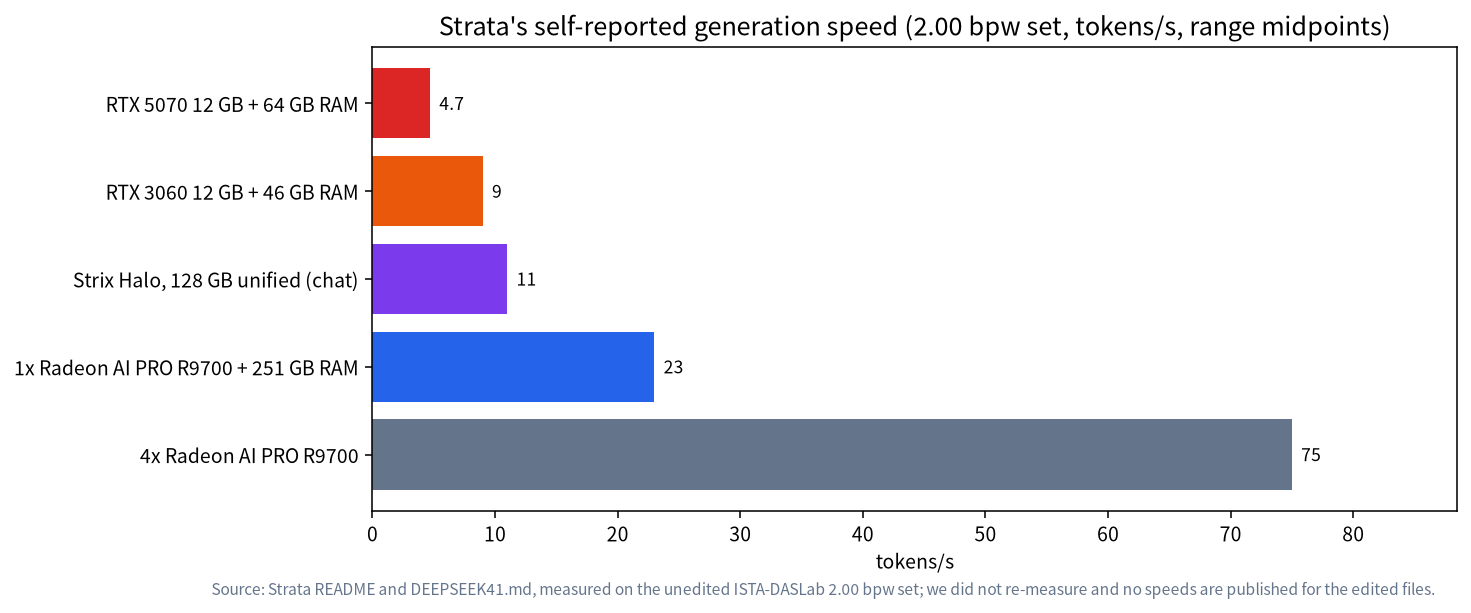
| Setup | Generation speed | Prompt reading | Source and note |
|---|---|---|---|
| RTX 5070 12GB + 64GB RAM + 3.6GB/s NVMe | about 4.7 (README 4-6) | about 121 tokens/s at 4K | Strata self-reported, engine 0.2.5 |
| RTX 3060 12GB + 46GB RAM | about 8-10 (README 9-11) | about 149 tokens/s at 8K | self-reported; DSpark off |
| Strix Halo 128GB unified memory | code about 19-21, chat about 11 | about 87 at 4K, 125 at 8K | self-reported; about 23 GB of experts still read from SSD |
| 1x R9700 + 251GB RAM | about 21-25 | about 320-360 at 8K | README, self-reported |
| 4x R9700 | README 74-77; docs about 48 (2.00) / 80 (2.25) | about 400-450 at 8K | the two pages disagree; we draw no conclusion |
| RTX 4090 48GB + 128GB (user-built engine) | 40.2 | about 615 at 4.6K | GitHub issue #3935, a single user report |
Two things need care. First, the RTX 3060 with 46 GB of RAM is faster than the RTX 5070 with 64 GB, the opposite of what you would expect. Strata’s documentation does not explain it and we did not investigate; it may involve the drive, engine version or test method, so we flag it rather than explain it away. Second, all of the above are Strata’s self-reported figures for the unedited ISTA-DASLab sets. AtomicChat’s edited variant publishes no speeds of its own. Its files are the same size as the stock ones, so the order of magnitude should be similar, but that is our inference and unverified. One more piece of context: Strata was created on 2026-09-24 and showed about 37,000 stars and 1,088 open issues when we read it. That signals strong interest, not a security audit.
The Quality Cost: Very Low Bit Width Plus “Faster” Mode
Two-bit quantization is not free. Strata’s figures for the unedited sets against the original model: 2.00 bpw has KL 0.170 and perplexity +15.5%; 2.25 bpw has KL 0.107 and +7.3%; 1.75 bpw has KL 0.217 and +21%, with plain English prose degrading most. ISTA-DASLab’s own card says the 2.00 set keeps 100% of the base model’s task average, while AtomicChat measured much lower AIME25 and GPQA scores for the same stock set; the two do not agree, and the details are in our fact-check. In addition, on PCs with 16 GiB of VRAM or less and on integrated GPUs such as Strix Halo, Strata defaults to “Faster” mode, using 5 of the 6 experts per token, which the documentation calls a small quality change, usually not noticeable. This is why “runs the full 763B” does not hold: what actually runs is roughly a 2-bit version that by default uses one expert fewer.
Choosing the Drive, RAM and GPU
| Tier | Configuration | Expected experience (inferred) | Note |
|---|---|---|---|
| Minimum to try | 12GB GPU + 64GB RAM + PCIe 4.0 NVMe | single-digit tokens/s, matching the vendor’s 4-6 | under about 40 GB of RAM is untested |
| More comfortable | same + more RAM (96-128 GB) | hit rate and speed rise | the more RAM, the less the drive is touched |
| Unified memory | Strix Halo 128GB | vendor 11-21 tokens/s | about 109 GB of experts stay in unified memory |
| Big RAM + one card | 251GB RAM + one 32GB card | vendor 21-25 tokens/s | the 2.00 set’s experts are likely all in RAM (inferred) |
| Not recommended | SATA SSD or hard disk for Engram and experts | ceiling under 1 token/s | the docs ask for NVMe |
Leave enough disk: the 2.00 set alone needs about 257 GB and all three sets about 533 GB; the three edited rungs total about 414 GB and still need ISTA’s Engram file (about 111 GB). For more on VRAM sizing see the GPU VRAM guide and our 12GB vs 16GB VRAM comparison; for the mechanics of RAM and CPU offload, read RAM vs VRAM and CPU offload and running MoE models locally. To see what your own card can do, check the VRAM table.
Alternatives
If the goal is a usable local model rather than this particular one, you have several options. One is a smaller model that fits entirely in RAM, often ten times faster; see MoE models for local use. Another is a machine with large unified memory such as Strix Halo 128GB or a high-memory Mac, covered in large-memory mini PCs and running local LLMs on a Mac; Strata states that Apple Silicon needs at least 64 GB and supports text only. A third is llama.cpp: upstream merged deepseek41 on 2026-10-25, and ISTA’s card says its unedited files load in b11870 or newer with the Engram table memory-mapped and kept out of RAM, though we have not measured its speed. A fourth, if your aim is safety research, is to run refusal-direction experiments on a smaller model, which is far cheaper; the method is in our explainer. For an internal private deployment, contact us for a budget assessment through solutions inquiry.
Risks and Compliance
The edited variant answers requests the original declines, and responsibility sits with the user. We do not reproduce harmful answers or offer ways around safeguards. An MIT licence is not compliance: public services must follow local generative-AI rules (China’s Interim Measures for the Management of Generative AI Services; in the EU, Regulation (EU) 2024/1689); this is general information, not legal advice. We recommend internal research use only, with classifier guardrails, logs and access control. Running third-party engines needs extra care: Strata’s DeepSeek engine is a separate signed download, and its docs say signatures and hashes are checked, but we have not verified the installer itself, so check the source and compare checksums before downloading. The fuller principles are in the fact-check.
What We Did and Did Not Do
We read Strata’s README and DeepSeek documentation and the AtomicChat and ISTA-DASLab model cards, and made our own throughput estimate. We did not download weights or time anything on hardware. Every “measured” figure in the tables is vendor self-reported, and every “derived” figure states its assumptions.
FAQ
Can 12GB VRAM and 64GB RAM really run it?
Yes; the vendor measured about 4.7 tokens/s (README 4-6). But most of the several-hundred-gigabyte weights sit on an SSD, you need about 257 GB of space, and waits are long, so it is not suited to real-time interaction.
Why is it so slow?
Each token uses 40 layers x 6 experts, about 2 GB of data. Experts that fit in neither VRAM nor RAM are read from disk, so drive bandwidth sets the ceiling.
How much faster is a faster SSD?
By our estimate at a 60% hit rate, 3.6 GB/s gives about 4.4 tokens/s, 7 GB/s about 8.6 and 12 GB/s about 14.7. These are ceilings; CPU compute and memory bandwidth would limit you first.
Does 128GB of RAM help?
Yes. The more experts cached, the less you read from disk. Strix Halo 128GB is quoted at 11-21 tokens/s, but that is unified memory and not the same as adding DIMMs to a normal PC.
Is the edited variant as fast as the stock GGUFs?
The file sizes match, so the order of magnitude should be similar, but the edited variant publishes no speeds and its thinking plans may run longer. We have not verified it.
Is it suitable for production?
We advise against it. There is no parallel-request support, quantization and Faster mode cost quality, and the edited variant answers requests the original refuses. For internal research, add guardrails and logs.
Talk With Us
Want a configuration estimated for your budget? Join the community or email admin@microaione.com with your GPU, RAM, drive and budget, and we will work through the numbers with you.
References: Strata’s DeepSeek-V4.1-Flash documentation, AtomicChat model card, ISTA-DASLab GSQ-RCO GGUF card, llama.cpp PR #31086, EU AI Act. Data read on 2026-11-01; all figures are as reported by those pages.