Strata Hardware Requirements: How Much RAM, VRAM and SSD You Need, With Build Tiers
Updated 2026-11-04. We have not run Strata ourselves. Every requirement below comes from the project’s documents or a named tester, and every speed is theirs.
The Strata hardware requirements are the reason this tool is interesting: a 125-billion-parameter model on a 12 GB graphics card sounds impossible until you see where the weight actually sits. The honest summary is that the GPU is the smallest part of the bill. Most of the model lives in system RAM, a smaller part on the SSD, and the GPU holds a cache of the experts it uses most. This article turns the documentation and tester reports into numbers you can plan a PC around, then sketches build tiers and says where we would not guess. If you have not met the tool yet, read what Strata is first.
The Strata hardware requirements at a glance
| Part | Practical floor | Comfortable |
|---|---|---|
| GPU | 12 GB NVIDIA RTX 20 to 50 series (older cards use a CUDA 12 engine); AMD, Intel Arc and Apple Silicon have their own guides | 16 to 24 GB, or two cards |
| RAM | About 48 GB for the two smallest sizes | 64 GB for every size; more for long contexts |
| SSD | About 80 GB free, NVMe preferred | 1 TB so you can keep several sizes |
| CPU | Modern x86-64; the engine has AVX2 and AVX-512 code paths | AVX-512 helps, according to testers |
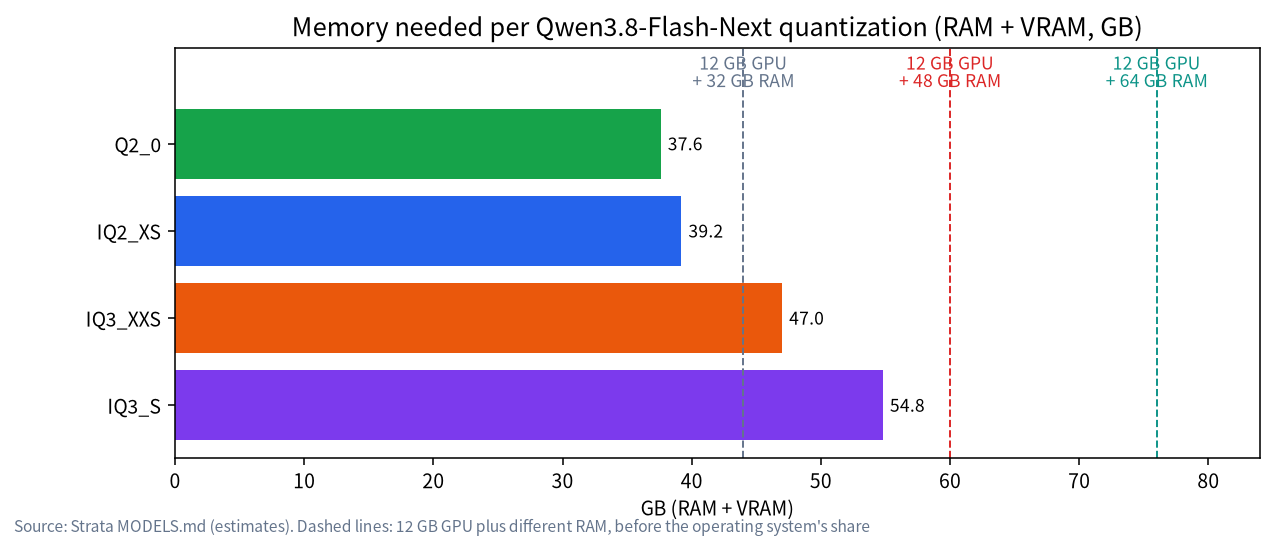
The project’s model page gives the weights as RAM plus VRAM: 37.6 GB for Q2_0, 39.2 for IQ2_XS, 47.0 for IQ3_XXS and 54.8 for IQ3_S. It tells you to leave room for the operating system and says the figures are estimates. A reviewer at AkitaOnRails wrote that the project’s stated minimum is 32 GB of RAM and VRAM combined, that this only runs the most compressed version, and that the IQ3_S that scored well in his tests wanted about 64 GB of RAM.
What each part does
GPU and VRAM. Per the project’s HOW_IT_WORKS document, the card holds attention layers, routers, shared experts, the KV cache and an expert cache that fills the remaining VRAM, at roughly 700 experts per extra gigabyte. A bigger cache means more tokens are computed on the GPU. PC Watch measured about 3,031 experts on a 12 GB card and a 72% hit rate with IQ2_XS, against 1,104 experts and 56% with IQ3_S. The number of parallel requests also follows VRAM: 1 on 12 GB, 2 on 20 GB, 3 on 24 GB and 4 on 32 GB or more.
RAM. All 24,576 experts sit in pinned memory, and the CPU computes the ones the GPU lacks. RAM capacity decides which size you can run, and RAM speed and CPU instructions decide how fast the misses are. PC Watch pointed at DDR4 bandwidth and the lack of AVX-512 on its test CPU as factors that slow things down, and another Japanese tester said the same about a CPU without AVX-512.
SSD. A 28.8 GB n-gram table is read a few rows per token. If RAM is short, an optional mode streams experts from disk, which the docs say works but is much slower. On a laptop with 30 GB of RAM, the arm1.ru reviewer measured about 6.9 TB read from the SSD in a 1.3-hour test run (1.4 GB/s on average).
CPU. Not a headline spec, but it does real work on every cache miss. The engine has separate code paths for CPUs with and without AVX-512.
Build tiers, with what testers reported
| Tier | Example parts | Sizes that fit | What the sources reported |
|---|---|---|---|
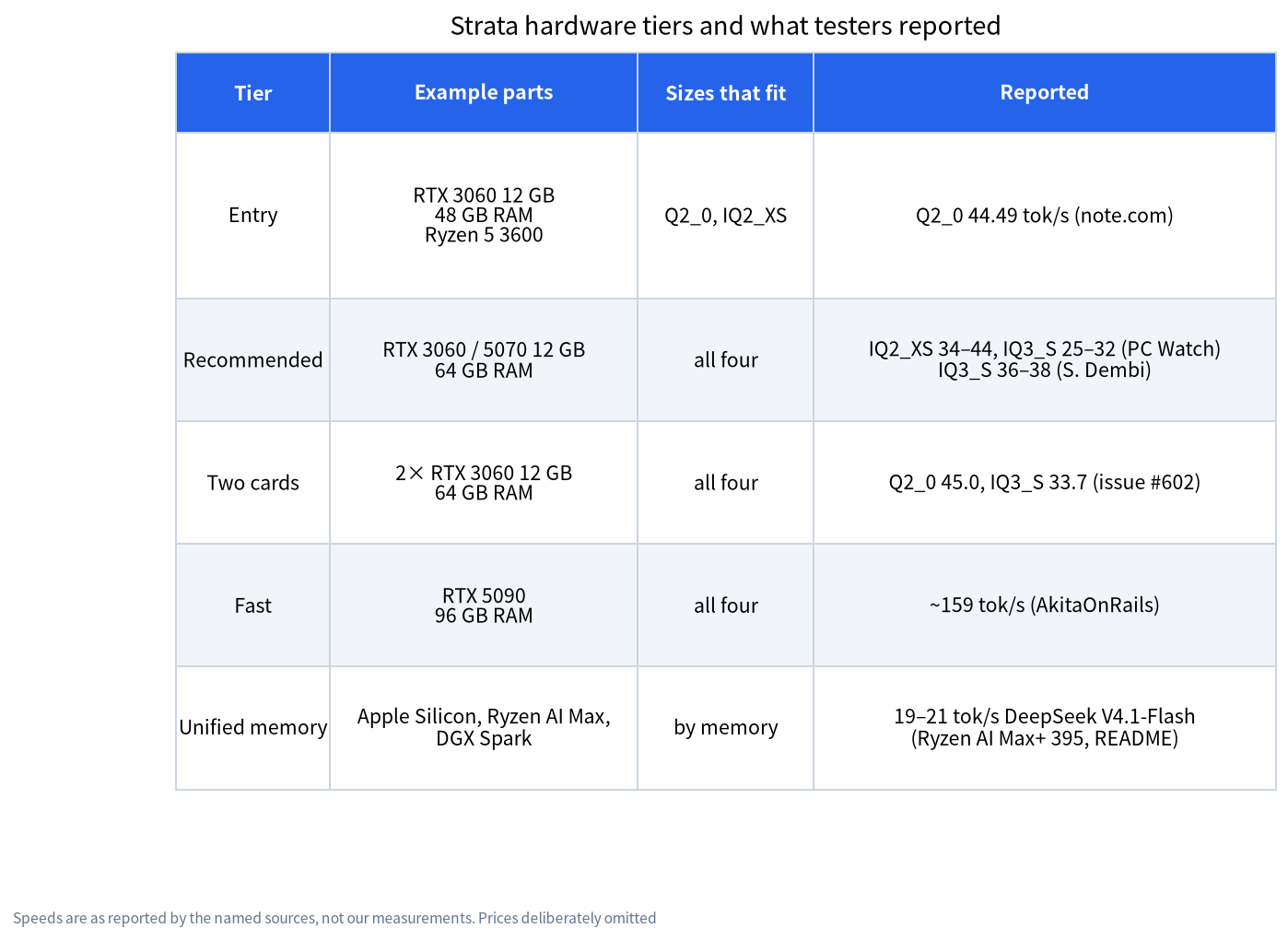
| Entry | RTX 3060 12 GB, 48 GB RAM, Ryzen 5 3600 | Q2_0, IQ2_XS | Q2_0 at 44.49 tok/s decode, 326.68 tok/s prefill (note.com) |
| Recommended | RTX 3060 or RTX 5070 12 GB, 64 GB RAM | All four | IQ2_XS 34 to 44 and IQ3_S 25 to 32 tok/s (PC Watch); IQ3_S 36 to 38 tok/s with about 50 GiB RAM (Dembi) |
| Two cards | 2× RTX 3060 12 GB, 64 GB RAM | All four | Q2_0 45.0 and IQ3_S 33.7 tok/s (project issue #602); multi-GPU splits by layers and needs no NVLink |
| Fast | RTX 5090, 96 GB RAM, strong CPU | All four | About 159 tok/s and a score of 91 on the author’s own benchmark (AkitaOnRails) |
| Unified memory | Apple Silicon (macOS 15+), Ryzen AI Max, DGX Spark | By memory | The project’s own README reports 19 to 21 tok/s (code) for DeepSeek V4.1-Flash on a Ryzen AI Max+ 395 with 128 GB |
We have not put prices in this table on purpose. GPU and memory prices move week to week, and the sources above did not give dated prices we could check. Our dated price guides are better places to start: entry-level build, 24 GB GPU build, buying used GPUs and cheap GPUs for LLMs.
Disk and SSD planning
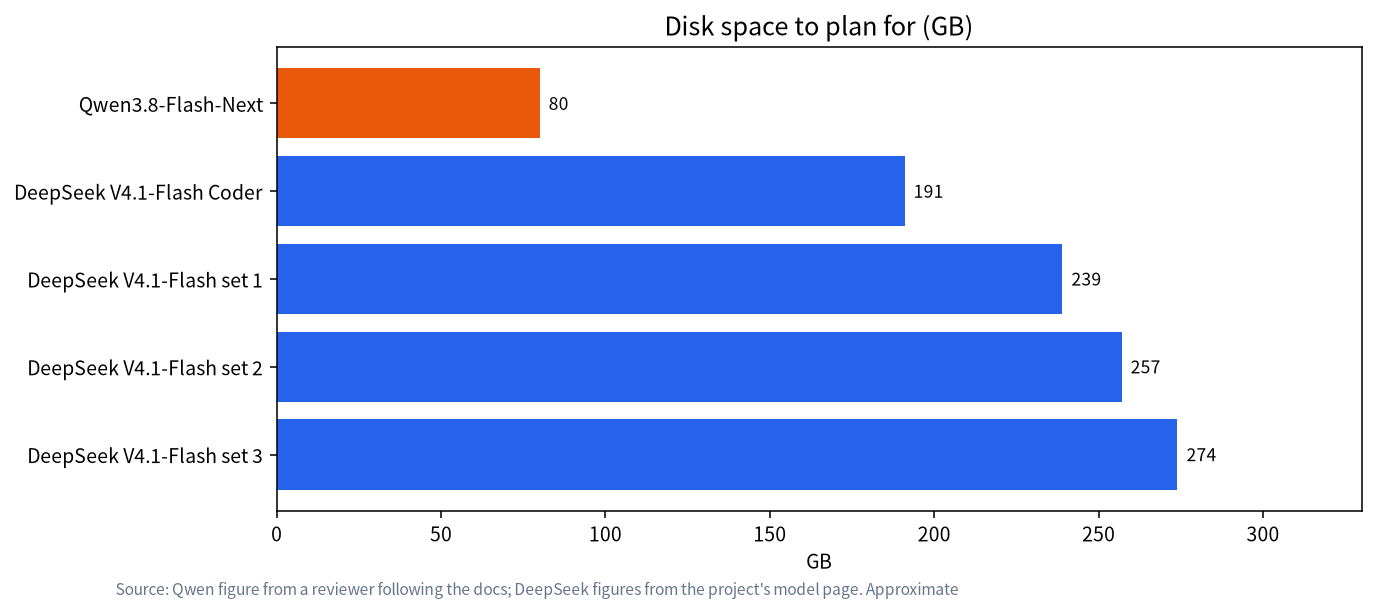
For Qwen3.8-Flash-Next plan about 80 GB free, mainly because the download includes the quantized experts, helper files and the n-gram table. DeepSeek V4.1-Flash needs 191 to 274 GB depending on the set; our DeepSeek V4.1 Flash on 12GB article covers that case. Reads do not wear an SSD out, but a busy drive slows everything else, so keep Strata’s folder on an NVMe disk that is not your system disk if you can.
Laptops, WSL2 and unified memory
Laptops are the awkward case. The arm1.ru reviewer ran the 125B model on an RTX 5080 Laptop GPU with 30 GB of RAM and found it worked, but memory was tight: Strata used about 21 GB of RAM and 4 to 5 GB of swap, which is why we would call 32 GB of RAM a stunt rather than a plan. Windows with WSL2 also works, as the community index shows for an RTX 5060 Ti, though the docs note that under Windows graphics drivers only part of the expert memory is pinned on multi-GPU runs. On unified-memory machines such as Strix Halo, the graphics memory and the RAM are the same pool, so one 128 GB figure replaces the separate VRAM and RAM numbers in the tables above.
More results from the project’s own benchmark index
The repository keeps a community benchmark index of user-submitted runs. They are self-reported, use different versions (v0.1.40 to v0.1.43) and prompt lengths, and we have not reproduced any of them, so treat the table as a feel for the range rather than a ranking.
| Hardware (as submitted) | Size | Decode, tok/s |
|---|---|---|
| RX 9070 16 GB, Ryzen 7 5800X3D, 64 GB RAM | IQ3_XXS | 57.9 to 58.7 |
| RTX 5060 Ti 16 GB (WSL2), Ryzen 7 3700X, 128 GB RAM | IQ3_S | 47.7 to 48.2 |
| 2× Tesla P40 24 GB, Xeon E5-2699 v3, 125 GB RAM | IQ3_S | 35.0 |
| Tesla V100 32 GB, Threadripper 2990WX, 96 GB RAM | UD-IQ4_XS | about 28 to 33 |
| Strix Halo laptop, 128 GB unified, 70 W | UD-IQ4_XS | 42 to 59, depending on prompt length |
Two things stand out. The 16 GB cards in the index report higher speeds than the 12 GB figures above for comparable sizes, which fits the expert-cache design, although the CPUs and versions differ. And old 24 GB workstation cards still run at a useful speed if the RAM is large. Both agree with the upgrade order below, but they are single submissions, so do not read them as guarantees.
Estimate your own machine
Add VRAM and RAM, then subtract the size of the model: what is left is the space for the operating system, browser, KV cache and everything else. This is simple arithmetic on the project’s numbers, not a measurement.
| Configuration (VRAM + RAM) | Total | Headroom for IQ2_XS (39.2 GB) | Headroom for IQ3_S (54.8 GB) |
|---|---|---|---|
| 12 GB + 32 GB | 44 GB | about 4.8 GB, very tight | does not fit |
| 12 GB + 48 GB | 60 GB | about 20.8 GB | about 5.2 GB, very tight |
| 12 GB + 64 GB | 76 GB | about 36.8 GB | about 21.2 GB |
The less headroom, the more likely you end up swapping like the arm1.ru laptop did, and speed suffers. Our advice is not to chase the largest size on a “just enough” machine; pick one size smaller and keep the headroom for long contexts and daily use. The same arithmetic tells you what memory to buy: decide on the size first, then work backwards, instead of buying first and hoping it fits.
Upgrade order, as we read the documents
This is our inference from how the project describes its design, not a measured ranking.
- RAM to 64 GB. All experts live there, so it decides which sizes you can run. It is usually the cheapest big step.
- More VRAM. Each gigabyte adds about 700 cached experts, and a higher hit rate means fewer CPU computations.
- A CPU with AVX-512 and faster memory. This helps the misses, according to two testers.
- NVMe storage. Matters most if you must stream experts from disk.
For the memory trade-offs behind this, see our RAM vs VRAM and CPU offload guide and our GPU VRAM guide.
When a custom build makes sense
Parts shopping is the hard bit: matching a 12 GB or 24 GB card, enough RAM slots, an NVMe drive, a power supply and cooling. If you would rather not do it, our team in Shenzhen builds and tests local-LLM machines, and the machines and solutions guide explains how that works. Tell us your target model, budget and noise limits, and we will propose a parts list with dated prices. We have not benchmarked Strata on any machine, so ask us to run a test on the specific configuration you are considering rather than assuming the numbers above. Power and heat are covered in our power and cooling guide.
What we did and did not do
We read the project’s MODELS, HOW_IT_WORKS and multi-GPU documents and the tester reports linked above on 2026-11-04. We built no machine, ran no benchmark and quote no prices. Where a figure comes from a single person, we name them.
FAQ
Can I run Strata with an 8 GB GPU?
The official path recommends 12 GB or more. The project’s community index lists two Quadro RTX 4000 8 GB cards with 96 GB of RAM running IQ2_XS at 18 to 23 tokens/s decode on very long prompts, but that is two cards and a lot of RAM, and we have not verified it.
Is 32 GB of RAM enough?
It is tight. The weights alone need 37.6 to 54.8 GB of RAM plus VRAM, so 12 GB of VRAM and 32 GB of RAM only just covers the smallest size on paper, before the operating system takes its share. The project’s coding-focused variant is listed at about 32 GB of RAM. For the standard sizes, 48 GB is the practical floor and 64 GB is comfortable.
Does RAM speed matter?
Yes, because the CPU computes experts that are not on the GPU. Testers flagged DDR4 bandwidth and missing AVX-512 as factors, but we have no controlled comparison.
Do I need an NVMe SSD?
For the standard path you mainly need space, about 80 GB. NVMe matters more if RAM is short and Strata must stream experts from disk.
Can I use AMD, Intel or a Mac?
The project lists supported AMD Radeon cards, Intel Arc on Linux, Apple Silicon on macOS 15 or newer, Ryzen AI Max and DGX Spark, each with its own guide. Check the install guide for your card.
Is two small GPUs better than one big one?
One tester measured two RTX 3060 cards at 45.0 tokens per second for Q2_0, against figures in the 40s for single cards from other testers, so the gain is not obvious on that size. It may help more with larger sizes, but we found no controlled comparison.
Talk with us
Planning a build around a GPU, RAM and budget? Join the community or email admin@microaione.com and tell us what you have.