Run DeepSeek V4.1 Flash Locally: Memory, Cost and Quantization Routes for the Obliterated Build
Before asking how to run DeepSeek V4.1 Flash locally, ask whether it fits. In our analysis of DeepSeek V4.1 Flash 1017 Obliterated we noted that this build is a 754.6B-parameter BF16 checkpoint with about 1.51 TB of files in its repository, nearly three times the original DeepSeek-V4.1-Flash-1017 (about 510 GB), so experience with the original does not transfer directly. This guide orders the feasible routes by memory capacity, gives derived weight sizes, hardware and cost orders of magnitude, a high-level download and quantization workflow, and a list of what we cannot confirm. We did not download or run the model; every size is either from the repository or a labelled derivation.
Key takeaways (Updated 2026-11-01)
- The official BF16 weights are about 1.51 TB in 83 shards, so holding them in GPU memory takes roughly 1.7 TB or more; a single 96 GB card is nowhere near enough.
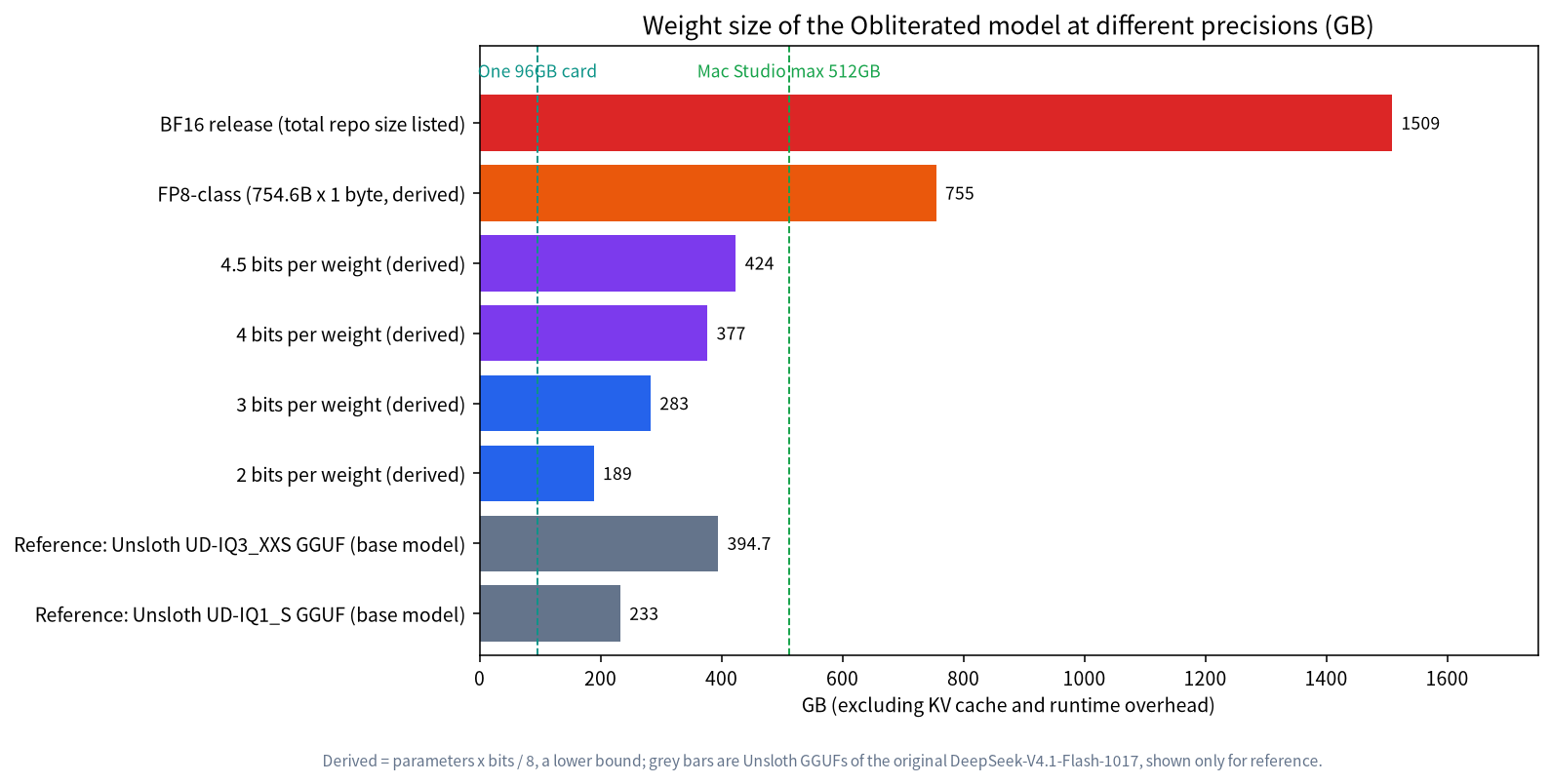
Using parameters × bits ÷ 8, FP8-class is about 755 GB, 4-bit about 377 GB and 3-bit about 283 GB. These are lower bounds: real GGUF quantizations are mixed precision, and the KV cache and runtime overhead come on top.
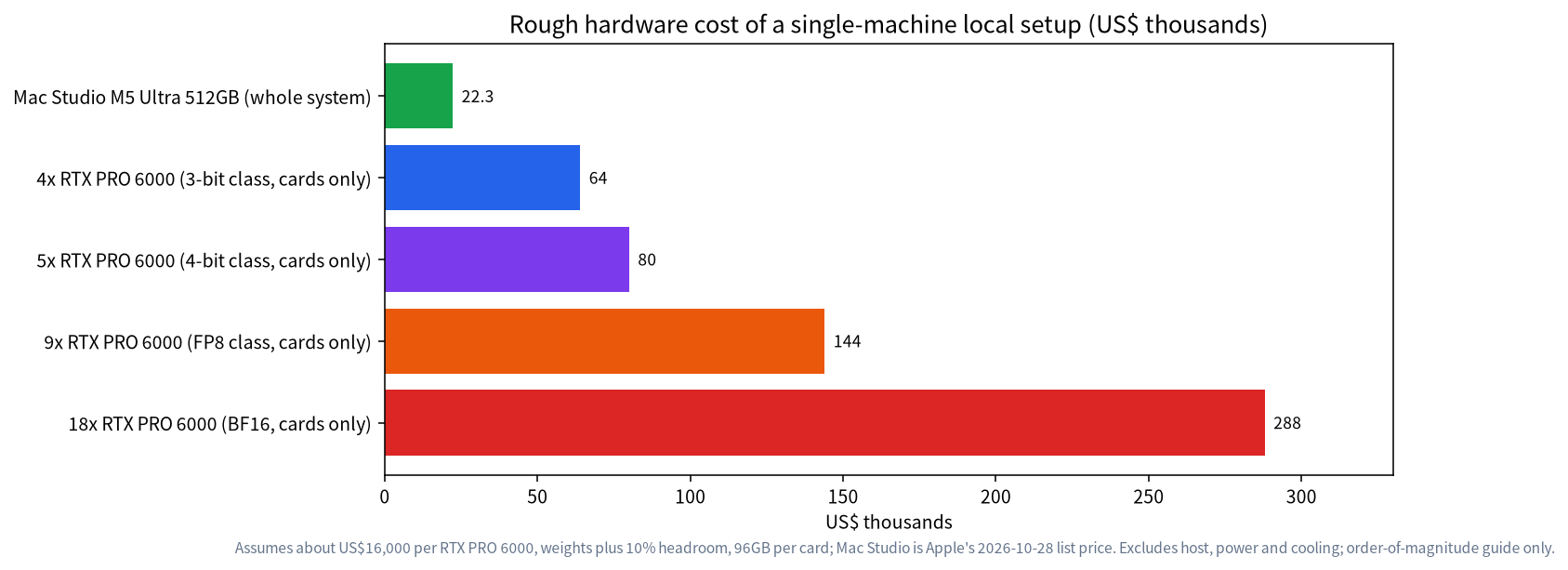
Rough cost: a Mac Studio with 512 GB is about US$22,299; with RTX PRO 6000 cards at roughly US$16,000 each, a 3-bit class setup needs about 4 and a 4-bit class setup about 5, so US$64,000 to 80,000 for the cards alone.
- We found no official GGUF for this checkpoint and did not verify that its deepseek_v41_text configuration converts cleanly; quality after quantization has to be re-evaluated by you.
Before You Run DeepSeek V4.1 Flash Locally: Why It Is So Large
The checkpoint’s configuration describes a mixture-of-experts (MoE) model: 40 layers, hidden size 5120, 384 routed experts with 6 active per token, a maximum context of 1,048,576 tokens, bfloat16 weights, and the architecture name DeepseekV41ForCausalLM. A MoE model uses only a fraction of its parameters per token, but every expert must be resident in memory, so memory follows total parameters, not active ones. Our guide to MoE models for local use explains this in more detail.
The original DeepSeek-V4.1-Flash-1017 uses mixed FP8 with FP4 experts and is about 510 GB; the Obliterated build is stored in BF16 at about 1,509 GB. Unsloth’s guide also describes the model as a roughly 552B backbone plus about 196B of Engram parameters, where the Engram tables (110.6 to 202.8 GB) can sit on an SSD through mmap and are read on demand. That is described for the original’s GGUFs; we did not verify that it applies to the Obliterated build.
How Much Memory at Each Precision
| Precision | Formula | Weight size (derived lower bound) | Note |
|---|---|---|---|
| BF16 (official) | Total repository files | about 1,509 GB | Loads directly, no conversion |
| FP8-class | 754.6B × 1 byte | about 755 GB | You requantize it yourself |
| 4.5-bit | 754.6B × 4.5 ÷ 8 | about 424 GB | Close to common Q4-style GGUFs |
| 4-bit | 754.6B × 4 ÷ 8 | about 377 GB | Real mixed precision is slightly larger |
| 3-bit | 754.6B × 3 ÷ 8 | about 283 GB | Quality starts to suffer |
| 2-bit | 754.6B × 2 ÷ 8 | about 189 GB | Larger quality loss |
For reference, Unsloth’s GGUFs of the original DeepSeek-V4.1-Flash-1017 are 394.7 GB for UD-IQ3_XXS, 233.0 GB for UD-IQ1_S and 508.4 GB for UD-Q8_K_XL. They belong to a different checkpoint and only show roughly where quantized sizes land. The derivation covers weights only; budget extra for the following.
- KV cache. Longer contexts need more cache; supporting 1M tokens does not mean every machine can use all of it.
- Runtime overhead. Activations, buffers and multi-GPU communication take memory; our cost estimates add a flat 10% margin.
- Disk. The download is about 1.51 TB; if you also convert, add intermediate files and the quantized result, and plan for at least about 3.5 TB of free NVMe space.
Hardware Routes and Rough Cost
| Route | Precision that fits | Hardware scale | Rough cost (cards or system list price only) | Main limit |
|---|---|---|---|---|
| 18 × 96 GB cards | BF16 | Multi-node or special chassis | about US$288,000 | A typical server cannot hold this many cards, so multi-node is needed |
| 9 × 96 GB cards | FP8-class | Multi-node or dense chassis | about US$144,000 | Same; you requantize yourself |
| 5 × 96 GB cards | 4-bit class | One multi-GPU workstation or server | about US$80,000 | High power and cooling demands |
| 4 × 96 GB cards | 3-bit class | One multi-GPU workstation | about US$64,000 | Quality must be tested |
| Mac Studio 512 GB | 3-bit class, 4-bit tight | One desktop system | about US$22,299 | Limited memory bandwidth, tight room for context |
| Large-memory CPU server (512 GB+ DDR5) | 3 to 4-bit GGUF | One server | We did not verify a price | Generation is usually much slower than on GPUs |
The costs assume about US$16,000 per RTX PRO 6000, weights plus a 10% margin, and 96 GB per card, which gives about US$288,000 for 18, US$144,000 for 9, US$80,000 for 5 and US$64,000 for 4. The card price comes from a TechPowerUp report dated 2026-08-13 on NVIDIA’s marketplace listing of US$16,000, and prices keep moving. The Mac Studio price comes from MacRumors on 2026-10-28: the M5 Ultra with 512 GB of RAM starts at US$22,299. Host, power supply, cooling, electricity and multi-node networking are excluded; treat it as an order-of-magnitude guide.
Two cautions when reading the table. First, fitting is not the same as running well: we did not measure speed on any hardware for this checkpoint, so we give no tokens-per-second figures. Second, MoE models can spill some layers to system RAM when VRAM is short, but speed drops; the trade-offs are covered in our guide to RAM versus VRAM and CPU offload.
Pick a Route by Usable Memory
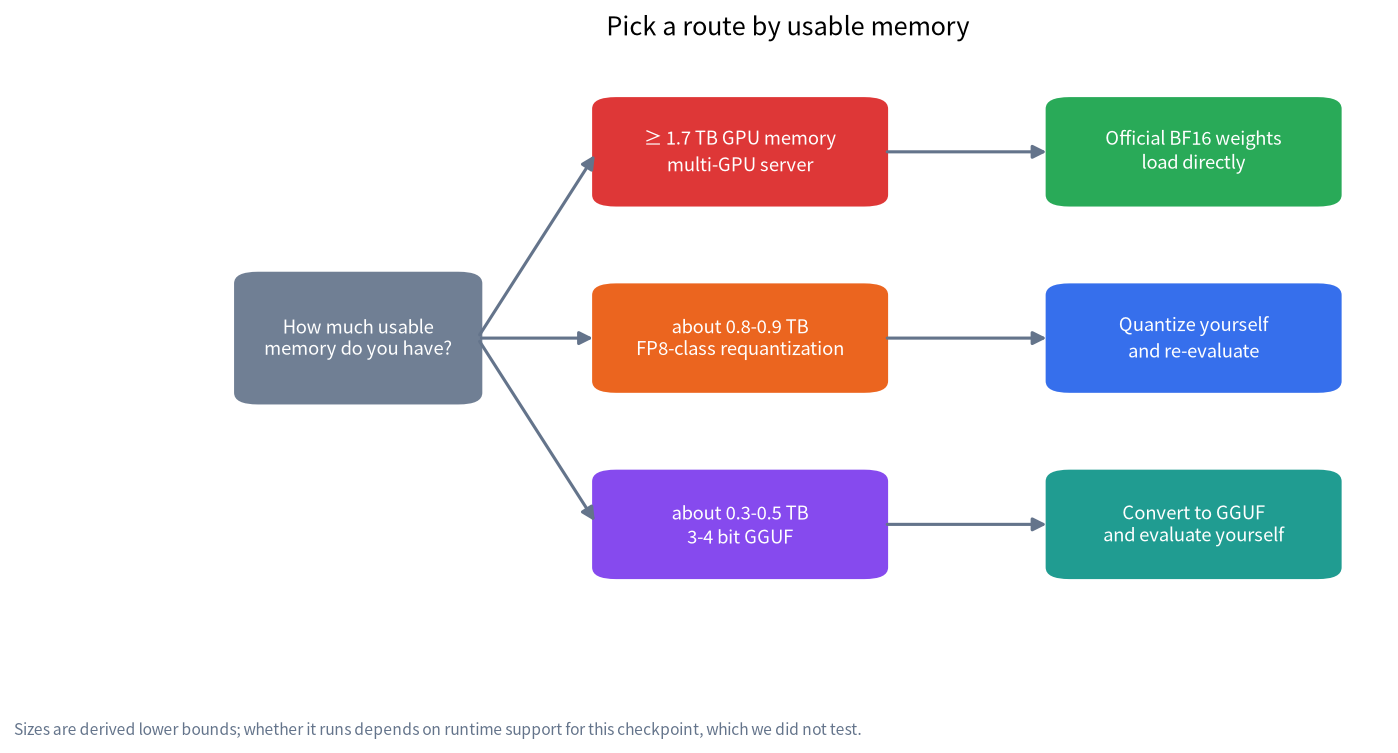
If you already know your usable memory, use this ladder.
| Usable memory | Suggested route | What to do |
|---|---|---|
| 1.7 TB or more of GPU memory | Official BF16 directly | Tensor or expert parallelism; check framework support for this architecture |
| About 0.8 to 0.9 TB | FP8-class requantization | Quantize it yourself and evaluate |
| About 0.3 to 0.5 TB | 3 to 4-bit GGUF | Convert to GGUF, quantize, then evaluate |
| Under 0.3 TB | Not recommended for this checkpoint | Use a smaller model, or 1 to 2-bit GGUFs of the original |
If all you want is the capability of DeepSeek V4.1 Flash and not an uncensored variant, the original is far more realistic. According to Unsloth’s guide, memory needs for the original’s GGUFs (RAM plus VRAM, Engram on SSD) are about 128 to 145 GB for 1-bit, 176 to 205 GB for 2-bit, 256 to 290 GB for 3-bit, 305 GB for 4-bit and 315 GB for 8-bit. Those figures are for the original and do not apply to the Obliterated build.
A High-Level Download and Quantization Workflow
This is a planning outline, not a line-by-line tutorial; follow each project’s current documentation for exact commands.
- Decide whether it is worth it. This is an uncensored build of more than 1.5 TB, meaningful only for research, red-teaming or controlled internal settings. Read the risk and compliance section of the analysis and decide your guardrail plan first.
- Prepare disk and network. A 1.51 TB download takes about 3.4 hours at a theoretical 1 Gbps line rate (derived) and usually longer in practice. Plan at least 3.5 TB of disk.
- Download only from the official repository. It is OBLITERATUS/DeepSeek-V4.1-Flash-1017-obliterated, with 83 safetensors shards plus the configuration, chat template and evaluation metadata. Check file counts and sizes afterwards, and avoid mirrors or “bundles” of unknown origin.
- Choose a runtime. The configuration was written by Transformers 5.18.0.dev0, so a matching recent version is likely needed; we did not verify support in vLLM or SGLang. In llama.cpp, the deepseek41 architecture was merged upstream on 2026-10-25 (PR #31086), although Unsloth’s guide still points to a separate PR branch, so use a recent build with deepseek41 support.
- Convert and quantize. A BF16 checkpoint must be converted to GGUF and then quantized. The checkpoint’s model_type is deepseek_v41_text and we did not verify that the converter handles it directly; if it fails, do not hack the configuration, and check the project’s issues first.
- Re-evaluate. The refusal, harm and MMLU results on the model card hold only for the BF16 weights. Quantization changes the weights again, and Unsloth’s tests of the original show lower bit widths lowering scores (for example, IQ1_S averages 83.53 over six benchmarks against 87.68 for Q8), so recheck quality and refusal behavior with your own prompt set.
- Set sampling parameters. The Obliterated model card gives no usage instructions. The common practice is to reuse the original’s recommendation of temperature 1.0 and top_p 1.0, which comes from Unsloth’s guide and the original documentation, not from this build.
- Add guardrails and isolate. Put input and output filtering in the runtime environment, and restrict network and tool permissions.
One correction to a claim that has circulated: deepseek_v41_text is sometimes presented as the name of a chat template, but it is the model_type in the configuration; the repository ships its own chat_template.jinja.
Risks, Compliance and Guardrails
This section repeats the analysis for convenience. A model without refusals produces harmful content more easily and should not be connected to public services, web browsing or agents that execute tools automatically. The following is general information, not legal advice: in mainland China, serving generative AI to the public means complying with the Interim Measures for the Management of Generative AI Services and related rules; in the EU, the AI Act sets obligations for general-purpose models. The uses we consider defensible are red-teaming and safety research, reducing over-refusal in fiction, and studying refusal mechanisms themselves, which our refusal direction ablation explainer covers. In production, add a safety classifier such as Llama Guard and keep logs.
Reference Builds and Solutions
To see how specific machines are chosen, start with these pages (the first four are Chinese-language pages on our main site): the VRAM table for quickly checking memory needs of different models, the hardware page with configurations by budget, the solutions page for complete systems and enterprise private deployment, and the solution inquiry page if you want a Shenzhen-built machine or remote assistance. Related build articles: the RTX PRO 6000 workstation, large-memory mini PCs, running LLMs on a Mac, dual-GPU builds and enterprise private deployment; for quantization basics see Q4_K_M explained. None of them is a measurement of this checkpoint; they are selection aids.
FAQ: Running DeepSeek V4.1 Flash Obliterated Locally
What is the minimum memory to run DeepSeek V4.1 Flash Obliterated?
The official BF16 weights are about 1.51 TB, so holding them in GPU memory takes about 1.7 TB or more. If you quantize to 3 or 4 bits yourself, the weights are derived at about 283 to 424 GB, plus context and runtime overhead.
Can a 512 GB Mac Studio run it?
By derivation, 3-bit class weights of about 283 GB fit, and 4-bit class at about 377 GB might just fit, but you must leave room for the system and context. We did not test it and found no official GGUF for this checkpoint, so we cannot promise it.
Why not use the memory figures for the original’s GGUFs?
They are for the original DeepSeek-V4.1-Flash-1017, about 510 GB at native precision. The Obliterated build is a 754.6B BF16 checkpoint, so the figures do not carry over.
Do refusal rates and capability stay the same after quantization?
Not necessarily. The model card’s results apply to the BF16 weights; quantization changes them again, so re-evaluate with your own prompt set.
Can I load it directly with Transformers?
The repository lists library_name as transformers and the configuration was written by Transformers 5.18.0.dev0, but we have not loaded it. Follow the model card and official documentation for the required version and settings.
Is it suitable for production?
We do not recommend exposing it directly to the public. For internal research, add input and output guardrails, logging and access control, and consult compliance staff first.
Talk With Us
Want to check what your budget and machines can reach? Join the community or email admin@microaione.com.
References: Obliterated model card, Unsloth: DeepSeek-V4.1-Flash local guide, llama.cpp PR #31086, MacRumors: Mac Studio M5 Ultra 512GB pricing, TechPowerUp: RTX PRO 6000 pricing. Data read on 2026-11-01.