Strata vs Ollama vs llama.cpp vs LM Studio vs vLLM: What Each Is For and Which to Choose
Updated 2026-11-04. Based on public documentation, release notes and third-party reports. We ran no benchmarks ourselves.
Strata vs Ollama is the comparison everyone is asking about this month, but it is not a fair fight between two tools that do the same job. Strata is a new engine built to run one class of very large mixture-of-experts (MoE) models on a PC with a small graphics card. Ollama is a mature, general model manager. llama.cpp, LM Studio and vLLM sit in different corners of the same map. This article puts the five side by side, shows what each is for, checks what we could verify about Qwen3.8-Flash-Next support, and ends with a decision guide. If you only know the term “Strata”, start with our explainer on what Strata is.
Strata vs Ollama: the short answer
- Strata: pick it when you want a very large MoE model, mainly Qwen3.8-Flash-Next, on a PC with a 12 to 24 GB GPU and 48 to 64 GB of RAM.
- Ollama: pick it when you want the easiest way to run many small and mid-size models and connect them to apps.
- llama.cpp: pick it when you want maximum control over GGUF models and hardware, or when a tool you use is built on it.
- LM Studio: pick it when you want a graphical app to find, download and chat with models.
- vLLM: pick it when you serve many users at once from GPUs with enough memory.
Side by side
| Strata | Ollama | llama.cpp | LM Studio | vLLM | |
|---|---|---|---|---|---|
| Main job | Run huge MoE models on small VRAM by tiering GPU, RAM and SSD | Pull, run and serve many models with one command | The inference library and server many tools build on | Desktop app to browse, download and chat | High-throughput serving engine |
| License | MIT (engine) | MIT | MIT | Proprietary app, free for home and work use per its terms | Apache-2.0 |
| GitHub stars (2026-11-04) | 39,548 | 185,856 | 133,318 | Not an open repository | 96,277 |
| Interface | Desktop app and terminal | Command line, app, REST API | Command line and llama-server |
Graphical app, lms CLI, headless mode |
Python library and server |
| API | OpenAI, Anthropic and Responses style | Own API plus OpenAI-compatible endpoints | OpenAI-compatible server | OpenAI-compatible server | OpenAI-compatible server |
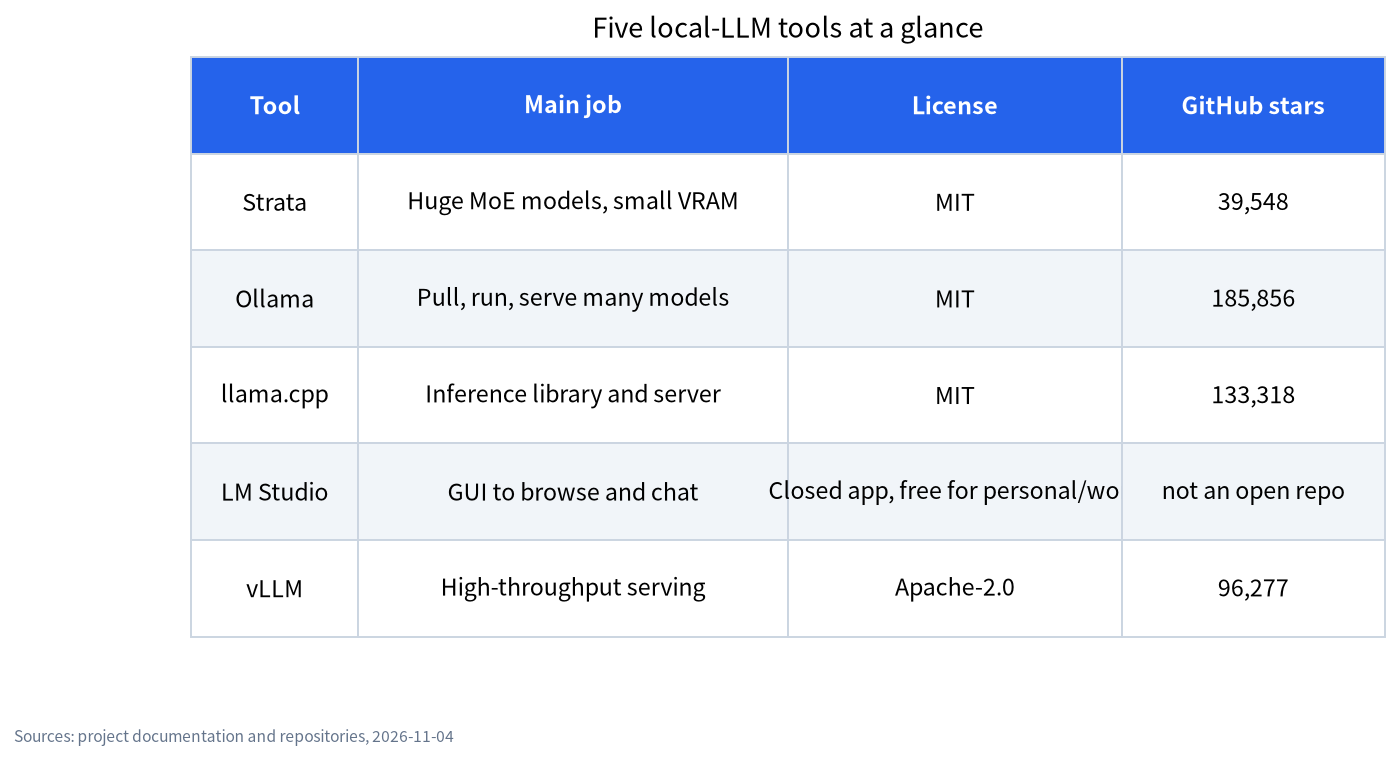
Stars measure attention, not quality. Strata’s repository is six weeks old; Ollama’s has had years to gather them. Release notes tell you more about momentum: Strata shipped six releases between 25 October and 2 November, and Ollama’s v0.40.14 appeared on 3 November.
What each is good at, and what to watch
| Tool | Strong at | Watch out for |
|---|---|---|
| Strata | Very large MoE models on 12 to 24 GB cards, one-click install, strata connect for coding agents |
Few supported models, young project, long prompts are slow on 12 GB cards (PC Watch), no outside security audit per its docs |
| Ollama | Simplicity, large model library, huge ecosystem, ollama launch for coding tools, MLX on Apple Silicon since v0.40.0 |
Not designed to stream a 125B MoE from RAM and SSD; optional cloud models and paid plans exist next to local use |
| llama.cpp | Wide hardware support, quantization formats, fine control; it added Qwen3.8-Flash-Next support in pull request #27742, merged 2026-08-27 | More flags to learn; you assemble the setup yourself |
| LM Studio | Friendly GUI, runs llama.cpp and MLX engines, can run headless with lms |
Closed-source app; follow its terms if you embed it in a product |
| vLLM | Throughput with many parallel requests | Wants GPU memory for the whole model; not aimed at a 12 GB card |
vLLM’s own repository is at github.com/vllm-project/vllm. For a longer look at the three most common tools, see our Ollama vs LM Studio vs llama.cpp guide, and for vLLM see our vLLM and SGLang introduction.
Qwen3.8-Flash-Next support, as we could verify it
This is the model behind most of the Strata hype, so it is worth being exact. Everything here is dated 2026-11-04.
- Strata: built for it (model list). The docs list four quantizations, 37.6 to 54.8 GB of RAM plus VRAM.
- llama.cpp: pull request #27742, “model: add Qwen3.8-Flash-Next (qwen4exp)”, was merged on 2026-08-27. A Hacker News user reported llama.cpp at about 21 tokens/s against Strata at about 60 tokens/s on one AMD setup. That is one anecdote, not a test we can vouch for.
- Ollama: its library page for
qwen3.8-flash-nextshowed a single tag,125b-mlx(105 GB, for Apple Silicon). A feature-request issue was closed on 2026-10-17. We found no tag for NVIDIA GPUs and did not test, so we do not claim Ollama cannot run it, only that we could not find a documented route. - LM Studio and vLLM: we did not check.
How each tool handles a model bigger than your VRAM
This is where the tools really differ. When a model does not fit on the card, Ollama and llama.cpp normally split it by layers: some layers run on the GPU and the rest on the CPU, with the weights held in RAM. That works well for dense models and is the standard route on small cards. A MoE model is different, because only a few experts are used per token. llama.cpp has options that keep the experts on the CPU side (the --cpu-moe family of flags), and one Hacker News user reported 16 tokens/s with a Q8_0 file on a machine with 192 GB of RAM using that approach. Strata goes a step further: it keeps a cache of the most-used experts on the GPU, computes the others on the CPU where they sit in RAM, and can stream the rest from the SSD. The result is a tool that does one thing well, at the cost of supporting only a few models. vLLM, by contrast, assumes the whole model lives in GPU memory, which is why it suits servers rather than a 12 GB desktop card.
How to read speed claims
Most “Strata is faster” posts compare different models. The Japanese blogger behind one RTX 3060 test put Strata’s 44.49 tokens/s for the 125B model next to Ollama results for 9B and 26B models on the same PC, and then said plainly that this table does not show Strata being faster or slower than Ollama. The arm1.ru test compared Strata running Flash-Next with llama.cpp running a different model, Qwen3.8-27B. A fair comparison needs the same model, quantization, context, hardware and software version; we found none that fully meets that bar. Until one appears, read speeds as “what this tool achieved on this model”, not “which tool is faster”. Read the sources: the note.com test, arm1.ru and the Hacker News thread.
Decision guide
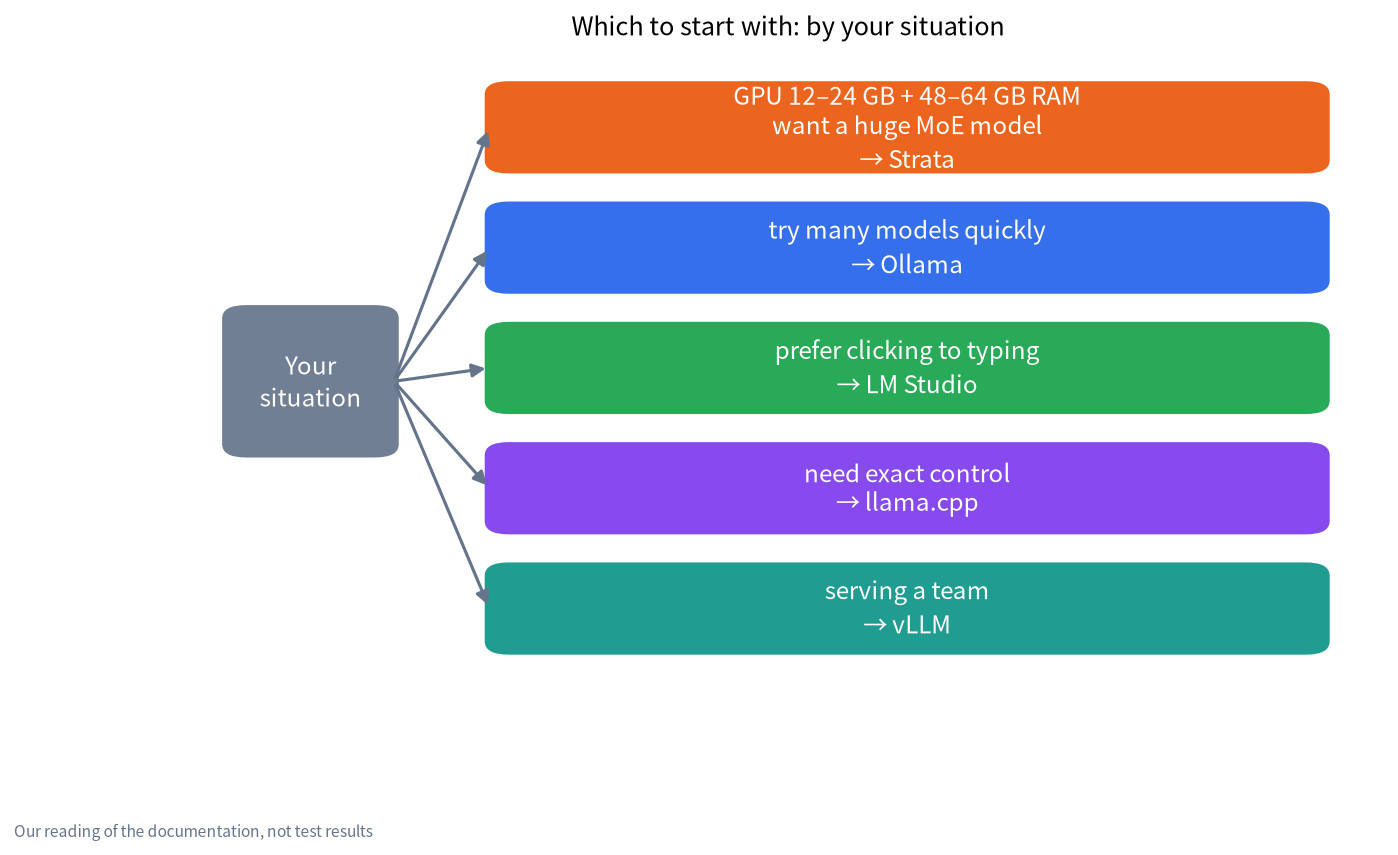
| Your situation | Start with | Why |
|---|---|---|
| 12 to 24 GB NVIDIA or AMD GPU, 48 to 64 GB RAM, you want Qwen3.8-Flash-Next | Strata | It is built for that model and that memory layout |
| You want to try many models quickly or connect Open WebUI | Ollama | Simplest install and the biggest ecosystem; see our Ollama install guide |
| You prefer clicking to typing | LM Studio | GUI model browser; see our LM Studio tutorial |
| You need exact control over flags, quantization or builds | llama.cpp | Closest to the metal |
| You serve a team from one GPU server | vLLM | Built for concurrent requests |
| You have a Mac with lots of unified memory | Ollama or LM Studio first | Both use MLX on Apple Silicon; Strata also supports macOS 15 or newer |
Nothing stops you from using two. Many people will keep Ollama for everyday models and add Strata for one large model; just remember both want the same VRAM and RAM. The practical steps are in our install guide for running Strata beside Ollama, and the memory numbers are in our hardware requirements article.
Licenses, data and cost
The engines are open source (MIT or Apache-2.0), but model weights have their own licenses; Qwen3.8-Flash-Next uses the Qwen Community License 1.0, so read it if you plan commercial use. Strata’s documents say it has no telemetry and no account; Ollama runs local models without sign-in and also offers optional cloud models and paid plans according to its release notes; LM Studio’s terms allow home and work use but not redistribution or hosting it as a service. Always check the current terms yourself.
What we did and did not do
We read each project’s repository, release notes and documentation, plus the third-party reports linked above, on 2026-11-04. We did not install any of the five tools for this article or measure a single speed. Where a claim comes from one user, we say so.
FAQ
Is Strata faster than Ollama?
We cannot say. Published comparisons mostly use different models, so they do not answer the question. Strata can run a 125B MoE model at tens of tokens per second on a 12 GB card according to testers, but that is a different job from running a 9B model in Ollama.
Can Ollama run Qwen3.8-Flash-Next?
On 2026-11-04 Ollama’s library listed a 105 GB MLX tag for Apple Silicon. We found no documented route for NVIDIA GPUs and did not test, so check the library page for your platform.
Which tool is best for a beginner?
Ollama or LM Studio. Both install in minutes and have the most guides. Add Strata later if you want a specific very large model.
Is Strata built on llama.cpp?
Its documentation lists ggml, the tensor library behind llama.cpp, as a third-party component, but Strata is a separate C++ engine with its own scheduling. It is not described as a llama.cpp fork.
Which is best for serving a team?
vLLM, if you have enough GPU memory for the whole model. Strata’s default fits parallel requests to your card (one on a 12 GB GPU), so a 12 GB card is meant for a single user rather than a team.
Do I need to uninstall Ollama to try Strata?
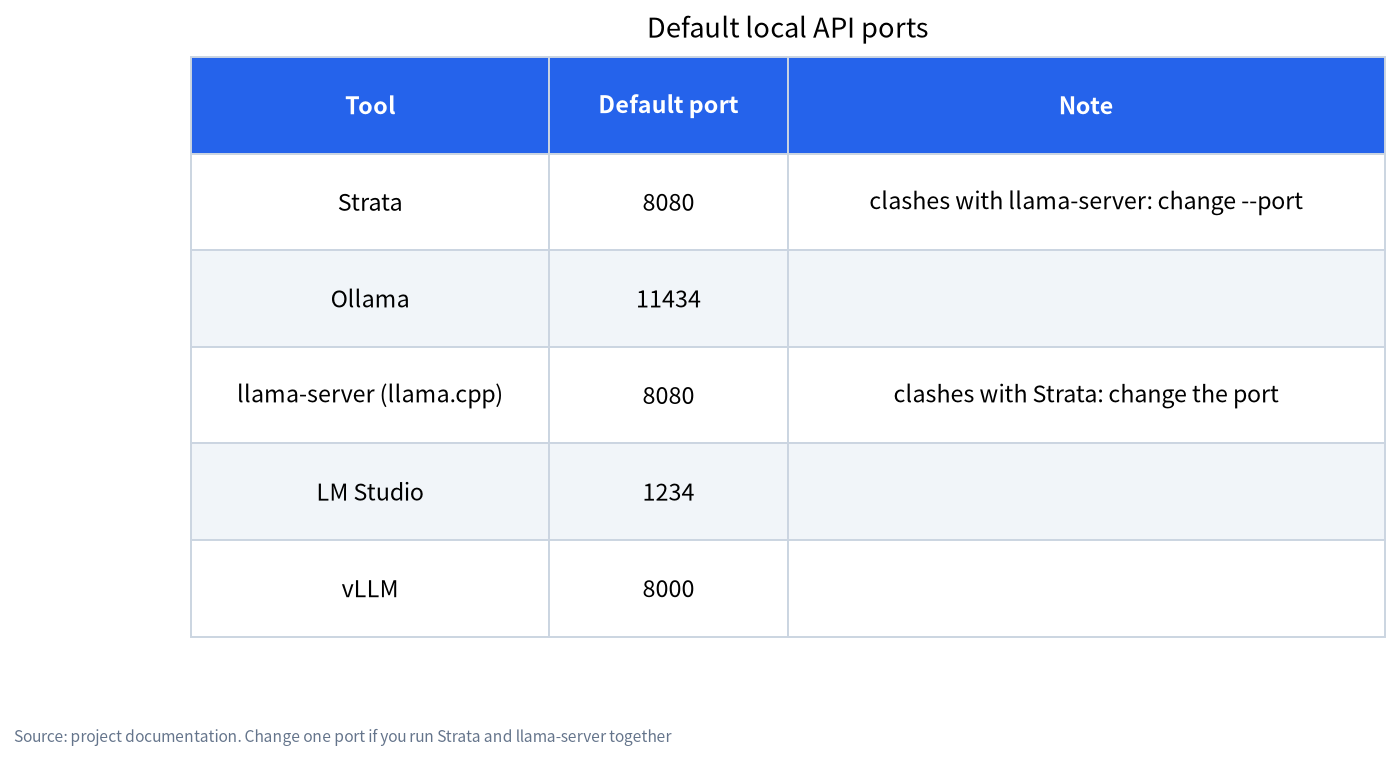
No. They use different default ports and different model folders. Just do not load two big models into the same GPU at once.
Talk with us
Not sure which tool fits your GPU and budget? Join the community or email admin@microaione.com with your GPU, RAM and use case. If you want a machine built and tested for this, see our machines and solutions guide.