RTX 5060 Ti 16GB for Local LLM: A Mainstream Build That Runs 14B Models Well
For many people, a local AI machine does not need to be a 20,000 yuan project. A card with 16GB of VRAM sits in a sweet spot: enough memory for the 14B models that give a noticeable step up over 8B models, a normal power supply, and a price that a mid-range PC budget can absorb. This guide on the RTX 5060 Ti 16GB for local LLM covers what the card is, what fits in 16GB, how fast it can be on paper, a complete reference build, and the point at which a used 3090 becomes the better answer. For the wider 12GB and 16GB landscape, see our 12GB and 16GB VRAM guide.
Verification note: Card specifications come from NVIDIA’s GeForce RTX 5060 family page, read on 2026-10-30. Prices and the build come from our reference files dated 2026-10-30, mostly Chinese market sources, and they change daily. Speeds and memory use are derived from bandwidth and model size, not measured. We did not test the card for this article.
Key takeaways (Updated 2026-10-30)
- NVIDIA lists the RTX 5060 Ti with 16GB of GDDR7 on a 128-bit bus, a 180W power figure, 600W required system power and a maximum GPU temperature of 87 degrees Celsius.
16GB runs 14B models at Q4_K_M with a 16K context comfortably, and a 32K context only just; 24B and 32B models do not fit usefully.
Our reference mainstream build with this card costs about 10,853 yuan, compared with 14,299 yuan for a build around a used 3090 that doubles the memory and more than doubles the bandwidth.
RTX 5060 Ti 16GB for Local LLM: What the Card Offers
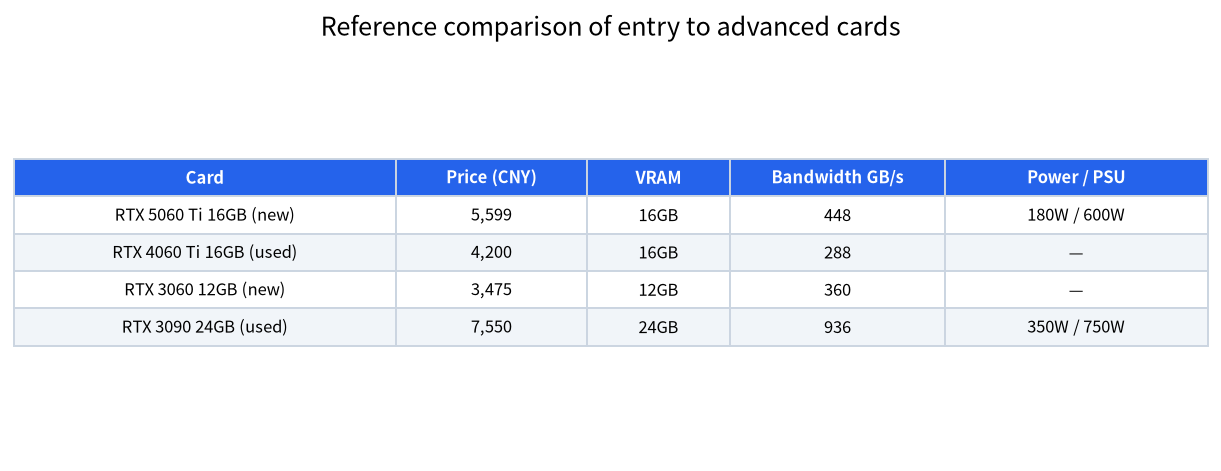
The 5060 Ti is a mid-range gaming card that comes in 16GB and 8GB versions; only the 16GB version is interesting for language models. NVIDIA’s page lists GDDR7 memory on a 128-bit interface. Using the memory bandwidth we have on file, 448 GB/s, it is faster than the previous-generation RTX 4060 Ti 16GB at 288 GB/s, and faster than the RTX 3060 12GB at 360 GB/s. It is much slower than an RTX 3090 at 936 GB/s. The 180W power figure and the 600W required system power mean that a typical 650W supply is enough for a normal desktop, which keeps the cost and noise low. The dimensions vary by manufacturer, so check the card you choose against your case.
Because token generation is limited by bandwidth, a narrow 128-bit bus is the main limitation. The card is a good fit if you value low power, new-card warranty and 16GB, and a poor fit if you want the fastest possible chat or 32B models.
What Fits in 16GB
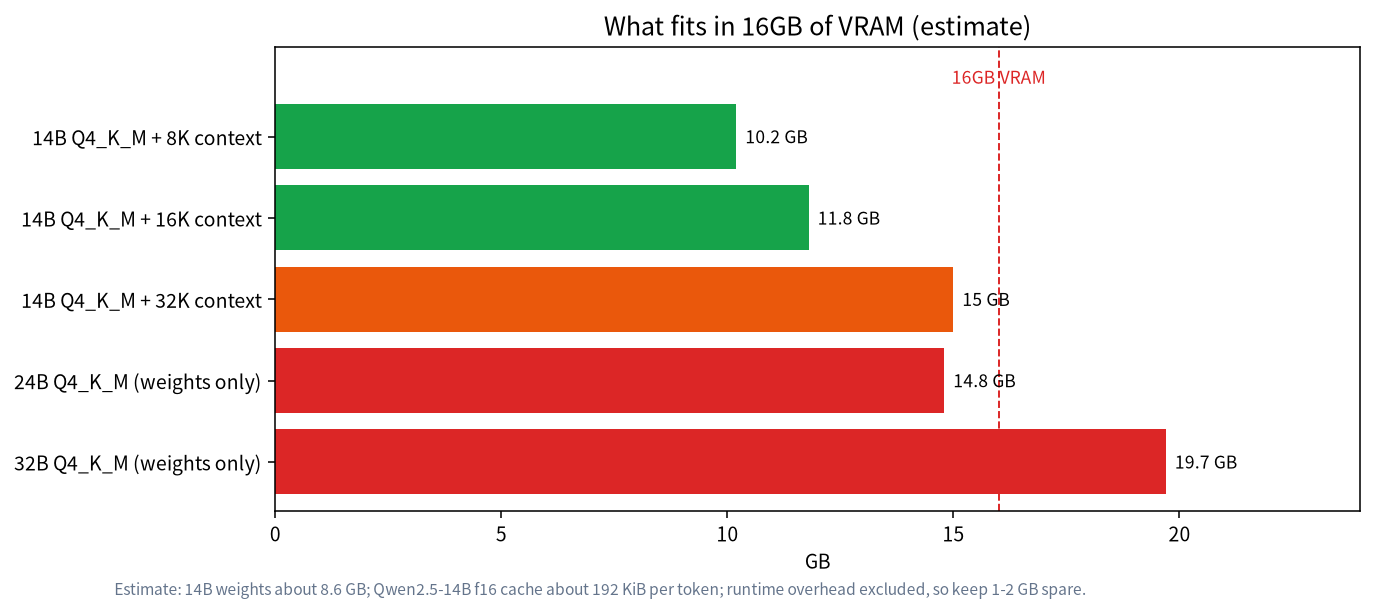
A Q4_K_M model takes about 0.61 GB per billion parameters, so a 14B model uses about 8.6GB. The cache adds to this: Qwen2.5-14B needs about 192 KiB per token in f16, so 8K tokens cost about 1.5 GiB, 16K tokens about 3 GiB, and 32K tokens about 6 GiB. The totals are about 10.2GB, 11.8GB and 15.0GB, and the last one leaves no space for the runtime’s overhead, so treat 32K as the edge. If you quantise the cache as described in our context length guide, the larger contexts fit more comfortably.
A 24B model takes about 14.8GB for weights alone, which leaves too little for a useful context. A 32B model needs about 19.7GB and does not fit on the card at Q4_K_M. A MoE model such as gpt-oss-20b, listed at 14GB by Ollama, fits with a small context, and runs fast because few parameters are active per token; see our gpt-oss guide. In practice, the best models for this card are 7B to 14B dense models and small MoE models, such as those in our Qwen guide.
Derived Speed Ceilings
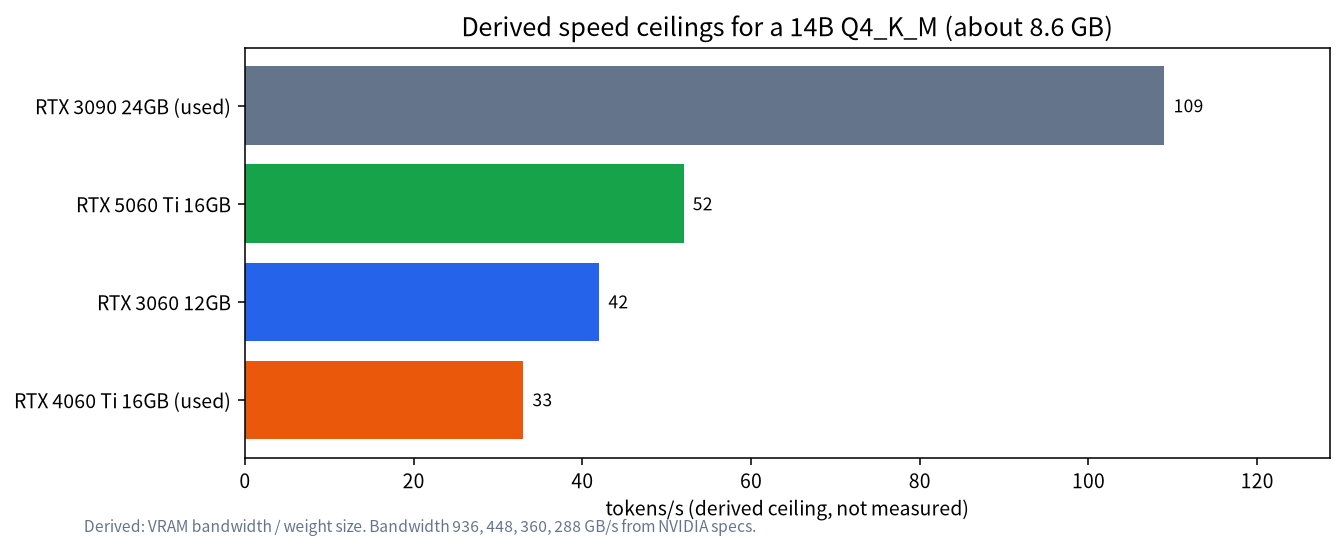
For a 14B Q4_K_M model of about 8.6GB, the bandwidth rule gives these upper limits: about 52 tokens per second on the 5060 Ti, 42 on an RTX 3060 12GB, 33 on a used RTX 4060 Ti 16GB, and 109 on a used RTX 3090. Real speeds are lower, and we have not measured any of these cards. The comparison shows what matters: the 5060 Ti beats the older 16GB card by more than half, and a used 3090 has roughly twice the ceiling. For chat, 50 tokens per second is already faster than most people read, so the 5060 Ti is not slow for a 14B model; it matters more when you use long prompts, reasoning models or several users.
A Reference Build at 10,853 Yuan
| Part | Reference price (CNY) |
|---|---|
| RTX 5060 Ti 16GB, new | 5,599 |
| CPU, Core i5-14600KF boxed | 1,300 |
| Motherboard, B760M DDR4 | 929 |
| Memory, DDR4 32GB (2 x 16GB) | 1,150 |
| SSD, 1TB | 1,025 |
| Power supply, 650W | 350 |
| Cooler | 250 |
| Case | 250 |
| Total | 10,853 |
The total excludes the monitor, peripherals, operating system licence, shipping and assembly service. It comes from our reference build file and is based on median prices as of 2026-10-30, so check live quotes. The 650W supply is above the 600W system requirement that NVIDIA lists, with some margin. We use DDR4 to keep the cost down, because for models that live entirely in VRAM the system memory speed matters little. If you plan to offload models to system RAM, read our offloading guide before deciding.
16GB Card or Used 3090?
| Option | Card price | Build total | Memory | Bandwidth | Notes |
|---|---|---|---|---|---|
| RTX 5060 Ti 16GB | 5,599 | 10,853 | 16GB | 448 GB/s | New, warranty, 180W |
| Used RTX 4060 Ti 16GB | 4,200 | about 9,450 | 16GB | 288 GB/s | Cheaper, slower, used risk |
| Used RTX 3090 24GB | 7,550 | 14,299 | 24GB | 936 GB/s | 350W, 750W PSU, used risk |
The build totals for the 3090 come from our reference file; the used 4060 Ti figure is our own calculation, replacing only the GPU in the mainstream build, and is approximate. For 3,446 yuan more than the 5060 Ti build, the 3090 build gives 8GB more memory and about twice the bandwidth, which unlocks 32B models. For people who want warranty and low power, the 5060 Ti is easier to live with. For people who want to grow into larger models, the 3090 route usually wins; our used GPU guide explains how to buy one safely, and the RTX 5090, 4090 and 3090 comparison covers the upper end.
Getting the Most From 16GB
Pick the quantisation to fit. For a 14B model, Q4_K_M leaves room for context, while Q6 or Q8 files may not. Set the context to what you need rather than the maximum, since every extra token costs cache memory. Close other programs that use VRAM, such as browsers with hardware acceleration and games, before loading a model. Check with ollama ps that the model runs fully on the GPU; a split between CPU and GPU can cut speed sharply, as described in our offloading guide. If you need 24B or 32B models occasionally, consider quantising the cache or using a smaller quantisation, and accept lower quality or shorter context.
Also plan the first-day tests. Load one 8B and one 14B model, run the same ten prompts, and compare quality and time. That tells you whether the extra memory pays off for your tasks. Keep the card’s driver updated, and watch temperature during long generation, because a 87 degree maximum is a limit, not a target.
Entry or Mainstream? A Short Decision
If you only run 7B and 8B models, a 12GB card from the entry tier, described in our entry build guide, is enough and saves about 3,000 yuan. If you want 14B models with room for a decent context, 16GB is the minimum comfortable tier. If you suspect you will want 32B models within a year, buying the 24GB tier now may be cheaper than buying twice. Our build configuration guide places all of these builds side by side.
A Ten-Minute Software Setup
After you install the driver, install Ollama as described in our Ollama guide and pull a 14B model, for example ollama pull qwen2.5:14b. Start a chat with ollama run qwen2.5:14b, ask a long question, and then open a second terminal and run ollama ps. The Processor column should read 100% GPU. If it shows a split between CPU and GPU, the model plus context do not fit, and you should lower the context or choose a smaller quantisation.
To stretch the context, you can set the environment variable OLLAMA_KV_CACHE_TYPE to q8_0, which Ollama documents as using roughly half the cache memory of f16, with Flash Attention enabled; q4_0 uses about a quarter, with a larger quality cost. For our 14B example, a q8_0 cache would bring the 32K case from about 15.0GB down to about 11.8GB, which is a comfortable fit. Test the quality on your own prompts before you rely on it. Remember that Ollama picks a default context based on VRAM: on a card with less than 24GiB it starts at 4K, so you must raise it yourself when you need more.
Who Should Skip This Card
Skip it if your first goal is a 32B model or a 70B model, because 16GB cannot hold them without heavy offloading and you will be disappointed. Skip it if you already own a 12GB card and mostly run 7B and 8B models; the upgrade brings less than it seems, and the money may be better spent on a 24GB card later. Skip it if you need image generation at high resolution and with large models, where memory needs are higher, as our ComfyUI guide explains. Consider it if you want a quiet, low-power, warranted card, a 14B-class assistant for coding or writing, and a machine that also plays games well.
The Upgrade Path
A 16GB card does not lock you in. If your needs grow, you can sell it and buy a 24GB card, or add a second card to the same machine if the motherboard and the power supply allow it. A 650W supply covers this card but not two cards, so if you plan to expand, buy a larger supply at the beginning; the extra cost at purchase is small compared with replacing it later. Keep the case and motherboard choices flexible too: a board with two full-length slots and a case with room for airflow make the later step cheaper. Our dual GPU guide shows what an expansion involves.
Common Mistakes
- Choosing the 8GB version. It does not suit most language models.
- Expecting 32B models. At Q4_K_M they need about 19.7GB.
- Ignoring the 128-bit bus. Bandwidth limits speed more than the size of the VRAM.
- Setting the maximum context. Cache memory grows with every token.
- Skipping the PCIe and case check. Card size varies by manufacturer.
FAQ: RTX 5060 Ti 16GB for Local LLM
Is the RTX 5060 Ti 16GB good for local LLMs?
It is a good entry to mainstream card for 7B to 14B models and small MoE models, with a new-card warranty and modest power.
How fast is it?
We have not measured it. The derived ceiling for a 14B Q4_K_M model is about 52 tokens per second, and real speeds will be lower.
Can it run a 32B model?
Not at Q4_K_M entirely in VRAM, since it needs about 19.7GB. You would need offloading or a smaller quantisation, with a speed or quality cost.
Is a used 3090 better?
For capacity and speed, yes: 24GB and 936 GB/s. It costs more, draws more power and has no warranty.
What power supply do I need?
NVIDIA lists 600W as the required system power. Our reference build uses a 650W supply.
Should I buy the 8GB version for LLMs?
No. For language models, 16GB is the version to look at.
Talk With Us
Planning a mainstream build and not sure about the card? Join the community or email admin@microaione.com.
References: NVIDIA GeForce RTX 5060 family, Ollama gpt-oss library page, Qwen2.5-14B model card.