Dify and RAGFlow Local Deployment: Build a Private Knowledge Base App With Docker and Ollama
Chat tools such as Open WebUI and AnythingLLM are enough for one person asking questions about a few documents. When a team wants a shared knowledge base, a chatbot on top of it, or a workflow that calls the model in several steps, you need an application platform. Two open-source choices are popular: Dify, which focuses on building AI apps and workflows, and RAGFlow, which focuses on parsing and retrieving from complex documents. This guide to Dify and RAGFlow local deployment covers the requirements, the Docker Compose steps, how to connect them to a model running in Ollama or vLLM, and how to choose between them. It assumes you have read our local RAG knowledge base guide.
Verification note: Requirements and commands come from the Dify README and Docker Compose documentation, the RAGFlow README and its local-model deployment page, all read on 2026-10-30. We did not deploy either platform for this article. Versions change quickly, so check the current release tag before you copy a command, and treat our description of strengths as a summary of their documentation, not a test result.
Key takeaways (Updated 2026-10-30)
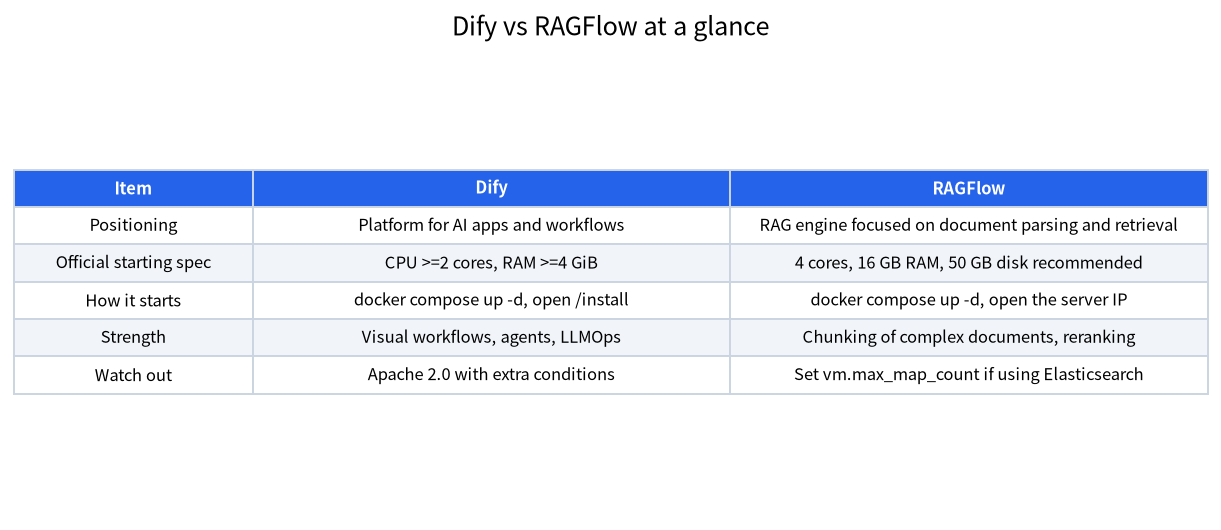
- Dify’s documented minimum is 2 CPU cores and 4 GiB of RAM; RAGFlow recommends 4 cores, 16GB of RAM and 50GB of disk, plus Docker 24.0.0 and Docker Compose 2.26.1 or later.
Both run as Docker Compose stacks and use a separate model server; connect them to Ollama or vLLM and configure both a chat model and an embedding model.
Never publish the Ollama port to the internet; RAGFlow’s own documentation warns to check the firewall before exposing port 11434.
What Each Platform Is For
Dify describes itself as an open-source platform for building AI applications. It lets you design workflows on a visual canvas, add knowledge bases, build agents, connect many model providers, and publish the result as a web app or an API. RAGFlow is a retrieval-augmented generation engine that concentrates on understanding documents: its README highlights document parsing, chunking and re-ranking, and its 1.0 release uses CPU inference for layout analysis, OCR and table recognition in DeepDoc. In short, Dify is the broader app builder, and RAGFlow is the deeper document pipeline. Many teams try both on the same documents and keep the one whose answers they prefer.
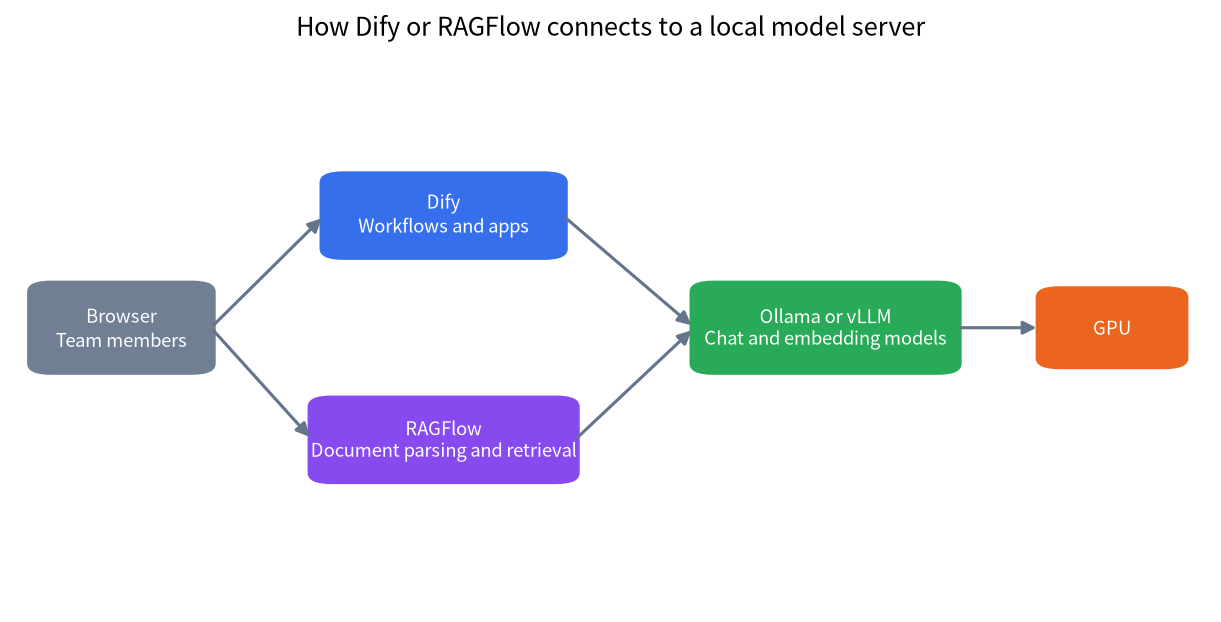
Neither platform is a model. Both call a model server for chat and for embeddings, which is where Ollama or vLLM comes in. If you are choosing between those servers, see our vLLM tutorial and Ollama install guide.
Dify and RAGFlow Local Deployment Requirements
| Item | Dify | RAGFlow |
|---|---|---|
| Minimum CPU and RAM | 2 cores, 4 GiB | 4 cores, 16GB recommended |
| Disk | Not stated as a minimum | 50GB available recommended |
| Docker | Docker 19.03 or later on Linux | Docker 24.0.0 or later |
| Docker Compose | 2.24.0 or later | 2.26.1 or later |
| macOS note | Give the Docker VM at least 2 vCPUs and 8 GiB | Docker Desktop on macOS also works for evaluation |
The numbers come from the projects’ own documentation and describe the platform, not the model. A GPU for the model is separate: the platform containers themselves run on the CPU, so a small server can host them while the model runs on a machine with a graphics card. Our VRAM calculator guide sizes the model side. In the RAGFlow 1.0 documentation, even the document analysis models run on the CPU, so give it enough cores if you will parse many PDFs.
Installing Dify With Docker Compose
Dify’s documentation recommends cloning the latest release, going to the docker folder, copying the example environment file to .env and starting the stack with Docker Compose. After the containers start, open the install page of your server, for example http://localhost/install, to create the administrator account. The commands are:
git clone --branch <latest-release> https://github.com/langgenius/dify.git
cd dify/docker
cp .env.example .env
docker compose up -d
If the clone fails because the release lookup returned null, use an explicit version number as the documentation explains. The Dify license is based on Apache 2.0 with additional conditions, so read it if you plan to offer Dify as a service to others.
Installing RAGFlow With Docker Compose
RAGFlow’s README asks you to check one host setting first: if you use Elasticsearch as the document engine, vm.max_map_count must be at least 262144 on the Docker host, and the value resets on reboot unless you put it in /etc/sysctl.conf. The README says this step is usually unnecessary with Infinity, the other engine it supports. You then clone the repository, go to the docker folder, check out the release tag the README names, and start the stack with Docker Compose. When it is up, open the server’s IP address in a browser; the default port 80 can be omitted.
Use docker ps and the container logs to confirm the services started. After you sign in, you add models on the model provider page: a chat model, an embedding model and, optionally, a reranker.
Connecting a Local Model Server
Both platforms support Ollama and OpenAI-compatible servers such as vLLM. The RAGFlow documentation shows the pattern: start Ollama, pull a chat model and an embedding model, then add them in the model provider page with the server’s address. It also stresses that a chat model is not an embedding model, so a knowledge base needs a separate embedding model; its example uses a small Qwen3 embedding model. The same applies in Dify, where a knowledge base with the High Quality index method uses an embedding model to turn chunks into vectors, and Dify’s documentation notes that you cannot switch a knowledge base from High Quality to Economical later.
Because the platform runs in containers, the address you enter must be reachable from inside the container. The loopback address in a container points to the container itself, so use the host’s LAN address or the name Docker provides for the host. Keep Ollama bound to a trusted network: RAGFlow’s documentation cautions that before you publish port 11434 you should confirm the firewall does not allow public inbound access. For safe remote access, follow our home server security checklist.
Planning the Model Side
The platform is only as useful as the models behind it, and a shared knowledge base puts more load on them than personal chat does. You need at least two models: a chat model that writes the answers and an embedding model that turns documents and questions into vectors. The embedding model is small and fast; the chat model is the one that needs real VRAM, and several users asking at once will multiply the memory needed for context, as our vLLM tutorial explains. For a team of five to ten people with occasional questions, a single 16GB or 24GB card running a 14B to 32B model through Ollama is a common starting point. For heavier use, an engine with continuous batching is worth considering.
Also decide how much context the retrieval step will place in each prompt. A knowledge base that returns several long chunks for every question can easily add thousands of tokens, so set the context length of the chat model accordingly, and check that the model really supports it. If answers seem to ignore the retrieved text, the first things to inspect are the context length, the chunk size and whether the embedding model understands the language of your documents.
Storage, Ports and Backups
Plan the disk before you start. The platform stores uploaded files, a relational database, a vector or search index and logs, and the model server keeps its own weights on disk. A 50GB recommendation from RAGFlow is a starting point, not a ceiling: ten thousand PDF pages can produce a large index, and keeping several model versions adds tens of gigabytes. Put the Docker data folders on a fast SSD, because parsing and indexing are heavily disk-bound, and keep an eye on free space from the first week.
Ports deserve the same attention. Both platforms listen on web ports on the host, and the model server listens on its own port. Decide which of these must be reachable from the office network, and which must stay on the machine. A reverse proxy with HTTPS and authentication in front of the web interface is far safer than opening raw ports, and the model server rarely needs to be reachable by anyone except the platform itself. Finally, schedule a backup of the Docker volumes and test a restore on another machine at least once; an untested backup is only a hope.
A First-Day Test Plan
Start with a small, representative set of documents, ten to twenty files that your users really ask about, including at least one messy PDF with tables. Create a knowledge base, wait for parsing to finish and read how the platform split the text; both platforms let you inspect chunks. Then write twenty questions with known answers, some that quote the text exactly and some that need a paraphrase or a combination of two passages. Run all of them, mark each answer as correct, partly correct or wrong, and note whether the cited source was the right one. Repeat after changing only one thing, such as the chunk size, the embedding model or the reranker. This simple table of results is worth more than any feature list when you decide between Dify and RAGFlow or between two embedding models.
Keep the test set. Every upgrade of the platform, the model or the documents can change the results, and a stored list of questions lets you notice a regression in minutes instead of weeks.
Choosing Between Dify and RAGFlow
| If you want to | Start with | Reason |
|---|---|---|
| Build a chatbot or workflow around your documents | Dify | Visual canvas, agents, many integrations |
| Get the best answers from scanned or complex PDFs | RAGFlow | Document parsing is its focus |
| Run on a small server with little RAM | Dify | Lower documented minimum |
| Try both on the same files | Both, one after the other | Compare answers with real questions |
| Keep it as simple as possible for one user | Neither; use AnythingLLM or Open WebUI | Less to maintain |
Operating the Platform
A platform used by a team needs the same care as any server. Back up the volumes that hold the database and the vector store before every upgrade, and read the release notes, since these projects change quickly. Create separate accounts, and decide who can see which knowledge base before you upload sensitive documents. Check what your configuration sends outside: if you enable web search tools, cloud model providers or telemetry, some data will leave your network, and our privacy guide lists what to check. Finally, test retrieval with questions whose answers you know, and keep that list to compare after every change.
Common Mistakes
- Using a chat model as the embedder. A knowledge base needs an embedding model.
- Using localhost from inside a container. The address must reach the host or the model container.
- Exposing port 11434 or the platform to the internet. Use a VPN or an authenticated reverse proxy.
- Skipping vm.max_map_count with Elasticsearch. RAGFlow may fail to start its document engine.
- Upgrading without a backup. Both platforms store state in volumes that you must protect.
FAQ: Dify and RAGFlow Local Deployment
Can Dify and RAGFlow run fully offline?
Yes, if you use local models and disable cloud providers and web tools. You still need internet access to download images and models at first.
Do they need a GPU?
The platforms run on the CPU. The model server needs a GPU for good speed with larger models.
Which is easier to install?
Both use Docker Compose. Dify’s documented minimum is lower; RAGFlow needs a host setting if you use Elasticsearch.
Can I use Ollama with both?
Yes. Both can connect to Ollama, and RAGFlow’s documentation also covers vLLM.
Is Dify really open source?
The repository uses the Dify Open Source License, based on Apache 2.0 with additional conditions; read the licence for commercial uses.
Which embedding model should I pick?
Choose one that supports your language, test it on sample questions and avoid changing it later, because documents must be re-embedded.
Talk With Us
Designing a shared knowledge base for a team? Join the community or email admin@microaione.com.
References: Dify README, Dify Docker Compose guide, RAGFlow README, RAGFlow local models guide.