Strata Install Guide: Set It Up Beside Ollama on Windows or Linux, Step by Step
Updated 2026-11-04. This Strata install guide follows the project’s own documentation (INSTALL.md and TERMINAL_LAUNCH.md) as of v0.2.10. We have not run the installer ourselves, so every step is attributed to its source and you should read the current docs before you start.
If you already use Ollama and want a Strata install guide for a very large model such as Qwen3.8-Flash-Next, the good news is that the two do not fight over ports or model folders. The bad news is that they do fight over graphics memory and RAM. This guide covers the checks to make first, the two ways to install, the commands that matter, how to connect coding tools, how to run Strata beside Ollama, and what testers say goes wrong. If you are still deciding whether you need it, read our Strata vs Ollama comparison first.
Before you start
| Check | What the docs say |
|---|---|
| Operating system | Windows 10/11 or Linux x86-64 for NVIDIA RTX cards; macOS 15 or newer on Apple Silicon; Linux for Intel Arc; separate guides for AMD Radeon, Ryzen AI Max and DGX Spark |
| NVIDIA driver | CUDA 13 packages need driver 580 or newer; older cards use a CUDA 12 engine |
| GPU memory | 12 GB or more is recommended for Qwen3.8-Flash-Next |
| RAM | Depends on the size you pick, from about 38 GB to 55 GB for the model alone; see the next section |
| Disk | About 80 GB free on an SSD, reported by a reviewer who followed the docs; DeepSeek V4.1-Flash needs far more |
| Internet | Needed to download models and engine updates |
Install a graphics driver first; Strata’s packages do not replace it. Then close other GPU-heavy programs. Memory planning is covered in our hardware requirements article.
Two ways to follow this Strata install guide
| Desktop app | Terminal | |
|---|---|---|
| Best for | A window with chat and settings | Coding tools, servers and scripts |
| How | Download the installer from the latest release: a Windows .exe setup (no administrator rights), a Linux AppImage or a macOS .dmg |
Run the one-line installer, then strata launch |
| Engine | Downloaded on first start for your GPU | Fetched with the first model, signature checked and test-started |
For the terminal, the documentation gives a Linux and macOS command that first saves the script and then runs it, and a PowerShell command for Windows. Open the script and read it before you run it; it executes with your user rights.
curl -fsSL https://github.com/Niko1221/Strata/releases/latest/download/install.sh -o install.sh
less install.sh
sh install.sh
On Windows PowerShell the documented line is irm https://github.com/Niko1221/Strata/releases/latest/download/install.ps1 | iex; if you prefer, download the file, read it, then run it. Open a new terminal afterwards so strata is on your PATH. If an AppImage will not start because FUSE is missing, the docs suggest running it with --appimage-extract-and-run.
Step by step in the terminal
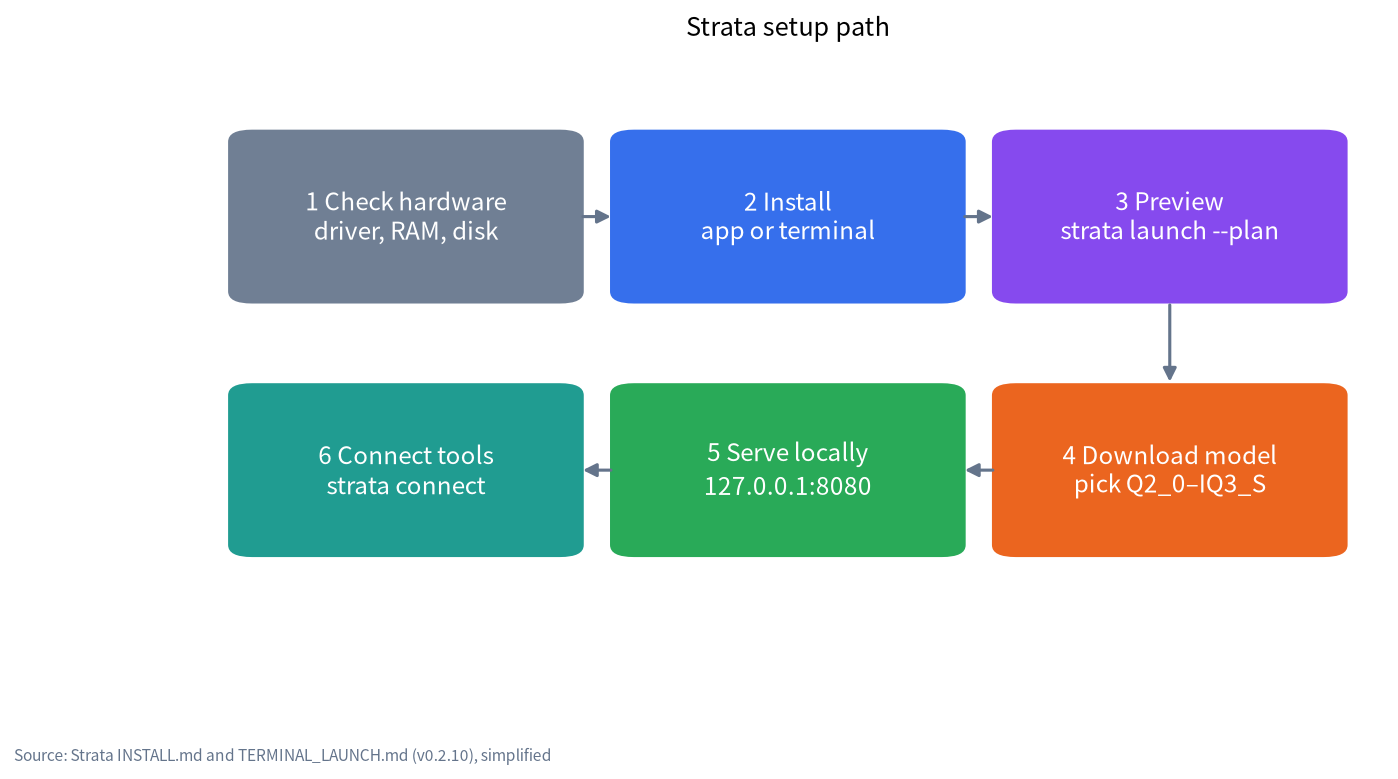
- Preview first.
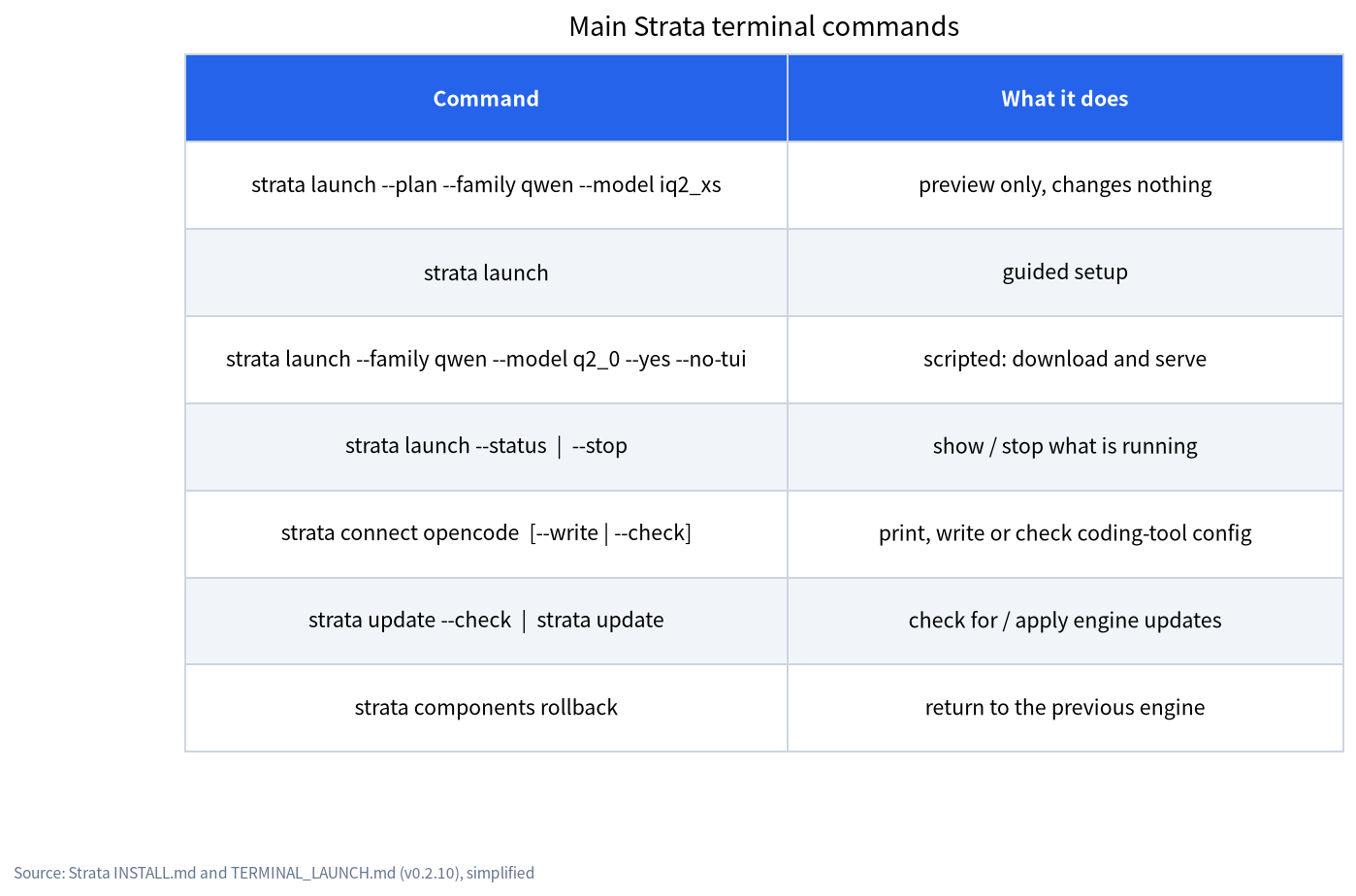
strata launch --plan --family qwen --model iq2_xsprints what would happen and changes nothing. It also tells you what is missing. - Guided setup. Run
strata launchand follow the screens: model, folder, context (8K to 512K), pictures, parallel requests, tuning, access and a saved preset. For parallel requests the default fits your card: 1 on a 12 GB GPU, 2 on 20 GB, 3 on 24 GB and 4 on 32 GB or more. Quick tuning takes about 20 minutes and is optional. - Scripted setup.
strata launch --family qwen --model q2_0 --yes --no-tuidownloads, serves, prints the address and returns.strata launch --statusshows what is running andstrata launch --stopstops it.
Which size to pick
| Size | RAM + VRAM for the model | The docs’ description |
|---|---|---|
| Q2_0 | 37.6 GB | Fastest, good quality |
| IQ2_XS | 39.2 GB | Fast, better quality |
| IQ3_XXS | 47.0 GB | Slower, great quality |
| IQ3_S | 54.8 GB | Slowest, best quality; the docs say it matches the full model on the published tests |
Leave memory for the operating system. On a 12 GB card with 64 GB of RAM, testers have used IQ2_XS and IQ3_S. PC Watch found short chats comfortable on IQ2_XS but code generation a step below IQ3_S, so pick the larger size if you code and have the RAM.
Check that the server works
The default address is http://127.0.0.1:8080. Strata exposes /health, /v1/models, the OpenAI Chat Completions path /v1/chat/completions, the Anthropic path /v1/messages and a Responses path.
curl http://127.0.0.1:8080/health
curl http://127.0.0.1:8080/v1/models
Use the model name returned by /v1/models in your client. Any OpenAI-compatible client, including Open WebUI (see our Open WebUI guide), can point at http://127.0.0.1:8080/v1. The server listens on your PC only. If you open it to your network, a Cloudflare tunnel or Tailscale, set an API key, because without one anyone who can reach the port can use the model and its tools. Our local LLM API server guide covers the general safety rules.
Connect coding tools with strata connect
strata connect lists OpenCode, Codex CLI, Claude Code, oh-my-pi, pi, Hermes Agent and OpenClaw. strata connect opencode prints the configuration, --write writes it after asking (anything replaced is backed up) and --check sends one prompt and one tool call the way that app does. The documentation lists known limits: Claude Code needs the CLAUDE_CODE_MAX_CONTEXT_TOKENS setting, OpenCode needs limit.input, Hermes refuses windows under 64K unless configured, and OpenClaw needs Node 24.16 or newer. A tester running OpenCode saw a tool call emitted as plain text end a task early and fixed it with Strata’s tool_call_recovery option; read that report.
Running Strata beside Ollama
| Topic | Strata | Ollama | What to do |
|---|---|---|---|
| Default port | 8080 | 11434 | No clash. Change Strata’s --port if another tool already uses 8080 |
| Model files | Its own install folder (~/.local/share/strata/install on Linux, %LOCALAPPDATA%\Strata\install on Windows) |
Ollama’s model folder; see our Ollama model path guide | Keep them apart; Strata’s docs describe no import from Ollama |
| GPU memory | Fills VRAM with an expert cache | Loads a model when asked and unloads it after idle time | Run ollama stop <model> before starting Strata |
| RAM | Pins all experts in RAM | Loads per model | Do not run two large models at once |
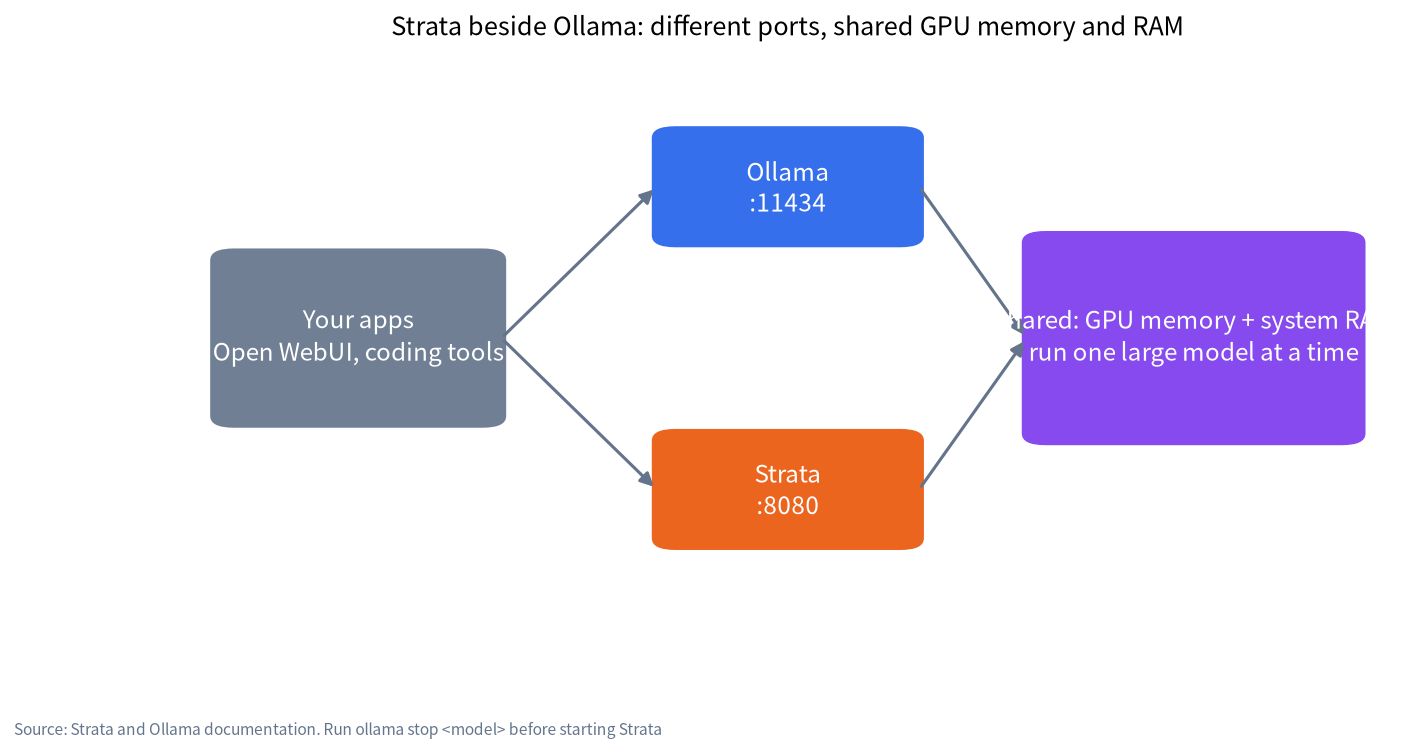
Strata’s strata models import PATH --plan recognizes specific file sets that Strata itself installs; nothing is copied or moved. We found nothing in the documentation about reusing Ollama’s downloaded model files, so assume you will download Strata’s packs separately. For Ollama itself, see our Ollama install guide.
Troubleshooting from public reports
| Symptom | Likely cause | What testers did |
|---|---|---|
| Very slow first minute | Engine and packs downloading or loading | Wait, then check strata launch --status |
| System lags, swap grows | Not enough RAM for the size | Pick a smaller size or close apps; one laptop with 30 GB of RAM swapped 4 to 5 GB |
| Long thinking never answers | Reasoning runs away | One tester on Proxmox set a 4,096-token reasoning budget and kept IQ3_S |
| Slow first token on long files | Prefill on a 12 GB card | Shorter context or smaller prompts; PC Watch saw about 25 s for 23k tokens |
| Settings seem hidden | Some options live in settings.json |
A Japanese user on note.com found them undocumented at the time; check the current docs |
| Port already in use | Another server on 8080, such as llama-server |
Pass a different --port |
A safe first-run checklist
Because Strata is new and fast-moving, a few habits save trouble.
- Use a test machine or a clean user account first. The installer is convenient, but you are running someone else’s script, and the project itself says it has had no outside security audit.
- Run the plan before the download.
strata launch --planshows which files will be fetched and how much space they take, so you do not discover a full disk 30 GB into a download. - Start with the smallest size. Q2_0 or IQ2_XS shows whether your RAM, driver and cooling are fine before you commit to the bigger packs.
- Keep it on localhost. Leave the access setting on “this computer only” until the model works. If you share it later, turn on the API key.
- Record what works. Save a preset with a name so you can restart with the same settings after an update.
- Watch temperatures and memory. One tester’s SSD read about 6.9 TB in a 1.3-hour run, and another’s laptop swapped; a monitor window or the Strata monitor tab will show trouble early.
Updating
In the terminal, strata update --check and strata update handle engine updates; with a model loaded, the command asks before stopping it. strata components rollback returns to the previous engine. In the app, use the update controls in Settings. Because releases arrive every two days or so, review the release notes before updating a setup that works.
What we did and did not do
We read the project’s INSTALL, terminal and model documents and the third-party reports linked above on 2026-11-04. We did not install Strata, so no command here was run by us. Version numbers and flags change quickly; trust strata launch --help over this page.
FAQ
Can Strata and Ollama run at the same time?
Yes, on different ports, but they share GPU memory and RAM. Stop the Ollama model before loading a large model in Strata.
Do I need to uninstall Ollama first?
No. They use different ports and model folders.
Can Strata reuse the models I already pulled with Ollama?
We found no documented import from Ollama. Strata downloads its own packs, so plan for the extra disk space.
How much disk space do I need?
About 80 GB free for Qwen3.8-Flash-Next according to a reviewer who followed the docs, and 239 to 274 GB for DeepSeek V4.1-Flash according to the project.
Is it safe to run the one-line installer?
It is a script that runs with your user rights. Save it, read it, and download only from the official repository. The project says it sends no telemetry, but also that it has had no outside security audit.
Which address do my apps use?
http://127.0.0.1:8080/v1 for OpenAI-compatible clients. Use the model name shown by /v1/models.
Talk with us
Stuck on a driver, a memory limit or a connection? Join the community or email admin@microaione.com with your GPU, RAM and error text. If you would rather have a tested machine, see our machines and solutions guide.