
Best GPU for Local LLMs: A VRAM Tier Table (2026)
Fact-check note: Card specs come from NVIDIA’s official product pages. Prices are US-market asking prices aggregated by readygpu.com and read on 29–30 October 2026; they are dated snapshots, and China-market reference prices are in the paragraph below the price table. Speeds and memory use come from third-party estimates or Ollama pages; we ran no benchmarks.
The short answer for anyone hunting the best GPU for local LLM use: it isn’t the fastest card, it’s the card whose VRAM is just enough for the model you actually want to run, with enough memory bandwidth to feel responsive. Capacity decides whether the model fits on the GPU; bandwidth largely decides how fast tokens come out; power, size and price decide whether you can fit and afford it. Below, we go tier by tier from 8GB to 32GB, then a dated price snapshot and a pitfall checklist.
If the link between VRAM and model size is still fuzzy, read How Much VRAM Does an LLM Need? first.
Best GPU for Local LLM Use: A VRAM Tier Table
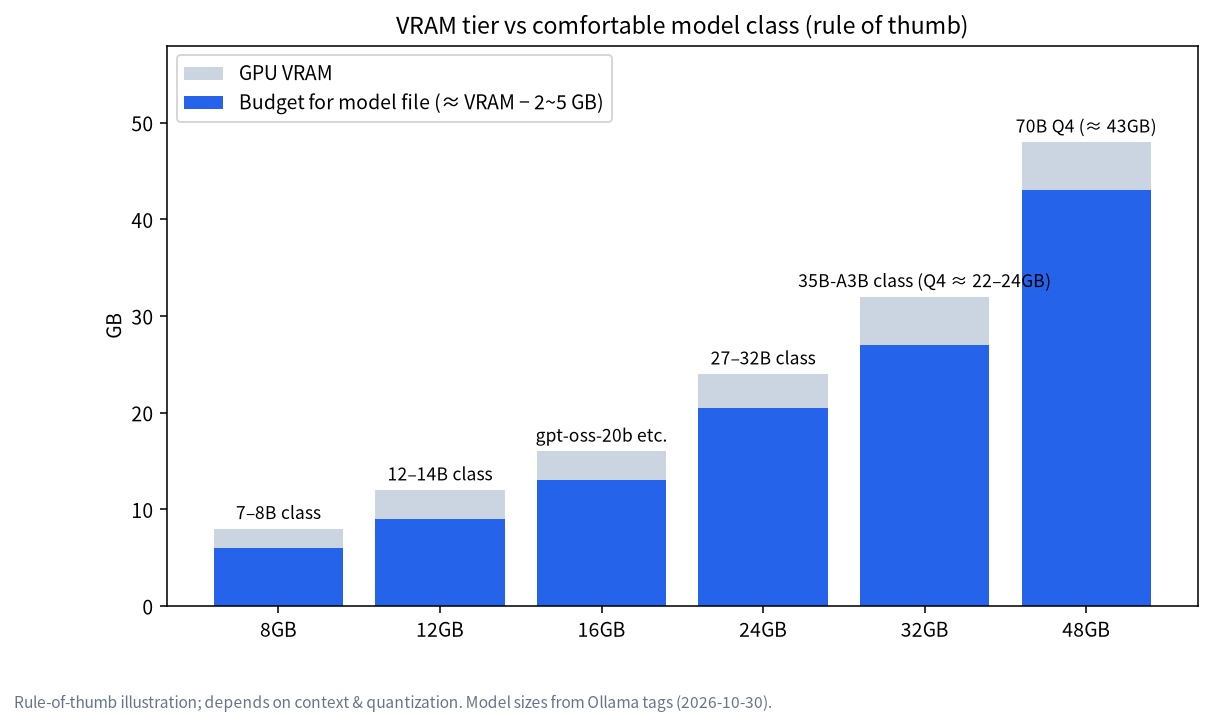
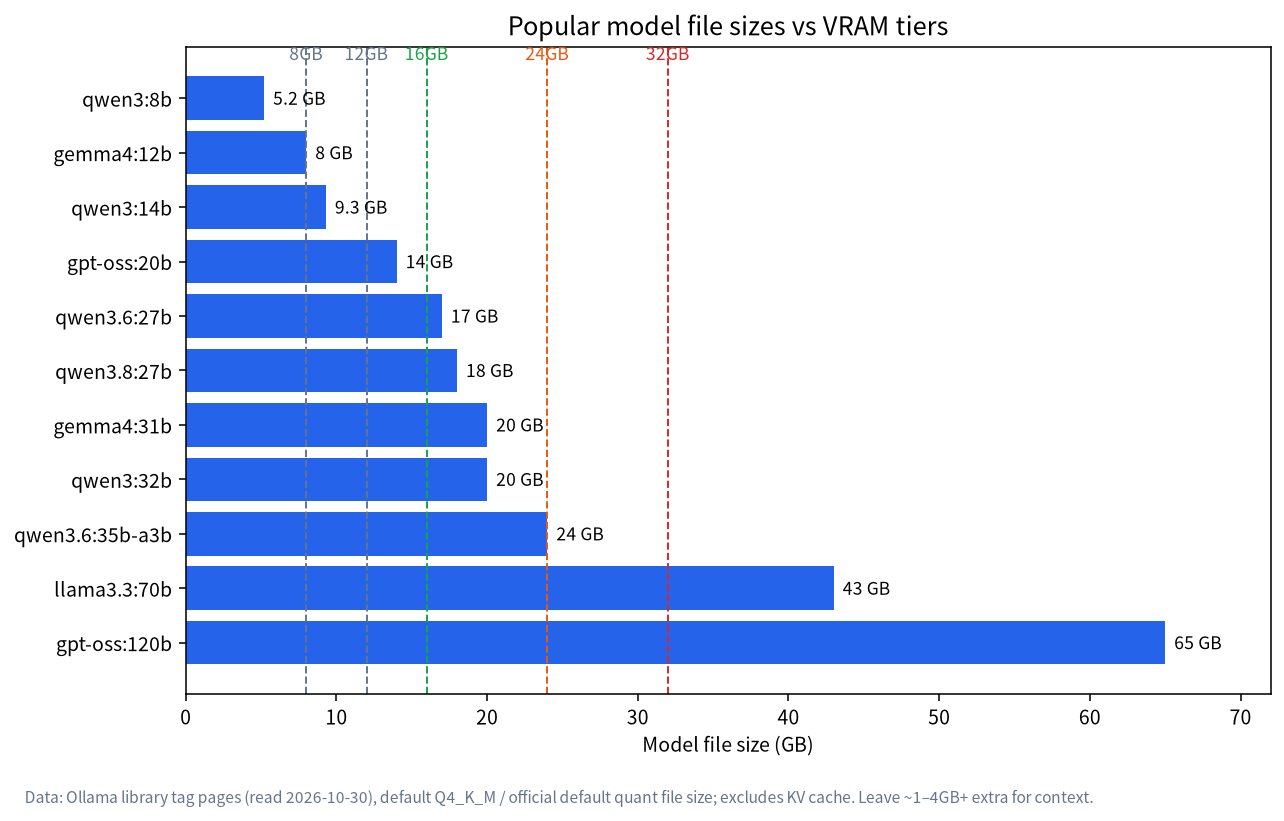
Model file sizes come from the Ollama library (read 2026-10-30) at Q4_K_M or the official default quantization. Real use also needs 1–4GB or more for context. The pairing of tiers and models is our rule-of-thumb synthesis from third-party guides, not a performance promise.
| VRAM tier | Model class that runs comfortably | Example models (file size) | Example cards (VRAM / bandwidth) | Who it suits |
|---|---|---|---|---|
| 8GB | 7B–8B | qwen3:8b (5.2GB) |
RTX 4060 class (8GB) | Getting started, light Q&A |
| 12GB | 12B–14B | gemma4:12b (8.0GB), qwen3:14b (9.3GB) |
RTX 3060 12GB (360GB/s), RTX 5070 (12GB / 672GB/s) | Tight budgets wanting better answers |
| 16GB | about 20B | gpt-oss:20b (14GB) |
RTX 5060 Ti 16GB (448GB/s), RTX 5070 Ti / 5080 (16GB / 896–960GB/s) | Best value |
| 24GB | 27B–32B | qwen3.6:27b (17GB), qwen3:32b (20GB), gemma4:31b (20GB) |
RTX 3090 (936GB/s), RTX 4090 (1008GB/s) | The individual’s main tier |
| 32GB | 35B-class MoE, high-precision 27B | qwen3.6:35b-a3b (24GB), qwen3.8:27b-q8_0 (30GB) |
RTX 5090 (1792GB/s) | Speed and headroom |
| 48GB+ | 70B | llama3.3:70b (43GB) |
Multi-GPU, pro cards, big unified-memory machines | Workstations, small teams |
Why bandwidth matters too
Generating each token means reading the model weights from memory once, so as long as the model fits, higher bandwidth means faster output. The chart puts several GPUs and unified-memory machines side by side (bandwidth data from readygpu.com, Apple’s site and NVIDIA’s documentation):
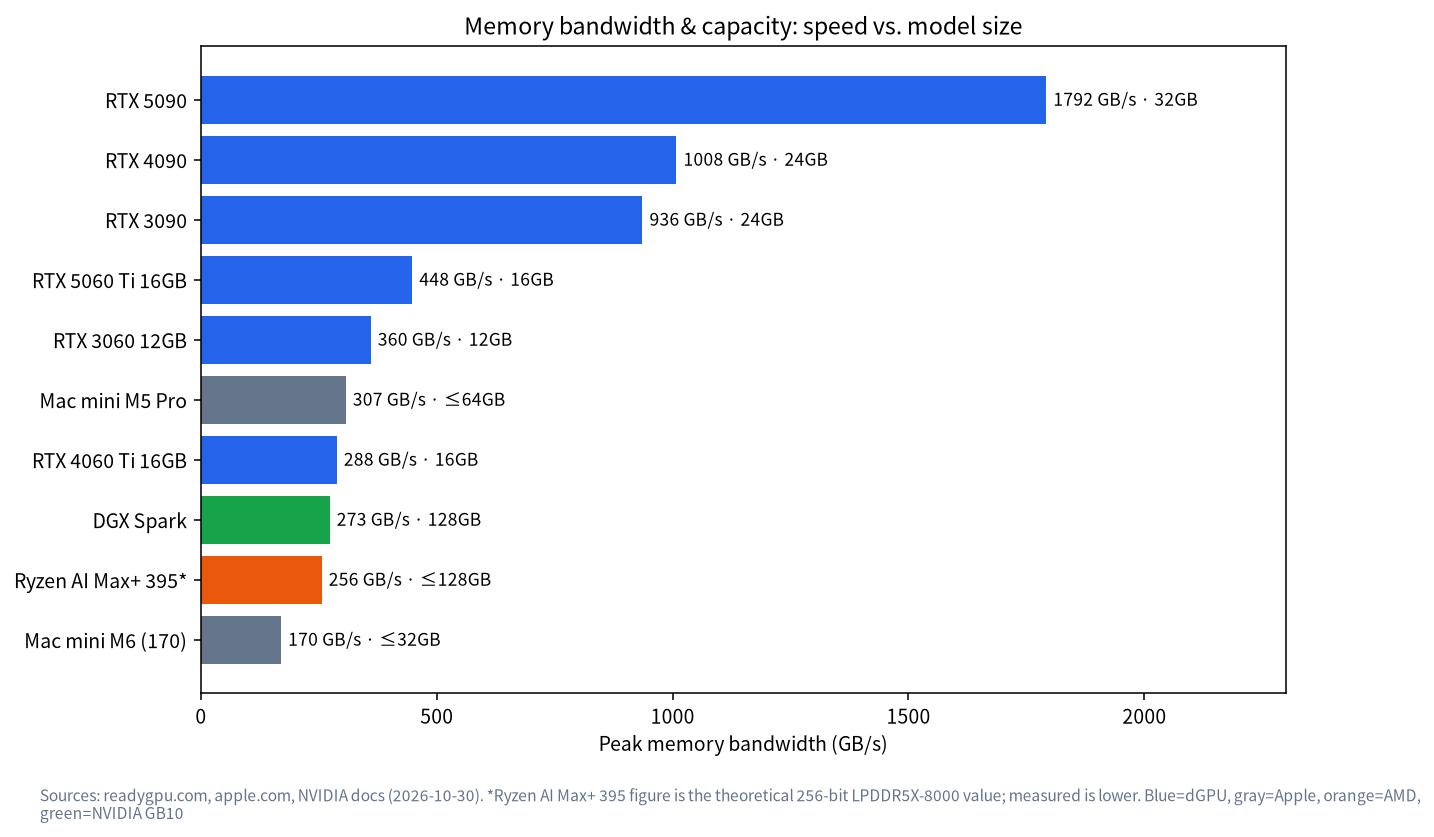
Two notes. Big unified-memory machines (Mac, Ryzen AI Max+, DGX Spark) can hold larger models but their bandwidth is below high-end discrete cards, so the same model usually generates more slowly than on an RTX 3090/4090/5090. And the 256GB/s shown for Ryzen AI Max+ 395 is a theoretical figure; measured effective bandwidth is lower. For those machines see Running LLMs on a Mac and Buying a Local LLM All-in-One Machine.
How to Choose Within Each Tier
8GB: entry level only
Eight gigabytes comfortably runs 7B–8B models with modest context. Specific picks are in What Can an 8GB GPU Run?. If you only want to try things, it’s enough; if you already know this will be a long-term habit, jump to 16GB or 24GB. The price gap is often smaller than the time you lose to a model that doesn’t fit.
12GB: the RTX 3060 12GB as a classic starter
readygpu.com lists the RTX 3060 12GB at 360GB/s, with US-market pricing on 2026-10-30 of roughly $370 new and from about $300 used (asking). Twelve gigabytes holds 12B–14B Q4 models, but headroom is limited.
16GB: the value zone, led by the RTX 5060 Ti 16GB
NVIDIA’s page lists the RTX 5060 Ti at 180W total graphics power with a 600W recommended PSU, friendly to ordinary cases and power supplies. Sixteen gigabytes fits a 20B-class model such as gpt-oss:20b (14GB) and, very tightly, a 14B at Q8 (about 15–16GB). readygpu.com lists 448GB/s and a US new price from about $618 on 2026-10-30 (asking).
24GB: the sweet spot for individuals
Twenty-four gigabytes fits 27B–32B Q4 models with room left for context, making it the best-value main tier. The usual picks are the RTX 3090 (mostly used) and RTX 4090. NVIDIA’s reference points: RTX 4090 at 450W with an 850W recommended PSU, and a 750W recommended PSU for the RTX 3090. Both are large 3-slot-class cards, so measure the case. Details in What Can a 24GB GPU Run?.
32GB: the RTX 5090
The RTX 5090 has 32GB of VRAM and 1792GB/s of bandwidth (readygpu.com); NVIDIA’s page lists 575W total graphics power and a 1000W recommended PSU. It runs everything in the 24GB tier comfortably and can hold a roughly 30GB Q8 of a 27B model (qwen3.8:27b-q8_0 is 30GB, a very tight fit). The cost is price, power and heat, all clearly higher.
Price Snapshot (30 October 2026, US asking prices)
Data is the lowest new and lowest used asking prices aggregated by readygpu.com. It’s a snapshot only; GPU prices swing widely, China-market prices differ markedly, and used asking prices are sometimes above new listings.
| GPU | VRAM | Lowest new asking | Lowest used asking | Note |
|---|---|---|---|---|
| RTX 3060 12GB | 12GB | about $370 | about $300 | Entry card |
| RTX 5060 Ti 16GB | 16GB | about $618 | about $725 | 16GB value card |
| RTX 4060 Ti 16GB | 16GB | about $780 | about $650 | Only 288GB/s bandwidth |
| RTX 5070 Ti | 16GB | about $1,460 | about $1,330 | 896GB/s bandwidth |
| RTX 3090 | 24GB | about $1,698 | about $1,599 | See used-card risks below |
| RTX 4090 | 24GB | about $2,073 | about $3,300 | Used above new listing; volatile |
| RTX 5090 | 32GB | about $5,654 | about $6,450 | Far above launch pricing; volatile |
Memory and GPU prices have also been volatile in China this year. China-market reference prices, estimated from Oct 2026 median market prices (the actual quote prevails): RTX 3060 12GB new about 3,475 RMB, RTX 5060 Ti 16GB about 5,599 RMB, used RTX 3090 about 7,550 RMB, RTX 4090 about 26,465 RMB, RTX 5090 new about 53,500 RMB, and RTX PRO 6000 96GB workstation edition about 143,000 RMB. These are medians of public quotes from JD, Taobao, ZOL, SMZDM, Guangzhou parts-market reports and Xianyu listing-median aggregators between 15 and 30 October 2026; late-October GPU prices change every day or two, so the actual quote prevails.
Picking a Card by Use Case
“Running a model locally” can mean very different things. This table is our rule-of-thumb synthesis to narrow the field, not a performance guarantee:
| Use case | Suggested starting tier | Why | Watch out for |
|---|---|---|---|
| Everyday Q&A, rewriting, translation | 8–12GB | 7B–14B models handle most daily tasks | Keep context modest; long documents slow things down |
| Coding assistant, long-document analysis | 16–24GB | Larger models and longer context; the KV cache is hungry | Ollama recommends at least 64000 tokens of context for agents and coding, so leave VRAM headroom |
| Shared by several people, several models loaded | 24GB+ | Concurrency adds cache use; several resident models need more VRAM | Control with OLLAMA_NUM_PARALLEL and OLLAMA_MAX_LOADED_MODELS; see the Ollama Install Guide |
Beyond the GPU: What the Rest of the Machine Needs
Many buyers spend the whole budget on the card and let the rest of the machine drag. Once VRAM holds the model, other parts only need to be adequate, but a few checks are mandatory:
| Part | Suggestion | Notes |
|---|---|---|
| Power supply | The card maker’s recommendation, plus headroom | 1000W recommended for the 5090, 850W for the 4090, 600W for the 5060 Ti |
| System RAM | At least your VRAM size, ideally 2x | Model loading, any spilled layers and the OS all need it |
| Storage | 1TB NVMe SSD at least | A 30B-class model file is close to 20GB; a few models fill a disk fast |
| Case and airflow | Check card length and thickness | Flagship cards are thick; a small case will run hot and throttle |
| Motherboard and PCIe | A standard x16 slot is fine for one card | Lane counts matter only when splitting across several cards |
Budget tiers for whole systems are in Local LLM PC Build Guide.
Running Cost: How to Estimate the Electric Bill
A card’s rated power is a ceiling; real inference draw depends on the model and load. We haven’t measured it, so what follows is an estimation formula, not a finding:
Monthly cost ≈ average power (kW) × hours per day × 30 × electricity price per kWh
A purely hypothetical example (the numbers are invented, only to show the arithmetic): 0.3kW average, 4 hours a day, at 0.15 per kWh gives 0.3 × 4 × 30 × 0.15 = 5.4 in your currency per month. Plug in your own tariff and draw, then compare with the cost reasoning in Local LLM vs Cloud API.
Buying Checklist and Pitfalls
- Choose the model first, then the VRAM. If you want 27B–32B, don’t buy 16GB; if you want 70B, don’t expect one 24GB card to do it.
- Capacity beats “newer generation”. For local LLMs an older 24GB card often beats a newer 16GB one, because anything that spills into system RAM falls off a speed cliff.
- Check bandwidth. At equal capacity, higher bandwidth generates faster; the RTX 4060 Ti 16GB (288GB/s) and 5060 Ti 16GB (448GB/s) differ markedly.
- Budget for power and cooling. NVIDIA recommends a 1000W PSU for the 5090 and 850W for the 4090. Don’t economise on the power supply.
- Inspect used cards. Mining wear, reflowed boards, ageing fans and memory faults are common risks; ask for a live stress test and a real
ollama runbefore paying. - Mind case dimensions. Flagship cards often exceed the clearance of mid-tower cases (see the photo below).
- Software support. NVIDIA is the least troublesome; for AMD check ROCm/Vulkan support, and see Ollama Troubleshooting for diagnosing detection problems.
A Used-Card Inspection Routine
Used 24GB cards are popular because they are the cheapest way into the main tier, but they carry real risk. Before paying, run through this routine:
- Ask for a live session, not just photos: GPU-Z or
nvidia-smishould show the correct model, 24GB of memory and a sane temperature at idle. - Run
ollama runwith a model that fills most of the VRAM (for example a 20GB-class model) and watch for crashes, artefacts or sudden slowdowns. - Listen for fan noise or rattles and check that every fan spins up and down.
- Look for signs of heavy mining use: dust packed in the fins, discoloured screws, removed warranty stickers.
- Agree a return window in writing; if the seller refuses a short one, walk away.
FAQ
What’s the minimum GPU for local LLMs?
For 7B–8B models, 8GB of VRAM is the starting point; for noticeably better answers, 12–16GB suits better. If your budget allows, 16GB is the safer floor.
RTX 3090 or RTX 4090 for 24GB?
Both have 24GB. The 4090 has higher bandwidth (1008GB/s vs 936GB/s) and higher power draw, and the price gap depends on the market at the time. If your goal is simply “the model fits”, the 3090’s capacity is enough; choose the 4090 if speed matters. Check current prices before deciding.
Can I use system RAM when VRAM runs out?
It runs, but layers in system RAM make it noticeably slower. Ollama automatically uses system RAM when VRAM is short; ollama ps shows the CPU/GPU split.
Do two 16GB cards equal one 32GB card?
Some inference engines support splitting across GPUs, but it isn’t lossless in every case and needs a compatible motherboard, PSU and case. Most individuals are better served by one large-VRAM card.
Mac or GPU?
A Mac’s unified memory fits bigger models and runs quietly, but bandwidth is below high-end discrete GPUs; NVIDIA offers the more mature ecosystem and speed. Weigh budget and target model; see Running LLMs on a Mac.
I want a whole machine. Where do I start?
Start with Local LLM PC Build Guide, organised by budget tier.
Next Steps and Community
If you can’t decide whether a card is worth buying, bring your budget and target models to the community (join the community). Our team in Shenzhen handles sourcing, assembly and testing for local-LLM machines and can give you a tiered configuration for your budget. Talk first; no pressure to buy.