
Run Qwen Locally: Picking a Qwen3, 3.5, 3.6 or 3.8 Size
Fact-check note: File sizes, context windows and feature descriptions were read from Ollama’s official model pages on 2026-10-30; VRAM estimates come from CanRun. We did not benchmark speed or quality ourselves, and we don’t quote vendor benchmark scores. Third-party estimates can differ from a real load, so trust
ollama ps.
Qwen is one of the most common open model families for local use: sizes run from under 1GB to well over 140GB, and most of them start with a single Ollama command. This guide focuses on how to run Qwen locally: what Qwen3, Qwen3.5, Qwen3.6, Qwen3.8, Coder and VL each are, how big the files are, which one your GPU should take, and how to start it and control thinking mode. If you’re new to Ollama, begin with Install Ollama.
Before You Run Qwen Locally: Know the Family
| Series | Sizes on Ollama (file size) | Context window (as listed) | Input | Notes |
|---|---|---|---|---|
| Qwen3 | 0.6b 523MB; 1.7b 1.4GB; 4b 2.5GB; 8b 5.2GB; 14b 9.3GB; 30b 19GB; 32b 20GB; 235b 142GB | Mostly 40K; 4b, 30b and 235b list 256K | Text | A mix of dense and MoE models, supports 100+ languages |
| Qwen3.5 | 0.8b about 1.2GB; 2b about 2.7GB; 4b about 3.3GB; 9b about 6.6GB; 27b 17–20GB; 35b 22GB; 122b 81GB | 256K | Text and image | A unified vision-language foundation |
| Qwen3.6 | 27b 18–19GB; 35b 23GB | 256K | Text and image | Stronger agentic coding; can retain reasoning from earlier messages |
| Qwen3.8 | 27b 18GB | 256K | Text and image | Thinking on by default, can be disabled per request |
| Qwen3-Coder | 30b 19GB; 480b 290GB | 256K | Text | A code-focused MoE: 30B total, about 3.3B active |
| Qwen3-VL | 2b 1.9GB; 4b 3.3GB; 8b 6.2GB; 30b 20GB; 32b 21GB; 235b 143GB | 256K | Text and image | Vision understanding; needs Ollama 0.12.7 or newer |
A few points. Qwen3’s 30B is a MoE model that activates only about 3.3B parameters per token, so it generates quickly, but the entire 19GB file has to sit in memory. Qwen3-Coder’s 480B needs at least 250GB of memory to run locally, which is beyond personal hardware. Sizes are for Ollama’s default quantization; other tags (such as MLX) differ slightly.
Run Qwen Locally by VRAM: Choosing a Size for Your GPU
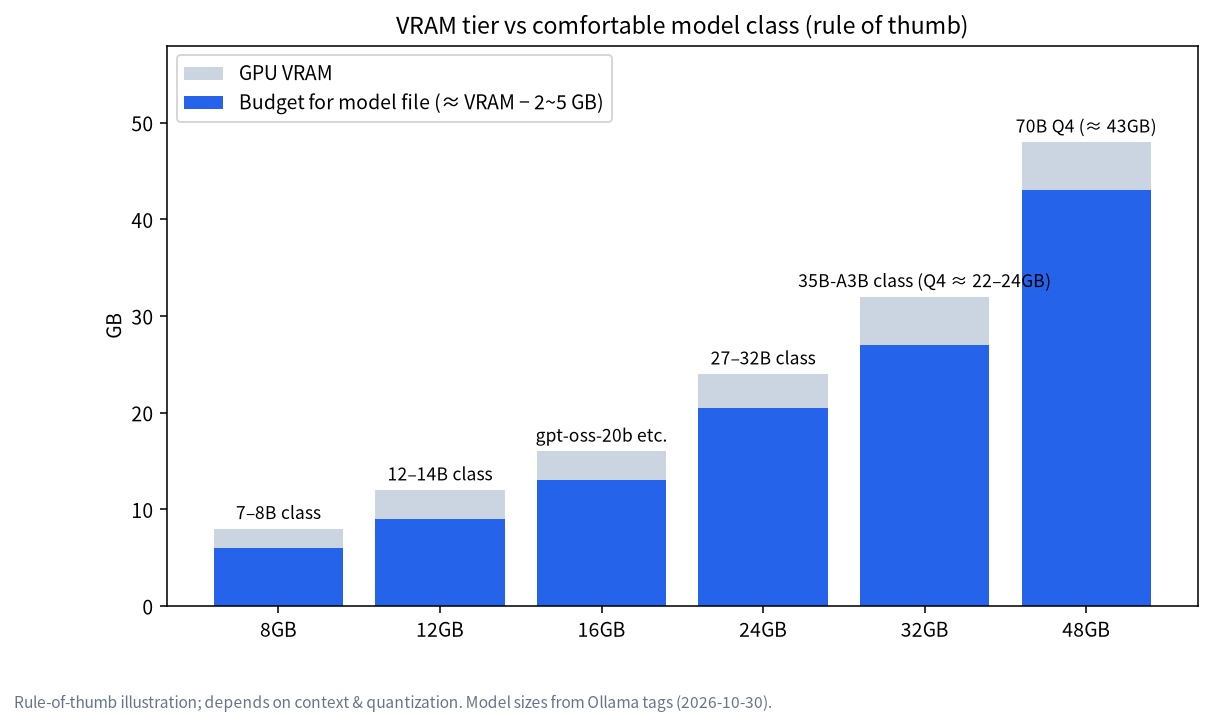
The table combines Ollama file sizes with CanRun’s 8k-context estimates:
| VRAM tier | Suggested Qwen tag | File size | CanRun 8k estimate | Notes |
|---|---|---|---|---|
| 8GB | qwen3:8b |
5.2GB | Not listed separately | Use 4k context; an 8GB card offers about 7.4GB usable |
| 8GB | qwen3.5:9b |
6.6–7.6GB | Not listed separately | Accepts images, but the margin is small |
| 12GB | qwen3:14b |
9.3GB | 10.5GB | Just fits; keep context to 4k–8k |
| 16GB | qwen3:14b |
9.3GB | 10.5GB | Roomy; allows longer context |
| 24GB | qwen3.6:27b |
18–19GB | 17.2GB | The 27B with the widest margin |
| 24GB | qwen3.8:27b |
18GB | 17.6GB | Same class, newer |
| 24GB | qwen3:30b (MoE) |
19GB | 19.8GB | Fast |
| 24GB | qwen3:32b |
20GB | 22.0GB | Thin margin; short context only |
| 24GB | qwen3.6:35b (MoE) |
23GB | 21.8GB | Tight |
| 64GB+ unified memory | qwen3.5:122b |
81GB | Not listed separately | Needs a large-memory machine |
CanRun’s Qwen estimates at 8k context: Qwen3 14B about 10.5GB in total; Qwen3.6 27B about 17.2GB (16.1GB weights plus 0.5GB KV cache); Qwen3.8 27B about 17.6GB; Qwen3 30B-A3B about 19.8GB; Qwen3 32B about 22.0GB (19.3GB weights plus 2.1GB KV cache); Qwen3.6 35B-A3B about 21.8GB. An 8GB card offers about 7.4GB usable, a 12GB card about 11.4GB, and a 24GB card about 23.4GB. For the method, see How Much VRAM Does an LLM Need?.
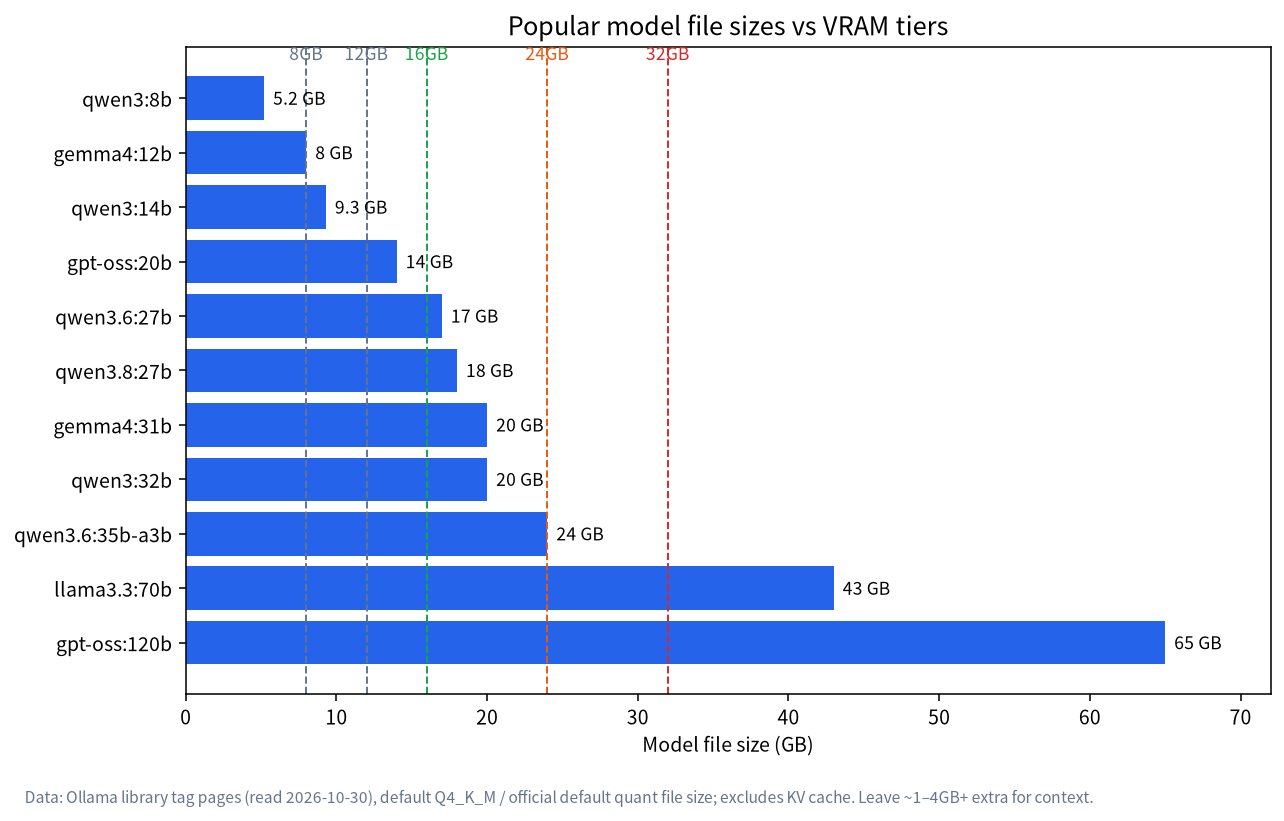
For tier-specific detail, read LLM on 8GB VRAM and LLM on 24GB VRAM.
Step by Step: Getting It Running
Assuming Ollama is already installed:
ollama pull qwen3:8b
ollama run qwen3:8b
The first command downloads the model and the second opens a chat. For a newer 27B-class model:
ollama run qwen3.6:27b
Once loaded, run ollama ps in another terminal and check that PROCESSOR reads 100% GPU; if a CPU share appears, the model doesn’t fit, so step down a size.
Calling it through the API is just as easy, using the format shown on Ollama’s page:
curl http://localhost:11434/api/chat -d '{
  "model": "qwen3.6:27b",
  "messages": [{"role": "user", "content": "Hello!"}]
}'
For a chat interface, see Open WebUI with Ollama.
Qwen’s Thinking Mode: On or Off?
The Qwen3.8 page says thinking mode is on by default and can be disabled per request, that reasoning depth can be tuned with reasoning_effort, and that reasoning from earlier messages is retained with preserve_thinking. Qwen3.6 adds an option to keep reasoning context from historical messages.
In Ollama’s API the think field controls this: true requests thinking output, false requests none (if the model permits), and leaving it unset uses the model default. Reasoning and the final answer come back in separate fields, message.thinking and message.content. The docs also note that thinking controls vary by model and can be discovered through /api/show.
Practical advice: turn thinking off for writing, chat and translation to get faster replies, and turn it on for maths, logic and difficult coding. Remember that thinking consumes context and time, and on cards under 24GB the context has to be shared with the reasoning trace.
Coding: Qwen3-Coder and the Newer 27B
The 30B version of Qwen3-Coder is a 19GB file on Ollama, listed with a 256K context, 30B total and about 3.3B active parameters, a good fit for completion and repository-scale reading on a 24GB card. The page also lists launch commands such as ollama launch claude --model qwen3-coder for connecting a local model to common coding-agent tools; supported tools and versions are as per the official page.
The Qwen3.6 page emphasises agentic coding upgrades. One caveat: agent and coding tools usually need long context (the official guidance is at least 64000 tokens), so on cards under 24GB you either pick a smaller model or combine it with KV-cache quantization, as explained in LLM Quantization and Q4_K_M.
Vision Models: Qwen3-VL and Image Input on 3.5 and 3.6
Qwen3-VL has six sizes from 2b (1.9GB) to 235b (143GB); the 8b version is only 6.2GB, so it suits image tasks on an 8GB card. The Qwen3.5, Qwen3.6 and Qwen3.8 pages list input as “text and image”, meaning the newer generation has vision built in. To read screenshots, tables or document images you can pick these directly without installing a separate vision model.
Licence and Commercial Use
The Hugging Face model page we checked lists Qwen3.6-27B under Apache-2.0, and Qwen3 and Qwen3.8 are likewise marked Apache-2.0. Apache-2.0 generally permits commercial use but requires keeping copyright and licence notices. For the specific model you use, read the licence text on its model page rather than relying on this article, and have your legal team confirm for internal company use or private delivery.
Qwen Compared With Other Popular Models
| Model | Ollama file size | Fits a 24GB card? | Notes |
|---|---|---|---|
qwen3.6:27b |
18–19GB | Yes, roomy | Dense; stronger agentic coding |
gemma4:31b |
19GB (default tag) | Yes | Dense; Apache-2.0 |
deepseek-r1:32b |
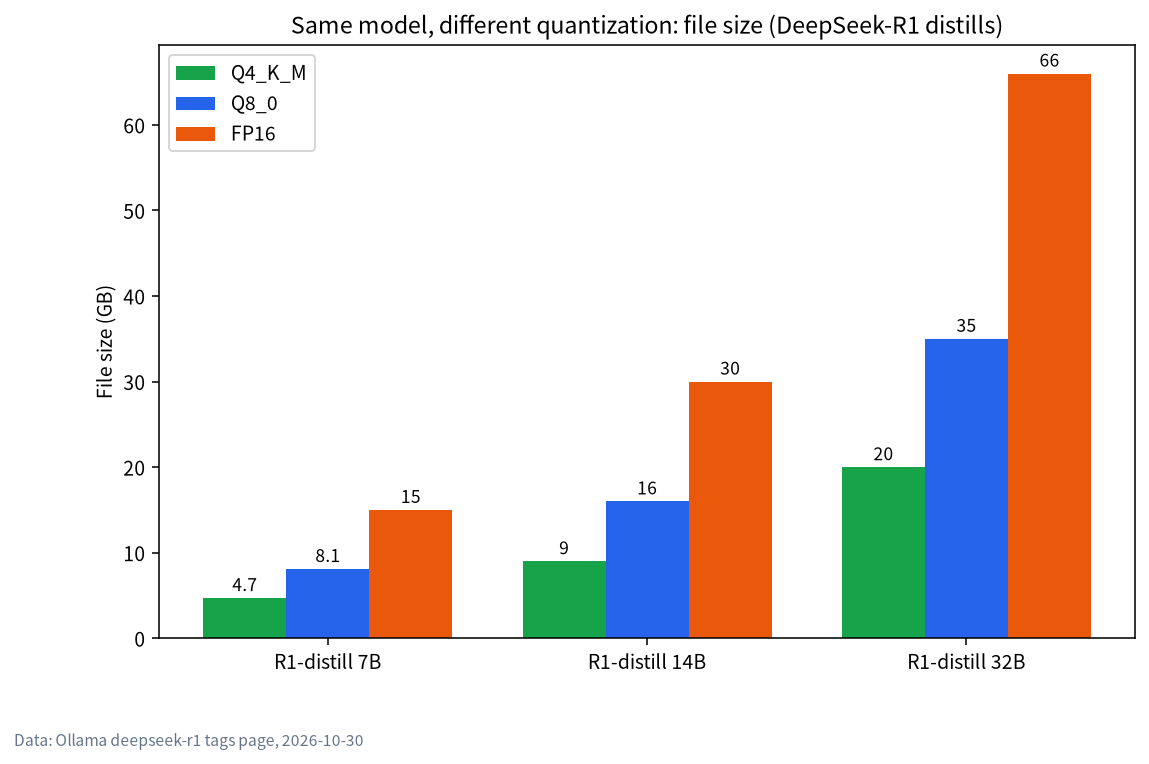
20GB | Yes, thin margin | Reasoning model with long thinking; see Run DeepSeek Locally |
llama3.3:70b |
43GB | No | Needs 48GB or more |
For broader comparisons and scenario picks, see Best Local LLMs.
Choosing a Quantization Level
One Qwen model comes in several quantization levels with very different file sizes. The table is from Ollama’s tag pages (2026-10-30):
| Model | Q4_K_M | Q8_0 | BF16/FP16 | Advice |
|---|---|---|---|---|
qwen3.6:27b |
17GB | 30GB | 56GB | On 24GB pick Q4_K_M; Q8_0 needs 32GB or more |
qwen3:32b |
20GB | 35GB | 66GB | Only Q4_K_M fits a 24GB card |
qwen3:30b-a3b |
19GB | 33GB | 61GB | Same |
For most people Q4_K_M is a sensible compromise between file size and quality; the reasoning and trade-offs are in LLM Quantization and Q4_K_M. Using the default tag (no suffix) gives you Ollama’s default quantization.
Mac Users: MLX Tags
Ollama offers -mlx tags for some Qwen models, such as qwen3.6:27b-mlx (19GB), qwen3.6:35b-mlx (23GB) and qwen3.5:9b-mlx (8.9GB), aimed at Apple silicon. Unified memory decides how large a model you can pick, and a Mac’s GPU can use about 70% of it; see Running LLMs on a Mac. Whether you can use MLX tags depends on your Ollama version, so follow the official page.
Choosing Qwen by Scenario
| Scenario | Suggestion | Note |
|---|---|---|
| Everyday chat, translation | qwen3:8b (8GB) or qwen3.6:27b (24GB) |
Turn thinking off for speed |
| Reading images and screenshots | qwen3-vl:8b (6.2GB) or the newer image-capable series |
Vision models need Ollama 0.12.7+ |
| Coding, repository reading | qwen3-coder:30b (19GB) |
A 24GB card’s workhorse |
| Maths and logic reasoning | A 27B-class model with thinking on | Thinking uses context |
| Low-spec PCs, speed first | qwen3:4b (2.5GB) or qwen3:1.7b (1.4GB) |
Limited ability, fine for light tasks |
After Deployment: Sharing It With Colleagues
If other devices on your home or office network should use the Qwen on one machine, you can make Ollama listen on a LAN address (the OLLAMA_HOST environment variable) and add Open WebUI for a web interface and accounts; the steps are in Open WebUI with Ollama. Do this only on a trusted network, since exposing it to the internet needs extra authentication and protection. With several people, VRAM must hold the model plus multiple context caches, and a larger OLLAMA_NUM_PARALLEL costs more, so teams with real concurrency should re-estimate VRAM for that load rather than reuse single-user numbers.
Keeping Models Updated and Tidy
Qwen moves quickly, and tags and sizes on Ollama’s pages change. To get the latest version, re-run ollama pull model-name; use ollama list to see what you’ve downloaded and ollama rm model-name to delete what you don’t use. Each model is several to dozens of gigabytes, so prune regularly.
Qwen Troubleshooting Checklist
- Slow download. Files run from a few to dozens of gigabytes; try a calmer time of day, and re-running the same command resumes an interrupted download.
- Model not supported. Qwen3-VL needs Ollama 0.12.7 or newer, so upgrade Ollama first.
- GPU not used. Check the driver and
ollama ps; see Ollama Troubleshooting. - Slower and slower, or forgetting earlier text. Context may be too short or the cache is overflowing VRAM; see How Much VRAM Does an LLM Need?.
- A long pause before answering. Thinking mode is “thinking”; turn it off for simple tasks.
FAQ
Which should I choose: Qwen3, 3.5, 3.6 or 3.8?
Choose Qwen3 for stability and the most community material; choose 3.5, 3.6 or 3.8 for image input and newer capability. Use the table above to settle the size first.
Can an 8GB GPU run Qwen?
Yes. qwen3:8b (5.2GB) or qwen3.5:9b (6.6–7.6GB) both run, though you must manage context; see LLM on 8GB VRAM.
Which Qwen is best on a 24GB GPU?
qwen3.6:27b or qwen3.8:27b leave the widest margin; choose qwen3:30b (MoE) for faster generation.
Can I use Qwen commercially?
The Qwen3, Qwen3.6 and Qwen3.8 pages we saw are marked Apache-2.0, which generally allows commercial use, but follow the licence text of the exact model you use.
How does Qwen differ from DeepSeek?
Qwen offers sizes from tiny to very large, while DeepSeek-R1 leans toward reasoning. See the same-class file-size comparison above.
Can I use LM Studio instead of Ollama?
Yes. LM Studio provides a graphical interface; see LM Studio Tutorial.
Next Steps and Community
The Qwen family updates fast, so ask which size suits your device in the community (join the community). Our Shenzhen team sources, builds and tests local-LLM machines and can suggest hardware for the model size you want to run. Talk first; no obligation to buy. Mention your device, your memory size and the exact Qwen tag you tried, so that replies can be specific rather than generic.