AMD GPU for Local LLMs: ROCm vs Vulkan, and Can the RX 7900 XTX or 9070 XT Do the Job?
For years, local AI was effectively an NVIDIA-only hobby. That has changed. Ollama’s official documentation now lists a long run of supported Radeon cards, and llama.cpp ships both a ROCm (HIP) backend and a Vulkan backend. For the same money, AMD often gives you more VRAM and more memory bandwidth, but the software side asks for more hands-on work than CUDA does. This guide explains how to use an AMD GPU for local LLMs: which cards are officially supported, how to choose between ROCm and Vulkan, the handful of environment variables that matter, and how to troubleshoot when the model silently lands on the CPU. For the base install, see our Ollama install guide; for the model file format, see GGUF and llama.cpp for beginners.
Verification note: The support lists, environment variables, and Linux/Windows differences come from Ollama’s official GPU documentation (docs.ollama.com/gpu, read on 2026-10-30). The llama.cpp build options come from its official docs/build.md. Memory bandwidth figures come from AMD’s own RX 9070 XT page, Ars Technica, and the comparehw.com spec table. We did not benchmark any AMD machine ourselves, so the speed ceilings below are theoretical values derived from bandwidth. Our reference price table has no verified AMD card prices, so we deliberately give none here.
Key takeaways (Updated 2026-10-30)
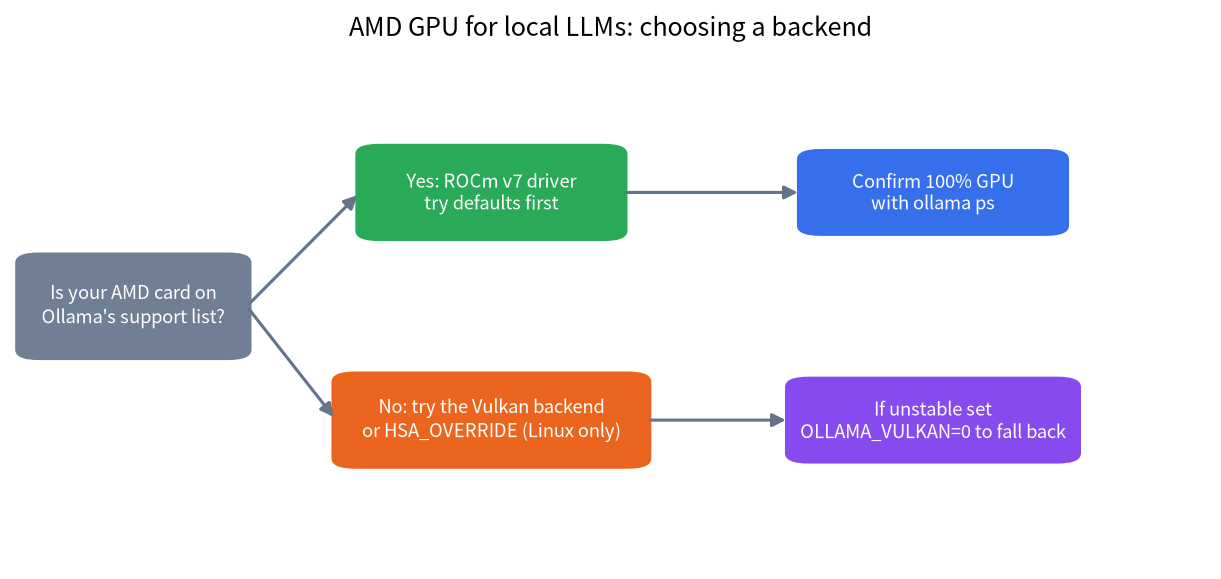
- Ollama supports a long list of Radeon cards through ROCm v7; cards outside the list can try the Vulkan backend.
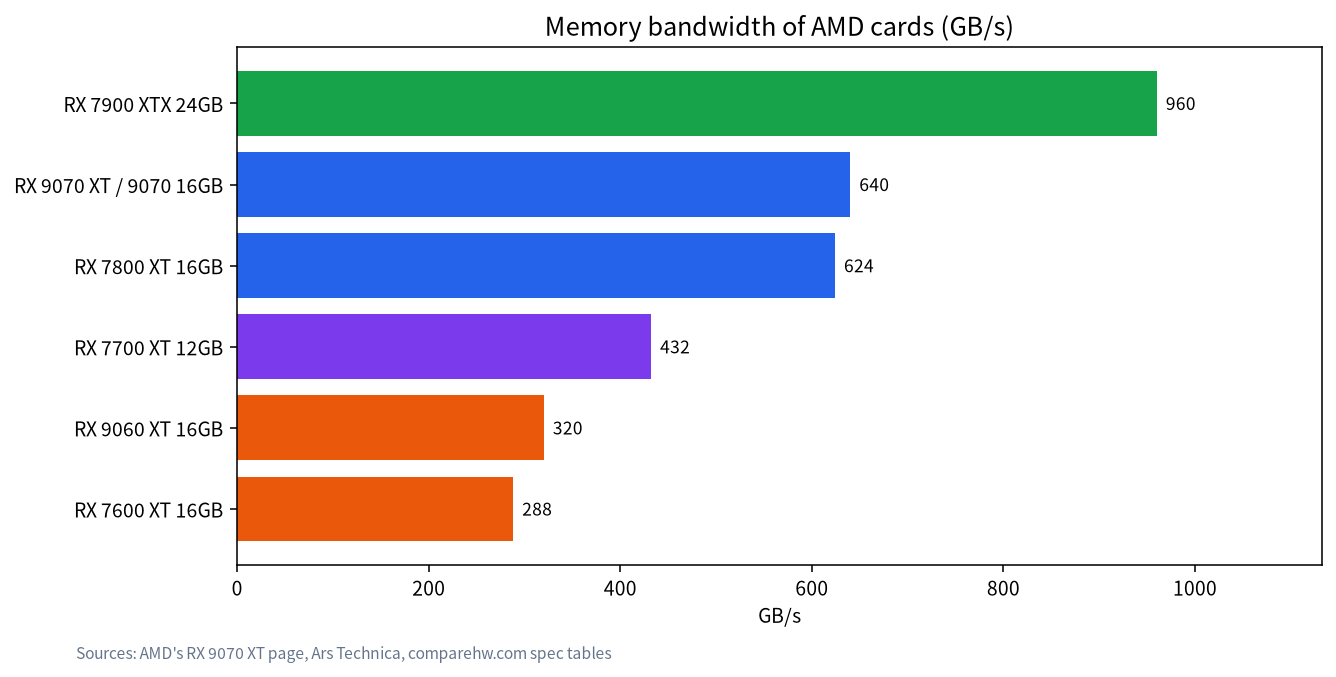
The RX 7900 XTX (24GB, 960 GB/s) is AMD’s most LLM-friendly consumer card; the RX 9070 XT has 16GB and 640 GB/s.
Windows support is narrower than Linux support, and HSA_OVERRIDE_GFX_VERSION is a Linux-only workaround.
Using an AMD GPU for Local LLMs: Start with the Support List
According to Ollama’s documentation, the cards below are supported through the ROCm library. On Linux you need the AMD ROCm v7 driver, installed or upgraded with AMD’s amdgpu-install utility. On Windows you need a ROCm v7 / HIP-capable driver stack.
| Family | Linux (official list, abridged) | Windows (official list) |
|---|---|---|
| Radeon RX | 9070 XT, 9070 GRE, 9070, 9060 XT, 9060, 7900 XTX, 7900 XT, 7900 GRE, 7800 XT, 7700 XT, 7700, 7600 XT, 7600, 6950 XT, 6900 XTX, 6900 XT, 6800 XT, 6800 | 7900 XTX, 7900 XT, 7900 GRE, 7800 XT, 7700 XT, 7600 XT, 7600 |
| Radeon AI PRO | R9700, R9600D | Not listed |
| Radeon PRO | W7900, W7800, W7700, W7600, W7500, W6900X, W6800X Duo, W6800X, W6800, V620 | W7900, W7800, W7700, W7600, W7500 |
| Ryzen AI | Ryzen AI Max+ 395, Max 390, Max 385, AI 9 HX 475 / 470 / 465 / 375 / 370 / 365 | Not listed |
| Instinct (data center) | MI350X, MI300X, MI300A, MI250X, MI250, MI210, MI100 | Not listed |
Notice that the RX 9000 series (such as the 9070 XT) does not appear in the Windows list, while it does appear for Linux. These lists change between releases, so re-read the official page before you buy. A card missing from the list does not automatically mean it cannot work; the next sections cover the Vulkan backend and the override variable.
ROCm vs Vulkan: How to Choose
| Aspect | ROCm (HIP) | Vulkan |
|---|---|---|
| Supported hardware | Cards on the official list | A wider range of cards on Windows and Linux |
| Setup | Needs the ROCm v7 driver stack; amdgpu-install on Linux | Most Windows GPU drivers bundle Vulkan; most Linux distributions need extra components |
| Speed | Usually the first choice on supported cards | In community tests it wins in some scenarios and loses in others, and it changes with software versions |
| Stability | Moves fast; match the driver carefully | On mixed iGPU and dGPU systems the iGPU’s Vulkan can be unstable |
| If something breaks | Check the driver and render-group permissions | Set OLLAMA_VULKAN=0 or pick the discrete GPU with GGML_VK_VISIBLE_DEVICES |
Ollama’s documentation says Vulkan is enabled by default when the backend is installed, and that on Windows most vendors’ drivers already bundle Vulkan support, so no extra setup is required. On some Linux distributions, AMD users need to add the ollama user to the render group. Also, Vulkan needs additional capabilities (or running as root) to expose available-VRAM data to Ollama’s scheduler. Without that, Ollama falls back to approximate model sizes when deciding placement. The documented fix is sudo setcap cap_perfmon+ep /usr/local/bin/ollama.
The Environment Variables That Matter
| Variable | What it does | Notes |
|---|---|---|
HSA_OVERRIDE_GFX_VERSION |
Makes ROCm treat an unsupported card as a close LLVM target | Linux only; for example the RX 5400 can be forced to 10.3.0, the nearest supported gfx1030 |
ROCR_VISIBLE_DEVICES |
Limits which AMD GPUs Ollama uses | List devices with rocminfo |
GGML_VK_VISIBLE_DEVICES |
Selects Vulkan devices | Setting it to -1 disables all Vulkan GPUs |
OLLAMA_VULKAN=0 |
Disables the Vulkan backend | Handy for troubleshooting |
The override variable is an experiment, not a guarantee. The official documentation states plainly that ROCm does not support every AMD GPU, and the override only asks the system to try a similar target. If you have several cards with different architectures, you can append a device number to the variable and set each one separately.
VRAM and Bandwidth: Which AMD Card to Choose
| Card | VRAM | Memory bandwidth | Ollama support (Linux / Windows) |
|---|---|---|---|
| RX 7900 XTX | 24GB | 960 GB/s | Yes / Yes |
| RX 9070 XT, 9070 | 16GB | 640 GB/s | Yes / not in the list |
| RX 7800 XT | 16GB | 624 GB/s | Yes / Yes |
| RX 7700 XT | 12GB | 432 GB/s | Yes / Yes |
| RX 9060 XT 16GB | 16GB | 320 GB/s | Yes / not in the list |
| RX 7600 XT | 16GB | 288 GB/s | Yes / Yes |
As with NVIDIA, local inference is sensitive to memory bandwidth: the theoretical decode ceiling is roughly bandwidth divided by model size. For a 14B model of about 8.6GB at Q4_K_M, the RX 7900 XTX has a ceiling near 112 tokens per second, the 9070 XT about 74, the 7800 XT about 73, the 9060 XT about 37, and the 7600 XT about 33. These are theoretical numbers, not measured speeds; real results are lower, but the ranking is a useful way to compare cards. The method is explained in 12GB and 16GB VRAM for local LLMs.
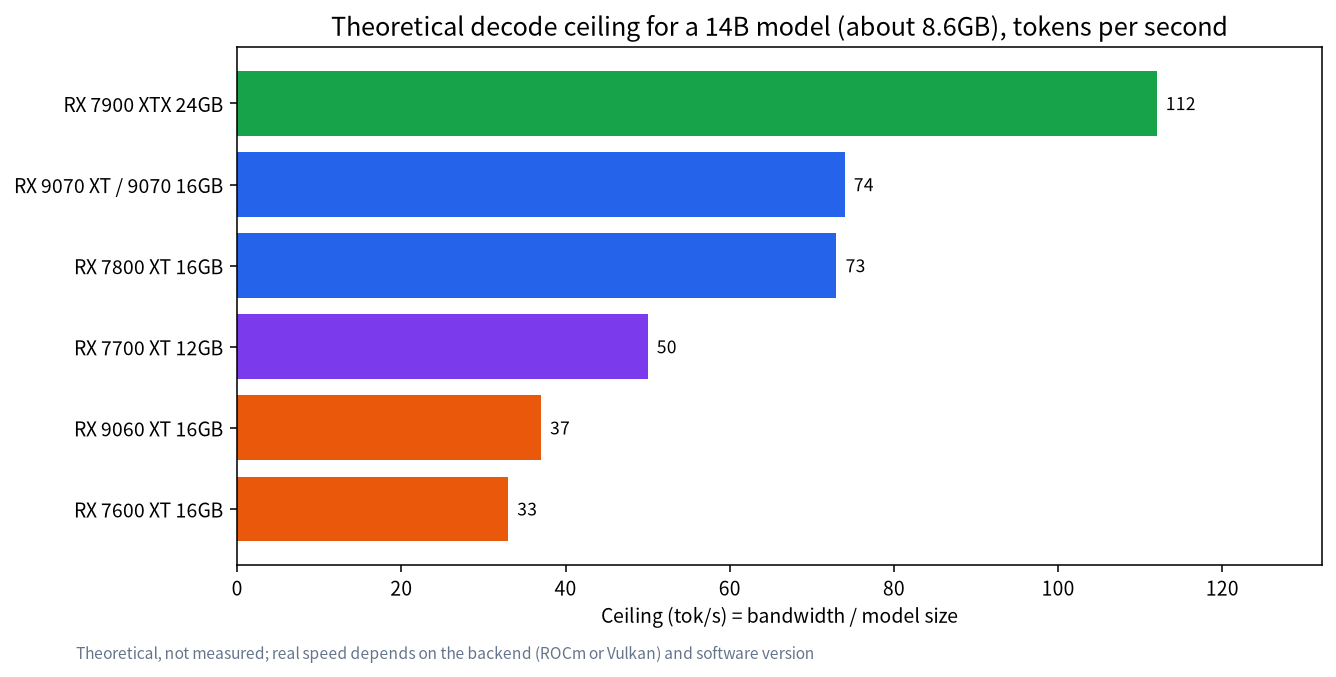
The 24GB RX 7900 XTX is the most attractive card on the AMD side: it can hold 30B-class models at 4-bit quantization, as discussed in 24GB VRAM for local LLMs. The 16GB cards, the 9070 XT and 7800 XT, map to the 14B to 24B range. How much VRAM you really need is something to calculate before you buy; see how to calculate LLM VRAM requirements.
Practical Setup Steps
- Confirm card and operating system: check the support list above against your exact model and OS.
- Install the driver: on Linux, follow AMD’s documentation and install ROCm v7 with amdgpu-install; on Windows, install the latest Radeon driver.
- Install Ollama: see the Ollama install guide.
- Pull and run a model: start with a 7B or 8B model as a smoke test.
- Verify: run
ollama ps; the PROCESSOR column should read 100% GPU.
If you would rather compile llama.cpp directly, the official build documentation uses -DGGML_HIP=ON for the HIP backend together with -DGPU_TARGETS= for your card’s target. For example, gfx1030 corresponds to RDNA2 and gfx1100 to the RX 7900 XTX / XT / GRE. The Vulkan backend has its own separate build option. Follow the official build document for the exact steps.
Troubleshooting Quick Reference
| Symptom | Likely cause | Fix |
|---|---|---|
ollama ps shows CPU instead of GPU |
Card not on the support list, or a driver mismatch | Check the list; on Linux try the override variable, or try Vulkan |
| GPU not found (Linux) | ROCm v7 missing, or user not in the render group | Install with amdgpu-install; add the ollama user to the render group |
| Unstable Vulkan on mixed iGPU and dGPU | The iGPU’s Vulkan is unreliable | Keep Vulkan on and pick the discrete GPU with GGML_VK_VISIBLE_DEVICES |
| Scheduler cannot see free VRAM | Vulkan lacks permission to read VRAM data | Set cap_perfmon as documented, or run as root |
| Very slow generation | Some layers landed on the CPU | Shorten the context or pick a smaller model; see Ollama not using the GPU |
Why the AMD Experience Differs from NVIDIA
NVIDIA’s advantage comes mostly from CUDA: most local-LLM tools target it first, and tutorials and error answers are most plentiful for it. AMD takes two roads, ROCm and Vulkan. The first needs the driver stack and card model to match closely; the second is broadly compatible but varies between software versions. So the real cost of choosing AMD is not the hardware. It is how much time you are willing to spend on troubleshooting. If you enjoy tinkering and value more VRAM at a given price, AMD is well worth considering. If you want something that simply works, check the support list first and then decide.
A practical habit for beginners: validate in the smallest possible steps. After installing the driver and Ollama, run only a small 7B or 8B model and confirm with ollama ps that it sits fully on the GPU. Then grow the model and context gradually, changing one variable at a time. When something breaks, you will know whether the culprit is the driver, the backend, or the model itself.
Integrated Graphics and Ryzen AI Max
Ollama’s official list also includes Ryzen AI processors such as the Ryzen AI Max+ 395. These use unified memory instead of dedicated video memory. Such machines play a different game from discrete cards: capacity can be large, but bandwidth is lower than on high-end discrete GPUs, so they suit fitting big models rather than chasing the highest speed. If you are considering this route, read large-memory mini PCs for local LLMs for the bandwidth and price comparison. On an ordinary desktop with both integrated and discrete graphics, remember to pin the workload to the discrete card with GGML_VK_VISIBLE_DEVICES or ROCR_VISIBLE_DEVICES so the model is not placed on the slower iGPU.
A Buying Checklist
- Check the official support list for your OS and your exact model, not just the series name.
- Confirm the VRAM covers the model you want to run; estimate with how to calculate LLM VRAM requirements and leave headroom for context.
- Check the power supply and case: the RX 9070 XT’s total board power is 304W with a recommended minimum PSU of 750W according to AMD, and the RX 7900 XTX is about 355W.
- For a used card, confirm warranty and returns, and run a stress test with a small model before deciding to keep it.
- Have a fallback plan: if ROCm does not work, can Vulkan meet your needs?
When Not to Choose AMD
- You want the smoothest experience and expect every tutorial to work as written. NVIDIA’s CUDA ecosystem still has more ready-made guides and tools.
- You plan to fine-tune models or generate images with tools that lean on CUDA; check each tool’s AMD support one by one.
- Your card is an older model outside the list and you do not want to fiddle with override variables.
FAQ: AMD GPUs and Local LLMs
Can an AMD GPU run Ollama?
Yes. Ollama’s documentation lists supported Radeon RX, Radeon PRO, and Ryzen AI parts. Linux needs the ROCm v7 driver, and Windows needs a ROCm v7 / HIP-capable driver stack.
What if my card is not on the support list?
You can try the Vulkan backend, or on Linux point HSA_OVERRIDE_GFX_VERSION at a similar target. Both are experimental and not guaranteed to be stable.
Can the RX 9070 XT run local LLMs?
It has 16GB of VRAM and 640 GB/s of bandwidth and appears in the Linux support list. It did not appear in the Windows list of the documentation we read, so check the latest documentation at the time you use it.
Is AMD or NVIDIA better for local LLMs?
It depends on your priorities. AMD often offers more VRAM at a similar price but needs more tinkering; NVIDIA’s ecosystem is more mature.
Can I use HSA_OVERRIDE_GFX_VERSION on Windows?
No. The llama.cpp documentation says the variable is not supported on Windows; it is a Linux workaround.
Is Vulkan slower than ROCm?
Not necessarily. Community tests show each winning in different scenarios and versions, so try both backends on your own machine.
Need Help Setting It Up?
If your AMD card will not run, ask in our community or email admin@microaione.com with your card model, operating system, and the output of ollama ps. For the broader route, start with the local LLM deployment guide.
References and further reading: Ollama: GPU support, llama.cpp: build documentation, AMD: Radeon RX 9070 XT specifications.