Enterprise Private LLM Deployment: Tiers, Hardware Budget, Security Checklist and Rollout (2026)
More and more companies want a language model that lives inside their own network. Contracts, customer records and internal documents should not be sent to a third-party API, yet employees still want question answering, summarization and coding help. Enterprise private LLM deployment is not finished when you buy a server: it touches model choice, hardware budget, permissions and audit, data compliance and long-term operations. This article gives a vendor-neutral framework: how to split the work into three tiers, what hardware each tier roughly needs, how to layer the system, how to map a security checklist to a recognized risk list, and how to roll out in phases. We do not invent customer cases or promise results, and every price is a reference price. If you are new to the topic, start with the local LLM deployment guide.
Verification note: hardware reference prices come from our median price table compiled on 2026-10-30; they exclude tax, services, facilities and operations, so use real quotes for decisions. The security checklist follows the OWASP Top 10 for LLM applications (2025 edition). The compliance section only quotes the scope wording of China’s Interim Measures for the Management of Generative AI Services and is not legal advice; ask your legal or compliance team. We have no customer cases and did not benchmark enterprise environments.
Key takeaways (Updated 2026-10-30)
- Start with a pilot: one 128GB-class unified-memory machine or one workstation with 24GB to 32GB of VRAM, validate real business questions, then decide whether to scale.
Use at least three layers: a gateway with authentication and audit, a retrieval layer with permission filtering, and a model server exposed only inside the network.
Map your security checklist to the OWASP LLM risks, especially prompt injection, sensitive information disclosure, excessive agency and unbounded consumption.
First, Decide Why You Want Private Deployment and When You Do Not Need It
Teams usually choose private deployment for three reasons: data stays inside the network, costs are predictable, and the system can be customized. The price is that you now own hardware, updates, security and outages. The comparison below helps you decide.
| Aspect | Private deployment | Cloud API |
|---|---|---|
| Where data goes | Stays inside your own network | Sent to a third-party service |
| Upfront cost | You buy hardware | Almost none |
| Long-term cost | Hardware depreciation plus operations staff, fairly predictable | Grows with usage, harder to predict |
| Model capability | Limited to the open-weight models you can fit | Usually the strongest closed models are available |
| Operations | Your responsibility | The provider’s responsibility |
| Best for | Sensitive data, steady usage, someone to operate it | Fast-changing needs, non-sensitive data, small teams |
If your data is not sensitive, usage is small, or nobody can own operations, a cloud API is simpler to start with; the trade-offs are covered in local deployment versus cloud APIs. Many companies end up with a hybrid: sensitive tasks use the private model and generic tasks use a cloud service.
On compliance, separate the scenarios first. China’s Interim Measures for the Management of Generative AI Services apply to services offered to the domestic public, and by its own wording research and applications that are not offered to the domestic public are outside its scope. Internal private deployments usually fall into the latter group, but whether the measures apply and what data protection or sector rules still apply must be decided by your legal or compliance team. We cannot decide that for you.
Three Tiers of Enterprise Private LLM Deployment
| Stage | Scale | Typical hardware idea | What it is for |
|---|---|---|---|
| Pilot | 3 to 10 people, one department | One workstation with 24GB to 32GB of VRAM, or one 128GB unified-memory mini PC | Validate knowledge-base Q&A and document summaries; see whether the business benefits |
| Department | 10 to 50 people | One or two stronger machines plus a gateway and a permission system | Stable internal Q&A and coding assistance |
| Company | 50 people and more | Multi-GPU servers or several nodes with monitoring, backup and high availability | Shared by several business lines; needs dedicated operations |
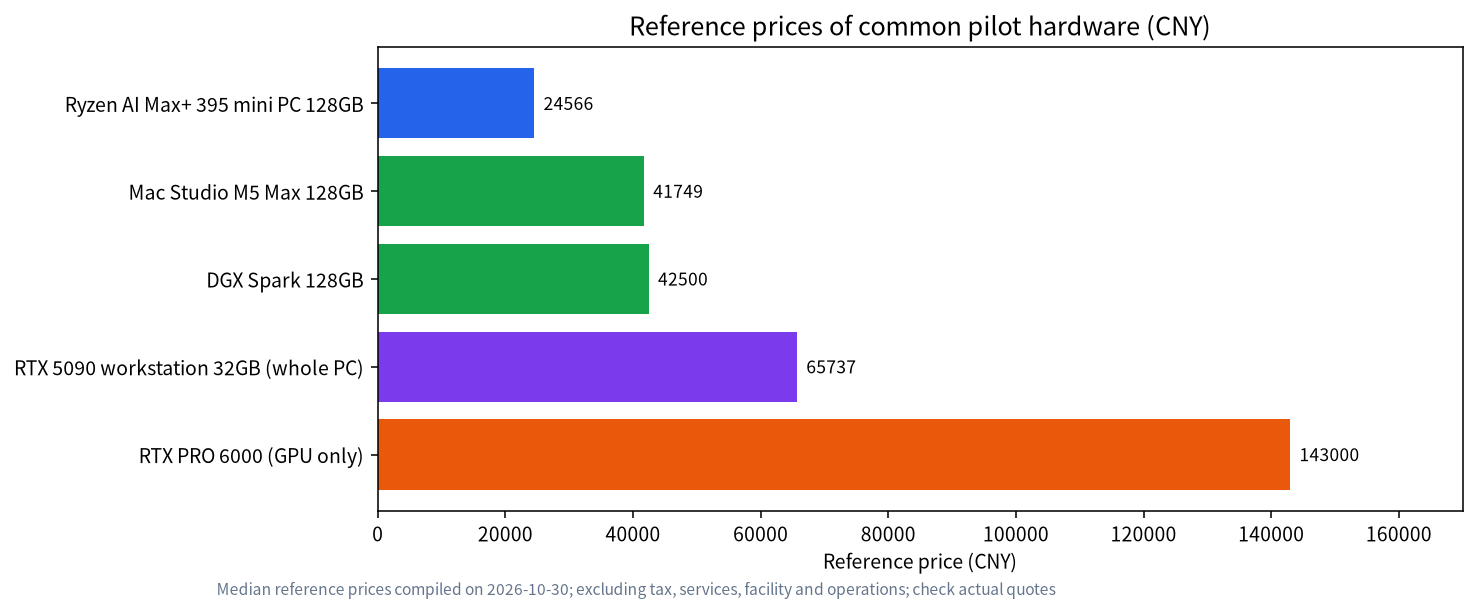
By our reference prices, common pilot hardware looks like this: a 128GB Ryzen AI Max+ 395 mini PC is about CNY 24,566, a Mac Studio M5 Max 128GB is about CNY 41,749, a DGX Spark 128GB is about CNY 42,500, a reference RTX 5090 32GB workstation as a whole PC is about CNY 65,737, and a single RTX PRO 6000 is about CNY 143,000 for the card alone. These prices exclude tax, facilities, operations and staff time; use them only to judge the order of magnitude.
Before choosing hardware, choose the model. To get strong capability inside the network, teams commonly use open-weight models between roughly 24B and 120B parameters. What fits where is explained in the VRAM guide and in the gpt-oss local deployment guide. The trade-offs of large-memory mini PCs are in running LLMs on a large-memory mini PC.
Layer the System: Never Let the Model Face Users Directly
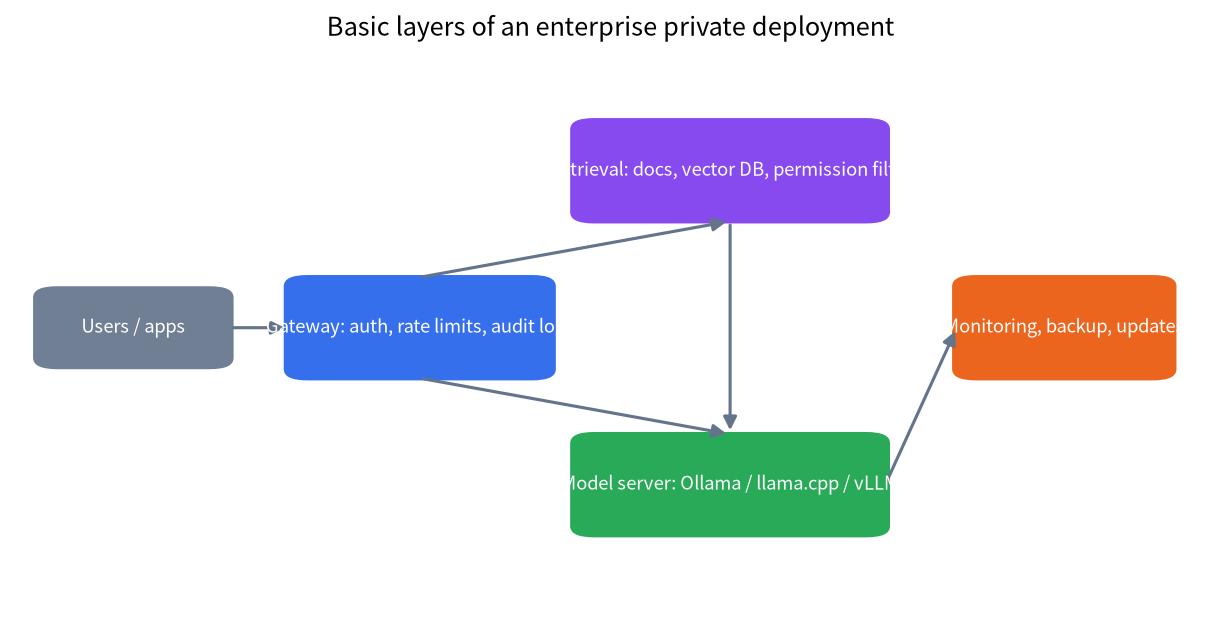
A maintainable private system needs at least the layers below, each with a clear job.
| Layer | Job | Common approach |
|---|---|---|
| Entry and gateway | Authentication, rate limits, audit logs | Use your company single sign-on and record who asked what and when (redacted according to policy) |
| Application UI | Chat page, knowledge-base page | Use a mature open-source UI, see Open WebUI with Ollama |
| Retrieval | Document ingestion, vector search, permission filtering | Filter by department or document permission, see building a local knowledge base |
| Model service | Inference | Expose only inside the network behind an authenticated reverse proxy |
| Operations | Monitoring, backup, updates | Record versions, back up configuration and indexes, test before upgrading |
The layer most often forgotten is retrieval permissions. If the knowledge base mixes every document into one index, a low-privilege employee may see content they should not simply by asking a question. Keep permission information when documents are ingested and filter by the asker’s permissions at query time.
Security Checklist Mapped to OWASP LLM Risks
OWASP publishes a Top 10 of risks for LLM applications (2025 edition). The table maps several common ones to things an enterprise can actually do.
| Risk (OWASP name) | What it means inside a company | What you can do |
|---|---|---|
| Prompt injection | A document or web page hides instructions that push the model beyond its limits | Do not let the model run high-risk actions directly; treat external content with suspicion |
| Sensitive information disclosure | Answers expose material that should not be shared | Filter retrieval by permission; redact logs |
| Supply chain | Downloaded models and tools are swapped or vulnerable | Download only from trusted sources; record hashes and versions |
| Vector and embedding weaknesses | The knowledge base is poisoned or searched across permissions | Control who can write documents; audit ingestion |
| Excessive agency | The model can call too many tools | Least privilege; human confirmation for critical actions |
| Unbounded consumption | A few users consume all compute | Rate limits, quotas, timeouts |
| Misinformation | A made-up answer is treated as fact | Show citations; have people review critical cases |
This table is a starting point, not a complete security design. Before launch, have your security team review the system and include prompt injection and cross-permission retrieval in internal red-team tests.
A Phased Rollout
- Set goals: write down three concrete business questions, such as contract clause Q&A, rather than “use an LLM”.
- Run a pilot: one machine, one department, one model, for four to six weeks.
- Evaluate: prepare a set of real questions, have business staff score the answers, and do not rely on technical metrics alone.
- Review security: use the checklist above to close gaps in permissions, logging and rate limits.
- Decide to scale or stop: use the evaluation to decide; a negative result is also a valuable result.
- Build operations: version control, backups, incident response and an update process.
Common Mistakes
- Buying the most expensive hardware first: pilot first, prove business value, then invest.
- Focusing on the model and ignoring permissions: most incidents come from the retrieval layer, not the model.
- Treating the internal network as safe: internal networks still need authentication, audit and least privilege.
- Having no evaluation standard: without one you cannot judge results or compare models.
- Ignoring operations labor: hardware is only part of the cost; updates, monitoring and fault handling need an owner.
How to Calculate the Full Cost
When you budget, include more than the hardware price: electricity, rack or room space, networking, backup storage, software subscriptions, security review and operations labor. Hardware is usually depreciated over three years, and operations labor, even part-time, is often the largest long-term cost. Add everything up, divide by the expected number of users and usage volume, and only then compare against the long-term bill of a cloud API. We suggest a simple spreadsheet that you refresh every quarter with real usage so that the decision does not rest on impressions.
Hardware prices also move with the market, so do not rely on a single day’s price and do not hard-code one number into a budget approval. Give a range and note the price date.
Working With an External Provider
If you plan to hire an outside team, clarify a few things up front: whose machines hold the data and logs, which documents and scripts are delivered, who responds to incidents, who owns updates and maintenance, and whether you can run the system on your own after the contract ends. A design you can run and understand yourself is usually more reliable than a black box that depends on the vendor. Our guide to buying an LLM all-in-one machine also lists questions worth asking when you buy a packaged system.
What a Good Pilot Report Contains
At the end of a pilot, write a short report that a decision maker can read in ten minutes. It should state the business questions you tested, how many real questions were asked, how business staff scored the answers, which kinds of question failed, how much time the system saved or did not save, what the hardware and electricity actually cost over the pilot period, and which security gaps were found and closed. Include the model name and version, the quantization, the context length and the retrieval settings, because the same hardware can behave very differently with different settings. Finally, write a clear recommendation: scale, adjust and repeat, or stop. A pilot that ends with “stop” has still saved the company from a larger mistake, and that is a legitimate outcome.
FAQ: Enterprise Private LLM Deployment
How much does enterprise private LLM deployment cost?
It depends on scale. A pilot on one workstation or one large-memory mini PC has hardware reference prices in the range of roughly CNY 20,000 to 70,000. Department and company tiers add a gateway, permissions, monitoring and operations, and need real quotes for the actual design.
Is private deployment always cheaper than a cloud API?
No. At low usage a cloud API is cheaper. With heavy and steady usage and sensitive data, private deployment has the advantage. Include hardware depreciation, electricity and operations labor in the comparison.
Does private deployment need a filing or assessment?
It depends on the scenario. The Interim Measures for Generative AI Services apply to services offered to the domestic public; whether internal use is covered and what other duties apply should be confirmed by your legal or compliance team.
Are open-source models good enough?
For many internal tasks such as knowledge-base Q&A, summarization and rewriting, open-weight models in the 24B to 120B range are enough, but test them on your own data.
How do we stop employees from seeing documents they should not?
Keep permission metadata at ingestion, filter retrieval by the asker’s permissions, and keep audit logs.
Should we fine-tune our own model?
Start with retrieval-augmented generation and connect your documents. Consider fine-tuning only when you have a clear need, because data preparation and evaluation cost more.
Want Help Scoping Your Case?
If you want to know which tier fits your situation, join the community or email admin@microaione.com with your scale, data types and budget, and we can help you think it through.
References and further reading: Cyberspace Administration of China: Interim Measures for the Management of Generative AI Services, OWASP Top 10 for LLM Applications.