MoE Models for Local LLMs: Why a 30B Model Can Run Like a 3B One
When you browse model lists you will see names such as Qwen3-30B-A3B or gpt-oss-20b that claim a large size and a small one at the same time. These are MoE models, short for mixture of experts, and they change the usual rules for local LLM hardware. They need memory for all their parameters but only read a fraction of them for each token, so they can generate far faster than a dense model of the same file size, especially on machines with lots of memory but modest bandwidth. This guide explains the idea, gives the numbers for models you can run today, shows derived speed ceilings and covers the options that make MoE practical on home hardware.
Verification note: Parameter counts come from the model cards of gpt-oss (OpenAI), Qwen3-30B-A3B (Qwen) and DeepSeek-V3 on Hugging Face; download sizes come from the Ollama library; the llama.cpp options come from its server documentation. All were checked on 2026-10-30. The speed ceilings are our derived estimates from memory bandwidth and are not benchmarks; we did not run these models for this article.
Key takeaways (Updated 2026-10-30)
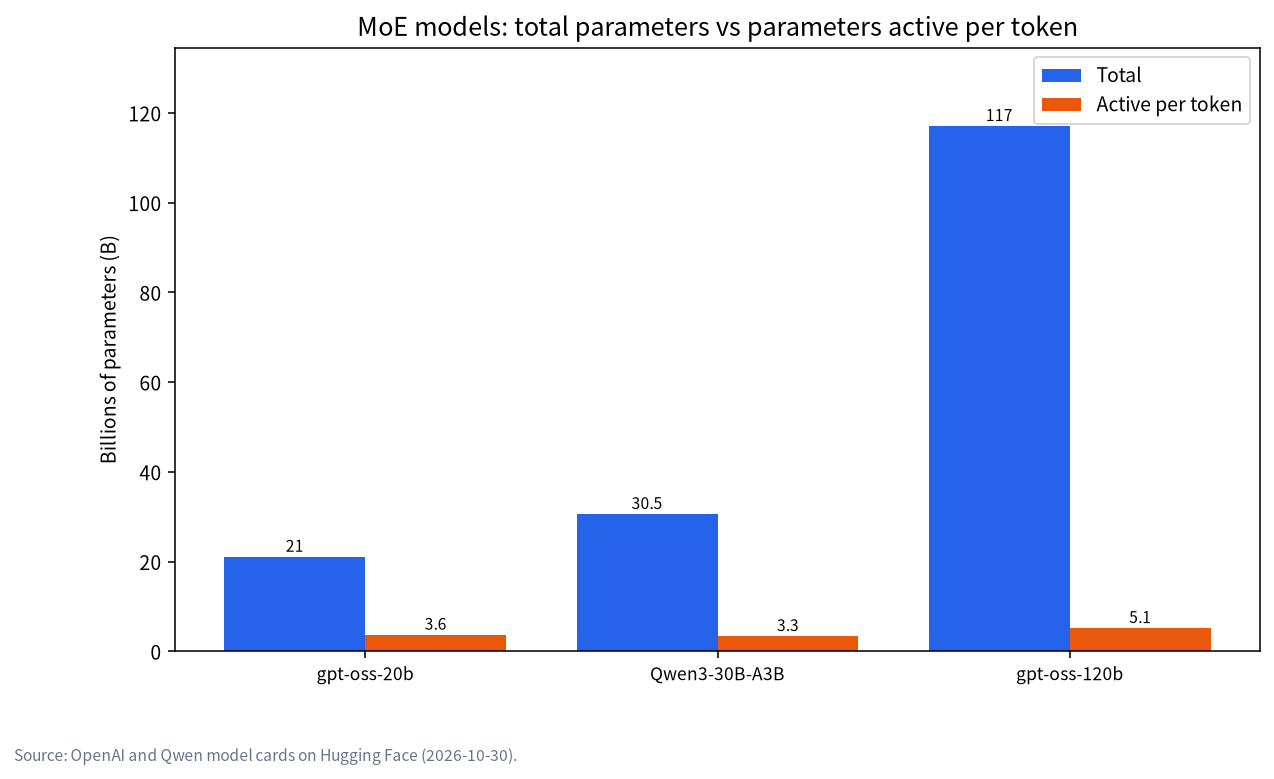
- A MoE model stores all its experts in memory but activates only a few per token: gpt-oss-20b has 21B parameters with 3.6B active, Qwen3-30B-A3B has 30.5B with 3.3B active, and gpt-oss-120b has 117B with 5.1B active.
Memory capacity must still hold the whole model, about 14GB for gpt-oss-20b and 65GB for gpt-oss-120b in the Ollama library, but speed follows the active weights, so MoE models run well from system RAM.
llama.cpp can keep expert weights on the CPU with
--cpu-moeor--n-cpu-moe, putting the shared layers on the GPU; this is the best use of a modest GPU plus plenty of RAM.
Dense Versus MoE in One Paragraph
In a dense model such as Llama 3.1 70B, every parameter takes part in producing every token, so each token reads all 43GB of a Q4_K_M file. In a mixture-of-experts model the feed-forward part of each layer is split into many small expert networks, and a router picks a few of them for each token. Qwen3-30B-A3B, for example, has 128 experts per layer according to its model card, and uses only a handful per token. The attention layers and the router are shared and always used. The result is a model with the knowledge capacity of a large network and the per-token work of a small one.
The Numbers for Models You Can Run
| Model | Total parameters | Active per token | Download in Ollama |
|---|---|---|---|
| gpt-oss-20b | 21B | 3.6B | 14GB |
| Qwen3-30B-A3B | 30.5B | 3.3B | 19GB |
| gpt-oss-120b | 117B | 5.1B | 65GB |
| DeepSeek-V3 | 671B | 37B | too large for most home setups |
OpenAI describes gpt-oss-120b as fitting on a single 80GB GPU and gpt-oss-20b as aimed at local use, which matches the file sizes above. DeepSeek-V3’s model card describes 671B total parameters with 37B activated for each token, which shows the pattern at the largest scale: its per-token work is like a 37B model while its memory need is that of a 671B one. Our article on gpt-oss covers running it in practice, and our best models list compares MoE and dense choices.
What MoE Changes About Memory and Speed
Capacity first. The whole model has to be stored somewhere, so a MoE model of a given file size needs the same memory as a dense model of that size. A 14GB gpt-oss-20b does not fit in an 8GB card, and a 65GB gpt-oss-120b needs a large unified-memory machine or a lot of RAM. Our VRAM calculator guide applies unchanged to capacity; add room for context as usual.
Speed is where MoE helps. The rule from our article on RAM and VRAM is that each token needs the active weights read from memory, so the speed ceiling is memory bandwidth divided by the bytes read per token. For a dense model that is the full file; for a MoE model it is roughly the active fraction. We estimate the read per token as file size times active parameters divided by total parameters, which is only an approximation, because attention weights are always read and different tokens use different experts.
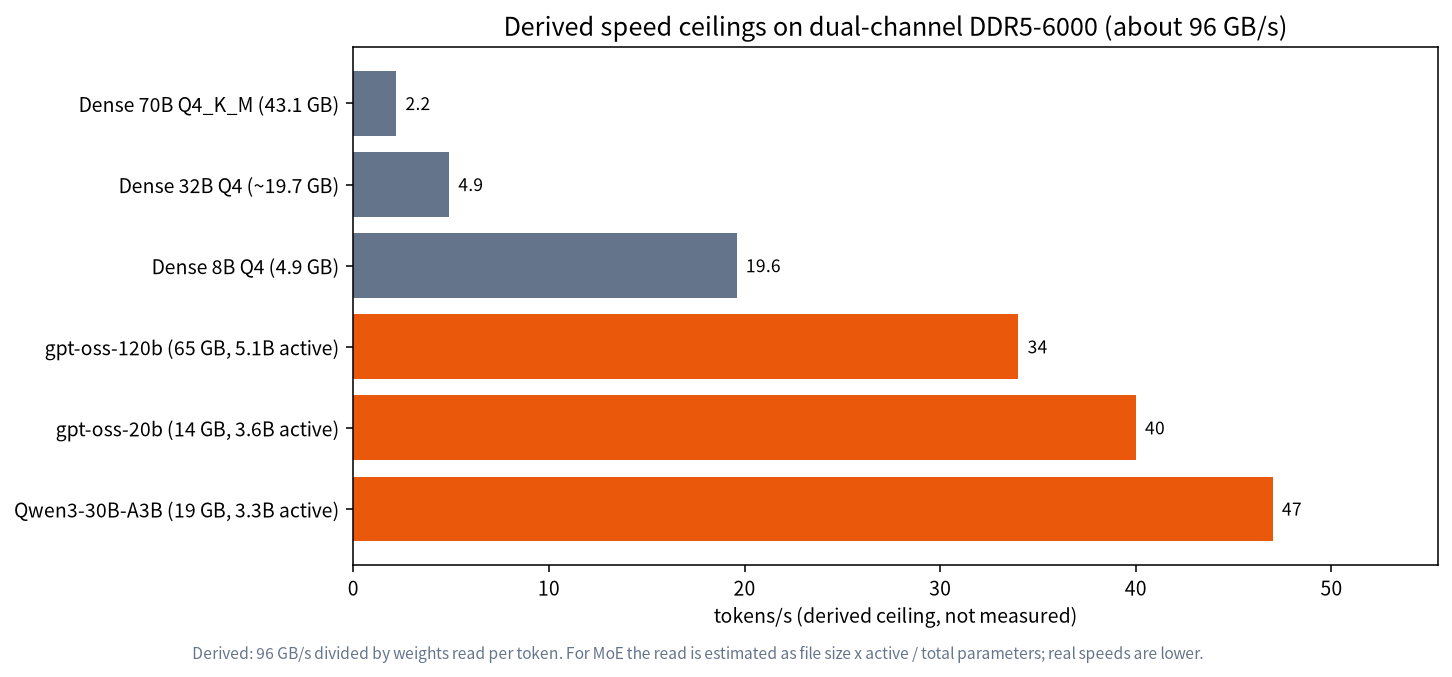
On dual-channel DDR5-6000, which gives about 96 GB/s, a dense 70B Q4_K_M model has a ceiling of about 2.2 tokens per second, and a dense 32B model about 4.9. By contrast, our estimates for gpt-oss-20b are about 40, for Qwen3-30B-A3B about 47 and even for gpt-oss-120b about 34, if the model fits in RAM. These are theoretical upper limits and real speeds are lower, but the gap between dense and MoE is large and real. It explains why people report that MoE models feel fast on machines without a strong GPU, including laptops and mini PCs; see our mini PC guide.
Prompt processing is a separate matter. When you paste a long document, the model has to read all of it before it starts to answer, and that stage is limited by compute more than by memory bandwidth, so a MoE model on a slow CPU can still feel sluggish for the first few seconds of a long prompt. A GPU that handles the shared layers helps most here, which is another reason to combine a modest card with plenty of RAM instead of relying on the CPU alone.
Running MoE Models on Modest Hardware
There are three practical setups.
- Everything on the GPU. If the whole model fits in VRAM, a MoE model is simply very fast. A 16GB card can hold the 14GB gpt-oss-20b download with a modest context.
- Shared layers on the GPU, experts in RAM. llama.cpp has
--cpu-moe, which keeps all expert weights on the CPU, and--n-cpu-moe N, which does that for the first N layers. The attention and shared parts stay in VRAM, where they are used for every token, while the large expert weights sit in cheap system RAM, and only a few of them are read per token. This setup lets a 12GB or 16GB card run models far larger than its VRAM at a surprisingly usable speed. The llama.cpp documentation also lists a cache for experts kept on the CPU. - Everything in RAM. On a machine with 64GB or more of fast memory, the CPU alone can run gpt-oss-120b at readable speeds, though slower than with a GPU helping.
In all three, remember that context also needs memory. Our context length guide explains the KV cache, and for MoE models the cache is similar to a dense model of the same layer width, so long contexts can still exhaust VRAM.
A Worked Memory Plan
Take a desktop with a 12GB graphics card and 64GB of system RAM, and suppose you want to try gpt-oss-120b, whose Ollama download is 65GB. The model alone is slightly more than the RAM, so it cannot work on this machine without a heavy use of disk, which is far too slow. A smaller target makes sense: Qwen3-30B-A3B at 19GB. The 12GB card cannot hold it all, but the experts can sit in RAM, which takes most of the 19GB, while the shared layers and the KV cache for a moderate context use the card. The operating system and other programs still need several gigabytes, so the 64GB machine has plenty of room. If you step up to 128GB of RAM, for example on a unified-memory mini PC, gpt-oss-120b becomes realistic, and our derived ceiling of about 34 tokens per second on DDR5-class bandwidth shows why people find it usable.
The same arithmetic tells you what not to buy. A 64GB kit cannot rescue a 117B model, and a faster GPU does little for experts that live in RAM, because the speed of those layers is set by memory bandwidth. If you want more speed from this plan, faster dual-channel memory or a platform with more memory channels helps more than a bigger graphics card.
How to Check It Is Working
Start llama.cpp with its normal logging and read the load messages: they report how many layers were offloaded to the GPU and the size of each buffer, so you can see how much sits in VRAM and how much in CPU memory. Watch GPU memory with nvidia-smi while the model generates. If VRAM is almost empty, your flags put too much on the CPU; if it is full and the program reports errors, reduce the context or move more experts to the CPU. Then generate a long answer and note the speed. Change one flag at a time and keep a record, because the best setting depends on your model, your memory kit and your context length. With Ollama the choice is automatic, and ollama ps shows the CPU and GPU split.
Choosing Between Dense and MoE
| Situation | Better choice | Reason |
|---|---|---|
| 12GB to 16GB GPU, lots of RAM | MoE with experts in RAM | Fast, larger knowledge capacity |
| Plenty of VRAM, wants best quality per size | Dense model | Often stronger per stored gigabyte |
| CPU-only laptop or mini PC | Small MoE | Speed follows active weights |
| Tight on total memory | Dense, quantized small model | MoE still needs all weights stored |
| Fine-tuning at home | Dense small model | Tooling is simpler |
A fair summary is that MoE trades memory for speed. You pay in capacity, because a 30B MoE file is as large as a 30B dense file, and you save in bandwidth. If your bottleneck is memory capacity, MoE does not help; if your bottleneck is speed on cheap hardware, it can transform the experience.
Quality, Quantization and Caveats
Do not assume a MoE model of a given total size matches a dense model of that size in quality, or that it matches a dense model with its active size. In practice the quality of a MoE model sits somewhere between the two, depends on the training and varies by task, so test the models on your own prompts. Quantization works on MoE models too, and the reductions that apply to dense models, described in our Q4_K_M guide, apply here; the gpt-oss models are released in a compact native format, which is why their files are smaller than their parameter counts suggest. Tool support is still uneven across programs, so check that your runtime version supports the architecture before you download a large file.
Common Mistakes
- Reading “A3B” as 3B memory. The whole model must be stored; only the speed follows the active part.
- Expecting MoE speed with experts on a slow disk. Keep experts in RAM or VRAM, not on swap.
- Ignoring context memory. The KV cache still grows with context length.
- Comparing only active parameters for quality. Total size and training matter too.
- Forgetting the runtime version. New architectures need a recent llama.cpp or Ollama.
FAQ: MoE Models
What does A3B mean in Qwen3-30B-A3B?
It means about 3 billion parameters are active per token, out of 30.5 billion in total, according to the model card (3.3B activated).
Do MoE models need less VRAM?
No. They need memory for all their weights. They are faster, not smaller, though you can keep experts in system RAM to use less VRAM.
Is gpt-oss-20b a MoE model?
Yes. OpenAI describes it as 21B parameters with 3.6B active, aimed at local use.
What does cpu-moe do?
It tells llama.cpp to keep the expert weights on the CPU while other layers can use the GPU, which saves VRAM at a modest speed cost.
Are MoE models better than dense ones?
Not always. They are faster per token for their size, but dense models are often stronger for the memory they use. Test on your own tasks.
Can I run gpt-oss-120b at home?
If you have about 65GB or more of memory available, plus room for context, it can run. Speed depends on your bandwidth.
Talk With Us
Choosing between a dense and a MoE model for your hardware? Join the community or email admin@microaione.com.
References: gpt-oss-20b model card, Qwen3-30B-A3B model card, DeepSeek-V3 model card, llama.cpp server documentation.