DeepSeek V4.1 Flash 1017 Locally: Is It the Best Open Model? Hardware, Quants and Cost
“Best open model” is an easy claim to inflate, so we test it against evidence. DeepSeek V4.1 Flash 1017 scores 32 on the Artificial Analysis Intelligence Index, tied with GLM-5.3 for the top open-weights spot, with an MIT license and a 1M-token context. But its weights are huge, and running it locally takes a machine with 128GB or more of combined RAM and VRAM, not an ordinary graphics card. This article compares it with other open-weights models and with closed Claude Opus 5, lists quant sizes and memory needs, works out API versus local cost, and gives a test method you can reproduce.
Verification note: Index data was read from Artificial Analysis on 2026-11-01. Benchmark scores come from DeepSeek’s own table on its Hugging Face model card (vendor-reported, compared against Opus 5, not the newer Opus 5.5). Quant sizes, memory needs and post-quantization scores come from Unsloth’s official guide (a self-test by the quantization publisher, not ours). API prices come from DeepSeek’s official pricing page. We have not run this model locally, so there are no self-measured speeds or scores here.
Key takeaways (Updated 2026-11-01)
- Artificial Analysis index: DeepSeek V4.1 Flash 1017 scores 32, tied with GLM-5.3 as the top open-weights model; Claude Opus 5.5 (max) scores 58 on the same board, a wide gap.
Unsloth’s combined RAM plus VRAM figures: about 128–145GB for 1-bit, 176–205GB for 2-bit, 305GB for 4-bit and 315GB for 8-bit.
API price off-peak is $0.15 per million input tokens ($0.003 on a cache hit) and $0.60 output, doubling at peak; for most individuals the API is far cheaper than a build, so run locally for privacy, offline use and control.
Is It Really the Best Open Model?
On third-party boards, “joint best”. In the Artificial Analysis leaderboard, DeepSeek V4.1 Flash 1017 (Max) and GLM-5.3 (Max) both score 32, followed by MiMo-V2.6-Pro at 30; DeepSeek V4 Pro 0813 (max) is at 23 and Qwen3.8 27B (xhigh) at 20. The board covers 86 models, 31 of them open weights.
| Open-weights model | Intelligence Index | Note |
|---|---|---|
| DeepSeek V4.1 Flash 1017 (Max) | 32 | MIT, 1M context, about 175 tokens/s via API, about $0.60 per task |
| GLM-5.3 (Max) | 32 | Joint first |
| MiMo-V2.6-Pro | 30 | Third |
| Qwen3.8 27B (xhigh) | 20 | Far fewer parameters, far lower hardware bar |
| DeepSeek V4 Pro 0813 (max) | 23 | Previous Pro model from the same lab |
| Reference: Claude Opus 5.5 (max, closed) | 58 | See our Opus 5.5 comparison |
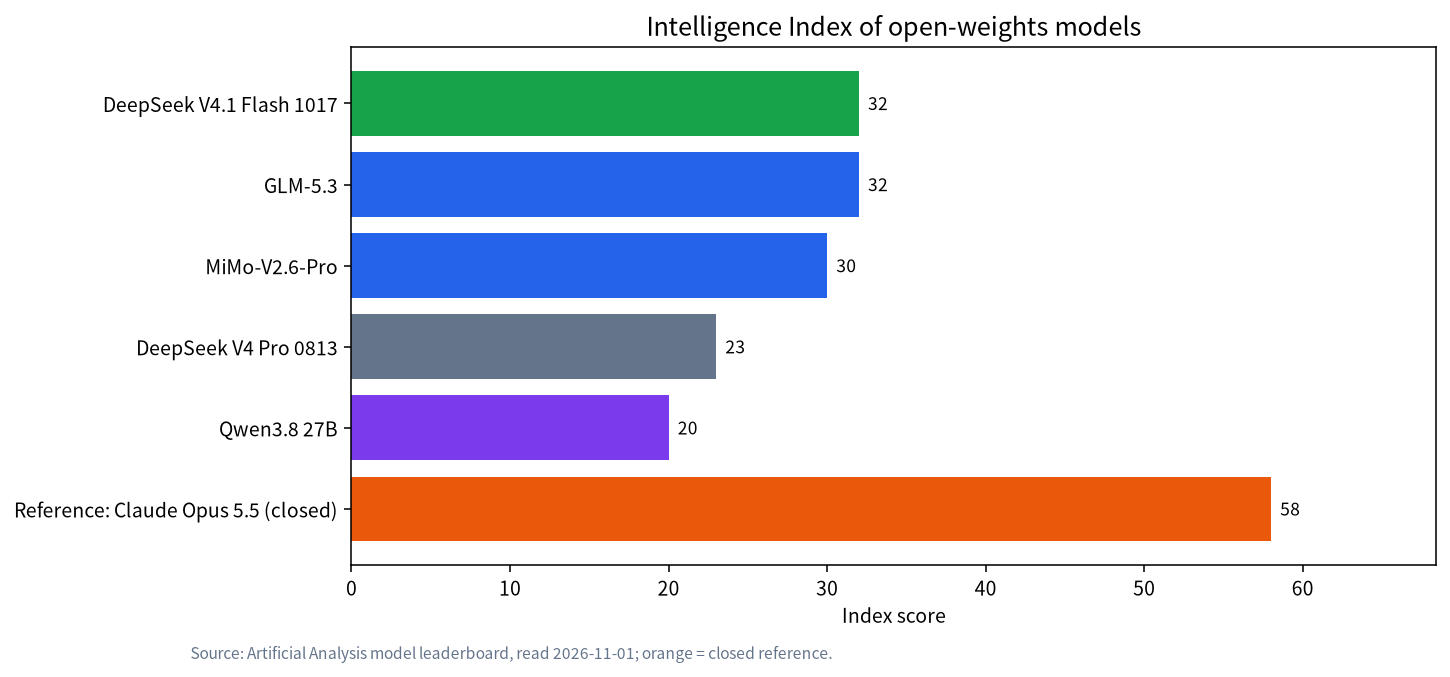
Two things to be clear about. First, “joint”: decimals and test batches affect third-party rankings, and 32 against 32 is a tie, not proof that DeepSeek is stronger. Second, “open” does not mean “runs on your machine”. The Hugging Face page lists about 763B parameters, and Unsloth’s guide describes roughly a 552B backbone plus about 196B of Engram parameters. Qwen3.8 27B scores only 20, but it is much smaller and far easier to host (check its model card for exact VRAM needs); the choice is how much hardware you will pay for per point of score.
Vendor-Reported Benchmarks Against Opus 5
DeepSeek’s model card compares it with Claude Opus 5 (vendor-reported, using DeepSeek’s own evaluation settings).
| Benchmark | DeepSeek V4.1 Flash 1017 | Claude Opus 5 |
|---|---|---|
| HLE (no tools) | 42.6 | 56.3 |
| Terminal-Bench 4.0 | 42.3 | 51.8 |
| DeepSWE v1.1 | 77.0 | 74.0 |
| ProgramBench | 29.1 | 37.0 |
| NL2Repo | 68.2 | 75.3 |
| AutomationBench v1.0.6 | 60.5 | 50.3 |
| Apex Bench v1.1 | 72.1 | 65.8 |
| Chartography | 83.0 | 84.0 |
DeepSeek leads on three of eight (DeepSWE, AutomationBench, Apex Bench) and trails on five. Note this is Opus 5, not the newer Opus 5.5, and these are the vendor’s own numbers, usually more optimistic than third-party indexes. The takeaway: it is not a replacement for the top closed model, but on some software-engineering and automation tasks it is close to the previous-generation flagship. The same card lists Terminal-Bench 4.0 scores of 37.9 for GLM-5.3 and 39.9 for GPT-5.6 Sol, against 42.3 for DeepSeek.
Running It Locally: Size and Memory
The short version: the lowest practical entry is Unsloth’s 1-bit dynamic quant, which the guide says can run on a machine with about 128GB of combined RAM and VRAM, such as a 128GB Mac or a DGX Spark class box; steadier quality needs 256GB or more. The table comes from Unsloth’s guide.
| Quant | Download size (GB) | Rough RAM plus VRAM need |
|---|---|---|
| UD-IQ1_S | 233.0 | 1-bit: about 128–145GB |
| UD-IQ1_M | 250.4 | 1-bit tier |
| UD-IQ2_XXS | 300.5 | 2-bit: about 176–205GB |
| UD-Q2_K_XL | 334.8 | 2-bit tier |
| UD-IQ3_XXS | 394.7 | 3-bit: about 256–290GB (a 256GB Mac Studio class machine) |
| UD-Q4_K_XL | 500.7 | 4-bit: about 305GB |
| UD-Q8_K_XL | 508.4 | 8-bit: about 315GB |
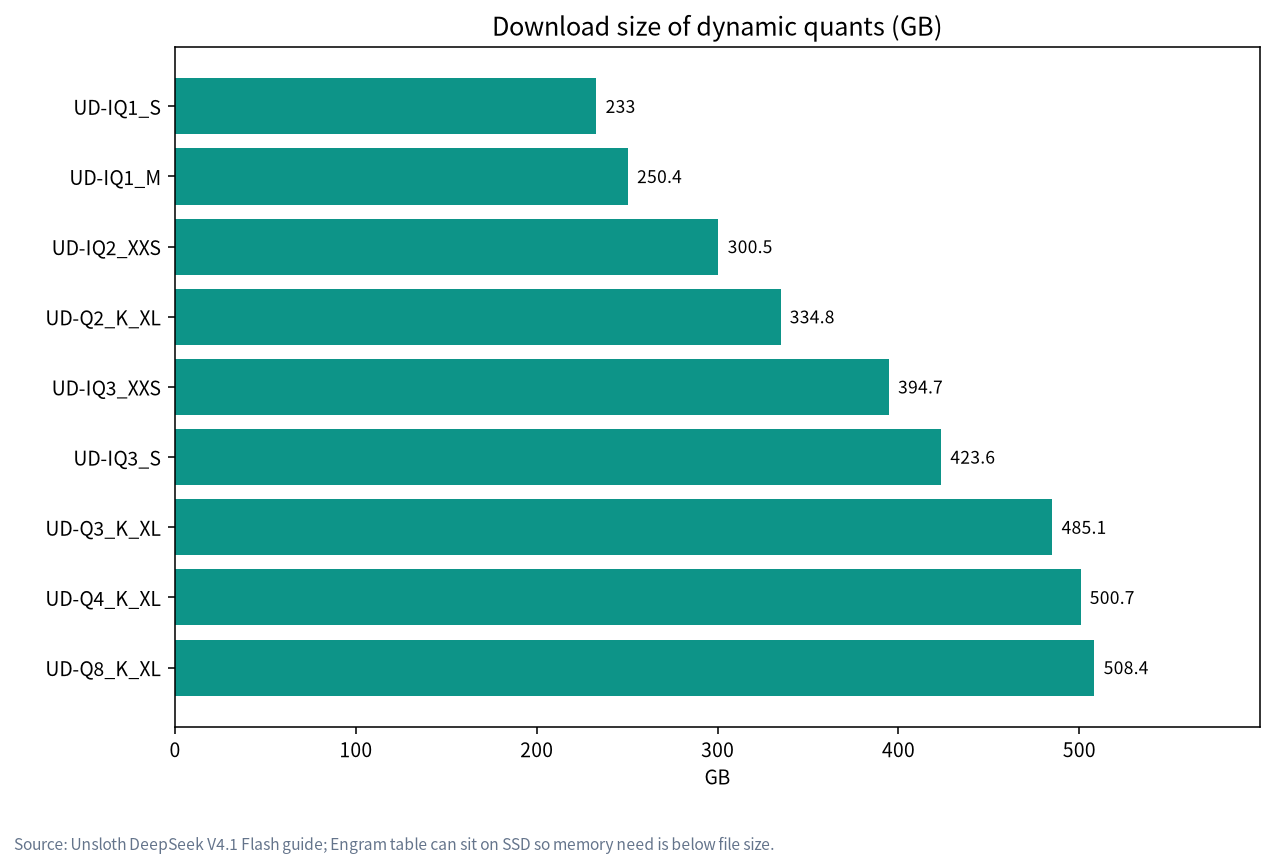
File sizes are bigger than the memory figures because Unsloth says the Engram table (about 110.6–202.8GB) can stay on SSD and be read through memory mapping rather than loaded into RAM. That is why a 233GB file can be listed as workable on 128GB. It also means a fast NVMe drive matters; we have not measured how much. Unsloth further notes that you need its maintained llama.cpp branch (the guide cites PR #30817) and that DSpark speculative decoding can give a 1.3–1.5 times speedup. These notes were read on 2026-11-01 and may have changed or been merged since, so re-read the guide before deploying.
How much does quantization cost in quality? Unsloth ran a six-benchmark average itself:
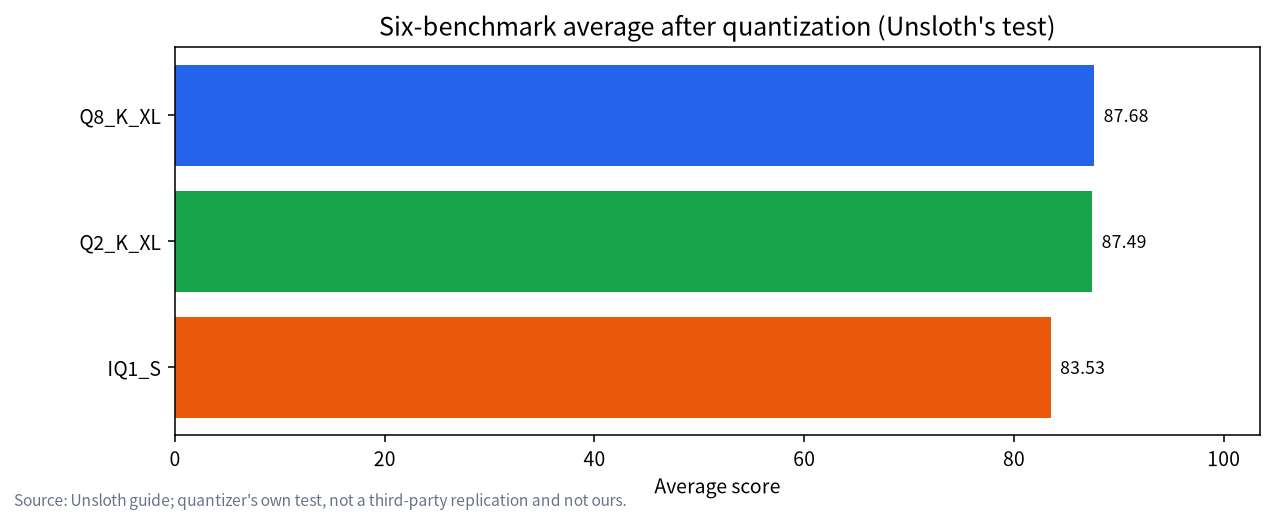
Q8 scores 87.68, Q2_K_XL 87.49 and IQ1_S 83.53. Going from 8-bit to 2-bit loses almost nothing, and 1-bit loses about four points. Unsloth also warns that quantization makes the model’s reasoning output longer, so look at speed and token use together. This is the quantizer’s own test, not an independent replication. For the basics, see our pieces on Q4_K_M and quantization and GGUF and llama.cpp.
Cost: API or Your Own Machine
DeepSeek’s official pricing (read 2026-11-01): the model name deepseek-flash maps to DeepSeek-V4.1-Flash-1017; off-peak, input costs $0.15 per million tokens on a cache miss and $0.003 on a hit, output $0.60. Peak hours (weekdays 01:00–04:00 and 06:00–10:00 UTC, excluding Chinese public holidays) cost double.
A worked example (our arithmetic): 500 million input tokens a month, 80% cache hits, plus 20 million output tokens, all at off-peak prices. Hits: 400M x $0.003 = $1.20; misses: 100M x $0.15 = $15; output: 20M x $0.60 = $12; total about $28.20. If everything landed at peak, it would be about double, around $56. A machine with 128GB or more of memory that can hold the 1-bit or 2-bit build typically costs several thousand dollars (we do not quote a price; check current listings), so on money alone a local build rarely pays back. Good reasons to run locally are data that cannot leave your network, offline use, a pinned version, custom inference stacks, or already owning the hardware. More on this in local versus cloud API.
Which Tier to Pick: Matching the Quant to Your Machine
This table turns the data above into a choice. It is our summary of the requirements Unsloth publishes, not a measurement, and speed is unknown.
| Your machine | Quant to consider | Watch out for |
|---|---|---|
| About 128GB combined RAM and VRAM (a 128GB Mac or DGX Spark class device) | UD-IQ1_S | 1-bit, about four points lower in Unsloth’s own average; the Engram table depends on SSD reads |
| About 176–205GB | UD-IQ2_XXS or UD-Q2_K_XL | 2-bit, almost no loss in Unsloth’s test; the best value range |
| About 256–290GB | UD-IQ3_XXS | 3-bit, suited to a 256GB-class machine |
| About 320GB or more | UD-Q4_K_XL or UD-Q8_K_XL | Closest to original precision, highest cost |
| Under 128GB | Do not force it | Use the API, or pick a smaller open-weights model |
The logic is to decide the most combined memory you can spare, hold back 5–10GB for the runtime and context (Unsloth’s guide warns that real usage grows with context length), then take the highest tier that fits. If you need very long context, say toward 1M tokens, remember that the KV cache takes extra memory; our explainer on context length and KV cache VRAM covers the arithmetic.
One more practical piece of advice: do not buy hardware for it first. Spend a week running your real tasks on the official API, confirm the output quality meets your needs, and only then decide whether a local build is worth the investment. If you end up staying on the API, you will have spent a few dollars on the test.
What If You Do Not Have That Much Memory
Most readers do not have 128GB or more. There are three common fallbacks: use the API and keep only sensitive work local; pick a smaller open model such as Qwen3.8 27B (index 20), with help from the model size chooser; or learn how MoE memory works before deciding, in MoE models locally and RAM, VRAM and CPU offload. Mac owners should start with running local LLMs on a Mac to understand the capacity-versus-bandwidth trade-off of unified memory. For the older distilled DeepSeek models, see our DeepSeek local deployment guide.
Test It Yourself: A Reproducible Method
We did not benchmark it, so here is a method you can run to decide which quant tier to use, or whether going local is worth it.
- Collect 20 real prompts of your own: 5 coding, 5 long-document summaries, 5 writing tasks in your language, 5 multi-step reasoning problems.
- Fix sampling: the model card recommends temperature 1.0 and top_p 1.0, with a large max_tokens for reasoning (the card suggests at least 256K).
- Run each quant tier and record correctness (manual score 0–2), generated tokens, tokens per second, time to first token and peak memory.
- Compare against the API: run the same prompts on the official API as your full-precision reference and see how much your quant loses.
- Log reasoning length: output tokens for the same question across quants, to check Unsloth’s claim that quantization lengthens reasoning.
Solve the problem below. Think briefly, then give the final answer.
Problem: <paste your real task>
Format: put the final answer after "Answer:", at most 200 words.
Common Mistakes
- Reading “joint first” as “clearly ahead”. 32 against 32 is a tie, and it sits far below the closed flagship’s 58.
- Looking only at download size. A 233GB file does not need 233GB of RAM, and enough RAM does not mean enough speed; disk speed matters when the Engram table sits on SSD.
- Ignoring quantization’s effect on reasoning length. Scores hold but outputs grow, changing cost and latency.
- Treating the vendor table as a full verdict. DeepSeek compares against Opus 5, and trails on five of eight.
- Skipping software requirements. Brand-new models often need a specific branch or a recent runtime.
Related Reading
- DeepSeek local deployment guide
- MoE models on local hardware
- RAM, VRAM and CPU offload
- Claude Opus 5.5 vs its rivals
- Model size chooser
FAQ: DeepSeek V4.1 Flash 1017
Is DeepSeek V4.1 Flash 1017 the best open model?
On the Artificial Analysis Intelligence Index it is tied with GLM-5.3 for the top open-weights spot, both at 32. “Best” depends on your task, so retest with your own prompts.
How much memory does DeepSeek V4.1 Flash 1017 need locally?
Unsloth lists combined RAM plus VRAM of about 128–145GB for 1-bit, 176–205GB for 2-bit and 305GB for 4-bit. The Engram table can sit on SSD, which is why download sizes exceed the memory figures.
Can a single 24GB GPU run it?
Not on its own: Unsloth’s lowest figure is about 128GB combined RAM plus VRAM, so a 24GB card would need a lot of system RAM and a fast SSD, and we have not measured speed. For what 24GB cards normally do, see our 24GB VRAM guide; they suit smaller models.
Is the API or local cheaper?
The API is usually far cheaper: by our example, 500M input and 20M output tokens a month cost about $28 off-peak. Local running is for privacy, offline use and control, not savings.
What is its license?
The Hugging Face model card lists the MIT license. Re-check the current license text before you deploy.
How far is it from Claude Opus 5.5?
On the third-party index it is 32 against 58. DeepSeek’s own table compares with Opus 5 and leads on three of eight; there is no official head-to-head with Opus 5.5.
Talk With Us
Planning a 128GB-plus inference box for your team? Join the community or email admin@microaione.com.
References: Hugging Face: DeepSeek-V4.1-Flash-1017 model card, Unsloth: run DeepSeek V4.1 Flash locally, DeepSeek API pricing, Artificial Analysis model leaderboard.