ChatGLM / GLM Local Deploy and One-Click Pack Caveats
ChatGLM local deployment was one of the first local-LLM topics to take off in China. In 2023, ChatGLM-6B let many people run a capable Chinese chat model on their own GPU for the first time. ChatGLM2, ChatGLM3, and the GLM-4 family followed, and in early 2026 the team open-sourced GLM-OCR for document parsing. The catch is that forums and cloud drives are still full of “ChatGLM2 one-click packs” and “no-setup bundles” of uncertain origin. This guide covers which version to pick today, how much VRAM you need, how to deploy from official weights, and how to spot a pack you should not run.
Verification note: Version information comes from Zhipu’s official GitHub and the zai-org (formerly THUDM) organization on Hugging Face, checked 2026-11-05. VRAM figures are estimates from parameter count and precision; real usage depends on context length and runtime. We do not provide or recommend any third-party bundle.
Key points (updated 2026-11-05)
- ChatGLM-6B, 2, and 3 are older releases, mainly useful for learning. New projects should start with GLM-4.
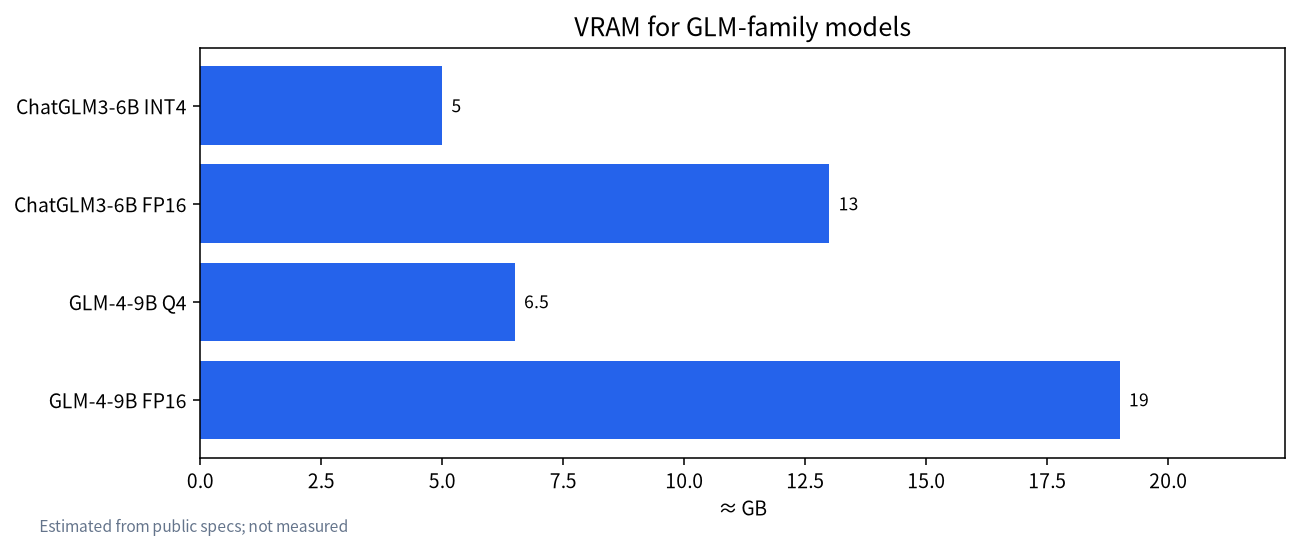
GLM-4-9B quantized to Q4 fits in 8 GB of VRAM; FP16 needs about 19 GB.
GLM-OCR is a document-recognition model of roughly 0.9B parameters, MIT-licensed, supported by vLLM, SGLang, and Ollama.
The real danger of one-click packs is not that they fail, but that they ship trojans, miners, or altered weights.
Official weights plus Ollama or LM Studio are already as easy as a one-click pack.
Why the GLM family is so popular in China
ChatGLM came out of Tsinghua University’s Knowledge Engineering Group and the Zhipu team. It was one of the earliest open-weight chat models tuned specifically for Chinese. At the time, most open models were English-first and their Chinese was uneven, while ChatGLM-6B ran smoothly on a mid-range consumer GPU. Low barrier plus good Chinese made it the default for university courses, student projects, and small companies testing the waters. A large user base with many people new to the command line is exactly why so many bundles and “lazy packs” appeared.
Zhipu has since moved to the GLM-4 naming, and the organization moved from THUDM to zai-org. The practical lesson for readers today is that many tutorials you will find date from 2023. Their dependency versions, VRAM numbers, and code snippets are out of date, and copying them often fails. Check which model version and date a tutorial targets, then confirm against the official repository.
ChatGLM local deployment: pick the right version first
| Version | Released | Params | Status | Advice |
|---|---|---|---|---|
| ChatGLM-6B | 2023-03 | ~6B | No longer updated | Learning only |
| ChatGLM2-6B | 2023-06 | ~6B | No longer updated | Avoid for new work |
| ChatGLM3-6B | 2023-10 | ~6B | Limited maintenance | Fine for existing projects |
| GLM-4-9B family | 2024 onward | ~9B | Chat, long-context, and other variants | Best personal pick |
| GLM-4.5 / 4.6 and later large models | 2025 onward | Large MoE | Needs multi-GPU servers | Enterprise private deployment |
| GLM-OCR | 2026-01 | ~0.9B | Active | Document parsing |
“GLM local” today usually means the GLM-4 family. Zhipu’s large MoE releases have deployment requirements closer to what we describe in running Kimi locally and are not personal-PC material.
VRAM and hardware needs
| Model and precision | Approx. VRAM | Suitable GPUs |
|---|---|---|
| ChatGLM3-6B INT4 | ~5 GB | GTX 1660 / RTX 3050 and up |
| ChatGLM3-6B FP16 | ~13 GB | 16 GB cards such as RTX 4070 Ti Super |
| GLM-4-9B Q4 | ~6–7 GB | RTX 3060 12 GB, RTX 4060 8 GB |
| GLM-4-9B FP16 | ~19 GB | RTX 3090 / 4090 24 GB |
| GLM-OCR | A few GB | Most 8 GB cards |
Long context adds KV cache on top of the weights, so leave headroom for long documents. The math is in context length and KV cache, and the VRAM calculator will tell you what your card can hold. Without enough VRAM you can fall back to system RAM and CPU, just more slowly; see what 12 GB and 16 GB cards can run.
Three ways to deploy from official weights
Option 1: Ollama or LM Studio (easiest). Search the Ollama library for GLM-4 tags and start one with ollama run. The tool handles quantization, sharding, and verification. In LM Studio, search for GLM and download a GGUF build, preferring publishers with many downloads and clear documentation. Beginners should start here; see the Ollama install guide and LM Studio tutorial.
Option 2: Transformers for development work.
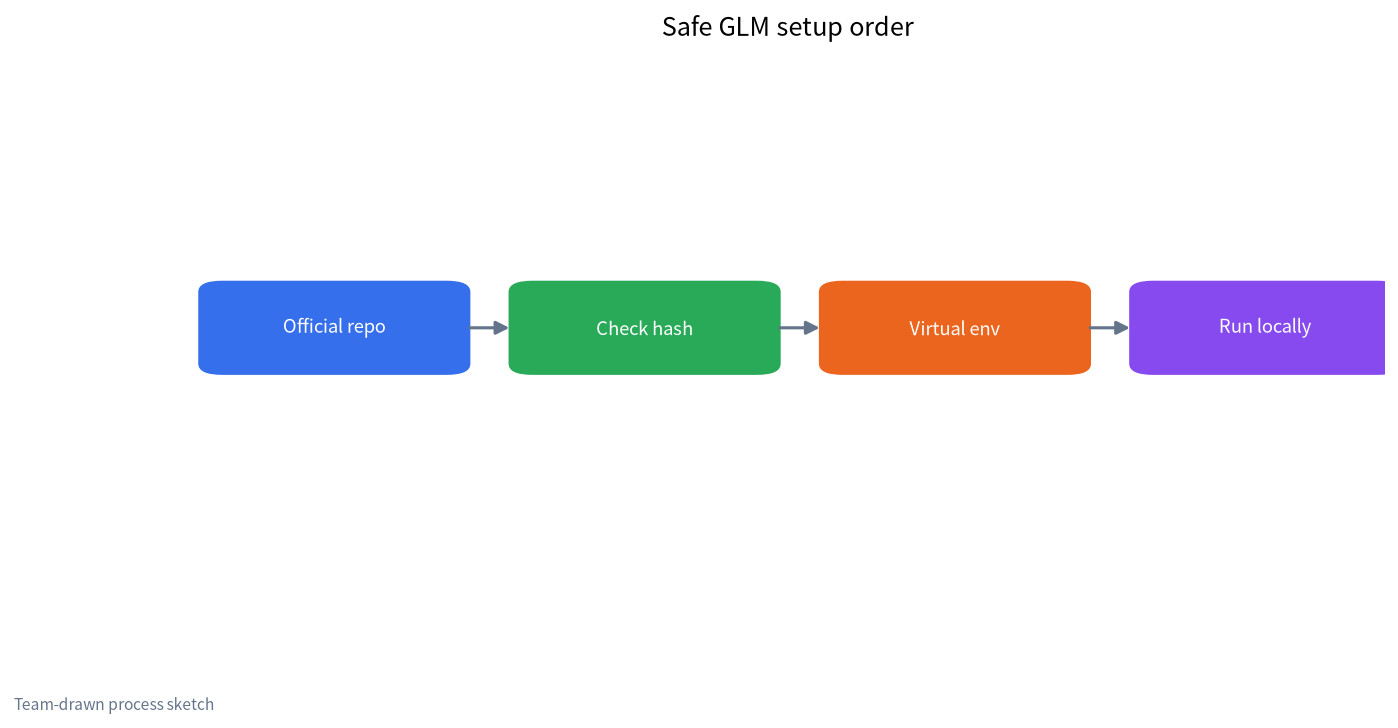
- Create a virtual environment with
python -m venv glmand activate it. - Install the
torchandtransformersversions the model card specifies. - Download weights from the official repo. From China, use ModelScope or a mirror; see the Hugging Face mirror guide.
- Run the model card’s sample code. Many GLM versions need
trust_remote_code=True, which executes Python code from the repository. Only do this for official repos.
Option 3: Serve with vLLM or SGLang. For several users at once, or to plug into platforms like Dify, serve an OpenAI-compatible API with vLLM for better concurrency and throughput. Start with our vLLM and SGLang intro.
GLM-OCR local deployment
GLM-OCR, released by Zhipu in January 2026, is a document-parsing model. The official card describes it as about 0.9B parameters under the MIT license, strong on tables, formulas, stamps, and complex layouts. Its small size makes it a good fit for processing contracts, invoices, and scans locally rather than uploading them.
- Download weights from zai-org/GLM-OCR on Hugging Face or the matching ModelScope repo.
- Install the recommended transformers version, or launch it with vLLM or SGLang as the card describes.
- For Ollama, use a build from the official library page or another trusted publisher.
- Feed it images or PDF pages and get Markdown or structured text back.
- Push the output into a local knowledge base so scanned files become searchable; see local RAG knowledge bases.
For finance and legal work, OCR output still needs human review, especially numbers and amounts. Sample a hundred pages to measure accuracy before deciding which document types can go straight into the index. Low-resolution, skewed, or shadowed scans benefit a lot from simple preprocessing before recognition.
ChatGLM one-click packs: why caution matters
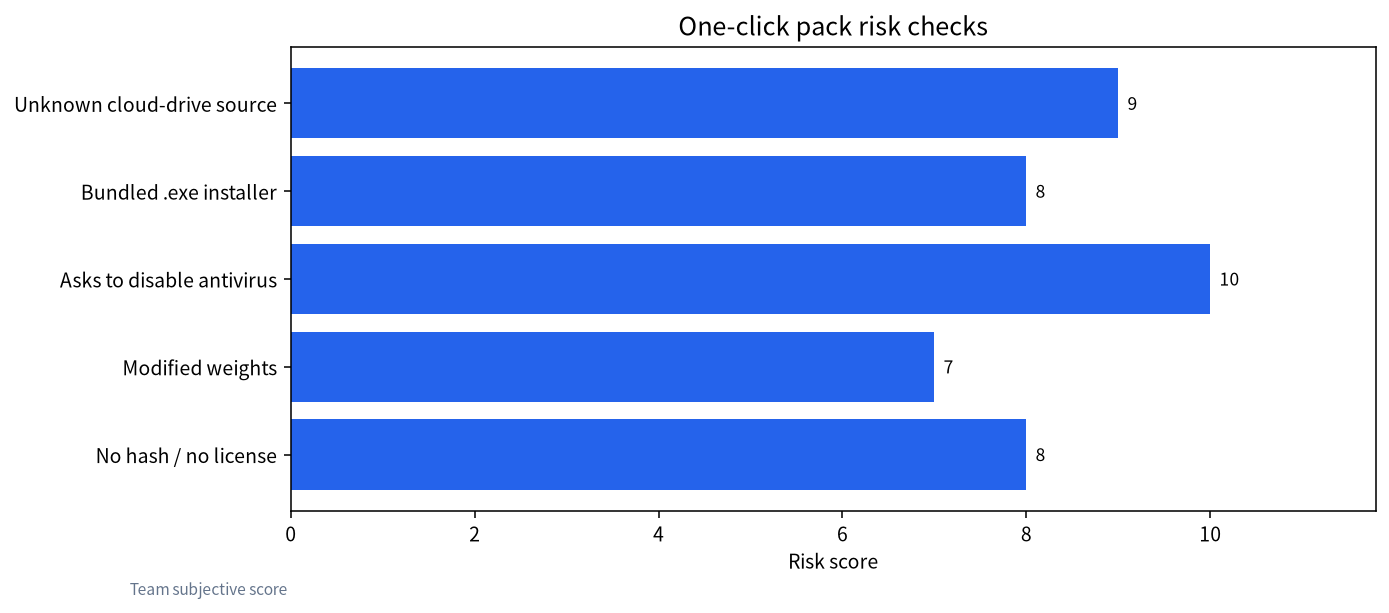
One-click packs are not evil by definition. Some are made by helpful community members who bundle the Python environment, dependencies, and weights. But the help requests we see cluster around a few patterns:
| Red flag | Possible outcome | How to tell |
|---|---|---|
| Unknown cloud drive or reshared group file | Swapped files or implanted programs | No traceable author or release page |
| Bundled .exe installer or “accelerator” | Trojan, miner, adware | Scan with antivirus and VirusTotal |
| Asks you to disable antivirus or firewall | Fully exposed system | Legitimate projects never ask this |
| Weights don’t match official hashes | Tampered or backdoored model | Compare SHA256 with the official repo |
| No license, no version notes | Can’t use compliantly or debug | Inspect the package contents |
| Marketed as “cracked” or “unrestricted” | Legal risk plus malware risk | Walk away |
One technical point deserves emphasis: PyTorch .bin files use pickle, which can execute arbitrary code when loaded. For any weights not from an official source, prefer safetensors and check the hash. We have covered “cracked” and “uncensored” GLM claims in our fact-check of leaked and cracked model claims and legal and compliance risks of uncensored models. Such bundles are usually neither compliant nor safe.
If all you want is a setup without typing commands, the methods in installing a local LLM on Windows without the command line are also one-click, but from official sources.
If you really must use a pack: a vetting routine
Sometimes a classroom or a client hands you a bundle and there is no time to rebuild it. In that case, reduce the risk rather than trusting it blindly.
- Isolate it. Run the pack in a virtual machine or a spare PC with no saved passwords, no company VPN, and no access to shared drives. Snapshot the VM first so you can roll back.
- Inventory the contents. List every file. A Python environment, a launcher script, and weight files are expected. Unexplained executables, DLLs in odd places, browser extensions, or scheduled-task scripts are not.
- Scan everything. Run your antivirus, then upload unfamiliar executables to a multi-engine scanner. A clean result is not proof of safety, but a hit is proof of trouble.
- Replace the weights. Delete the bundled model files and download the same version from the official repo. Compare hashes if you want to know whether the bundle’s copy was altered.
- Watch the network. On first launch, check outgoing connections. A local model has no reason to contact unknown servers.
- Rebuild when you can. Once it works, recreate the setup from scratch using official sources, and retire the bundle.
Common errors with older ChatGLM tutorials
Most failures with 2023-era guides come from version drift. A newer transformers release may remove an internal function the old remote code relied on, producing attribute errors at load time. Pin the versions the model card lists, inside a fresh virtual environment. CUDA mismatches are the next most common issue: a torch build compiled for one CUDA version will not use the GPU on a driver that is too old, and silently falls back to CPU. Check with torch.cuda.is_available() before blaming the model. Finally, quantization libraries used by old INT4 scripts are often unmaintained; switching to a GGUF build in Ollama or LM Studio usually solves the problem faster than repairing the old stack. If you inherited a project built on ChatGLM2 or ChatGLM3, plan a migration to GLM-4: keep the old service running, stand up the new model beside it, compare answers on your saved question set, and switch traffic only when the new one is at least as good.
After deployment: making GLM useful
- Write a clear system prompt. Define the role, tone, and what to say when it does not know. This helps more than swapping models repeatedly.
- Keep context in check. A 9B-class model forgets earlier turns in very long chats. Use retrieval for long documents instead of pasting everything.
- Pair it with a knowledge base. Company policies and product manuals in a local index raise answer accuracy noticeably.
- Update regularly. Point releases often fix repetition and formatting bugs.
- Keep an evaluation set. Save twenty or thirty questions you ask most, and rerun them every time you change model or quantization.
- Respect safety boundaries. Add moderation and access control before exposing a service, and do not chase so-called jailbreak behavior. Our explainer on LLM jailbreaks covers why.
FAQ
Is ChatGLM local deployment still worth doing?
For learning and maintaining older projects, yes. For new work, use GLM-4 or another current model; quality and tooling are better.
Can I use a ChatGLM2 one-click pack?
Running is not the same as safe. Download weights from the official repo and deploy with Ollama, LM Studio, or your own virtual environment. If you must use a pack, verify the source, scan it, and compare hashes.
How much VRAM does GLM-4-9B need?
About 6–7 GB at Q4, so an 8 GB card works. FP16 needs about 19 GB, so a 24 GB card. Long context needs extra headroom.
What hardware does GLM-OCR need?
At roughly 0.9B parameters, it runs on most machines with an 8 GB GPU, and on CPU more slowly.
Can I use GLM models commercially?
It depends on the version. GLM-OCR is MIT-licensed. Other GLM releases have their own model licenses; read the LICENSE in each repo.
Is trust_remote_code safe?
It runs code from the model repository. Enable it only for official repos or ones you have reviewed, never for weights of unknown origin.
Need help with a deployment?
Join the community or email admin@microaione.com. Our Shenzhen team can help check versions, VRAM, and file provenance.
Sources: Zhipu GLM-4 on GitHub, GLM-OCR model card, GLM-OCR docs, our open-source LLM download guide.